Your Chevy will not start. The security light keeps flashing. You turn the key again, but nothing changes. This situation feels frustrating and confusing, especially when your car worked fine just minutes ago.
In most cases, the problem comes from the theft deterrent system. This system protects your vehicle from theft, but it can also block the owner by mistake. When that happens, the engine will not start, even though nothing is mechanically wrong.
Many drivers think their car has a serious failure. They worry about expensive repairs or towing costs. In reality, you can often fix this issue yourself. You just need to follow the correct reset process.
In this guide on how to reset your Chevy theft deterrent system, you will learn simple and proven methods that work on multiple models. These include Silverado, Malibu, Impala, and more. The steps are clear and easy to follow, even if you have no technical experience.
By the end of this guide, you will know exactly how to reset the system, why the issue happens, and how to prevent it in the future. This will save you time, money, and unnecessary stress.
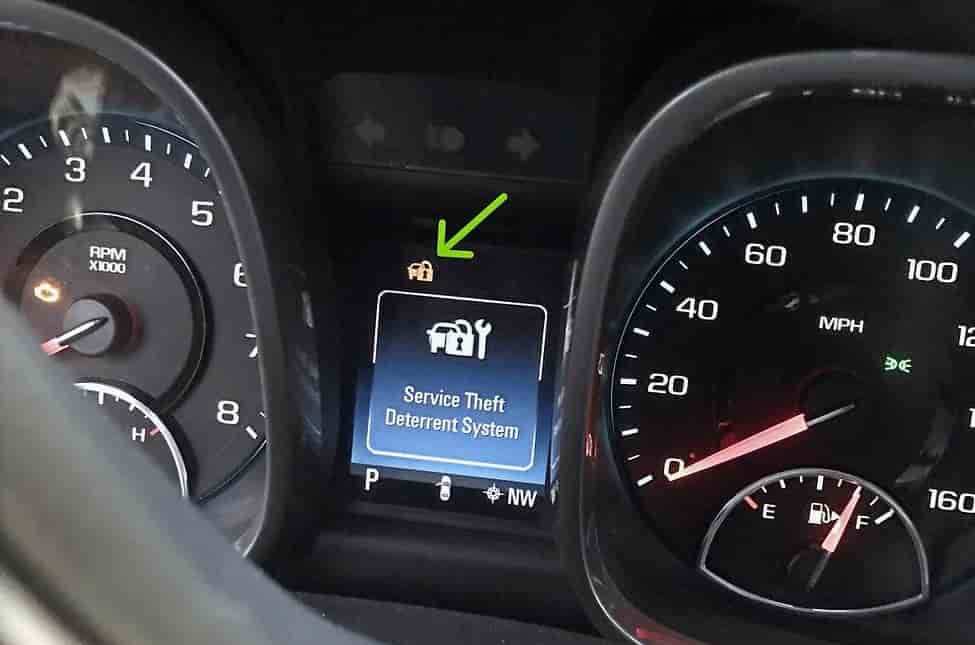
What Is the Chevy Theft Deterrent System
The Chevy theft deterrent system is a built in security feature that protects your vehicle from unauthorized access. It works by verifying the key before allowing the engine to start. If the system does not recognize the key, it blocks the ignition immediately.
Most Chevy models use systems like Passlock or Passkey. These systems rely on a small chip inside the key or a sensor in the ignition cylinder. When you insert the key and turn it, the system checks for a correct signal. If the signal matches, the engine starts normally. If not, the system activates the security lock.
This is where many problems begin. A weak battery, worn key, or faulty ignition switch can interrupt the signal. When that happens, the system may think someone is trying to steal the car. As a result, it disables the fuel system or starter.
You may notice the security light turning on or flashing. In some cases, the engine starts for a second and then shuts off. These are clear signs that the theft deterrent system has blocked your vehicle.
Understanding how this system works helps you fix the issue faster. Instead of guessing or replacing parts, you can focus on the correct reset method. This saves both time and money.
Signs Your Chevy Theft Deterrent System Needs Reset
Your Chevy often shows clear warning signs when the theft deterrent system fails. If you recognize these signals early, you can reset the system quickly and avoid bigger problems.
The most common sign is that the engine will not start. You turn the key or press the start button, but nothing happens. In some cases, the engine starts for a second and then shuts off immediately. This happens because the system cuts off fuel or ignition.
Another obvious sign is the security light on the dashboard. The light may flash continuously or stay on without turning off. This tells you that the system does not recognize your key or detects a security issue.
You may also notice that your key fob stops working. The doors may not lock or unlock as expected. This can indicate a communication problem between the key and the vehicle system.
In some situations, the car enters a lockout mode. You cannot start the engine for several minutes, even if you try multiple times. This usually happens after repeated failed attempts.
These signs often appear together, not just individually. When you see them, do not panic. The issue does not always mean serious damage. In most cases, you can fix it by following the correct reset procedure.
How to Reset Your Chevy Theft Deterrent System
If your car will not start and the security light stays on, you can reset the system yourself. You do not need special tools. You only need patience and the correct steps.
Below are the most effective methods that work on most Chevy models.
Method 1: 10 Minute Reset (Quick Relearn)
This is the fastest and most common way to reset your Chevy theft deterrent system. It works well for minor glitches.
First, insert your key into the ignition. Turn it to the ON position but do not start the engine. Leave the key in this position.
Next, watch the security light on the dashboard. It will stay on or flash. Wait for about 10 minutes until the light turns off.
Once the light goes off, turn the key to the OFF position. Wait a few seconds. Then try to start the engine.
If the car starts normally, the reset is complete. This method solves many basic lockout issues.
Method 2: 30 Minute Relearn Procedure
If the quick reset does not work, you should use the full relearn process. This method is more reliable for persistent problems.
Insert the key and turn it to the ON position. Do not start the engine. Leave it there for 10 minutes until the security light turns off.
Turn the key to OFF for a few seconds. Then repeat the same process two more times. In total, you will complete three cycles of 10 minutes.
After the third cycle, turn the key off again. Wait a moment, then start the engine.
This process allows the system to relearn the correct key signal. It often fixes deeper issues related to Passlock or key recognition.
Method 3: Key Fob and Door Lock Reset
Sometimes, the issue comes from the key signal or remote system. You can try a simple lock and unlock sequence.
Step out of the car and close all doors. Use the key fob to lock the vehicle. Wait a few seconds, then unlock it.
Repeat this process several times. Then insert the key and try to start the engine.
This method helps reset the communication between the key and the security system.
Important Tips During Reset
Keep your battery stable during the process. A weak battery can interrupt the reset and cause failure.
Do not remove the key too early. If you interrupt the process, you may need to restart from the beginning.
Stay patient during the waiting time. The system needs enough time to complete the relearn cycle.
By following these methods, you can reset your Chevy theft deterrent system without visiting a mechanic. Most drivers fix the issue at home using these exact steps.
How to Reset Your Chevy Theft Deterrent System
If your vehicle will not start and the security light stays on, you can reset your Chevy theft deterrent system at home with a few simple steps. Start by inserting the key into the ignition and turning it to the ON position without starting the engine. Leave the key in this position and watch the security light on the dashboard. It will remain on or flash for several minutes. Wait about ten minutes until the light turns off, then turn the key to OFF, pause briefly, and try to start the engine. This quick relearn method often solves minor issues.
If the problem continues, you should perform a full relearn procedure. Turn the key to the ON position again and wait ten minutes until the security light turns off. Turn it off for a few seconds and repeat this process two more times. After completing three cycles, try to start the engine. This method allows the system to relearn the correct key signal and works well for more persistent errors.
You can also reset the system by locking and unlocking the vehicle with your key fob several times before starting the car. This helps restore communication between the key and the system. Always make sure your battery remains stable during the process, and avoid interrupting the steps too early. By following these methods, most drivers can fix the issue without professional help.
Chevy Theft Deterrent System Reset for Different Models
The reset process for the Chevy theft deterrent system works similarly across most models, but small differences may appear depending on the vehicle year and system type. Understanding these differences helps you apply the correct method faster and avoid unnecessary frustration.
For Chevy Silverado, the system often uses Passlock technology. The 10 minute or 30 minute relearn procedure works well in most cases. However, older Silverado models may take longer to recognize the key, so patience is important during the reset process.
For Chevy Malibu, the theft deterrent system can be more sensitive to battery issues. If the battery voltage drops, the system may fail to recognize the key. In this case, you should ensure the battery is fully charged before performing the relearn steps. This increases the success rate significantly.
For Chevy Impala, the system behaves similarly to Malibu but may trigger lockout mode more quickly after repeated failed attempts. If this happens, you should wait a few minutes before trying the reset again. Then follow the full relearn procedure for better results.
For Chevy Equinox and other newer models, the system integrates more advanced electronic modules. While the reset steps remain the same, issues may involve deeper components like the body control module. If basic resets do not work, further diagnosis may be required.
In most situations, the standard relearn methods will solve the problem regardless of the model. Knowing these small differences helps you troubleshoot more effectively and avoid repeating failed attempts.
Why Your Chevy Theft Deterrent System Won’t Reset
In some cases, you follow all the steps but your Chevy still will not start. The theft deterrent system refuses to reset, and the security light remains on. This situation can feel frustrating, but it usually points to a deeper issue rather than a failed procedure.
One common cause is a weak or dying battery. The system depends on stable voltage to complete the relearn process. If the battery drops during the reset, the system cannot store the correct signal. As a result, the reset fails even when you follow the steps correctly.
Another frequent problem is a worn or damaged key. Over time, the chip inside the key may stop sending a consistent signal. When this happens, the system cannot recognize the key and keeps the vehicle locked.
The ignition switch can also cause issues. If the switch does not read the key properly, it interrupts communication with the security system. This leads to repeated reset failures and ongoing lockout.
In more serious cases, the problem comes from the body control module. This module manages the vehicle’s security functions. If it malfunctions, the system may not respond to any reset method.
You should also consider wiring or sensor faults. Loose connections or damaged components can break the signal between the key and the system. This prevents the relearn process from completing.
When your Chevy theft deterrent system will not reset, focus on identifying the root cause instead of repeating the same steps. Fixing the underlying issue often solves the problem faster and prevents it from returning.
How Long Does It Take to Reset the System
The time required to reset your Chevy theft deterrent system depends on the method you use. In most cases, the quick relearn process takes about ten minutes. This method works well for minor errors and temporary glitches.
If the issue is more serious, you will need the full relearn procedure. This process takes around thirty minutes because you must complete three cycles. Each cycle requires you to wait about ten minutes for the security light to turn off.
In some situations, the process may take longer. A weak battery or system error can delay the reset. If this happens, you should check the battery and repeat the steps carefully. Most drivers can complete the reset within thirty minutes without any tools.
Reset Cost: DIY vs Mechanic
Resetting the Chevy theft deterrent system at home does not cost anything. You only need your key and time to follow the steps. This makes the DIY method the best option for most drivers.
If you visit a mechanic, the cost usually ranges from 80 to 300 dollars depending on the issue. A dealership may charge more, often between 150 and 500 dollars. These costs increase if the problem involves parts like the ignition switch or control module.
Many drivers choose professional help too quickly. In reality, most reset issues can be solved at home. Trying the manual reset first can save a significant amount of money.
Pro Tips to Prevent Future Issues
You can reduce the risk of future problems by following a few simple habits. Always keep your car battery in good condition. A stable power supply helps the system work correctly.
Use a high quality key and avoid damaged or worn keys. If your key starts to fail, replace it early to prevent signal issues.
Avoid repeated failed start attempts. Too many attempts can trigger lockout mode and make the problem worse. If the car does not start, pause and follow the correct reset process instead.
Regular maintenance also helps prevent hidden electrical issues. Checking your ignition system and connections can reduce the chance of failure.
Conclusion
Dealing with a locked vehicle can feel stressful, especially when your car refuses to start without warning. However, once you understand how to reset your Chevy theft deterrent system, the situation becomes much easier to handle.
Most problems come from simple causes such as signal errors, battery issues, or key recognition failures. By following the correct steps, you can reset the system and get back on the road without expensive repairs.
This guide has shown you practical methods that work across multiple Chevy models. You now know how to identify the issue, apply the right reset procedure, and prevent it from happening again.
If this guide helped you fix your problem, consider saving it for future reference or sharing it with other Chevy owners. Knowing how to handle this issue can save time, money, and unnecessary stress.
I’m trying to figure out how to do this for a chevy traverse 2020 with push button start. I’ve not yet found any information on how to do this reset with a push button start system.