The Volvo Radio Not Working issue is one of the most common problems drivers face in modern cars. Many Volvo vehicles use a fully integrated infotainment system. The radio depends on software and electrical components inside this system. Because of this structure, even a small error can stop the radio from working.
Drivers often notice different symptoms. The radio may produce no sound. The screen may freeze or turn black. Sometimes the controls stop responding. In some cases, Bluetooth audio still works while the radio fails. This creates confusion because the system does not fail in a single obvious way.
Several triggers can cause this issue. A system update may fail. A weak battery can interrupt the electronics. A blown fuse can cut power to the audio system. Software glitches can also stop the radio without warning. These problems may appear suddenly or after maintenance work.
This guide will help you understand why your Volvo radio stops working. It will also show you how to diagnose the issue step by step. You will learn how to test simple causes first. Then you can move to deeper system checks if needed.
Modern Volvo infotainment systems are advanced but sensitive. Small disruptions can affect performance. A clear troubleshooting process helps you avoid unnecessary repair costs. It also helps you restore the system faster without guessing the cause.
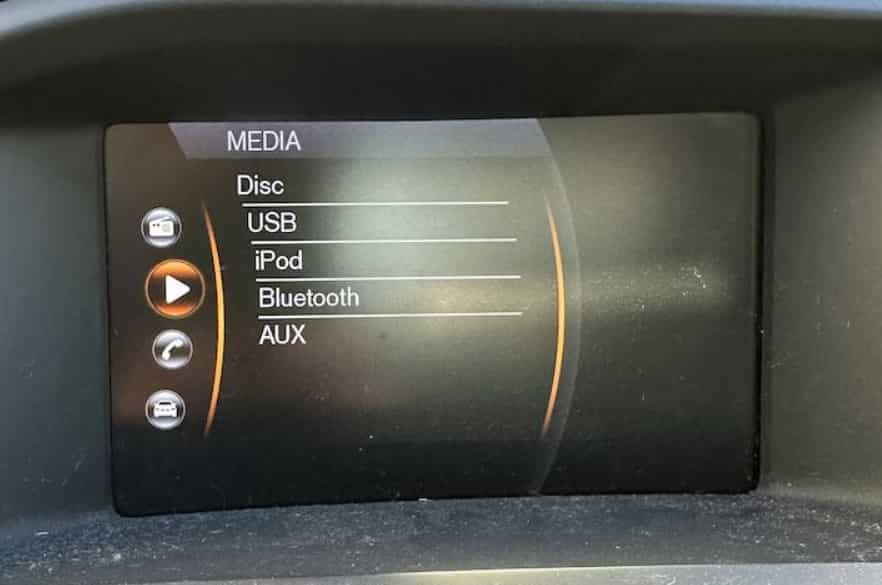
COMMON SYMPTOMS OF VOLVO RADIO NOT WORKING
When the Volvo Radio Not Working issue appears, the system usually shows clear warning signs. These symptoms help you identify the problem before you start fixing it. Most issues in Volvo infotainment systems follow a similar pattern, even if the root cause differs.
One of the most common symptoms is no sound from the speakers. The system may still power on, but no audio comes out. This often confuses drivers because the display looks normal.
Another frequent issue is a frozen or black screen. The infotainment display may stop responding completely. You cannot change stations or access menus in this state.
Some drivers notice that the radio does not respond to any control input. Buttons, touch screen, or steering wheel controls may all stop working. The system feels stuck even though the car is running normally.
In other cases, Bluetooth audio works but FM or AM radio does not. This creates a split behavior in the system. One source works while another fails without a clear reason.
Intermittent sound loss can also occur. The radio may work for a short time and then stop again. This usually points to unstable software or electrical issues.
These symptoms are important because they guide your diagnosis. Each sign points to a different possible cause. Understanding them helps you choose the correct fix in the next steps.
MAIN CAUSES OF VOLVO RADIO NOT WORKING
The Volvo Radio Not Working issue usually comes from a few main categories. Most problems in Volvo infotainment systems are not random. They follow predictable patterns related to software, power supply, or hardware components.
One common cause is a software glitch in the infotainment system. The system may freeze or stop responding after a minor error. This often happens without warning and can affect all audio functions.
A faulty system update can also trigger radio failure. When the software update does not install correctly, the infotainment system may lose key functions. This includes radio access, sound output, or source switching.
Electrical issues are another major cause. A blown fuse can cut power to the radio circuit. When this happens, the system may still turn on, but the audio section stops working completely.
Low voltage or battery problems can also disrupt the system. If the battery disconnects or drops below stable levels, the infotainment system may reset incorrectly. This can lead to missing or unstable radio functions.
Hardware failure is less common but still possible. The amplifier may stop working. Speakers may fail. Wiring connections may loosen over time. These issues directly affect sound output.
Some cases involve corrupted settings or system configuration errors. These errors can occur after repairs, resets, or updates. They often require a full system reset to fix.
Understanding these causes is important. Each cause requires a different solution. The next section will help you start with simple checks before moving to advanced fixes.
SYSTEM RESTART AND BASIC RESET
When the Volvo Radio Not Working issue appears, the first step is to restart the system. This method solves many temporary glitches in Volvo infotainment systems. It is simple, fast, and does not require tools.
Start by turning off the vehicle completely. Remove the key or press the stop button depending on your model. Wait for at least five to ten minutes. This waiting time allows the system to shut down fully. It also clears temporary memory errors.
After waiting, restart the car and check the radio again. Test different audio sources such as FM radio, Bluetooth, or USB. This helps you confirm whether the issue affects all audio or only one source.
If the radio still does not work, perform a soft reset of the infotainment system. Many Volvo models allow a reset by holding the power button for several seconds. This forces the system to reboot without affecting saved settings.
In some cases, the system may recover immediately after the reset. This usually indicates a minor software glitch rather than a hardware failure. If nothing changes, the issue may be deeper and require further diagnosis.
This step is important because it eliminates temporary errors early. It also prevents unnecessary repairs when the problem is only caused by a system freeze or minor crash.
CHECK FUSES AND ELECTRICAL SYSTEM
If the Volvo Radio Not Working issue continues after a system restart, the next step is to check the electrical system. Many problems in Volvo vehicles come from simple power interruptions rather than complex failures.
Start by locating the fuse box in your car. The exact position depends on the model, but it is usually found under the dashboard or in the engine compartment. Refer to your vehicle manual if needed.
Once you find the fuse box, look for the fuse related to the audio system or infotainment unit. Carefully remove it and inspect it closely. A blown fuse often shows a broken metal strip or visible burn marks.
If the fuse is damaged, replace it with one that has the same rating. Using the wrong fuse can cause further electrical problems. After replacement, turn on the car and test the radio again.
If the fuse looks fine, check the battery connection. A loose or unstable connection can affect the infotainment system. Make sure the terminals are clean and properly tightened.
Electrical issues may also come from low voltage. When the battery is weak, the system may not receive stable power. This can cause the radio to stop working or behave unpredictably.
This step helps you rule out basic electrical problems. It is important because many radio issues are not caused by software or hardware failure but by simple power disruption.
DIAGNOSE SOFTWARE AND INFOTAINMENT ISSUES
If the Volvo Radio Not Working issue remains after checking fuses and power, the next step is to focus on the software system. Many problems in Volvo infotainment systems come from software errors rather than hardware failure.
Start by checking if the issue began after a recent system update. A failed or incomplete update can break radio functions. In some cases, the system may still run but lose access to audio features.
Next, check if the infotainment system is frozen or lagging. A slow or unresponsive screen often signals a software crash. This can affect radio control, station switching, and sound output.
You should also try a factory reset of the infotainment system. This action restores default settings and removes corrupted configurations. It often fixes hidden software bugs that are not visible during normal use.
After the reset, reconnect Bluetooth devices and reconfigure audio settings. Incorrect pairing or corrupted media profiles can block sound output or radio access.
If your system supports over the air updates, check whether a new update is available. Sometimes manufacturers release patches to fix known radio or audio bugs.
Software issues are common in modern vehicles because infotainment systems are highly integrated. Fixing them usually does not require physical repair, but it does require a structured reset and reconfiguration process.
INSPECT HARDWARE COMPONENTS
If the Volvo Radio Not Working issue continues after software troubleshooting, you need to check the hardware system. In many Volvo vehicles, audio output depends on several physical components working together. A failure in any part can stop the radio completely.
Start by checking the amplifier. The amplifier controls sound output to all speakers. If it fails, the system may still turn on, but no audio will come out. A faulty amplifier is a common cause of complete silence.
Next, inspect the speakers. A damaged speaker can produce distorted sound or no sound at all. If only one side of the car has audio issues, the problem may be speaker related.
You should also check the wiring connections. Loose or damaged wires can interrupt the audio signal. Over time, vibration and wear can weaken connections inside the door panels or dashboard.
Moisture or corrosion can also affect hardware performance. Water exposure may damage connectors or internal circuits. This often leads to unstable or partial audio failure.
In rare cases, the infotainment control unit itself may fail. When this happens, multiple systems can be affected at the same time, not just the radio.
Hardware problems usually require physical inspection and professional tools. Unlike software issues, they cannot be fixed with a simple reset. Identifying the correct component is important before replacing any parts.
WHEN TO VISIT A PROFESSIONAL MECHANIC
If the Volvo Radio Not Working problem continues after all basic and advanced checks, you should consider professional support. In some cases involving Volvo vehicles, the issue goes beyond simple troubleshooting and requires specialized diagnostic tools.
You should visit a mechanic if the radio does not respond after a full system reset. This often indicates a deeper software corruption or a hardware failure that cannot be fixed manually.
Another warning sign is when multiple electrical systems fail at the same time. If you notice problems with the display, sound system, or other infotainment features together, the issue may be related to the main control unit.
You should also seek professional help if the fuse keeps blowing repeatedly. This usually points to a short circuit in the wiring system, which requires detailed inspection and repair.
If you suspect amplifier failure or internal module damage, it is better to avoid further testing on your own. Modern infotainment systems are sensitive and can be easily damaged by incorrect handling.
A certified technician can run full diagnostics using Volvo-specific tools. This helps identify the exact cause quickly and prevents unnecessary part replacement.
Professional repair is often the safest option when the issue is not resolved by basic steps. It ensures the system is restored correctly and reduces the risk of long-term damage.
CONCLUSION
The Volvo Radio Not Working issue can come from many different causes, ranging from simple system glitches to complex hardware failures. In most cases involving Volvo vehicles, the problem is not permanent and can be resolved with a clear and structured troubleshooting process.
You should always start with basic steps such as restarting the system. This alone can fix temporary software errors. If that does not work, checking the fuse and electrical system is the next logical step. Many radio issues come from simple power interruptions rather than serious damage.
If the problem continues, software diagnosis becomes important. A system update, reset, or configuration fix can restore normal operation. Only after that should you move on to hardware inspection, where components like amplifiers, speakers, and wiring are checked.
This step-by-step approach helps you avoid unnecessary repairs and saves both time and cost. It also helps you understand how your infotainment system works and why it sometimes fails.
If none of the solutions work, professional diagnosis is the safest option. Modern Volvo infotainment systems are complex, and accurate tools are often required to identify hidden faults.
By following this guide, you can confidently diagnose and resolve most Volvo radio issues without guesswork.