Modern Hyundai vehicles include advanced safety features that improve driver awareness and reduce accident risks. One important feature is the Blind Spot Detection system, also known as the BSD system. This technology helps drivers detect vehicles hiding beside the car during lane changes. When the system works properly, it increases confidence and improves road safety. However, many Hyundai owners suddenly see the “Hyundai Check BSD System” warning on the dashboard and do not understand the cause.
The warning often appears during rainy weather, after a car wash, or while driving in heavy traffic. Some drivers notice that blind spot alerts stop working completely. Others experience random warning lights that stay on for hours or even days. This situation creates frustration because many drivers fear expensive repairs or serious electrical problems.
Several issues can trigger the Hyundai Check BSD System warning. Dirty radar sensors are one of the most common causes. Moisture, mud, snow, or road debris can block the sensors and interrupt the radar signal. In other cases, damaged wiring, weak battery voltage, software glitches, or sensor calibration errors may cause the problem. Minor rear bumper damage can also affect sensor alignment and disable the BSD system.
Certain Hyundai models such as the Tucson, Santa Fe, Elantra, Sonata, and Palisade report BSD issues more frequently because their sensors remain exposed to weather and road conditions. Drivers often search for quick solutions because dealership repair costs can become expensive if the issue involves sensor replacement or recalibration.
This guide explains what the Hyundai Check BSD System warning means, why it appears, and how to fix it correctly. You will also learn how to reset the BSD system, estimate repair costs, and determine whether it is safe to continue driving your Hyundai while the warning remains active.
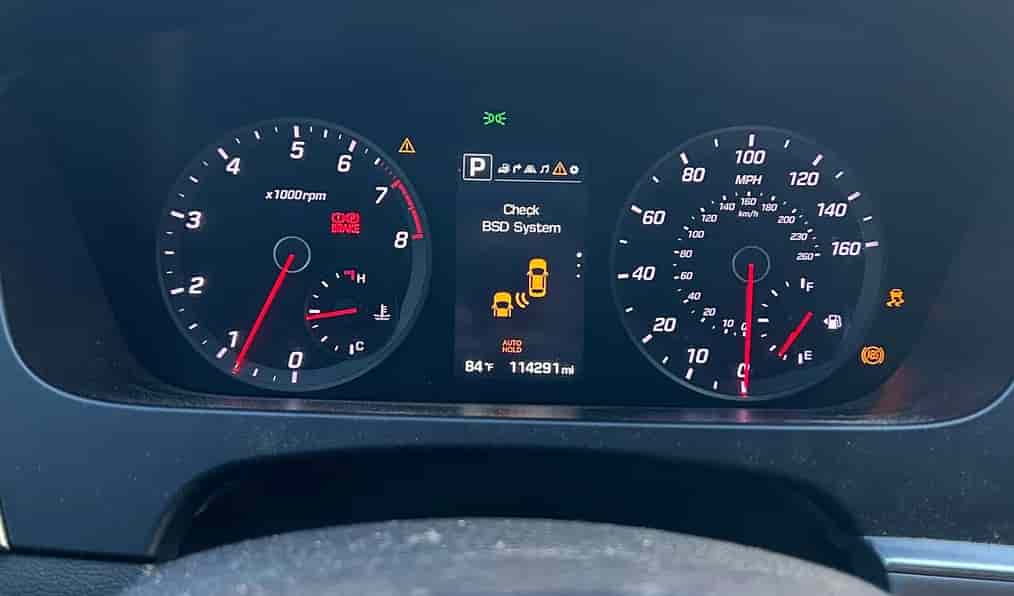
What Does the Hyundai Check BSD System Warning Mean?
The Hyundai Check BSD System warning means the Blind Spot Detection system cannot operate correctly. Hyundai designed this system to monitor areas that drivers cannot easily see through the side mirrors. When another vehicle enters the blind spot area, the system sends visual or audible alerts to help prevent unsafe lane changes.
The warning appears when the vehicle detects a problem inside the BSD system. Sometimes the issue is temporary. Heavy rain, snow buildup, dirt, or moisture near the rear bumper sensors can interfere with the radar signal. After cleaning the sensors or driving in better weather conditions, the warning may disappear automatically.
In other situations, the issue comes from hardware or electrical failures. A faulty radar sensor may stop detecting nearby vehicles correctly. Loose wiring or corrosion can interrupt communication between the sensor and the control module. Software problems may also trigger the warning and disable the system.
Many drivers first notice the issue when the BSD warning light stays active on the dashboard. Some drivers also report that blind spot alerts disappear during lane changes. In more serious cases, additional driver assistance systems stop working because Hyundai safety technologies share the same electronic network.
Drivers should not ignore the Hyundai Check BSD System warning for long periods. A disabled blind spot monitoring system reduces driving awareness and increases accident risk during highway driving or heavy traffic conditions. Identifying the root cause early can prevent more expensive repairs later.
Common Causes of Hyundai Check BSD System Warning
Several problems can trigger the Hyundai Check BSD System warning in Hyundai vehicles. In many cases, the issue starts with blocked radar sensors located behind the rear bumper. These sensors constantly monitor nearby traffic and help detect vehicles in blind spot areas. When dirt, mud, snow, or heavy rain covers the sensor surface, the radar signal becomes weak or unstable. Many Hyundai owners also notice the warning after washing the car because water residue interferes with sensor communication. Fortunately, cleaning the bumper area often solves the problem quickly.
Some drivers continue seeing the warning even after cleaning the sensors. This situation usually points to hardware or electrical problems inside the BSD system. A faulty radar sensor may lose accuracy or stop detecting nearby vehicles completely. Minor rear bumper impacts can also damage the sensor or shift its position slightly. Even small parking accidents may create alignment problems that disable the blind spot monitoring feature.
Electrical issues are another common cause of BSD system failures. Loose wiring connections, corrosion, damaged cables, or weak battery voltage can interrupt communication between the radar sensor and the control module. Modern Hyundai safety systems depend heavily on stable electrical power, so voltage fluctuations often trigger unexpected warning messages.
Software and calibration problems may also activate the Hyundai Check BSD System warning. Hyundai vehicles use advanced driver assistance software that requires precise sensor alignment. After suspension work, bumper repairs, or wheel alignment adjustments, the BSD system may need recalibration. Without proper calibration, the system cannot monitor surrounding vehicles accurately, which increases the risk of false alerts or complete system shutdown.
How to Fix Hyundai Check BSD System Warning
Fixing the Hyundai Check BSD System warning depends on the root cause of the problem. In many situations, drivers can solve the issue without expensive repairs if they identify the warning early. The first step is checking the rear bumper area where the BSD radar sensors are located. Dirt, mud, snow, or moisture often blocks the sensors and prevents accurate vehicle detection. Cleaning the bumper carefully with a soft microfiber cloth can restore normal system operation within minutes.
If the warning remains active, restarting the vehicle may help reset temporary software glitches. Many Hyundai drivers report that turning the engine off for several minutes and restarting the car clears the BSD warning after heavy rain or long highway trips. A weak battery can also create unstable voltage levels that affect Hyundai safety systems. Checking battery health and charging performance is important if multiple dashboard warnings appear at the same time.
Some BSD problems require a manual system reset. Drivers can disconnect the battery for several minutes to reset the vehicle’s electronic control modules. However, this method may not solve hardware related issues. If the warning continues returning, the BSD system may require professional diagnostics and recalibration.
Sensor calibration becomes necessary after rear bumper repairs, wheel alignment adjustments, or minor collisions. Hyundai dealerships and specialized repair shops use advanced diagnostic tools to restore proper sensor positioning and communication. In more serious cases, technicians may need to replace a damaged radar sensor or repair faulty wiring connections.
Ignoring the Hyundai Check BSD System warning for long periods can reduce driving safety and increase repair costs later. Identifying the cause early and fixing the issue quickly helps maintain reliable blind spot monitoring performance and prevents additional electronic system failures.
Hyundai BSD System Reset Guide
Many Hyundai drivers search for a quick reset solution when the Hyundai Check BSD System warning suddenly appears. In some situations, resetting the system can remove temporary software glitches and restore normal BSD operation. However, a reset only works when the issue comes from communication errors or temporary sensor interruptions rather than permanent hardware damage.
The simplest reset method starts with turning the engine off completely. Drivers should leave the vehicle parked for several minutes before restarting it. This process allows the electronic control modules to reboot and reconnect with the BSD sensors. In many cases, the warning disappears after the system completes a fresh startup cycle.
If the warning remains active, drivers can try a battery reset procedure. Disconnecting the negative battery terminal for about ten minutes helps clear temporary electronic faults stored inside the vehicle system. After reconnecting the battery, the driver should restart the vehicle and check whether the BSD warning has disappeared. This method sometimes works after heavy rain, weak battery conditions, or sudden voltage fluctuations.
Some Hyundai owners also use an OBD2 scanner to clear BSD related trouble codes. Diagnostic scanners can reset certain warning messages and help identify deeper system problems. However, clearing the code without fixing the actual issue usually causes the warning to return quickly.
A reset will not solve every BSD problem. Faulty radar sensors, damaged wiring, calibration failures, or rear bumper impacts often require professional repairs. If the Hyundai Check BSD System warning continues appearing after multiple reset attempts, the vehicle should receive a complete diagnostic inspection to prevent further safety system failures.
Is It Safe to Drive with a Hyundai Check BSD System Warning?
Many drivers continue using their vehicles after seeing the Hyundai Check BSD System warning because the car often appears to drive normally. In some situations, the issue may only involve temporary sensor interference caused by rain, dirt, or snow. The vehicle can usually operate safely for short distances if the BSD warning appears during severe weather conditions and disappears after cleaning the sensors.
However, drivers should understand that the Blind Spot Detection system plays an important role in overall driving safety. The BSD system helps monitor areas that side mirrors cannot fully cover during lane changes. When the system stops working, drivers lose an extra layer of protection that helps prevent side collisions and blind spot accidents.
The warning becomes more serious if additional safety systems also stop working. Some Hyundai vehicles display lane assist, forward collision warning, or parking sensor errors at the same time because these technologies share connected electronic modules. Multiple warning messages may indicate deeper electrical or communication problems inside the vehicle.
Drivers should pay close attention to unusual symptoms such as delayed alerts, random warning lights, or complete loss of driver assistance features. These signs may point to sensor damage, wiring faults, or calibration failures that require immediate inspection. Continuing to drive for long periods without repairing the issue can increase accident risk, especially during highway driving or heavy traffic conditions.
If the Hyundai Check BSD System warning remains active for several days, professional diagnostics become necessary. Repairing the problem early helps restore full safety performance and prevents more expensive electronic failures later. Even though the vehicle may still operate normally, ignoring blind spot monitoring issues can reduce driver awareness and increase the chances of dangerous lane change mistakes.
Hyundai Check BSD System Repair Cost
Repair costs for the Hyundai Check BSD System warning can vary depending on the exact cause of the problem. Some issues require only simple cleaning or a quick system reset, while others involve sensor replacement, wiring repairs, or advanced calibration procedures. Understanding the possible costs helps Hyundai owners prepare for repairs and avoid unnecessary expenses.
Minor problems usually cost very little to fix. Cleaning dirty radar sensors or resetting the BSD system may solve the warning without requiring replacement parts. Many drivers handle these basic solutions at home within a few minutes. If the issue involves weak battery voltage or loose electrical connections, repair costs often remain relatively affordable compared to major sensor failures.
More serious BSD problems become expensive when the radar sensor itself fails. Hyundai BSD radar sensors use advanced detection technology that requires precise communication with the vehicle’s electronic safety systems. Replacing a damaged sensor can cost several hundred dollars depending on the Hyundai model and labor rates in the area. Luxury trims and newer Hyundai vehicles often use more advanced sensors that increase replacement costs further.
Calibration services also add to the total repair bill. After replacing a BSD sensor or repairing the rear bumper, technicians must recalibrate the system to restore accurate blind spot detection performance. Specialized diagnostic equipment is necessary for this process, which increases labor expenses at dealerships and professional repair shops.
Many drivers choose independent repair shops to reduce costs because dealership service prices are usually higher. However, experienced technicians with ADAS calibration equipment remain important for proper repairs. Choosing low quality repairs or skipping calibration may cause recurring BSD warnings and unreliable blind spot monitoring performance later.
How to Prevent BSD System Problems in Hyundai Vehicles
Preventing BSD system problems is often much easier and cheaper than repairing them later. Hyundai Blind Spot Detection systems rely on radar sensors and electronic communication to monitor nearby vehicles accurately. Regular maintenance and careful driving habits can help drivers avoid unexpected warning messages and expensive repairs.
Keeping the rear bumper area clean is one of the most important preventive steps. Dirt, mud, snow, and road salt can quickly block the radar sensors and reduce system accuracy. Drivers should inspect the bumper regularly, especially after driving in bad weather or on dirty roads. Cleaning the sensor area with a soft cloth helps maintain stable radar performance and prevents temporary BSD warnings.
Avoiding minor rear bumper impacts also protects the BSD system from damage. Many radar sensors sit behind the rear bumper, so even small parking accidents can affect sensor alignment. Drivers often underestimate low speed impacts because the bumper may appear undamaged from the outside. However, hidden sensor misalignment can still trigger warning messages and disable blind spot monitoring functions.
Regular battery maintenance also supports stable BSD performance. Weak batteries and unstable voltage levels can interrupt communication between Hyundai safety systems and electronic control modules. Replacing an aging battery before it fails completely helps reduce the risk of unexpected dashboard warnings.
Software updates and system inspections are equally important for modern Hyundai vehicles. Dealerships often release updates that improve safety system stability and communication performance. Drivers should also schedule professional inspections after rear bumper repairs, suspension work, or wheel alignment adjustments because these services may affect BSD sensor calibration.
Proper maintenance helps the Hyundai Check BSD System operate accurately for years. Drivers who inspect sensors regularly and address small issues early often avoid costly repairs and maintain safer driving conditions in daily traffic.
Conclusion
The Hyundai Check BSD System warning can appear for many different reasons, ranging from simple sensor blockage to serious electrical or hardware failures. Dirty radar sensors, weak battery voltage, software glitches, damaged wiring, and rear bumper impacts remain some of the most common causes behind the warning. While some problems disappear after cleaning the sensors or restarting the vehicle, others require professional diagnostics and calibration.
Understanding how the BSD system works helps drivers respond quickly when warning messages appear. Early diagnosis can prevent more expensive repairs and reduce the risk of losing important safety features during daily driving. Blind spot monitoring systems play a critical role in highway safety, lane changes, and heavy traffic situations where visibility becomes limited.
Drivers should never ignore persistent BSD warnings for long periods, especially when additional safety systems also begin malfunctioning. Regular maintenance, sensor cleaning, software updates, and careful driving habits can help prevent many BSD related problems before they become serious.
By identifying the root cause early and choosing proper repairs, Hyundai owners can restore full BSD functionality and continue driving with greater confidence and safety.