Apple CarPlay not working inside a Volvo can quickly disrupt your driving experience. Many drivers depend on smartphone integration for maps, calls, and music. When the system fails, it often feels unexpected and frustrating.
In modern vehicles from Volvo Cars, Apple CarPlay plays a key role in daily driving. It connects your iPhone directly to the car display and allows safer access to apps while driving. This system runs through Apple CarPlay, which links your phone and infotainment system in real time.
Problems usually appear in simple but confusing ways. The screen may go black. The iPhone may not connect. In some cases, the system works before but suddenly stops without warning. These issues often come from software conflicts, cable problems, or system compatibility gaps.
This guide explains why Volvo CarPlay stops working. It also breaks down compatibility issues and shows clear steps to fix them. Each section focuses on practical solutions that help you restore the connection quickly. You will also learn how to prevent the issue from happening again.
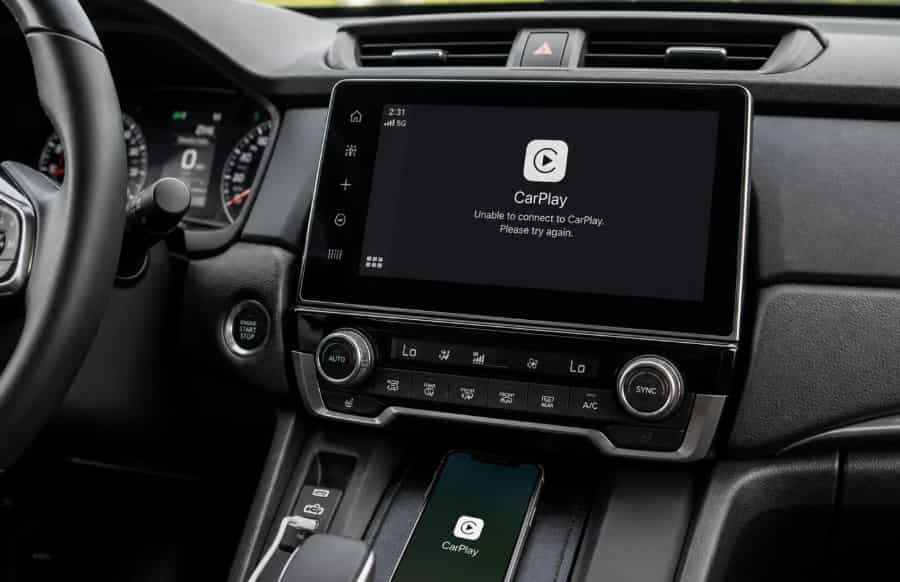
What Is Volvo Apple CarPlay System and How It Works
The CarPlay system in Volvo vehicles connects your iPhone to the car infotainment screen. It turns the dashboard into a simple interface that shows apps, navigation, calls, and music.
In vehicles from Volvo Cars, the system works as a bridge between the driver and the smartphone. It reduces distraction by limiting phone interaction while driving. The system displays a simplified version of your iPhone through Apple CarPlay.
Volvo uses different infotainment generations depending on model year. Older models often rely on wired USB connections. Newer models may support wireless CarPlay, depending on software version and region. Both versions depend on stable communication between the phone and the vehicle system.
The connection works through data transfer, not just charging. That means the cable, software version, and system settings all play an important role. Even a small mismatch can stop CarPlay from starting.
Understanding this structure helps explain why problems occur. CarPlay does not depend on one system only. It depends on both the iPhone and the Volvo infotainment system working together correctly.
Main Causes of Volvo CarPlay Not Working
Volvo CarPlay problems usually come from multiple small issues rather than a single failure. The system depends on both the iPhone and the vehicle software working in sync. When one side changes or fails, the connection can break.
One of the most common causes is iPhone compatibility. If your iOS version is outdated or too new for the vehicle firmware, the connection may fail. Settings on the phone can also block CarPlay. If you disable CarPlay or restrict USB access, the system will not start.
Another frequent issue comes from USB connection problems. A damaged cable can interrupt data transfer even if it still charges the phone. Non certified cables often cause unstable connections. The USB port in vehicles from Volvo Cars can also wear out over time and reduce connection quality.
Software glitches in the infotainment system also cause failures. Temporary bugs may appear after long use or after updates. These glitches can stop CarPlay from launching correctly until the system is restarted.
Wireless interference affects newer setups. Bluetooth and Wi Fi signals can conflict when multiple devices connect at the same time. This can block the handshake process required by Apple CarPlay.
Vehicle model limitations also play a role. Some Volvo models only support wired CarPlay. Others require software activation before the feature works fully. These differences often confuse users when they switch between models or upgrade software.
Volvo CarPlay Compatibility Issues Explained
Compatibility issues are one of the main reasons Volvo CarPlay stops working even when nothing looks broken. The system depends on both vehicle software and iPhone software working at the same level.
In vehicles from Volvo Cars, Apple CarPlay support varies by model year and infotainment system version. Some older models only support wired connections. Newer models may support wireless CarPlay, but only if the software is fully updated.
On the phone side, Apple CarPlay requires a compatible iOS version. If the iPhone runs an outdated system, CarPlay may not start. If the iPhone runs a very new iOS version while the car software is outdated, the system can also fail.
Another common issue comes from software activation. Some Volvo models require CarPlay to be enabled through system settings or dealer activation. Users often assume the feature is broken when it is simply not activated.
Regional differences also affect compatibility. Certain Volvo software features roll out gradually by market. This means two identical cars in different regions may behave differently.
Because of these factors, compatibility is not static. It changes with every software update on both the phone and the vehicle. This is why CarPlay may suddenly stop working even after months of normal use.
Step by Step Fixes for Volvo CarPlay Not Working
When Volvo CarPlay stops working, you should start with simple checks before moving to advanced fixes. Most issues come from small connection or software errors that you can fix in a few minutes.
First, restart your iPhone. This clears temporary system bugs that may block Apple CarPlay from starting. After restarting, reconnect the device using a certified cable if you use a wired setup.
Next, check the USB cable and port. A damaged or low quality cable often causes unstable connections. Replace it with an Apple certified cable and try a different USB port inside vehicles from Volvo Cars if available.
Then restart the car infotainment system. Turn off the vehicle, wait a few minutes, and start it again. This step resets temporary software errors that may block CarPlay detection.
If the problem continues, check software updates. Update your iPhone to the latest iOS version. Also check Volvo system updates in the infotainment settings. Outdated software often causes compatibility issues.
If CarPlay still does not work, reset network settings on your iPhone. This removes corrupted Bluetooth and Wi Fi configurations that may interfere with connection.
As a last step, you can reset the infotainment system. This should only be used when all other methods fail because it removes saved settings.
Most CarPlay problems can be solved using these steps without visiting a service center.
Model Specific Issues XC40 XC60 XC90
Volvo CarPlay problems do not appear the same way across all models. Each vehicle line uses different infotainment hardware and software versions. This creates different failure patterns even when the symptom looks similar.
In the XC40, CarPlay issues often come from USB connection instability. Many users report that Volvo Cars systems in this model fail to recognize the iPhone after long drives or after software updates. A weak cable or dirty USB port usually makes the problem worse.
The XC60 shows more intermittent connection behavior. CarPlay may connect at first but disconnect during use. This often links to software synchronization issues between the vehicle system and Apple CarPlay. Wireless interference can also affect performance in newer XC60 versions.
The XC90 generally has a more stable system, but it is not free from issues. Most problems appear after major software updates. In some cases, the infotainment system needs a full restart before CarPlay works again. Users may also experience delayed response when switching between apps.
Across all three models, software version plays a key role. Older firmware increases the risk of compatibility errors. Even if the hardware is fine, outdated software can still block CarPlay from starting.
Understanding these model differences helps you diagnose problems faster. Instead of applying random fixes, you can focus on the most likely cause based on your specific Volvo model.
Prevention Tips to Avoid CarPlay Failures
Preventing Volvo CarPlay issues is easier than fixing them after they happen. Most problems come from avoidable software gaps, unstable connections, or outdated systems.
The first important habit is to use certified accessories. A high quality Apple certified cable helps maintain stable data transfer between your phone and vehicles from Volvo Cars. Low quality cables often cause random disconnects even when charging works normally.
You should also keep both systems updated. Regular iOS updates improve compatibility with Apple CarPlay. At the same time, Volvo infotainment updates fix bugs and improve system stability. When both sides stay updated, connection errors become less frequent.
Another useful habit is restarting the system occasionally. Long periods of continuous use can create temporary software glitches. Restarting the car infotainment system clears memory errors and keeps performance stable.
Avoid connecting too many Bluetooth devices at the same time. Multiple active connections can create interference and weaken CarPlay stability. Keep only essential devices paired when driving.
You should also unplug the phone properly after each use. Sudden disconnection during active data transfer can sometimes cause temporary sync issues.
Finally, check settings regularly. Make sure CarPlay is enabled on your iPhone and allowed in the vehicle system. Small setting changes after updates can sometimes disable the connection without warning.
By following these simple practices, you can significantly reduce the chance of CarPlay failures and maintain a smooth driving experience.
Conclusion
Volvo CarPlay issues can feel frustrating, especially when the system stops working without clear warning. However, most problems are not caused by hardware failure. They usually come from software mismatches, connection errors, or simple configuration issues.
In vehicles from Volvo Cars, Apple CarPlay is designed to work smoothly with your smartphone, but it still depends on stable communication between systems. When something breaks in that chain, the connection fails. This is why even small issues like an outdated cable or software version can stop the system from working.
The role of Apple CarPlay is to mirror your iPhone safely inside the car. If either the phone or the vehicle system falls out of sync, CarPlay will not start or will disconnect during use.
The good news is that most issues can be solved quickly. Restarting devices, updating software, and checking cables resolve the majority of cases. Only a small number of problems require professional service.
By understanding the causes, checking compatibility, and following preventive steps, you can keep your CarPlay system stable and reliable. This ensures a smoother and safer driving experience every time you use your Volvo.