Volvo drivers often face a frustrating problem when the GPS suddenly stops working. The navigation system may freeze, show the wrong location, or fail to load maps during a trip. In some cases, the system loses signal completely while the car is moving. This issue affects both Volvo Sensus Navigation and newer Volvo models that use Google Built-in systems.
This problem does not always come from hardware failure. In many situations, software bugs cause the issue. Outdated map data can also break the navigation system. Some drivers notice the problem right after a software update. Others see random GPS signal loss even when driving in open areas.
Volvo navigation systems rely on several components to work correctly. The system needs satellite signals, software stability, and updated map data. When one of these parts fails, the GPS starts to behave incorrectly. This can lead to wrong routes, frozen screens, or missing location data.
This guide explains the real causes behind Volvo GPS Not Working issues. It also shows you how to fix them step by step. You will learn how to check the infotainment system, reset navigation settings, and identify signal or software problems. By following this guide, you can restore your GPS system and prevent similar issues in the future.
WHY VOLVO GPS STOPS WORKING
Volvo GPS stops working for several clear technical reasons. Most cases do not come from a single fault. The issue usually comes from a combination of software, signal, and system data errors.
One common cause is weak or unstable GPS signal. The navigation system depends on satellites to calculate the vehicle position. When the signal drops, the system shows wrong locations or stops updating the map. This often happens in tunnels, parking basements, or areas with tall buildings that block satellite signals.
Another frequent cause is software errors inside the infotainment system. Volvo vehicles use different platforms such as Volvo Sensus Navigation and Google Built-in systems. When these systems face bugs or incomplete updates, the GPS function can freeze or stop responding. This often happens right after a software update or system reboot.
Outdated map data also creates serious navigation issues. When the map version is old, the system may fail to recognize new roads or updated routes. This leads to incorrect navigation instructions or missing location data.
Connectivity issues also affect GPS performance, especially in models using Google Built-in. These systems rely on internet connection to improve navigation accuracy. If the connection drops, the system may fail to load maps or calculate routes correctly.
In some cases, hardware problems also play a role. A damaged GPS antenna can reduce signal strength. This leads to delayed location updates or complete signal loss while driving. However, hardware failure is less common compared to software-related issues.
Understanding these root causes helps you avoid random fixes. It also helps you choose the correct troubleshooting method instead of resetting the system without direction.
VOLVO SENSUS NAVIGATION SYSTEM ERRORS EXPLAINED
The Volvo Sensus Navigation system controls most navigation functions in many Volvo vehicles. It handles map display, route calculation, and real time positioning. When this system fails, the GPS often stops working or behaves incorrectly.
Many drivers experience frozen screens inside the navigation interface. The map may stop moving even when the car is driving. In some cases, the system fails to load maps completely. This creates a blank screen or a delayed response when entering a destination.
Another common issue is incorrect route calculation. The system may send the driver through wrong roads or fail to update the route after a turn. This usually happens when the system data becomes unstable or partially corrupted.
System lag also appears in many Volvo vehicles. The interface may respond slowly when switching between menus or entering navigation mode. This lag often signals internal software stress or memory overload inside the infotainment system.
These errors often relate to the core infotainment architecture known as Volvo Sensus Navigation. When this system becomes unstable, the GPS module cannot process location data correctly. As a result, navigation accuracy drops and the system may stop responding.
Most Sensus-related errors do not come from permanent hardware damage. They usually come from software instability, cache conflicts, or incomplete updates. This is why resetting or updating the system often restores normal GPS function.
Understanding these system errors helps you avoid unnecessary repairs. Instead of replacing hardware immediately, you can focus on software checks and system resets first.
VOLVO GPS NOT WORKING AFTER SOFTWARE UPDATE
Many Volvo drivers notice GPS problems right after a software update. The navigation system may stop responding, freeze, or show incorrect location data. In some cases, the map disappears completely or fails to load routes.
Software updates often change how the infotainment system processes navigation data. When the update does not install correctly, the system can develop conflicts between old and new files. This creates instability in the GPS function.
Another common issue comes from incomplete system synchronization. After an update, the system needs time to rebuild navigation data and reconnect services. If the process gets interrupted, the GPS may stop working or behave unpredictably.
Some vehicles also face compatibility issues between software versions and map data. When the map version does not match the system version, navigation errors can appear. This leads to wrong routes or missing road information.
These problems often appear in systems running Volvo Sensus Navigation as well as newer vehicles using Google Built-in. Both systems depend heavily on software integrity to deliver accurate navigation.
In most cases, the issue does not indicate hardware failure. A simple reset or software refresh often restores normal GPS function. However, repeated update failures may indicate deeper system corruption that requires professional service.
Understanding the risks of post-update errors helps you avoid unnecessary panic. Instead of assuming the GPS is broken, you can focus on system recovery steps such as rebooting, resetting cache, or checking for additional updates.
HOW TO RESET VOLVO GPS AND NAVIGATION SYSTEM
When Volvo GPS stops working, a reset often fixes the problem quickly. The navigation system may freeze due to software glitches or temporary data errors. A reset helps clear these issues and restores normal function.
The first method is a soft reset. You can restart the infotainment system without affecting personal settings. In most Volvo models, you press and hold the home button or power button until the screen turns off and restarts. This process clears temporary system errors and refreshes the navigation module.
If the soft reset does not work, you can try a full system reboot. Turn off the engine and lock the car. Wait for at least ten to fifteen minutes. During this time, the system shuts down completely and clears background processes. After that, restart the vehicle and check the GPS again.
Some cases require a factory reset. This method restores the system to default settings. It removes saved preferences, paired devices, and cached navigation data. You should only use this option when other fixes fail because it resets the entire infotainment system.
These reset methods apply to systems using Volvo Sensus Navigation. The system often recovers after clearing temporary software conflicts. In newer models using Google Built-in, the reset process may also re-sync Google services and restore navigation stability.
In many cases, a simple restart solves the GPS problem without needing repairs. This makes reset steps the first and most important troubleshooting action before deeper diagnostics.
FIX VOLVO GPS NOT WORKING ON GOOGLE BUILT IN SYSTEMS
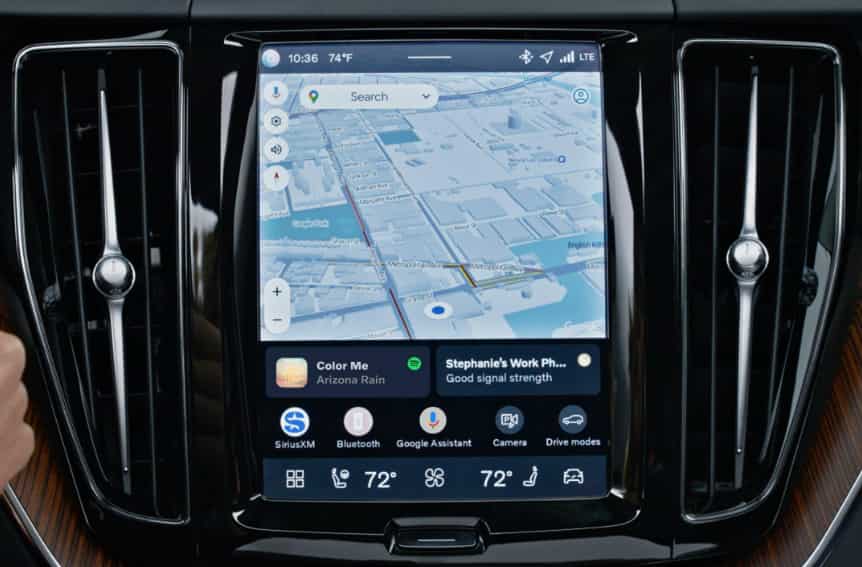
Many newer Volvo models use Google Built-in systems for navigation. This system relies on Google Maps and internet connectivity to provide real time directions. When it fails, the GPS may stop loading maps or show incomplete navigation data.
One common issue comes from internet connection loss. The system needs a stable data connection to update maps and calculate routes. When the connection drops, Google Maps may freeze or fail to start navigation. You should first check the car’s connectivity status and ensure mobile data or WiFi is active.
Another frequent problem comes from Google account synchronization errors. The system uses your Google account to store preferences and navigation data. If the account fails to sync, the navigation system may stop responding or reset unexpectedly.
App cache corruption can also affect performance. Over time, temporary data inside Google Maps can become corrupted. This leads to slow loading, wrong location tracking, or blank map display. Clearing the cache or restarting the app often restores normal function.
Software conflicts may also appear after updates. The system may not fully integrate new changes with existing navigation data. This can cause unstable behavior inside the infotainment system and interrupt GPS accuracy.
These issues often affect vehicles using Google Built-in. Since this system depends heavily on cloud services, any disruption in connectivity or account sync can directly impact navigation performance.
Most of these problems do not require hardware repair. A stable connection, account re-login, or system restart often solves the issue quickly. However, repeated failures may indicate deeper software instability that requires a full system reset or update check.
VOLVO GPS SIGNAL LOSS WHILE DRIVING
Some Volvo drivers experience sudden GPS signal loss while driving. The navigation system may freeze, delay location updates, or show an incorrect position on the map. This issue often appears in specific driving environments rather than constant system failure.
One common cause is satellite signal blockage. GPS relies on a clear line of sight to satellites. When you drive through tunnels, underground parking areas, or roads surrounded by tall buildings, the signal becomes weak or unstable. This leads to temporary navigation failure or inaccurate positioning.
Another factor is interference from the vehicle environment. Some windshield coatings or tinted glass can reduce GPS signal strength. This can slightly affect accuracy, especially in urban areas with weak satellite coverage.
Urban environments also create what is known as signal reflection. Tall buildings bounce satellite signals in different directions. This confuses the system and causes small errors in location tracking or route updates.
Weather conditions can also play a minor role. Heavy rain or dense clouds may reduce signal quality, although this is less common. The system usually recovers quickly once the vehicle moves into open areas.
These signal-related issues affect all navigation systems, including those running Volvo Sensus Navigation and Google Built-in. The GPS module depends entirely on satellite visibility, so external conditions directly impact performance.
In most cases, signal loss is temporary and does not indicate system failure. Once the vehicle returns to an open area, the GPS quickly reconnects and restores normal navigation.
HOW TO UPDATE VOLVO MAPS TO FIX NAVIGATION ISSUES
Outdated maps often cause Volvo GPS problems. The system may show incorrect routes, missing roads, or failed navigation. Updating the map data helps restore accuracy and improve overall performance.
Volvo navigation systems rely on updated geographic data to calculate routes correctly. When the map version becomes old, the system may not recognize new roads or recent traffic changes. This leads to wrong directions or incomplete route planning.
In many Volvo models, map updates can be installed through the infotainment system or via USB depending on the system version. Some newer vehicles using Google Built-in update maps automatically through cloud services. In these cases, the system needs a stable internet connection to complete the update process.
If the update fails or interrupts, the navigation system may become unstable. This can cause GPS errors, slow loading maps, or missing location data. Restarting the system or retrying the update often solves the issue.
These updates are essential for systems like Volvo Sensus Navigation and Google Built-in. Both systems depend on accurate map data to deliver correct navigation results.
Regular updates also reduce long term GPS issues. When the system stays updated, it can match real world road conditions more accurately. This improves driving experience and reduces navigation errors significantly.
In most cases, updating maps is one of the most effective solutions for Volvo GPS not working issues. It should always be checked before considering hardware repair or advanced troubleshooting.
MODEL SPECIFIC VOLVO GPS ISSUES (XC60, XC90, S60)
Volvo GPS problems do not always appear the same across all models. Each vehicle may show different symptoms depending on the infotainment system version and hardware configuration.
In Volvo XC60, drivers often report delayed GPS response. The map may lag behind real driving position, especially during city driving. This usually relates to software performance inside the infotainment system or weak signal processing.
In Volvo XC90, the most common issue is system freezing. The navigation screen may stop responding or restart unexpectedly. This often happens when the system handles multiple functions at the same time, such as media, calls, and navigation.
In Volvo S60, users sometimes experience intermittent signal loss. The GPS may work normally and then suddenly drop location tracking for a few seconds. This can be linked to antenna sensitivity or temporary software instability.
These issues still connect to the core navigation platforms used in Volvo vehicles. Systems running Volvo Sensus Navigation may show more traditional interface lag, while vehicles using Google Built-in depend more on network stability and cloud synchronization.
Although symptoms differ, the root causes are often similar. Software bugs, outdated map data, or weak signal conditions usually trigger most GPS problems across all models.
Understanding model specific behavior helps narrow down troubleshooting steps. Instead of applying random fixes, drivers can focus on the most likely cause based on their Volvo model.
WHEN TO VISIT VOLVO SERVICE CENTER AND FINAL CONCLUSION
Some Volvo GPS problems cannot be solved with basic troubleshooting. If the navigation system still fails after resets, updates, and map checks, the issue may come from deeper system or hardware failure.
You should consider visiting a Volvo service center when the GPS stops working completely for a long time. If the system does not respond after multiple restarts, this may indicate a serious software corruption or hardware malfunction.
A faulty GPS antenna can also cause persistent signal loss. In this case, the system cannot receive satellite data correctly. This leads to constant navigation errors even in open areas with strong signal coverage.
Another situation that requires professional support is repeated system crashes. If the infotainment system freezes often or restarts without reason, the internal software may be unstable. This often needs a full diagnostic check from technicians.
These issues affect both Volvo Sensus Navigation and Google Built-in. When basic fixes do not work, professional tools are required to identify the exact cause.
In most cases, Volvo GPS problems come from software, signal, or map data issues. These problems are often fixable without major repairs. Regular updates, proper resets, and stable connectivity can prevent most navigation failures.
Understanding how the system works helps you avoid unnecessary stress when GPS issues appear. Instead of guessing, you can follow a clear troubleshooting process and identify the real cause step by step.
If the problem continues, professional inspection is the safest solution to restore full navigation performance.