Modern GM vehicles use an Electronic Parking Brake system instead of a traditional handbrake. This system uses electronic motors to control the rear brakes. It improves safety and braking precision, but it also makes maintenance more complex.
The GM Electronic Parking Brake Service Mode allows the system to release the rear calipers safely. This function is necessary when you replace brake pads or work on the rear brake system. Without this mode, the calipers can stay locked. This can damage the actuator or make brake service difficult.
Many users struggle when they try to activate or deactivate this mode. The process is not always intuitive. It can also differ slightly between Chevrolet, GMC, and Cadillac models. If you use the wrong steps, the system may show errors or stay stuck in service mode.
This guide shows you how to activate and deactivate GM Electronic Parking Brake Service Mode step by step. You will also learn when to use it and how to avoid common mistakes. The goal is to help you complete brake service safely and restore the system to normal operation without errors.
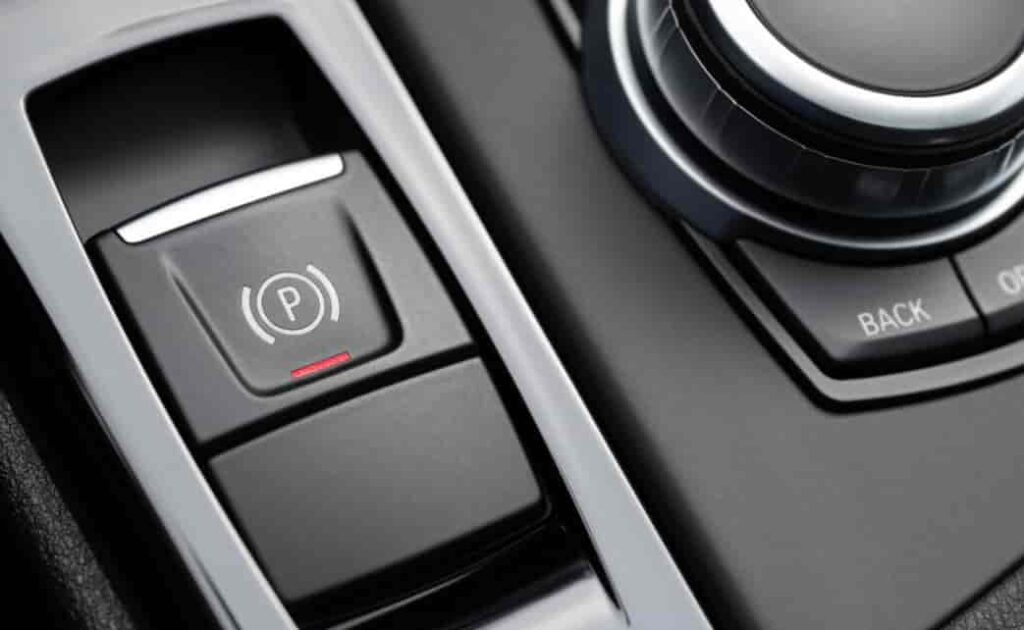
What Is GM Electronic Parking Brake Service Mode?
The GM Electronic Parking Brake Service Mode is a built in maintenance function inside the braking system. It controls the electronic actuators that operate the rear brake calipers. This mode allows the system to retract the calipers so you can safely service the brake components.
When the service mode is active, the system releases pressure from the rear brake motors. This creates enough space to remove and replace brake pads or inspect the brake rotor. The vehicle prevents manual forcing of the caliper because the electronic system stays engaged during normal operation.
GM designed this function to protect the EPB system from damage. Without service mode, technicians may damage the actuator or compress the caliper incorrectly. The system uses electronic signals to ensure the brake components move in a controlled sequence.
This mode is part of the vehicle’s safety architecture. It connects to the onboard control module and communicates with the brake system in real time. Once maintenance is complete, the system must exit service mode to restore normal parking brake function.
The GM Electronic Parking Brake Service Mode plays a key role in modern brake service procedures. It ensures safe disassembly, prevents mechanical stress, and maintains proper calibration of the electronic parking brake system.
When You Need to Use Service Mode
You need to use the GM Electronic Parking Brake Service Mode whenever you perform maintenance on the rear braking system. This mode protects the electronic parking brake components and allows safe mechanical access.
The most common situation is brake pad replacement. The rear calipers on GM vehicles are controlled by electric motors, so they do not retract manually like older systems. Service mode releases the calipers so you can remove and install new brake pads without forcing the mechanism.
You also need this mode when you replace or inspect rear brake rotors. The system must stay in a retracted position to give enough clearance for proper servicing. Without service mode, the caliper may stay locked and block disassembly.
Another case is EPB system maintenance or diagnosis. If the system detects faults, technicians may activate service mode to reset or recalibrate the electronic components. This helps restore normal operation and clear system errors.
You may also use service mode after battery replacement or voltage loss. Some GM vehicles reset brake calibration when power is interrupted. In this case, the system may require reinitialization through service mode.
The system may also request service mode indirectly through warning messages on the dashboard. These alerts indicate that the electronic parking brake needs inspection or adjustment.
Using the GM Electronic Parking Brake Service Mode at the right time ensures safe maintenance, prevents damage to the actuator, and keeps the braking system working correctly.
GM Electronic Parking Brake Service Mode Activation (Step-by-Step)
Activating the GM Electronic Parking Brake Service Mode requires a correct sequence. The system must enter a controlled state before you perform any brake service. This ensures the rear calipers retract safely and the actuator does not get damaged.
Preparation Before Activation
Before you start, make sure the vehicle is in a safe condition. Park the vehicle on a flat surface. Keep the transmission in Park mode. Turn the ignition ON but do not start the engine. Check that the battery has enough charge because low voltage can interrupt the process.
Make sure your foot is on the brake pedal if the vehicle requires it. Some GM models may also require the driver door to remain closed during activation.
Activation Process
Start by accessing the EPB control through the vehicle switch or diagnostic scan tool. On many GM vehicles, you press and hold the electronic parking brake switch in the release position for several seconds.
You may hear the rear calipers moving. This sound indicates that the system is retracting the brake actuators. At the same time, the dashboard may display a service message confirming activation.
If you use a diagnostic tool, select the Electronic Parking Brake Service Mode function from the brake control menu. Follow the on screen instructions to complete activation.
Confirmation of Service Mode
Once the process is complete, the system will confirm that service mode is active. The parking brake warning light may stay on. The rear calipers will remain fully retracted. This confirms that the system is ready for brake service.
Important Notes
Different GM models such as Chevrolet, GMC, and Cadillac may use slightly different activation steps. Always follow the exact procedure for your vehicle model. Incorrect activation can cause system errors or incomplete caliper movement.
How to Perform Brake Service While in EPB Service Mode
Once the GM Electronic Parking Brake Service Mode is active, you can begin the brake service process. The system keeps the rear calipers retracted so you can safely access the brake components without resistance.
Start by removing the rear wheels. This gives you full access to the brake assembly. The caliper should remain in a retracted position. Do not try to force it back manually because the electronic actuator is still engaged in a controlled state.
Next, remove the brake caliper bolts. Carefully lift the caliper and support it using a hook or support tool. Avoid letting the caliper hang by the brake hose because this can cause damage.
Remove the old brake pads from the caliper bracket. Inspect the bracket for wear, rust, or dirt. Clean the contact points before installing new brake pads. This helps ensure smooth movement and even braking performance.
If you replace the brake rotor, remove it carefully after the caliper is fully supported. Make sure the hub surface is clean before installing the new rotor.
After installing the new brake pads and reassembling the components, double check all bolts and fittings. Make sure everything is tightened to the correct specification.
The system remains in service mode during the entire process. This prevents the rear calipers from extending unexpectedly and ensures a safe working environment.
GM Electronic Parking Brake Service Mode Deactivation
After you finish brake service, you must deactivate the GM Electronic Parking Brake Service Mode to restore normal system operation. This step is important because it allows the electronic parking brake to recalibrate and return the rear calipers to their working position. If you skip or perform this step incorrectly, the system may display errors or the parking brake may not function properly.
Before you start deactivation, make sure all brake components are fully installed. Check that the brake pads are seated correctly inside the caliper bracket and that all bolts are tightened to the correct specification. Remove any tools from the brake area to avoid interference. Keep the vehicle in Park mode and turn the ignition ON. A stable battery voltage is important because low power can interrupt the reset process.
To exit service mode, use the electronic parking brake switch or a diagnostic scan tool. In most GM vehicles, you press and hold the EPB switch in the apply position for several seconds. The system will begin moving the rear calipers back into their normal operating position. You may hear motor sounds during this process, which is completely normal. It indicates that the actuator is resetting and the system is recalibrating.
When using a scan tool, select the option to exit or disable service mode and follow the instructions on the screen until the system confirms completion. Once finished, the dashboard warning light should turn off and the parking brake should return to normal operation. You should also test the brake pedal and parking brake function to confirm everything works correctly.
Common Problems During Activation or Deactivation
When working with the GM Electronic Parking Brake Service Mode, users often face issues during activation or deactivation. These problems usually come from incorrect procedures, low battery voltage, or system communication errors. Understanding these issues helps you avoid unnecessary repairs and complete the brake service safely.
One common problem is the service mode not activating. In many cases, this happens when the ignition sequence is not correct or the EPB switch is not held long enough. Some GM models also require a specific condition, such as the transmission being in Park and the driver door closed. If any condition is not met, the system will not enter service mode.
Another frequent issue is the system getting stuck in service mode. This usually occurs when the deactivation process is interrupted. A weak battery or sudden voltage drop can prevent the electronic parking brake from completing its reset cycle. When this happens, the parking brake warning light may stay on, and the system may not respond correctly.
Some users also experience warning lights that do not turn off after exiting service mode. This can be caused by improper brake pad installation, incorrect caliper positioning, or incomplete system calibration. In some cases, the vehicle requires a diagnostic scan tool to clear stored fault codes.
There are also situations where the rear calipers do not fully retract or extend. This often indicates a faulty actuator or a communication issue between the control module and the brake system. In such cases, manual reset attempts will not solve the problem, and professional diagnostics may be required.
Tools Required for Service Mode Operation
To properly use the GM Electronic Parking Brake Service Mode, you need the right tools and a stable working setup. Using incorrect tools can lead to incomplete calibration, system errors, or damage to the electronic parking brake components.
The most important tool is a compatible diagnostic scan tool. Many GM vehicles require a scan tool to activate and deactivate service mode correctly. This tool communicates directly with the brake control module and sends commands to the electronic actuators. Without it, some models may not allow full access to service functions.
In addition to a scan tool, you still need basic mechanical tools. These include a socket set, torque wrench, and caliper service tools. These tools help you remove brake calipers, replace brake pads, and reinstall components with proper tightening force. Using the correct torque specification is important to ensure safe braking performance.
A stable battery charger is also highly recommended. The EPB system depends on consistent voltage during service mode operations. Low battery power can interrupt activation or deactivation and cause the system to freeze or display warning errors.
You may also need a brake caliper compression tool in some cases, although the electronic system usually retracts the caliper automatically in service mode. A clean workspace and proper safety equipment such as gloves and eye protection are also important to avoid injury during brake service.
Using the correct tools ensures that the GM Electronic Parking Brake Service Mode functions smoothly and that the braking system returns to normal operation without faults or calibration issues.
Safety Guidelines You Must Follow
Working with the GM Electronic Parking Brake Service Mode requires strict attention to safety. The system controls critical braking components, so any mistake can affect vehicle safety and braking performance. Following correct procedures helps prevent damage and ensures reliable operation after service.
Before starting any work, always secure the vehicle on a flat and stable surface. Keep the transmission in Park and engage wheel chocks to prevent movement. Even though the electronic parking brake is designed to hold the vehicle, you should never rely on it alone during maintenance.
Do not force the rear calipers manually when the system is active. The electronic actuator controls caliper movement, and manual pressure can damage the motor or internal gears. Always use service mode to release or reset the calipers properly.
Maintain stable battery voltage throughout the process. Low voltage is one of the main causes of EPB system failure during activation or deactivation. If needed, connect a battery charger to avoid interruptions that can leave the system in an incomplete state.
Avoid skipping any step in the activation or deactivation process. Each sequence is designed to protect the electronic braking system and ensure proper calibration. Incorrect steps can trigger warning lights or cause the parking brake to malfunction.
After completing service, always test the brake system. Check brake pedal firmness and confirm that the parking brake engages and releases correctly. If any abnormal behavior appears, recheck installation or perform a diagnostic scan.
Following these safety guidelines ensures that the GM Electronic Parking Brake Service Mode operates correctly and that the braking system remains safe and reliable after maintenance.
Model Variations in GM Vehicles
The GM Electronic Parking Brake Service Mode does not always work the same way across all vehicles. Different GM brands such as Chevrolet, GMC, and Cadillac use slightly different electronic brake control systems. Because of this, the activation and deactivation process can vary depending on the model and year.
In many Chevrolet models, the system allows basic service mode activation through the EPB switch combined with ignition control. These vehicles often follow a simpler sequence, but they still require correct timing and stable battery voltage to avoid errors.
GMC trucks and SUVs may use a more advanced EPB configuration. These systems often depend more heavily on diagnostic scan tools for full service mode control. The electronic control module in these vehicles may also include additional safety checks before allowing caliper retraction.
Cadillac models usually feature the most advanced electronic parking brake systems. They integrate EPB functions with multiple vehicle control modules. Because of this integration, service mode often requires a scan tool and precise software commands to activate or exit properly.
Even within the same brand, differences between model years can affect the procedure. Software updates, brake system redesigns, or changes in electronic architecture may alter how the service mode behaves. This is why it is important to always follow the exact procedure for the specific vehicle you are working on.
Understanding these variations helps prevent incorrect activation attempts and reduces the risk of system faults. It also ensures that the GM Electronic Parking Brake Service Mode works correctly across different vehicle platforms.
Conclusion
The GM Electronic Parking Brake Service Mode plays an essential role in modern brake maintenance. It allows safe retraction of the rear calipers so you can service brake pads and related components without damaging the electronic actuator system. When used correctly, it ensures both safety and proper system calibration.
Throughout this guide, you have learned how to activate and deactivate the service mode step by step. You also understand when to use it, how the system behaves during operation, and what tools are required for a successful procedure. Each step works together to protect the electronic braking system and maintain reliable performance after maintenance.
It is also clear that mistakes during activation or deactivation can lead to system errors, warning lights, or even a stuck parking brake. This is why following the correct sequence is critical. Stable battery voltage, proper tool usage, and attention to model-specific differences all play an important role in achieving a smooth process.
Different GM vehicles such as Chevrolet, GMC, and Cadillac may have slight variations in how the system responds. Because of this, always refer to the correct procedure for your specific model before starting any brake service work.
By following the correct method for the GM Electronic Parking Brake Service Mode, you ensure safe maintenance, prevent costly damage, and keep the braking system functioning at its highest reliability level.