Few automotive features are as convenient as remote start. Whether you want to warm up your Toyota on a freezing winter morning or cool down the cabin during a hot summer day, the ability to start your vehicle from a distance can make everyday driving far more comfortable. That is why it can be incredibly frustrating when your Toyota remote start suddenly stops working without warning.
Many Toyota owners assume a malfunctioning remote start system automatically means an expensive repair. Fortunately, that is not always the case. In many situations, the problem can be traced to something simple, such as a weak key fob battery, an incorrect button sequence, or an expired Remote Connect subscription. In other cases, built-in safety features may intentionally disable remote start to protect the vehicle and its occupants.
Understanding why your Toyota remote start is not working is the first step toward finding the right solution. Rather than guessing and potentially wasting time and money, a systematic troubleshooting approach can help you identify the root cause quickly.
In this guide, we will explore the 10 most common reasons Toyota remote start systems fail and provide practical fixes that can help restore functionality and get you back on the road with confidence.
How Toyota Remote Start Works
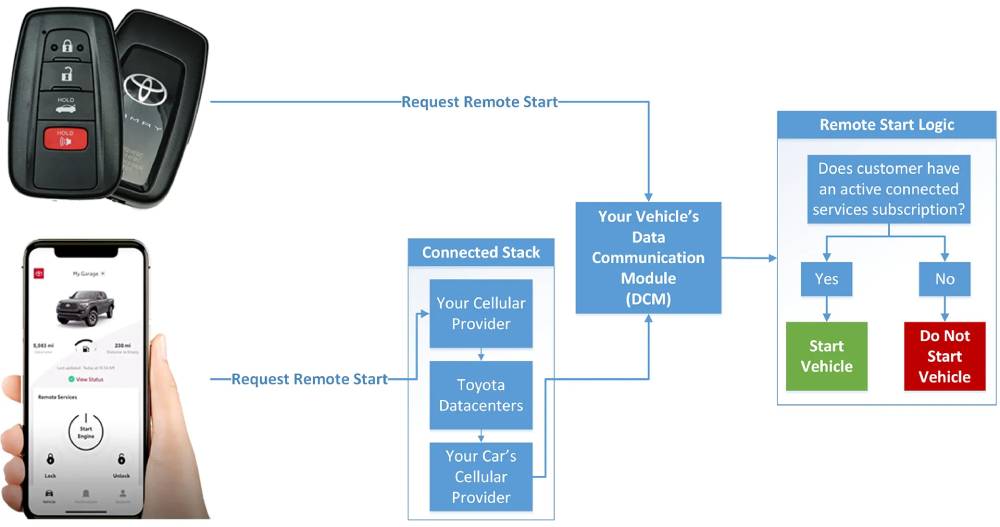
Before troubleshooting a remote start problem, it helps to understand how Toyota’s remote start system operates. Depending on the model year and trim level, your vehicle may use either a key fob-based remote start system or Toyota’s Remote Connect smartphone application.
For vehicles equipped with a factory key fob remote start feature, the system typically requires a specific sequence of button presses. Most Toyota models require the driver to press the lock button twice and then hold it on the third press for several seconds. When the command is successfully received, the vehicle’s lights may flash, and the engine will start remotely.
Newer Toyota models often rely on Toyota Remote Connect, a connected service that allows owners to start, stop, lock, and monitor their vehicles through a mobile app. This system requires an active subscription and a stable connection between the vehicle, Toyota servers, and the smartphone application.
Toyota also incorporates several safety measures into its remote start technology. The system may automatically disable itself if certain conditions are detected, including an open hood, low battery voltage, active warning lights, or security-related concerns. These safeguards are designed to prevent accidental operation and protect the vehicle from potential damage.
Understanding these basic operating principles can make troubleshooting much easier when remote start stops functioning as expected.
1. Dead or Weak Key Fob Battery
One of the most common reasons a Toyota remote start system stops working is a weak or depleted key fob battery. Since the remote start feature requires a stronger and more consistent signal than basic lock and unlock functions, a battery that appears to work normally may still fail to activate remote start.
Many drivers are surprised when their doors unlock without issue, yet the engine refuses to start remotely. This often occurs because the remaining battery power is sufficient for short-range communication but not strong enough to transmit the remote start command.
Several warning signs may indicate a weakening key fob battery. The remote start function may work only occasionally, require multiple attempts, or operate only when standing very close to the vehicle. In some cases, the vehicle may display a key battery warning message on the dashboard.
Fortunately, this issue is usually easy and inexpensive to fix. Most Toyota key fobs use a CR2032 coin-cell battery that can be replaced within minutes. After installing a fresh battery, test the remote start feature again using the correct activation sequence.
If the problem persists after battery replacement, inspect the battery installation to ensure proper orientation and contact. In rare cases, the key fob may require reprogramming or replacement due to internal damage.
2. Incorrect Remote Start Activation Sequence
Another surprisingly common reason Toyota remote start fails is user error. Many owners are unaware that remote start requires a precise sequence of button presses, and even small timing mistakes can prevent the command from being recognized.
For most Toyota vehicles equipped with factory remote start, the proper procedure involves pressing the lock button twice and then pressing and holding it on the third attempt. The timing between presses is important. Pressing too quickly or waiting too long between button presses may cause the system to ignore the request entirely.
Drivers who rarely use remote start are particularly susceptible to this issue. After months of not using the feature, it is easy to forget the correct sequence and assume the system has developed a fault.
Distance can also affect activation. While Toyota remote start systems offer reasonable range, obstacles such as buildings, walls, and electronic interference can weaken the signal. If the vehicle does not respond, move closer and try the sequence again.
Reviewing the owner’s manual for your specific Toyota model can help confirm the correct activation procedure. Some vehicles may have slight variations depending on trim level, model year, and installed technology packages.
Before assuming a mechanical or electronic failure, verify that the activation sequence is being performed correctly. This simple check can save considerable time and prevent unnecessary diagnostic costs.
3. Expired Toyota Remote Connect Subscription
If your Toyota uses the Remote Connect app instead of a traditional key fob remote start system, an expired subscription may be the reason the feature no longer works. Many Toyota owners are unaware that remote start functionality on certain models is tied to connected services that require an active subscription after the initial trial period ends.
This issue often creates confusion because the vehicle itself appears to be functioning normally. The engine starts without problems when using the push-button ignition, the doors lock and unlock correctly, and no warning lights are present. However, every attempt to start the vehicle remotely through the app fails.
A common scenario occurs when drivers purchase a new Toyota and enjoy remote start access during the complimentary trial period. Months or years later, the trial expires, and the feature suddenly stops working. Because the transition can happen without any obvious vehicle warning, many owners mistakenly assume there is a technical malfunction.
To determine whether a subscription issue is responsible, log into the Toyota app and review your account status. Check whether Remote Connect remains active and verify that your payment information is current. If the subscription has expired, renewing the service may immediately restore remote start functionality.
Before spending money on diagnostics or repairs, confirming your subscription status can eliminate one of the most overlooked causes of remote start failure.
4. Weak or Failing Vehicle Battery
While most drivers focus on the key fob battery, the vehicle’s battery itself plays an equally important role in remote start operation. Toyota’s electronic control systems continuously monitor battery voltage, and if the battery level drops below a safe threshold, remote start may be disabled automatically.
This safety feature exists to ensure that the vehicle retains enough power to start normally when the driver enters the cabin. Allowing remote start to operate with a weak battery could increase the risk of a no-start condition later.
Several symptoms may indicate that your vehicle battery is approaching the end of its lifespan. You may notice slow engine cranking during startup, dim interior lighting, flickering dashboard displays, or inconsistent performance from electronic accessories. In colder climates, these symptoms often become more noticeable because low temperatures place additional strain on aging batteries.
Battery-related issues are especially common in vehicles that sit unused for extended periods. Even modern Toyota models can experience battery discharge if driven infrequently or left parked for weeks at a time.
Testing the battery is a simple first step. Many automotive parts stores offer complimentary battery testing services that can quickly determine whether the battery remains healthy. If the battery fails testing or shows signs of deterioration, replacement may restore normal remote start operation and improve overall vehicle reliability.
5. A Door, Hood, or Trunk Is Not Fully Closed
Toyota’s remote start system includes multiple safety checks before allowing the engine to start. One of the most important requirements is that all doors, the hood, and the trunk or rear hatch must be fully closed and securely latched.
Even if an opening appears closed from the outside, a partially engaged latch can trigger a sensor that prevents remote start activation. This safeguard helps reduce the risk of injury, theft, or accidental vehicle movement during remote operation.
The hood is one of the most frequently overlooked components. After routine maintenance such as oil changes, battery replacement, or fluid inspections, the hood may not be completely secured. As a result, the vehicle’s computer interprets the hood as open and automatically disables remote start.
Door sensors can also create problems. A worn latch, faulty sensor, or misaligned door may cause the vehicle to believe a door remains open even when it appears shut. In some cases, drivers may notice an interior warning light indicating that a door is ajar.
To troubleshoot this issue, inspect each door carefully and verify that the hood and trunk are fully latched. Open and close each component firmly before attempting remote start again. If the problem persists, a defective latch sensor may require professional diagnosis and replacement.
Because this issue is easy to overlook, it should always be checked before moving on to more complicated troubleshooting procedures.
6. Check Engine Light Is On
Many Toyota owners are surprised to learn that a seemingly unrelated warning light can disable the remote start system. If the check engine light is illuminated, Toyota’s onboard computer may automatically prevent remote start from operating until the underlying issue is resolved.
This protective measure is designed to prevent additional stress on the engine or emissions system when a fault has already been detected. Even minor issues that do not noticeably affect drivability can trigger a diagnostic trouble code and deactivate remote start functionality.
Common causes include faulty oxygen sensors, loose fuel caps, emissions-related problems, ignition system faults, and battery voltage irregularities. In some situations, the vehicle may continue to drive normally despite the warning light being present, making it difficult for owners to connect the issue to their remote start problem.
The best approach is to scan the vehicle for diagnostic trouble codes using an OBD-II scanner. Many automotive parts stores offer code-reading services at no charge. Once the underlying problem is identified and repaired, remote start functionality often returns automatically after the fault code is cleared.
Ignoring a check engine light can lead to more expensive repairs over time. If your Toyota remote start suddenly stops working and a warning light appears on the dashboard, resolving that issue should be a priority before investigating more complex causes.
7. Valet Mode or Vehicle Settings Restrictions
Modern Toyota vehicles offer a variety of customizable settings designed to improve security and driver control. However, some of these settings can unintentionally disable remote start, leaving owners wondering why the feature no longer functions.
Valet Mode is one example. Depending on the model and connected services available, Valet Mode may limit certain vehicle functions while the car is in the possession of a parking attendant, service technician, or other temporary driver. In some cases, remote start may be disabled as part of these restrictions.
Driver profiles and security settings can also affect remote start operation. If settings were recently changed through the infotainment system or Toyota app, they may interfere with the feature. This is particularly common after software updates, account changes, or ownership transfers.
Another possibility involves parental controls or fleet management settings on vehicles equipped with advanced connected services. These features may limit remote access capabilities for security purposes.
To rule out configuration-related problems, review your vehicle settings through the infotainment screen and the Toyota app. Look for options related to remote services, security features, and driver restrictions. Restoring default settings or disabling restrictive modes may immediately resolve the issue.
Because these settings are often hidden within multiple menu layers, many owners overlook them during troubleshooting. Taking a few minutes to review system configurations can potentially save hours of frustration.
8. Toyota App Connection Problems
For Toyota owners who rely on Remote Connect, app-related issues are among the most common causes of remote start failures. Since the system depends on communication between your smartphone, Toyota’s servers, and the vehicle itself, a disruption at any point can prevent remote commands from reaching the car.
Connectivity issues may occur for several reasons. Poor cellular reception, outdated software, server maintenance, account authentication problems, or temporary network outages can all interfere with normal operation. In many cases, the vehicle itself is functioning perfectly, but communication between systems has been interrupted.
One common sign of a connection problem is when the app displays error messages, fails to update vehicle status, or takes an unusually long time to process commands. Users may also notice that other connected features, such as vehicle location services or lock and unlock functions, stop responding.
Begin troubleshooting by ensuring that your smartphone has a stable internet connection. Next, verify that the Toyota app is updated to the latest version. Logging out and back into your account can often resolve temporary authentication issues.
If problems continue, try deleting and reinstalling the app. Restarting your smartphone and allowing the vehicle several minutes to reconnect to Toyota’s network may also help restore communication.
When widespread server issues occur, the problem may not be on your end at all. In these situations, waiting for Toyota’s connected services to return to normal operation is often the only solution. Checking online forums and service status updates can help determine whether other users are experiencing similar problems.
9. Remote Start Range Limitations and Signal Interference
Sometimes the problem is not with the vehicle or the remote start system at all. Instead, the issue may be related to signal strength and communication range. Like any wireless technology, Toyota remote start systems rely on radio frequency signals that can be affected by distance, physical obstacles, and environmental conditions.
Many drivers assume that remote start should work from virtually anywhere, but every system has practical limitations. Large buildings, parking garages, metal structures, and dense urban environments can significantly reduce signal strength. Even when you are technically within range, interference from nearby electronic devices may disrupt communication between the key fob and the vehicle.
Weather conditions can also play a role. Heavy rain, snow, and extreme environmental conditions occasionally weaken signal transmission. Although these factors rarely disable remote start completely, they can contribute to inconsistent performance.
A simple way to test for range-related issues is to move closer to the vehicle and attempt the remote start procedure again. If the system works reliably at shorter distances but fails from farther away, signal limitations are likely responsible.
Drivers who regularly park in underground garages or crowded urban areas often encounter these challenges. In such situations, using Toyota Remote Connect through a smartphone may provide more reliable remote access than relying solely on the key fob.
Before assuming that a costly repair is necessary, consider whether environmental factors could be affecting communication between your remote and the vehicle.
10. Software or Firmware Problems
Modern Toyota vehicles contain numerous electronic control modules that work together to manage remote start functionality. Like any computer-based system, software glitches, outdated firmware, or communication errors between modules can occasionally cause unexpected problems.
Software-related issues may arise after system updates, battery replacements, electrical faults, or extended periods of inactivity. In some cases, owners report that remote start stops working suddenly even though no obvious mechanical problem exists.
Symptoms can vary depending on the specific fault. The remote start command may be ignored entirely, work intermittently, or generate error messages within the Toyota app. Other electronic systems may also exhibit unusual behavior if software communication issues are present.
Manufacturers regularly release software updates to improve reliability, fix bugs, and address compatibility concerns. If your Toyota has not received recent updates, outdated software could be contributing to the problem.
Checking for available updates through the vehicle’s infotainment system or consulting a Toyota dealership can help determine whether software improvements are available. Technicians can also perform advanced diagnostics to identify module communication errors that are difficult to detect through basic troubleshooting.
Although software issues are less common than battery or subscription-related problems, they become more likely as vehicles incorporate increasingly sophisticated connected technologies.
How to Reset Toyota Remote Start
If none of the previous solutions have resolved the issue, resetting the remote start system may help restore normal operation. While Toyota does not provide a universal reset procedure for every model, several methods can often clear temporary glitches and re-establish communication between system components.
The first and simplest approach is to lock the vehicle, wait several minutes, and then attempt the remote start sequence again. This brief pause allows certain electronic modules to complete their shutdown cycle and refresh system communications.
Another option involves restarting the vehicle normally and allowing it to run for several minutes. After shutting the engine off, exit the vehicle, lock all doors, and test remote start again. This process can sometimes reset temporary software conflicts.
For app-based systems, logging out of Toyota Remote Connect and signing back in may help refresh account synchronization. Reinstalling the application can also resolve issues related to corrupted app data or outdated software.
In cases involving electrical irregularities, disconnecting the vehicle battery for a short period may reset certain electronic systems. However, this procedure should only be performed if you are comfortable working with automotive electrical components and understand the potential impact on saved settings.
If remote start remains unavailable after performing these steps, professional diagnostics may be necessary to identify deeper electrical, software, or hardware-related concerns.
When to Visit a Toyota Dealer
While many remote start problems can be resolved through basic troubleshooting, some situations require professional assistance. Knowing when to seek expert help can prevent unnecessary frustration and ensure that underlying issues are addressed correctly.
If you have already verified the key fob battery, vehicle battery, subscription status, door latches, warning lights, and app connectivity, yet remote start still does not function, a dealership diagnostic inspection may be the next logical step.
Professional technicians have access to manufacturer-specific diagnostic tools capable of communicating with Toyota control modules. These tools can identify hidden fault codes, software conflicts, sensor failures, and communication errors that may not be visible through standard consumer-grade scanners.
You should also consider scheduling service if remote start stopped working immediately after a repair, battery replacement, collision, software update, or installation of aftermarket electronics. These events can sometimes affect system programming or interfere with factory-installed components.
Although dealership diagnostics may involve an upfront cost, early detection of electronic issues can often prevent more expensive repairs in the future. A thorough inspection provides peace of mind and helps ensure that all vehicle systems continue operating safely and reliably.
Frequently Asked Questions
Why is my Toyota remote start not working even though the doors unlock normally?
This is one of the most common complaints among Toyota owners. In many cases, the key fob battery is becoming weak. While the battery may still provide enough power to lock and unlock the doors, it may not generate a strong enough signal for remote start activation. Other possible causes include an incorrect button sequence, low vehicle battery voltage, or a disabled remote start setting.
Does Toyota remote start require a subscription?
The answer depends on your vehicle model and how the feature is configured. Many newer Toyota vehicles use Toyota Remote Connect, which requires an active subscription after the complimentary trial period expires. Some models also support key fob-based remote start, which may continue to function independently of Remote Connect. Checking your owner’s manual or Toyota account can clarify the requirements for your specific vehicle.
Can a low vehicle battery disable remote start?
Yes. Toyota’s onboard systems continuously monitor battery health and voltage levels. If the battery charge drops below a predetermined threshold, remote start may be disabled automatically to ensure the vehicle can still start normally when needed. This protective feature helps prevent battery-related no-start situations.
How do I reset my Toyota remote start system?
There is no single reset procedure that applies to every Toyota model. However, common troubleshooting methods include restarting the vehicle, locking and unlocking all doors, re-syncing the Toyota app, updating software, or temporarily disconnecting the battery if appropriate. If these methods do not work, professional diagnostics may be required.
Why did my Toyota remote start stop working after replacing the key fob battery?
This issue can occur if the replacement battery was installed incorrectly, if the battery is defective, or if the key fob was damaged during the replacement process. Verify that the battery is properly seated and facing the correct direction. If the problem continues, the key fob may need reprogramming or further inspection.
Why does remote start work sometimes but not all the time?
Intermittent remote start operation is often caused by weak batteries, signal interference, poor cellular connectivity, software glitches, or environmental factors that affect communication between the remote and the vehicle. Tracking when and where the problem occurs can help identify the underlying cause more quickly.
Conclusion
When your Toyota remote start is not working, it is easy to assume that a major mechanical or electrical failure is to blame. Fortunately, most remote start problems stem from relatively simple issues that can be identified and resolved without expensive repairs. Weak key fob batteries, incorrect activation procedures, expired Remote Connect subscriptions, low vehicle battery voltage, and safety-related restrictions account for the majority of remote start failures.
The key to successful troubleshooting is following a systematic process. Start with the simplest and most common causes before moving on to more advanced diagnostics. Checking battery health, verifying subscription status, inspecting door and hood latches, and reviewing vehicle settings can often restore remote start functionality within minutes.
As Toyota vehicles continue to incorporate more connected technologies, software updates and app connectivity have become increasingly important factors as well. Staying current with updates and understanding how your vehicle’s remote start system operates can help prevent future issues.
By working through the ten common causes outlined in this guide, most owners can quickly identify the source of the problem and get their remote start system working again. If the issue persists after completing all recommended troubleshooting steps, a qualified Toyota technician can perform a detailed diagnostic inspection and ensure your vehicle continues to operate safely and reliably.
Whether the problem is as simple as a dead battery or as complex as a software communication fault, addressing it early can save time, reduce frustration, and help you enjoy the convenience of Toyota remote start once again.