Your Hyundai may suddenly show a “Key Not Detected” warning. The car then refuses to start. This situation often confuses drivers and creates stress, especially when you are in a hurry.
Modern Hyundai vehicles use a Smart Key System developed by Hyundai Motor Company. This system detects the key fob automatically. You do not need to insert a physical key. The system relies on wireless signals between the key fob, antennas, and the car’s control unit.
When one part fails, the system stops working. The car then blocks the ignition. You will see the “Key Not Detected” message on the dashboard.
Several issues can cause this problem. A weak key fob battery is the most common cause. A weak car battery can also trigger the error. Signal interference may block communication. In some cases, the immobilizer or ECU system fails and prevents the car from recognizing the key.
This guide explains all possible causes in detail. It also shows step by step solutions you can try at home. You will learn how to identify simple issues and when you need professional repair.
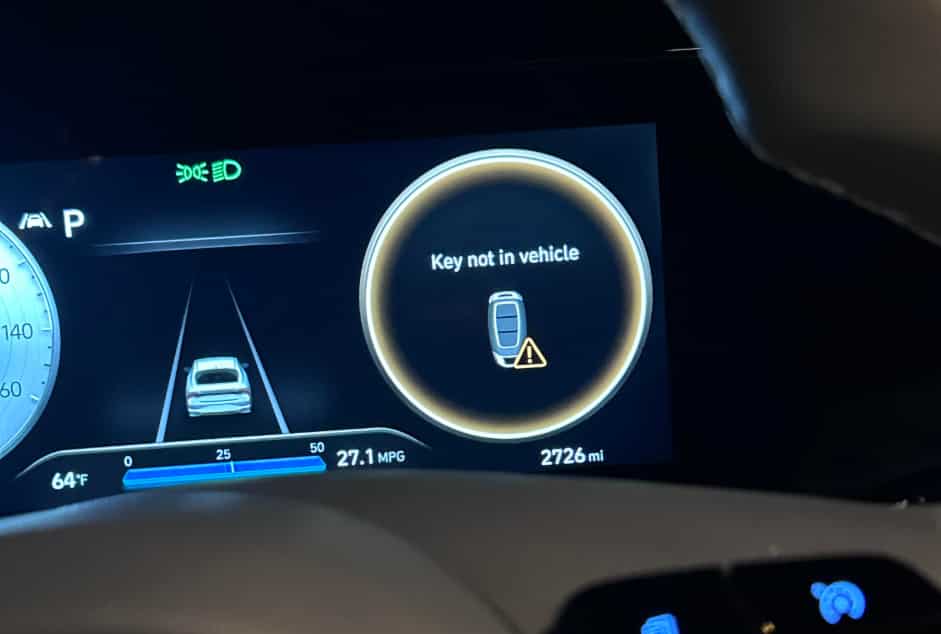
What Does “Hyundai Key Not Detected” Mean
The “Key Not Detected” warning appears when your car cannot recognize the key fob. This message comes from the vehicle’s security system. It stops the engine from starting to prevent unauthorized access.
Your Hyundai uses a Smart Key System that communicates with the key fob through radio frequency signals. The key fob sends a unique signal. The car receives this signal through internal antennas. The system then checks the signal with the ECU for verification.
If the signal is missing or invalid, the system fails the check. The car then activates the immobilizer system. This system blocks the ignition and fuel system. It protects the vehicle from theft.
The immobilizer plays a key role in modern vehicles. It ensures only the correct key can start the engine. Even if someone tries to force the ignition, the engine will not start without proper authentication.
A failure in any part of this process can trigger the warning. The issue may come from the key fob, the car battery, or the internal communication system. In some cases, interference or electronic faults can also break the connection.
In simple terms, this warning means your car cannot confirm that the key is nearby or valid. The system then disables the start function as a safety measure.
Common Causes of Hyundai Key Not Detected
The “Key Not Detected” warning usually appears when your Hyundai cannot communicate properly with the key fob. In most situations, the issue comes from simple and common causes, but it can also involve deeper electronic or system failures inside the vehicle.
One of the most frequent reasons is a dead or weak key fob battery. The key fob relies on a small battery to send signals to the car. When this battery becomes weak, the signal strength drops and the vehicle can no longer recognize the key. Many drivers notice early signs such as reduced remote range or inconsistent door lock response before the warning appears on the dashboard.
Another common cause is a weak car battery. The Smart Key System depends on stable electrical power to function correctly. When the car battery voltage drops, the system may fail to process the key signal. This problem often occurs when the vehicle has not been used for a long time or when cold weather reduces battery performance.
Signal interference can also block communication between the key and the vehicle. Electronic devices such as smartphones, WiFi routers, or strong radio signals can disrupt the transmission. In some cases, simply moving the key away from electronic devices or bringing it closer to the start button can solve the issue.
A faulty key fob may also cause the problem. Internal damage from water exposure, drops, or circuit failure can stop the key from sending signals properly. In this case, replacing the battery will not help because the internal chip may already be damaged.
Finally, antenna or ECU issues inside the vehicle can also trigger this warning. The antennas receive the signal from the key, while the ECU verifies it. If either component fails, the system cannot confirm the key and will block engine start as a safety measure.
How to Fix Hyundai Key Not Detected
When your Hyundai shows the “Key Not Detected” warning, you can often solve the problem with a few simple steps before going to a workshop. Most cases come from weak batteries, temporary signal issues, or minor system glitches, so basic troubleshooting usually helps.
Start with the emergency start method. Hold the key fob directly against the start button and press the brake pedal at the same time. Hyundai vehicles include a backup detection mode that can read the key even when the battery is weak. This method often allows the engine to start immediately and confirms that the key fob still works.
Next, replace the key fob battery if you have not done it recently. Most Hyundai key fobs use a CR2032 battery. A weak battery reduces signal strength and causes intermittent detection problems. After replacing the battery, test the key again by locking and unlocking the doors.
If the problem continues, check the car battery. A low vehicle battery can disrupt the Smart Key System. Try starting the car with jumper cables if the battery seems weak. Stable voltage is necessary for the system to recognize the key properly.
You can also reset the system. Turn off the engine, exit the car, close all doors, and wait a few minutes. This allows the electronic systems to reset and clear temporary glitches.
Finally, try your spare key if available. If the spare key works normally, the issue is likely with the original key fob. If both keys fail, the problem may come from the vehicle system such as antennas or the ECU.
Advanced Problems When the Key Is Not the Real Issue
If basic fixes do not solve the “Key Not Detected” problem, the issue may come from deeper electronic components inside the vehicle. At this stage, the problem is no longer related to the key fob itself but to the communication system inside the car.
One possible cause is a failure in the antenna system. Hyundai vehicles use internal antennas placed around the cabin to detect the key signal. If one of these antennas stops working, the car may not receive the signal even if the key fob is fully functional. This creates a situation where the key works normally but the vehicle cannot detect it.
Another possible issue involves the Engine Control Unit. The ECU manages communication between the Smart Key System and the engine. If the ECU develops a fault or software glitch, it may block the authentication process. In this case, the vehicle cannot confirm the key identity and will prevent the engine from starting.
Wiring problems can also cause detection failure. Damaged or loose wiring between the antenna, ECU, and ignition system can interrupt signal transmission. This often happens due to wear over time, moisture exposure, or previous repair work that was not done correctly.
The immobilizer system can also malfunction. When the immobilizer fails, it may incorrectly reject a valid key signal. This safety system is designed to prevent theft, but a fault can mistakenly block the owner’s key from working.
At this stage, the problem usually requires professional diagnostic tools. A technician can scan the system, identify the faulty component, and reset or replace the affected parts.
Hyundai Model Specific Key Not Detected Issues
The “Key Not Detected” problem can appear on many Hyundai models, but the frequency and causes may differ depending on the vehicle design and system setup. Some models are more sensitive to battery voltage, while others are more prone to signal or antenna issues.
On the Hyundai Elantra, the issue often relates to weak key fob batteries or unstable vehicle battery voltage. This model uses a sensitive Smart Key System that may react quickly when power levels drop. Drivers may notice the warning appears after the car sits unused for a few days or during cold weather conditions.
On the Hyundai Tucson, signal detection problems are more common. The antenna system in this model can sometimes struggle with consistent key recognition, especially if there is electronic interference inside the vehicle. In some cases, placing the key too far from the start button can also trigger the warning.
On the Hyundai Santa Fe, the system is more advanced but also more complex. This increases the chances of software glitches or ECU related issues. When problems occur, they are often linked to system communication errors rather than simple battery issues. In some cases, both keys may fail to be detected, which usually points to a deeper system fault.
Across all models, the Smart Key System and immobilizer still follow the same principle. The car must confirm a valid key signal before allowing the engine to start. If any part of the system fails, the vehicle will block ignition as a safety measure.
Understanding these model differences helps narrow down the cause faster. It also helps you decide whether a simple fix is enough or if professional diagnosis is required.
When to Visit a Dealer or Mechanic
Most “Key Not Detected” issues can be solved with basic troubleshooting, but there are situations where you should stop trying home fixes and move to professional diagnosis. This helps you avoid wasting time and prevents further damage to the vehicle’s electronic systems.
You should visit a dealer or qualified mechanic when both the main key and the spare key fail to work. This usually indicates that the problem is not in the key fob itself but inside the vehicle system. In this case, the issue may involve the antennas, ECU, or immobilizer system, which require specialized tools to diagnose.
Another clear sign is when replacing the key fob battery and checking the car battery does not solve the problem. If the warning continues even after these steps, the system may have a deeper communication or software issue that cannot be fixed manually.
You should also seek professional help if the problem appears repeatedly and becomes more frequent over time. Intermittent failures often point to wiring issues or unstable electronic components. These problems usually worsen if left untreated.
A technician will use diagnostic scanners to read error codes from the vehicle. This allows them to identify whether the issue comes from the Smart Key System, ECU, antenna modules, or immobilizer system. In some cases, they may need to reprogram the key or update the vehicle software.
Getting professional support early can save you from unexpected breakdowns. It also ensures the security system of your Hyundai continues to function correctly and safely.
Conclusion
The “Hyundai Key Not Detected” issue can feel serious, but in many cases it comes from simple and fixable problems. Most drivers experience this warning due to weak key fob batteries, low car battery voltage, or temporary signal interference. These issues affect communication between the key and the Smart Key System, which prevents the engine from starting.
In other situations, the problem can be more complex. Faults in the antenna system, ECU, or immobilizer can also block key detection. These components work together to verify the key signal and allow engine ignition. When one part fails, the system activates a safety lock to protect the vehicle.
The best approach is to follow a clear step by step process. Start with the key fob battery, then check the car battery, and try the emergency start method. If the issue continues, test the spare key and observe whether the problem persists. This helps you quickly identify whether the cause is simple or system related.
If none of the basic solutions work, professional diagnosis becomes necessary. A technician can scan the system, find the exact fault, and repair or reprogram the affected components.
By understanding how the system works and what causes failures, you can respond faster and avoid unnecessary stress. Regular maintenance of your key fob and vehicle battery also helps reduce the chance of this issue happening again in the future.