Have you ever placed your smartphone on your Toyota’s wireless charging pad only to discover that nothing happens? Whether the charging indicator flashes briefly, the charging process starts and stops unexpectedly, or the device fails to charge altogether, wireless charging issues can quickly become frustrating.
Modern Toyota vehicles are equipped with convenient Qi wireless charging technology that allows drivers to keep their smartphones powered without the hassle of cables. This feature is especially useful during long trips when navigation apps, music streaming, and hands-free communication can quickly drain battery life. However, many Toyota owners report problems with wireless charging systems in models such as the RAV4, Camry, Highlander, Tacoma, Tundra, and Corolla.
The good news is that a malfunctioning wireless charger does not always indicate a major vehicle problem. In many cases, the issue is caused by something simple, such as improper phone placement, an incompatible phone case, overheating, software glitches, or charging pad obstructions. Understanding the root cause can save you time, money, and an unnecessary visit to the dealership.
In this guide, we will explore the most common reasons why Toyota wireless charging is not working, provide step-by-step troubleshooting solutions, and explain when professional repair may be necessary.
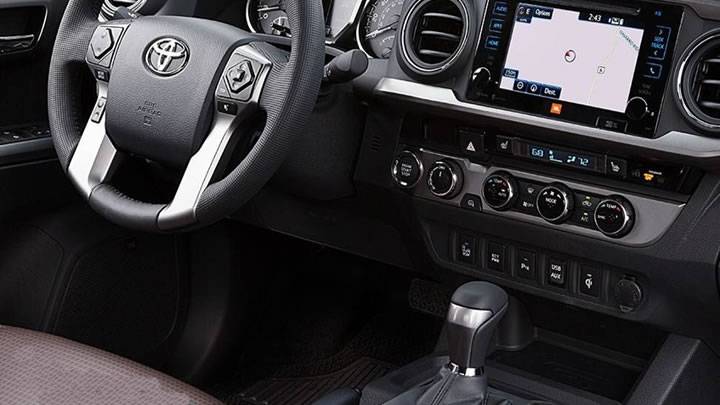
How Toyota Wireless Charging Works
Before troubleshooting any issue, it helps to understand how Toyota’s wireless charging system operates. Most modern Toyota vehicles use Qi wireless charging technology, which transfers power from a charging pad embedded in the center console or dashboard to a compatible smartphone.
The system works through electromagnetic induction. When a Qi-enabled smartphone is placed correctly on the charging pad, the charging coil inside the phone aligns with the coil inside the vehicle’s charging pad. Once alignment is established, power is transferred wirelessly to charge the device.
For the system to function properly, several conditions must be met. The vehicle must be running or in the appropriate power mode, the wireless charging feature must be activated, and the smartphone must support Qi charging standards. In addition, the phone must be positioned correctly on the charging surface to ensure the charging coils align properly.
Most Toyota wireless chargers include indicator lights that communicate system status. A green light generally indicates normal charging operation, while flashing amber or orange lights may signal a positioning issue, overheating condition, foreign object detection, or another charging-related problem.
Because wireless charging relies heavily on coil alignment and environmental conditions, even minor factors such as a thick phone case, metal accessory, or excessive heat can interrupt the charging process.
Signs Your Toyota Wireless Charger Is Not Working
Wireless charging problems do not always appear in the same way. Recognizing the symptoms can help narrow down the cause and speed up the troubleshooting process.
One of the most obvious signs is when the phone does not charge at all after being placed on the charging pad. In this situation, the charging icon never appears on the screen, and the charging indicator may remain off or display an error signal.
Another common symptom is intermittent charging. The device may begin charging for a few seconds before disconnecting unexpectedly. This cycle can repeat continuously, making it difficult to maintain battery power during a drive. Intermittent charging is often linked to poor phone placement, excessive movement while driving, or interference caused by accessories.
Some Toyota owners notice a flashing orange or amber indicator light on the charging pad. This warning usually indicates that the system has detected a problem preventing normal charging. Common triggers include foreign objects, overheating, incompatible devices, or coil misalignment.
In other cases, the charging pad may work perfectly with one smartphone but fail with another. This often points to compatibility issues, software conflicts, or differences in wireless charging hardware between devices.
Identifying which symptom matches your situation is an important first step toward finding the correct solution.
Common Causes of Toyota Wireless Charging Problems
Several factors can prevent Toyota wireless charging systems from working properly. Fortunately, most of these issues can be identified and resolved without professional assistance.
One of the most common causes is a thick or incompatible phone case. Heavy-duty protective cases, wallet cases, and cases containing metal components can block the transfer of power between the charging pad and the phone. Magnetic mounts and metal plates used for dashboard holders may also interfere with charging performance.
Incorrect phone placement is another frequent issue. Wireless charging requires precise alignment between the charging coils. Even if the phone is only slightly off-center, charging may fail or become inconsistent. This problem is particularly common while driving on rough roads, where vehicle movement can cause the phone to shift.
Overheating can also interrupt charging. During hot weather, the interior temperature of a vehicle can rise rapidly. If either the charging pad or smartphone becomes too hot, the system may temporarily stop charging to protect sensitive electronic components from damage.
Foreign objects are another overlooked cause. Coins, keys, credit cards, and debris left on the charging pad can trigger Toyota’s safety mechanisms. The system may automatically disable charging when it detects an obstruction between the charging surface and the device.
Software-related issues can also affect charging performance. Smartphone operating system updates, background applications, and temporary system glitches may interfere with communication between the phone and the wireless charger.
Finally, electrical issues within the vehicle itself may contribute to charging failures. A weak battery, unstable voltage supply, or malfunctioning charging hardware can all prevent the wireless charging system from operating correctly.
Step-by-Step Fixes for Toyota Wireless Charging Not Working
If your Toyota wireless charger is not functioning correctly, follow these troubleshooting steps before scheduling a service appointment. In many cases, the problem can be resolved within a few minutes.
Start by removing your phone case and any attached accessories. Thick protective cases, magnetic mounts, wallet attachments, and metal plates are among the most common causes of wireless charging failure. Place the phone directly on the charging pad and check whether charging begins normally.
Next, reposition the device carefully. Wireless charging depends on proper coil alignment, and even a slight shift can interrupt power transfer. Place the phone in the center of the charging pad and ensure it remains stable during driving. Some larger smartphones may require slight adjustments to find the optimal charging position.
Restarting your smartphone is another simple but effective solution. Temporary software glitches can interfere with wireless charging functionality. A quick reboot clears background processes and resets communication between the phone and the charging system.
You should also inspect and clean the charging pad. Dust, dirt, and small objects can prevent proper contact and trigger safety features. Use a clean microfiber cloth to wipe the surface and remove any debris.
If the issue persists, verify that wireless charging is enabled both on the vehicle and on the smartphone. Certain battery-saving modes or device settings may limit wireless charging functionality. Consult your phone’s settings menu to ensure there are no charging restrictions in place.
Testing a second Qi-compatible smartphone can help isolate the problem. If another device charges successfully, the issue is likely related to your original phone rather than the Toyota charging system.
Finally, perform a vehicle system reset if recommended by your owner’s manual. Restarting the infotainment system or cycling the ignition can sometimes clear temporary software faults affecting the charging module.
Toyota Models Most Frequently Reporting Wireless Charging Issues
Wireless charging complaints can occur in any vehicle equipped with the feature, but certain Toyota models appear more frequently in owner discussions and service reports.
The Toyota RAV4 is one of the most commonly mentioned models when it comes to wireless charging concerns. Many owners report that the phone shifts position during normal driving, causing charging interruptions. Larger smartphones may be especially sensitive to movement within the charging tray.
The Toyota Camry also generates occasional complaints regarding charging consistency. Some drivers find that charging performance varies depending on the exact placement of the phone. In certain cases, charging may proceed slowly compared to traditional wired connections.
Owners of the Toyota Highlander have reported instances where the charging pad fails to detect compatible devices despite proper placement. These situations are often linked to software updates, device compatibility, or charging pad sensitivity.
Pickup truck owners driving the Toyota Tacoma and Toyota Tundra sometimes encounter charging interruptions on uneven roads. Because trucks often experience more vibration than passenger cars, maintaining ideal phone alignment can be challenging during travel.
It is important to note that wireless charging issues are not necessarily design flaws. In many cases, differences in smartphone dimensions, charging coil locations, operating system versions, and environmental conditions contribute to inconsistent performance.
Regardless of the model you drive, understanding the specific behavior of your charging system can make troubleshooting significantly easier.
When to Visit a Toyota Dealership
While most wireless charging problems can be resolved through basic troubleshooting, some situations require professional diagnosis and repair.
If the charging pad never activates under any circumstances, even when tested with multiple compatible devices, there may be an internal hardware fault. Damaged charging coils, faulty wiring, or a defective charging module can prevent the system from operating altogether.
Persistent warning indicators are another sign that professional attention may be necessary. If the charging pad continuously displays error lights despite proper phone placement and a clean charging surface, the system may be detecting an underlying electrical problem.
Physical damage should also be addressed by qualified technicians. Cracked charging surfaces, liquid spills, or visible wear inside the charging compartment can compromise system performance and safety.
In some cases, wireless charging problems occur alongside other electrical issues within the vehicle. If you notice problems with infotainment functions, power outlets, battery performance, or dashboard electronics, a broader electrical inspection may be required.
Drivers whose vehicles remain under warranty should consult their local Toyota dealer before attempting extensive repairs. Warranty coverage may include diagnostics, replacement components, or software updates that can resolve the issue at little or no cost.
Seeking professional assistance at the appropriate time can prevent minor problems from developing into more expensive repairs in the future.
Toyota Wireless Charging Repair Cost
When basic troubleshooting fails to restore charging functionality, many owners begin to wonder how much a repair might cost. The answer depends on the source of the problem, the specific Toyota model, and whether the vehicle is still covered by warranty.
The first expense is usually a diagnostic inspection. A dealership or qualified repair facility will test the charging system, inspect the wiring, verify software operation, and determine whether the fault originates from the charging pad, control module, or another electrical component.
If the issue is caused by a damaged charging pad, replacement costs are generally moderate compared to major electrical repairs. Labor charges may vary depending on how easily the charging unit can be accessed within the center console or dashboard.
Software-related issues are often less expensive to resolve. In some cases, a system update or module reset may restore normal operation without requiring replacement parts. This is one reason why professional diagnosis is important before purchasing new components.
More complex electrical faults involving wiring harnesses, connectors, or vehicle control modules can increase repair costs. Fortunately, these situations are less common than simple alignment, compatibility, or charging pad issues.
Vehicle owners should also check their warranty coverage. Depending on the model year and warranty status, Toyota may cover certain charging system repairs. Reviewing warranty documentation before authorizing repairs can potentially save a significant amount of money.
The best approach is to identify the root cause first. Spending time on accurate diagnosis often prevents unnecessary parts replacement and helps ensure that the correct repair is performed the first time.
How to Prevent Future Wireless Charging Problems
Preventing wireless charging issues is often easier than fixing them. A few simple habits can help maintain reliable charging performance and extend the lifespan of the system.
Keeping the charging pad clean is one of the most effective preventive measures. Dust, dirt, and small objects can interfere with charging efficiency and trigger safety shutdowns. Regular cleaning helps ensure consistent contact between the phone and the charging surface.
Avoid using cases or accessories that contain metal components. While protective cases are important, certain materials can block wireless charging signals or create alignment issues. If charging performance becomes inconsistent, consider switching to a wireless charging compatible case.
Proper phone placement should become a routine habit. Taking a few extra seconds to center the device correctly can prevent many common charging interruptions. This is particularly important when driving on uneven roads where movement can shift the phone away from the optimal charging position.
Monitoring cabin temperature can also improve charging reliability. Excessive heat is one of the most common reasons wireless charging systems temporarily stop working. Parking in shaded areas, using sunshades, and allowing the cabin to cool before charging can reduce heat-related interruptions.
Keeping your smartphone software updated is equally important. Manufacturers frequently release updates that improve battery management, charging performance, and compatibility with wireless charging systems.
Regularly inspecting the charging area for signs of wear, damage, or loose components can help identify potential problems before they become serious. Early detection often prevents more costly repairs later.
Frequently Asked Questions
Why is my Toyota wireless charger blinking orange?
A blinking orange or amber light usually indicates that the system has detected an issue preventing normal charging. Common causes include incorrect phone placement, overheating, foreign objects on the charging pad, or an incompatible device. Repositioning the phone and cleaning the charging surface often resolves the problem.
Why does wireless charging stop after a few minutes?
Wireless charging may stop automatically if the phone or charging pad becomes too hot. Thermal protection systems are designed to prevent damage to electronic components. Removing the phone case, reducing cabin temperature, and allowing the device to cool can often solve this issue.
Can a phone case prevent wireless charging?
Yes. Thick cases, wallet cases, magnetic accessories, and metal-backed cases can interfere with wireless charging. Testing the phone without the case is one of the quickest ways to determine whether the case is causing the problem.
Which Toyota models support wireless charging?
Wireless charging is available on many Toyota vehicles, including the RAV4, Camry, Corolla, Highlander, Tacoma, Tundra, Sienna, and several other models. Availability may vary depending on trim level and model year.
Can software updates affect charging performance?
Yes. Both smartphone operating system updates and vehicle software updates can occasionally affect wireless charging functionality. Restarting the device and ensuring all software is current may help restore normal operation.
How do I reset my Toyota wireless charger?
The exact procedure varies by model. In many cases, turning the vehicle off, waiting several minutes, and restarting the system can reset temporary faults. Some models may also allow infotainment system resets through the settings menu. Consult your owner’s manual for model-specific instructions.
Conclusion
Experiencing a Toyota wireless charging not working issue can be frustrating, especially when you rely on your smartphone for navigation, communication, and entertainment during daily drives. Fortunately, most wireless charging problems are caused by relatively simple factors such as improper phone placement, incompatible cases, overheating, software glitches, or debris on the charging pad.
By following a structured troubleshooting process, many drivers can restore normal charging performance without visiting a repair shop. Simple actions such as repositioning the phone, removing accessories, cleaning the charging surface, or restarting the device often provide quick and effective solutions.
When troubleshooting does not resolve the issue, professional diagnosis can help identify hardware or electrical faults before they lead to more extensive repairs. Understanding how your Toyota wireless charging system works and maintaining it properly can significantly reduce the likelihood of future problems.
If your Toyota wireless charger continues to malfunction after trying the fixes outlined in this guide, consult your owner’s manual or schedule an inspection with a qualified Toyota technician. Addressing the issue early can help ensure reliable performance and keep your devices powered whenever you need them.