Have you recently changed the oil in your Toyota Camry, only to notice that the maintenance light is still glowing on the dashboard? If so, you are not alone. Many Camry owners assume the illuminated light indicates a mechanical problem, when in reality, it is often just a maintenance reminder that needs to be reset manually after service is completed.
Toyota Camry models are equipped with a maintenance reminder system designed to help drivers stay on top of routine vehicle care. After a scheduled oil change, the system continues to display the maintenance required light until it is reset. While the process is straightforward, the exact steps can vary depending on your Camry’s model year and dashboard configuration.
Knowing how to reset the oil change light yourself can save time, eliminate unnecessary trips to the dealership, and ensure your vehicle’s maintenance schedule remains accurate. Whether you drive an older Camry with a traditional odometer display or a newer model featuring advanced digital settings, the reset procedure can typically be completed in just a few minutes.
In this guide, you will learn how to reset the oil change light on Toyota Camry models from 2007 through 2025, understand what the warning light means, and discover solutions if the light remains on after the reset procedure.
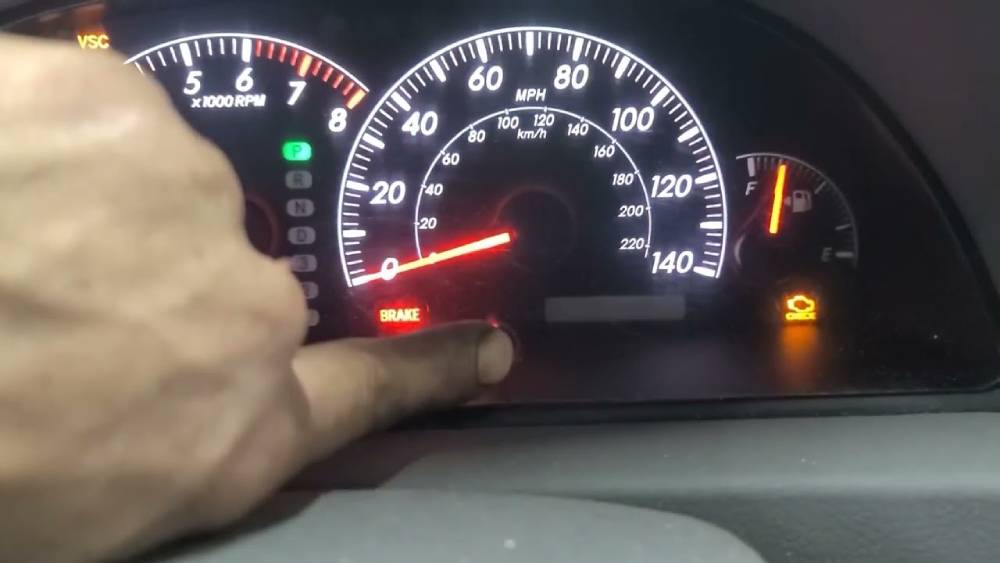
What Does the Oil Change Light Mean on a Toyota Camry?
Many Toyota Camry owners become concerned when they see a maintenance light appear on the dashboard. Fortunately, this warning is usually not an indication of a serious engine problem. In most cases, it simply serves as a reminder that routine maintenance is due.
Understanding the Maintenance Required Light
The Maintenance Required light is programmed to activate at specific mileage intervals, typically every 5,000 miles. Toyota designed this feature to help drivers remember important services such as oil changes, tire rotations, and general inspections. The system tracks vehicle mileage and displays the reminder when the next maintenance interval approaches.
Once the required service has been completed, the reminder does not automatically disappear. The system must be reset manually so it can begin counting toward the next scheduled maintenance interval.
Maintenance Light vs. Check Engine Light
One of the most common misconceptions among drivers is confusing the Maintenance Required light with the Check Engine light. While both appear on the dashboard, they serve very different purposes.
The Maintenance Required light is a service reminder based primarily on mileage. It does not monitor engine performance or diagnose vehicle problems.
The Check Engine light, on the other hand, is connected to the vehicle’s onboard diagnostic system. It can indicate issues related to emissions, engine performance, sensors, fuel delivery, or other mechanical components. If the Check Engine light appears, further diagnosis may be necessary.
Is It Safe to Drive With the Maintenance Light On?
In most situations, yes. The maintenance reminder is simply informing you that scheduled service is due. However, delaying oil changes for extended periods can negatively affect engine performance and long term reliability. It is always best to complete the recommended maintenance as soon as possible before resetting the reminder.
Before You Reset the Oil Change Light
Before performing a reset, it is important to make sure the oil change has actually been completed. Resetting the maintenance reminder without servicing the vehicle can lead to missed maintenance intervals and potentially expensive repairs in the future.
Start by checking your service records or confirming the oil was recently changed. If you performed the service yourself, verify that the correct oil type and quantity were used according to Toyota’s specifications.
Next, inspect the engine oil level using the dipstick. Park the vehicle on a level surface, turn off the engine, and allow several minutes for the oil to settle. Remove the dipstick, wipe it clean, reinsert it fully, and then check the oil level. The oil should fall within the recommended range indicated on the dipstick.
You should also identify your Toyota Camry’s model year before proceeding. Reset procedures differ significantly between older and newer generations. Vehicles equipped with traditional trip buttons use one method, while modern models with digital displays and steering wheel controls use another.
Taking a few minutes to verify these details can help ensure a successful reset on the first attempt.
How to Reset Oil Change Light Toyota Camry (2007–2011 Models)
If you own a Toyota Camry manufactured between 2007 and 2011, the reset process uses the odometer and trip reset button located on the dashboard.
Begin by inserting the key into the ignition and turning it to the ON position without starting the engine. Press the Trip button until the odometer displays “Trip A.” This step is essential because the reset will not work if another display mode is selected.
Turn the ignition off completely.
Press and hold the Trip reset button. While continuing to hold the button, turn the ignition back to the ON position without starting the engine.
Keep holding the button for several seconds. You will notice a series of dashes or zeros appearing on the odometer display. This indicates that the maintenance data is being cleared.
Continue holding the button until the display returns to normal. Once the process is complete, release the button and turn the ignition off.
Start the vehicle and check the dashboard. The Maintenance Required light should no longer be illuminated.
If the light remains on, repeat the procedure carefully and ensure that Trip A was selected before beginning the reset sequence. Releasing the button too early is one of the most common reasons the reset fails on these model years.
How to Reset Oil Change Light Toyota Camry (2012–2017 Models)
Toyota retained a similar maintenance reminder system for the 2012 through 2017 Camry, although some dashboard displays and controls were updated. The reset process remains simple and can usually be completed in less than a minute.
Start by turning the ignition to the ON position without starting the engine. If your vehicle uses a push button start system, press the Start button twice without pressing the brake pedal.
Use the Trip button to cycle through the available displays until “Trip A” appears on the instrument cluster. Selecting the correct display is important because the maintenance reset function is tied specifically to Trip A.
Turn the ignition off.
Press and hold the Trip reset button. While holding the button, turn the ignition back to the ON position. Continue holding the button as the display begins to show a countdown sequence or a series of dashes.
After several seconds, the display will return to normal and the maintenance reminder data will be cleared. Release the button and switch the ignition off.
Start the engine and verify that the Maintenance Required light is no longer visible. If the light remains illuminated, repeat the procedure and ensure each step is followed precisely. Even a small variation in the sequence can prevent the reset from completing successfully.
Many owners mistakenly attempt the reset while viewing the odometer or Trip B screen. This is one of the most common causes of reset failure on this generation of Toyota Camry.
How to Reset Oil Change Light Toyota Camry (2018–2024 Models)
Beginning with the 2018 model year, Toyota introduced a more advanced multi information display that allows drivers to access maintenance settings through steering wheel controls. As a result, the reset process differs from older Camry models.
Turn the ignition on or start the vehicle.
Using the directional buttons on the steering wheel, navigate through the information menus displayed on the instrument cluster. Locate the Settings menu, which is typically represented by a gear icon.
Scroll through the available options until you find Vehicle Settings or Maintenance Settings. Depending on the trim level and software version, the wording may vary slightly.
Select Scheduled Maintenance or Maintenance Reset. A confirmation message will appear asking whether you want to reset the maintenance data.
Choose Yes and confirm the action.
The system will immediately clear the maintenance reminder and begin tracking mileage for the next service interval.
Once the reset is complete, return to the main display screen and verify that no maintenance warning messages remain active.
Owners of hybrid models may notice slight differences in menu structure, but the overall process remains largely the same. If you cannot locate the maintenance settings menu, consult your owner’s manual for model specific instructions.
How to Reset Oil Change Light Toyota Camry (2025 and Newer Models)
The newest Toyota Camry models feature even more advanced digital displays and software driven maintenance tracking systems. Although the interface may look different from previous generations, resetting the oil change reminder remains straightforward.
Turn on the vehicle and wait for the digital instrument cluster to fully load.
Using the steering wheel controls, open the main settings menu. Navigate to the Vehicle Settings section and locate Maintenance Information or Service Reminder Settings.
Select Reset Maintenance Reminder from the available options.
The system will display a confirmation prompt to prevent accidental resets. Confirm your selection and allow the vehicle to complete the process.
After a few moments, the maintenance reminder will be cleared and the vehicle will begin calculating the next service interval based on mileage and maintenance schedules.
One advantage of newer Camry models is that they provide more detailed maintenance tracking information. Some configurations allow drivers to monitor upcoming service intervals, maintenance history, and vehicle health data directly from the instrument cluster.
After completing the reset, it is a good idea to review the maintenance schedule and verify that all required services have been performed. Resetting the reminder should always be the final step after completing an oil change or scheduled maintenance visit.
Oil Change Light Still On? Try These Fixes
If you have followed the reset procedure and the maintenance light is still illuminated, do not panic. In most cases, the issue is caused by an incomplete reset sequence rather than a mechanical problem.
The first solution is to repeat the reset process carefully from the beginning. Many failed resets occur because a button was released too early or the wrong display screen was selected. Follow each step exactly as outlined for your specific model year.
Another common issue involves selecting the incorrect trip display. On older Toyota Camry models, the maintenance reminder can usually only be reset when Trip A is displayed. Attempting the procedure from Trip B or the odometer screen may prevent the reset from working.
For newer Camry models, verify that you selected the correct maintenance reset option within the vehicle settings menu. Some models include multiple maintenance tracking categories, and resetting the wrong one may leave the oil change reminder active.
If the maintenance light continues to appear after several reset attempts, consider checking the vehicle’s maintenance settings for software updates or configuration issues. Although uncommon, a system glitch can occasionally interfere with the reset process.
Some drivers attempt to disconnect the battery in hopes of clearing dashboard warnings. While this may reset certain vehicle systems, it is generally not the recommended solution for clearing a maintenance reminder. Disconnecting the battery can erase other stored settings and may create additional inconvenience.
If none of these methods work, an OBD-II diagnostic scanner may help identify any underlying issues. In rare situations, a dealership or qualified technician may need to inspect the vehicle’s maintenance tracking system.
Common Mistakes When Resetting a Toyota Camry Oil Change Light
Many unsuccessful reset attempts can be traced back to a handful of common mistakes. Understanding these errors can save time and frustration.
One of the biggest mistakes is resetting the maintenance reminder before performing the oil change. The reminder exists to help drivers stay on schedule with routine service. Clearing it without completing the maintenance can result in missed oil changes and increased engine wear over time.
Another frequent mistake involves selecting the wrong display screen before beginning the reset sequence. Older Camry models typically require Trip A to be displayed. Failing to select the correct screen often prevents the system from entering reset mode.
Drivers also commonly release the Trip reset button too soon. The countdown or dash sequence must complete fully before the button is released. Interrupting the process may leave the maintenance data unchanged.
Confusing the Maintenance Required light with the Check Engine light is another issue. These indicators serve different purposes. Resetting the maintenance reminder will not resolve a Check Engine warning, and attempting to do so may cause unnecessary confusion.
Finally, some owners use instructions intended for a different model year. Toyota has changed the reset process several times throughout the Camry’s history. Following the wrong procedure is one of the most common reasons a reset fails.
Toyota Camry Oil Change Intervals and Maintenance Schedule
Understanding your vehicle’s maintenance schedule is just as important as knowing how to reset the oil change light.
Most modern Toyota Camry models equipped with synthetic oil can typically go between 7,500 and 10,000 miles between oil changes under normal driving conditions. However, Toyota’s maintenance reminder often appears every 5,000 miles because additional services such as tire rotations and inspections may be recommended at that interval.
Drivers who frequently operate their vehicles in severe conditions may need more frequent maintenance. Examples include stop and go traffic, extreme temperatures, towing, frequent short trips, or driving on dusty roads.
Using the correct oil type is essential for maintaining engine performance and longevity. Most recent Toyota Camry models require high quality synthetic oil that meets Toyota’s specifications. Using the wrong oil can reduce fuel efficiency and increase engine wear.
In addition to scheduled oil changes, drivers should monitor for warning signs that indicate maintenance may be needed sooner than expected. These signs can include unusual engine noise, reduced fuel economy, sluggish performance, dark or dirty oil, and dashboard warning lights.
Staying proactive with maintenance helps protect one of the most important investments you own. Regular oil changes, inspections, and timely resets of the maintenance reminder system contribute to better reliability, improved fuel economy, and a longer engine lifespan.
Frequently Asked Questions
How do I reset the maintenance required light on a Toyota Camry?
The exact procedure depends on your vehicle’s model year. Older Camry models typically use the Trip A display and Trip reset button, while newer models allow drivers to reset the maintenance reminder through the vehicle settings menu using steering wheel controls. Always follow the procedure designed for your specific model year to ensure a successful reset.
Why is my oil change light still on after an oil change?
In most cases, the maintenance reminder remains active because the reset procedure was not completed correctly. Common causes include selecting the wrong display screen, releasing the reset button too early, or choosing the wrong maintenance option in the settings menu. Repeating the reset process carefully usually resolves the issue.
Will disconnecting the battery reset the oil change light?
Disconnecting the battery may reset certain vehicle systems, but it is not the recommended method for clearing the maintenance reminder. This approach can erase radio presets, clock settings, and other stored preferences. Using the proper reset procedure is safer and more effective.
Can I drive with the maintenance required light on?
Yes, in most situations you can continue driving safely. The Maintenance Required light is generally a reminder that scheduled service is due rather than an indication of an immediate mechanical problem. However, delaying maintenance for an extended period may negatively impact engine health and vehicle reliability.
How often should I change the oil in my Toyota Camry?
The recommended oil change interval depends on your model year, engine type, driving habits, and oil type. Many modern Toyota Camry models using synthetic oil can go between 7,500 and 10,000 miles between oil changes. Always refer to your owner’s manual for the maintenance schedule recommended by Toyota.
Is the Maintenance Required light the same as the Check Engine light?
No. The Maintenance Required light is a scheduled service reminder based primarily on mileage. The Check Engine light indicates that the vehicle’s onboard diagnostic system has detected a problem that may require inspection or repair. The two warning lights serve completely different purposes.
What happens if I reset the maintenance light without changing the oil?
Resetting the maintenance reminder without performing the oil change can lead to inaccurate maintenance tracking. As a result, you may forget when the next oil change is actually due, increasing the risk of engine wear and costly repairs. It is always best to complete the required service before resetting the reminder.
Conclusion
Knowing how to reset the oil change light on a Toyota Camry is a simple but valuable skill that can save both time and money. Whether you drive a 2007 model with a traditional odometer display or a 2025 Camry equipped with the latest digital technology, the reset process can usually be completed in just a few minutes without specialized tools.
The most important thing to remember is that the Maintenance Required light is designed to help you stay on top of routine service. It is not a replacement for proper vehicle maintenance. Always complete the recommended oil change and inspection before resetting the reminder system.
By following the correct procedure for your model year, you can quickly clear the maintenance reminder, keep your service records accurate, and ensure your Toyota Camry continues to perform at its best. Regular oil changes remain one of the most effective ways to protect engine performance, improve fuel efficiency, and extend the lifespan of your vehicle.
If you have successfully reset the oil change light on your Toyota Camry, consider sharing your model year and experience. Your insights may help other Camry owners troubleshoot common issues and complete the process with confidence.