Imagine getting into your Toyota, pressing the Start button, and seeing a frustrating message on the dashboard: “Key Not Detected.” Suddenly, your vehicle refuses to start, leaving you wondering whether you’re dealing with a dead key fob, a faulty battery, or a more serious electrical problem.
The good news is that in most cases, a Toyota Key Not Detected warning does not indicate a major mechanical failure. Modern Toyota vehicles use advanced Smart Key technology that allows the car to communicate wirelessly with your key fob. When that communication is interrupted, the system may be unable to verify the key’s presence, preventing the engine from starting.
This issue can affect a wide range of Toyota models, including the Camry, Corolla, RAV4, Highlander, Tacoma, and Prius. Common causes range from a weak key fob battery and signal interference to vehicle battery problems or Smart Key system malfunctions.
Before spending money on repairs or replacing your key, it is important to understand what may be causing the problem. In this guide, we will explore the most common reasons behind the Toyota Key Not Detected message and provide easy troubleshooting steps that can help you get back on the road quickly and safely.
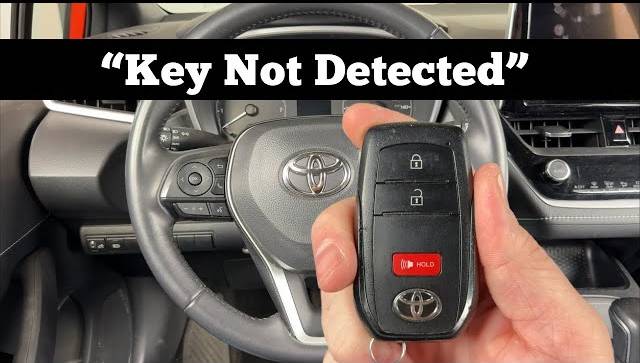
What Does Toyota Key Not Detected Mean?
The “Toyota Key Not Detected” warning appears when your vehicle’s Smart Key system cannot identify or communicate with the key fob. In modern Toyota vehicles, the Smart Key system uses radio frequency signals to establish a secure connection between the vehicle and the authorized key. Once the system confirms the key’s identity, it allows functions such as keyless entry, push button start, and remote vehicle access.
When the warning appears, it means the vehicle is unable to verify that the correct key is present. As a result, the engine may not start, and certain convenience features may become unavailable. This can happen even when the key fob is physically inside the vehicle.
Many drivers assume that this warning automatically means the key fob is broken. However, the issue is often caused by a temporary communication failure rather than a defective key. Factors such as a weak battery, electronic interference, improper key placement, or a low vehicle battery can all disrupt the signal between the key and the vehicle.
Toyota vehicles are designed with security in mind. The immobilizer system prevents unauthorized starting by requiring a verified electronic handshake between the key and the vehicle. If this handshake fails, the system displays the warning message and blocks engine startup as a protective measure.
Understanding how the Smart Key system works is the first step toward diagnosing the problem and finding the right solution.
Dead or Weak Key Fob Battery
A weak or depleted key fob battery is the most common reason drivers encounter a Toyota Key Not Detected warning. Since the Smart Key system relies on wireless communication, the key fob must have enough battery power to transmit a signal strong enough for the vehicle to recognize.
Most Toyota key fobs use small coin cell batteries that typically last between two and four years, depending on usage habits and environmental conditions. Over time, the battery gradually loses its ability to transmit a reliable signal. When this happens, the vehicle may intermittently detect the key or fail to detect it altogether.
Several warning signs often appear before complete battery failure. You may notice that the remote lock and unlock functions work only at shorter distances. The push button start system may require multiple attempts before recognizing the key. Some vehicles may also display a low key battery warning before the battery becomes completely depleted.
Fortunately, replacing a Toyota key fob battery is usually inexpensive and can often be done at home within a few minutes. Most replacement batteries cost only a few dollars and require no specialized tools.
If your vehicle suddenly displays a Toyota Key Not Detected message, checking the key fob battery should always be your first troubleshooting step. In many cases, replacing the battery immediately resolves the issue without any further repairs.
Key Fob Too Far Away or Signal Interference
Another common reason for a Toyota Key Not Detected warning is that the key fob is either outside the vehicle’s detection range or experiencing signal interference. Although Toyota’s Smart Key system is highly advanced, it still relies on radio frequency communication that can be affected by distance and environmental factors.
Many drivers accidentally leave the key in a purse, backpack, gym bag, or even a jacket placed in the cargo area. Depending on the vehicle model and the location of the key, the system may struggle to establish a strong enough connection to verify the key’s presence.
Electronic interference can also disrupt communication between the vehicle and the key fob. Devices such as smartphones, wireless chargers, laptops, Bluetooth accessories, and portable Wi Fi hotspots can sometimes interfere with the signal. Parking structures, airports, government buildings, and areas with large amounts of electronic equipment may increase the likelihood of interference.
In some cases, metallic objects can weaken the signal as well. Keys stored near metal containers, electronic devices, or thick protective cases may not transmit properly.
If you suspect interference, move the key closer to the Start button and remove any nearby electronic devices. Many Toyota models also allow emergency starting by holding the key fob directly against the Start button while pressing the brake pedal. This method often works even when the key fob battery is weak or external interference is present.
Simple adjustments in key placement can often restore communication and eliminate the warning message.
Damaged Key Fob
If replacing the battery does not solve the problem, the key fob itself may be damaged. Toyota key fobs are designed to withstand everyday use, but they are not immune to wear and tear. Accidental drops, exposure to moisture, and years of regular handling can gradually affect the internal components responsible for transmitting signals.
Physical damage is one of the most common causes of key fob failure. A key that has been dropped multiple times may develop cracked solder joints or damaged circuit boards. Even if the exterior appears intact, internal components can become loose or disconnected, preventing proper communication with the vehicle.
Water damage is another frequent culprit. Rain exposure, accidental spills, or leaving the key in a pocket during a wash cycle can damage sensitive electronics inside the fob. Corrosion may develop over time, reducing signal strength or causing complete failure.
Signs of a damaged key fob include inconsistent operation, buttons that no longer respond, reduced remote range, or a vehicle that intermittently recognizes the key. If you have access to a spare key fob, testing it can quickly determine whether the issue lies with the original key.
In some cases, professional repair may be possible. However, severely damaged key fobs often require replacement and reprogramming. While this can be more expensive than replacing a battery, it is still less costly than replacing unnecessary vehicle components due to a misdiagnosed issue.
Weak Vehicle Battery
Many drivers focus entirely on the key fob when they see a Toyota Key Not Detected warning, but the vehicle’s battery can also play a major role. The Smart Key system depends on several electronic modules, sensors, and antennas that require stable electrical power to function correctly.
When the vehicle battery begins to weaken, voltage levels may drop below what the system needs for reliable operation. As a result, communication between the key and the vehicle can become unstable, leading to intermittent detection problems or complete failure to recognize the key.
A weak vehicle battery often produces additional symptoms beyond the key warning. You may notice slow engine cranking, dim headlights, flickering dashboard lights, or electrical accessories that operate inconsistently. In some cases, the vehicle may display multiple warning messages simultaneously because various electronic systems are affected by low voltage.
Battery problems become especially common during extreme weather conditions. Cold temperatures can significantly reduce battery performance, while excessive heat may shorten overall battery life. Vehicles that sit unused for extended periods are also more susceptible to battery-related issues.
Checking the battery voltage is a simple but important diagnostic step. A healthy battery typically measures around 12.6 volts when the engine is off. If the voltage is significantly lower, charging or replacing the battery may restore normal Smart Key operation.
Before assuming there is a fault with the key or security system, it is always worth verifying that the vehicle battery is in good condition.
Smart Key System Malfunction
If the key fob and vehicle battery are both functioning properly, the issue may involve the Smart Key system itself. Although less common, electronic faults within the system can prevent the vehicle from detecting an authorized key.
Toyota’s Smart Key system consists of multiple components working together. These include antennas located throughout the vehicle, electronic control modules, sensors, receivers, and the immobilizer system. A failure in any of these components can disrupt communication and trigger a Toyota Key Not Detected warning.
One possible cause is a faulty antenna. The antennas are responsible for detecting and receiving signals from the key fob. If an antenna becomes damaged or disconnected, the vehicle may struggle to identify the key even when it is inside the cabin.
Software glitches can also contribute to detection issues. Like many modern vehicles, Toyota models rely heavily on computerized systems. Temporary software errors may occasionally interfere with key recognition. In some situations, disconnecting the battery for a short period or performing a system reset may resolve the problem.
More serious cases may involve immobilizer faults or damaged control modules. These issues typically require professional diagnostic equipment to identify and repair. Drivers may notice persistent warning messages, repeated starting failures, or problems affecting multiple key fobs.
When all basic troubleshooting steps have been exhausted, professional diagnosis becomes necessary. A qualified technician can scan the vehicle for fault codes, inspect Smart Key components, and determine the exact source of the malfunction.
Replace the Key Fob Battery
When a Toyota Key Not Detected warning appears, replacing the key fob battery should be your first troubleshooting step. It is inexpensive, quick, and often resolves the issue immediately.
Most Toyota key fobs use coin cell batteries such as CR2032 or CR2450 batteries, although the exact type may vary depending on the model and year of the vehicle. These batteries typically last between two and four years before their performance begins to decline.
To replace the battery, start by removing the mechanical key from the fob. Carefully open the key fob housing using a small flathead screwdriver or a plastic trim tool. Once opened, remove the old battery and install the new one, ensuring the positive and negative sides are oriented correctly. After reassembling the key fob, test the lock and unlock functions before attempting to start the vehicle.
If the warning disappears after battery replacement, the issue was likely caused by insufficient signal strength from the old battery. Even if the remote buttons still function, a weak battery may not provide enough power for reliable Smart Key communication.
Because replacement batteries are affordable and widely available, many Toyota owners keep a spare battery on hand to avoid unexpected starting problems in the future.
Hold the Key Fob Near the Start Button
Many Toyota owners are unaware that their vehicle includes an emergency starting procedure designed specifically for situations where the key fob cannot be detected normally.
If the vehicle displays a Toyota Key Not Detected message, place the key fob directly against or very close to the Start button while pressing the brake pedal. Then press the Start button as you normally would.
This method works because Toyota vehicles contain a backup detection system that can recognize the key at very short distances, even when the key fob battery is weak. By bringing the key closer to the receiver, the system can often verify the key’s identity and allow the engine to start.
The exact location for emergency detection may vary slightly between Toyota models. However, the Start button area is typically the recommended position. Consult your owner’s manual if you are unsure of the procedure for your specific vehicle.
This technique can be especially helpful when you are away from home and unable to replace the battery immediately. While it may not permanently solve the problem, it often allows you to start the vehicle and drive to a safe location for further troubleshooting.
Move Away From Sources of Interference
Electronic interference can sometimes prevent the Smart Key system from communicating properly with the key fob. If the warning appears unexpectedly, consider whether nearby devices or environmental factors may be affecting the signal.
Smartphones, tablets, wireless chargers, Bluetooth devices, portable Wi Fi routers, and other electronic equipment can occasionally interfere with radio frequency communication. While these devices do not always cause problems, they can contribute to detection issues in certain situations.
Parking garages, airports, military facilities, broadcasting stations, and densely populated urban areas may also contain high levels of electromagnetic activity that interfere with key detection. In these environments, the vehicle may have difficulty distinguishing the key’s signal from surrounding radio frequencies.
Begin by removing electronic devices from the immediate area around the key fob. If the key is stored in a bag containing multiple electronic items, move it to a separate location. You can also step outside the vehicle and reenter after a few moments to allow the system to attempt a fresh connection.
If possible, move the vehicle to another location and test the key again. Many drivers discover that the warning disappears once they leave an area with significant signal interference.
Although interference-related issues are usually temporary, understanding how your surroundings affect the Smart Key system can help prevent future occurrences.
Check the Vehicle Battery
If replacing the key fob battery does not resolve the issue, the next step is to inspect the vehicle’s battery. A weak or failing car battery can cause a wide range of electrical problems, including Smart Key detection failures.
Modern Toyota vehicles rely heavily on electronic systems. The Smart Key system, immobilizer, sensors, and control modules all require stable voltage to operate correctly. When battery voltage drops too low, communication between these systems may become unreliable, causing the vehicle to display a Toyota Key Not Detected warning.
One of the easiest ways to evaluate battery health is by looking for additional symptoms. Slow engine cranking, dim headlights, flickering interior lights, and multiple dashboard warning messages can all indicate a weak battery. If several of these symptoms occur at the same time, the battery may be approaching the end of its service life.
Using a digital multimeter can provide a more accurate assessment. A healthy battery should generally read around 12.6 volts when the engine is off. Readings significantly below this level may indicate a discharged or deteriorating battery.
If the battery is weak, charging it or replacing it may restore normal Smart Key functionality. Addressing battery issues early can also prevent more serious electrical problems and reduce the risk of unexpected breakdowns.
Use the Spare Key
Testing a spare key fob is one of the simplest ways to determine whether the problem lies with the key itself or the vehicle’s Smart Key system.
If your Toyota came with a second key, try using it to unlock the vehicle and start the engine. If the spare key works normally, the original key fob is likely the source of the problem. The issue may involve a weak battery, internal damage, programming errors, or component failure within the key.
On the other hand, if both key fobs trigger the same Toyota Key Not Detected warning, the problem is more likely related to the vehicle. This could indicate a low vehicle battery, a faulty antenna, a communication issue within the Smart Key system, or a malfunctioning immobilizer component.
Using a spare key can save considerable time and money by narrowing down the possible causes before seeking professional assistance. It helps eliminate guesswork and provides valuable information for technicians if diagnostic work becomes necessary.
Many drivers forget about their spare key until an emergency occurs. Keeping the spare key in a safe and accessible location can be extremely helpful when troubleshooting Smart Key issues or dealing with unexpected key fob failures.
How to Reset the Toyota Smart Key System
In some cases, the Toyota Smart Key system may experience a temporary software glitch that prevents it from detecting the key properly. Performing a system reset can sometimes restore normal communication and eliminate the warning message.
One basic method involves turning the vehicle completely off and removing all electronic accessories connected to it. Wait several minutes before attempting to start the vehicle again. This simple reboot process may allow the control modules to reinitialize and reestablish communication with the key.
Another commonly used approach is disconnecting the vehicle battery. After ensuring the vehicle is turned off, disconnect the negative battery terminal and wait approximately ten to fifteen minutes. Reconnect the battery, start the vehicle, and check whether the warning has disappeared. This procedure effectively resets many electronic systems and may clear temporary communication faults.
Some Toyota models may require key reprogramming if the system has lost synchronization with the key fob. Reprogramming procedures vary depending on the model and year, and certain vehicles require specialized diagnostic equipment available at dealerships or automotive locksmiths.
It is important to note that a reset is not a guaranteed fix for every situation. If the Toyota Key Not Detected warning returns repeatedly, the vehicle may have an underlying hardware issue that requires professional inspection.
Reset procedures are most effective when the problem is caused by temporary software interruptions rather than damaged components or failed electronic modules.
When Should You Contact a Toyota Dealer?
While many Toyota Key Not Detected issues can be resolved with basic troubleshooting, some situations require professional diagnosis and repair. If you have already replaced the key fob battery, tested a spare key, checked the vehicle battery, and attempted a system reset without success, it may be time to contact a Toyota dealer or qualified automotive locksmith.
One clear sign that professional assistance is needed is when multiple key fobs fail to work with the same vehicle. This often indicates a problem within the Smart Key system rather than the keys themselves. Faulty antennas, damaged wiring, immobilizer issues, or malfunctioning control modules may require specialized diagnostic equipment to identify.
You should also seek professional help if the warning appears frequently and becomes more severe over time. Intermittent detection failures can eventually develop into a complete inability to start the vehicle, leaving you stranded unexpectedly.
In some cases, dashboard warning lights related to the security system, electrical system, or engine management system may accompany the Toyota Key Not Detected message. These additional warnings can provide important clues about underlying faults that require expert evaluation.
Although dealership repairs can be more expensive than simple DIY fixes, accurate diagnosis can prevent unnecessary part replacements and ensure the problem is resolved correctly the first time.
Toyota Models Most Commonly Affected
The Toyota Key Not Detected warning can occur in virtually any Toyota vehicle equipped with a Smart Key system. However, certain models are more frequently discussed by owners due to their popularity and large number of vehicles on the road.
Toyota Camry
The Toyota Camry is one of the most commonly reported models for Smart Key detection issues. Most cases are related to aging key fob batteries, signal interference, or vehicle battery problems rather than major system failures.
Toyota Corolla
Corolla owners occasionally experience intermittent key detection warnings, particularly in older vehicles where key fob batteries and electronic components have undergone years of use. Fortunately, many of these cases are resolved through basic troubleshooting.
Toyota RAV4
The RAV4’s widespread popularity means there are many reports of key detection issues online. Weak batteries, damaged key fobs, and software-related communication glitches are among the most frequently reported causes.
Toyota Highlander
Highlander owners may encounter key detection warnings due to Smart Key antenna issues or battery-related electrical problems. The warning often appears intermittently before becoming more noticeable over time.
Toyota Tacoma
Truck owners frequently use their vehicles in demanding environments where keys may be exposed to moisture, dust, and physical impacts. These conditions can contribute to key fob damage and communication problems.
Toyota Prius
The Prius relies heavily on advanced electronics and battery management systems. In some cases, low voltage conditions or electronic communication faults may contribute to Smart Key detection issues.
Regardless of the model, the diagnostic process remains largely the same. Starting with the simplest and most common causes often leads to the fastest solution.
Frequently Asked Questions
Why does my Toyota say Key Not Detected even after replacing the battery?
If the warning remains after installing a new battery, the issue may involve a damaged key fob, signal interference, a weak vehicle battery, a faulty Smart Key antenna, or an electronic system malfunction. Testing a spare key can help narrow down the cause.
Can I start my Toyota if the key fob battery is dead?
Yes. Most Toyota vehicles include an emergency starting feature. Place the key fob directly against or near the Start button while pressing the brake pedal and attempting to start the engine. This allows the vehicle to detect the key through a backup system.
How much does a replacement Toyota key fob cost?
Replacement costs vary depending on the model and whether programming is required. Basic replacement key fobs may cost between $50 and $150, while advanced Smart Keys with programming can range from $200 to $500 or more.
Can a weak vehicle battery trigger a Key Not Detected warning?
Yes. The Smart Key system relies on stable electrical power. A weak or failing vehicle battery can interfere with communication between the key and the vehicle, resulting in detection errors.
How do I know if my key fob is damaged?
Common signs include reduced operating range, unresponsive buttons, intermittent detection issues, visible physical damage, or complete failure despite installing a new battery.
Is it safe to continue driving after the warning disappears?
If the warning disappears after replacing the battery or correcting a temporary issue, the vehicle is generally safe to drive. However, recurring warnings should be investigated promptly to avoid unexpected starting problems in the future.
Do I need a dealership to reprogram a Toyota Smart Key?
Not always. Some automotive locksmiths can perform Smart Key programming at a lower cost than a dealership. However, certain Toyota models may require manufacturer-specific diagnostic tools.
Conclusion
Seeing a Toyota Key Not Detected warning can be frustrating, especially when you’re in a hurry and your vehicle refuses to start. Fortunately, the problem is often caused by simple issues such as a weak key fob battery, signal interference, improper key placement, or a low vehicle battery rather than a major mechanical failure.
The most effective approach is to begin with the easiest troubleshooting steps. Replace the key fob battery, move the key closer to the Start button, eliminate potential sources of interference, and verify the condition of your vehicle’s battery. These simple checks can resolve the majority of key detection problems without the need for expensive repairs.
If basic troubleshooting does not solve the issue, testing a spare key and performing a Smart Key system reset can help identify whether the problem is related to the key itself or the vehicle’s electronic systems. Persistent warnings, repeated starting failures, or multiple non-functioning key fobs may indicate a more complex issue that requires professional diagnosis.
By understanding the most common causes of the Toyota Key Not Detected message, you can save time, avoid unnecessary expenses, and restore your vehicle’s functionality more quickly. If you have experienced this issue, share your experience and the solution that worked for you. Your insight may help other Toyota owners facing the same frustrating problem.