Have you noticed your Toyota battery dying overnight for no obvious reason? Is the red SOS warning light suddenly staying on? Or maybe your Toyota app stopped connecting even though everything seemed fine just days ago. If any of these problems sound familiar, there is a good chance the issue could be related to the vehicle’s DCM system.
In recent years, many Toyota owners have reported problems linked to the Data Communication Module, commonly known as the DCM. This system is responsible for handling important connected services such as Remote Connect, emergency SOS features, GPS communication, and mobile app integration. While these technologies are designed to make driving more convenient, a faulty DCM can quickly turn into a frustrating and expensive problem.
Some drivers have experienced repeated battery drain issues, while others struggle with remote start failures, connectivity interruptions, or warning messages that refuse to disappear. Even more concerning, several newer Toyota models appear to be affected, including popular vehicles like the RAV4, Camry, Highlander, and Tacoma.
In this guide, we will break down the Toyota models most commonly affected by DCM problems, explain the symptoms owners should watch for, and explore the possible causes and repair options. Whether you are trying to diagnose a mysterious battery issue or simply want to know if your vehicle is at risk, this article will help you understand what is really happening behind the scenes.
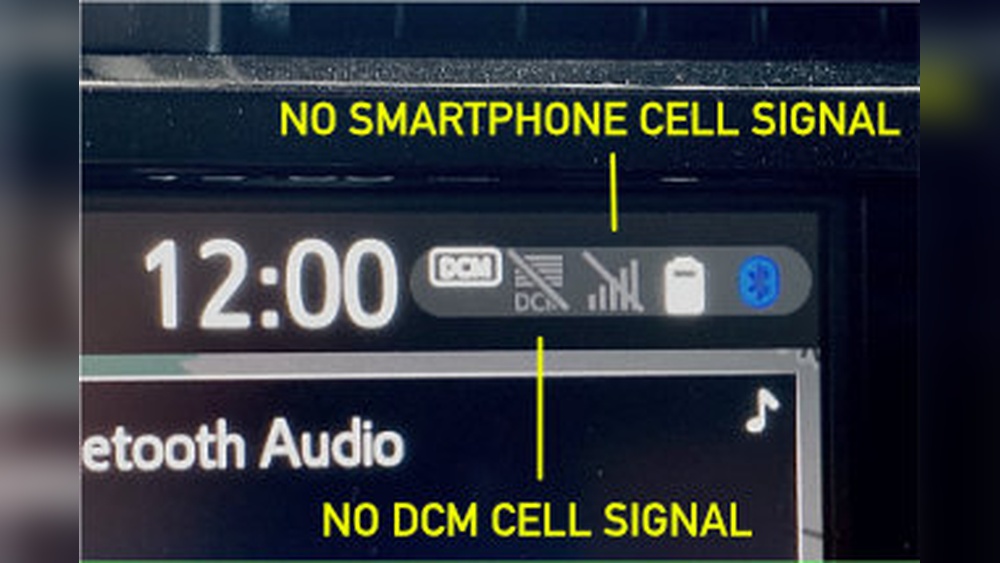
Toyota Models Commonly Affected by DCM Problems
Although DCM related complaints can appear in different Toyota vehicles, certain models seem to experience these problems more frequently than others. Most reports involve vehicles produced between 2019 and 2023, especially models equipped with advanced telematics and Remote Connect services.
Toyota RAV4
The Toyota RAV4 is one of the most commonly reported models associated with DCM issues. Many owners have experienced overnight battery drain, app connectivity failures, and persistent SOS warning lights. Hybrid versions appear especially sensitive to communication module problems because of their more complex electrical systems.
Toyota Camry
Several Toyota Camry owners have reported DCM malfunctions affecting Remote Connect and telematics features. Some drivers noticed that the vehicle battery repeatedly lost charge after being parked overnight. Others experienced intermittent connection failures between the vehicle and the Toyota mobile app.
Toyota Highlander
The Highlander has also generated numerous complaints related to DCM communication errors. Common symptoms include unstable GPS tracking, emergency system alerts, and remote start features suddenly becoming unavailable. In some cases, owners required software updates or complete DCM replacement.
Toyota Tacoma
Tacoma drivers have reported issues involving SOS malfunction warnings and failed communication services. Some owners noticed the problem appearing shortly after software updates or battery replacement procedures.
Toyota Tundra
Modern Tundra models equipped with advanced connectivity packages have occasionally experienced telematics interruptions and subscription service failures. Drivers sometimes report that the truck loses communication with Toyota servers without warning.
Toyota Corolla
Although less common than in SUVs and trucks, certain Corolla models still experience DCM related problems. The most frequent complaints involve app synchronization issues and warning notifications connected to subscription services.
Toyota Venza
The Venza has also appeared in owner discussions regarding telematics instability and battery drain concerns. Some drivers noticed the DCM remaining active even when the vehicle was fully shut down.
The growing number of owner complaints suggests that DCM issues are not isolated to a single Toyota model. Instead, the problem appears linked to connected vehicle systems used across multiple platforms.
Common Symptoms of Toyota DCM Problems
One reason Toyota DCM problems are difficult to diagnose is that the symptoms can vary widely from one vehicle to another. Some issues appear minor at first, while others can leave drivers stranded with a completely dead battery. Understanding the most common warning signs can help owners identify the problem earlier before it becomes more serious.
Overnight Battery Drain
One of the most frequently reported symptoms is unexplained battery drain. Owners often discover that the vehicle struggles to start after sitting overnight or for just a couple of days. In many cases, the battery itself is still healthy, but the DCM continues consuming power even when the vehicle is turned off.
Red SOS Warning Light
Another common sign is the red SOS indicator remaining illuminated on the dashboard or overhead console. This warning usually indicates a communication problem between the DCM and Toyota’s emergency service network.
Toyota App Connection Failures
Many drivers notice that the Toyota app suddenly stops syncing with the vehicle. Remote functions such as door lock control, vehicle status updates, and remote start may no longer work properly. Sometimes the app displays messages stating that subscription services are unavailable.
Remote Start Not Working
A faulty DCM can interrupt communication between the smartphone app and the vehicle, preventing remote engine start from functioning. This issue is especially frustrating during extremely hot or cold weather when drivers rely on climate preconditioning.
GPS and Connectivity Interruptions
Some owners report unstable GPS performance, delayed vehicle tracking updates, or random connectivity loss while driving. These interruptions may appear intermittently, making the issue difficult to reproduce during dealer inspections.
Recurring Electrical Warnings
In more severe cases, drivers may experience multiple warning messages related to communication systems, telematics, or electronic control modules. Because these alerts often overlap with other electrical symptoms, many owners initially assume the battery itself is defective.
Recognizing these symptoms early can save owners from repeated battery replacements, unnecessary repairs, and costly diagnostic visits.
What Causes Toyota DCM Problems?
Toyota DCM problems can develop for several different reasons, which is why diagnosing the issue is often more complicated than simply replacing the battery. In many cases, the root cause involves a combination of software instability, communication failures, and electrical system stress.
Software Bugs and Firmware Errors
One of the most common causes is faulty software within the DCM itself. Modern Toyota vehicles rely heavily on firmware updates to maintain communication between the car, mobile applications, and cloud services. If a software update fails or contains bugs, the DCM may continue running in the background even after the vehicle is turned off. This can create abnormal battery drain and trigger warning messages.
Some owners report that their problems began shortly after over the air updates or dealership software reprogramming. Others notice intermittent connectivity issues that appear randomly without any obvious hardware failure.
Faulty DCM Hardware
In some situations, the DCM module itself may become defective. Internal hardware failure can prevent the system from entering sleep mode properly, causing constant power consumption. Damaged communication circuits may also interfere with GPS tracking, emergency SOS systems, and Remote Connect features.
Because the DCM is deeply integrated into the vehicle’s electronics, a failing module can create symptoms that resemble unrelated electrical problems.
Weak or Aging 12 Volt Battery
A weak battery does not always cause the DCM problem, but it can make the symptoms significantly worse. Modern telematics systems require stable voltage to operate correctly. If the battery voltage drops too low, communication errors may begin appearing throughout the system.
Many Toyota owners replace the battery only to discover that the real issue remains unresolved because the DCM continues draining power in the background.
Cellular Network Changes
Some older DCM systems were designed around previous generation cellular networks. As telecom providers phase out older infrastructure such as 3G connectivity, certain Toyota telematics systems may struggle to maintain stable communication. This transition has contributed to connectivity interruptions in some vehicles.
Wiring and Fuse Problems
Corroded wiring, loose electrical connections, or damaged fuses can also interfere with DCM operation. Even a small communication interruption between modules may trigger warning lights or disable connected services.
Because several different factors can contribute to DCM issues, accurate diagnosis is essential before replacing expensive components unnecessarily.
How to Diagnose a Toyota DCM Issue
Diagnosing a Toyota DCM problem can be challenging because the symptoms often overlap with battery failure, alternator issues, or general electrical malfunctions. However, there are several steps owners can take to narrow down the cause before scheduling expensive repairs.
Check the Battery Condition First
Start by testing the 12 volt battery. A weak or aging battery may trigger communication problems that resemble DCM failure. Use a multimeter or battery tester to verify that voltage remains stable both while the vehicle is off and while it is running.
If the battery repeatedly loses charge overnight despite being relatively new, the DCM may be drawing excessive power in the background.
Inspect the SOS Indicator
Look for the red SOS light on the overhead console. If the indicator stays illuminated continuously, the vehicle may be experiencing a telematics communication issue connected to the DCM system.
Some drivers also notice warning messages related to subscription services or emergency assistance features.
Test Toyota App Connectivity
Open the Toyota app and verify whether remote services are functioning correctly. Try using features such as remote lock, remote start, or vehicle location tracking. If the app repeatedly fails to communicate with the vehicle, the DCM could be disconnected from Toyota’s servers.
Perform a Basic System Reset
In some cases, temporarily disconnecting the vehicle battery for several minutes may reset the communication system. While this does not permanently fix deeper problems, it can sometimes restore functionality temporarily and help confirm that the issue is related to the DCM.
Scan for Diagnostic Trouble Codes
Using an OBD II scanner can help identify stored communication errors. Certain diagnostic trouble codes may point directly to telematics or network communication failures. Professional diagnostic tools used by dealerships can provide even more detailed information.
Monitor for Repeated Symptoms
One of the clearest signs of a DCM issue is the repeated return of symptoms after temporary fixes. If battery drain, app failures, or SOS warnings continue despite battery replacement or resets, the communication module itself may require repair or replacement.
Careful diagnosis is important because replacing the wrong component can quickly become expensive without solving the underlying problem.
Possible Fixes for Toyota DCM Problems
The right solution for a Toyota DCM problem depends on what is actually causing the malfunction. Some issues can be resolved with simple troubleshooting steps, while others may require dealer level repairs or complete module replacement.
Restart the Vehicle System
One of the simplest fixes is performing a system reset. Disconnecting the negative battery terminal for several minutes may temporarily reboot the communication system and restore app connectivity or warning light functionality.
Although this method does not permanently solve hardware defects, some owners report short term improvement after restarting the system.
Update the Toyota App and Vehicle Software
Outdated software can sometimes interfere with telematics communication. Check for updates to the Toyota mobile application and ask the dealership whether your vehicle has any available firmware updates for the DCM system.
Manufacturers occasionally release software patches designed to improve connectivity stability and reduce battery drain behavior.
Replace the 12 Volt Battery
If the battery is weak or aging, replacing it may improve system reliability. Modern Toyota telematics systems are highly sensitive to voltage fluctuations, and unstable power can trigger repeated communication errors.
However, if the battery continues draining after replacement, the DCM itself may still be the underlying problem.
Inspect Fuses and Electrical Connections
Checking the DCM related fuse and inspecting wiring connections may reveal corrosion or loose terminals. A damaged fuse can interrupt communication between the DCM and other vehicle systems.
Some owners temporarily disable battery drain by removing the DCM fuse, although this also disables connected services and emergency communication features.
Dealer Software Reprogramming
If the issue is caused by corrupted firmware, dealerships may perform software reprogramming or system calibration. This process can sometimes resolve recurring communication problems without replacing hardware.
Replace the DCM Module
In more serious cases, the DCM itself may require replacement. This is often the most expensive repair option, with costs potentially reaching hundreds or even thousands of dollars depending on the vehicle model and warranty coverage.
Because the module must communicate with multiple electronic systems, replacement usually requires professional installation and programming.
Addressing the issue early can prevent repeated battery failures and reduce the risk of additional electrical complications later.
Has Toyota Issued a Recall for DCM Problems?
Many Toyota owners experiencing battery drain or connectivity issues naturally wonder whether the company has issued an official recall for DCM related problems. The answer is somewhat complicated because not every vehicle or symptom falls under a formal recall campaign.
In several cases, Toyota has released Technical Service Bulletins, commonly known as TSBs, to address telematics and communication system concerns. These bulletins provide dealerships with updated diagnostic procedures, software fixes, and repair recommendations for specific models experiencing DCM related issues.
Unlike a recall, a Technical Service Bulletin does not automatically guarantee free repairs for every owner. Coverage often depends on factors such as the vehicle model, production year, warranty status, and the exact nature of the malfunction.
Some owners have reported receiving partial warranty coverage for DCM replacement, while others were required to pay out of pocket for diagnostics and repairs. Because policies may vary between dealerships and regions, checking directly with Toyota is always recommended.
Drivers concerned about possible recalls or service campaigns should verify their Vehicle Identification Number through Toyota’s official recall lookup system or contact a local dealer for updated information. Even if no official recall exists, dealerships may still have internal guidance regarding known DCM related problems affecting certain models.
It is also important to document recurring symptoms such as battery drain, SOS warning lights, and app connectivity failures. Keeping service records may help support warranty claims or future repair negotiations if Toyota expands service coverage later.
As connected vehicle systems become more advanced, manufacturers continue updating software and communication modules to improve reliability. Staying informed about service bulletins and warranty extensions can help owners avoid unnecessary repair expenses.
Dealer Repair vs DIY Troubleshooting
When dealing with Toyota DCM problems, many owners face the difficult decision of whether to attempt troubleshooting themselves or visit a dealership for professional repairs. The best option often depends on the severity of the symptoms and the owner’s comfort level with vehicle electronics.
When DIY Troubleshooting Makes Sense
Simple issues such as temporary app connectivity failures or minor communication glitches can sometimes be resolved at home. Owners may try restarting the system by disconnecting the battery, updating the Toyota app, or checking battery voltage levels.
Inspecting fuses and looking for obvious wiring damage are also reasonable first steps for drivers with basic automotive knowledge. In some cases, these simple actions may restore functionality without requiring expensive repairs.
DIY troubleshooting is especially useful when symptoms appear intermittently or after a software update. Performing basic checks first can help owners avoid unnecessary dealership diagnostic fees.
When Professional Repair Is Necessary
More serious DCM issues usually require professional diagnosis and repair equipment. If the vehicle continues experiencing overnight battery drain, recurring SOS warnings, or complete telematics failure, dealership level diagnostics may be unavoidable.
Replacing the DCM module itself is not a simple plug and play repair. The new unit often requires software programming, network registration, and integration with multiple vehicle systems. Attempting this repair without proper tools can create additional electrical problems.
Professional service is also recommended when warranty coverage may apply. Dealerships can verify Technical Service Bulletins, software campaigns, or possible warranty extensions connected to the issue.
Balancing Cost and Reliability
Some owners hesitate to visit the dealer because DCM repairs can become expensive. However, repeatedly replacing batteries or ignoring communication failures may lead to even larger electrical problems over time.
For many drivers, starting with basic troubleshooting and escalating to professional repair only if symptoms persist offers the most practical balance between cost savings and long term reliability.
Conclusion
Toyota DCM problems have become an increasingly common concern among owners of modern connected vehicles. From overnight battery drain and red SOS warning lights to Remote Connect failures and unstable app communication, these issues can quickly become frustrating and expensive if left unresolved.
Models such as the Toyota RAV4, Camry, Highlander, Tacoma, Tundra, Corolla, and Venza appear among the vehicles most frequently associated with DCM related complaints. While the severity of the problem varies from one vehicle to another, many cases share similar symptoms linked to telematics communication failures.
The good news is that not every DCM issue requires complete module replacement. Some problems can be resolved through software updates, battery replacement, system resets, or dealership reprogramming. Identifying the warning signs early can help owners avoid repeated battery failures and unnecessary repair costs.
If your Toyota is experiencing unexplained electrical issues, app connectivity interruptions, or recurring SOS alerts, it may be worth investigating the DCM system before replacing other components. Checking for Technical Service Bulletins, warranty coverage, and dealer software updates could save both time and money.
As Toyota continues expanding advanced connected vehicle technology, understanding how the DCM works has become more important for drivers who want to keep their vehicles reliable and fully functional.
Have you experienced DCM problems with your Toyota? Share your experience, symptoms, or repair results in the comments to help other owners facing the same issue.