Backup cameras play a major role in modern Hyundai vehicles. Drivers use them daily to park safely, avoid hidden obstacles, and improve rear visibility. When the system suddenly fails, even simple parking tasks can become stressful and risky.
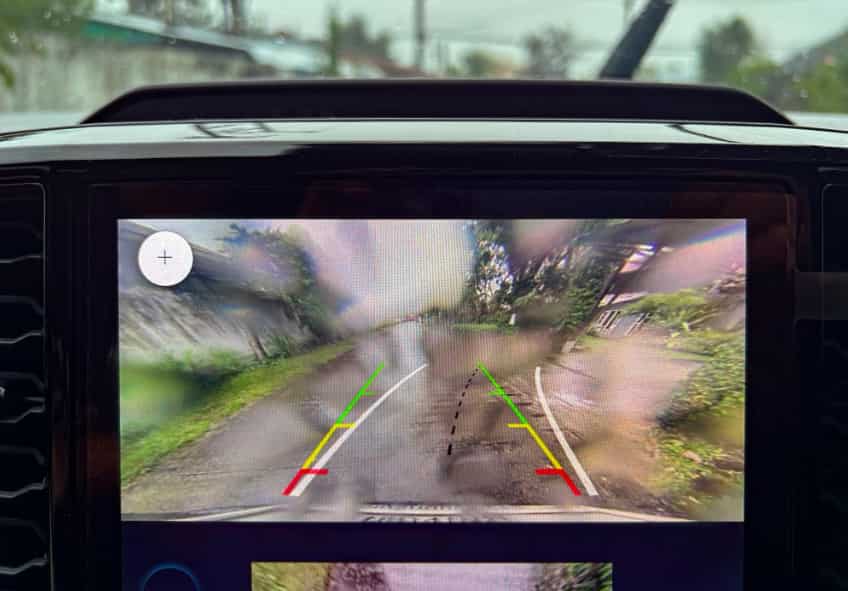
Many owners now report different Hyundai backup camera problems across several models. Some drivers see a black screen after shifting into reverse. Others notice flickering images, blurry visuals, delayed response times, or complete signal loss. These issues often appear without warning and may become worse during cold weather or heavy rain.
Several factors can trigger these camera failures. Damaged wiring, software glitches, faulty camera modules, and electrical problems are among the most common causes. In some cases, moisture enters the rear camera housing and interrupts the video signal. Older Hyundai vehicles may also develop infotainment system issues that affect camera performance.
A failing backup camera creates more than simple inconvenience. Poor rear visibility increases the risk of parking accidents, especially at night or in crowded areas. Many drivers also worry about expensive repair bills because some camera problems require full component replacement.
The good news is that not every issue requires major repairs. Some Hyundai backup camera problems can be fixed with basic troubleshooting or software updates. This guide explains the most common symptoms, causes, repair methods, and replacement costs. You will also learn how to diagnose camera failures correctly and check whether your Hyundai model qualifies for a recall or warranty repair.
Common Hyundai Backup Camera Problems
One of the most frequent Hyundai backup camera problems is a black screen when reversing. The display does not show any image when the driver shifts into reverse, or it briefly turns on before going completely dark. Many drivers assume the camera has failed, but the real issue often comes from the infotainment system, wiring connections, or unstable electrical signals. Loose connectors or intermittent wiring faults can interrupt the video feed and cause the screen to lose signal. In some cases, moisture inside the rear camera housing also blocks transmission and leads to a full black screen. Cold weather can make the problem worse because electrical components respond more slowly and may temporarily fail until the system warms up.
Flickering or flashing images also appear in many Hyundai vehicles. The camera feed may jump, distort, or disappear for a second before returning. This usually happens when the electrical connection becomes unstable or when vibration affects a loose wiring harness. Software bugs in the infotainment system can also trigger display instability, especially after system updates. Drivers often notice the issue more on rough roads, which further confirms that physical connection problems play a role.
Another common issue is a blurry or foggy camera image. Dirt on the lens can reduce clarity, but internal condensation is a more serious cause. Moisture trapped inside the camera housing creates a foggy layer that blocks visibility. Temperature changes and frequent exposure to rain or car washes can accelerate this condition. When this happens, simple cleaning is not enough and the camera may require repair or replacement.
Delayed response or a “no signal” error also occurs in some Hyundai models. These problems often relate to software delays, damaged cables, or communication failures between the camera and infotainment system. Intermittent failures are also common, where the camera works sometimes and fails without warning, usually indicating early wiring or system instability that can worsen over time.
What Causes Hyundai Backup Camera Problems
Hyundai backup camera problems usually come from a combination of hardware, electrical, and software issues. One of the most common causes is a faulty camera module. Over time, the internal components of the camera can degrade due to heat, vibration, and continuous exposure to outdoor conditions. When this happens, the system may produce a black screen, distorted image, or complete signal loss.
Another major cause is damaged or loose wiring. The rear hatch area in Hyundai vehicles is constantly opening and closing, which puts stress on the wiring harness. This repeated movement can cause wires to wear out, loosen, or break. When the connection becomes unstable, the camera feed may flicker, cut out, or fail completely. Corrosion in connectors can also interrupt the electrical signal and create intermittent problems that are difficult to detect at first.
Software and infotainment system glitches also play an important role. Modern Hyundai vehicles rely on integrated infotainment systems to process the camera feed. If the software becomes outdated or a firmware update fails, the system may not display the rear view image correctly. In some cases, a simple system reset or software update can restore normal function, but persistent issues often require deeper diagnostics.
Moisture intrusion is another frequent trigger. Water can enter the camera housing during heavy rain, car washes, or due to worn seals. Once moisture builds up inside, it can blur the image or completely block visibility. Temperature changes can make this worse by creating condensation inside the lens.
Electrical issues such as blown fuses or unstable voltage supply can also disrupt camera performance. When the system does not receive consistent power, the camera may turn off randomly or fail to activate when shifting into reverse. Over time, these small electrical inconsistencies can lead to full system failure if not addressed early.
Hyundai Models Commonly Affected by Backup Camera Issues
Hyundai backup camera problems do not affect every model in the same way. Some vehicles show a higher frequency of issues due to design, wiring layout, or infotainment system differences. Understanding which models are more affected helps drivers identify risks early and decide whether a repair or inspection is needed.
The Hyundai Tucson is one of the most commonly reported models for backup camera issues. Many drivers experience intermittent camera failure, black screen problems, or wiring-related malfunctions in the rear hatch area. This is often linked to repeated movement of the hatch door, which puts stress on the wiring harness over time.
The Hyundai Santa Fe also shows similar complaints, especially related to display freezing or delayed camera activation. In some cases, moisture intrusion around the rear camera can affect image clarity and cause long-term performance issues. Owners also report occasional infotainment system glitches that interrupt the camera feed.
The Hyundai Sonata has fewer hardware issues but is more affected by software-related problems. Drivers often experience lag, delayed image display, or temporary black screen issues after system updates. These problems usually relate to infotainment communication errors rather than camera hardware failure.
The Hyundai Elantra is another model where backup camera failures are reported, especially in older versions. Wiring wear, connector corrosion, and black screen issues are the most common symptoms. In some cases, the camera may work intermittently before completely failing.
The Hyundai Palisade, being a more advanced SUV, integrates its camera system with a larger infotainment display. While the system is more modern, it can still experience software bugs, screen freezing, or communication errors between sensors and the display unit.
Overall, these models show that Hyundai backup camera problems often depend on a combination of electrical design, usage conditions, and system complexity rather than a single manufacturing issue.
How to Diagnose Hyundai Backup Camera Problems
Diagnosing Hyundai backup camera problems requires a step-by-step approach because the issue can come from hardware, wiring, or software. The first step is to inspect the camera lens visually. Dirt, mud, or condensation on the lens can immediately reduce image quality or block the view completely. In many cases, a simple cleaning can restore normal performance if the issue is only external.
Next, check the wiring connections in the rear hatch area. This is one of the most common failure points in Hyundai vehicles. Continuous opening and closing of the trunk can loosen or damage the wiring harness over time. If the connection becomes unstable, the camera may flicker, cut out, or stop working entirely. Any visible wear or corrosion should be addressed immediately to prevent further failure.
Restarting the infotainment system is another useful diagnostic step. Many Hyundai backup camera problems are linked to temporary software glitches. Turning the system off and on again or performing a soft reset can sometimes restore the camera feed. If the problem started after a software update, the issue may be related to firmware compatibility.
It is also important to check the vehicle’s fuse box. A blown fuse can cut power to the camera system and result in a black screen or no signal error. Replacing a damaged fuse is a simple fix, but it should always match the correct specification for safety and system stability.
For more advanced diagnosis, scanning the vehicle with an OBD2 tool can help detect error codes related to the infotainment system or camera module. These codes provide insight into whether the issue is electrical or software-related.
Finally, checking for Hyundai software updates is essential. Manufacturers often release updates that fix known camera bugs or improve system performance. Keeping the system updated helps reduce the risk of recurring backup camera failures.
Hyundai Backup Camera Repair Costs
Repair costs for Hyundai backup camera problems vary widely depending on the root cause of the issue. Some problems are simple and inexpensive to fix, while others require full component replacement and professional labor. Understanding these cost ranges helps owners decide whether to repair, replace, or upgrade the system.
If the issue is caused by dirt, condensation, or minor external blockage, the cost is usually very low. In many cases, cleaning the camera lens or resealing minor moisture exposure can be done at home or during a basic service visit. This type of maintenance typically has minimal cost, but it only applies when there is no internal damage.
Wiring repairs are more complex and usually fall into a mid-range cost category. Damaged or loose wiring in the rear hatch often requires disassembly of interior panels to access the harness. Labor costs increase because the repair is time-consuming. If connectors are corroded or wires are broken, replacement may be necessary to restore stable camera performance.
Replacing the backup camera module itself is more expensive. The total cost depends on whether the owner chooses an OEM part or an aftermarket alternative. OEM cameras generally cost more but offer better compatibility and reliability. Aftermarket options are cheaper but may not integrate perfectly with the Hyundai infotainment system. Installation labor also adds to the total expense.
Infotainment system repairs or replacements are the most expensive scenario. If the issue comes from the display unit or internal software failure, the repair may involve reprogramming or replacing the head unit. This significantly increases both parts and labor costs.
Dealership repairs are usually more expensive than independent workshops. However, dealerships may provide warranty coverage or access to official Hyundai software updates. Independent repair shops can reduce costs but may not always offer the same level of system integration support.
Hyundai Backup Camera Recall Information
Some Hyundai backup camera problems are linked to official recalls or service campaigns, depending on the model year and system design. These recalls usually focus on rear visibility failures that affect safety, such as cameras not displaying an image, freezing screens, or complete loss of rear view functionality.
In certain cases, Hyundai and regulatory agencies identify software or hardware defects that impact the backup camera system. When this happens, affected vehicles may qualify for a free repair or system update at authorized dealerships. The goal of these recalls is to restore proper rear visibility and reduce the risk of parking or reversing accidents.
Owners can check recall eligibility by using their vehicle identification number, also known as VIN. This allows the system to match the car with any active safety recalls or technical service bulletins. If a match is found, the dealership typically performs the repair at no cost to the owner.
It is important to note that not all Hyundai backup camera problems are part of a recall. Many issues come from normal wear and tear, wiring damage, or moisture exposure. However, if the problem appears suddenly or matches known safety-related symptoms, it is worth checking official recall databases or contacting a Hyundai service center for confirmation.
Some drivers may also notice that software updates released by Hyundai indirectly fix camera issues without being labeled as a recall. These updates can improve system stability, resolve display errors, or enhance communication between the camera and infotainment system. Keeping the vehicle software up to date is therefore an important preventive step.
Understanding recall information helps owners avoid unnecessary repair costs and ensures that safety-related defects are addressed properly by the manufacturer.
Can You Drive With a Faulty Hyundai Backup Camera?
Driving with a faulty Hyundai backup camera is still possible because the vehicle does not rely on this system to operate. However, it significantly reduces rear visibility and increases the risk of minor accidents, especially when reversing in tight spaces, parking lots, or areas with poor lighting.
When the backup camera stops working, drivers must rely more on side mirrors and direct visual checks. This increases reaction time and can make parking less precise. In modern driving conditions, where rear visibility is often limited by vehicle design, a non-functioning camera becomes a noticeable safety disadvantage.
The risk becomes higher at night or in bad weather. Rain, fog, and low light conditions already reduce visibility, and without a working camera, blind spots become more difficult to manage. This can lead to scrapes, collisions with low obstacles, or difficulty detecting pedestrians behind the vehicle.
In most regions, driving with a faulty backup camera is not illegal, but it may still affect vehicle inspection results in areas where rear visibility systems are required for newer cars. Insurance complications can also arise if an accident occurs and it is proven that a known safety feature was not functioning properly and left unrepaired.
While the vehicle remains drivable, it is not recommended to ignore Hyundai backup camera problems for long periods. Even if the issue seems minor or intermittent, it can worsen over time and eventually lead to complete system failure. Addressing the problem early helps maintain safety and avoids more expensive repairs later.
For best practice, drivers should treat a faulty backup camera as a warning sign rather than a minor inconvenience, especially in vehicles frequently used in urban driving or tight parking environments.
How to Prevent Future Hyundai Backup Camera Problems
Preventing Hyundai backup camera problems starts with regular care and simple maintenance habits. The backup camera is exposed to harsh conditions every day, so small preventive actions can help avoid costly repairs and system failures over time.
Keeping the camera lens clean is one of the most effective steps. Dirt, dust, and road grime can quickly reduce image quality and make it harder to see obstacles behind the vehicle. Regular cleaning with a soft cloth helps maintain clear visibility and prevents buildup that may affect performance.
It is also important to avoid high pressure water directly on the rear camera. Strong water jets from car washes or pressure washers can force moisture into the camera housing. Once water enters the system, it can cause fogging, blurry images, or internal electrical issues that are difficult to repair.
Updating the infotainment software regularly can also reduce the risk of camera malfunctions. Hyundai often releases system updates that improve camera stability, fix bugs, and enhance communication between the display and camera module. Ignoring updates may increase the chance of glitches or delayed camera response.
Drivers should also pay attention to the rear hatch wiring area. Since the trunk opens and closes frequently, the wiring harness is under constant movement. Periodic inspection can help detect early signs of wear, loose connections, or corrosion before they lead to full camera failure.
Finally, protecting the vehicle from extreme weather conditions helps extend camera lifespan. Long exposure to heavy rain, snow, or extreme heat can weaken electrical components and seals over time. Parking in covered areas when possible reduces environmental stress on the system.
With consistent maintenance and early attention to small issues, most Hyundai backup camera problems can be avoided or significantly delayed, ensuring stable performance and safer driving conditions.
Conclusion
Hyundai backup camera problems can come from several different sources, including hardware wear, wiring damage, software glitches, and environmental factors. While the symptoms may look similar on the surface, such as a black screen, blurry image, or delayed display, the underlying causes can vary significantly between vehicles and model years.
In most cases, early diagnosis helps reduce repair costs and prevents more serious failures. Simple issues like dirty lenses or minor software errors can often be resolved quickly, while wiring faults or damaged camera modules may require professional repair or replacement. Ignoring the problem for too long can lead to complete system failure and higher expenses.
Repair costs also depend on the type of fix required. Basic maintenance is usually inexpensive, but replacing the camera or infotainment system can become costly, especially if OEM parts are used. This is why understanding the symptoms early and identifying the root cause is important for every Hyundai owner.
It is also worth checking for official recalls or software updates, as some Hyundai backup camera problems are linked to manufacturer-wide issues that can be fixed at no cost. Staying up to date with maintenance and system updates helps maintain consistent performance and improves rear visibility safety.
Overall, a faulty backup camera should not be ignored. Even though the vehicle remains drivable, rear visibility plays a critical role in everyday safety. Taking early action ensures better driving confidence, fewer risks in tight spaces, and lower long-term repair costs for Hyundai owners.