Are you still paying for OnStar even though you barely use it? You are not alone. Many drivers across GM vehicles sign up for OnStar when they first buy their car, only to realize later that the monthly subscription keeps charging long after the service stops being useful.
This frustration usually comes from three common problems. First, the subscription fees quietly add up over time, especially when you forget about auto renewal. Second, there are growing concerns about privacy, as more users become aware of how connected car services collect and use driving data. Third, the cancellation process is not always as straightforward as expected, leaving many users unsure about whether their account is truly deactivated.
That is exactly why this guide exists. In this complete and updated 2026 walkthrough, you will learn how to deactivate OnStar step by step for all GM vehicles. We will cover everything you need, including how to cancel your OnStar subscription, how to disable connected services, how to stop tracking features, and what actually happens after deactivation.
By the end of this guide, you will have full control over your OnStar account and your vehicle’s connected features, without confusion or unexpected charges.
What Is OnStar and How It Works
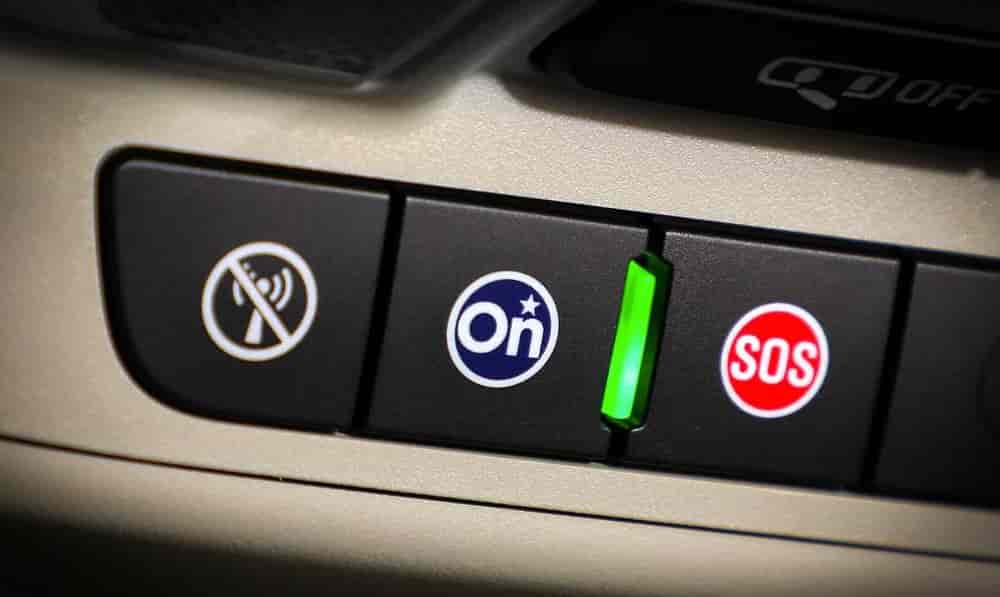
Before you learn how to deactivate OnStar, you need to understand what it does. This system comes built into most GM vehicles. It connects your car to cloud services and adds extra features for safety and convenience.
OnStar mainly focuses on driver safety. It can detect a crash and contact emergency services right away. You can also press a button to speak with an advisor at any time. These features help many drivers feel more secure on the road.
The system also offers several convenience tools. You can lock or unlock your car remotely. You can start the engine using your phone. You can even track your vehicle location in real time. OnStar also provides navigation support and vehicle diagnostics to keep you informed.
Despite these benefits, many users choose to cancel the service. The main reason is the ongoing subscription cost. Many drivers stop using the features but still pay every month. Privacy also becomes a concern. The system collects driving data to deliver its services, and not everyone feels comfortable with that.
When you understand how OnStar works, you can make a better decision. You will know exactly what you disable and what features you lose after deactivation.
Reasons to Deactivate OnStar
Many drivers decide to deactivate OnStar after a period of use. While the service offers useful features, it does not fit everyone’s needs long term. Understanding these reasons will help you feel more confident about your decision.
The most common issue is the subscription cost. OnStar requires a monthly or yearly fee. Over time, this cost becomes noticeable, especially if you rarely use the features. Many users forget about auto renewal and continue paying without real value in return.
Another major concern is privacy. OnStar collects vehicle data to provide its services. This can include location tracking and driving behavior. Some drivers feel uncomfortable sharing this level of information. They prefer to keep full control over their personal data.
Lack of usage is also a key factor. At first, remote access and emergency features seem useful. However, many drivers stop using them after a few months. When that happens, the service no longer justifies the cost.
Some users also report frustration with the cancellation process. They expect a quick online option, but often need to contact customer support instead. This creates a barrier that delays deactivation and adds to the frustration.
Finally, modern vehicles already include built in features that reduce the need for OnStar. Smartphone apps, navigation systems, and insurance services can replace many of its functions. This makes the subscription feel less essential than before.
When you look at these factors together, it becomes clear why many drivers search for how to deactivate OnStar and take back control of their vehicle and expenses.
How to Deactivate OnStar
Now let’s get to the most important part. If you want to stop charges and disable the service, you need to follow the correct process. Many users make small mistakes here and continue getting billed. This step by step guide will help you avoid that problem.
Step 1: Check Your OnStar Subscription Status
Start by logging into your OnStar account through the official app or website. Look for your current plan and billing cycle. Pay attention to renewal dates and active services.
This step matters because some users have multiple plans linked to one vehicle. If you skip this check, you might cancel only part of the service and still get charged.
Step 2: Contact OnStar Support
At the moment, OnStar does not offer a full self service cancellation for all users. The most reliable way is to contact support directly.
You can do this in two ways. Press the blue OnStar button inside your vehicle or call their customer service number. Speaking with an advisor ensures your request gets processed correctly.
Step 3: Request Cancellation Clearly
When you speak with the advisor, state your request clearly. Tell them you want to cancel your OnStar subscription and deactivate all connected services.
Ask them to confirm that:
- Your subscription will not renew
- All paid plans are canceled
- No future charges will occur
Being direct here helps you avoid partial cancellation.
Step 4: Confirm Deactivation
After the request, ask for a confirmation. This can be an email or a reference number. Do not skip this step.
Many users assume the service is canceled, but billing continues due to incomplete requests. A confirmation gives you proof and peace of mind.
Step 5: Remove Payment Method
Log back into your account and remove your payment details if possible. This adds an extra layer of protection against unexpected charges.
Even after cancellation, some systems may still attempt renewal. Removing your card prevents this issue.
Step 6: Test the System
Finally, check if OnStar features still work. Try remote access or press the OnStar button. If the system no longer connects, the deactivation is successful.
If it still works, contact support again and reference your previous request.
Following these steps ensures that you fully complete the process of how to deactivate OnStar without confusion or hidden charges. Taking a few extra minutes to confirm everything can save you money and frustration later.
How to Turn Off OnStar Tracking and Data Collection
For many users, cost is not the only concern. Privacy plays a major role when deciding how to deactivate OnStar. Even after canceling the subscription, some drivers still worry about how their vehicle data gets collected and used.
OnStar relies on data to deliver its features. This includes location tracking, driving behavior, and system diagnostics. While this improves functionality, it also raises concerns for users who want full control over their personal information.
To reduce or stop tracking, you should start with your account settings. Log in to your OnStar or GM account through the mobile app or official website. Look for privacy or data sharing options. Turn off any settings related to data collection, location services, or driving analytics.
Next, check your vehicle settings. Many GM vehicles allow you to manage privacy preferences directly from the infotainment system. Navigate to settings, then look for sections related to connectivity or data sharing. Disable anything مرتبط with tracking or remote data access.
You should also review permissions inside the mobile app. Some features continue to collect data as long as the app remains connected to your vehicle. Disable background access or uninstall the app if you no longer use it.
If you want maximum privacy, contact customer support and request full data deactivation. Ask them to remove your vehicle from active tracking systems and confirm that no data continues to sync.
Taking these steps gives you more control beyond simply canceling the subscription. It ensures that your decision to deactivate OnStar also limits how your data gets collected and stored.
What Happens After You Deactivate OnStar
After you complete the process of how to deactivate OnStar, your vehicle will continue to work normally. However, several connected features will stop immediately. Understanding this helps you avoid confusion later.
First, you will lose access to emergency services. The automatic crash response and emergency button will no longer connect you to an advisor. This is one of the biggest changes, especially for drivers who rely on added safety support.
You will also lose remote access features. You can no longer start your car, unlock doors, or track your vehicle through the mobile app. These tools depend entirely on an active OnStar subscription.
Navigation and live assistance services will stop as well. If you used OnStar for turn by turn directions or real time support, those features will no longer be available.
However, your car’s core functions remain unchanged. You can still drive, use built in controls, and access standard infotainment features. Basic systems do not depend on OnStar, so your driving experience stays the same in everyday situations.
In some vehicles, limited free features may still work. For example, basic diagnostics or trial services might remain active for a short time. This depends on your model and region.
If you change your mind later, you can reactivate OnStar at any time. You simply need to log in and choose a new subscription plan. The system will reconnect quickly without any major setup.
Knowing what changes after deactivation helps you make a confident decision. You will not face unexpected surprises, and you can choose whether the trade off between cost and features works for you.
Common Problems When Cancelling OnStar
Even when you follow the correct steps, some issues can still happen during the cancellation process. These problems often cause confusion and frustration, especially when charges continue after you think the service is already deactivated.
One common issue is ongoing billing. Some users cancel their subscription but still see charges on their account. This usually happens when the cancellation request is incomplete or only applies to part of the plan. In some cases, users cancel a trial but forget about a paid package linked to the same account.
Another problem is lack of confirmation. Many users finish a call with support but do not receive any email or reference number. Without proof, it becomes difficult to verify whether the service was fully canceled. This can lead to unexpected renewals later.
Some drivers also face difficulty reaching customer support. Long wait times or unclear instructions can delay the process. This becomes more frustrating when users expect a simple online cancellation option.
Technical errors can also occur. The system may still show an active subscription even after cancellation. In other cases, the mobile app continues to display connected features, which makes users think the service is still running.
To fix these problems, always ask for clear confirmation after cancellation. Keep records of your request, including time, date, and any reference number. If charges continue, contact support again and provide this information.
You should also check your bank statements regularly. If you notice unexpected charges, act quickly to resolve the issue. Removing your payment method after cancellation can also help prevent future billing problems.
Understanding these common issues will help you avoid mistakes and complete the process of how to deactivate OnStar without stress or hidden costs.
Pro Tips Before Deactivating OnStar
Before you finalize the process, take a few extra steps to avoid future issues. These small actions can save you time, money, and unnecessary stress.
First, review your subscription details carefully. Check if your plan includes bundled services or trial extensions. Some users cancel one service but leave another active without noticing. This often leads to unexpected charges later.
Next, back up any important data linked to your account. If you use OnStar for navigation history or vehicle reports, save this information before deactivation. Once the service stops, you may not be able to access it again.
You should also check your email for any recent updates from OnStar. Sometimes, changes in terms or billing cycles affect how cancellation works. Staying informed helps you avoid confusion during the process.
Another useful step is to confirm your account status after cancellation. Log in again and make sure all services show as inactive. Do not rely only on a phone confirmation. A quick check ensures everything is fully completed.
Finally, keep a record of your cancellation. Save emails, take screenshots, or write down your reference number. If any issue appears later, you will have proof to resolve it quickly.
Conclusion
Deactivating OnStar may seem complicated at first, but the process becomes simple when you follow the right steps. From checking your subscription to confirming cancellation, each action plays a key role in helping you avoid hidden charges and unwanted services.
This guide has shown you exactly how to deactivate OnStar for all GM vehicles in a clear and practical way. You now understand how the system works, why many users choose to cancel, and what happens after deactivation. You also know how to handle common problems and protect your personal data.
For many drivers, the decision comes down to value and control. If you no longer use the features or feel concerned about privacy, canceling the service can be the right move. It helps you reduce monthly expenses and take full control of your vehicle’s connected features.
If you are still unsure, take a moment to review your needs and driving habits. The best choice is the one that fits your lifestyle and priorities.
Have you tried to deactivate OnStar yet? Share your experience or any issues you faced. Your insight might help other drivers make a better decision.