How to Use Apple CarPlay in Tesla: Complete Guide to Workarounds, Setup Methods, and Compatibility Explained is one of the most searched topics among modern electric vehicle owners who want a seamless connection between their smartphone and their car infotainment system. As smartphones become central to navigation, communication, and entertainment, drivers increasingly expect their in car experience to mirror the convenience they already have on their devices. This is especially true for users of Apple CarPlay from Apple Inc., which has become a standard interface for iPhone integration across many vehicles.
However, owners of vehicles from Tesla, Inc. quickly discover that there is no native support for Apple CarPlay inside Tesla’s operating system. Instead, Tesla relies on its own proprietary infotainment platform, which is deeply integrated with its navigation, media, and vehicle control systems. This design choice creates a gap between user expectations and actual functionality, leading many drivers to search for alternative ways to bring CarPlay into their Tesla experience.
Because of this limitation, a growing ecosystem of workaround solutions has emerged. These include third party hardware devices, browser based access methods, and wireless integration tools designed to simulate or replicate CarPlay functionality inside Tesla vehicles. Each method comes with its own advantages, limitations, and technical requirements.
In this guide, we will explore all available methods in detail, explain why Tesla does not support Apple CarPlay natively, and help you understand which solutions are practical in real world usage. The goal is to give you a complete and realistic understanding of how to use Apple CarPlay in Tesla without confusion or unrealistic expectations.
Why Tesla Does Not Support Apple CarPlay
A common question when learning how to use Apple CarPlay in Tesla is why the feature is missing. The lack of native support is not a technical oversight. It is a clear product decision shaped by Tesla’s long term software strategy.
The infotainment system in Tesla, Inc. is designed as a closed ecosystem. Tesla builds and controls the entire software stack. This includes navigation, media, and vehicle controls. This approach gives Tesla full control over performance and user experience.
This design also reduces dependence on external platforms. Tesla does not need Apple CarPlay from Apple Inc. or similar systems. Instead, Tesla offers built in apps for maps, music, and voice control. This creates a consistent experience across all vehicles.
Another key reason is control over software updates. Tesla updates its system regularly through over the air updates. A third party system like CarPlay would add another interface layer. This could create conflicts in design and performance. It would also limit Tesla’s ability to evolve its user interface freely.
Data control is another important factor. Tesla manages user data within its own ecosystem. A third party system would introduce additional data pathways. This could reduce transparency and complicate system integration.
For these reasons, Tesla does not support Apple CarPlay. The company prioritizes its own software ecosystem over external integration. This explains why all CarPlay solutions in Tesla come from third party workarounds instead of official support.
Is Apple CarPlay Officially Compatible with Tesla
Apple CarPlay is not officially compatible with Tesla vehicles. This applies to all models, including Model 3, Model Y, Model S, and Model X. There is no built in support inside the Tesla operating system.
Tesla, Inc. does not provide any native integration for Apple CarPlay from Apple Inc.. This means you cannot connect an iPhone and directly project the CarPlay interface onto the Tesla screen through official software settings.
Tesla also does not support Android Auto or similar smartphone projection systems. Instead, Tesla relies on its own infotainment platform. This system includes navigation, media apps, voice commands, and vehicle controls in one unified interface.
Many users misunderstand compatibility because Tesla still allows Bluetooth connection with smartphones. However, Bluetooth only supports basic functions such as calls, audio streaming, and contacts. It does not enable full CarPlay functionality.
Some third party solutions claim to enable CarPlay in Tesla. These solutions do not change official compatibility. They only create an external layer that simulates or mirrors the CarPlay interface. The Tesla system itself remains unchanged.
Because of this limitation, Apple CarPlay in Tesla should be viewed as a workaround experience rather than a native feature. Understanding this distinction helps users choose the right solution and avoid unrealistic expectations when setting up their system.
Workaround Methods to Use Apple CarPlay in Tesla
Since there is no native support, users rely on alternative methods to use Apple CarPlay in Tesla. These methods do not change the Tesla operating system. Instead, they create external systems that deliver a CarPlay experience inside the car.
One common approach uses third party hardware devices. These devices connect to your iPhone and generate a CarPlay interface. The interface is then displayed on the Tesla screen through a browser based system or an external display solution. This method is widely used because it requires minimal changes to the car software.
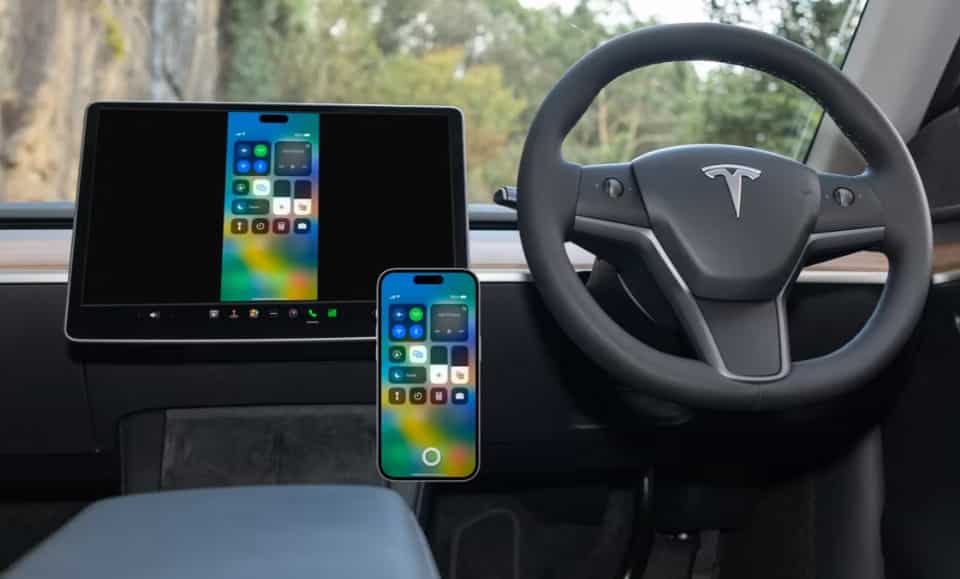
Another method involves browser based CarPlay emulation. Some systems use the Tesla web browser to load a CarPlay interface over WiFi. The iPhone connects to a companion device that streams the interface. This approach depends heavily on network stability and may show some delay.
A more advanced option uses dedicated CarPlay AI boxes. These devices act as mini computers running a modified infotainment system. They connect to the Tesla display and provide a full CarPlay interface along with additional Android based features. This method offers more flexibility but also increases cost and setup complexity.
Screen mirroring is another workaround. It allows users to mirror their iPhone screen onto the Tesla display. However, this method does not provide a true CarPlay experience. It simply duplicates the phone interface, which may not be optimized for driving.
Each workaround has trade offs in terms of performance, stability, and ease of use. Some solutions prioritize simplicity, while others focus on a more complete CarPlay experience. Understanding these differences is important before choosing a setup method for your Tesla.
Step by Step Setup to Use Apple CarPlay in Tesla via Third Party Devices
Setting up Apple CarPlay in Tesla requires external devices because there is no native integration inside the system of Tesla, Inc.. The most common solution involves using a third party CarPlay adapter or AI box that connects your iPhone and displays the CarPlay interface inside the car.
The first step is choosing a compatible device. Most users select a CarPlay AI box or a wireless CarPlay adapter that supports screen output through WiFi or browser based access. After selecting the device, you need to connect it to your Tesla system. In many cases, this is done through the Tesla browser or through a dedicated input interface provided by the device.
Next, you pair your iPhone with the adapter. This usually happens through Bluetooth for initial pairing and WiFi for data transfer. Once connected, the device will automatically launch the CarPlay interface powered by Apple CarPlay from Apple Inc..
After pairing, you configure the display settings. This includes screen resolution, touch response sensitivity, and audio routing. Many devices allow you to choose whether sound plays through Bluetooth or through the Tesla speaker system.
Once setup is complete, you can launch CarPlay whenever the device is active. Navigation apps, music apps, and messaging features will appear in a simplified driving interface. This allows you to use familiar iPhone features while driving without directly interacting with your phone.
If issues appear, such as lag or disconnection, most problems come from WiFi instability or incorrect pairing. Restarting the device or re-establishing the Bluetooth connection usually resolves these issues.
Wireless Apple CarPlay Solutions for Tesla
Wireless Apple CarPlay is one of the most convenient ways to improve in car connectivity without using cables. In the context of Tesla vehicles from Tesla, Inc., wireless solutions are especially popular because they reduce setup complexity and improve daily usability.
Most wireless setups rely on a dedicated CarPlay adapter that creates a direct connection between your iPhone and the in car display system. The adapter typically uses Bluetooth for initial pairing and WiFi for data transmission. This combination allows the system to stream the CarPlay interface without physical cables.
One major advantage of wireless solutions is convenience. Once paired, the system can automatically reconnect every time you enter the vehicle. This makes it easier to use navigation and media apps from Apple CarPlay by Apple Inc. without repeating the setup process.
However, wireless systems also come with limitations. Connection stability depends heavily on signal quality. If multiple devices are connected to the same WiFi channel, users may experience lag or occasional disconnection. This can affect navigation responsiveness and audio playback.
Another factor is latency. Wireless transmission introduces a small delay compared to wired systems. While this delay is usually minor, it can still impact user experience in high responsiveness scenarios such as map zooming or voice command input.
Despite these limitations, wireless CarPlay remains one of the most practical solutions for Tesla owners who want a balance between convenience and functionality. It reduces clutter inside the car and offers a more seamless daily driving experience compared to manual wired connections or browser based setups.
Best Devices and Tools to Enable CarPlay in Tesla
Choosing the right device is the most important step when you want to use Apple CarPlay in Tesla. Since there is no native support in vehicles from Tesla, Inc., all solutions depend on third party hardware and software combinations.
The most popular option is a CarPlay AI box. This device connects to your car system and runs a full infotainment environment. It supports Apple CarPlay from Apple Inc. along with additional Android based features. It is often preferred by users who want a complete smart interface rather than a basic mirror system.
Another common option is a plug and play wireless CarPlay adapter. This type of device is easier to install and focuses only on CarPlay functionality. It is designed for users who want simplicity and fast setup without advanced customization.
Some advanced systems also include screen mirroring devices. These tools allow you to display your iPhone screen directly on the Tesla display. While this method is flexible, it does not fully replicate the CarPlay experience and may feel less optimized for driving use.
When selecting a device, compatibility is a key factor. Not all adapters work smoothly with Tesla software updates. Users should also consider performance factors such as lag, resolution quality, and connection stability.
Price is another important consideration. Basic adapters are affordable but limited in features. AI boxes are more expensive but provide a richer experience with better integration and multitasking capabilities.
Overall, the best choice depends on your priorities. If you want simplicity, a wireless adapter is enough. If you want a full infotainment upgrade, a CarPlay AI box is the better option.
Limitations and Risks of Using Apple CarPlay in Tesla
Using Apple CarPlay in Tesla is possible only through third party solutions, and this naturally introduces several limitations. Since vehicles from Tesla, Inc. are not designed for CarPlay integration, every workaround operates outside the native system.
One of the main limitations is performance stability. Because CarPlay is not built into the Tesla operating system, users may experience lag, delayed touch response, or occasional disconnections. These issues often depend on WiFi strength and the quality of the external device being used.
Another limitation is system compatibility. Tesla frequently updates its software. These updates can sometimes affect third party devices, causing temporary bugs or reduced functionality. Users may need to wait for adapter firmware updates to restore full performance.
Safety is another important concern. When using Apple CarPlay from Apple Inc. through external systems, drivers may become distracted by additional interfaces. Switching between Tesla controls and CarPlay screens can increase cognitive load while driving.
There are also potential warranty and support considerations. Tesla does not officially support third party infotainment modifications. While most adapters are safe to use, any system integration issues are not covered by Tesla service support.
Finally, installation quality matters. Poorly configured devices can lead to audio routing problems, screen glitches, or unstable connections. Choosing low quality hardware increases the risk of a frustrating user experience.
For these reasons, users should treat CarPlay in Tesla as an optional enhancement rather than a core feature. Understanding these limitations helps set realistic expectations and reduces potential issues during daily use.
Tesla Native System vs Apple CarPlay Experience
When comparing the native infotainment system in vehicles from Tesla, Inc. with Apple CarPlay from Apple Inc., the differences come from two completely different design philosophies. Tesla builds a fully integrated software and hardware ecosystem, while Apple CarPlay focuses on smartphone projection and familiar iPhone based interaction inside the car.
In terms of navigation, Tesla relies on its built in maps and real time traffic data. The system is tightly integrated with vehicle routing, battery estimation, and charging stop planning. This creates a highly optimized experience for electric driving. Apple CarPlay, on the other hand, depends on third party navigation apps like Apple Maps or Google Maps. It provides a familiar interface but does not integrate deeply with vehicle battery systems.
For media and entertainment, Tesla offers native apps such as music streaming and video features when parked. These apps are optimized for the vehicle’s screen and performance environment. Apple CarPlay provides access to a wider ecosystem of apps from the iPhone, which many users find more flexible and familiar.
Voice control also differs significantly. Tesla uses its own voice command system designed specifically for vehicle functions. CarPlay relies on Siri, which is powerful for general tasks but less integrated with vehicle specific controls.
User experience is another key difference. Tesla focuses on a minimal and centralized interface that controls almost everything in one screen. CarPlay focuses on simplicity and familiarity, mirroring the iPhone experience directly in the car.
Each system has strengths depending on user preference. Tesla prioritizes deep vehicle integration and efficiency. Apple CarPlay prioritizes familiarity and ecosystem continuity across devices.
Future Possibility Will Tesla Ever Support Apple CarPlay
The question of whether Apple CarPlay from Apple Inc. will ever be officially supported in vehicles from Tesla, Inc. continues to attract strong interest from users. However, based on current industry direction, official integration remains unlikely in the near future.
Tesla has consistently followed a closed ecosystem strategy. The company designs its own infotainment platform and tightly integrates software with hardware. This approach allows Tesla to control performance, user experience, and feature development without relying on external systems. Introducing CarPlay would reduce this level of control and create a parallel interface inside the vehicle.
Another factor is strategic competition. Apple and Tesla operate in overlapping technology spaces, especially in software, mobility, and future automotive platforms. This makes deep integration less likely because both companies prioritize their own ecosystems and long term platform independence.
At the same time, the automotive industry is evolving. Many traditional car manufacturers now include CarPlay as a standard feature because users expect smartphone integration. This creates ongoing pressure from consumers, even if companies like Tesla choose not to follow the same path.
Instead of adopting CarPlay, Tesla is more likely to continue improving its native system. The company regularly updates its interface, adds new features, and expands its app ecosystem through over the air updates. This reduces the need for external platforms inside the car.
As a result, the future of Apple CarPlay in Tesla will most likely remain dependent on third party workarounds rather than official support. Users should expect continued improvements in adapter technology, but not native integration from Tesla itself.
Conclusion
Understanding how to use Apple CarPlay in Tesla requires a clear view of both capability and limitation. Since vehicles from Tesla, Inc. do not support Apple CarPlay from Apple Inc. natively, every solution available today depends on external tools and workarounds rather than built in integration.
Throughout this guide, we explored why Tesla chooses a closed infotainment system, how compatibility works in practice, and what methods users can apply to bring a CarPlay experience into their vehicles. These methods include wireless adapters, AI boxes, screen mirroring systems, and browser based solutions. Each option offers a different balance between convenience, performance, and cost.
We also looked at the limitations that come with these solutions. While third party systems can successfully replicate many CarPlay features, they may still face challenges such as latency, compatibility issues, and dependency on software updates. Because of this, the experience is not identical to native CarPlay integration found in other vehicles.
In practical terms, the best approach depends on user expectations. Drivers who value simplicity may prefer basic wireless adapters. Those who want a more complete infotainment experience may choose advanced AI box solutions. However, no option fully replaces native integration.
Ultimately, Apple CarPlay in Tesla should be seen as an enhancement rather than a core system feature. As technology continues to evolve, third party solutions will likely improve, but official support from Tesla remains uncertain. Understanding these realities helps users make informed decisions and choose the setup that best fits their driving needs.