A Tesla left camera not working is usually caused by a software glitch, camera obstruction, calibration issue, or hardware failure. Because the left side repeater camera supplies visual data to Tesla Vision, Autopilot, Blind Spot Camera, and other driver assistance features, even a single camera malfunction can reduce vehicle functionality and trigger safety warnings.
Common symptoms include a black camera feed, a “Left Camera Unavailable” or “Camera Obstructed” message, disabled Autopilot features, or missing blind spot video when activating the turn signal. While some issues can be resolved by cleaning the camera, restarting the vehicle, or installing the latest software update, others require camera calibration or professional diagnosis through Tesla Service.
This guide explains how to fix a Tesla left camera not working using a step-by-step troubleshooting process. You’ll learn how to identify the most common causes, determine whether the problem is related to software or hardware, perform safe diagnostic checks, and understand when a repair is necessary. By following the troubleshooting steps in order, you can often restore normal camera operation or confidently decide when it’s time to schedule a service appointment.
Why is the Tesla left camera not working?
A Tesla left camera stops working because of four primary causes: camera obstruction, software issues, calibration problems, or hardware failure. Identifying which category the fault belongs to is the first step toward an effective repair. A temporary software glitch can often be resolved in minutes, while physical damage or a failed camera module typically requires professional service.
The left side repeater camera supports Tesla Vision by providing image data for features such as Blind Spot Camera, Autopilot, Lane Keeping Assistance, and Sentry Mode. When the camera cannot transmit reliable visual information, Tesla may disable or limit these driver assistance features to maintain safety.
The following sections explain the most common causes and the symptoms associated with each one.
Camera obstruction
A blocked camera is one of the most common and easiest problems to fix. Dirt, mud, road salt, heavy rain, snow, ice, or condensation on the camera lens can reduce image quality enough for the system to display a warning.
Common signs include:
- “Camera Obstructed” warning
- Blurry or distorted camera image
- Blind Spot Camera not appearing
- Temporary Autopilot restrictions
Cleaning the lens with a soft microfiber cloth is often enough to restore normal operation if no hardware damage exists.
Software glitch
Temporary software issues can interrupt communication between the camera and Tesla’s onboard systems. This may occur after an over-the-air (OTA) software update, an unexpected system error, or a temporary failure during vehicle startup.
Typical symptoms include:
- Black camera screen
- “Left Camera Unavailable” message
- Camera working again after restarting the vehicle
- Intermittent camera failures that appear and disappear
Because these symptoms often occur without physical damage, software troubleshooting should be completed before assuming the camera needs replacement.
Camera calibration issue
The left camera may stop functioning correctly if the vehicle’s camera system requires recalibration. Calibration ensures every camera provides accurate positioning data for Tesla Vision. If calibration is incomplete or interrupted, some driver assistance features may remain unavailable even though the camera itself is operational.
Calibration issues commonly occur after:
- Windshield replacement
- Side repeater camera replacement
- Body repairs
- Suspension or wheel alignment work
- Certain software updates
The vehicle may continue driving normally while displaying messages indicating that camera calibration is in progress or incomplete.
Hardware failure
A damaged camera or electrical connection can prevent the left camera from operating altogether. Physical impact, water intrusion, damaged wiring, loose connectors, or internal component failure may interrupt communication with the vehicle.
Common symptoms include:
- The camera never recovers after multiple restarts.
- The same warning returns every drive.
- The camera feed remains permanently black.
- Autopilot or Blind Spot Camera stays unavailable.
- Physical damage is visible around the side repeater camera housing.
Hardware-related failures generally require diagnosis through Tesla Service or replacement of the affected camera module.
How do you fix a Tesla left camera not working?
Fix a Tesla left camera by checking for obstructions, restarting the vehicle, updating the software, recalibrating the cameras, inspecting for physical damage, and using Service Mode to identify hardware faults. Performing these steps in order helps eliminate simple issues before considering a camera replacement.
1. Clean the left side camera
Remove anything that blocks the camera lens before performing other troubleshooting steps. Dust, mud, road salt, insects, ice, or water droplets can reduce image quality enough for Tesla Vision to disable camera-based features.
Use a clean microfiber cloth to wipe the camera lens gently. Avoid abrasive materials, ammonia-based cleaners, or high-pressure water directed at the camera housing, as they may damage the lens or force moisture into the assembly.
After cleaning, drive the vehicle for several minutes to determine whether the warning disappears and camera functions return.
2. Restart the vehicle
Restarting the vehicle can resolve temporary software communication errors. A reboot reloads the vehicle’s operating systems and restores communication between the camera module and Tesla Vision if the issue is software-related.
To perform a soft reboot:
- Park the vehicle safely.
- Shift into Park (P).
- Press and hold both steering wheel scroll wheels.
- Continue holding until the touchscreen turns black.
- Wait for the Tesla logo to appear before releasing the buttons.
If the camera resumes normal operation after the restart, the problem was likely a temporary software fault rather than a hardware failure.
3. Install the latest software update
Software updates frequently include fixes for camera stability, Autopilot performance, and Tesla Vision improvements. If your vehicle is running an outdated firmware version, installing the latest update may resolve known bugs affecting the left camera.
Open Controls → Software and check whether an update is available. If one is pending, complete the installation while the vehicle is parked and connected to a reliable Wi-Fi network whenever possible.
If the camera problem began immediately after an update, monitor Tesla release notes and future updates, as Tesla often resolves software-related issues through subsequent over-the-air releases.
4. Allow the cameras to recalibrate
Camera calibration restores accurate positioning data after certain repairs or software changes. During calibration, some driver assistance features remain unavailable until Tesla Vision completes the learning process.
Calibration may be required after:
- Replacing a side repeater camera.
- Windshield replacement.
- Body repairs near the camera.
- Suspension or wheel alignment work.
- Certain firmware updates.
Drive on clearly marked roads under normal daylight conditions to allow calibration to complete. Depending on driving conditions, the process may take several miles before all camera-based features become available again.
5. Inspect the camera for physical damage
Visible damage usually indicates a hardware problem that cannot be resolved through software troubleshooting. Examine the left side repeater camera and the surrounding trim for cracks, scratches, loose mounting, moisture inside the lens, or signs of impact.
Look for these conditions:
- Cracked camera lens
- Water condensation inside the housing
- Loose or damaged trim
- Evidence of collision damage
- Missing or broken camera cover
If physical damage is present, replacing the camera assembly is typically necessary.
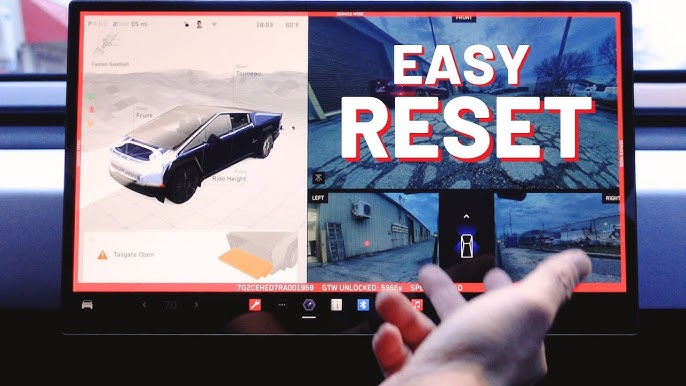
6. Run diagnostics in Service Mode
Service Mode helps identify whether the failure originates from software, communication, or camera hardware. This built-in diagnostic interface can display camera status and fault information that is not visible during normal vehicle operation.
If Service Mode reports persistent camera communication errors or hardware faults after cleaning, rebooting, updating, and recalibrating the vehicle, professional inspection is recommended instead of continuing to troubleshoot.
Completing these six steps resolves most software-related camera issues. If the left camera remains unavailable after every step, the problem is more likely caused by a failed camera module, damaged wiring, or another hardware component that requires Tesla Service.
How can you tell whether the problem is software or hardware?
The fastest way to identify the cause is to observe how the camera behaves after basic troubleshooting. Software issues are usually temporary and improve after a reboot, software update, or camera calibration. Hardware failures are typically persistent and continue to affect the same camera regardless of the troubleshooting steps performed.
The comparison below helps determine which type of fault is more likely.
| Symptom | More Likely Software Issue | More Likely Hardware Issue |
|---|---|---|
| Camera works again after restarting the vehicle | ✓ | |
| Camera fails only after a software update | ✓ | |
| Camera calibration remains incomplete temporarily | ✓ | |
| Camera warning appears intermittently | ✓ | |
| Camera feed stays black on every drive | ✓ | |
| Physical damage or cracked lens | ✓ | |
| Moisture inside the camera housing | ✓ | |
| Camera remains unavailable after updates and reboot | ✓ | |
| Camera communication errors continue in Service Mode | ✓ |
Software-related issues usually affect system communication rather than the camera itself. If the camera begins working normally after restarting the vehicle or installing the latest firmware, additional repairs are generally unnecessary.
Hardware failures are different because the camera module, electrical connector, or wiring has stopped functioning correctly. In these situations, the warning returns consistently, and camera-based features such as Blind Spot Camera or Autopilot remain unavailable until the faulty component is repaired or replaced.
Before scheduling a service appointment, complete every troubleshooting step in the previous section. This reduces the possibility of replacing a camera when the actual cause is only a temporary software issue.
When should you contact Tesla Service?
Contact Tesla Service when the left camera continues to malfunction after completing all standard troubleshooting steps or when there are signs of physical damage. Persistent camera failures often require specialized diagnostic equipment or replacement parts that are not accessible to vehicle owners.
Schedule a service appointment if you experience any of the following conditions:
- The left camera remains unavailable after cleaning, restarting the vehicle, updating the software, and completing camera calibration.
- The camera housing is cracked, loose, or shows signs of impact.
- Water or condensation is visible inside the camera lens.
- Service Mode reports camera communication or hardware faults.
- Autopilot, Tesla Vision, or Blind Spot Camera remain disabled because of the camera failure.
- Multiple cameras stop working at the same time, indicating a broader electrical or system issue.
Before visiting a Tesla Service Center, record the warning messages displayed on the touchscreen and note when the problem occurs. For example, identify whether the camera fails only during startup, after driving for several minutes, or under specific weather conditions. These details help technicians reproduce the issue more efficiently and reduce diagnostic time.
If the vehicle is still covered by Tesla’s New Vehicle Limited Warranty or an applicable repair warranty, camera replacement may be covered when the failure results from a manufacturing defect rather than external damage.
Does a left camera failure affect Autopilot?
Yes. A failed left camera can disable or limit several Tesla Vision features because the system depends on multiple cameras to monitor the vehicle’s surroundings. Although the exact impact varies depending on the fault, losing input from the left side repeater camera reduces the vehicle’s ability to detect adjacent traffic and maintain full situational awareness.
You may notice the following changes when the left camera is unavailable:
- Autopilot cannot be engaged.
- Traffic-Aware Cruise Control may be temporarily unavailable.
- Automatic Lane Change may be disabled.
- Blind Spot Camera does not appear when using the left turn signal.
- Lane Keeping Assistance may operate with reduced functionality.
- The vehicle displays warnings such as “Camera Unavailable” or “Autopilot Features Limited.”
In some cases, the camera may begin working again after a restart or software update. However, if the warning remains after completing all troubleshooting steps, the system will continue restricting camera-dependent features until the fault is corrected.
Can You Drive with a Tesla Left Camera Not Working?
Yes, you can usually continue driving the vehicle, but you should expect reduced driver assistance features and increased responsibility for monitoring surrounding traffic. A failed left camera does not normally prevent the vehicle from operating, but it can disable safety systems that rely on Tesla Vision.
Driving with a malfunctioning camera requires extra caution because features such as Blind Spot Camera, Autopilot, and Automatic Lane Change may no longer provide assistance. Drivers should perform manual mirror checks, verify blind spots visually, and avoid relying on unavailable driver assistance functions until the issue has been resolved.
If multiple cameras fail simultaneously or the vehicle displays additional safety warnings affecting steering, braking, or visibility systems, discontinue using driver assistance features and arrange a professional inspection as soon as possible.
How much does it cost to replace a Tesla left camera?
The total replacement cost depends on the vehicle model, the failed component, labor charges, and whether camera calibration is required after installation. Because Tesla does not publish standardized repair pricing for every model and region, service costs can vary significantly.
A repair estimate typically includes:
- Replacement side repeater camera module.
- Labor for removing and installing the camera.
- Camera calibration after replacement.
- Diagnostic inspection, if required.
- Applicable taxes and service fees.
If the camera failed because of a manufacturing defect and the vehicle remains within the applicable warranty period, Tesla may cover part or all of the repair cost. Damage caused by collisions, road debris, water intrusion, or other external factors is generally handled through the owner’s insurance policy or paid repair.
The most accurate estimate can be obtained by requesting a quote through the Tesla mobile app or an authorized Tesla Service Center.
How Can You Prevent Tesla Camera Problems?
Regular inspection and proper maintenance significantly reduce the likelihood of camera-related issues. While electronic components can still fail over time, many camera warnings are caused by environmental conditions or preventable physical damage.
Follow these maintenance practices to keep the camera operating reliably:
- Clean every exterior camera regularly using a soft microfiber cloth.
- Remove snow, ice, mud, insects, and road salt before driving.
- Avoid directing high-pressure water at the side repeater camera during washing.
- Install software updates promptly to receive camera performance improvements and bug fixes.
- Inspect the camera housing after minor collisions or contact with roadside objects.
- Check for moisture, condensation, or cracks if camera warnings appear after heavy rain or car washing.
Routine inspections require only a few minutes but can help identify minor issues before they develop into hardware failures that require camera replacement.
Proper camera maintenance also helps ensure that Tesla Vision, Autopilot, Blind Spot Camera, and other advanced driver assistance systems continue operating as designed.
Frequently Asked Questions
Can a reboot fix a Tesla left camera?
Yes, a reboot can fix the problem if the camera failure is caused by a temporary software issue. Restarting the vehicle reloads Tesla’s operating system and re-establishes communication between the camera module and Tesla Vision. If the warning disappears after the reboot and the camera feed returns, no additional repair is usually required.
If the camera remains unavailable after multiple restarts, continue troubleshooting by checking for software updates, completing camera calibration, or inspecting the camera for physical damage.
Does replacing the left camera require calibration?
Yes. Camera calibration is normally required after replacing a Tesla side repeater camera. Calibration allows Tesla Vision to accurately determine the camera’s position relative to the vehicle and synchronize it with the other cameras.
Until calibration is complete, features such as Autopilot, Automatic Lane Change, and Lane Keeping Assistance may remain unavailable or operate with limited functionality. The process typically completes after driving on well-marked roads under suitable lighting conditions.
Will Autopilot work if one camera fails?
Not always. Tesla may disable Autopilot or limit certain driver assistance features when one of the required cameras stops providing reliable image data. The exact behavior depends on which camera has failed and whether Tesla Vision can safely continue operating with information from the remaining cameras.
If the left side repeater camera is unavailable, you may lose functions such as Blind Spot Camera, Automatic Lane Change, or Autopilot until the issue is resolved.
Can cold weather cause the left camera to stop working?
Yes, but the effect is usually temporary. Ice, snow, frost, heavy condensation, or freezing rain can block the camera lens and prevent Tesla Vision from processing a clear image. In these situations, the vehicle may display a “Camera Obstructed” warning instead of indicating a hardware failure.
Removing snow or ice from the camera housing and allowing the lens to clear naturally often restores normal operation.
Is a Tesla left camera covered under warranty?
It depends on the cause of the failure and the vehicle’s warranty status. Camera failures resulting from manufacturing defects are generally covered under Tesla’s applicable warranty. However, damage caused by accidents, road debris, improper repairs, water intrusion from external impacts, or other non-manufacturing causes may not qualify for warranty coverage.
If you are unsure whether the repair is covered, request a diagnosis through the Tesla mobile app or contact a Tesla Service Center for a warranty assessment.