Is your Chevy Bolt unable to charge when you need it the most? This issue can quickly ruin your plans and leave you feeling stuck. Many drivers face this problem at the worst possible time, especially when they rely on their vehicle for daily travel.
Most owners immediately worry about battery damage or expensive repairs. However, not every charging issue comes from a serious failure. In many cases, simple problems such as loose connections, software glitches, or incompatible charging stations cause the issue.
Understanding the root cause makes a big difference. When you know what to check, you can save time and avoid unnecessary costs. You also reduce the risk of misdiagnosing the problem and making it worse.
In this guide, you will learn how the Chevy Bolt charging system works and why your vehicle may fail to charge. You will also discover practical steps to troubleshoot the issue and fix it quickly.
By the end, you will feel more confident handling a Chevy Bolt unable to charge and know exactly when to take further action.
How the Chevy Bolt Charging System Works
To fix a Chevy Bolt unable to charge, you first need to understand how the system operates. When you know how each component works, you can identify problems faster and avoid unnecessary confusion.
The Chevy Bolt uses a lithium ion battery pack to store energy. This battery powers the entire vehicle and requires a stable charging process to function properly. The onboard charger plays a key role by converting AC power from your home or charging station into DC power that the battery can store.
The charging port acts as the connection point between your vehicle and the power source. If this port has dirt, damage, or loose connections, charging may fail or stop unexpectedly. Many drivers overlook this simple detail, but it often causes real issues.
The Chevy Bolt supports multiple charging levels. Level 1 charging uses a standard household outlet and works slowly but reliably. Level 2 charging offers faster speeds and is common in homes and public stations. DC fast charging provides the quickest results, but it depends on compatible stations and proper battery conditions.
Each part of this system must work together smoothly. If one element fails, the entire charging process can stop. That is why understanding the system gives you a strong advantage when troubleshooting.
Top Causes Why Your Chevy Bolt Is Unable to Charge
When your Chevy Bolt is unable to charge, the problem often comes from a few common sources. Identifying the exact cause helps you fix the issue faster and avoid unnecessary repairs.
Below are the most frequent reasons you should check first.
Faulty Charging Cable or Connector
A damaged or loose cable can interrupt the charging process. If the connector does not fit tightly or shows signs of wear, the vehicle may refuse to charge. Always inspect the cable before assuming a bigger problem.
Software Glitch or System Error
Modern EVs rely heavily on software. A temporary system bug can block charging even when everything else works fine. In many cases, a simple restart resolves the issue.
Battery Temperature Issues
Extreme temperatures affect battery performance. If the battery becomes too hot or too cold, the system may delay or stop charging to protect itself. This situation often happens in harsh weather conditions.
Charging Station Compatibility Problems
Not all charging stations work the same way. Some public chargers may not communicate properly with your Chevy Bolt. If your vehicle fails to charge at one station but works at another, compatibility is likely the issue.
Damaged Charging Port
Dust, debris, or physical damage inside the charging port can block the connection. Even small obstructions can prevent proper contact between the cable and the port.
Battery Degradation or Fault
Over time, battery performance declines. In rare cases, internal faults can stop the charging process completely. This issue often requires professional diagnosis.
Power Supply Issues at Home
Sometimes the problem does not come from the car. An unstable power source, faulty outlet, or circuit overload can prevent charging. Checking your home electrical system can save time and effort.
This list covers the most common causes behind a Chevy Bolt unable to charge. Many of these issues are simple to identify and fix if you follow the right steps.
Step by Step Troubleshooting Guide
If your Chevy Bolt is unable to charge, you should follow a clear process instead of guessing. A step by step approach helps you find the issue quickly and avoid unnecessary stress.
Start with the simplest checks before moving to more complex ones.
Step 1: Check the Charging Cable and Power Source
Inspect the charging cable for damage or loose connections. Make sure the plug fits securely into both the vehicle and the outlet. If you charge at home, test another outlet to rule out power issues.
Step 2: Restart the Vehicle System
Turn off your Chevy Bolt completely and wait a few minutes. Then restart the system and try charging again. This simple step often fixes temporary software glitches.
Step 3: Try a Different Charging Station
If possible, connect your vehicle to another charging station. If it works elsewhere, the original station likely caused the problem. This step helps you isolate the issue quickly.
Step 4: Inspect the Charging Port
Look inside the charging port for dust, debris, or visible damage. Clean it carefully if needed. A blocked or dirty port can prevent proper contact and stop charging.
Step 5: Check Dashboard Messages and Alerts
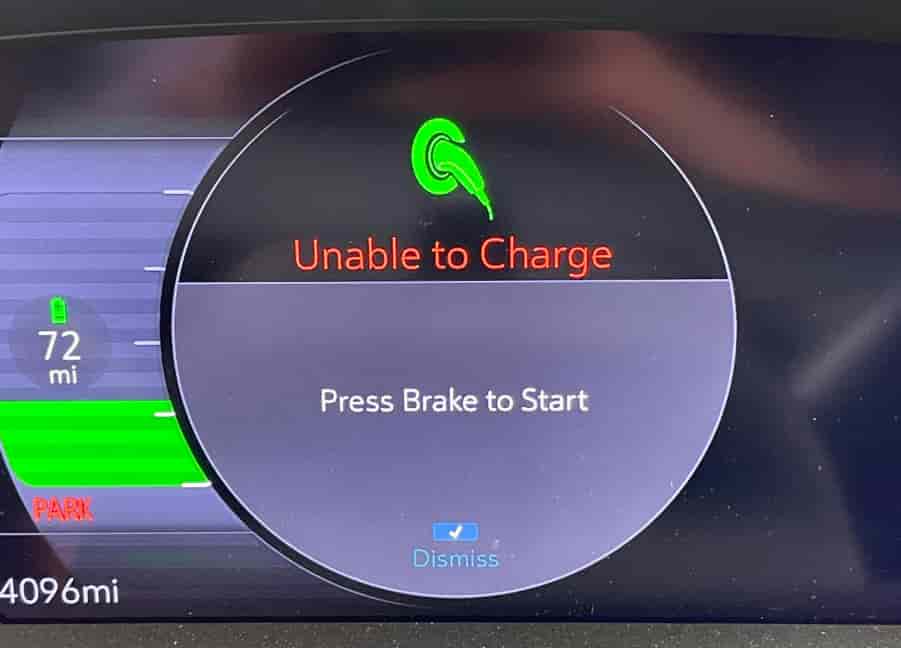
Pay attention to any warning messages on the dashboard. These alerts often provide clues about what went wrong. Even a small detail can point you in the right direction.
Following these steps allows you to diagnose most charging problems without professional help. In many cases, you can resolve the issue within minutes.
Chevy Bolt Charging Error Codes Explained
When your Chevy Bolt is unable to charge, the system often displays warning messages that help you understand the issue. These alerts provide valuable clues, and reading them correctly can save you both time and money.
One common message is charging interrupted. This warning appears when the charging process stops suddenly. In most cases, a loose cable, unstable power supply, or a communication issue with the charging station causes the interruption. You should reconnect everything carefully and try again.
Another frequent alert is unable to charge. This message usually indicates a broader problem. It may come from a software glitch, a connection issue, or an abnormal battery condition. You need to combine this warning with other signs to identify the root cause accurately.
You may also see a battery fault warning, which signals a more serious issue. This alert often relates to the battery management system or internal battery components. If this message appears, you should avoid repeated charging attempts and consider professional inspection.
In some cases, the system shows charge cord not fully connected. This issue happens when the connector does not sit properly in the charging port. Even a small misalignment can stop the charging process completely.
Understanding these error messages gives you better control when your Chevy Bolt is unable to charge. Instead of guessing, you can quickly narrow down the problem and take the right action.
How Temperature Affects Charging Performance
Temperature plays an important role when your Chevy Bolt is unable to charge. The battery system does not always operate at the same efficiency in different environmental conditions, and the vehicle actively adjusts charging behavior to protect the battery.
In cold weather, the battery temperature drops and the chemical reactions inside the lithium ion cells slow down. When this happens, your Chevy Bolt may reduce charging speed or temporarily stop charging. The system does this to prevent long term battery damage. In many cases, you may notice charging starts normally but becomes extremely slow or pauses unexpectedly.
In hot weather, the situation is different. High temperatures can stress the battery and increase the risk of overheating. To protect the system, the vehicle may limit charging power or stop charging until the battery cools down. This safety mechanism helps extend battery life but can confuse drivers who expect normal charging behavior.
You may also experience temperature related issues when using fast charging stations. DC fast charging generates more heat, so the system carefully monitors battery conditions during the process. If the temperature goes outside the safe range, charging pauses automatically.
To reduce these issues, you should try pre conditioning your vehicle before charging. Parking in a shaded or temperature controlled environment also helps stabilize battery performance. When you understand how temperature affects the system, you can better interpret why your Chevy Bolt is unable to charge in certain situations.
When to Seek Professional Help
If your Chevy Bolt is unable to charge even after basic troubleshooting, you may be dealing with a deeper technical issue. At this point, continuing to test random solutions can waste time and may even increase the risk of further damage.
You should consider professional help when your vehicle fails to charge at multiple charging stations. If the problem appears everywhere, it is no longer related to a specific cable or station. This often points to internal issues such as the onboard charger, battery management system, or charging port hardware.
Another warning sign is repeated error messages on the dashboard. If alerts like battery fault or charging system failure appear frequently, the system is signaling a condition that requires diagnostic tools. These tools are only available at certified service centers.
You should also seek help if the charging port shows visible damage or if the cable does not lock properly. Physical damage can affect electrical contact and may worsen over time if ignored.
In some cases, the battery itself may degrade beyond normal performance limits. When this happens, only a trained technician can confirm the condition and recommend repair or replacement options.
Although many Chevy Bolt charging issues are simple, some require advanced inspection. Acting early helps you avoid higher repair costs and ensures your vehicle stays safe and reliable.
CONCLUSION
A Chevy Bolt unable to charge can feel stressful, especially when you depend on your vehicle every day. However, most charging problems come from simple and fixable causes rather than serious battery failure.
In many cases, issues such as a faulty cable, temporary software glitch, charging station incompatibility, or temperature changes can interrupt the charging process. When you understand how the system works and follow a clear troubleshooting process, you can quickly identify the root cause and take the right action.
This guide has shown you how to break down the problem step by step. You learned how to check basic components first, interpret error messages, and recognize when temperature or system behavior affects charging. You also now know when the issue requires professional inspection instead of home troubleshooting.
The key takeaway is simple. Do not panic when your Chevy Bolt is unable to charge. Start with the easiest checks, move step by step, and only escalate when necessary. This approach saves time, reduces stress, and helps you avoid unnecessary repair costs.
If you have experienced a similar charging issue with your Chevy Bolt, sharing your situation can also help other owners find solutions faster.