Have you ever started your Subaru only to find that the touchscreen refuses to respond? Whether the display is frozen, completely black, or reacting unpredictably, a malfunctioning touchscreen can quickly turn a convenient driving experience into a frustrating one. Since modern Subaru vehicles rely heavily on their infotainment systems for navigation, media controls, smartphone connectivity, backup camera functions, and even vehicle settings, a non-working screen can affect far more than just entertainment.
Many Subaru owners immediately worry about expensive repairs or full screen replacements when touchscreen issues appear. The good news is that not every problem requires a trip to the dealership. In many cases, the issue may be caused by a temporary software glitch, a failed update, a weak battery, or a simple system error that can be resolved in minutes. Understanding the root cause is the first step toward finding the right solution and potentially avoiding unnecessary repair costs.
In this guide, we will explore the most common reasons a Subaru touch screen stops working, explain how to identify different types of touchscreen failures, and walk you through several easy fixes you can try at home. Whether your screen is frozen, lagging, displaying a black screen, or not responding to touch commands, these troubleshooting steps can help get your infotainment system back to normal.
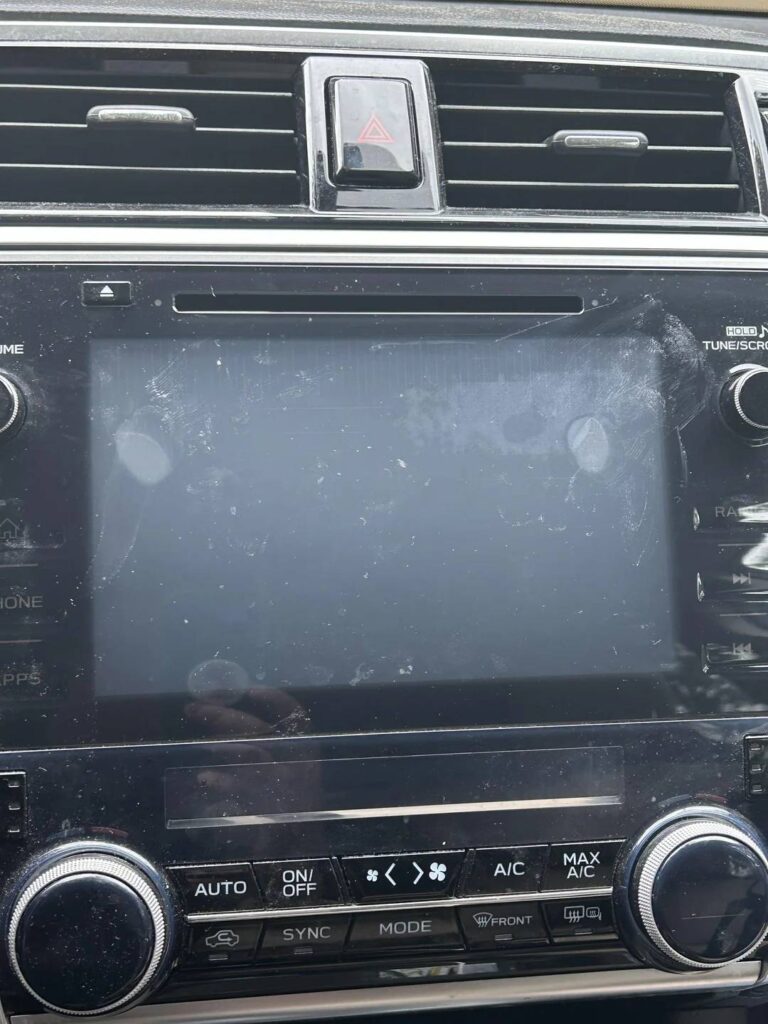
Common Signs Your Subaru Touch Screen Is Not Working
Before attempting any repairs, it is important to identify the specific symptoms your touchscreen is experiencing. Different issues often point to different underlying causes.
Screen Frozen on One Page
One of the most common complaints among Subaru owners is a touchscreen that becomes stuck on a single screen. The display may continue showing information, but tapping icons or menus produces no response. In some cases, the audio system may continue working normally while the touch controls remain completely unresponsive.
Black or Blank Display
A black screen can be particularly concerning because it may indicate either a software malfunction or a hardware failure. Some drivers notice the screen remains dark immediately after starting the vehicle, while others experience random blackouts during operation. If the screen goes black but audio continues to play, the problem may be related to the display rather than the entire infotainment system.
Slow Response and Lagging
Touchscreens often show warning signs before failing completely. Menus may take several seconds to open, navigation commands may lag, and touchscreen inputs may require multiple attempts before registering. These symptoms frequently suggest software instability, insufficient system resources, or outdated firmware.
Ghost Touch Issues
Ghost touch occurs when the screen appears to activate commands on its own. The system may randomly switch menus, change radio stations, or open applications without user input. This issue can be distracting while driving and often points to touchscreen digitizer problems or software bugs.
Intermittent Functionality
Some Subaru touchscreens work perfectly one day and fail the next. This inconsistent behavior can make diagnosis difficult because the system appears normal during some trips and problematic during others. Intermittent failures are commonly associated with loose connections, software conflicts, or electrical issues.
Recognizing these symptoms can help narrow down the cause of the problem and determine the most effective solution.
What Causes a Subaru Touch Screen to Stop Working?
A touchscreen failure does not always mean the entire infotainment system needs replacement. In fact, many problems stem from issues that can be resolved quickly and affordably.
Software Glitches
Modern Subaru infotainment systems operate much like a computer or smartphone. Temporary software bugs, failed updates, memory conflicts, or corrupted system files can cause the screen to freeze, lag, or stop responding altogether.
Software related problems are especially common after a system update. If the touchscreen issue began shortly after installing new software, there is a strong chance the problem is software based rather than hardware related.
System Requires a Reset
Like any electronic device, Subaru infotainment systems occasionally need a restart. Applications running in the background can become unresponsive, causing the touchscreen to freeze or function incorrectly. A simple reboot often clears temporary errors and restores normal operation.
Weak or Failing Battery
Many drivers are surprised to learn that battery health can directly affect infotainment performance. Modern vehicle electronics require stable voltage levels to function properly. When the battery becomes weak or begins to fail, the touchscreen may experience glitches, delayed responses, or complete shutdowns.
This is particularly common during cold weather or after replacing the battery without allowing all electronic modules to recalibrate properly.
Blown Fuse
The infotainment system relies on dedicated electrical circuits protected by fuses. If a fuse fails, power delivery to the touchscreen may be interrupted. A blown fuse can cause the display to stop working entirely while other vehicle functions continue operating normally.
Hardware Failure
Although less common than software issues, physical hardware failures do occur. Problems may involve the touchscreen digitizer, display panel, internal circuit boards, or wiring connections. Hardware failures are more likely when the screen remains completely unresponsive despite multiple troubleshooting attempts.
Understanding these potential causes can help you avoid unnecessary repairs and focus on the most likely solution first.
Easy Fixes You Can Try at Home
Before scheduling a dealership appointment or replacing expensive components, there are several simple troubleshooting steps worth trying. Many Subaru owners have successfully restored touchscreen functionality using these methods.
Restart the Vehicle
The simplest solution is often the most effective. Turn the vehicle off completely and allow it to sit for several minutes before restarting. This process allows electronic modules to shut down fully and can resolve temporary software conflicts.
Perform a Soft Reset
Most Subaru infotainment systems can be rebooted manually by pressing and holding the power button for approximately ten to fifteen seconds. The screen should turn off and restart automatically. This process refreshes the operating system without deleting personal settings or saved data.
Check for Software Updates
Manufacturers regularly release software updates to address bugs, improve stability, and enhance system performance. If your Subaru infotainment system supports updates, installing the latest version may resolve touchscreen responsiveness issues.
Inspect Battery Condition
A weak battery can cause a surprising number of electronic problems. Check for signs of corrosion on battery terminals, verify battery age, and test voltage levels if possible. Replacing an aging battery may solve recurring infotainment issues that appear unrelated at first glance.
Examine Relevant Fuses
Consult your owner’s manual to locate the fuse associated with the infotainment system. Carefully inspect the fuse for damage and replace it if necessary using the correct amperage rating. This inexpensive fix can sometimes restore a completely nonfunctional touchscreen within minutes.
By working through these troubleshooting steps systematically, many Subaru owners can identify and resolve touchscreen problems without incurring costly repair bills.
How to Reset a Subaru Touch Screen
If basic troubleshooting has not resolved the issue, performing a proper reset is often the next logical step. Resetting the infotainment system can eliminate temporary software errors, clear frozen processes, and restore normal touchscreen functionality.
Method 1: Perform a Soft Reset
A soft reset is the safest and most commonly recommended option. Start by turning on the vehicle and allowing the infotainment system to fully load. Press and hold the audio system power button for approximately ten to fifteen seconds. The display should turn off and then restart automatically.
This process refreshes the system without deleting saved settings, paired Bluetooth devices, navigation preferences, or radio presets. For many Subaru owners, a soft reset is enough to fix frozen screens, delayed responses, and random software glitches.
Method 2: Use an Ignition Cycle Reset
If a soft reset does not work, try an ignition cycle reset. Turn the vehicle off completely and remove the key if applicable. Open the driver’s door and wait several minutes before restarting the vehicle. This allows multiple electronic control modules to shut down and restart properly.
The ignition cycle reset can be particularly effective when touchscreen issues are related to communication errors between different vehicle systems.
Method 3: Factory Reset
When persistent software problems continue despite other troubleshooting efforts, a factory reset may help. Access the infotainment system settings menu and select the option to restore factory defaults.
Keep in mind that this procedure typically removes personalized settings, saved devices, navigation history, and other stored preferences. Before proceeding, make sure you are comfortable reconfiguring the system afterward.
A factory reset should generally be considered a last resort before seeking professional diagnosis.
When DIY Fixes Don’t Work
While many touchscreen problems can be resolved at home, some situations indicate a more serious issue that requires professional attention. Knowing when to stop troubleshooting can save time and prevent unnecessary frustration.
Touchscreen Digitizer Failure
The digitizer is the component responsible for detecting touch inputs. When it fails, the display may continue showing menus and information normally, but the screen will not respond when touched.
In some cases, only certain portions of the screen become unresponsive. Drivers may notice that buttons near the edges work while buttons in the center do not, or vice versa. This symptom often points directly to a failing digitizer rather than a software issue.
Internal Display Damage
Physical damage can occur even when there are no obvious external cracks. Exposure to extreme temperatures, manufacturing defects, or long term wear can affect the display panel itself.
Common warning signs include flickering images, dead pixels, distorted colors, brightness fluctuations, or sections of the screen that appear permanently dark. When these symptoms appear, replacing the display assembly may be necessary.
Wiring and Connector Issues
Behind the dashboard, multiple wiring harnesses and connectors link the infotainment system to the vehicle’s electrical network. Loose connections, corrosion, moisture intrusion, or damaged wiring can interrupt communication and power delivery.
Because accessing these components often requires dashboard disassembly, professional inspection is usually recommended. A trained technician can quickly identify damaged connectors or electrical faults that are difficult for most owners to diagnose.
Infotainment Control Module Failure
In rare cases, the problem may involve the infotainment control module itself. This central unit processes touchscreen commands, manages software functions, and controls communication between various multimedia features.
A failing control module may cause repeated system crashes, black screens, failed updates, or complete touchscreen inactivity. Professional diagnostic equipment is typically required to confirm this type of failure.
Subaru Models Commonly Reporting Touch Screen Issues
Although touchscreen problems can occur in any vehicle, certain Subaru models have generated more owner complaints due to the complexity and size of their infotainment systems.
Subaru Outback
The Subaru Outback has received significant attention regarding infotainment system performance, particularly in models equipped with larger touchscreen displays. Some owners report freezing, delayed responses, system reboots, and intermittent touchscreen functionality.
Because the screen controls numerous vehicle functions, even minor software issues can become highly noticeable during daily driving.
Subaru Forester
Forester owners have occasionally reported touchscreens becoming slow, unresponsive, or requiring frequent resets. In many cases, software updates have helped improve overall system stability and responsiveness.
Drivers may also experience temporary connection issues involving Apple CarPlay or Android Auto, which can sometimes be mistaken for touchscreen failure.
Subaru Crosstrek
The Crosstrek generally receives positive reliability ratings, but some owners have reported display freezes, touchscreen lag, and occasional software related glitches. These issues are often resolved through system updates or resets rather than hardware replacement.
Subaru Ascent
The Ascent’s advanced infotainment system includes a large display with extensive functionality. While feature rich, the system’s complexity can sometimes contribute to software instability. Owners have reported occasional freezing, black screens, and delayed touch response under certain conditions.
It is important to note that experiencing one of these issues does not necessarily mean your vehicle requires major repairs. Many reported problems have been successfully resolved through software updates, resets, or minor electrical repairs rather than complete screen replacement.
Repair and Replacement Costs
One of the biggest concerns for Subaru owners dealing with touchscreen problems is the potential cost of repairs. Many drivers assume that a malfunctioning display automatically means replacing the entire infotainment system, but that is not always the case.
The actual repair cost depends on the underlying cause of the issue. Software related problems are typically the least expensive to address. In some situations, a simple system update or reset can restore full functionality at little to no cost. Dealerships may charge a diagnostic fee if specialized equipment is required to identify software issues.
Battery related problems are also relatively affordable compared to major infotainment repairs. If the touchscreen issue is caused by insufficient voltage or an aging battery, replacing the battery may solve the problem while improving overall vehicle reliability.
Fuse replacements represent another low cost repair. Since fuses are inexpensive components, correcting a power delivery issue may cost only a small amount compared to replacing larger electronic modules.
Hardware failures can significantly increase repair expenses. Replacing a touchscreen digitizer, display assembly, or infotainment control module often requires specialized labor and programming procedures. Depending on the Subaru model and the parts involved, repair costs can range from a few hundred dollars to well over a thousand dollars.
For vehicles that are still covered by a manufacturer’s warranty or extended service plan, some touchscreen related repairs may be covered. Owners should review warranty documentation and contact their dealership to determine eligibility before paying for major repairs out of pocket.
The key takeaway is that proper diagnosis should always come before replacement. Spending a few minutes troubleshooting could save hundreds or even thousands of dollars in unnecessary repair costs.
How to Prevent Future Touch Screen Problems
While no electronic system is completely immune to failure, there are several steps Subaru owners can take to reduce the likelihood of future touchscreen issues.
Keep Software Updated
Manufacturers continuously release updates designed to improve performance, fix bugs, and address known issues. Keeping the infotainment system updated helps ensure optimal stability and reduces the risk of software related malfunctions.
Ignoring available updates may leave the system vulnerable to problems that have already been corrected by Subaru engineers.
Maintain a Healthy Battery
Many drivers underestimate the impact battery health has on modern vehicle electronics. A weak battery can create voltage fluctuations that affect multiple systems, including the infotainment display.
Regular battery inspections, terminal cleaning, and timely replacement can help maintain stable electrical performance throughout the vehicle.
Protect the Vehicle from Extreme Temperatures
Excessive heat and severe cold can place additional stress on electronic components. Prolonged exposure to extreme temperatures may accelerate wear on display panels, touch sensors, and internal circuitry.
Whenever possible, park in shaded areas during hot weather and use a garage during harsh winter conditions.
Restart the System Occasionally
Just as computers and smartphones benefit from occasional restarts, infotainment systems can also perform better when periodically rebooted. Restarting the system helps clear temporary software processes and reduces the chance of minor glitches accumulating over time.
Address Small Issues Early
Many major electronic failures begin as minor inconveniences. Occasional freezing, delayed response times, or intermittent screen behavior should not be ignored. Investigating these symptoms early may prevent more serious problems from developing later.
Consistent maintenance and proactive troubleshooting can significantly improve the long term reliability of your Subaru’s infotainment system.
Frequently Asked Questions
Why is my Subaru touch screen frozen?
A frozen touchscreen is often caused by temporary software glitches, memory conflicts, failed updates, or communication errors within the infotainment system. In many cases, performing a soft reset can restore normal functionality.
How do I reset my Subaru touchscreen?
Most Subaru infotainment systems can be reset by pressing and holding the power button for approximately ten to fifteen seconds until the display restarts. If that does not work, an ignition cycle reset or factory reset may be necessary.
Can a bad battery affect the touchscreen?
Yes. Modern infotainment systems rely on stable voltage levels to operate correctly. A weak or failing battery can cause touchscreen freezing, lagging, random reboots, and other electronic issues.
How much does it cost to repair a Subaru touchscreen?
Repair costs vary depending on the cause. Software updates and fuse replacements are generally inexpensive, while touchscreen or infotainment module replacements can cost several hundred to several thousand dollars.
Is touchscreen replacement covered under warranty?
Coverage depends on the vehicle’s warranty status and the nature of the failure. If the issue results from a manufacturing defect and the vehicle remains within the warranty period, repair costs may be partially or fully covered.
Conclusion
A Subaru touch screen not working can be frustrating, especially when essential features such as navigation, smartphone connectivity, climate controls, and backup camera functions become difficult or impossible to access. Fortunately, many touchscreen problems are caused by relatively minor issues rather than complete hardware failure.
Software glitches, temporary system freezes, battery related electrical problems, and blown fuses are among the most common causes. In many cases, simple troubleshooting steps such as restarting the vehicle, performing a soft reset, updating system software, or inspecting the battery can restore normal operation without requiring expensive repairs.
However, if the touchscreen remains unresponsive after multiple troubleshooting attempts, the problem may involve hardware components such as the digitizer, display panel, wiring, or infotainment control module. At that point, professional diagnosis becomes the most effective path forward.
The good news is that understanding the potential causes of touchscreen failure allows you to make informed decisions and avoid unnecessary expenses. Before assuming the worst and replacing the entire system, take the time to work through the easy fixes outlined in this guide. A few simple troubleshooting steps could save you significant time, money, and frustration while getting your Subaru infotainment system back to working properly.