A display that suddenly becomes too bright or too dim can make every drive less comfortable. Many Honda CR V owners notice that the infotainment screen changes brightness without warning. Some screens stay too dark during the day. Others remain too bright at night. These problems reduce visibility and make the display harder to read.
Several factors can trigger this issue. Incorrect display settings often cause unexpected brightness changes. A blocked ambient light sensor can also confuse the system. In some cases, outdated software creates display errors. Electrical problems and a failing head unit can produce similar symptoms. Because several components work together, finding the real cause requires a logical approach.
This Honda CR V Brightness Glitch Fix guide explains the most common symptoms, possible causes, and proven solutions. You will learn how to inspect the display settings, test the ambient light sensor, update the infotainment system, and identify electrical problems. The guide also explains when a simple adjustment solves the issue and when professional repairs become necessary. By following each troubleshooting step in order, you can restore normal screen brightness, avoid unnecessary repairs, and improve your driving experience.
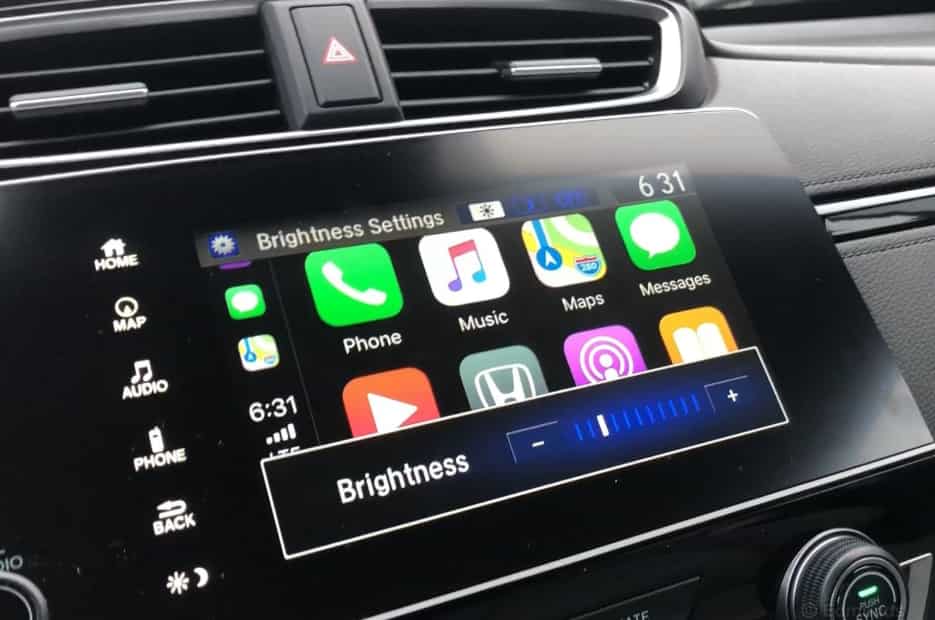
What Is the Honda CR V Brightness Glitch?
The Honda CR V brightness glitch refers to an unexpected change in the brightness of the infotainment display or digital dashboard. The screen may become too bright, too dim, or switch between brightness levels without any input from the driver. In some vehicles, the display also fails to change correctly between day mode and night mode. These issues can appear occasionally or continue every time you start the vehicle.
The problem affects more than screen visibility. A display that is too bright can create glare during night driving. On the other hand, a dim screen can make navigation, camera views, and vehicle settings difficult to read in daylight. As a result, the driver may become distracted while trying to adjust the display instead of focusing on the road.
Several symptoms can help identify this problem. The screen may remain dark even in bright sunlight. It may also stay bright after the headlights turn on. Some owners notice that the display flickers for a few seconds before returning to normal. Others find that the brightness setting resets every time they restart the vehicle. In more serious cases, the screen brightness changes randomly throughout the drive.
The brightness glitch can affect several systems inside the Honda CR V. The infotainment touchscreen is the most common component involved. However, the instrument cluster, climate control display, navigation screen, and backup camera display may also show similar behavior. When multiple displays experience the same issue, the root cause often involves shared settings, the ambient light sensor, software, or the vehicle’s electrical system.
Understanding these symptoms makes troubleshooting much easier. It also helps you narrow down the possible causes before replacing expensive parts that may still work properly.
What Causes the Honda CR V Brightness Glitch?
Several factors can cause a Honda CR V display to become too bright, too dim, or change brightness unexpectedly. Although the symptoms often look similar, the underlying cause can vary from a simple setting to a hardware problem. Understanding these possible causes makes troubleshooting faster and helps prevent unnecessary repairs.
Incorrect display settings are one of the most common reasons for brightness problems. The infotainment system stores separate brightness preferences for different driving conditions. If these settings change accidentally, the screen may no longer adjust as expected.
The ambient light sensor also plays an important role. It detects outside lighting and tells the infotainment system when to switch between day mode and night mode. Dirt, dashboard accessories, or a faulty sensor can interfere with this process and cause the display to react at the wrong time.
Software issues are another common cause. An incomplete update or temporary system error may affect how the display controls brightness. In many cases, restarting the infotainment system or installing the latest software update restores normal operation.
Electrical components can also contribute to the problem. A weak 12 volt battery or unstable voltage may cause the infotainment system to behave unpredictably. Loose wiring or damaged connectors can produce similar symptoms, especially if the brightness changes only from time to time.
If none of these solutions resolve the issue, the infotainment head unit may have an internal fault. A failing display, worn backlight, or damaged circuit board can prevent the system from controlling brightness correctly. Identifying the exact cause is the first step toward applying the most effective Honda CR V brightness glitch fix.
Honda CR V Brightness Glitch Fix: Step by Step Troubleshooting
You can fix most Honda CR V brightness problems without replacing expensive parts. The key is to check each possible cause in the correct order. This approach saves time and helps you avoid unnecessary repairs.
Start by opening the display settings on the infotainment system. Check the brightness level for both day mode and night mode. If the settings look unusual, restore the default values and test the screen again. Next, adjust the dashboard illumination control. Turn the headlights on and off to confirm that the display responds correctly in different lighting conditions.
If the problem continues, inspect the ambient light sensor. Remove any objects that may block the sensor, including phone mounts, dashboard covers, or decorative accessories. Wipe the sensor with a soft cloth and test the display in both bright sunlight and low light. A clean sensor can often restore normal brightness control.
The next step is to restart the infotainment system and check for available software updates. Installing the latest software may correct display bugs and improve system stability. If the issue appeared after a recent update, resetting the display settings can also help restore normal operation.
Finally, inspect the vehicle’s electrical system. A weak 12 volt battery, loose wiring, or poor electrical connections can affect the infotainment display. If the brightness still changes without warning after completing every step, the head unit may have an internal fault. At that point, a professional inspection is the safest option. Following this troubleshooting process allows you to identify the real cause and apply the most effective Honda CR V brightness glitch fix.
Permanent Solutions Based on the Root Cause
A temporary fix may restore normal screen brightness for a short time, but the problem often returns if the root cause remains. For that reason, you should match the solution to the specific fault instead of replacing parts without proper diagnosis.
If incorrect display settings caused the issue, restore the default configuration and adjust the brightness again. Save separate preferences for day mode and night mode if your Honda CR V supports this feature. After making the changes, restart the infotainment system to confirm that the settings remain unchanged.
If the ambient light sensor fails to detect changing light conditions, inspect the area around the sensor. Remove any objects that block its view and clean the surface with a soft cloth. If the sensor still responds incorrectly after cleaning, replacing the sensor is usually the most reliable solution.
Software related problems often require an official system update. Install the latest infotainment software available for your vehicle. If the problem started after an update, perform a factory reset only after backing up your personal settings. This process can remove corrupted files that affect brightness control.
Electrical faults require a different approach. Test the 12 volt battery and inspect the charging system to ensure they provide stable voltage. Tighten loose battery terminals and repair damaged wiring whenever necessary. Stable electrical power helps the infotainment system operate as designed.
If every troubleshooting step fails, the infotainment head unit may have an internal hardware fault. In this situation, professional diagnosis is the safest option. Repairing or replacing the head unit can permanently eliminate recurring brightness problems and restore normal display performance.
DIY Repair or Visit a Honda Dealer?
Many Honda CR V brightness problems have simple solutions that owners can handle at home. If the issue is related to display settings, the ambient light sensor, or a temporary software error, you can usually fix it with basic troubleshooting. These solutions require little time and do not involve special tools. They also help you avoid unnecessary repair costs.
Before scheduling a service appointment, complete the basic checks described in this guide. Adjust the display brightness, inspect the ambient light sensor, restart the infotainment system, and install any available software updates. If the display returns to normal after one of these steps, no further repairs are usually required.
However, some problems need professional attention. A screen that flickers constantly, turns black, or changes brightness without any clear pattern may indicate a hardware or electrical fault. Loose wiring, unstable voltage, or a failing infotainment head unit often require specialized diagnostic equipment. Attempting to repair these components without experience can lead to additional damage.
Warranty coverage is another factor to consider. If your Honda CR V is still under warranty, contact an authorized Honda dealer before replacing any electronic component. The dealer can inspect the system, verify the cause of the problem, and determine whether the repair qualifies for warranty service. This approach may save both time and money.
Choosing between a DIY repair and professional service depends on the symptoms. Simple software or setting related issues often have quick solutions. Persistent electrical or hardware faults should always receive a complete inspection. A proper diagnosis ensures that you apply the correct Honda CR V brightness glitch fix instead of replacing parts that still function normally.
How to Prevent Future Brightness Problems
Preventing display brightness issues is often easier than fixing them. A few simple maintenance habits can keep the infotainment system working properly and reduce the chance of future problems.
Keep the ambient light sensor clean and free from obstructions. Avoid placing phone holders, dashboard covers, or decorative accessories near the sensor. Even a small object can affect how the system detects surrounding light and adjusts screen brightness.
Keep your infotainment software up to date. Honda regularly releases software updates that improve system stability and correct known bugs. Installing these updates can prevent display glitches and improve overall performance.
Pay attention to your vehicle’s electrical system. Replace a weak 12 volt battery before it begins to affect electronic components. Check the battery terminals for corrosion and make sure all electrical connections remain clean and secure. A stable power supply helps the infotainment system perform consistently.
Choose aftermarket accessories carefully. Low quality chargers, adapters, or electronic devices can interfere with the vehicle’s electrical system. Whenever possible, use accessories that meet Honda’s recommendations and disconnect any device that causes unexpected display behavior.
Finally, monitor the display after every software update or repair. If you notice unusual brightness changes, inspect the system immediately instead of waiting for the problem to become worse. Early diagnosis often prevents minor issues from developing into expensive repairs. Regular maintenance and careful observation remain the most effective ways to avoid future Honda CR V brightness problems.
Frequently Asked Questions
Why does my Honda CR V screen become too dim during the day?
The most common causes include incorrect display settings, a blocked ambient light sensor, or software issues. Start by checking the brightness settings and cleaning the sensor before investigating more complex problems.
Why is my Honda CR V display too bright at night?
This usually happens when the system does not switch correctly to night mode. An obstructed ambient light sensor, incorrect illumination settings, or outdated infotainment software may prevent the display from adjusting automatically.
Can a weak 12 volt battery cause brightness problems?
Yes. An unstable power supply can affect the infotainment system and other electronic components. If the battery no longer provides consistent voltage, the display may flicker or change brightness unexpectedly.
Will a factory reset fix the brightness glitch?
A factory reset can solve problems caused by corrupted software or incorrect settings. However, it will not repair a faulty sensor, damaged wiring, or a failing infotainment head unit.
When should I visit a Honda dealer?
You should seek professional assistance if the screen continues to flicker, remains completely black, or changes brightness after you complete every troubleshooting step. A qualified technician can diagnose electrical faults and confirm whether the head unit requires repair or replacement.
Conclusion
Finding the right Honda CR V brightness glitch fix begins with identifying the real cause of the problem. In many cases, a simple adjustment to the display settings, a clean ambient light sensor, or a software update restores normal screen brightness. These basic checks require little time and often solve the issue without expensive repairs.
If the problem continues, inspect the electrical system and consider the condition of the infotainment head unit. Persistent brightness changes, screen flickering, or repeated display failures usually indicate a deeper fault that requires professional diagnosis. Addressing these issues early can prevent additional damage and reduce long term repair costs.
By following the troubleshooting steps in this guide, you can diagnose the problem with confidence and choose the most effective solution. Regular software updates, proper vehicle maintenance, and routine inspection of the electrical system also help prevent future display issues. With the right approach, you can keep your Honda CR V infotainment system performing reliably and enjoy a safer, more comfortable driving experience.