Modern vehicles are becoming smarter every year, and advanced driver assistance systems now play a significant role in improving road safety. Among these technologies, Honda Lane Departure Warning is one of the most valuable features included in the Honda Sensing suite. Instead of taking control of the vehicle, this intelligent system monitors your position within the lane and alerts you when your vehicle begins to drift unintentionally. As a result, drivers have more time to react before a minor mistake develops into a serious accident.
Many Honda owners recognize the warning symbol on the dashboard but are still unsure how the feature actually works. Others wonder why the system sometimes fails to provide an alert or suddenly displays an error message. It is also common to confuse Honda Lane Departure Warning with Lane Keeping Assist System because both features rely on the same forward facing camera. Although they work together, they serve different purposes and respond differently while driving.
Understanding how Honda Lane Departure Warning operates is essential for getting the most from your vehicle’s safety technology. Like any driver assistance feature, it performs best under specific conditions and has certain limitations that every driver should know. Weather conditions, faded lane markings, windshield damage, or an improperly calibrated camera can all affect its performance.
This comprehensive guide explains everything you need to know about Honda Lane Departure Warning. You will learn how the system detects lane markings, when it activates, the benefits it provides, its most common problems, and the practical solutions that can restore normal operation. Whether you already own a Honda or are considering purchasing one equipped with Honda Sensing, this guide will help you understand how to use the technology safely and effectively.
What Is Honda Lane Departure Warning?
Honda Lane Departure Warning is an advanced driver assistance feature that helps drivers stay in their lane. The system monitors the vehicle’s position and detects unintended lane departures. When the vehicle begins to cross a lane marking without a turn signal, it immediately alerts the driver. This early warning gives the driver time to steer back into the correct lane.
Honda includes this feature in the Honda Sensing safety suite. It works with other driver assistance technologies to improve road safety and reduce the risk of accidents. Instead of controlling the vehicle, Honda Lane Departure Warning keeps the driver informed whenever it detects unexpected lane movement.
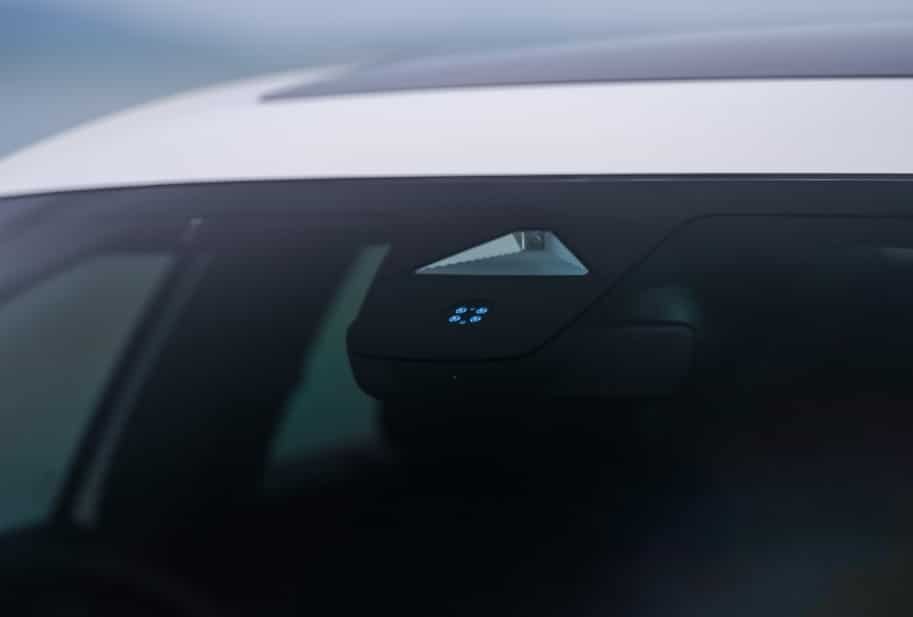
A forward facing camera mounted near the windshield continuously scans the road ahead. It identifies visible lane markings and tracks the vehicle’s position. If the camera detects that the vehicle is drifting without driver intent, the system issues a visual, audible, or vibration alert. The type of notification depends on the Honda model and equipment.
Honda Lane Departure Warning does not replace safe driving habits. It does not steer the vehicle or make driving decisions for you. The driver must stay attentive, keep both hands on the steering wheel, and respond to every warning. Think of the system as an extra layer of awareness rather than a substitute for driver control.
Many recent Honda models offer Honda Lane Departure Warning through Honda Sensing. Popular examples include the Accord, Civic, CR V, HR V, Pilot, and Passport. Features may differ by model year and trim level. Learning how Honda Lane Departure Warning works helps drivers use the technology more effectively and enjoy a safer driving experience.
How Does Honda Lane Departure Warning Work?
Honda Lane Departure Warning uses a forward facing camera to monitor the road ahead while you drive. Honda installs this camera near the top of the windshield, where it has a clear view of the lane markings. As the vehicle moves forward, the camera continuously scans both sides of the lane and compares the vehicle’s position with the detected road lines. This process happens in real time and allows the system to recognize when the vehicle begins to drift.
The system works only when it can clearly identify lane markings. Solid and broken white or yellow lines provide the best results. If the camera loses sight of these markings, the system may stop monitoring the lane until it detects them again. For this reason, road conditions play an important role in overall performance.
Honda Lane Departure Warning activates only under certain driving conditions. The vehicle must travel above the minimum operating speed specified for the model. The camera must also have a clear view of the road, and the driver should not use the turn signal. When these conditions are met, the system monitors every lane change and determines whether the movement appears intentional or accidental.
If the vehicle starts leaving its lane without a turn signal, the system immediately sends a warning. Most Honda models display a visual message on the instrument cluster. Many models also produce an audible alert or vibrate the steering wheel to capture the driver’s attention. These notifications encourage the driver to correct the steering before the vehicle fully crosses the lane marking.
Several factors can reduce the system’s accuracy. Heavy rain, dense fog, snow, or direct sunlight may limit the camera’s ability to detect lane markings. Worn road paint, construction zones, and sharp curves can also affect performance. In addition, dirt, ice, or condensation on the windshield may block the camera and prevent the system from working correctly.
Although Honda Lane Departure Warning provides valuable support, it cannot predict every driving situation. It does not detect every road edge or every lane marking. It also cannot replace an alert driver. You should always keep your hands on the steering wheel and pay close attention to surrounding traffic. When drivers understand both the capabilities and the limits of Honda Lane Departure Warning, they can use the technology more effectively and improve overall driving safety.
Honda Lane Departure Warning vs Lane Keeping Assist
Many drivers assume that Honda Lane Departure Warning and Lane Keeping Assist perform the same task. Although both features use the same forward facing camera and belong to Honda Sensing, they serve different purposes. Understanding the difference helps drivers know what to expect from each system and prevents confusion when a warning or steering input occurs.
Honda Lane Departure Warning focuses on driver awareness. The system watches the vehicle’s position within the lane and looks for signs of unintentional lane drift. If the vehicle begins to cross a lane marking without an active turn signal, it warns the driver through visual, audible, or vibration alerts. The system does not steer the vehicle back into the lane. Instead, it reminds the driver to take immediate action and regain proper lane position.
Lane Keeping Assist takes the next step by providing gentle steering support. When the camera detects clear lane markings and the vehicle remains within the operating conditions, the system can apply small steering corrections to help keep the vehicle centered. These steering inputs are smooth and limited. The driver must keep both hands on the steering wheel and remain ready to take full control at any moment.
Another feature that drivers often confuse with these systems is Road Departure Mitigation. Unlike Lane Keeping Assist, this technology focuses on preventing the vehicle from leaving the roadway completely. It monitors road edges and lane boundaries, then warns the driver or applies limited braking or steering assistance if the vehicle appears likely to leave the road. This extra protection becomes especially useful on rural roads and highways where an unintended departure could lead to a serious collision.
The biggest difference between these technologies lies in their purpose. Honda Lane Departure Warning alerts the driver. Lane Keeping Assist helps maintain the vehicle’s position within the lane. Road Departure Mitigation helps reduce the chance of leaving the roadway. Together, these systems create multiple layers of protection, but none of them replace safe driving habits or driver attention. Drivers should view them as helpful assistants rather than autonomous driving features.
Benefits of Honda Lane Departure Warning
Honda Lane Departure Warning offers more than a simple dashboard alert. It helps drivers recognize unsafe lane movement before it becomes a serious hazard. Even experienced drivers can lose focus for a brief moment. A quick glance at the navigation screen or a few seconds of fatigue may cause the vehicle to drift. The system provides an early warning that allows the driver to react before the vehicle leaves its lane.
One of the biggest advantages of Honda Lane Departure Warning is improved driver awareness. Instead of waiting until the vehicle has already crossed into another lane, the system notifies the driver as soon as it detects unintended movement. This extra awareness can reduce panic and give the driver more time to make a smooth steering correction. As a result, the vehicle is more likely to remain safely within its lane.
The feature also makes highway driving more comfortable. Long trips often require drivers to maintain the same lane for extended periods. Fatigue and reduced concentration become more common during these journeys. Honda Lane Departure Warning helps drivers stay alert by providing timely reminders whenever the vehicle begins to drift. Although it cannot prevent every mistake, it encourages safer driving habits throughout the trip.
Another important benefit is its ability to work alongside other Honda Sensing technologies. While Lane Departure Warning focuses on alerts, features such as Lane Keeping Assist, Adaptive Cruise Control, and Collision Mitigation Braking System provide additional support in different driving situations. Together, these systems improve overall vehicle safety and help drivers respond more effectively to changing road conditions.
Honda Lane Departure Warning can also increase confidence for new drivers and families. Many buyers consider advanced safety technology when choosing their next vehicle. A system that continuously monitors lane position offers extra reassurance during daily commuting, weekend travel, and long distance driving. Although the driver remains fully responsible for controlling the vehicle, this feature adds another layer of protection that supports safer and more confident driving in a wide range of road conditions.
Limitations of Honda Lane Departure Warning
Although Honda Lane Departure Warning improves driving safety, it cannot perform perfectly in every situation. The system depends on a forward facing camera, clear lane markings, and suitable weather conditions. When any of these factors change, its performance may become less reliable. Understanding these limitations helps drivers use the feature correctly and avoid unrealistic expectations.
Poor weather is one of the most common challenges. Heavy rain, snow, dense fog, and strong glare from the sun can reduce the camera’s visibility. If the camera cannot clearly detect lane markings, the system may stop monitoring the road or delay its warnings. A dirty windshield, ice buildup, or mud covering the camera area can create the same problem.
Road conditions also affect how well the system works. Faded lane markings, temporary construction zones, narrow roads, and sharp curves make it harder for the camera to identify the correct lane boundaries. On roads without visible lane markings, Honda Lane Departure Warning may not activate at all. Drivers should never expect the system to function on every type of roadway.
Another limitation involves driving behavior. The system recognizes intentional lane changes when the driver uses the turn signal. If the turn signal is activated, Honda Lane Departure Warning does not issue an alert because it assumes the lane change is planned. Likewise, sudden steering inputs or aggressive driving may reduce the system’s ability to interpret vehicle movement accurately.
Drivers should also remember that Honda Lane Departure Warning does not control the vehicle. It cannot avoid collisions, steer around obstacles, or make driving decisions. The system only provides alerts when it detects possible unintended lane departure. Every steering correction and safety decision still depends on the driver.
For the best results, drivers should treat Honda Lane Departure Warning as a helpful safety assistant rather than a replacement for attentive driving. Keeping the windshield clean, following road signs, and maintaining full concentration remain essential for safe travel. When drivers understand both the strengths and the limitations of the system, they can use it more effectively and gain the greatest safety benefit from the technology.
Common Honda Lane Departure Warning Problems
Honda Lane Departure Warning is a dependable safety feature, but it may not always operate as expected. Most problems result from road conditions, weather, or camera visibility rather than a serious vehicle fault. Understanding these common issues can help drivers identify the cause and determine whether the system needs professional attention.
One of the most common problems is a message indicating that the system is temporarily unavailable. This usually happens when the forward facing camera cannot clearly detect lane markings. Heavy rain, snow, fog, strong sunlight, or a dirty windshield can reduce the camera’s ability to monitor the road. Once visibility improves, the system often resumes normal operation.
Another frequent complaint is that the system fails to issue a warning when the vehicle drifts out of its lane. In many cases, the road lacks clear lane markings or the vehicle is traveling below the required operating speed. The system also remains inactive during intentional lane changes when the driver uses the turn signal.
Some drivers experience unexpected or false warnings. Construction zones, faded lane markings, road shadows, and unusual pavement patterns can confuse the camera. Although these alerts are usually temporary, they may reduce driver confidence if they occur repeatedly.
A warning light that stays on after starting the vehicle may indicate a camera calibration issue, software problem, or electrical fault. If cleaning the windshield and restarting the vehicle do not solve the problem, the system should be inspected by a qualified Honda technician. Prompt diagnosis helps restore proper operation and ensures Honda Lane Departure Warning continues to provide reliable support on the road.
How to Fix Honda Lane Departure Warning Problems
Most Honda Lane Departure Warning problems have simple solutions and do not require major repairs. Before visiting a service center, drivers can perform several basic checks to determine whether road conditions or vehicle settings are causing the issue.
Start by inspecting the windshield, especially the area in front of the forward facing camera. Dirt, dust, water spots, ice, or insect debris can block the camera’s view and prevent it from detecting lane markings accurately. Cleaning the windshield often restores normal operation within a short time.
Next, confirm that the system is turned on through the vehicle settings. Some Honda models allow drivers to disable Lane Departure Warning manually. If the feature has been switched off, it will not monitor lane position or provide alerts until it is enabled again.
Road conditions also play an important role. Test the system on a well marked road during clear weather. Visible lane markings and good lighting help the camera perform more accurately. If the feature works normally in these conditions, poor visibility or faded road markings likely caused the earlier problem.
If the warning light remains on or the system continues to malfunction, restart the vehicle. Temporary software errors may disappear after a complete restart. When the problem persists, the vehicle may require a software update, camera calibration, or inspection of the electrical system.
Drivers should not attempt to adjust or recalibrate the camera themselves. Proper calibration requires specialized equipment and precise measurements. A qualified Honda technician can diagnose the fault, perform any necessary repairs, and verify that the system operates correctly. Regular maintenance and prompt attention to warning messages help keep Honda Lane Departure Warning working reliably and ensure it continues to support safe driving.
How to Turn On or Off Honda Lane Departure Warning
Honda allows drivers to customize Lane Departure Warning through the vehicle settings. Although the exact steps may vary by model year and trim level, the process remains similar across most vehicles equipped with Honda Sensing.
To turn on Honda Lane Departure Warning, start the vehicle and access the Driver Information Interface or the infotainment display. Open the vehicle settings menu and locate the Driver Assist or Honda Sensing section. Select Lane Departure Warning and confirm that the feature is enabled. Once activated, the system automatically monitors lane position whenever the driving conditions meet its operating requirements.
If you prefer not to receive lane departure alerts, you can disable the feature using the same settings menu. Some Honda models also provide a dedicated safety button that allows quick access to Honda Sensing features. After the system is turned off, the vehicle will no longer issue visual, audible, or vibration warnings when it detects unintended lane departure.
Keep in mind that disabling Honda Lane Departure Warning does not affect other Honda Sensing technologies unless you turn them off separately. Features such as Adaptive Cruise Control, Lane Keeping Assist, and Collision Mitigation Braking System continue to operate according to their individual settings.
Many drivers leave Honda Lane Departure Warning enabled because it provides an extra layer of protection during daily commuting and highway travel. If you disable the system temporarily, consider turning it back on before long trips to take full advantage of the vehicle’s built in safety technology.
How to Reset Honda Lane Departure Warning
If Honda Lane Departure Warning does not work properly, a simple reset may restore normal operation. In many cases, the issue results from temporary software glitches or poor driving conditions rather than a hardware failure. Before requesting professional service, drivers can try a few basic troubleshooting steps.
Begin by parking the vehicle safely and turning off the engine. Wait for a few minutes before restarting the vehicle. This process allows the electronic control systems to reboot and may clear temporary errors that affect Honda Lane Departure Warning.
Next, check the windshield and the area around the forward facing camera. Remove any dirt, dust, ice, or debris that could block the camera’s view. A clear camera is essential because the system depends on visible lane markings to operate correctly.
After restarting the vehicle, drive on a road with clear lane markings and good weather conditions. Make sure the system is turned on through the vehicle settings. If Honda Lane Departure Warning begins working normally, the problem was likely temporary or caused by poor visibility.
If the warning light remains on or the system continues to malfunction, a basic reset may not solve the issue. The vehicle may require a software update, camera calibration, or diagnostic inspection. This situation often occurs after replacing the windshield, repairing the front of the vehicle, or disconnecting the battery.
Avoid attempting to recalibrate the camera yourself. Honda uses specialized equipment to align the camera accurately, and incorrect calibration can reduce system performance. If the problem persists after these basic steps, schedule an inspection with an authorized Honda service center. A professional diagnosis helps restore proper operation and ensures Honda Lane Departure Warning continues to provide accurate and reliable safety alerts.
Honda Models Equipped with Lane Departure Warning
Honda Lane Departure Warning is available on many modern Honda vehicles through the Honda Sensing safety suite. Over the past several years, Honda has expanded this technology across most of its lineup to improve driver safety and meet growing demand for advanced driver assistance features. However, availability may vary depending on the model year, trim level, and market.
Popular Honda sedans such as the Civic and Accord include Honda Lane Departure Warning on many recent trims. These vehicles combine the feature with other Honda Sensing technologies to provide a safer and more comfortable driving experience for daily commuting and highway travel.
Honda also equips many sport utility vehicles with this technology. Models such as the CR V, HR V, Pilot, Passport, and Prologue offer Lane Departure Warning on most current versions. Families often choose these vehicles because they include a wide range of active safety features that help reduce driver workload during long trips.
Minivans and pickup trucks also benefit from Honda Sensing. Many Odyssey and Ridgeline models include Honda Lane Departure Warning as standard or optional equipment, depending on the trim level. Drivers should review the vehicle specifications before purchasing because feature availability can differ between model years.
If you are unsure whether your Honda includes Lane Departure Warning, check the owner’s manual, review the vehicle information display, or enter the vehicle identification number on the official Honda website. You can also contact a local Honda dealership for confirmation.
As Honda continues to expand its safety technology, Honda Lane Departure Warning has become a standard feature on many new models. Understanding whether your vehicle supports this system allows you to use its safety features more effectively and enjoy greater confidence behind the wheel.
Tips for Using Honda Lane Departure Warning Safely
Honda Lane Departure Warning works best when drivers understand both its strengths and its limitations. Following a few simple practices can improve system performance and help you get the greatest safety benefit from this technology.
Always keep the windshield clean, especially around the forward facing camera. Dirt, dust, water spots, and ice can block the camera’s view and reduce its ability to detect lane markings accurately. Regular cleaning helps the system operate more consistently in different weather conditions.
Drive on roads with clear and visible lane markings whenever possible. Honda Lane Departure Warning relies on the camera to identify lane boundaries. Faded paint, construction zones, and damaged roads can reduce detection accuracy and prevent the system from providing timely alerts.
Keep both hands on the steering wheel at all times. Honda Lane Departure Warning is a driver assistance feature, not a self driving system. It does not control the vehicle or make driving decisions. Staying alert allows you to respond immediately if the system issues a warning.
Use your turn signal before changing lanes. This simple habit improves road safety and helps the system recognize that the lane change is intentional. As a result, unnecessary warnings are less likely to occur.
Pay extra attention during heavy rain, snow, fog, or bright sunlight. These conditions may reduce camera visibility and affect system performance. If you notice that Honda Lane Departure Warning is temporarily unavailable, continue driving carefully until visibility improves.
Finally, follow your Honda maintenance schedule and install software updates when available. Routine inspections help ensure the camera and related safety systems continue to function correctly. When combined with safe driving habits, Honda Lane Departure Warning becomes a valuable tool that supports greater confidence and safety on every journey.
Frequently Asked Questions
Does Honda Lane Departure Warning work at all speeds?
No. Honda Lane Departure Warning operates only above a minimum driving speed, which varies by model and model year. The system also requires clear lane markings and suitable driving conditions to function correctly.
Why is my Honda Lane Departure Warning not working?
The most common causes include a dirty windshield, poor weather, faded lane markings, or a blocked forward facing camera. If the problem continues after cleaning the windshield and restarting the vehicle, the system may need professional inspection or camera calibration.
Can I turn off Honda Lane Departure Warning?
Yes. Most Honda models allow you to enable or disable the feature through the Driver Information Interface or the infotainment system. The exact steps depend on your vehicle model and trim level.
Is Honda Lane Departure Warning the same as Lane Keeping Assist?
No. Honda Lane Departure Warning only alerts the driver when the vehicle begins to leave its lane without a turn signal. Lane Keeping Assist provides gentle steering support to help keep the vehicle centered within the lane.
Does Honda Lane Departure Warning work at night?
Yes, it can work at night if the camera can clearly detect lane markings. However, poor lighting, heavy rain, fog, or worn road markings may reduce system performance.
Does replacing the windshield affect Honda Lane Departure Warning?
Yes. Replacing the windshield may require camera recalibration because the forward facing camera must remain precisely aligned. Without proper calibration, the system may not detect lane markings accurately.
Can Honda Lane Departure Warning prevent accidents?
The system helps reduce the risk of unintended lane departure by warning the driver early. However, it cannot prevent every accident or replace safe driving habits. Drivers must remain attentive and maintain full control of the vehicle at all times.
Conclusion
Honda Lane Departure Warning is an important safety feature that helps drivers recognize unintended lane drift before it becomes a serious risk. By using a forward facing camera to monitor lane markings, the system provides timely alerts that encourage quick and safe steering corrections. Although it does not control the vehicle, it adds an extra layer of protection during daily commuting, highway travel, and long distance driving.
To get the best performance from Honda Lane Departure Warning, drivers should keep the windshield clean, follow regular maintenance schedules, and understand the conditions that affect system accuracy. Clear lane markings, good weather, and proper camera calibration all contribute to reliable operation. Knowing the difference between Lane Departure Warning and other Honda Sensing features also helps drivers use each technology more effectively.
If you experience warning messages or inconsistent performance, start with simple troubleshooting steps such as cleaning the windshield, checking the system settings, and restarting the vehicle. When problems continue, a qualified Honda technician can diagnose the issue and restore proper operation.
As Honda continues to expand its advanced safety technologies, Honda Lane Departure Warning remains a valuable feature for drivers who want greater confidence behind the wheel. Learning how the system works, recognizing its limitations, and using it correctly will help you enjoy a safer and more comfortable driving experience. If you have questions or personal experience with Honda Lane Departure Warning, share your thoughts in the comments and join the conversation.