Wireless charging is one of the most convenient features available in modern Kia vehicles. Instead of searching for a charging cable every time you drive, you simply place your compatible smartphone on the charging pad and expect the battery to recharge automatically. When the system suddenly stops working, however, the experience quickly becomes frustrating. Your phone may refuse to charge, disconnect after only a few seconds, or display a blinking indicator that leaves you wondering what went wrong.
If your Kia wireless charging not working issue has appeared unexpectedly, you are not alone. Many Kia owners experience occasional charging problems caused by simple factors such as incorrect phone placement, incompatible phone cases, software glitches, excessive heat, or temporary communication errors between the vehicle and the device. In other situations, the problem may involve a damaged charging module, a blown fuse, or an electrical fault that requires professional attention.
The good news is that most wireless charging problems can be diagnosed and resolved without replacing any parts. Understanding how the charging system operates is the first step toward identifying the real cause instead of relying on trial and error. A systematic approach often saves both time and unnecessary repair costs.
This comprehensive guide explains why your Kia wireless charger may stop working, how to troubleshoot the problem step by step, and what you can do to prevent it from happening again. You will also learn about phone compatibility, common issues affecting specific Kia models, warning light meanings, and the situations where visiting a Kia dealership becomes the most practical solution.
How Kia Wireless Charging Works
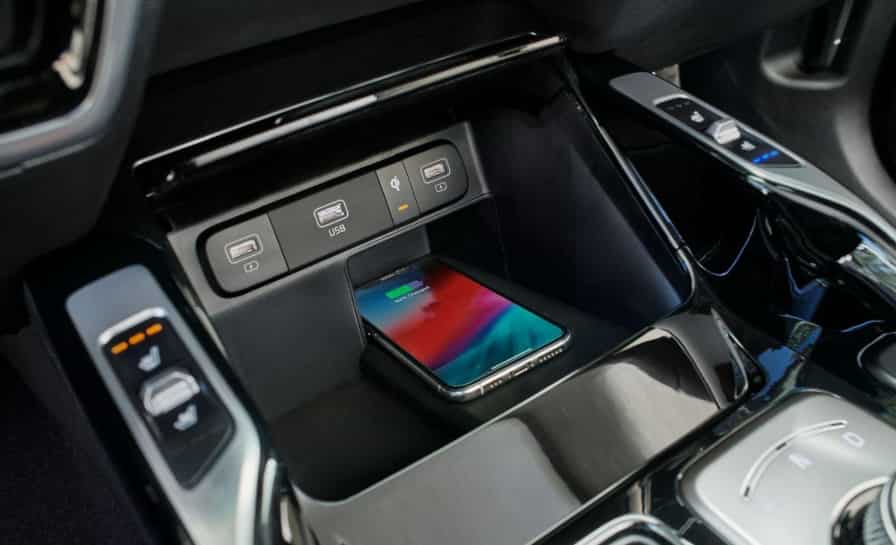
Kia wireless charging uses Qi technology to charge smartphones without a cable. When you place a compatible phone on the charging pad, the system starts transferring power through electromagnetic induction. A coil inside the vehicle creates a magnetic field. Another coil inside the phone receives this energy and converts it into battery power. This process feels simple for the driver, but it depends on several technical components working together.
The system first detects whether a Qi compatible phone is present. Once it confirms compatibility, it activates the charging process. The system also checks alignment, temperature, and safety conditions during operation. If it detects any issue, it stops charging to protect the phone and the vehicle system.
Kia also includes foreign object detection in many models. This feature blocks charging when it detects metal items like keys or coins on the pad. It helps prevent damage, but it can also cause confusion if users do not understand how it works.
Several components support the system. The charging coil sends energy. The control module manages power flow. The fuse protects the electrical circuit. Some models also connect the charging system with the infotainment software.
If any part fails or behaves incorrectly, charging may stop or become unstable. Software bugs, overheating, or poor phone placement often trigger these issues. This is why many drivers report a Kia wireless charging not working problem even when the hardware is not damaged. Understanding this system helps you identify the real cause faster and avoid unnecessary repairs.
Why Is Your Kia Wireless Charging Not Working?
A Kia wireless charging system can stop working for many different reasons. In most cases, the issue does not come from a complete hardware failure. Instead, small factors like phone placement, case interference, or temporary software glitches often interrupt the charging process. Because the system depends on precise alignment and stable communication, even minor changes can lead to failure or inconsistent performance.
One of the most common reasons is incorrect phone positioning. The charging coil inside the phone must align with the coil inside the vehicle pad. If the phone sits too far left or right, the system cannot transfer power. Road vibration can also shift the phone slightly, which leads to sudden disconnection while driving.
Phone cases also play a major role. Thick cases, especially those with metal plates or magnetic rings, often block or weaken the wireless signal. In some cases, the phone may not charge at all. Even non metal cases can reduce efficiency if they are too thick or poorly designed for Qi charging.
Foreign object interference is another frequent issue. Kia vehicles use a safety feature that stops charging when metal objects are detected on the pad. Items such as coins, keys, or credit cards can trigger this protection system. Sometimes even small hidden metal parts inside a phone case can activate it without the user realizing.
Compatibility is also important. Not all smartphones support Qi wireless charging. If the phone does not support the standard or has limited wireless charging capability, the system will not activate. Some older Android models and budget devices may fall into this category.
In many cases, the issue comes from the vehicle settings or software. Certain Kia models allow wireless charging to be enabled or disabled through the infotainment system. A software glitch or recent update can also temporarily disrupt communication between the charging pad and the system controller. Restarting the vehicle or resetting the infotainment system often resolves this type of issue.
Overheating is another key factor. Wireless charging generates heat during operation. If the temperature becomes too high, the system automatically shuts down to protect the phone and internal components. This often happens in hot climates or when the phone is running heavy applications while charging.
Electrical issues can also cause failure. A blown fuse or unstable power supply may prevent the charging pad from working completely. In some cases, the charging module itself may be damaged due to long term wear or moisture exposure.
Because so many factors can affect performance, a Kia wireless charging not working issue requires a structured troubleshooting approach. Identifying whether the cause comes from the phone, environment, or vehicle system helps you fix the problem faster and avoid unnecessary part replacement.
How to Fix Kia Wireless Charging Not Working
When your Kia wireless charging stops working, you should follow a clear troubleshooting process instead of guessing the cause. Most problems come from simple issues, so you can often fix them without visiting a repair shop. Start with the easiest checks first and move toward more technical steps if needed.
Begin by restarting your phone. This helps clear temporary software glitches that may interfere with wireless charging. Many users overlook this step, but it often restores normal charging behavior immediately.
Next, remove your phone case. Thick cases or cases with metal parts can block the wireless signal. After removing the case, place the phone directly on the charging pad and check if it starts charging. If it works, the case is the main cause.
Then make sure you position the phone correctly. Center the device on the charging pad so the internal coils align properly. Even a small shift can stop the charging process. While driving, check if movement or vibration is causing the phone to slide out of position.
You should also clean the charging pad. Dust, dirt, or small objects can interfere with the connection. Use a soft cloth and make sure the surface is completely clear before testing again.
Check the vehicle settings next. Some Kia models allow you to enable or disable wireless charging through the infotainment system. If the feature is turned off, the system will not work even if everything else is fine.
Test another Qi compatible phone if possible. This helps you confirm whether the issue comes from your device or the vehicle system. If the second phone works, the original phone may have compatibility or hardware problems.
If the charging still fails, inspect the vehicle power system. A blown fuse or unstable electrical supply can disable the charging pad completely. In this case, you may need professional assistance.
Finally, restart the infotainment system or perform a soft reset. This can fix software-related issues that affect communication between the vehicle and the charging module. If none of these steps work, the charging module itself may be faulty and require inspection at a Kia service center.
Following this structured process helps you resolve most cases of Kia wireless charging not working quickly and avoids unnecessary repair costs.
Kia Models That May Experience Wireless Charging Issues
Wireless charging problems do not affect all Kia models in the same way. Some vehicles show more frequent issues due to design differences, software behavior, or charging pad placement. Understanding model specific patterns helps you identify whether the issue is normal behavior or a potential fault.
The Kia Sportage often reports wireless charging interruptions caused by phone movement. The charging pad sits in a position that is sensitive to vibration, so the phone may shift slightly while driving. This leads to intermittent charging or sudden disconnection.
The Kia Sorento can experience reduced charging efficiency when large phones are used. The charging area may not fully align with bigger devices, especially when thick cases are installed. This creates unstable charging performance even when the system is working correctly.
The Kia Telluride has a wider cabin layout, but some users still report alignment issues. Larger phones may sit unevenly on the pad, which affects coil positioning and leads to inconsistent charging behavior.
The Kia EV6 sometimes shows software related charging issues. In some cases, infotainment updates or system resets can temporarily disrupt wireless charging functionality. These issues are often resolved through system reinitialization or software updates from the dealer.
The Kia Carnival may experience sensitivity issues with foreign object detection. Small items near the charging pad can trigger safety shutdown, even when the phone is properly placed.
The Kia K5 generally performs well, but some users report indicator light confusion. The system may show charging status incorrectly even when power transfer is unstable or interrupted.
Across all models, the most common cause of a Kia wireless charging not working issue is still related to phone positioning, case interference, or compatibility rather than hardware failure. However, model specific behavior can influence how often these issues appear and how noticeable they become during daily use.
Phone Compatibility Problems
Phone compatibility is one of the most overlooked reasons behind a Kia wireless charging not working issue. Even if the vehicle system works correctly, the charging process will fail if the phone does not fully support Qi wireless charging or if external accessories interfere with the connection.
Most modern iPhones support Qi wireless charging starting from iPhone 8 and newer models. However, performance can vary depending on the case used. MagSafe cases, for example, may interfere with alignment on some Kia charging pads. While MagSafe works well with Apple accessories, it does not always align properly with non magnetic vehicle charging systems.
Samsung Galaxy devices generally perform better with Kia wireless chargers because many models are optimized for Qi standards. However, thick protective cases or built in metal plates can still block the signal. In some cases, fast wireless charging may not activate, and the phone may only charge at a slower rate or not at all.
Google Pixel devices also support Qi charging, but older models may have weaker coil alignment sensitivity. This can lead to inconsistent charging, especially when the phone is not placed exactly at the center of the pad.
Another important factor is Qi versus Qi2 compatibility. Newer Qi2 devices offer improved magnetic alignment, but not all Kia vehicles fully support this standard yet. This can create a mismatch where the phone expects stronger alignment support than the vehicle provides.
Accessories also play a major role in compatibility issues. Magnetic rings, pop sockets, and wallet style cases often disrupt charging stability. Even when the phone technically supports wireless charging, these accessories can reduce efficiency or completely block energy transfer.
Because of these factors, many users incorrectly assume there is a hardware failure in the vehicle when the real issue comes from the phone setup. When troubleshooting a Kia wireless charging not working problem, testing with a bare phone without any case or accessories is one of the most effective ways to confirm compatibility.
Why Your Kia Wireless Charger Keeps Disconnecting
A Kia wireless charger that keeps disconnecting is usually caused by instability in alignment, temperature changes, or external interference rather than a complete system failure. This issue often appears when the phone starts charging normally but then stops after a few seconds or minutes. Understanding the reason behind this behavior helps you fix it more effectively.
One of the main causes is phone movement. Even a slight shift on the charging pad can break the alignment between the coils. This happens frequently while driving on rough roads or making sharp turns. When the alignment breaks, the system immediately stops charging to prevent energy loss.
Heat is another important factor. Wireless charging generates heat during operation. If the phone or charging pad becomes too warm, the system automatically pauses charging to protect both devices. This is especially common in hot climates or when the phone is running heavy apps like navigation or streaming services.
Phone cases can also cause intermittent charging. Thick cases, metal plates, or magnetic attachments can weaken the connection. In some cases, the phone may start charging but lose connection once the system detects instability.
Battery optimization settings on the phone may also interrupt charging. Some smartphones automatically limit or pause wireless charging when background processes increase power consumption. This can create the impression of a faulty charger even when the system works normally.
Software glitches inside the vehicle infotainment system can also play a role. Temporary errors may disrupt communication between the charging module and the phone. In many cases, restarting the vehicle or resetting the infotainment system resolves the issue quickly.
Foreign object detection can also trigger disconnection. Small metallic items near or under the phone can confuse the system and cause it to shut down charging for safety reasons.
Because of these combined factors, a Kia wireless charging not working issue that appears as intermittent charging is often solved by repositioning the phone, removing the case, or allowing the system to cool down before retrying.
Wireless Charging Light Meanings
The wireless charging indicator in Kia vehicles helps you understand the current status of the charging system. When the system works normally, the light provides clear feedback about whether the phone is charging, paused, or blocked by an error. However, many drivers misinterpret these signals, which leads to confusion about a possible Kia wireless charging not working issue.
A green light usually means the phone is charging correctly. In this state, the system has successfully detected a compatible device, and power transfer is active. The phone should continue charging as long as it remains properly aligned and no external issues occur.
An orange light often indicates that the system has detected a phone but is not delivering stable charging. This can happen when alignment is slightly off, the phone case is too thick, or the system is limiting power due to heat. In some cases, it also appears when charging begins but cannot maintain a stable connection.
A blinking orange light typically signals a problem or interruption. The system may detect a foreign object, poor alignment, or an incompatible device. It can also appear when the charging pad overheats or when the system temporarily shuts down charging for safety reasons.
No indicator light usually means the system is not active. This may happen if wireless charging is turned off in the vehicle settings, the fuse is damaged, or the charging module is not receiving power. It can also indicate a deeper electrical issue that requires inspection.
Understanding these signals helps you quickly identify whether your Kia wireless charging not working problem is related to a simple positioning issue or a more technical fault. Instead of guessing, you can use the indicator light as a diagnostic tool to guide your next troubleshooting step.
How to Prevent Wireless Charging Problems
Preventing wireless charging issues in your Kia is much easier than fixing them after they occur. Most problems develop gradually due to small habits, environmental conditions, or lack of maintenance. By following a few simple practices, you can keep the system stable and reduce the chances of experiencing a Kia wireless charging not working issue.
Start by keeping the charging pad clean at all times. Dust, dirt, or small debris can interfere with the connection between the phone and the charging coil. A quick wipe with a soft cloth every few days helps maintain stable performance and prevents unnecessary interruptions.
You should also avoid placing metal objects on the charging pad. Items like coins, keys, or credit cards can trigger the foreign object detection system and stop charging immediately. Even small metallic parts hidden inside phone cases can create the same problem.
Using a compatible phone is also important. Make sure your device supports Qi wireless charging and works well with automotive charging systems. If possible, test your phone without a case first to confirm stable charging performance before adding accessories back.
Phone cases play a major role in charging stability. Thin, non metal cases usually work fine, but thick cases or cases with magnetic components often reduce efficiency. Removing the case during charging is one of the simplest ways to improve performance.
Temperature management is another key factor. Wireless charging naturally generates heat, and excessive temperature can force the system to pause or stop charging. Parking in shaded areas and avoiding heavy phone usage during charging helps reduce overheating risks.
Software updates also matter. Kia infotainment systems occasionally receive updates that improve charging stability. Keeping your vehicle software up to date ensures better compatibility and fewer unexpected glitches.
Finally, always position your phone carefully on the charging pad. Centering the device correctly ensures proper coil alignment and stable energy transfer. A small adjustment can make a significant difference in charging consistency.
By applying these preventive steps, you can significantly reduce the chances of facing a Kia wireless charging not working problem and ensure a smoother, more reliable charging experience every time you drive.
When Should You Replace the Wireless Charging Module?
In most cases, a Kia wireless charging not working issue does not require immediate hardware replacement. However, there are situations where the charging module itself may be faulty. If you have already tried all basic troubleshooting steps and the system still does not respond, the problem may come from internal components.
A strong sign of hardware failure is when the charging pad shows no indicator light at all, even when the vehicle is on and wireless charging is enabled in settings. This often points to a blown fuse, damaged wiring, or a failed charging module.
Another warning sign is inconsistent behavior across multiple compatible phones. If different Qi enabled devices all fail to charge, the issue is likely not related to the phone. Instead, the vehicle system itself may need inspection.
Overheating damage or long term wear can also reduce performance. In some cases, the charging pad may still detect a phone but fail to deliver stable power. When this happens frequently, replacement may be more cost effective than repeated repairs.
If your vehicle is still under warranty, you should contact an authorized Kia service center before attempting any repairs. Many wireless charging issues can be resolved under warranty coverage depending on the cause.
Frequently Asked Questions
Why does my Kia wireless charger keep blinking orange?
A blinking orange light usually means the system detects an error. This can be caused by misalignment, overheating, foreign objects, or incompatible phone cases.
Can I use MagSafe with Kia wireless charging?
Yes, but results vary. Some MagSafe cases can interfere with alignment and reduce charging efficiency on Kia pads.
Why does my Kia wireless charging stop after a few minutes?
This is often caused by overheating, phone movement, or power optimization settings on the device.
Does wireless charging work with all Kia models?
Most modern Kia models include wireless charging, but performance and placement vary depending on the vehicle design.
Can software updates fix wireless charging issues?
Yes, in some cases. Infotainment updates can improve stability and fix communication glitches between the system and the phone.
Conclusion
Wireless charging in Kia vehicles is designed to provide convenience, but it relies on precise alignment, compatible devices, and stable system communication. When problems occur, they are usually caused by simple factors such as phone positioning, case interference, overheating, or temporary software glitches rather than permanent hardware failure.
By understanding how the system works and following a structured troubleshooting process, you can quickly resolve most issues without expensive repairs. Regular maintenance, proper phone usage, and keeping the system clean and updated will help prevent future charging problems.
If you continue to experience a Kia wireless charging not working issue after trying all solutions, a professional inspection is the best next step to ensure the system is functioning correctly and safely.