Have you recently changed the oil in your Toyota 4Runner only to find that the maintenance light is still illuminated on the dashboard? Many 4Runner owners experience this situation and assume something is wrong with the vehicle. In reality, the maintenance required light is simply a reminder system designed to notify drivers when routine service is due.
While the light itself is not usually a sign of a mechanical problem, leaving it on can be annoying and may make it difficult to know when the next maintenance interval arrives. Fortunately, resetting the maintenance light on a Toyota 4Runner is a quick process that can typically be completed in less than a minute without special tools or a trip to the dealership.
The exact reset procedure can vary slightly depending on the model year and whether your 4Runner uses a traditional ignition key or a push-button start system. Understanding the correct steps for your vehicle is essential to ensure the maintenance reminder resets properly.
In this guide, you will learn how to reset the maintenance light on Toyota 4Runner models from all generations. We will also explain what the maintenance light means, when it should be reset, common troubleshooting tips, and how it differs from the check engine light. By the end of this article, you will be able to confidently reset the reminder and keep your maintenance records accurate.
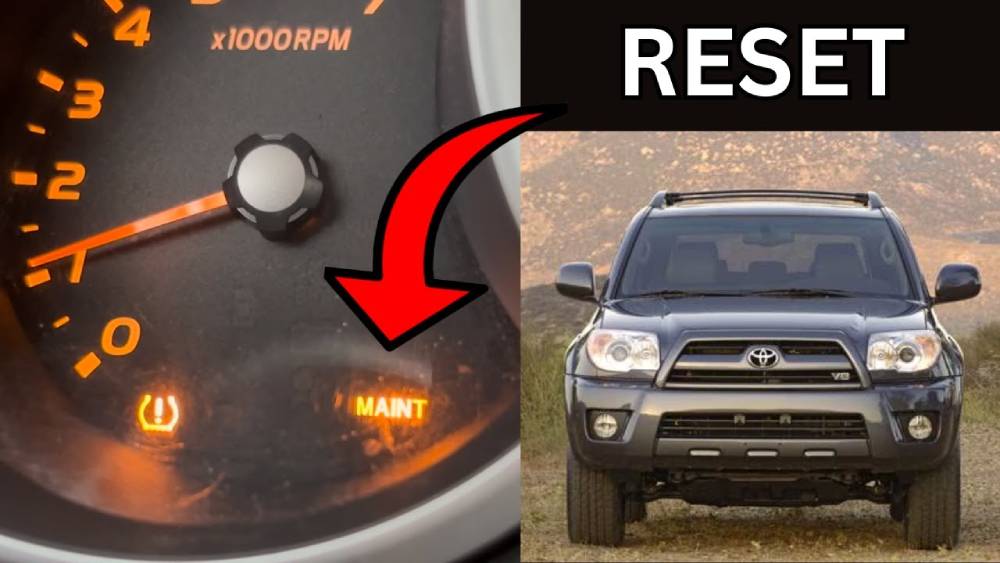
What Does the Maintenance Light Mean on a Toyota 4Runner?
The maintenance light on a Toyota 4Runner is a built in reminder system that helps owners stay on schedule with routine vehicle maintenance. Unlike many warning indicators that signal a potential malfunction, the maintenance required light is triggered by mileage intervals rather than a detected mechanical issue.
In most Toyota 4Runner models, the maintenance light illuminates approximately every 5,000 miles. This reminder is designed to encourage drivers to perform essential services such as oil changes, tire rotations, fluid inspections, and other routine maintenance tasks that contribute to the vehicle’s long term reliability.
Many drivers mistakenly believe that the maintenance light indicates a serious engine problem. However, this light serves only as a service reminder. Once the recommended maintenance has been completed, the light should be manually reset so the system can begin tracking the next maintenance interval.
It is important to understand the difference between the maintenance light and the check engine light. The maintenance light is based on mileage and scheduled service intervals, while the check engine light is connected to the vehicle’s onboard diagnostic system and may indicate an actual engine or emissions related issue that requires further inspection.
Understanding the purpose of the maintenance light helps Toyota 4Runner owners avoid unnecessary concern while ensuring their vehicles continue to receive timely maintenance.
When Should You Reset the Maintenance Light?
The maintenance light should only be reset after the recommended maintenance service has been completed. Resetting the light without performing the necessary maintenance can lead to missed service intervals and increase the risk of long term wear on critical vehicle components.
The most common reason to reset the maintenance light is after an oil change. Since many Toyota 4Runner models are programmed to display the maintenance reminder at regular mileage intervals, the light often remains illuminated even after fresh oil has been installed until the system is manually reset.
In addition to oil changes, the maintenance light may be reset following other scheduled services. These services can include tire rotations, fluid level inspections, brake inspections, air filter replacements, and manufacturer recommended maintenance procedures outlined in the owner’s manual.
Drivers should avoid resetting the maintenance reminder simply to turn off the dashboard light. Doing so eliminates an important reminder that helps track future maintenance needs. Over time, skipping scheduled service can negatively affect engine performance, fuel efficiency, and overall vehicle longevity.
Maintaining accurate service records and resetting the maintenance light only after completing the required maintenance ensures that your Toyota 4Runner remains reliable and performs at its best for years to come.
Quick Reset Method for Most Toyota 4Runner Models
If you need a fast solution, the following method works for many Toyota 4Runner models. Before beginning, make sure the vehicle is parked safely and the engine is turned off.
Step 1: Turn the ignition switch to the OFF position.
Step 2: Press and hold the Trip or Odometer button located on the instrument panel.
Step 3: While continuing to hold the button, turn the ignition to the ON position without starting the engine. For push button start models, press the Start button twice without pressing the brake pedal.
Step 4: Keep holding the Trip or Odometer button. You may notice a series of dashes or countdown indicators appear on the dashboard display.
Step 5: Continue holding the button until the display returns to normal and the maintenance light turns off.
Step 6: Release the button and start the vehicle to verify that the maintenance reminder has been successfully reset.
If the maintenance light remains illuminated after following these steps, you may need to use the specific reset procedure for your model year, which is covered in the next section.
How to Reset Maintenance Light on Toyota 4Runner (2010–Present)
Toyota 4Runner models manufactured from 2010 to the present use a slightly updated maintenance reminder system, but the reset process remains straightforward. Depending on the trim level and model year, your vehicle may have either a traditional ignition key or a push button start system.
For models equipped with a traditional ignition key, begin by turning the key to the OFF position. Press and hold the Trip button on the dashboard. While holding the button, turn the ignition key to the ON position without starting the engine. Continue holding the Trip button as the display shows a countdown sequence or a series of dashes. Once the countdown completes and the odometer reading reappears, release the button. The maintenance light should now be reset.
For push button start models, ensure the vehicle is completely off. Press and hold the Trip button. Without pressing the brake pedal, press the Start button twice to enter ignition mode. Continue holding the Trip button until the maintenance reset sequence completes. When the display returns to normal, release the button and start the vehicle to verify the reset.
If the maintenance reminder remains illuminated, repeat the process carefully and ensure the correct odometer screen is selected before beginning the procedure. In many cases, selecting Trip A instead of the total odometer reading can prevent the reset from working correctly.
How to Reset Maintenance Light on Toyota 4Runner (2003–2009)
Toyota 4Runner models produced between 2003 and 2009 use a similar maintenance reminder system, although the instrument cluster layout differs from newer generations.
To reset the maintenance light, insert the key and turn the ignition to the ON position. Press the Trip button repeatedly until the odometer displays the total vehicle mileage rather than Trip A or Trip B. Turn the ignition back to OFF.
Next, press and hold the Trip button while turning the ignition back to the ON position. Continue holding the button as the display begins a countdown sequence. Depending on the model year, a series of zeros or dashes may appear on the display.
Do not release the button until the countdown is complete and the normal odometer reading returns. Once finished, release the button and turn the ignition off. Start the vehicle and verify that the maintenance required light is no longer displayed.
One of the most common mistakes during this procedure is attempting the reset while the display is showing Trip A or Trip B. Another frequent issue is releasing the Trip button too early before the countdown has fully completed. Following the steps carefully typically resolves these problems.
How to Reset Maintenance Light on Toyota 4Runner (1996–2002)
Earlier Toyota 4Runner models feature a simpler dashboard design compared to later generations. While maintenance reminder systems varied slightly across model years, the reset procedure remains relatively easy to perform.
Begin by locating the odometer reset button on the instrument cluster. Turn the ignition key to the OFF position. Press and hold the reset button while turning the key to the ON position. Continue holding the button for several seconds until the maintenance reminder indicator clears or begins flashing before turning off completely.
Some model years may require additional time holding the button before the reset is accepted. If the maintenance light does not reset immediately, repeat the process and ensure the button remains depressed throughout the entire procedure.
After completing the reset, start the engine and confirm that the maintenance reminder is no longer visible. If the light continues to appear, consult the owner’s manual for model specific instructions or inspect the vehicle for any electrical issues that may interfere with the reset process.
Although these older Toyota 4Runner models are known for their durability and simplicity, keeping track of regular maintenance remains just as important. Resetting the maintenance reminder after completing service helps maintain an accurate maintenance schedule and ensures the vehicle continues operating reliably.
Toyota 4Runner Maintenance Light Won’t Reset?
In most cases, the maintenance light can be reset in less than a minute. However, some owners may find that the reminder remains illuminated even after following the reset procedure. Fortunately, several common causes can usually be identified and corrected quickly.
The first thing to check is whether the correct procedure was followed for your specific model year. Toyota has made small changes to dashboard systems over different generations of the 4Runner, and using the wrong method may prevent the reset from working properly.
Another common issue involves the odometer display. Many Toyota 4Runner models require the total mileage screen to be displayed before initiating the reset process. Attempting the reset while Trip A or Trip B is selected may cause the procedure to fail.
Releasing the Trip button too early is another frequent mistake. The button must remain pressed until the countdown sequence finishes and the normal odometer display returns. Even releasing it a second too soon can interrupt the process.
Battery related issues can also affect dashboard electronics. If the vehicle recently experienced a weak battery, battery replacement, or electrical interruption, the instrument cluster may not respond normally. In these situations, repeating the reset procedure after ensuring the battery is fully charged may solve the problem.
If the maintenance light still refuses to reset after several attempts, there could be an issue with the instrument cluster, dashboard controls, or electronic systems. Professional diagnosis from a qualified technician or Toyota dealership may be necessary.
Maintenance Required Light vs Check Engine Light
Many drivers confuse the maintenance required light with the check engine light because both indicators appear on the dashboard. Despite their similar appearance, they serve very different purposes.
The maintenance required light is a mileage based reminder that alerts drivers when routine service is due. It does not monitor engine performance or vehicle health. Instead, it tracks driving distance and activates at predetermined service intervals.
The check engine light, on the other hand, is connected to the vehicle’s onboard diagnostic system. This warning light appears when the computer detects a fault related to the engine, emissions system, fuel system, sensors, or other critical components.
A maintenance light typically indicates that services such as an oil change or tire rotation should be performed. In contrast, a check engine light may signal problems ranging from a loose gas cap to more serious mechanical issues requiring immediate attention.
Resetting the maintenance light is usually a simple manual procedure that does not require special tools. Resetting a check engine light often requires diagnosing and repairing the underlying problem before clearing the fault code with a scan tool.
Understanding this distinction can help Toyota 4Runner owners avoid unnecessary worry while also recognizing when professional inspection is truly needed.
Toyota 4Runner Maintenance Schedule Overview
Following Toyota’s recommended maintenance schedule is one of the best ways to maximize the lifespan and reliability of your 4Runner. The maintenance reminder system is designed to support this schedule by notifying drivers when service is due.
At approximately every 5,000 miles, Toyota generally recommends a tire rotation along with a basic inspection of fluids, brakes, steering components, and other critical systems. These inspections help identify minor issues before they become costly repairs.
At around 10,000 miles, many Toyota 4Runner models require an engine oil and oil filter replacement in addition to the standard inspection procedures. Regular oil changes are essential for protecting engine components and maintaining optimal performance.
By 15,000 miles, additional inspections may be recommended, including checks of the cooling system, suspension components, and cabin air filter. These services help ensure continued reliability and comfort.
At 30,000 miles, a more comprehensive maintenance visit is often required. This may include detailed inspections, fluid replacements, filter replacements, and other manufacturer recommended services depending on the model year and driving conditions.
Consulting your owner’s manual remains the best way to determine the exact maintenance requirements for your specific Toyota 4Runner. Adhering to these intervals can improve fuel efficiency, reduce repair costs, and help preserve the vehicle’s resale value.
Frequently Asked Questions
Can I reset the maintenance light myself?
Yes. Most Toyota 4Runner owners can reset the maintenance light in less than a minute using the Trip or Odometer button without any specialized equipment.
Will resetting the maintenance light erase diagnostic trouble codes?
No. Resetting the maintenance reminder only clears the service notification. It does not erase diagnostic trouble codes or affect the check engine light.
Why did the maintenance light come back on after resetting?
The light may return if the reset procedure was not completed correctly. It can also reappear when the next scheduled maintenance interval is reached.
Is it safe to drive with the maintenance light on?
In most situations, yes. The maintenance light is a service reminder rather than a fault warning. However, the recommended maintenance should be completed as soon as possible.
Do all Toyota 4Runner model years use the same reset procedure?
No. While the general process is similar, individual steps may vary depending on the generation, dashboard design, and ignition system used in your vehicle.
Conclusion
Knowing how to reset the maintenance light on a Toyota 4Runner is a simple but valuable skill for any owner. Whether you drive an older model from the late 1990s or a newer generation equipped with a push button start system, the reset process typically takes only a few moments once the required maintenance has been completed.
It is important to remember that the maintenance required light is designed as a service reminder rather than a warning of a mechanical failure. Its primary purpose is to help drivers stay on track with routine maintenance such as oil changes, tire rotations, and vehicle inspections. By resetting the light after completing these services, you can maintain an accurate maintenance schedule and avoid confusion when the next service interval arrives.
If the maintenance light does not reset successfully, carefully review the procedure for your specific model year and ensure the correct odometer setting is selected before beginning the process. In rare cases, persistent reset issues may indicate an electrical or instrument cluster problem that requires professional attention.
Regular maintenance remains one of the most effective ways to extend the life of your Toyota 4Runner, improve performance, and reduce the likelihood of expensive repairs. By following the manufacturer’s recommended service schedule and properly resetting the maintenance reminder, you can keep your 4Runner running reliably for many years and miles to come.