Have you ever turned on your Jeep only to find that the radio is frozen, the touchscreen is not responding, or your Bluetooth connection suddenly stops working? These frustrating issues are more common than many Jeep owners realize, especially with modern infotainment systems that control everything from audio and navigation to smartphone connectivity.
Before spending time and money at a dealership, learning how to reset Jeep radio can help you solve many common problems quickly and conveniently. A simple reset may restore your Uconnect system, fix software glitches, reconnect Bluetooth devices, and bring your entertainment system back to normal operation.
This complete step-by-step guide explains different methods to reset a Jeep radio, including soft resets and factory resets. Whether you drive a Jeep Wrangler, Grand Cherokee, Cherokee, Compass, or another model equipped with a Uconnect system, these troubleshooting steps can help you handle common radio problems with confidence.
From frozen screens and audio failures to connection errors after a battery replacement, this guide covers the most effective solutions. By following the correct reset procedure, you can avoid unnecessary repairs and keep your Jeep infotainment system working smoothly.
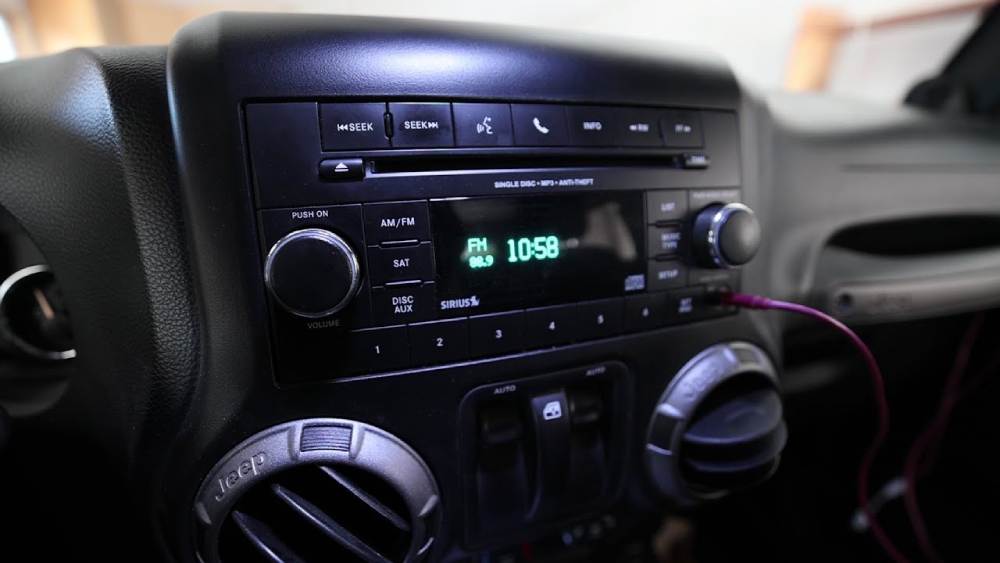
Why Do You Need to Reset a Jeep Radio?
Modern Jeep vehicles are equipped with advanced infotainment systems that control much more than traditional radio functions. The Uconnect system manages audio settings, Bluetooth connections, navigation features, smartphone integration, and various vehicle preferences. When this system experiences software problems, a simple reset can often restore normal operation.
One of the most common reasons Jeep owners search for how to reset Jeep radio is a frozen touchscreen. The display may become unresponsive, fail to load properly, or remain stuck on the startup screen. This problem is usually caused by temporary software glitches rather than serious hardware failures.
Bluetooth connection problems are another frequent issue. Your Jeep may fail to recognize your smartphone, disconnect repeatedly, or refuse to pair with a new device. Resetting the radio system can clear temporary connection errors and allow your phone to reconnect properly.
Software bugs can also affect Jeep radio performance. After system updates or long periods of use, the infotainment system may become slower, restart unexpectedly, or experience random errors. A reset helps refresh the system and remove minor software conflicts.
Battery replacement is another situation where a Jeep radio reset may become necessary. When power is disconnected, some infotainment systems may lose communication with vehicle modules or require a reboot before returning to normal operation.
Additionally, audio problems such as missing sound, incorrect settings, or delayed responses can sometimes be fixed through a reset. Understanding the cause of the problem helps you choose the right reset method and avoid unnecessary repairs.
Things to Know Before Resetting Your Jeep Radio
Before performing a Jeep radio reset, it is important to understand the difference between a soft reset and a factory reset. Choosing the wrong method may result in losing saved settings or requiring you to configure your system again.
A soft reset is usually the safest first step. This process simply restarts the infotainment system without removing personal settings. Your saved radio stations, Bluetooth connections, and user preferences typically remain unchanged. A soft reset is recommended when your Jeep radio is frozen, slow, or experiencing temporary software issues.
A factory reset is a more advanced option. This process restores the system to its original settings and removes stored information. Bluetooth devices, personalized preferences, saved locations, and some system configurations may need to be set up again after the reset.
Before you reset your Jeep radio, consider saving important information. Make a note of your favorite radio stations, connected devices, and navigation settings if you plan to perform a factory reset.
You should also check your Jeep model and Uconnect version because reset procedures may vary. Jeep Wrangler, Grand Cherokee, Cherokee, Compass, and other models may use different infotainment configurations.
Make sure your vehicle battery has enough power before starting the reset process. Interrupting the system while it is restarting may create additional problems. If your Jeep has electrical issues or a weak battery, resolve those problems first.
A reset can solve many software-related issues, but it cannot repair damaged hardware. If your touchscreen remains black, buttons do not respond, or the system repeatedly fails after resetting, professional diagnosis may be required.
How to Perform a Soft Reset on Jeep Radio
A soft reset is the easiest and most recommended method when your Jeep radio is not working properly. This process restarts the Uconnect system and clears temporary software errors without deleting your personal settings.
Follow these steps to perform a soft reset on your Jeep radio.
First, turn the ignition switch to the ON position. Your vehicle does not always need to be running, but the infotainment system must have power.
Next, locate the volume and tuner buttons on your Jeep radio system. On many Jeep models equipped with Uconnect, pressing and holding these buttons together can force the system to restart.
Hold both buttons for approximately 10 to 20 seconds. During this time, the screen may turn black or become unresponsive briefly. Continue holding until the system begins the reboot process.
After the screen turns off, release the buttons and wait for the Uconnect system to restart. The startup process may take several moments depending on your Jeep model and software version.
Once the system is back online, check whether the original problem has been resolved. Test the touchscreen, audio system, Bluetooth connection, and other features to confirm everything is working correctly.
A soft reset is useful for many common problems, including a frozen Jeep touchscreen, slow system response, Bluetooth connection failures, and temporary software glitches.
The biggest advantage of a soft reset is that it does not erase important information. Your saved settings usually remain available, making it the best first solution before attempting a factory reset.
If your Jeep radio continues to experience problems after a soft reset, the next step may be performing a factory reset or checking for available Uconnect software updates.
How to Factory Reset Jeep Radio and Restore Default Settings
If a soft reset does not solve your Jeep radio problems, a factory reset may be the next solution. A factory reset completely restores the Uconnect infotainment system to its original settings and removes stored data that may be causing software conflicts.
A factory reset is useful when your Jeep radio continues freezing, experiences repeated system crashes, has persistent Bluetooth issues, or behaves unusually after software updates. It can also be helpful when preparing to sell your vehicle because it removes personal information and connected devices.
Before starting the process, remember that a factory reset will erase some saved information. This may include paired smartphones, saved radio stations, navigation history, and personalized system preferences. If you want to keep this information, write it down before proceeding.
To perform a factory reset on your Jeep radio, follow these steps.
First, turn on your Jeep and allow the Uconnect system to fully load. Make sure the vehicle has enough battery power to complete the reset process.
Next, access the touchscreen display and open the Settings menu. Depending on your Jeep model and Uconnect version, the menu options may appear slightly different.
Look for the Reset option within the system settings. Select the option related to restoring factory defaults or resetting the system.
The system will display a confirmation message explaining that your stored settings will be removed. Confirm the reset and allow the Jeep radio system to restart.
During the reboot process, the screen may turn off temporarily. Avoid pressing buttons or turning off the vehicle while the system is restoring its settings.
Once the reset is complete, you will need to configure your Jeep radio again. This includes reconnecting your smartphone through Bluetooth, saving your favorite radio stations, adjusting audio preferences, and updating navigation settings.
A factory reset can solve many software-related problems, but it should not be the first step for minor issues. Always try a soft reset before performing a complete system restoration.
How to Reset Jeep Radio After Battery Replacement
Many Jeep owners experience radio problems after replacing or disconnecting the vehicle battery. When power is removed, the infotainment system may lose communication with certain vehicle modules or experience temporary software errors.
If your Jeep radio stops working after a battery replacement, performing a reset can often restore normal operation. This issue does not always indicate a serious problem with the radio hardware.
After installing a new battery, start by turning off your Jeep completely. Remove the key or switch off the ignition system and allow the vehicle electronics to shut down.
Wait several minutes before restarting the vehicle. This allows the electronic control modules to reset and establish a fresh connection.
Turn the ignition back on and check whether the Uconnect system starts normally. If the screen remains frozen or the radio does not respond, perform a soft reset using the reset procedure described earlier.
In some cases, a Jeep radio may request a security code after battery replacement. This security feature helps protect the audio system from unauthorized use. If you do not have the required code, you may need to check your vehicle documents or contact a Jeep service center.
Battery-related radio issues can also occur because of low voltage. If the battery was weak before replacement or the charging system has problems, the infotainment system may continue experiencing errors even after a reset.
Before assuming the radio is damaged, check the battery condition and electrical system. A stable power supply is essential for modern Jeep infotainment systems to operate correctly.
Learning how to reset Jeep radio after battery replacement can save time and prevent unnecessary service appointments. Many common problems can be fixed with a proper reboot and system refresh.
How to Reset Jeep Radio on Different Jeep Models
Although many Jeep vehicles use the Uconnect infotainment system, the reset process may vary slightly depending on the model and software version. Understanding the differences between Jeep models can help you choose the correct reset method.
Jeep Wrangler Radio Reset
The Jeep Wrangler is known for its rugged design, but its modern versions also include advanced infotainment technology. Common radio problems include frozen touchscreens, Bluetooth connection failures, and delayed system responses.
For many Jeep Wrangler models, a soft reset can be performed by holding specific radio buttons until the system restarts. If the issue continues, accessing the Uconnect settings menu and performing a factory reset may help.
Jeep Grand Cherokee Radio Reset
The Jeep Grand Cherokee features a more advanced infotainment system with additional comfort and technology features. Problems may include navigation errors, touchscreen delays, and audio system interruptions.
A soft reset is usually the best starting point. If the system continues malfunctioning, a factory reset can remove corrupted settings and restore normal performance.
Jeep Cherokee Radio Reset
Jeep Cherokee owners commonly experience Bluetooth pairing problems and occasional touchscreen freezes. Resetting the Uconnect system can help clear temporary software conflicts.
Before performing a full reset, try restarting the system and removing old Bluetooth connections. Reconnecting your smartphone after the reset often resolves communication issues.
Jeep Compass Radio Reset
The Jeep Compass uses a compact infotainment system that provides essential connectivity features. Common complaints include slow response times, connection failures, and screen glitches.
A reset can refresh the system and improve performance. If problems return frequently, checking for software updates may provide a long-term solution.
Regardless of your Jeep model, the basic troubleshooting approach remains the same. Start with a soft reset, move to a factory reset if necessary, and seek professional help if the problem appears to involve hardware failure.
Common Problems After Resetting Jeep Radio
After learning how to reset Jeep radio and completing the process, most infotainment issues should improve. However, some Jeep owners may still experience problems after the reset. Understanding these situations can help you identify whether the issue requires additional troubleshooting or professional assistance.
Bluetooth Does Not Connect After Reset
One of the most common issues after resetting a Jeep radio is Bluetooth connection failure. Since a reset may remove previously paired devices, your smartphone may need to be connected again.
To fix this problem, open the Bluetooth settings on your Jeep Uconnect system and delete old device information. Then remove the Jeep connection from your smartphone settings and pair the devices again.
Make sure Bluetooth is enabled on your phone and that no other nearby devices are automatically connecting to the system. In many cases, creating a fresh connection solves pairing problems immediately.
Jeep Touchscreen Is Still Frozen
If your Jeep touchscreen remains frozen after a reset, the issue may involve a deeper software problem or a hardware malfunction. Try performing another soft reset and check whether the system responds.
You should also verify whether your Jeep has available software updates. Outdated Uconnect software can sometimes cause touchscreen delays, random restarts, and system instability.
If the screen remains completely unresponsive, professional inspection may be necessary. A damaged display, faulty wiring, or internal module failure cannot be fixed through a simple reset.
Jeep Radio Requires a Security Code
Some Jeep radio systems may request a security code after power loss, battery replacement, or system reset. This security feature prevents unauthorized use of the audio system.
If you do not have the code, check your owner’s manual, vehicle documentation, or previous service records. The code may also be available through an authorized Jeep service provider using your vehicle identification information.
Avoid entering random codes because repeated incorrect attempts may temporarily lock the system.
No Sound After Jeep Radio Reset
Another issue some owners experience is having a working display but no audio output after resetting the system. This can happen when audio settings return to default or when the system needs additional time to reconnect with vehicle components.
Check the volume level, mute settings, audio source selection, and connected devices. If the problem continues, restarting the vehicle completely may help refresh communication between the infotainment system and audio components.
Radio Keeps Restarting After Reset
A Jeep radio that repeatedly turns off and restarts may indicate a software conflict, power supply issue, or faulty component. While a reset can solve temporary glitches, repeated crashes usually require further diagnosis.
Check the vehicle battery condition, especially if the problem started after battery replacement or electrical work. Low voltage can affect modern infotainment systems and create unexpected behavior.
Understanding these common problems after resetting Jeep radio helps you avoid unnecessary repairs. Many issues can be solved with simple troubleshooting, but knowing when to seek professional help is equally important.
When Should You Contact a Jeep Dealer?
Although resetting a Jeep radio can solve many software-related problems, some situations require professional attention. A reset can refresh the infotainment system, but it cannot repair damaged hardware or serious electrical problems.
You should consider contacting a Jeep dealer or qualified automotive technician if your radio continues failing after multiple reset attempts.
One common sign is a completely unresponsive touchscreen. If the display remains black, does not respond to touch, or shows visible damage, the issue may involve the screen hardware rather than the software.
Another warning sign is repeated system failure. If your Jeep radio keeps freezing, restarting, or losing settings after every reset, there may be a deeper issue with the Uconnect module, wiring, or vehicle electronics.
Audio problems that continue after resetting should also be inspected. If there is no sound despite correct settings and proper connections, the amplifier, speakers, or internal audio components may need testing.
Electrical problems can also affect Jeep infotainment performance. Issues such as battery drainage, unstable voltage, or damaged wiring may prevent the radio system from operating correctly.
Before visiting a dealership, record the symptoms you experience. Note when the problem occurs, what reset methods you tried, and whether the issue started after a battery replacement, software update, or other vehicle service.
This information can help technicians diagnose the problem more quickly and reduce unnecessary troubleshooting time.
Knowing how to reset Jeep radio is an effective first step for solving many common infotainment issues. However, understanding the limits of a reset ensures that you get the right solution when a more serious problem exists.
Conclusion
Knowing how to reset Jeep radio can help you solve many common infotainment problems without immediately visiting a dealership. Whether your Jeep radio is frozen, your Bluetooth connection is not working, or your Uconnect system is experiencing software glitches, the right reset method can often restore normal performance quickly.
For most issues, starting with a soft reset is the safest option because it refreshes the system without removing your personal settings. If problems continue, a factory reset can help eliminate deeper software conflicts by restoring the system to its original configuration.
Before performing any reset, remember to identify the cause of the problem and understand the difference between reset methods. A factory reset may remove saved Bluetooth devices, radio stations, and personalized settings, so preparation is important.
From Jeep Wrangler and Grand Cherokee to Cherokee and Compass models, many radio issues can be resolved with proper troubleshooting. However, if your Jeep radio continues failing after multiple resets, the problem may involve hardware or electrical components that require professional inspection.
A properly functioning infotainment system improves your driving experience by keeping your audio, navigation, and smartphone features reliable. By following this complete guide on how to reset Jeep radio, you can save time, avoid unnecessary repair costs, and keep your Jeep technology running smoothly.
Have you experienced a frozen Jeep radio or Uconnect problem before? Share your experience and let other Jeep owners know which reset method worked for you.
Frequently Asked Questions About Jeep Radio Reset
How do I reset my Jeep radio?
You can reset your Jeep radio by performing a soft reset or factory reset. A soft reset usually involves holding specific radio buttons for several seconds until the Uconnect system restarts. A factory reset can be completed through the system settings menu and restores the radio to default settings.
Will resetting my Jeep radio delete my settings?
A soft reset normally does not delete your saved settings. However, a factory reset may remove Bluetooth connections, saved radio stations, navigation data, and personalized preferences.
Why is my Jeep radio screen frozen?
A frozen Jeep radio screen is often caused by temporary software glitches, outdated software, or system errors. Performing a soft reset is usually the first solution to try.
How do I reset Jeep Uconnect after replacing the battery?
After replacing the battery, turn off the vehicle and allow the electronic systems to shut down. Restart the vehicle and perform a soft reset if the Uconnect system does not work properly. Some models may require additional setup or a security code.
Can I reset my Jeep radio without going to a dealer?
Yes. Many common Jeep radio issues can be fixed at home using a soft reset or factory reset procedure. However, problems caused by damaged hardware, electrical failures, or faulty components may require professional service.
Why is my Jeep radio still not working after a reset?
If your Jeep radio continues to malfunction after resetting, the issue may involve hardware damage, wiring problems, low battery voltage, or a defective Uconnect module. A professional inspection may be necessary.