Few situations are more frustrating than turning the key in your GM vehicle only to find that the engine refuses to start while the Security light continues to flash on the dashboard. Whether you own a Chevrolet Silverado, GMC Sierra, Cadillac Escalade, Buick Enclave, or another General Motors model, a security lockout can leave you stranded without warning. In many cases, the problem is not a dead battery or a faulty starter but the vehicle’s theft deterrent system preventing the engine from starting.
The good news is that a security lockout does not always require an expensive trip to the dealership. Many GM vehicles equipped with the Passlock, Passkey, or Vehicle Anti-Theft System (VATS) can be reset by following a specific relearn procedure. Understanding how the system works and knowing the correct reset steps can save you time, reduce repair costs, and get your vehicle back on the road safely.
In this comprehensive guide, you will learn the complete GM Security Lockout Reset Procedure for a wide range of GM models. We will explain why the security system becomes activated, identify the most common warning signs, walk you through the standard 10-minute and 30-minute relearn procedures, and discuss what to do if the reset does not solve the problem. By the end of this guide, you will have the knowledge needed to diagnose security lockout issues with confidence and determine when professional assistance may be necessary.
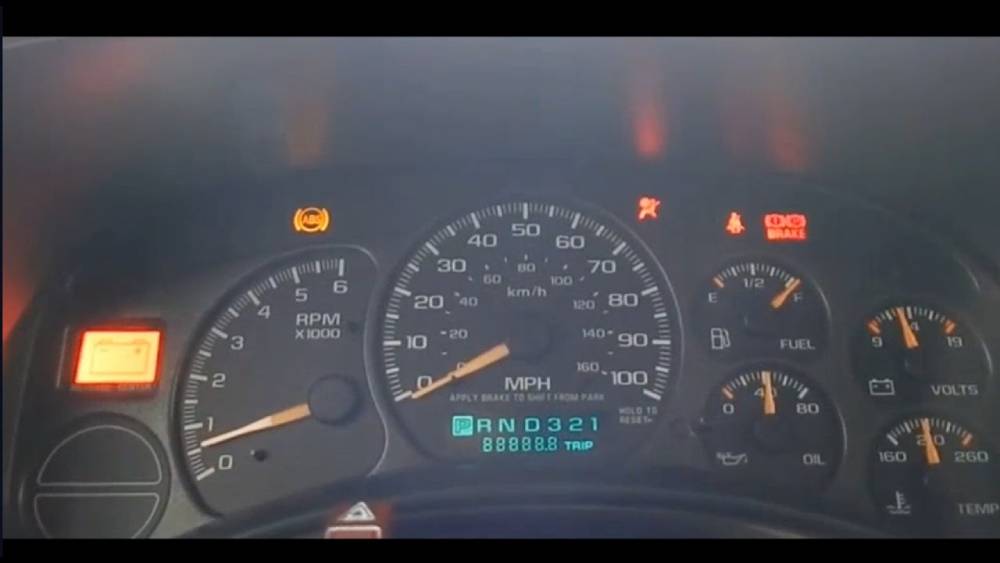
What Is the GM Security Lockout System?
The GM Security Lockout System is an electronic anti theft feature designed to prevent unauthorized access and vehicle theft. Instead of relying solely on a traditional mechanical key, modern General Motors vehicles use an electronic verification process to confirm that the correct key or transponder is being used before allowing the engine to start.
Depending on the model and production year, GM vehicles may be equipped with Passlock, Passkey, or the Vehicle Anti Theft System. While these systems differ in design, they all serve the same purpose of protecting the vehicle from theft by disabling the fuel system, ignition system, or starter when an invalid key or suspicious activity is detected.
When the ignition key is turned, the Body Control Module (BCM) communicates with the Powertrain Control Module (PCM) or Engine Control Module (ECM). The BCM verifies the security information received from the ignition cylinder or transponder key. If the authentication is successful, the PCM allows the engine to start normally. If the verification fails, the system enters Security Lockout Mode, preventing the vehicle from starting.
A security lockout can occur for several reasons, including an interrupted communication between control modules, a faulty ignition switch, a damaged key, or an electrical issue affecting the anti theft system. Although the system is designed to improve vehicle security, it can occasionally prevent legitimate owners from starting their vehicles when a component malfunctions or loses synchronization.
Understanding how the GM Security Lockout System operates is the first step toward diagnosing the problem and performing the correct reset procedure without replacing unnecessary parts.
Common Symptoms of a GM Security Lockout
Recognizing the warning signs of a security lockout can help you identify the issue before spending time and money diagnosing other components. Because the symptoms often resemble those of a dead battery or a failed starter, many vehicle owners initially misdiagnose the problem.
One of the most obvious indicators is a flashing or continuously illuminated Security light on the instrument cluster. This warning light signals that the anti theft system has detected an authentication problem and has disabled the starting sequence.
Another common symptom is an engine that cranks normally but refuses to start. In this situation, the battery and starter motor are functioning correctly, yet the theft deterrent system prevents fuel delivery or ignition because it cannot verify the security credentials.
Some vehicles may not crank at all. Turning the ignition key produces no engine response because the starter circuit has been disabled by the security module. This symptom is particularly common when the system believes an unauthorized attempt to start the vehicle has occurred.
Drivers may also notice that the key is no longer recognized even though it has worked reliably in the past. This can happen if the transponder chip becomes damaged, the ignition cylinder sensor fails, or communication between the BCM and PCM is interrupted.
Vehicles equipped with factory remote start may also experience unexpected failures. The remote start system may stop functioning entirely because the anti theft system blocks all starting commands until the security issue is resolved.
In some cases, the problem appears intermittently. The vehicle starts normally one day but enters security lockout mode the next, making diagnosis more challenging. These intermittent failures often point to aging electrical components, loose wiring, or a failing ignition switch.
Why Does a GM Vehicle Enter Security Lockout Mode?
A GM vehicle can enter Security Lockout Mode for a variety of reasons, ranging from simple battery issues to failures within the anti theft system itself. Identifying the underlying cause is essential because repeatedly performing a reset without addressing the real problem may only provide a temporary solution.
A weak or discharged battery is one of the most common causes. Low system voltage can interrupt communication between the Body Control Module and the Powertrain Control Module, causing the vehicle to lose its stored security information during startup.
Battery replacement can also trigger a security lockout on certain GM models. Disconnecting power may cause the theft deterrent system to require a relearn procedure before it will authorize the engine to start again.
A worn or damaged ignition cylinder is another frequent culprit. Over time, internal components may no longer send accurate security data to the BCM, leading the system to reject an otherwise valid ignition key.
Faulty or damaged keys can produce similar symptoms. Physical wear, damaged transponder chips, or exposure to moisture may prevent the key from transmitting the correct identification code during the startup process.
Electrical problems such as corroded connectors, damaged wiring, blown fuses, or poor ground connections can also interfere with communication between security system components. Even a minor wiring fault may cause the BCM to interpret the situation as a potential theft attempt.
In older GM vehicles equipped with Passlock, the sensor inside the ignition housing is another common failure point. As the sensor ages, it may generate inconsistent readings, causing the anti theft system to activate unexpectedly.
Control module software issues may also contribute to repeated lockouts. A BCM or PCM that has lost synchronization due to a voltage spike, software corruption, or module replacement often requires a security relearn procedure or professional programming.
Before attempting the GM Security Lockout Reset Procedure, it is always recommended to inspect the battery, verify the condition of the ignition key, and check for diagnostic trouble codes using an OBD II scanner. Identifying the root cause first can prevent recurring lockout issues and reduce unnecessary repair expenses.
GM Security Lockout Reset Procedure Step by Step
If your GM vehicle refuses to start because the security system has been activated, the standard security relearn procedure is often the fastest and most effective solution. This process allows the Body Control Module to recognize the ignition key again and restore communication with the Powertrain Control Module. Although the exact procedure may vary slightly between models, the following steps work for many Chevrolet, GMC, Cadillac, Buick, Pontiac, and Saturn vehicles equipped with Passlock or Passkey systems.
Step 1: Verify the Battery Condition
Before beginning the reset procedure, ensure the battery is fully charged and in good condition. Low battery voltage is one of the leading causes of failed security relearn attempts. If the battery voltage drops below the required level during the procedure, the BCM may not complete the relearn process successfully.
Inspect the battery terminals for corrosion and make sure all cable connections are clean and secure. If the battery is more than a few years old or has recently shown signs of weakness, consider testing or replacing it before proceeding.
Step 2: Insert the Correct Ignition Key
Insert the original ignition key into the ignition cylinder. Whenever possible, avoid using a duplicated key during the relearn procedure because some aftermarket keys may not communicate properly with the vehicle’s anti theft system.
Turn the ignition switch to the ON position without starting the engine. At this stage, all dashboard warning lights should illuminate, including the Security light.
Step 3: Wait for the Security Light to Turn Off
Leave the ignition in the ON position without touching the key or attempting to crank the engine.
During this time, the Body Control Module begins communicating with the anti theft components and attempts to verify the security credentials stored in memory.
In most GM vehicles, the Security light will remain illuminated or flash for approximately ten minutes. Once the relearn process is complete, the light should either turn off completely or stop flashing.
Patience is essential during this step. Opening doors, disconnecting the battery, or turning the ignition off too early can interrupt the relearn cycle and require you to start over.
Step 4: Turn the Ignition Off
After the Security light turns off, rotate the ignition switch to the OFF position.
Leave the key in the ignition for approximately five to ten seconds. This brief pause allows the control modules to store the newly learned security information before the next ignition cycle.
Step 5: Start the Engine
Turn the ignition key to the START position and attempt to start the engine.
If the relearn procedure was successful, the engine should start normally and the Security light should remain off.
Allow the engine to idle for several minutes to ensure the BCM and PCM complete their synchronization process without interruption.
Step 6: Repeat the Procedure if Necessary
Some GM vehicles require three consecutive relearn cycles before the security information is fully synchronized.
If the engine still does not start after the first attempt, repeat the entire process up to three times. Completing all three cycles typically requires about thirty minutes, which is why this method is commonly referred to as the 30 Minute Relearn Procedure.
If the vehicle still refuses to start after three complete cycles, further diagnosis will be required because the problem is likely related to a failed security component rather than a simple synchronization issue.
30 Minute Passlock Relearn Procedure
Certain General Motors vehicles require an extended relearn procedure whenever the ignition switch, Body Control Module, Powertrain Control Module, or Passlock sensor has been replaced. Unlike the basic ten minute reset, this process performs three consecutive learning cycles to completely restore communication between the vehicle’s security modules.
Begin by inserting the ignition key and turning it to the ON position without attempting to start the engine. Leave the ignition on for approximately ten minutes until the Security light stops flashing or turns off.
Turn the ignition to the OFF position and wait for at least five seconds.
Repeat this sequence two additional times. After the third ten minute cycle has been completed, turn the ignition off once more for several seconds before attempting to start the engine.
If all security information has been successfully relearned, the engine should start normally and the Security light should remain off.
During this procedure, avoid disconnecting the battery, charging the battery, removing the key, or operating electrical accessories that could interrupt the relearn process. Even a brief interruption may require restarting the entire thirty minute sequence from the beginning.
If the Security light continues flashing after completing all three cycles, scan the vehicle for diagnostic trouble codes. Persistent security faults often indicate a defective ignition switch, failed Passlock sensor, damaged wiring, or a malfunctioning Body Control Module that requires further inspection.
GM Models Covered by This Procedure
The GM Security Lockout Reset Procedure applies to many General Motors vehicles manufactured over the past two decades. While individual model years may have slight differences in their anti theft systems, the basic relearn process remains very similar across most vehicles equipped with Passlock or Passkey technology.
Chevrolet models commonly supported by this procedure include the Silverado, Colorado, Tahoe, Suburban, Avalanche, TrailBlazer, Equinox, Traverse, Malibu, Impala, Monte Carlo, Cobalt, HHR, Uplander, Express, and Avalanche.
For GMC vehicles, owners of the Sierra, Yukon, Yukon XL, Acadia, Terrain, Envoy, Canyon, Savana, and Jimmy may also use this relearn procedure when experiencing security lockout issues.
Cadillac owners can often perform the same reset on the Escalade, CTS, STS, DTS, SRX, XTS, ATS, DeVille, and several other models equipped with factory anti theft systems.
Buick vehicles such as the Enclave, Encore, LaCrosse, Lucerne, Regal, Rainier, Rendezvous, and LeSabre also utilize similar security architectures, making this procedure applicable in many situations.
Older Pontiac models including the Grand Prix, G6, G5, Bonneville, Montana, Torrent, and Sunfire frequently rely on Passlock technology and may require the thirty minute relearn after ignition or security component replacement.
Saturn vehicles including the Ion, Vue, Aura, Relay, and L Series are also known to experience security lockout conditions that can often be resolved using the same relearn procedure.
Although this guide covers a wide range of GM vehicles, owners should always consult their factory service manual if their specific model year includes unique programming requirements or advanced immobilizer technology.
What to Do If the Reset Does Not Work
If your vehicle still refuses to start after completing the GM Security Lockout Reset Procedure, the issue likely extends beyond a simple loss of synchronization. While the relearn process resolves many security lockout cases, persistent problems usually indicate a faulty component, damaged wiring, or a communication failure within the anti theft system.
The first step is to scan the vehicle using a professional OBD II scanner capable of reading Body Control Module and theft deterrent system codes. Standard code readers often retrieve only powertrain codes, while security related faults are stored in other control modules. Diagnostic trouble codes can quickly identify whether the issue involves the Passlock sensor, ignition switch, BCM, PCM, or another component.
Next, inspect the ignition switch and ignition lock cylinder. These parts experience constant wear and are among the most common causes of recurring security lockouts. A worn ignition cylinder may fail to send the correct security signal, causing the BCM to reject the key even though it is the original factory key.
The condition of the ignition key should also be evaluated. If the key is bent, excessively worn, or has a damaged transponder chip, the security system may fail to recognize it. If a spare factory key is available, test the vehicle using that key before replacing other components.
Battery health remains another important factor. Even if the engine cranks normally, unstable battery voltage can interrupt communication between the BCM and PCM. Measure battery voltage under load and verify that the charging system is operating within the manufacturer’s specifications.
Inspect all wiring associated with the anti theft system. Loose connectors, damaged insulation, corrosion, or poor ground connections can create intermittent communication failures that trigger unexpected security lockouts. Pay particular attention to wiring near the steering column, ignition switch, and Body Control Module.
Vehicles that have recently undergone repairs may also require additional programming. Replacing the BCM, PCM, ignition switch, or instrument cluster often requires module programming with manufacturer specific diagnostic equipment. In these cases, the standard relearn procedure alone will not restore normal operation.
If every inspection has been completed and the vehicle still remains in security lockout mode, professional diagnosis is recommended. An experienced technician can perform advanced module testing, verify network communication, and determine whether software updates or component replacement are necessary.
How to Prevent Future Security Lockout Problems
Although some security system failures are unavoidable due to component aging, many lockout incidents can be prevented through regular maintenance and careful vehicle operation.
Maintaining a healthy battery is one of the most effective preventive measures. Weak batteries frequently cause communication errors between electronic control modules. Test the battery periodically, clean the terminals, and replace the battery before it reaches the end of its service life.
Always use an original GM key whenever possible. Low quality duplicate keys or damaged transponder keys may not communicate consistently with the anti theft system, increasing the likelihood of authentication failures.
Avoid disconnecting the battery unnecessarily. If battery replacement is required, follow the recommended procedures outlined in your owner’s manual. Some GM models may require a security relearn after power has been interrupted.
Address dashboard warning lights promptly. A flashing Security light, intermittent no start condition, or occasional key recognition problem should never be ignored. Early diagnosis can prevent a minor issue from developing into a complete vehicle immobilization.
Protect electrical components from moisture and corrosion. Water intrusion around the steering column, fuse box, or Body Control Module can damage sensitive circuits and create intermittent communication problems that are difficult to diagnose.
If your vehicle has undergone repairs involving the ignition system, steering column, BCM, or PCM, verify that all programming procedures have been completed correctly before returning the vehicle to regular use.
Routine inspections performed during scheduled maintenance can also identify worn ignition components before they fail completely. Replacing a deteriorating ignition switch or lock cylinder early is often far less expensive than dealing with an unexpected roadside breakdown.
By following these preventive practices, you can significantly reduce the likelihood of future security lockouts while extending the reliability of your GM vehicle’s anti theft system.
Frequently Asked Questions
How long does the GM Security Lockout Reset Procedure take?
The standard relearn procedure typically takes about ten minutes. Some vehicles require three complete relearn cycles, increasing the total time to approximately thirty minutes.
Can I perform the reset without a scan tool?
Yes. Many GM vehicles allow the security relearn procedure to be completed without any special diagnostic equipment. However, if the reset fails, a professional scan tool capable of reading BCM and anti theft system codes will be necessary for further diagnosis.
Why is my Security light still flashing after the reset?
A flashing Security light after completing the relearn procedure usually indicates that the system has not successfully recognized the key or that another component has failed. Common causes include a faulty ignition switch, damaged Passlock sensor, defective wiring, or a malfunctioning Body Control Module.
Does disconnecting the battery reset the anti theft system?
No. Disconnecting the battery rarely resets the theft deterrent system. In some cases, it may actually trigger another security relearn because stored security information can become unsynchronized after power is removed.
Can a weak battery cause a security lockout?
Yes. Low battery voltage is one of the most common reasons the BCM and PCM lose communication. A weak battery may prevent the security system from completing its authentication process, resulting in a no start condition.
Will this procedure work after replacing the ignition switch?
In many cases, yes. However, some GM vehicles require the complete thirty minute relearn procedure or additional programming after ignition switch replacement.
Does this guide apply to all GM vehicles?
This procedure covers many Chevrolet, GMC, Cadillac, Buick, Pontiac, and Saturn models equipped with Passlock or Passkey systems. Newer GM vehicles that use advanced immobilizer technology or push button start systems may require different programming procedures.
When should I seek professional repair?
If the vehicle still will not start after completing the relearn procedure, multiple diagnostic trouble codes are present, or security lockouts occur repeatedly, professional diagnosis is recommended. Continued attempts to reset the system without identifying the underlying fault are unlikely to resolve the issue permanently.
Conclusion
A security lockout can be alarming, especially when your GM vehicle suddenly refuses to start without any obvious mechanical problems. Fortunately, in many cases, the issue is caused by a temporary loss of communication between the vehicle’s anti theft system and its control modules rather than a major engine failure.
By following the GM Security Lockout Reset Procedure, many owners can successfully restore communication between the Body Control Module and the Powertrain Control Module without visiting a dealership. Whether your vehicle requires the standard 10 minute relearn or the complete 30 minute Passlock relearn procedure, carefully following each step can often save both time and unnecessary repair costs.
It is equally important to understand that a successful reset does not always eliminate the underlying cause. Weak batteries, worn ignition switches, damaged Passlock sensors, faulty wiring, or failing control modules can all trigger recurring security lockouts. If the problem returns repeatedly, diagnosing the root cause is essential to prevent future breakdowns and avoid replacing parts unnecessarily.
Routine maintenance can significantly reduce the likelihood of anti theft system failures. Keeping your battery in good condition, using the original ignition key, addressing warning lights promptly, and inspecting electrical connections during regular service intervals will help ensure reliable vehicle operation.
If your GM vehicle still refuses to start after completing the relearn procedure, professional diagnostics may be required to identify hidden faults within the security system. Modern GM vehicles rely on complex communication between multiple electronic modules, and specialized diagnostic equipment is sometimes necessary to complete programming or module synchronization.
We hope this guide has helped you understand the GM Security Lockout Reset Procedure and provided the confidence to troubleshoot common security lockout issues on your own. If you have experienced a different symptom, found an alternative solution, or have questions about a specific Chevrolet, GMC, Cadillac, Buick, Pontiac, or Saturn model, share your experience in the comments below. Your insights may help other GM owners solve similar problems more quickly and efficiently.