Battery Saver Mode on a Dodge Charger indicates that the vehicle has detected low battery voltage or excessive electrical demand and is automatically reducing power consumption to preserve enough energy for essential functions and engine starting. While the message often appears because of a weak battery, it can also be triggered by a failing alternator, excessive parasitic battery drain, poor battery connections, or faults within the charging system. The warning itself is a protective feature rather than a confirmed component failure, making proper diagnosis essential before replacing any parts.
Understanding what activates Battery Saver Mode helps prevent unnecessary repairs and reduces the risk of unexpected breakdowns. Modern Dodge Charger models rely on multiple electronic control modules, battery sensors, and the charging system to continuously monitor battery health. When the system detects that battery voltage falls below an acceptable operating threshold or electrical demand exceeds charging capacity, it disables or limits non-essential electrical features to conserve power.
This guide explains what Battery Saver Mode means on a Dodge Charger, the most common causes that trigger it, the symptoms that typically accompany the warning, and a step-by-step diagnostic process to identify the root cause. It also covers proven repair methods, situations where replacing the battery is the correct solution, and preventive maintenance practices that help reduce the likelihood of the warning returning.
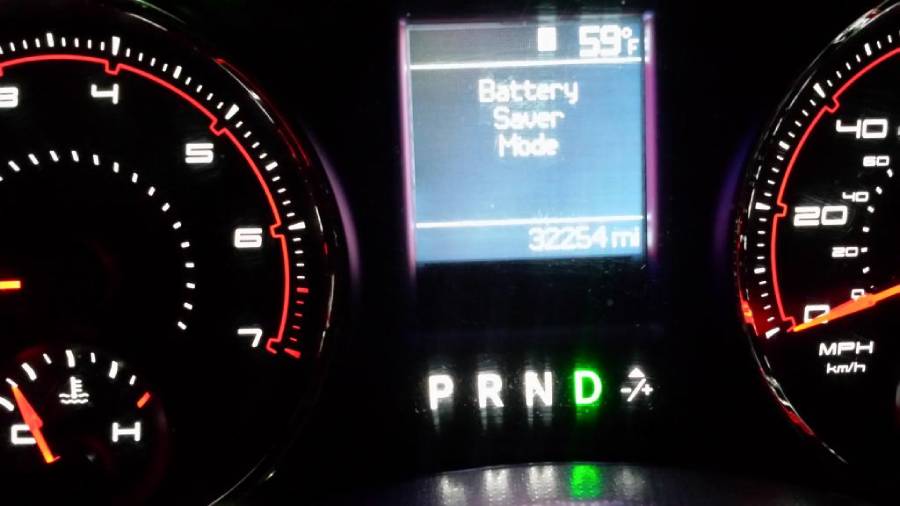
What Does Battery Saver Mode Mean on a Dodge Charger?
Battery Saver Mode on a Dodge Charger is a protective function that reduces power consumption when the vehicle detects that battery voltage has dropped below a safe operating level or the charging system cannot meet current electrical demand. Instead of indicating a specific component failure, the message signals that the vehicle is attempting to preserve enough electrical energy to keep critical systems operating and ensure the engine can restart.
Modern Dodge Charger models continuously monitor the electrical system through the Powertrain Control Module (PCM), battery sensor, and charging system. These components evaluate battery voltage, charging current, and electrical load while the engine is running or when the ignition is in accessory mode. If the system determines that battery capacity is decreasing faster than it can be replenished, Battery Saver Mode is activated automatically.
When Battery Saver Mode is enabled, the vehicle may temporarily disable or limit non-essential electrical features to reduce battery discharge. Depending on the model year and vehicle configuration, affected features may include interior lighting, heated seats, heated steering wheel, infotainment functions, USB charging ports, remote start, Auto Start-Stop operation, or climate control performance. Essential systems such as engine management, steering, braking, and safety electronics remain prioritized.
The warning itself should not be interpreted as proof that the battery has failed. In many cases, Battery Saver Mode is the first indication that the charging system requires inspection. Identifying the underlying cause is essential because replacing the battery alone may not resolve the problem if the alternator, battery sensor, or another electrical component is responsible.
Why Does a Dodge Charger Enter Battery Saver Mode?
A Dodge Charger typically enters Battery Saver Mode because the electrical system detects insufficient battery voltage, inadequate charging output, or excessive electrical demand. Although the warning appears as a single message, several different faults can trigger it. Understanding these causes helps narrow the diagnosis before replacing expensive components.
Is the Battery Voltage Too Low?
Low battery voltage is the most common reason Battery Saver Mode is activated. A fully charged 12-volt automotive battery normally measures approximately 12.6 volts with the engine off. When voltage drops significantly because of battery discharge, extended parking, or repeated short trips, the vehicle recognizes that available electrical energy is becoming limited.
Battery voltage may fall after leaving lights on overnight, operating accessories without the engine running, or driving primarily on short trips that do not provide enough time for the alternator to fully recharge the battery. As voltage decreases, the PCM begins reducing electrical loads to preserve the remaining capacity for engine starting.
Is the Battery Nearing the End of Its Lifespan?
An aging battery gradually loses its ability to store and deliver electrical energy, making Battery Saver Mode more likely to activate. Most automotive batteries provide reliable service for approximately three to five years, although lifespan varies depending on climate, driving habits, and maintenance.
As batteries age, internal chemical reactions reduce capacity and increase internal resistance. A battery may still start the engine under normal conditions but struggle to support multiple electrical accessories simultaneously. During cold weather or periods of heavy electrical demand, voltage can drop quickly enough to trigger Battery Saver Mode even though the battery has not completely failed.
Common signs of an aging battery include slower engine cranking, dim headlights before startup, inconsistent remote start operation, and repeated Battery Saver Mode messages after the battery has been fully charged.
Is the Alternator Failing to Charge the Battery?
A failing alternator can activate Battery Saver Mode because it no longer produces enough electrical power to recharge the battery while the engine is running. The alternator supplies electricity to vehicle systems and replenishes battery capacity during normal driving. If charging output decreases because of worn internal components, damaged bearings, a faulty voltage regulator, or slipping drive belts, the battery begins supplying more power than it receives.
Unlike a worn battery, alternator problems often become more noticeable while driving. Drivers may observe fluctuating dashboard lights, electrical accessories operating inconsistently, battery warning lights, or multiple electronic system warnings. If alternator output continues to decline, the battery eventually becomes depleted and the engine may stall once battery voltage can no longer support essential systems.
Can a Parasitic Battery Drain Trigger Battery Saver Mode?
Yes. Excessive parasitic battery drain can cause Battery Saver Mode by slowly discharging the battery while the vehicle is parked. Every modern vehicle consumes a small amount of electrical current after shutdown to maintain memory functions for modules such as the clock, security system, and keyless entry. However, a malfunctioning electronic module, aftermarket accessory, or damaged wiring can increase this current draw beyond normal levels.
Examples include improperly installed dash cameras, audio amplifiers, GPS trackers, remote starters, or interior lighting that remains energized after the vehicle has been turned off. If the battery repeatedly loses significant charge overnight, Battery Saver Mode may appear at the next startup even though the charging system itself is functioning correctly.
Can Extreme Temperatures Affect Battery Performance?
Extreme hot and cold temperatures reduce battery performance and can contribute to Battery Saver Mode activation. Cold weather slows the chemical reactions inside the battery, reducing available cranking power while simultaneously increasing the energy required to start the engine. High temperatures accelerate internal battery degradation, shortening overall service life and reducing long-term capacity.
Vehicles operated in regions with severe seasonal temperature changes may experience Battery Saver Mode more frequently during winter mornings or after prolonged exposure to summer heat. In these situations, temperature often acts as a contributing factor rather than the sole cause, exposing weaknesses in batteries that are already nearing the end of their useful lifespan.
Can Aftermarket Electrical Accessories Cause the Warning?
Yes. Aftermarket electrical accessories can overload the charging system or create abnormal battery drain, leading to Battery Saver Mode. High-power audio systems, auxiliary lighting, winches, radar detectors, and remote-start systems increase electrical demand beyond the vehicle’s original design specifications. If these accessories are installed incorrectly or continue drawing power after the ignition is switched off, battery voltage can decrease enough to trigger the warning.
Diagnosing Battery Saver Mode on vehicles equipped with aftermarket accessories should include verifying installation quality, measuring parasitic current draw, and confirming that all accessories are connected through properly rated circuits and relays. Eliminating unnecessary electrical loads often resolves recurring Battery Saver Mode warnings without replacing the battery or alternator.
What Symptoms Usually Appear with Battery Saver Mode?
Battery Saver Mode is often accompanied by multiple electrical symptoms because the vehicle begins limiting power to non-essential systems when battery voltage or charging capacity becomes insufficient. The combination of symptoms depends on the severity of the voltage drop and the underlying fault. A weak battery may initially cause only minor inconveniences, while a failing alternator or severe charging system problem can eventually affect vehicle drivability.
Does the Engine Crank More Slowly?
Slow engine cranking is one of the earliest signs associated with Battery Saver Mode. Starting the engine requires a large amount of electrical current from the battery. When battery capacity decreases or charging output is insufficient, the starter motor turns the engine more slowly than normal before ignition occurs.
A slow crank after the vehicle has been parked overnight often indicates battery deterioration or excessive parasitic battery drain. If slow cranking becomes progressively worse over several days, the battery may no longer be receiving adequate charging current from the alternator.
Do the Headlights Become Dim or Flicker?
Dim or flickering headlights often indicate unstable system voltage rather than a lighting problem. Headlights require a consistent electrical supply to maintain brightness. As battery voltage fluctuates or alternator output declines, light intensity may vary while driving or when additional electrical accessories are activated.
Drivers frequently notice headlights dimming when idling at traffic lights, using power windows, or switching on the air conditioning. These changes suggest that the charging system is struggling to maintain sufficient voltage under increased electrical load.
Can Interior Electronics Shut Off Automatically?
Yes. Battery Saver Mode may temporarily disable non-essential electronic features to reduce electrical demand. Depending on the Dodge Charger model and equipment level, the system may limit infotainment functions, USB charging ports, interior lighting, heated seats, heated steering wheel, or other comfort features.
These temporary shutdowns are intentional protective actions rather than individual component failures. The vehicle prioritizes electrical power for critical systems such as the engine control module, fuel system, ignition system, and safety equipment.
Why Does the Auto Start-Stop System Stop Working?
Battery Saver Mode commonly disables the Auto Start-Stop system because restarting the engine requires sufficient battery reserve. The Start-Stop system continuously evaluates battery state of charge before allowing the engine to shut off at traffic lights or during brief stops.
If battery capacity falls below the required threshold, the vehicle prevents automatic engine shutdown to reduce the risk of a failed restart. Many drivers first notice Battery Saver Mode after realizing the Auto Start-Stop feature has stopped operating normally.
Can the Battery Warning Light Appear at the Same Time?
Yes. The battery warning light may illuminate together with Battery Saver Mode when the charging system detects abnormal operating conditions. Although many drivers assume this light indicates a failed battery, it actually monitors the overall charging system. A faulty alternator, damaged drive belt, defective voltage regulator, loose battery connections, or wiring problems can all trigger the warning.
When Battery Saver Mode and the battery warning light appear simultaneously, the charging system should be inspected as soon as possible because the battery may no longer be receiving enough charging current during normal driving.
Why Do Multiple Electrical Warning Messages Appear?
Multiple warning messages often appear because modern Dodge Charger models use interconnected electronic control modules that depend on stable system voltage. When voltage drops below design specifications, unrelated modules may temporarily lose communication or operate outside their normal parameters.
Drivers may see warnings involving traction control, ABS, electronic stability control, parking sensors, or power steering even though these systems are functioning correctly. In many cases, these secondary warnings disappear after restoring normal battery voltage and repairing the underlying charging system fault.
Is It Safe to Drive with Battery Saver Mode On?
Whether it is safe to drive with Battery Saver Mode depends on the condition that triggered the warning. The message itself does not automatically mean the vehicle must be stopped immediately. However, it should never be ignored because continued driving with an unresolved charging system problem can eventually leave the battery unable to power essential vehicle systems.
If Battery Saver Mode appears by itself and the vehicle starts, accelerates, and operates normally without additional warning lights, it is generally possible to drive a short distance to a safe location or repair facility. During this time, drivers should minimize electrical demand by turning off unnecessary accessories such as heated seats, aftermarket electronics, and high-power charging devices to reduce battery discharge.
Immediate attention is required if Battery Saver Mode appears together with the battery warning light, repeated electrical failures, dimming headlights, loss of power steering assistance, engine misfires, or messages indicating charging system failure. These symptoms often suggest that the alternator is no longer supplying enough electrical power to keep the vehicle running. Once the remaining battery charge is exhausted, the engine may stall and fail to restart.
Ignoring Battery Saver Mode for an extended period increases the likelihood of unexpected breakdowns, repeated battery discharge, and damage caused by operating the battery in a deeply depleted state. Even if the warning disappears after restarting the vehicle, recurring Battery Saver Mode messages indicate that the electrical system should be tested to identify the root cause before the condition becomes more severe.
How Do You Diagnose Dodge Charger Battery Saver Mode?
Diagnosing Battery Saver Mode requires identifying whether the problem originates from the battery, charging system, electrical connections, or excessive current draw. Replacing parts without testing often results in unnecessary repair costs because the same warning can be triggered by multiple electrical faults. Following a structured diagnostic process allows the root cause to be identified efficiently.
Check the Battery Voltage
Measuring battery voltage is the first step in diagnosing Battery Saver Mode. Voltage provides a quick indication of the battery’s state of charge and whether the charging system is functioning normally.
With the engine turned off for several hours, a healthy battery should measure approximately 12.6 volts. Readings between 12.4 and 12.5 volts indicate partial discharge, while measurements below 12.2 volts suggest the battery requires charging or further testing. After starting the engine, charging voltage should typically remain between 13.5 and 14.8 volts. A lower reading may indicate insufficient alternator output, while excessively high voltage can point to a faulty voltage regulator.
Although voltage alone cannot determine battery health, abnormal readings provide valuable direction for the remaining diagnostic process.
Inspect Battery Terminals and Ground Connections
Loose, corroded, or damaged battery connections can create voltage loss that mimics battery or alternator failure. Even a healthy battery cannot deliver sufficient current if electrical resistance increases at the terminals or ground connections.
Inspect both battery terminals for white or blue corrosion, loose clamps, damaged cables, or signs of overheating. Follow the negative cable to the chassis ground and verify that all mounting points are clean and securely fastened. Poor ground connections may cause intermittent Battery Saver Mode warnings, slow cranking, and random electronic faults despite otherwise healthy electrical components.
Cleaning corrosion and tightening loose connections often restores proper voltage without replacing any major parts.
Test the Battery Condition
A battery load test determines whether the battery can maintain voltage under high electrical demand. Batteries frequently pass a simple voltage check while failing under actual starting loads because internal capacity has deteriorated.
Most repair shops perform computerized battery testing that evaluates available cold cranking amps (CCA), internal resistance, and remaining service life. If measured capacity falls significantly below the battery’s rated specification, replacement is generally recommended even if the battery can still start the engine occasionally.
Testing becomes especially important when the battery is more than three years old or Battery Saver Mode repeatedly returns after recharging.
Test Alternator Output
The alternator should be tested whenever Battery Saver Mode appears during normal driving. A weak alternator may produce enough electricity at idle but fail to maintain proper voltage when headlights, air conditioning, heated seats, or other accessories increase electrical demand.
Charging system testing should include output voltage, charging current, and voltage stability under different engine speeds and electrical loads. Fluctuating voltage, low charging output, or intermittent charging failures indicate that the alternator or voltage regulator requires further inspection.
Additional symptoms supporting alternator failure include dim headlights while driving, battery warning lights, electrical accessories operating inconsistently, and repeated battery discharge despite installing a new battery.
Scan Diagnostic Trouble Codes
Scanning the vehicle with an OBD-II diagnostic scanner helps identify faults stored by the vehicle’s control modules. Modern Dodge Charger models continuously monitor battery management, charging performance, and communication between electronic modules. When abnormal conditions occur, the system often stores diagnostic trouble codes before noticeable symptoms become severe.
Codes related to charging voltage, battery sensor performance, generator control, or communication errors provide valuable clues that cannot be identified through visual inspection alone. Reviewing stored codes before replacing components improves diagnostic accuracy and reduces unnecessary repairs.
Check for Parasitic Battery Drain
Excessive parasitic current draw can repeatedly discharge the battery even when the charging system operates normally. After the vehicle enters sleep mode, electrical current should decline to a relatively low level as most control modules shut down. A component that continues drawing excessive power overnight gradually reduces battery voltage until Battery Saver Mode appears during the next startup.
Diagnosing parasitic drain involves measuring current draw with a digital multimeter and isolating the affected circuit by removing fuses one at a time. Common causes include malfunctioning body control modules, glove box lights, trunk lights, aftermarket alarm systems, remote starters, GPS trackers, and high-power audio equipment.
Inspect the Intelligent Battery Sensor (IBS)
Vehicles equipped with an Intelligent Battery Sensor rely on accurate battery data to manage charging strategy and electrical load. If the sensor provides incorrect information because of internal failure, wiring damage, or poor electrical connections, the PCM may activate Battery Saver Mode even when the battery and alternator are functioning correctly.
Inspection should include checking the sensor connector for corrosion, verifying wiring integrity, and scanning for manufacturer-specific fault codes related to battery management. Sensor replacement should only be considered after confirming that battery condition and charging system performance meet factory specifications.
How Do You Fix Battery Saver Mode on a Dodge Charger?
The correct repair depends entirely on the component responsible for triggering Battery Saver Mode. Clearing the warning without resolving the underlying electrical problem usually results in the message returning after several drive cycles. Permanent repairs require correcting the root cause identified during diagnosis.
Recharge the Battery
Recharging the battery is appropriate when Battery Saver Mode results from temporary battery discharge rather than permanent battery deterioration. Batteries may become discharged after prolonged parking, repeated short trips, or leaving electrical accessories operating with the engine off.
A smart battery charger restores charge gradually while monitoring battery condition throughout the charging process. After charging is complete, battery voltage and load capacity should be tested again to confirm the battery remains capable of supporting normal vehicle operation.
If Battery Saver Mode returns shortly after charging, additional testing is necessary because another charging system fault is likely present.
Clean Battery Terminals
Cleaning battery terminals restores electrical conductivity by removing corrosion that increases circuit resistance. Even minor corrosion can reduce charging efficiency and create voltage drops that activate Battery Saver Mode under heavy electrical load.
Disconnect the negative battery cable before removing the positive terminal. Clean both terminals and cable clamps using an approved battery terminal cleaning tool or corrosion removal solution. After reinstalling the connections, tighten each clamp securely and apply dielectric grease or terminal protectant to reduce future corrosion.
Replace an Aging Battery
Battery replacement is the appropriate solution when testing confirms that the battery has lost sufficient capacity or fails a load test. Installing a new battery restores reserve capacity and improves voltage stability throughout the electrical system.
Replacement batteries should match the manufacturer’s specifications for group size, cold cranking amps, reserve capacity, and battery technology. Using an undersized battery may result in recurring Battery Saver Mode warnings, especially during cold weather or when operating multiple electrical accessories simultaneously.
Some Dodge Charger models require battery registration or charging system relearn procedures after installation to ensure accurate battery management.
Replace a Faulty Alternator
Alternator replacement is necessary when charging output no longer meets vehicle requirements. A defective alternator cannot maintain battery charge regardless of battery condition, causing Battery Saver Mode to reappear repeatedly.
Replacement should include inspection of the serpentine belt, belt tensioner, electrical connectors, charging cables, and mounting hardware. Replacing only the alternator without correcting related charging system problems may shorten the service life of the new component.
After installation, charging voltage should be verified under idle and loaded operating conditions to confirm normal system performance.
Repair Excessive Battery Drain
Eliminating abnormal current draw prevents repeated battery discharge after the vehicle has been parked. Repairs vary depending on the source of the drain and may involve replacing faulty control modules, correcting damaged wiring, repairing lighting circuits, or removing improperly installed aftermarket accessories.
After repairs are completed, parasitic current should be measured again to verify that electrical consumption has returned to manufacturer specifications before returning the vehicle to service.
Reset the Charging System if Necessary
Some Dodge Charger models may require electronic system initialization after major battery or charging system repairs. Clearing diagnostic trouble codes and allowing the control modules to relearn charging parameters ensures accurate battery management during future operation.
If Battery Saver Mode remains active after confirmed repairs, manufacturer-specific diagnostic procedures should be followed to verify software calibration, battery sensor operation, and communication between charging system components.
When Should You Replace the Battery Instead of Repairing the Charging System?
The battery should be replaced when testing confirms that it can no longer store or deliver sufficient electrical energy, while the charging system should be repaired when the alternator or related components fail to maintain proper charging voltage. Distinguishing between these two conditions prevents unnecessary parts replacement and resolves Battery Saver Mode more effectively.
How Can You Tell if the Battery Needs Replacement?
A battery should be replaced if it fails a load test, has significantly reduced cold cranking capacity, or has reached the end of its service life. Most Dodge Charger batteries provide reliable performance for approximately three to five years under normal driving conditions. High temperatures, frequent short trips, and repeated deep discharges can shorten that lifespan.
Several indicators suggest battery replacement is the appropriate solution:
- The battery fails a professional load or conductance test.
- Resting voltage remains low after a full recharge.
- The engine cranks slowly despite clean battery terminals.
- Battery Saver Mode returns shortly after charging.
- The battery case is swollen, cracked, or leaking electrolyte.
- The battery is beyond its expected service life.
Replacing the battery before complete failure reduces the likelihood of unexpected no-start conditions and minimizes stress on the charging system.
When Is the Charging System the Real Problem?
The charging system should be repaired when the battery passes testing but cannot remain fully charged because the alternator is not supplying adequate electrical output. Installing a new battery without correcting charging system faults typically results in the same Battery Saver Mode warning reappearing after several days or weeks.
Signs that indicate a charging system problem include:
- Charging voltage remains below the normal operating range while the engine is running.
- The battery warning light illuminates during driving.
- Headlights dim as engine speed changes.
- Electrical accessories operate inconsistently.
- The battery repeatedly becomes discharged even after replacement.
- Diagnostic trouble codes indicate generator or charging circuit faults.
In these situations, technicians should inspect the alternator, voltage regulator, serpentine belt, charging cables, battery sensor, and related wiring before replacing additional components.
Can Both the Battery and Alternator Fail at the Same Time?
Yes. Both components may require replacement if a failing alternator has repeatedly operated a battery in a discharged condition. Batteries that remain undercharged for extended periods experience accelerated internal degradation, reducing their ability to recover even after charging system repairs.
For example, an alternator that has produced insufficient charging voltage for several months may permanently damage an otherwise healthy battery through repeated deep discharge cycles. In this case, replacing only the alternator may not eliminate Battery Saver Mode because the weakened battery can no longer maintain stable voltage under load.
For older vehicles with high mileage, testing both the battery and alternator together provides the most reliable diagnosis before authorizing repairs.
Can You Prevent Battery Saver Mode from Returning?
Routine maintenance of the battery and charging system significantly reduces the likelihood of Battery Saver Mode returning. Most electrical system failures develop gradually rather than occurring without warning. Regular inspections allow potential problems to be corrected before they trigger low-voltage warnings.
Test the Battery Regularly
Periodic battery testing identifies declining performance before noticeable symptoms develop. Annual battery inspections become increasingly important once the battery reaches three years of service. Measuring voltage alone is not sufficient because batteries can display normal voltage while possessing greatly reduced reserve capacity.
Routine load testing helps determine whether replacement should be scheduled before Battery Saver Mode begins appearing.
Avoid Excessive Accessory Use
Operating high-power accessories while the engine is off accelerates battery discharge. Audio systems, interior lighting, USB chargers, portable refrigerators, dash cameras, and other electronics continue consuming stored battery energy even when the vehicle is parked.
Limiting accessory use during extended parking periods helps preserve battery charge and reduces unnecessary discharge cycles.
Maintain the Charging System
A properly functioning charging system keeps the battery at an appropriate state of charge during everyday driving. Regular inspection should include checking belt condition, belt tension, charging voltage, battery cables, and ground connections.
Addressing minor charging system issues early prevents excessive battery wear and reduces the risk of unexpected electrical failures.
Drive Long Enough to Recharge the Battery
Short trips may not provide enough time for the alternator to fully recharge the battery after each engine start. Every engine start consumes a substantial amount of electrical energy, particularly during cold weather. Repeated trips lasting only a few minutes can gradually reduce battery state of charge over several days.
Occasionally driving the vehicle for longer distances allows the alternator sufficient time to restore battery capacity and maintain proper electrical system performance.
Inspect Aftermarket Electrical Accessories
Properly installed aftermarket accessories reduce the risk of abnormal battery drain. Electrical modifications should use correctly rated wiring, relays, fuses, and switched power sources rather than remaining permanently connected to battery power.
If Battery Saver Mode begins appearing shortly after installing new electrical equipment, the installation should be inspected before replacing factory components.
Frequently Asked Questions About Dodge Charger Battery Saver Mode
Can Battery Saver Mode Turn Off by Itself?
Yes. Battery Saver Mode may disappear after battery voltage returns to normal. For example, charging the battery with an external charger or driving long enough for the alternator to restore battery capacity may temporarily clear the warning. However, if the underlying problem remains unresolved, the message will likely return during future driving cycles.
Will Disconnecting the Battery Clear the Warning?
Disconnecting the battery may temporarily clear stored warning messages, but it does not repair the underlying fault. If low battery voltage, charging system failure, or excessive electrical drain still exists, Battery Saver Mode will usually reappear after the vehicle completes its normal monitoring process.
Does Battery Saver Mode Always Mean the Battery Is Bad?
No. Battery Saver Mode indicates that the electrical system has detected low available electrical power, not necessarily a failed battery. A defective alternator, poor battery connections, excessive parasitic current draw, faulty battery sensor, or charging system wiring problem can all trigger the same warning.
Testing the complete charging system is more reliable than replacing the battery based solely on the dashboard message.
Can a Bad Alternator Trigger Battery Saver Mode?
Yes. A failing alternator is one of the most common causes of recurring Battery Saver Mode warnings. When charging output falls below vehicle demand, the battery begins supplying electrical power instead of receiving it. As battery voltage decreases, the PCM activates Battery Saver Mode to reduce unnecessary electrical loads and preserve sufficient power for critical vehicle functions.
Can Cold Weather Activate Battery Saver Mode?
Yes. Cold weather can contribute to Battery Saver Mode because low temperatures reduce battery efficiency while increasing the electrical demand required to start the engine. Batteries that perform adequately during warm weather may experience significant voltage drops during winter, exposing age-related deterioration that previously went unnoticed.
Final Thoughts
Battery Saver Mode is a protective feature designed to preserve battery power rather than a diagnosis of a specific component failure. The warning most commonly results from low battery voltage, battery deterioration, alternator problems, excessive parasitic battery drain, or poor electrical connections. Because multiple faults can produce identical symptoms, replacing parts without testing often increases repair costs without solving the underlying issue.
A systematic diagnostic approach—including battery testing, charging system evaluation, electrical connection inspection, and diagnostic code scanning—provides the most accurate path to identifying the root cause. Once the faulty component has been repaired or replaced, Battery Saver Mode typically disappears and normal electrical system operation resumes.
Routine battery maintenance, periodic charging system inspections, and prompt attention to early electrical symptoms help prevent Battery Saver Mode from returning while improving long-term reliability for your Dodge Charger.