Many Kia owners enjoy lower fuel consumption, but not everyone likes the Auto Start Stop system. The engine shuts off whenever the vehicle stops, and many drivers find this behavior frustrating in heavy traffic. Frequent engine restarts can also reduce driving comfort and make every trip feel less consistent.
If you want to disable Kia Auto Start Stop, you are not alone. Thousands of Kia owners search for the same solution every year. Some drivers want smoother acceleration. Others simply prefer to keep the engine running while waiting at traffic lights.
Fortunately, Kia gives drivers several ways to manage this feature. You can turn it off temporarily by using the factory controls on most models. You can also choose aftermarket solutions that remember your preferred setting after every engine restart. Each option offers different benefits, so understanding how they work is important.
This guide explains everything you need to know about disabling Kia Auto Start Stop. You will learn how the Idle Stop and Go system works, how to disable it safely, and which methods suit different Kia models. We will also explain possible effects on fuel economy, warranty coverage, and long term vehicle reliability. By the end of this guide, you will know which solution fits your driving habits and your vehicle.
What Is Kia Auto Start Stop and How Does It Work?
Kia Auto Start Stop is a fuel saving feature that automatically turns off the engine when your vehicle comes to a complete stop. Kia refers to this technology as the Idle Stop and Go system, or ISG. The system helps reduce fuel consumption and lowers exhaust emissions during short stops in city traffic.
The system works by monitoring several driving conditions. It checks battery health, engine temperature, brake pedal position, cabin climate demand, and other important factors. When these conditions meet the required standards, the engine stops automatically while you keep your foot on the brake.
The engine starts again as soon as you release the brake pedal or prepare to move. This process happens within seconds and allows you to continue driving without using the ignition switch. Most drivers notice only a brief pause before the vehicle moves forward.
Not every stop activates the ISG system. Your Kia may keep the engine running if the battery charge is low or if the engine has not reached the proper operating temperature. The system may also remain inactive when the air conditioning needs extra power or when the steering wheel is turned sharply. These conditions help protect the engine and maintain a comfortable driving experience.
Many modern Kia models include this technology as standard equipment. You can find it in popular vehicles such as the Sportage, Sorento, Telluride, K5, Seltos, Forte, Carnival, Niro, and Soul. Although the system improves fuel efficiency, many drivers still choose to disable Kia Auto Start Stop because they prefer smoother traffic performance and more consistent engine operation.
Understanding how the system works makes it easier to choose the right method to disable Kia Auto Start Stop. It also helps you avoid unnecessary modifications that could affect your vehicle or create unexpected warning messages.
Can You Disable Kia Auto Start Stop?
Yes, you can disable Kia Auto Start Stop, but the available method depends on your Kia model and the result you want to achieve. Some drivers only want to switch the system off during each trip. Others prefer a solution that remembers their preferred setting every time they start the engine.
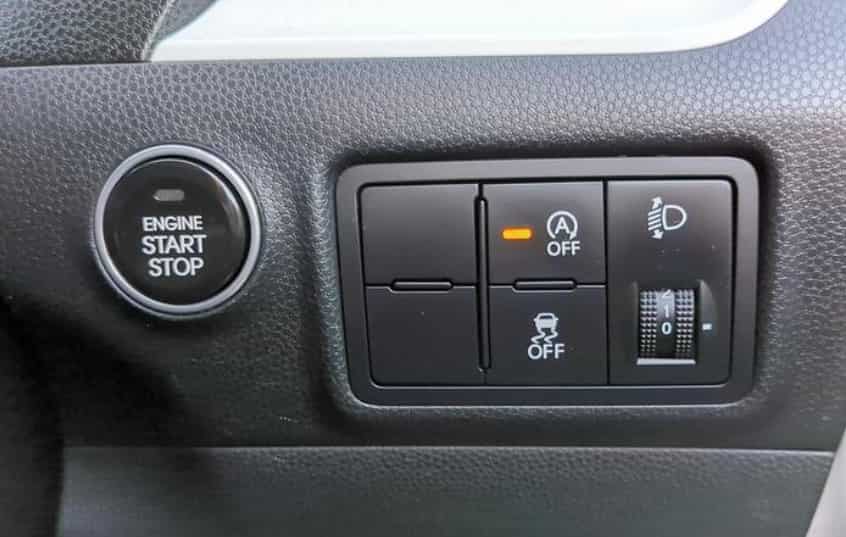
The easiest option is to press the ISG OFF button if your vehicle has one. This factory feature disables the Auto Start Stop system for the current drive. After you restart the engine, the system usually turns back on automatically. Kia designed the system this way to meet fuel economy and emissions requirements.
Many owners look for a more convenient solution because they do not want to press the button every time they drive. In this case, an Auto Start Stop memory module can remember the last setting. If you leave the system off before shutting down the engine, the module restores that setting the next time you start the vehicle. Many drivers choose this option because installation is simple and the original wiring often remains unchanged.
Some owners also ask whether they can disable Kia Auto Start Stop through software or ECU programming. This option exists for certain vehicles, but it is not available for every Kia model. It may also affect your warranty, local regulations, or future software updates. For these reasons, you should understand the possible risks before making permanent changes.
You may also find videos or online guides that suggest disconnecting sensors or changing battery settings. These methods can create warning lights, diagnostic trouble codes, or charging problems. They may also affect other vehicle systems that depend on accurate sensor data. For most owners, these shortcuts are not worth the risk.
Before choosing any method, think about your driving habits and your long term plans for the vehicle. A temporary solution works well if you only want more control during daily driving. A memory module may offer the best balance between convenience and safety. Permanent modifications should remain the last option because they often require advanced knowledge and careful consideration.
How to Temporarily Disable Kia Auto Start Stop
The easiest way to disable Kia Auto Start Stop is to use the factory controls that Kia provides. Most modern Kia models include an ISG OFF button that allows drivers to deactivate the Idle Stop and Go system for the current trip. After starting the engine, simply press the button before you begin driving. A dashboard indicator usually confirms that the feature is turned off. Once disabled, the engine will continue running when the vehicle comes to a complete stop instead of shutting down at traffic lights or in slow moving traffic. This method is simple, safe, and does not require any vehicle modifications. However, the system normally returns to its default setting after you switch off the engine, so you must repeat the process every time you start the vehicle.
Some Kia models may also reduce Auto Start Stop activity under certain driving conditions. For example, selecting Sport Mode can make the system less likely to activate because the vehicle prioritizes quicker throttle response and engine performance. In addition, the Idle Stop and Go system continuously monitors battery voltage, engine temperature, climate control demand, steering angle, and other operating conditions before deciding whether to stop the engine. If any of these conditions fall outside the required range, the system keeps the engine running automatically. Although some drivers try to take advantage of these conditions to prevent Auto Start Stop from working, this approach is not recommended because the system uses these parameters to protect the engine and electrical components. For most owners, pressing the ISG OFF button remains the safest and most reliable way to disable Kia Auto Start Stop without affecting vehicle performance, reliability, or warranty coverage.
How to Permanently Disable Kia Auto Start Stop
Many Kia owners want a solution that keeps the Auto Start Stop system disabled every time they start the vehicle. Since the factory setting usually resets after each ignition cycle, many drivers choose an Auto Start Stop memory module. This device remembers the last setting before the engine shuts down. If you leave the system off, the module automatically restores that preference the next time you start the vehicle. Most memory modules connect directly to the original wiring without cutting or modifying factory components. As a result, installation is often simple and completely reversible. Many owners consider this option the best balance between convenience and safety because it preserves the vehicle’s original functions while eliminating the need to press the ISG OFF button every day.
Some drivers also explore ECU programming or software coding to permanently disable Kia Auto Start Stop. Although this method may work on certain Kia models, it is not available for every vehicle and usually requires specialized equipment. Software modifications can also affect future updates, diagnostic procedures, or warranty coverage. For this reason, most experts recommend avoiding permanent programming unless you fully understand the possible consequences. You should also avoid temporary shortcuts such as disconnecting sensors, altering battery signals, or installing unofficial electrical modifications. These methods can trigger warning lights, create diagnostic trouble codes, and interfere with other vehicle systems. If you want a long term solution, a high quality memory module designed for your specific Kia model remains the safest and most practical choice.
Disable Kia Auto Start Stop by Model
The process to disable Kia Auto Start Stop is similar across most Kia vehicles, but the button location and available features may vary by model and model year. Newer vehicles equipped with the Idle Stop and Go system usually include an ISG OFF button that allows you to turn the feature off during the current drive. Popular models such as the Kia Sportage, Sorento, Telluride, Seltos, K5, Forte, Carnival, Niro, and Soul all follow the same basic operating principle. After starting the engine, press the ISG OFF button and confirm that the indicator light appears on the instrument cluster. Once the light is on, the engine will continue running when the vehicle stops until you switch off the ignition. Because Kia restores the factory setting after each restart, you must repeat this step every time you drive unless you install a compatible memory module.
Although the operating principle remains consistent, the exact button location can differ between models. Some vehicles place it beside the gear selector, while others position it below the climate controls or on the lower dashboard near the steering wheel. Certain trim levels and regional versions may also use different switch layouts. If you cannot find the button, check your owner’s manual or the vehicle’s quick reference guide for the correct location. Owners who want a more permanent solution often install a model specific Auto Start Stop memory module that automatically restores the previous setting after every engine restart. Before purchasing any device, make sure it is compatible with your Kia model, production year, engine, and trim level to ensure reliable operation and avoid unnecessary installation issues.
Will Disabling Kia Auto Start Stop Affect Your Vehicle?
Many drivers worry that disabling Kia Auto Start Stop could damage the engine or reduce the lifespan of important components. In most cases, using the factory ISG OFF button does not harm the vehicle because Kia designed this feature as part of the normal driving experience. When you press the button, the engine simply continues running instead of shutting down at every stop. The vehicle still operates within the manufacturer’s specifications, and all other systems continue to function as intended. Choosing this method does not place additional stress on the engine, transmission, or electrical system during normal driving.
The situation becomes different when owners attempt permanent modifications. Software coding, unofficial electrical changes, or sensor bypass methods may interfere with how the vehicle manages the engine and battery. These changes can trigger warning lights, generate diagnostic trouble codes, or affect future software updates. They may also create unexpected problems during routine maintenance or warranty inspections. For this reason, most automotive professionals recommend avoiding modifications that alter factory wiring or electronic control systems. If you want a long term solution, a high quality Auto Start Stop memory module designed specifically for your Kia model is generally a safer choice. Before making any permanent changes, review your owner’s manual, understand your warranty terms, and confirm that the selected solution is compatible with your vehicle. Taking these precautions helps protect reliability while allowing you to disable Kia Auto Start Stop with greater confidence.
Does Disabling Kia Auto Start Stop Affect Fuel Economy?
Many drivers wonder whether disabling Kia Auto Start Stop increases fuel consumption. The answer depends on how and where you drive. The Idle Stop and Go system saves fuel by turning off the engine during short stops. This reduces unnecessary idling in city traffic. If you drive through crowded streets every day, keeping the engine running may use slightly more fuel. For most drivers, however, the difference remains small and is difficult to notice during normal commuting.
The impact becomes even smaller on highways because the engine rarely stops during steady driving. Many owners disable Kia Auto Start Stop because they prefer smoother acceleration and a more consistent driving experience. Others simply dislike frequent engine restarts in stop and go traffic. Although the system can improve fuel efficiency, it is only one factor that affects overall consumption. Driving habits, traffic conditions, tire pressure, routine maintenance, and engine condition usually have a much greater influence. If comfort is your main priority, temporarily disabling the system is unlikely to increase your fuel costs by a significant amount.
Why Does Kia Auto Start Stop Keep Turning Back On?
Many Kia owners notice that the Auto Start Stop system turns back on after every engine restart. This behavior is completely normal. Kia programs the Idle Stop and Go system to return to its default setting each time you start the vehicle. The design helps the vehicle meet fuel economy targets and emissions standards in many markets. As a result, pressing the ISG OFF button only disables the feature for the current trip.
This automatic reset often frustrates drivers who prefer to keep the system off. Fortunately, it does not indicate a fault or malfunction. It simply reflects the way the software operates. If you do not want to press the ISG OFF button every time you drive, you may consider installing a compatible Auto Start Stop memory module. These devices remember your last selection and restore it after each engine restart. Before choosing a memory module, verify that it matches your Kia model, model year, engine, and trim level. Selecting the correct device helps ensure reliable operation and prevents compatibility issues.
Kia Auto Start Stop Not Working
If your Kia Auto Start Stop is not working, the system may be operating exactly as designed. The Idle Stop and Go system only activates when several conditions meet the required standards. If one condition falls outside the normal range, the engine continues running to protect vehicle performance and reliability. This behavior does not always indicate a mechanical problem. In many cases, the system simply waits until the operating conditions become suitable again.
Several factors can prevent the system from activating. A low battery charge is one of the most common causes. The system may also remain inactive if the engine is still warming up or if the climate control requires additional power. Heavy electrical loads, frequent steering input, or driving on steep roads can also keep the engine running. If all operating conditions appear normal but the feature still does not work, inspect the vehicle for warning lights or diagnostic messages. You should also schedule an inspection with a qualified Kia technician if the problem continues. A professional diagnosis can identify battery issues, sensor faults, or software problems that may affect the Idle Stop and Go system.
Frequently Asked Questions
Can I permanently disable Kia Auto Start Stop?
Yes, you can permanently disable Kia Auto Start Stop on some models by installing a compatible Auto Start Stop memory module or using ECU programming. Most owners prefer a memory module because it is easier to install and usually does not require permanent vehicle modifications.
No. The ISG OFF button only disables the system for the current drive. After you restart the engine, the Idle Stop and Go system automatically returns to its default setting.
Will disabling Kia Auto Start Stop void my warranty?
Using the factory ISG OFF button does not affect your warranty because Kia designed it for normal vehicle operation. However, software modifications or unofficial electrical changes may affect warranty coverage. Always review your warranty terms before making permanent modifications.
Does disabling Auto Start Stop damage the engine?
No. Turning the system off with the factory controls does not damage the engine or other major components. The vehicle continues to operate within Kia’s intended design. Problems are more likely to occur when owners modify the electrical system or install incompatible devices.
Why does my Kia say Auto Stop conditions not met?
This message appears when the Idle Stop and Go system detects that one or more operating conditions are outside the required range. Common reasons include a low battery charge, a cold engine, high climate control demand, or increased electrical load. The system resumes normal operation after these conditions return to normal.
What is the safest way to disable Kia Auto Start Stop?
The safest method is to press the factory ISG OFF button before driving. If you want the setting to remain off after every restart, choose a high quality memory module that is specifically designed for your Kia model and model year.
Conclusion
Knowing how to disable Kia Auto Start Stop helps you choose the solution that best fits your driving style. Whether you prefer to use the factory ISG OFF button or install a compatible memory module, each option offers its own advantages. The right choice depends on how often you drive, how much convenience you want, and whether you plan to keep your vehicle completely original.
For most Kia owners, the factory button remains the safest and simplest way to disable the system. It requires no modifications and allows you to restore the original settings at any time. If you want a more convenient solution, a model specific memory module can automatically restore your preferred setting after every engine restart. Before making permanent changes, always consider warranty coverage, software compatibility, and your vehicle’s long term reliability.
Although the Idle Stop and Go system helps reduce fuel consumption and emissions, many drivers value smoother acceleration and a more consistent driving experience. Understanding how the system works makes it easier to decide whether disabling it is the right option for your needs.
We hope this guide has answered your questions about how to disable Kia Auto Start Stop. If you still have questions about a specific Kia model or model year, leave a comment below. We will help you find the safest and most effective solution for your vehicle.