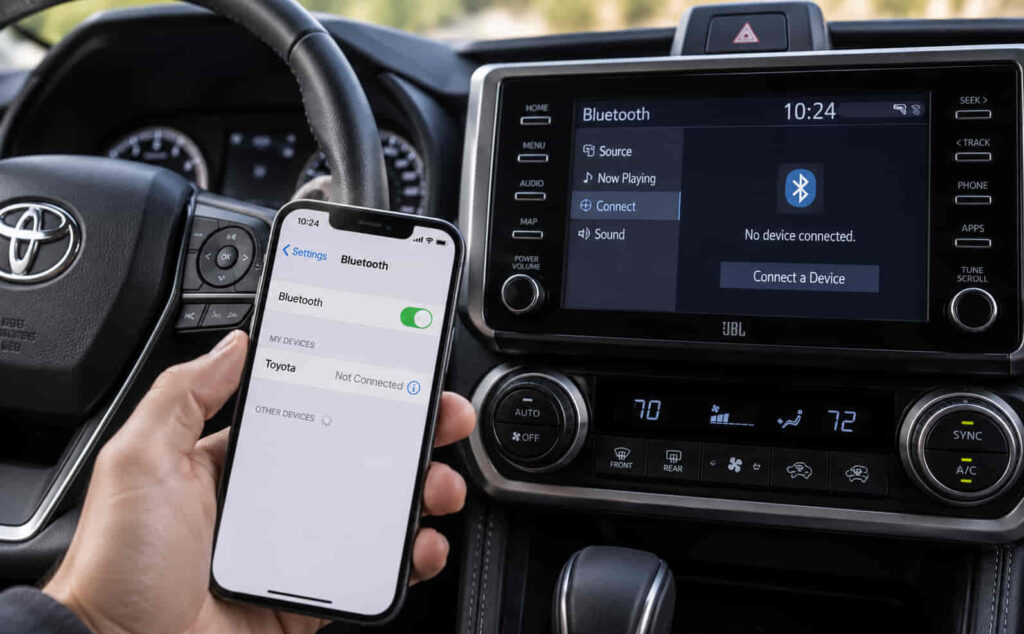
Toyota Bluetooth may stop working because of corrupted pairing data, incorrect phone settings, stored-device conflicts, software problems, audio-source errors, or faults within the Toyota multimedia system. The right fix depends on the exact symptom. A Toyota that cannot detect a phone has a different problem from a system that connects successfully but does not play music, while repeated disconnections often point to pairing conflicts, software instability, or competing Bluetooth connections.
The fastest way to fix Toyota Bluetooth is to troubleshoot the connection in a specific order. Start by checking Bluetooth on the phone and Toyota multimedia system, restart both devices, remove the existing pairing from both sides, and pair the phone again as a new device. If the connection still fails, check saved devices, media permissions, software updates, multimedia settings, and the system reset options available in the vehicle.
This guide explains why Toyota Bluetooth is not working, how to identify whether the problem comes from the phone or the vehicle, and how to fix connection, pairing, audio, and disconnection problems before considering a hardware repair.
Why Is Toyota Bluetooth Not Working?
Toyota Bluetooth usually stops working because the phone and the vehicle can no longer establish or maintain a valid Bluetooth connection. The most common causes are corrupted pairing data, incorrect Bluetooth settings, stored-device conflicts, phone compatibility problems, multimedia software errors, incorrect audio-source settings, or a fault within the infotainment system. The exact cause can usually be narrowed down by identifying what the system does before the connection fails. A Toyota that does not detect a phone has a different connection problem from a vehicle that pairs successfully but cannot play music.
Corrupted pairing data is one of the first causes to check because Bluetooth stores identification and authorization information on both the phone and the Toyota multimedia system. This stored information allows the devices to recognize each other without completing the full pairing process every time the vehicle starts. When the saved Bluetooth record becomes inconsistent, the phone may still display the Toyota as a paired device while the vehicle refuses to connect to it. This is why simply turning Bluetooth off and back on does not always solve the problem. Removing the saved connection from both devices and creating a new pairing forces the phone and multimedia system to exchange fresh connection information.
Stored devices can also interfere with Toyota Bluetooth when the multimedia system attempts to connect to another previously paired phone. Toyota vehicles can remember multiple Bluetooth devices, but only a limited number can be actively connected or prioritized at the same time, depending on the multimedia system and vehicle model. A previously paired phone inside or near the vehicle may therefore connect automatically before the intended phone establishes a connection. This situation is especially common in households where two or more drivers regularly use the same Toyota. Deleting unused devices or changing the preferred device can remove the conflict without requiring a complete multimedia reset.
Phone settings and software can cause similar symptoms. Bluetooth permissions, operating-system updates, power-management features, and background connection settings determine how an iPhone or Android phone communicates with the vehicle. A phone update can change these settings or invalidate an existing pairing record even though Bluetooth itself remains enabled. The problem is more likely to originate from the phone when one smartphone cannot connect but another phone pairs with the same Toyota normally. In contrast, if several different phones fail to connect to the vehicle, the Toyota multimedia system becomes the more likely source of the problem.
A Bluetooth connection can also appear to be working even when the required audio function is not active. Bluetooth calling and Bluetooth music rely on different connection functions, so a phone may handle hands-free calls correctly while music remains silent. In this situation, the problem is not necessarily the Bluetooth pairing itself. The Toyota multimedia system may be using another audio source, or the phone may not be allowing media audio through the connection. Selecting Bluetooth Audio as the media source and confirming the phone’s media permissions can restore sound without deleting the entire pairing.
Software or hardware problems should be considered after the basic connection checks have failed. The Toyota multimedia system can occasionally freeze, restart, or stop responding to Bluetooth commands, particularly when the infotainment software has been running continuously or a connection process has failed repeatedly. Restarting the multimedia system may restore the Bluetooth service. A deeper fault becomes more likely when the Bluetooth menu disappears, the head unit repeatedly reboots, multiple phones fail in the same way, or other infotainment functions stop working at the same time.
How Do You Fix Toyota Bluetooth That Is Not Working?
Fix Toyota Bluetooth by checking the connection from the simplest setting first and only moving to a multimedia reset after basic pairing steps fail. Start by making sure Bluetooth is active on the phone and that the Toyota multimedia system is ready to connect. Restarting the phone and the infotainment system can clear a temporary connection state without changing saved settings. This first step is important because a failed Bluetooth process can remain active in the background even when both devices still show Bluetooth as enabled.
The next step is to remove the existing pairing when restarting does not restore the connection. Delete the Toyota from the phone’s list of paired Bluetooth devices, then remove the phone from the Toyota multimedia system. Removing the connection from only one side can leave the other device with an outdated authorization record, which can recreate the same failure during the next connection attempt. After both records have been removed, restart the phone, return the Toyota multimedia system to its Bluetooth pairing screen, and pair the devices as a new connection. The menu names and pairing sequence can differ between Toyota models, model years, Entune systems, and newer Toyota Audio Multimedia systems, but the connection principle remains the same.
Unused Bluetooth devices should be removed when the vehicle stores several old phones. Saved-device conflicts can cause the multimedia system to search for or automatically connect to a different phone before the intended device is ready. A driver who replaces an old iPhone with a new iPhone, for example, may still have both devices stored under similar names in the Toyota system. Deleting the old entry removes ambiguity and makes it easier for the infotainment system to select the correct phone during startup.
The audio source should be checked separately when the phone shows a successful Bluetooth connection but no music is coming through the vehicle speakers. Select Bluetooth Audio from the Toyota multimedia source menu and confirm that media audio is enabled for the Toyota connection on the phone. Increasing the volume on both devices is also necessary because the phone’s media volume and the vehicle’s audio volume can operate independently. If calls work but music does not, the connection is at least partially functional, which makes an audio-profile or source-selection problem more likely than a complete Bluetooth failure.
Restarting or resetting the Toyota multimedia system is appropriate when deleting and recreating the pairing does not solve the problem. A soft restart is preferable before a full settings reset because it reloads the infotainment software without necessarily deleting saved devices, radio presets, or user preferences. The restart method varies by Toyota multimedia generation, so owners should use the procedure specified for their vehicle rather than assuming that one button combination applies to every Toyota. A factory or settings reset should be treated as a later troubleshooting step because it may erase paired phones and other customized settings.
The final diagnostic step is to test the Toyota with a second phone. This simple comparison separates a phone-specific problem from a vehicle-side problem more reliably than repeatedly changing settings on one device. If the second phone connects normally, the original phone’s Bluetooth settings, permissions, software, or saved pairing data should be investigated further. If two or more compatible phones fail to connect after the multimedia system has been restarted and the saved devices have been cleared, the problem is more likely to involve the Toyota infotainment software, Bluetooth hardware, or another vehicle-side fault.
Read more: What Cars Have CVT Transmissions
Why Is My Toyota Bluetooth Not Connecting to My Phone?
Toyota Bluetooth may fail to connect to a phone when the vehicle cannot discover the device, the saved pairing information is no longer valid, another phone is taking connection priority, or the smartphone is blocking the Bluetooth connection. The fastest way to identify the cause is to determine whether the Toyota cannot see the phone at all or can see the phone but fails during the connection process. These two symptoms point to different stages of Bluetooth communication and therefore require different fixes.
A Toyota that does not appear in the phone’s available Bluetooth devices is usually experiencing a discovery problem. The multimedia system must be in the correct pairing or device-addition mode before a new smartphone can detect it. Simply opening the Bluetooth menu does not always place the system into an active pairing state. The exact menu path varies between Toyota multimedia generations, so the driver should use the vehicle’s Bluetooth or device-management menu and select the option for adding a new device. The phone should have Bluetooth enabled and remain on its Bluetooth settings screen during the initial search.
A connection can also fail after the Toyota and phone successfully detect each other. In this case, old pairing information is a more likely cause. Both devices store information that identifies the other device and authorizes future connections. When the stored records no longer match, the phone may show the Toyota as previously paired while the Toyota refuses to complete the connection. This can happen after changing phones, restoring a smartphone from a backup, updating the phone’s operating system, or resetting part of the multimedia system. Deleting the existing Bluetooth record from both the phone and Toyota, then pairing them again as new devices, creates a clean authorization process.
Connection priority can cause another type of failure when several smartphones have been paired with the same vehicle. The Toyota multimedia system may attempt to reconnect to the device that was previously designated as preferred or that becomes available first. If two paired phones enter the vehicle together, the driver may see the intended phone listed in the multimedia system but not actively connected. Removing unused devices or changing the preferred phone reduces this conflict. This is particularly relevant for shared vehicles where several family members regularly connect their phones to the same Toyota.
The smartphone itself should be investigated when only one phone fails to connect. Bluetooth permissions, background restrictions, network settings, and operating-system behavior can affect how the device interacts with the vehicle. Restarting the phone clears temporary Bluetooth processes that may be stuck, while deleting the Toyota from the phone’s saved-device list removes an invalid connection state. A more extensive network reset should not be the first step because it can also remove saved Wi-Fi networks and other connectivity settings, depending on the phone and operating system.
A second-phone test provides a stronger diagnosis when the cause is still unclear. If another compatible smartphone pairs with the Toyota without difficulty, the multimedia system is functioning well enough to establish a Bluetooth connection, which makes the original phone the more likely source of the problem. If several phones cannot discover or connect to the same Toyota after saved devices have been removed and the multimedia system has been restarted, the fault is more likely to be on the vehicle side. At that stage, multimedia software, system settings, or Bluetooth hardware should be investigated rather than repeatedly changing settings on one phone.
Why Is Toyota Bluetooth Connected but Not Playing Music?
Toyota Bluetooth can show a successful connection while music remains silent because Bluetooth calling and Bluetooth audio are separate functions, and a phone can connect to one without correctly routing media through the other. When calls work but music does not, the Bluetooth connection itself is not completely broken. The problem is more likely to involve the selected audio source, media permissions, phone output settings, or the Bluetooth audio profile used by the multimedia system.
The Toyota multimedia system must use Bluetooth Audio as the active media source before music from the phone is routed through the vehicle speakers. A phone can remain connected for hands-free calling while the head unit continues playing FM radio, satellite radio, USB audio, or another source. In this situation, starting a song on the phone does not automatically prove that the vehicle has switched to Bluetooth media. Selecting Bluetooth Audio from the multimedia source menu establishes the correct playback path without requiring the phone to be paired again.
Media permissions on the phone can create the same symptom. A smartphone may authorize calls and contacts while media audio is disabled or unavailable for that specific Bluetooth connection. This creates an apparently normal connection because the phone icon and Bluetooth status remain visible, but music does not reach the Toyota speakers. Reviewing the Bluetooth settings for the paired Toyota device can reveal whether media audio is enabled. Android phones may expose these connection functions individually, while iPhone behavior is managed differently by iOS, so the exact settings should be checked according to the phone’s current operating system.
Audio output on the smartphone should also be checked when the song is playing but no sound comes from the vehicle. Modern phones can route audio to multiple destinations, including the phone speaker, wireless earbuds, smartwatches, speakers, and vehicle systems. If another Bluetooth device remains connected, the phone may send media to that device instead of the Toyota. Manually selecting the Toyota as the active audio output or disconnecting competing Bluetooth accessories can restore playback without changing the vehicle’s pairing information.
Volume settings can produce a false impression of Bluetooth failure because media volume on the phone and audio volume in the vehicle may operate independently. A phone can maintain a valid Bluetooth media connection while its media volume is muted or set very low. The Toyota head unit may therefore show the song title, playback progress, or connected device name even though little or no sound is heard. Raising the phone’s media volume and the vehicle’s audio volume separately helps distinguish a volume problem from a connection problem.
A corrupted Bluetooth pairing should be considered when Bluetooth Audio is selected, media permissions are correct, and the phone still cannot send music to the vehicle. The saved connection may be functional enough to support calls while failing to negotiate media audio correctly. Removing the Toyota from the phone, deleting the phone from the multimedia system, restarting both devices, and pairing them again forces the connection profiles to be created from the beginning. This is more effective than repeatedly disconnecting and reconnecting an existing pairing when the stored Bluetooth data itself is the source of the fault.
The problem is more likely to involve the Toyota multimedia system when several phones connect for calls but none can play Bluetooth audio. A software restart should then be attempted before a full settings reset because restarting can reload the multimedia functions without deleting all saved preferences. If Bluetooth Audio remains unavailable, the source menu freezes, or other media functions fail at the same time, the issue extends beyond a simple phone-setting problem and should be treated as a broader infotainment fault.
Why Does Toyota Bluetooth Keep Disconnecting?
Toyota Bluetooth usually keeps disconnecting because the saved pairing data is unstable, another Bluetooth device is competing for the connection, the phone is restricting background connectivity, or the Toyota multimedia system is experiencing a software problem. A repeated disconnection is different from a complete pairing failure because the phone and vehicle are initially able to communicate. The fault occurs after the connection has already been established, so troubleshooting should focus on what interrupts or replaces that active connection.
Corrupted pairing data is one of the first causes to eliminate when Toyota Bluetooth connects normally and then disconnects without warning. The phone and multimedia system reuse stored connection information every time they reconnect, which means an unstable pairing record can repeatedly recreate the same problem. Deleting the Toyota from the phone and removing the phone from the Toyota multimedia system is more effective than simply pressing disconnect and reconnect. Pairing the devices again as new forces both systems to rebuild the Bluetooth relationship rather than continuing to use potentially damaged stored data.
Competing Bluetooth devices can also interrupt a stable connection. A smartphone may already be connected to wireless earbuds, a smartwatch, a speaker, or another vehicle system, while the Toyota multimedia unit may be attempting to reconnect to a second saved phone. Bluetooth is designed to support multiple connection functions, but device priorities and supported profiles determine which connection remains active. A practical example is a shared Toyota that has both drivers’ phones stored in the multimedia system. If both phones are inside the vehicle, the system may switch to the device with higher priority or the one it recognizes first. Removing unused paired devices reduces this source of instability.
Phone power-management settings can affect Bluetooth behavior when the connection drops after the screen turns off, the phone enters a low-power state, or the vehicle has been running for several minutes. Modern smartphones control background processes to reduce battery consumption, and those controls can affect wireless services on some devices. The exact settings vary by operating system and phone manufacturer, so the correct troubleshooting approach is to check whether the disconnection follows a repeatable phone behavior rather than assuming the Toyota head unit is defective. If disabling a restrictive battery setting or restarting the phone restores a stable connection, the phone is the stronger source of the problem.
Software changes should be investigated when Bluetooth problems begin immediately after a phone operating-system update or a multimedia software change. An existing Bluetooth pairing was created under the previous software state, so the stored connection may no longer behave correctly after that environment changes. Deleting and recreating the pairing is therefore a logical first response after an update. A multimedia restart can also help because it reloads the Toyota Bluetooth service without immediately erasing all stored user settings.
The disconnection is more likely to be vehicle-related when several phones experience the same failure in the same Toyota. This comparison is important because one phone disconnecting does not prove that the multimedia system is faulty. If two or more compatible phones repeatedly disconnect after clean pairing, unused devices have been removed, and the multimedia system has been restarted, the diagnosis should move toward Toyota infotainment software or hardware. Repeated head-unit freezes, spontaneous reboots, disappearing Bluetooth menus, or failures across other audio functions strengthen that conclusion.
Why Is Toyota Bluetooth Not Working With an iPhone?
Toyota Bluetooth may stop working with an iPhone when the existing pairing becomes invalid, Bluetooth communication is interrupted after an iOS change, or the iPhone and Toyota retain conflicting connection records. The most effective first repair is to remove the saved Toyota connection from the iPhone and remove the iPhone from the Toyota multimedia system, then restart both devices and create a new pairing.
An iPhone can continue displaying a Toyota under previously connected Bluetooth devices even when the underlying pairing no longer completes correctly. This creates a misleading situation because the device appears to be recognized, but calls, music, or automatic reconnection may fail. Choosing the option to forget the Toyota connection removes the iPhone’s saved relationship with the vehicle. The corresponding iPhone entry should also be deleted from the Toyota multimedia system so neither side retains an outdated record.
Restarting the iPhone is useful before pairing again because it reloads the phone’s active Bluetooth processes. This is particularly relevant when the problem begins after a software update, after the phone has been restored from another device, or after Bluetooth has behaved inconsistently with several accessories. Once the phone restarts, the Toyota should be placed into its add-device or pairing mode and connected as a new device rather than attempting to reuse the previous pairing.
A broader network-settings reset should be treated as a later troubleshooting step rather than the default fix. This type of reset affects more than the Toyota Bluetooth connection and can remove other stored connectivity information on the phone. It therefore makes sense only after restarting, forgetting the Toyota connection, deleting the iPhone from the vehicle, and performing a clean pairing have failed. The diagnostic principle is to make the least disruptive change capable of fixing the problem before moving to a wider reset.
The Toyota multimedia system becomes the stronger suspect when the same iPhone connects correctly to other Bluetooth devices but cannot connect to the vehicle, especially if another iPhone or Android phone also fails in the Toyota. Conversely, if another phone pairs with the vehicle normally, the issue is more likely to remain within the original iPhone’s settings or saved Bluetooth state. This two-device comparison prevents unnecessary multimedia resets when the problem is isolated to one phone.
Why Is Toyota Bluetooth Not Working With an Android Phone?
Toyota Bluetooth may fail with an Android phone because of damaged pairing data, Bluetooth permissions, device-specific power management, software changes, or a conflict between saved wireless connections. Android troubleshooting requires slightly more device-specific consideration because manufacturers can modify Bluetooth menus, permission controls, and battery-management behavior even when the phones run the same general version of Android.
The first fix should still be a clean pairing rather than an advanced system change. Remove the Toyota from the Android phone’s paired-device list, delete the Android phone from the Toyota multimedia system, restart both devices, and pair them again. This sequence eliminates the most common source of connection inconsistency without altering unrelated phone settings. It also ensures that the phone and Toyota create a fresh Bluetooth authorization instead of continuing to reuse an unstable saved record.
Bluetooth and nearby-device permissions should be checked when the phone discovers the Toyota but cannot use all connection functions. Android can separate access for calls, contacts, media audio, and nearby devices depending on the phone and software version. A connection can therefore appear successful while one function remains unavailable. For example, the phone may connect for calls while music does not play because media audio is disabled for that specific Toyota connection. Checking the connection settings for the paired vehicle is more precise than deleting unrelated applications or changing every wireless setting on the phone.
Battery-management controls deserve attention when an Android phone connects successfully and then drops the Toyota connection after the screen turns off or after the phone has been idle. Some manufacturers apply aggressive background restrictions to preserve battery life, and these controls can affect wireless processes. The important diagnostic signal is consistency. If Bluetooth disconnects under the same power-saving condition but remains stable when that restriction is removed, the phone’s power-management behavior is more likely to be responsible than the vehicle.
Clearing Bluetooth-related stored data can help on Android devices that provide access to that function, but it should not be presented as a universal procedure. Android interfaces and system controls differ between manufacturers and software versions, so a menu path that exists on one device may not exist on another. This step is more appropriate after clean pairing and a restart have failed, and it should be performed with the understanding that other saved Bluetooth connections may also be affected.
The diagnosis should shift toward the Toyota multimedia system when multiple Android phones and other compatible smartphones show the same failure. A single Android device that cannot connect while other phones work normally points toward phone-specific settings, permissions, or software. Multiple phones failing under the same conditions indicate a broader vehicle-side problem, particularly when the head unit freezes, restarts, or fails to display Bluetooth functions consistently.
Why Is Toyota Bluetooth Not Showing Up on My Phone?
Toyota Bluetooth may not show up on a phone when the multimedia system is not in pairing mode, the vehicle is already connected to another device, Bluetooth discovery has temporarily failed, or the infotainment system is not broadcasting a discoverable connection. This problem occurs before pairing is completed, so deleting audio settings or changing music permissions will not solve it. The first diagnostic goal is to determine whether the phone cannot detect the Toyota or whether the Toyota cannot detect the phone.
The Toyota multimedia system must be placed into its device-addition or Bluetooth pairing mode before a new phone can reliably discover it. Having Bluetooth enabled in the vehicle is not always the same as making the system discoverable to a new device. Depending on the Toyota model, model year, and multimedia generation, the driver may need to open the Bluetooth or device settings and select the option for adding a new phone. The phone should remain on its Bluetooth settings screen while the Toyota searches for nearby devices or broadcasts its own Bluetooth identity.
An existing connection can prevent the intended phone from appearing correctly. If the Toyota automatically connects to a previously paired smartphone when the vehicle starts, the multimedia system may prioritize that device rather than remaining available for a new pairing. This is particularly common in vehicles shared by multiple drivers. Disconnecting the active phone or removing unused saved devices can make the Toyota available for a new connection without requiring a full multimedia reset.
The problem may come from the phone when the Toyota is visible to other smartphones but not to one specific device. Restarting Bluetooth on that phone, restarting the phone itself, and removing any previous Toyota pairing record can restore device discovery. A stored Toyota entry can sometimes prevent a phone from treating the vehicle as a new available device even though the old connection no longer works correctly. Removing that record allows the phone to perform a fresh Bluetooth scan and pairing request.
The Toyota multimedia system becomes the more likely cause when two or more compatible phones cannot detect the vehicle. This pattern shows that the problem is not isolated to one phone’s Bluetooth settings. Restarting the infotainment system should be the next step because a temporary multimedia software failure can prevent the Bluetooth service from entering discovery mode. If the Bluetooth menu is missing, unresponsive, or repeatedly freezes after restart, the issue should be treated as a broader multimedia-system fault rather than a standard pairing problem.
The timing of the failure also provides useful diagnostic information. If Toyota Bluetooth disappears only after the head unit freezes or restarts, the infotainment system is the stronger suspect. If the Toyota remains visible to other devices while one phone cannot find it, the original phone is more likely responsible. Identifying which side fails the discovery process prevents unnecessary resets and keeps troubleshooting focused on the component actually causing the connection failure.
How Do You Know Whether the Bluetooth Problem Is Your Phone or Your Toyota?
The most reliable way to determine whether a Bluetooth problem comes from the phone or the Toyota is to test the connection with a second compatible phone and compare how the original phone works with another Bluetooth device. These two comparisons separate a phone-specific failure from a vehicle-side failure more effectively than repeatedly changing settings on only one device.
Start by checking whether the original phone can connect normally to another Bluetooth device. A phone that also fails with wireless headphones, speakers, or another vehicle is more likely to have a Bluetooth setting, software, permission, or hardware problem of its own. If the phone connects normally to other Bluetooth devices but consistently fails with the Toyota, the diagnosis shifts toward either a Toyota-specific pairing conflict or the vehicle’s multimedia system.
The second test is to connect another compatible smartphone to the same Toyota. If the second phone pairs, handles calls, and plays Bluetooth audio normally, the Toyota system has demonstrated that its Bluetooth hardware and core connection functions are operating. The original phone then becomes the more likely source of the failure. Its saved pairing data, operating-system settings, permissions, or background connectivity should be investigated before resetting the Toyota multimedia system.
A different diagnosis applies when multiple phones fail with the same vehicle. If two or more compatible smartphones cannot discover the Toyota, cannot complete pairing, or repeatedly disconnect in the same way, the multimedia system becomes the stronger common factor. This does not automatically prove a hardware failure because corrupted vehicle-side pairing records or infotainment software can produce the same symptoms. Removing old devices, restarting the multimedia system, and performing a clean pairing should still be attempted before concluding that physical repair is necessary.
The type of failure also helps identify which component is responsible. If calls work but music does not, the Toyota and phone have already established at least part of the Bluetooth connection, so the fault is more likely to involve media audio, the selected source, or an audio-related connection function. If the phone never detects the Toyota, the problem occurs earlier in the discovery process. If the multimedia system repeatedly freezes or its Bluetooth menu disappears regardless of which phone is used, the evidence points more strongly toward the vehicle.
Connection timing provides another useful clue. A phone that works initially but disconnects only when it enters a low-power state may have a background or battery-management issue. A Toyota that drops several different phones at the same point after startup is more likely to have a multimedia software problem. Troubleshooting becomes more accurate when the same symptom is reproduced under the same conditions because repeatable behavior reveals which device changes immediately before the connection fails.
This comparison method also prevents unnecessary factory resets. A factory reset can erase saved phones and other multimedia preferences, but it cannot repair a Bluetooth problem that exists only on one smartphone. Testing another phone first provides evidence about where the fault exists and allows the next repair step to target either the smartphone or the Toyota multimedia system rather than resetting both without a clear diagnosis.
How Do You Reset Bluetooth on a Toyota?
Reset Toyota Bluetooth by removing the existing phone connection from both the smartphone and the Toyota multimedia system, restarting the devices, and pairing them again before using a full multimedia factory reset. This sequence is the safest reset method because it targets the Bluetooth relationship first without immediately deleting unrelated vehicle settings.
The first level of reset is a complete re-pairing. Delete the Toyota from the phone’s saved Bluetooth devices and remove the phone from the Toyota multimedia system. Both records should be removed because each device stores information about the other. Leaving one side unchanged can allow outdated pairing data to interfere with the new connection. After both records are deleted, restart the phone and the multimedia system, place the Toyota into pairing mode, and establish a new connection.
A multimedia restart is the next step when clean pairing does not restore Bluetooth. Restarting reloads the infotainment software and can clear a temporary Bluetooth process that has stopped responding. This is different from a factory reset because a restart is intended to reload the system without deliberately erasing all saved preferences. The exact restart procedure varies between Toyota models and multimedia generations, so the correct method should be based on the vehicle’s specific system rather than a single universal button sequence.
A settings reset is more appropriate when Bluetooth failures continue across several phones or other infotainment settings also behave incorrectly. Resetting multimedia settings can remove paired devices and customized preferences, which gives the system a cleaner configuration from which to establish a new Bluetooth connection. The phone should be paired again only after the reset is complete so that the Toyota creates a new device record rather than reusing previous connection data.
A full factory reset should remain a later troubleshooting step because it affects more than Bluetooth. Depending on the multimedia system, it may remove saved phones, personal preferences, audio settings, and other user data. Performing this reset before testing a second phone can create unnecessary work if the real problem exists only on the original smartphone. A second-device test therefore provides useful evidence before a broader reset is performed.
The result after a reset also helps identify the underlying fault. If Bluetooth works normally after the devices are paired again, corrupted pairing data was the likely cause. If the problem returns only on one phone, the diagnosis shifts toward that smartphone. If multiple compatible phones continue to fail after the Toyota multimedia system has been restarted or reset, the problem is more likely to involve infotainment software or vehicle-side hardware.
Can Apple CarPlay or Android Auto Cause Toyota Bluetooth Problems?
Apple CarPlay and Android Auto can appear to cause Toyota Bluetooth problems because smartphone projection and Bluetooth may use related connection processes, but a CarPlay or Android Auto failure is not automatically a Bluetooth failure. The correct diagnosis depends on whether the phone cannot pair with the Toyota at all or whether Bluetooth works while smartphone projection does not.
Bluetooth and smartphone projection perform different functions. Toyota Bluetooth primarily supports features such as hands-free calling and wireless audio, while Apple CarPlay and Android Auto provide a broader interface for supported phone applications, navigation, calls, messages, and media. Depending on the Toyota multimedia system and phone configuration, CarPlay or Android Auto may operate through a wired or wireless connection. A phone can therefore maintain Bluetooth calling even when CarPlay or Android Auto fails to launch.
The reverse situation can also create confusion. A driver may see the phone recognized by the Toyota multimedia system and assume that Bluetooth is fully functional, even though the vehicle is communicating with the phone through another connection method. This is why the exact symptom matters. If hands-free calls and Bluetooth Audio work normally but CarPlay does not start, troubleshooting should focus on CarPlay rather than repeatedly deleting the Bluetooth pairing. If Bluetooth calls, Bluetooth Audio, and device pairing all fail, the problem is broader than smartphone projection alone.
Wireless connection conflicts can occur when the phone has several saved vehicle connections or automatically reconnects to another device. A previously configured CarPlay or Android Auto connection may coexist with Bluetooth records, and resetting only one connection type may not resolve a wider device-recognition problem. Removing the vehicle from the relevant phone connection settings and creating a clean connection can help when the failure begins after changing phones or modifying the multimedia configuration.
Wired smartphone projection introduces another diagnostic path. If CarPlay or Android Auto works through a USB connection while Toyota Bluetooth does not work, the successful wired connection does not prove that the Bluetooth system is healthy because the two connection methods rely on different functions. Conversely, if Bluetooth works but wired projection fails, the USB cable, port, phone settings, or projection configuration becomes more relevant than the Bluetooth pairing.
The most useful approach is to troubleshoot the function that is actually failing. Bluetooth pairing problems should be diagnosed through device discovery, saved pairing records, Bluetooth Audio, calls, and multimedia stability. CarPlay or Android Auto problems should be investigated separately when Bluetooth continues to operate normally. Keeping these connection types distinct prevents unrelated settings from being reset and makes it easier to identify whether the fault originates from the phone, the Toyota multimedia system, or the connection method itself.
Can You Replace Only the Toyota Camry Touch Screen Digitizer?
You can replace only the Toyota Camry touchscreen digitizer when the display still works correctly and the failure is limited to touch input, provided that the specific head unit allows component-level repair. This approach is different from replacing the complete display or infotainment head unit. The digitizer is the touch-sensitive layer that detects finger input, while the LCD or display panel creates the image. When the image remains clear but the screen has dead zones, ghost touches, inaccurate touch positions, or no touch response, the digitizer becomes the more relevant component to diagnose.
Digitizer replacement is most appropriate when the rest of the infotainment system continues to function normally. Audio may still play, physical controls may work, the backup camera may still display, and menus may continue updating even though the driver cannot control them through the screen. This symptom pattern shows that the head unit and display are still performing key functions, which makes complete head-unit replacement less justified unless further diagnosis identifies an internal fault.
The repair method depends on the Toyota Camry model year and the construction of the installed multimedia unit. Some assemblies allow a technician to separate and replace the touch layer, while others are more practical to repair as a complete screen assembly. Part availability also affects the decision because an individual digitizer may not be available or economical for every factory head unit. For this reason, the repair should be based on the exact multimedia unit rather than on the Toyota Camry name alone.
Replacing the digitizer also requires more precision than performing a software reset or checking a fuse. The screen assembly must be removed without damaging connectors, trim components, the LCD panel, or the replacement touch layer. Improper installation can create alignment problems, additional dead zones, display damage, or connection faults. A component-level repair makes sense when the diagnosis clearly identifies the digitizer and the replacement can be completed without approaching the cost of a complete head-unit replacement.
When Should You Replace the Toyota Camry Head Unit?
Replace the Toyota Camry head unit when diagnosis confirms an internal multimedia-unit failure that cannot be corrected through software, power, wiring, fuse, display, or digitizer repair. The head unit should be treated as the final major component in the troubleshooting process rather than the first part to replace. Its broader role means that an internal failure can affect several infotainment functions at the same time, but the same symptoms can also be produced by a loss of external electrical power.
Complete head-unit replacement becomes more reasonable when the system repeatedly fails to boot, enters recurring restart loops, loses both display and audio, or remains completely inactive despite verified power and ground. It also becomes relevant when multiple functions such as Bluetooth, phone integration, audio, screen output, and touchscreen control fail together. These combined symptoms indicate a wider system problem than an isolated touch layer or display fault.
A head unit that intermittently recovers after restarting still requires diagnosis before replacement. Repeated freezing can originate from software instability, inconsistent voltage, loose connectors, or an internal hardware problem. Replacing the unit without separating these possibilities can result in unnecessary cost while leaving an external electrical fault unresolved. The correct decision comes after confirming that power delivery is stable and that simpler repair paths have already been excluded.
The replacement choice also depends on whether the owner wants to retain the original Toyota system or install an aftermarket unit. An OEM replacement generally preserves the factory appearance and intended integration, while an aftermarket head unit may add newer connectivity or interface features. Compatibility must be evaluated carefully because the infotainment system can interact with steering-wheel controls, microphones, cameras, amplifiers, USB ports, and other vehicle electronics. A replacement unit should therefore be selected for the specific Camry year and equipment package rather than only by screen size.
How Much Does It Cost to Fix a Toyota Camry Touch Screen?
The cost to fix a Toyota Camry touch screen depends on whether the problem is caused by software, a fuse, wiring, the digitizer, the display, or the complete head unit. A single repair price is not accurate because these faults require different parts and levels of labor. A frozen screen that only needs a system reset costs fundamentally less to correct than a failed touchscreen layer or complete multimedia unit.
Software-related problems are generally the least hardware-intensive because the existing screen and head unit remain usable. A fuse-related problem can also be inexpensive when the fuse itself is the only failed component. The cost rises when the fuse failed because of damaged wiring or a short circuit, since the electrical fault must be located and repaired rather than simply covered by installing another fuse.
Digitizer repair usually costs less than replacing the entire head unit when the touch layer can be serviced separately. The final amount depends on the specific screen assembly, replacement part quality, labor required to remove the multimedia unit, and whether the repair shop performs component-level touchscreen work. A damaged LCD increases the scope because the display and touch layer may need to be replaced together rather than repairing touch input alone.
Complete head-unit replacement is normally the more expensive repair path because it involves a larger electronic assembly and may require additional installation or configuration work. OEM and aftermarket units can also differ substantially in price and compatibility. A factory replacement may be preferred when retaining original integration is the priority, while an aftermarket unit can be considered when replacement is already necessary and additional multimedia features are desired.
The most accurate estimate should therefore be based on diagnosis before parts are ordered. The useful question is not simply how much a Toyota Camry touchscreen costs to fix, but which component has actually failed. Confirming whether the problem is software, electrical, digitizer-related, display-related, or internal to the head unit prevents paying for a complete infotainment replacement when a smaller repair would restore normal operation.
Can a Weak Toyota Battery Cause Bluetooth or Infotainment Problems?
A weak Toyota 12-volt battery can contribute to Bluetooth or infotainment problems when unstable voltage affects the multimedia system, but it should not be treated as the first cause of an isolated pairing failure. Bluetooth depends on the vehicle’s infotainment electronics operating normally, so electrical instability can create symptoms such as slow startup, system freezing, unexpected reboots, lost settings, or temporary communication failures. A battery-related problem becomes more plausible when Bluetooth faults appear together with other electrical or multimedia symptoms.
The strongest diagnostic clue is whether the Bluetooth problem occurs in isolation. A Toyota that starts normally, has a stable multimedia display, retains settings, and only fails to connect with one phone is more likely to have a pairing or smartphone-related issue than a battery problem. In contrast, a head unit that restarts during startup, loses saved settings, responds slowly, or behaves unpredictably at the same time as Bluetooth failures points toward a wider electrical or infotainment issue.
Battery condition can matter most when voltage falls during vehicle startup or after the vehicle has been parked for an extended period. The infotainment system requires stable electrical power while it initializes its software and wireless functions. If voltage drops enough to interrupt that process, Bluetooth may fail to load correctly even though the system appears to recover later. This can explain cases where the connection works after restarting the vehicle or multimedia system but fails again under similar startup conditions.
A battery should therefore be considered as part of a broader diagnosis rather than used as a default explanation for Toyota Bluetooth not working. If the vehicle shows slow cranking, repeated electronic resets, warning messages, inconsistent infotainment behavior, or other power-related symptoms, checking the 12-volt battery and charging system is more justified. If no other electrical symptoms are present, pairing data, phone settings, software, and multimedia configuration should be investigated first.
When Is Toyota Bluetooth Not Working Because of a Hardware Problem?
Toyota Bluetooth is more likely to have a hardware problem when multiple compatible phones fail in the same way, software resets do not change the symptoms, and the multimedia system shows additional faults such as freezing, missing menus, repeated restarts, or loss of audio functions. Hardware should be considered only after phone-specific causes, pairing conflicts, and standard multimedia resets have been ruled out.
A single phone that cannot connect is weak evidence of a vehicle hardware failure. The original phone may have corrupted pairing data, permission problems, operating-system conflicts, or background restrictions. The diagnosis becomes stronger when the same Toyota fails with multiple phones that work normally with other Bluetooth devices. At that point, the common component is the vehicle rather than the individual smartphones.
The head unit is one possible source of a vehicle-side Bluetooth failure because it manages the infotainment interface and wireless connection functions. A failing multimedia system may stop responding when the Bluetooth menu is opened, fail to retain paired devices, lose Bluetooth Audio as a selectable source, or restart without user input. These symptoms indicate a broader system problem because they affect the operation of the infotainment unit itself rather than one specific phone connection.
Electrical connections and related vehicle components can also contribute when Bluetooth problems occur alongside other audio or multimedia failures. A loss of power, unstable connection, or infotainment-related electrical fault can prevent the head unit from operating consistently. This type of failure should not be diagnosed solely from a Bluetooth symptom, however. The presence of additional faults such as intermittent display operation, loss of sound across multiple sources, or repeated system resets provides stronger evidence that the issue extends beyond pairing.
A software problem can still imitate hardware failure, which is why a multimedia restart or supported software update should be considered before replacing components. If the Toyota Bluetooth system returns to normal after a clean pairing, reboot, or software correction, hardware replacement is unnecessary. If the fault remains unchanged across multiple phones and after appropriate software troubleshooting, professional testing becomes more reasonable because the remaining causes are increasingly vehicle-specific.
When Should You Take a Toyota to a Dealer for Bluetooth Problems?
A Toyota should be taken to a dealer or qualified automotive electronics technician when multiple phones fail to connect, the Bluetooth menu disappears or freezes, the multimedia system repeatedly reboots, or the problem continues after clean pairing and system resets. These symptoms indicate that further troubleshooting may require vehicle-specific software access, electrical testing, or inspection of the infotainment hardware.
Professional diagnosis is not usually necessary when the problem affects only one phone. A clean re-pairing, smartphone restart, permission check, and comparison with a second phone can resolve or isolate many Toyota Bluetooth problems without vehicle service. Taking the vehicle in before performing these checks can make the diagnosis less efficient because the technician still needs to determine whether the fault originates from the phone or the Toyota.
Dealer-level diagnosis becomes more useful when the failure can be reproduced with several compatible smartphones. This creates a consistent vehicle-side pattern and gives the technician a clearer symptom to investigate. The multimedia system can then be checked for software issues, available updates, stored faults, electrical instability, or hardware problems. The exact diagnostic process depends on the Toyota model, model year, and infotainment generation because Bluetooth architecture and software vary across vehicles.
A professional inspection is also appropriate when Bluetooth failure occurs with other infotainment symptoms. Repeated screen freezing, spontaneous head-unit restarts, loss of multiple audio sources, failure to save settings, or a missing Bluetooth menu suggests that the problem is no longer limited to smartphone pairing. These symptoms require a wider examination of the multimedia system and its electrical supply rather than another round of phone-side troubleshooting.
The most useful information to provide during service is the exact failure pattern. A technician can diagnose the problem more effectively when it is clear whether the Toyota cannot detect phones, fails during pairing, connects without audio, disconnects repeatedly, or loses Bluetooth functionality entirely. It is also useful to establish whether the fault occurs with more than one phone and whether restarting or resetting the multimedia system changes the behavior. This evidence narrows the fault from a general complaint of “Bluetooth not working” to a specific system condition that can be reproduced and tested.