A malfunctioning radio volume control can quickly turn an enjoyable drive into a frustrating experience. Whether you are listening to your favorite playlist, following GPS directions, or taking hands-free calls, a properly functioning audio system is essential for comfort and convenience. Unfortunately, many Toyota owners have reported issues where the radio volume control stops working, responds inconsistently, or changes the volume without any input.
The problem can affect various Toyota models, including the Camry, Corolla, RAV4, Tacoma, Highlander, and Tundra. In some cases, the volume knob becomes completely unresponsive. In others, the steering wheel controls fail to adjust the sound level, or the volume fluctuates unexpectedly while driving. These symptoms may seem alarming, but they are often caused by common issues such as software glitches, worn-out components, faulty wiring, or problems within the infotainment system.
Understanding the root cause of the issue is the first step toward finding the right solution. While some problems can be resolved with a simple system reset, others may require cleaning, repair, or replacement of specific components. The good news is that many Toyota radio volume control problems can be diagnosed and fixed without replacing the entire head unit.
In this guide, we will explore the most common causes of Toyota radio volume control issues, explain how to troubleshoot them, and provide practical solutions to restore your audio system’s performance.
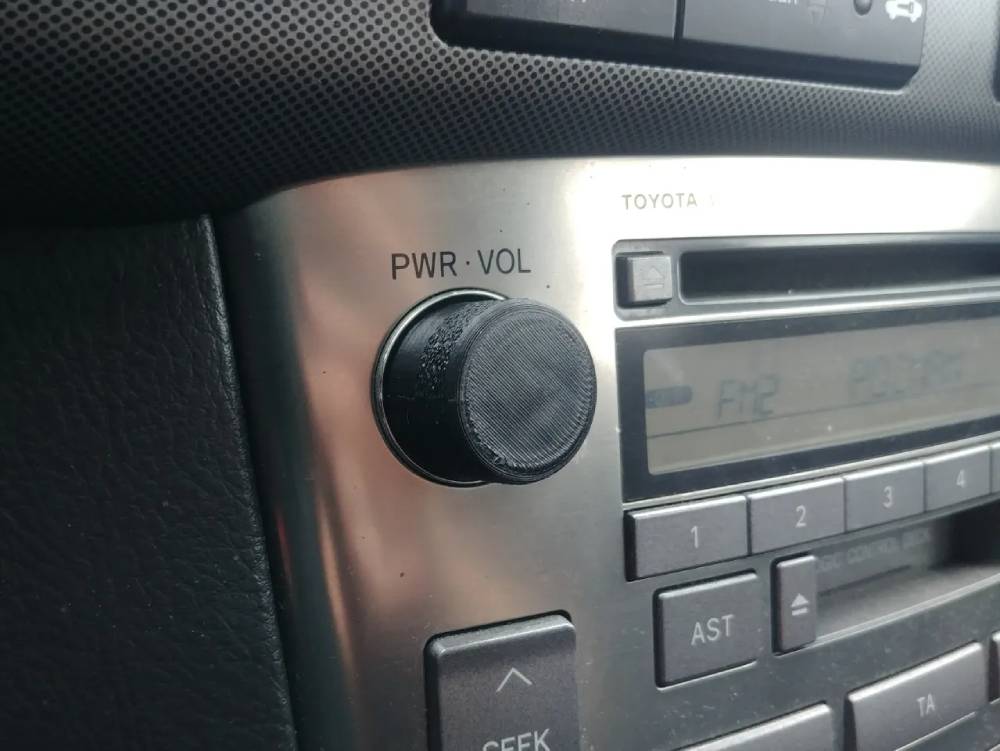
Common Symptoms of Toyota Radio Volume Control Problems
Before attempting any repairs, it is important to identify the specific symptoms your vehicle is experiencing. Different symptoms often point to different underlying causes.
Volume Knob Does Not Respond
One of the most common complaints among Toyota owners is a volume knob that no longer responds when turned. The display may remain unchanged, and the audio level stays fixed regardless of how many times the knob is rotated. This issue is often caused by a worn rotary encoder inside the control knob.
Volume Changes on Its Own
Some drivers notice that the radio volume increases or decreases without any input. This behavior can occur intermittently or become progressively worse over time. In many cases, a failing volume encoder sends incorrect signals to the infotainment system, causing random volume adjustments.
Volume Stuck at One Level
Another common symptom is a volume level that remains stuck at either a very low or very high setting. The radio may still function normally in other aspects, but the inability to adjust sound levels can significantly impact the driving experience.
Steering Wheel Audio Controls Not Working
If the volume knob works but the steering wheel controls do not, the problem may be related to the steering wheel control circuit, clock spring, or wiring connections. This issue is particularly noticeable when all other steering wheel buttons continue to function normally.
Delayed or Lagging Volume Adjustments
Drivers may also experience a delay between turning the knob and hearing a change in volume. While this may seem like a hardware issue, it is often associated with software bugs or outdated infotainment firmware.
What Causes Toyota Radio Volume Control Problems?
Several factors can contribute to volume control failures in Toyota vehicles. Identifying the root cause can save time, money, and unnecessary parts replacement.
Faulty Volume Knob Encoder
The most common cause is a worn or defective rotary encoder located behind the volume knob. Over time, dust, dirt, and normal wear can affect the encoder’s ability to accurately register user input. As a result, the system may misinterpret commands or fail to respond entirely.
Software Glitches in the Infotainment System
Modern Toyota vehicles rely heavily on software to manage audio functions. Temporary software bugs can cause erratic behavior, including delayed responses, frozen controls, or random volume changes. In many cases, a simple reboot or system update can resolve the problem.
Loose or Damaged Wiring
Electrical connections behind the dashboard may loosen due to vibration, age, or previous repair work. Damaged wiring can interrupt communication between the radio controls and the head unit, resulting in inconsistent volume adjustment.
Steering Wheel Control Malfunctions
When steering wheel audio controls stop working, the issue may originate from the clock spring assembly. This component allows electrical signals to pass between the steering wheel and the vehicle’s electronic systems. Wear and tear can eventually cause signal interruptions.
Defective Head Unit
Although less common, the radio head unit itself can fail. Internal circuit board damage, manufacturing defects, or electrical surges may prevent the audio system from processing volume commands correctly.
How to Fix Toyota Radio Volume Control Problems
Once you have identified the symptoms and possible causes, you can begin troubleshooting the issue using the following methods.
Restart the Infotainment System
Many temporary software issues can be fixed by restarting the system. Turn off the vehicle completely, wait a few minutes, and restart the engine. In some Toyota models, holding the power button for several seconds may force a system reboot.
Perform a Factory Reset
A factory reset can eliminate software conflicts that may be affecting volume controls. Navigate to the system settings menu and follow the manufacturer’s instructions to restore factory defaults. Remember that saved settings and paired devices may be erased during this process.
Check for Software Updates
Toyota periodically releases firmware updates for its infotainment systems. Installing the latest software version can fix known bugs and improve overall system stability. Consult your owner’s manual or dealership for update procedures.
Inspect Fuses and Wiring
A blown fuse or loose wiring connection can prevent the volume controls from functioning properly. Carefully inspect the relevant fuses and wiring harnesses connected to the radio system. Replace damaged components as needed.
Clean the Volume Knob
Dirt and debris can accumulate around the volume knob over time. Using compressed air or an electronics-safe contact cleaner may restore proper operation if contamination is affecting the encoder.
Replace the Faulty Component
If troubleshooting does not resolve the issue, replacement of the volume encoder, steering wheel controls, clock spring, or head unit may be necessary. Professional diagnosis is recommended when electrical components are involved.
Toyota Models Most Commonly Affected
While radio volume control issues can occur in virtually any vehicle, certain Toyota models appear more frequently in owner complaints and service reports. The problem is not necessarily caused by poor design but rather by the widespread use of similar infotainment systems across multiple model years.
Toyota Camry
The Toyota Camry is one of the most commonly reported models when it comes to audio system concerns. Owners have described situations where the volume knob becomes unresponsive, skips volume levels, or adjusts the sound in the opposite direction of the knob rotation. These issues are most often linked to wear within the rotary encoder or software-related glitches.
Toyota Corolla
Corolla owners occasionally experience delayed volume response or intermittent failures of both the volume knob and steering wheel controls. Because the Corolla is one of Toyota’s best-selling vehicles worldwide, even a small percentage of affected units can generate a large number of reported cases.
Toyota RAV4
The RAV4’s advanced infotainment system offers many features but also introduces additional software complexity. Some owners report random volume fluctuations, frozen audio controls, or temporary loss of functionality after software updates. In many cases, resetting the system restores normal operation.
Toyota Tacoma
Tacoma drivers frequently use their vehicles in demanding environments where dust, vibration, and temperature changes may accelerate wear on electronic components. As a result, issues involving the volume knob encoder and wiring connections can become more noticeable over time.
Toyota Highlander and Tundra
Highlander and Tundra owners have also reported occasional volume control problems, particularly in older vehicles with higher mileage. These issues are often associated with aging electronics rather than a specific design defect.
Repair Costs and Replacement Options
The cost of repairing a Toyota radio volume control problem can vary significantly depending on the source of the issue and the repair method chosen.
Low Cost DIY Solutions
Many volume control issues can be resolved without spending a significant amount of money. Restarting the infotainment system, performing a factory reset, updating software, or cleaning the volume knob typically requires little more than time and basic tools.
Estimated cost: $0 to $30
Volume Knob or Encoder Replacement
If the rotary encoder inside the volume control has failed, replacement may be required. Depending on the design of the head unit, the encoder can sometimes be replaced individually rather than replacing the entire radio assembly.
Estimated cost: $50 to $200
Steering Wheel Control Repairs
Problems involving steering wheel controls may require replacement of buttons, wiring, or the clock spring assembly. Labor costs can vary depending on the model and accessibility of the affected components.
Estimated cost: $150 to $500
Head Unit Repair
If internal electronics within the radio have failed, a specialized repair service may be able to restore functionality. This option is often less expensive than purchasing a brand-new unit.
Estimated cost: $200 to $800
Complete Head Unit Replacement
In severe cases where repairs are not practical, replacing the factory head unit may be the best solution. Costs depend on whether an original equipment unit or aftermarket system is selected.
Estimated cost: $500 to $2,000 or more
Before approving a major repair, it is always advisable to obtain a professional diagnosis to ensure that the correct component is being replaced.
How to Prevent Future Volume Control Problems
Although not every issue can be avoided, proper maintenance and usage habits can significantly reduce the likelihood of future radio volume control failures.
Keep the Interior Clean
Dust, dirt, and moisture are common enemies of electronic controls. Regularly cleaning the dashboard and control surfaces can help prevent contamination from entering the volume knob assembly.
Install Software Updates Promptly
Manufacturers frequently release updates that improve system stability and correct known bugs. Keeping your infotainment software current can help prevent many software-related volume control issues.
Avoid Excessive Force
Volume knobs and control buttons are designed for normal operation. Applying excessive force or rapidly spinning the knob can accelerate wear on internal components.
Protect Electronics from Extreme Conditions
Extended exposure to excessive heat, humidity, or moisture can shorten the lifespan of electronic systems. Whenever possible, park in shaded areas or use protective windshield covers during hot weather.
Address Minor Problems Early
A volume knob that occasionally skips levels or responds inconsistently may seem like a minor annoyance. However, these early warning signs often indicate developing hardware issues. Addressing the problem promptly can prevent more expensive repairs later.
Schedule Regular Vehicle Inspections
Routine maintenance appointments provide an opportunity for technicians to identify electrical issues before they become major failures. Preventive inspections can help maintain the reliability of both the audio system and other electronic components throughout the vehicle.
Frequently Asked Questions
Why is my Toyota radio volume knob not working?
The most common cause is a faulty rotary encoder inside the volume knob. Over time, normal wear, dust accumulation, and repeated use can prevent the encoder from accurately detecting input. Software glitches, loose wiring, or head unit issues may also contribute to the problem.
Why does my Toyota radio volume change by itself?
Random volume fluctuations are often caused by a worn volume encoder that sends incorrect signals to the infotainment system. In some cases, outdated software or electrical interference may also trigger unexpected volume changes.
Can a software update fix Toyota radio volume problems?
Yes. Many modern Toyota infotainment systems rely on software to control audio functions. If the issue is related to a firmware bug, installing the latest software update may restore normal operation and improve overall system performance.
Why are my steering wheel volume controls not working?
Steering wheel audio controls typically communicate through the clock spring assembly and associated wiring. If these components become damaged or worn, the volume buttons may stop responding even though the radio itself continues to function normally.
Should I replace the entire radio if the volume control stops working?
Not necessarily. Many volume control problems can be fixed by cleaning the knob, replacing the rotary encoder, updating software, or repairing wiring connections. Replacing the entire head unit should generally be considered only after other troubleshooting methods have failed.
How much does it cost to repair a Toyota radio volume control issue?
Repair costs vary depending on the cause. Simple software fixes may cost nothing, while replacing a faulty encoder can range from $50 to $200. More complex repairs involving the head unit or steering wheel electronics may cost several hundred dollars.
Can I fix the problem myself?
Many owners can successfully perform basic troubleshooting steps such as restarting the infotainment system, performing a factory reset, checking for software updates, or cleaning the volume knob. However, electrical repairs and component replacements may require professional assistance.
Conclusion
A Toyota radio volume control not working can be frustrating, but it does not always indicate a major failure. In many cases, the issue stems from common problems such as a worn volume knob encoder, software glitches, loose wiring, or steering wheel control malfunctions. Understanding the symptoms and identifying the root cause are essential steps toward finding an effective solution.
Fortunately, many volume control issues can be resolved through simple troubleshooting procedures. Restarting the infotainment system, performing a factory reset, installing software updates, or cleaning the volume knob may restore normal functionality without the need for expensive repairs. When hardware components are involved, replacing a faulty encoder or repairing damaged wiring is often far more cost effective than replacing the entire head unit.
By maintaining your vehicle’s infotainment system, keeping software up to date, and addressing minor issues before they become serious problems, you can extend the lifespan of your Toyota’s audio system and avoid unnecessary repair expenses. If troubleshooting does not solve the issue, a professional diagnosis can help pinpoint the exact cause and ensure that the correct repair is performed.
Whether you drive a Camry, Corolla, RAV4, Tacoma, Highlander, or another Toyota model, taking a systematic approach to diagnosis and repair can help restore reliable volume control and improve your overall driving experience.