Modern vehicles like the Toyota Camry rely heavily on advanced infotainment and communication systems to deliver a seamless driving experience. From radio and Bluetooth connectivity to Apple CarPlay and Android Auto integration, these features have become essential for many drivers. However, when an unexpected message such as “RCD Unavailable” appears on the infotainment screen, it can quickly become a source of frustration and concern.
Many Toyota Camry owners encounter this warning without understanding what it actually means. In some cases, the radio may stop working, audio functions may become unavailable, or the multimedia system may fail to respond altogether. Naturally, drivers may worry that the issue signals a serious electrical or mechanical problem that could lead to expensive repairs.
Fortunately, the Toyota Camry RCD Unavailable error is often related to software glitches, communication failures between electronic modules, power interruptions, or infotainment system configuration issues. While some cases require professional diagnosis, many can be resolved through simple troubleshooting steps that do not involve replacing any components.
In this guide, we will explain what the Toyota Camry RCD Unavailable message means, explore the most common causes behind the error, and provide practical solutions to help restore your vehicle’s multimedia system quickly and safely.
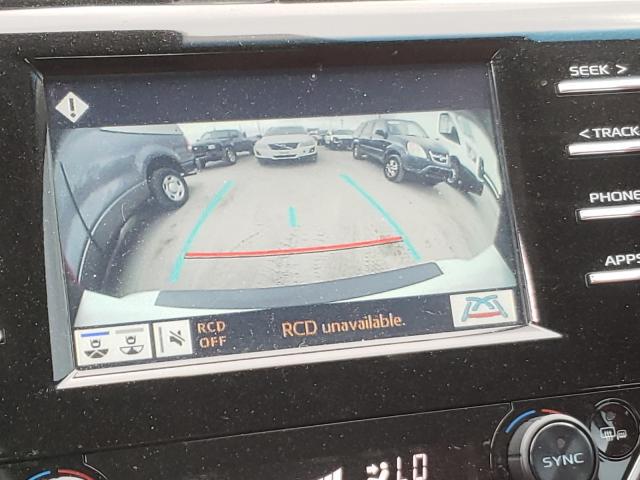
The “RCD Unavailable” message typically indicates that the vehicle’s infotainment system cannot access or communicate with a specific multimedia function or electronic control module. Depending on the Camry model year and infotainment configuration, RCD may refer to a component responsible for radio communication, media management, or data exchange within the multimedia system.
When this error appears, the infotainment unit is essentially informing the driver that a required service, module, or communication pathway is currently unavailable. As a result, certain entertainment and connectivity features may stop functioning normally.
Drivers often report symptoms such as a nonresponsive radio, missing audio output, Bluetooth connection failures, unavailable media sources, or intermittent screen freezing. In some cases, the warning disappears after restarting the vehicle, while in others it remains active every time the car is started.
It is important to understand that the RCD Unavailable warning does not usually affect the vehicle’s ability to drive safely. The engine, transmission, braking system, and steering functions typically continue to operate normally. However, the warning can significantly reduce the usability of the infotainment system and may indicate an underlying software or communication issue that should be addressed before it worsens.
Understanding the meaning of this message is the first step toward identifying the root cause and applying the appropriate fix.
Several factors can trigger the RCD Unavailable message. Identifying the exact cause is essential because the appropriate solution depends on the source of the problem.
One of the most common causes is a software glitch within the infotainment system. Like smartphones and computers, modern vehicle multimedia systems rely on software that can occasionally freeze, crash, or fail to load certain services correctly. Temporary software conflicts may prevent communication between modules and trigger the warning message.
Another frequent cause is a recent battery replacement or battery disconnection. When power is interrupted, some electronic modules may lose temporary settings or require a system reinitialization process. If synchronization does not occur properly, the infotainment system may display communication-related warnings such as RCD Unavailable.
Low battery voltage can also contribute to the issue. A weak battery may not provide stable power during vehicle startup, causing some electronic systems to initialize incorrectly. This problem is particularly common in older batteries nearing the end of their service life.
Communication failures between vehicle control modules are another possibility. Modern Toyota vehicles use a network known as the Controller Area Network, or CAN Bus, to allow different electronic systems to exchange information. A loose connector, damaged wiring harness, or faulty module can interrupt communication and generate infotainment-related errors.
In less common situations, the problem may be caused by a malfunctioning head unit, damaged multimedia hardware, or an internal failure within the infotainment system itself. These cases often require professional diagnostic equipment to confirm the source of the fault.
Signs and Symptoms Associated with the Error
The Toyota Camry RCD Unavailable warning can present itself in several different ways depending on the underlying cause and the vehicle’s multimedia configuration.
The most obvious symptom is the appearance of the warning message on the infotainment display. Some drivers notice the message immediately after starting the vehicle, while others encounter it during normal operation.
Radio functionality may become unavailable or operate intermittently. Drivers may be unable to switch stations, access saved presets, or receive audio output through the vehicle’s speakers.
Bluetooth connectivity problems are also common. The system may fail to recognize paired devices, disconnect unexpectedly, or refuse new connection requests. Similar issues can affect Apple CarPlay and Android Auto integration, preventing smartphones from connecting properly.
In some cases, the infotainment screen may become slow, unresponsive, or frozen. Menu navigation can lag significantly, and certain multimedia features may disappear temporarily from the display.
Audio-related symptoms can include complete sound loss, distorted playback, or inconsistent volume behavior. Drivers may notice that navigation prompts, phone calls, and media playback stop producing sound even though the screen appears functional.
If multiple symptoms occur simultaneously, the issue may point to a broader communication or hardware problem rather than a simple software glitch. Recognizing these warning signs can help narrow down the cause and determine the most effective troubleshooting approach.
Fortunately, many cases of the Toyota Camry RCD Unavailable error can be resolved without replacing expensive components. Starting with basic troubleshooting steps can save both time and money.
The first solution is to restart the infotainment system. Turn off the vehicle completely, remove the key if applicable, and wait several minutes before restarting the engine. This process allows the system to perform a fresh boot cycle and can clear temporary software glitches that may be causing communication issues.
If the warning remains, consider performing a system reset through the infotainment settings menu. Depending on the Camry model year, the reset option may be found under General Settings, System Settings, or Multimedia Settings. A reset can restore default configurations and eliminate corrupted temporary data that may be preventing the system from functioning correctly.
Checking the vehicle battery is another important step. A weak or aging battery can create unstable voltage conditions during startup, causing electronic modules to initialize improperly. Inspect the battery terminals for corrosion, ensure all connections are tight, and verify that the battery voltage falls within the manufacturer’s recommended range.
Owners should also inspect the relevant fuses associated with the infotainment system. A partially damaged or blown fuse may interrupt communication between multimedia components. Consult the owner’s manual to locate the appropriate fuse box and identify multimedia-related circuits.
Software updates can also resolve known infotainment bugs. Toyota periodically releases firmware updates designed to improve system stability and correct software defects. If your vehicle has not received recent updates, installing the latest software version may eliminate the RCD Unavailable warning.
When basic troubleshooting does not solve the issue, professional diagnostic testing may be necessary. Technicians can use specialized scan tools to identify communication faults, module errors, and hardware failures that are not visible through standard system menus.
When Should You Visit a Toyota Dealer or Repair Shop?
Although many RCD Unavailable issues are minor, there are situations where professional assistance becomes necessary. Ignoring persistent warnings can sometimes allow underlying electronic problems to worsen over time.
A dealership or qualified repair facility should be consulted if the warning message appears repeatedly despite multiple system resets. Recurring errors often indicate deeper software conflicts, network communication failures, or hardware defects that require specialized equipment to diagnose accurately.
Drivers should also seek professional help if the infotainment screen becomes completely black, refuses to power on, or remains frozen for extended periods. These symptoms may suggest a failing head unit or internal hardware malfunction.
Another warning sign is the appearance of multiple electronic system errors at the same time. If the RCD Unavailable message is accompanied by connectivity failures, backup camera issues, navigation malfunctions, or other unusual electrical symptoms, the vehicle may be experiencing a broader communication problem within its electronic network.
During a professional inspection, technicians typically connect a diagnostic scanner to retrieve fault codes stored by the vehicle’s control modules. These codes provide valuable information about communication interruptions, software conflicts, and component failures. Additional testing may include wiring inspections, voltage checks, module communication analysis, and software verification.
Although professional diagnosis may involve an upfront cost, it can prevent unnecessary parts replacement and help identify the exact source of the problem more efficiently.
Preventive maintenance plays an important role in reducing the likelihood of future infotainment system issues. While no electronic system is completely immune to glitches, several practices can improve reliability and minimize the risk of recurring errors.
Keeping the vehicle battery in good condition is one of the most effective preventive measures. A healthy battery provides stable voltage to all electronic systems and helps ensure proper module initialization during startup. Regular battery testing can identify declining performance before problems begin to appear.
Owners should also keep the infotainment software updated whenever updates become available. Manufacturers frequently release software improvements that address known bugs, compatibility issues, and system stability concerns. Installing these updates can significantly reduce the likelihood of communication-related warnings.
Avoiding unauthorized modifications to the vehicle’s electrical system is equally important. Aftermarket accessories, poorly installed audio equipment, and nonstandard wiring modifications can interfere with factory communication networks and increase the risk of electronic malfunctions.
Routine inspections of electrical connections can also help prevent future issues. Loose connectors, moisture intrusion, and corrosion may gradually affect communication between modules. Addressing these problems early can prevent intermittent faults from developing into more serious system failures.
Finally, if the vehicle experiences unusual infotainment behavior, addressing the issue promptly rather than waiting for it to worsen can help maintain system reliability and reduce long-term repair costs. A proactive approach is often the most effective way to keep the Toyota Camry multimedia system operating smoothly.
Frequently Asked Questions
In most cases, the RCD Unavailable warning is not considered a safety-critical issue. The message generally affects the infotainment system rather than essential driving functions such as the engine, brakes, steering, or transmission. Drivers can usually continue operating the vehicle safely while troubleshooting the problem. However, if the warning appears alongside multiple electrical system faults, professional diagnosis is recommended to rule out broader communication issues.
Yes, most Toyota Camry owners can continue driving when the RCD Unavailable warning appears. The issue typically impacts multimedia functions, including radio, Bluetooth, navigation, and smartphone connectivity. While the vehicle remains drivable, it is advisable to investigate the cause as soon as possible to prevent potential system instability or future electronic complications.
It can. Many drivers first notice the warning shortly after replacing or disconnecting the battery. Power interruptions may temporarily disrupt communication between electronic modules, causing the infotainment system to display error messages until all systems complete their initialization process. In many cases, a system restart or reset resolves the issue.
Will Resetting the Infotainment System Delete My Data?
A basic restart generally does not remove personal settings. However, a factory reset may erase saved radio stations, Bluetooth pairings, navigation preferences, and other customized settings. Before performing a full reset, it is a good idea to review the vehicle manual and note any important configurations you may need to restore later.
Repair costs vary depending on the root cause. Software-related issues may be resolved at little or no cost through a system reset or software update. Battery replacement, fuse repairs, or connector inspections typically involve modest expenses. If the problem stems from a failed infotainment head unit or damaged electronic module, repair costs can increase significantly. Accurate diagnosis is essential before replacing any components.
Can a Software Update Fix the Problem?
Yes. Software glitches are among the most common causes of infotainment-related warnings. Toyota periodically releases firmware updates that improve system performance and correct known bugs. If the RCD Unavailable error is linked to outdated software, updating the infotainment system may resolve the issue completely.
What Should I Do If the Warning Keeps Returning?
If the warning reappears after multiple resets, battery checks, and software updates, professional diagnostic testing is recommended. Persistent errors often indicate communication faults, wiring problems, module failures, or deeper software conflicts that require specialized tools to identify accurately.
Conclusion
The Toyota Camry RCD Unavailable message can be frustrating, especially when it disrupts important infotainment features such as radio, Bluetooth connectivity, smartphone integration, and multimedia playback. Because modern vehicles rely heavily on interconnected electronic systems, even a minor communication issue can trigger warning messages that leave drivers unsure of what action to take.
Fortunately, the RCD Unavailable error is often less serious than it initially appears. In many cases, the problem is caused by temporary software glitches, battery-related interruptions, outdated firmware, or communication errors between electronic modules. Simple troubleshooting steps such as restarting the infotainment system, performing a system reset, checking battery health, inspecting fuses, and installing software updates can often restore normal functionality without the need for costly repairs.
That said, persistent warnings should never be ignored. If the message continues to appear, if the infotainment system becomes completely unresponsive, or if multiple electronic systems begin displaying faults simultaneously, a professional inspection is the most reliable way to identify the underlying issue. Early diagnosis can prevent unnecessary part replacements and reduce the risk of more complex electrical problems developing over time.
By maintaining a healthy battery, keeping software up to date, avoiding improper electrical modifications, and addressing infotainment issues promptly, Toyota Camry owners can significantly reduce the likelihood of encountering the RCD Unavailable warning in the future.
If your Toyota Camry is currently displaying the RCD Unavailable message, start with the troubleshooting steps outlined in this guide. A systematic approach will often lead to a quick and cost-effective solution, allowing you to restore full multimedia functionality and enjoy a smoother driving experience once again.