Few things are more frustrating than replacing your car battery, turning the ignition key, and discovering that your GM radio is locked. Instead of your favorite music or navigation system, you’re greeted with a message like LOC, LOCKED, or INOP. For many Chevrolet, GMC, Buick, Cadillac, and Pontiac owners, this unexpected problem can quickly turn a simple battery replacement into a confusing and time consuming experience.
The good news is that a locked radio does not necessarily mean your stereo is damaged. In most cases, the issue is caused by GM TheftLock, a factory installed anti theft feature designed to discourage radio theft by requiring a security code whenever the radio loses power. While this system helps protect your vehicle, it can also create frustration if you’ve misplaced the original code or purchased a used vehicle without the owner’s documentation.
This complete guide explains how to unlock a GM radio without code using safe and legitimate methods. You’ll learn why your radio becomes locked, what the messages on the display actually mean, how to retrieve the information needed to regain access, and when a dealership or professional service may be required. We’ll also cover common mistakes to avoid, helping you save time, prevent unnecessary expenses, and restore your factory radio as quickly as possible.
Whether you drive an older GM model with a traditional TheftLock radio or a newer factory infotainment system, this step by step guide will help you understand your options and choose the safest solution.
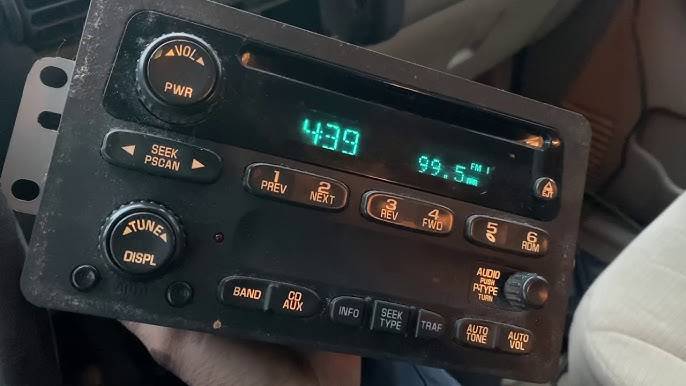
What Is the GM TheftLock Radio System?
If you’re searching for how to unlock GM radio without code, it’s important to understand why your radio becomes locked in the first place. The answer lies in GM TheftLock, an anti theft feature that General Motors introduced to reduce the resale value of stolen factory radios.
Unlike older car stereos that could simply be removed and installed in another vehicle, a TheftLock equipped radio is programmed to recognize when it has lost power. If the battery is disconnected, completely drained, or the radio is removed from the vehicle, the system may require a security code before it can be used again. Without the correct code, the radio remains locked, making it much less attractive to thieves.
The TheftLock system was introduced on many GM vehicles beginning in the 1990s and continued across numerous Chevrolet, GMC, Buick, Cadillac, Pontiac, Oldsmobile, and Saturn models. While newer GM infotainment systems use more advanced security measures tied to the vehicle’s electronic control modules, many older factory radios still rely on the traditional TheftLock code system.
One of the most confusing aspects for vehicle owners is the message displayed on the radio screen. Although they all indicate a security issue, each message has a different meaning.
LOC
The “LOC” message stands for “Locked.” It means the radio is waiting for the correct security code to be entered. This is the most common message drivers see after replacing a battery or disconnecting the vehicle’s electrical system.
LOCKED
Some GM radios display the word “LOCKED” instead of “LOC.” While the wording differs, the meaning is essentially the same. The radio has entered security mode and will not operate until it receives the correct unlock code.
INOP
The “INOP” message is slightly different. It appears after too many incorrect code attempts have been entered. Rather than allowing unlimited guesses, the TheftLock system temporarily disables code entry to discourage unauthorized access. Depending on the radio model, you may need to leave the ignition switched on for approximately one hour before another attempt is permitted.
Understanding these messages can save considerable time during troubleshooting. Many owners assume the radio has failed electrically, when in reality it is functioning exactly as designed. Identifying whether your display shows LOC, LOCKED, or INOP is the first step toward selecting the correct recovery method.
Why Your GM Radio Gets Locked
Many drivers first encounter the TheftLock system immediately after routine maintenance. The radio may have worked perfectly before replacing the battery, yet suddenly refuses to function once power is restored. This behavior is intentional and does not necessarily indicate a defective radio.
The most common cause is a battery replacement. When the battery is disconnected, the radio temporarily loses its power source. Upon reconnecting the battery, the TheftLock system may interpret the interruption as an attempt to remove the radio from the vehicle, triggering the security feature.
A dead or completely discharged battery can produce the same result. Even if the battery was never physically removed, a prolonged loss of electrical power may activate the radio’s security mode.
Another frequent situation occurs when someone installs a used factory GM radio from another vehicle. Since many factory radios are linked to their original vehicle configuration, installing the unit elsewhere often causes it to enter a locked state until ownership can be verified and the correct code is provided.
Entering the wrong security code multiple times is another common mistake. Instead of unlocking the radio, repeated incorrect attempts may cause the display to change from LOC to INOP, temporarily preventing any additional code entries.
Electrical repairs can also trigger the TheftLock feature. Replacing fuses, repairing damaged wiring, disconnecting the vehicle’s electrical system, or performing certain maintenance procedures may interrupt power long enough for the radio to require authentication again.
Fortunately, these situations rarely mean the radio itself is broken. In most cases, the hardware continues to function normally. The challenge is simply restoring authorized access through the proper recovery procedure.
Can You Unlock a GM Radio Without the Original Code?
The short answer is yes, but only under specific circumstances.
Many online articles suggest that you can unlock any GM radio without a code by pressing a few buttons or using a universal master code. Unfortunately, this information is often misleading. There is no universal GM radio unlock code that works for every vehicle or every factory radio model.
Whether you can unlock your radio without the original code depends on several factors, including the model year, radio type, and available ownership documentation.
If you legally own the vehicle, there are several legitimate ways to recover access. Many dealerships can retrieve the correct security code using your Vehicle Identification Number (VIN) or the radio’s serial number. In some cases, older GM radios allow you to obtain the serial number directly from the radio display through a specific button sequence, making code retrieval much easier.
Newer GM infotainment systems may not require a traditional security code at all. Instead, they often verify ownership through electronic communication with the vehicle’s control modules. If replacement components have been installed or programming has been interrupted, dealer level diagnostic equipment may be necessary to restore operation.
While searching online, you will likely encounter websites claiming to generate free unlock codes instantly. Many of these services are outdated, inaccurate, or designed primarily to collect personal information or charge hidden fees. Likewise, software advertised as a “GM radio unlock generator” often fails to work with modern factory radios.
Another mistake is repeatedly entering random security codes in the hope of guessing the correct combination. This approach usually causes the radio to enter INOP mode, extending the recovery process and increasing frustration.
The safest approach is always to use legal methods based on proof of ownership. Whether you obtain the code through a dealership, an authorized radio service, or official GM resources, following the proper procedure protects both your vehicle and its factory security system.
Step by Step Guide to Unlock GM Radio Without Code
If your factory radio displays LOC, LOCKED, or INOP, don’t panic. In most cases, the radio can be restored using legitimate methods without replacing the unit. The exact process depends on your vehicle’s model year and radio type, but the following steps will help you determine the safest way to regain access.
Method 1: Check Whether the Radio Displays LOC or INOP
Before attempting any recovery procedure, identify the message shown on the radio display. This small detail determines what you should do next.
If your radio displays LOC, the system is waiting for the correct security code. You can continue with the code retrieval process immediately.
If the display reads INOP, the radio has temporarily disabled code entry because too many incorrect codes were entered. This is a built in security feature designed to prevent unauthorized guessing.
To clear the INOP status, turn the ignition key to the ON position while leaving the engine off. Keep the radio powered for approximately one hour without interrupting the electrical supply. Once the waiting period expires, the display usually returns to LOC, allowing another code entry attempt.
Avoid disconnecting the battery during this process because doing so may reset the waiting period and force you to start over.
Method 2: Retrieve the Radio Serial Number
Many older GM factory radios allow owners to display the radio’s serial number directly on the screen. This serial number is often required when requesting the correct unlock code from an authorized source.
The button sequence varies depending on the radio model. On many late 1990s and early 2000s GM radios, pressing and holding preset buttons such as 2 and 3, or 1 and 4, for several seconds displays a series of numbers on the screen. These numbers form the radio identification required for code retrieval.
Some models display two separate groups of numbers. In that case, record both groups exactly as shown, since they may need to be combined into a single serial number.
Newer GM infotainment systems generally do not display the serial number using button combinations. Instead, the information is stored electronically and can only be accessed using dealer diagnostic equipment or specialized scan tools.
Write the serial number carefully and double check every digit before proceeding. Even one incorrect number can result in an invalid unlock code.
Method 3: Request the Correct Unlock Code Using Your VIN
Once you have the necessary information, the safest way to unlock your GM radio is to obtain the correct security code through official channels.
Most authorized GM dealerships can retrieve the radio code using your Vehicle Identification Number (VIN), the radio serial number, or both. You will typically be asked to provide proof of ownership, such as your vehicle registration and a valid photo ID.
Depending on the dealership and vehicle model, the code retrieval process may take only a few minutes or require additional verification. Some dealerships provide this service free of charge, while others may charge a small administrative fee.
If your vehicle still has its original factory radio installed, the VIN alone may be sufficient for the dealership to locate the correct code. However, if the radio has been replaced with a used unit from another vehicle, the radio serial number is usually required because the security information no longer matches the original VIN.
After receiving the security code, carefully enter it according to the instructions in your owner’s manual. Enter each digit accurately and avoid repeated incorrect attempts, as this may return the radio to INOP mode and delay the unlocking process.
Contact a GM Dealer for Assistance
If you’re unable to retrieve the serial number or the previous methods do not work, contacting an authorized GM dealership is usually the fastest and most reliable solution.
Dealership technicians have access to manufacturer databases and diagnostic equipment that are unavailable to most vehicle owners. They can verify ownership, identify the correct radio configuration, and retrieve or program the appropriate security information.
When visiting a dealership, bring the following documents to avoid unnecessary delays:
- Vehicle registration
- Government issued photo identification
- Vehicle Identification Number (VIN)
- Radio serial number, if available
Some dealerships may also inspect the vehicle to confirm that the installed radio matches the vehicle’s original equipment.
Although many owners hesitate because they expect high costs, radio code retrieval is often less expensive than replacing the entire stereo system. The exact fee varies by dealership, vehicle model, and region, but it is generally far more affordable than purchasing a replacement factory radio.
If your radio has experienced internal hardware failure in addition to the security lock, the technician can also determine whether repair or replacement is the better option.
Professional GM Radio Unlock Services
For owners who cannot easily visit a dealership, professional radio unlock services may offer another legitimate solution.
These businesses specialize in factory automotive electronics and often have the equipment required to retrieve radio security information from compatible GM models. Some operate local repair shops, while others allow customers to mail in the radio for programming or code recovery.
Before choosing a service provider, verify that the company has experience with OEM GM radios and positive customer reviews. A reputable technician should clearly explain the process, pricing, estimated turnaround time, and any warranty offered on the service.
Be cautious of websites promising instant unlock codes for every GM radio. Many online code generators rely on outdated databases and may provide incorrect information. Others charge hidden fees or request unnecessary personal information without guaranteeing results.
Professional unlock services are generally most appropriate when the dealership cannot assist, the radio has been replaced from another vehicle, or specialized electronic programming is required. Choosing an experienced technician reduces the risk of damaging the radio and increases the likelihood of a successful recovery.
Common Mistakes to Avoid When Unlocking a GM Radio
Trying to unlock a GM radio without understanding how the TheftLock system works can make the process more difficult than necessary. Many vehicle owners unintentionally create additional problems by following outdated advice or relying on unreliable online resources. Avoiding the following mistakes can save both time and money.
Entering Random Security Codes
One of the most common mistakes is repeatedly guessing the unlock code. Some drivers assume there are only a few possible combinations and begin entering random numbers until something works.
Unfortunately, GM radios are designed to detect multiple failed attempts. After several incorrect entries, the radio usually switches from LOC to INOP, temporarily disabling code entry. Instead of solving the problem, random guessing only extends the amount of time required before another attempt can be made.
Using Fake Online Code Generators
A quick internet search reveals hundreds of websites claiming they can generate a free GM radio unlock code instantly. While a few legitimate services exist for certain older radio models, many websites use outdated databases or provide completely inaccurate codes.
Some websites are designed primarily to collect personal information or charge hidden fees without delivering a working solution. Others advertise software downloads that may expose your computer to malware.
Whenever possible, obtain your unlock code through official GM channels or a trusted automotive electronics specialist.
Disconnecting the Battery Repeatedly
Many owners believe disconnecting the battery will reset the radio and remove the security lock. In reality, this almost never works.
The TheftLock feature is intentionally designed to survive power interruptions. Disconnecting the battery repeatedly may actually prolong the recovery process, especially if the radio has entered INOP mode and requires a waiting period before accepting another code.
Ignoring the Owner’s Manual
If you purchased the vehicle new or received the original documentation, the owner’s manual may already contain the radio security code or instructions for retrieving it.
Many drivers overlook this simple step and spend unnecessary time searching online before checking the documents that came with the vehicle.
Videos and forum posts sometimes recommend cutting wires, modifying internal components, or installing unofficial software to bypass the TheftLock system.
These methods can permanently damage the radio, void repair options, or create additional electrical problems within the vehicle. They may also violate local laws if used on equipment that cannot be legally verified as belonging to the vehicle owner.
Following manufacturer approved procedures remains the safest and most reliable approach.
Frequently Asked Questions
Can I unlock my GM radio for free?
In some cases, yes. If you still have the original radio code recorded in your owner’s manual or maintenance records, you can unlock the radio without paying any additional fees. Some GM dealerships also provide radio code retrieval at no cost, although policies vary by location.
Will disconnecting the battery unlock the radio?
No. Disconnecting the battery does not remove the TheftLock security feature. In fact, losing battery power is one of the most common reasons a GM radio becomes locked in the first place.
What does INOP mean on a GM radio?
INOP stands for “Inoperative.” It indicates that too many incorrect security codes have been entered. The radio temporarily disables additional attempts as a security precaution. Leaving the ignition switched on for about one hour often allows the radio to return to LOC mode.
Can I unlock a used GM factory radio?
Yes, but the process may be more complicated. A used factory radio may no longer match the VIN of your current vehicle. In these situations, the radio serial number and professional programming may be required before the unit can be activated.
Do all GM vehicles use TheftLock?
No. Many vehicles manufactured during the 1990s and early 2000s use traditional TheftLock security codes. Newer GM vehicles typically rely on integrated electronic security systems that communicate directly with the vehicle’s control modules instead of requiring a manual unlock code.
Is it legal to unlock a GM radio without the original code?
Yes, provided you are the lawful owner of the vehicle or have authorization to perform the repair. The recommended methods in this guide involve verifying ownership and using legitimate recovery procedures rather than bypassing the manufacturer’s security system.
Conclusion
A locked factory radio can be frustrating, especially after something as routine as replacing a battery or performing electrical maintenance. Fortunately, understanding how the GM TheftLock system works makes the recovery process much easier and helps you avoid unnecessary repairs or expensive radio replacements.
If your radio displays LOC, LOCKED, or INOP, begin by identifying the message and determining whether the system is ready to accept a security code. Older GM radios often allow you to retrieve the serial number directly from the display, while newer models may require dealership diagnostic equipment. In either case, using official code retrieval methods is the safest and most reliable way to restore your radio.
Avoid unreliable code generators, repeated guessing, or unauthorized bypass techniques that may damage the radio or delay the unlocking process. Verifying ownership and following legitimate recovery procedures protects both your vehicle and its built in security features.
By following the steps outlined in this guide, you now have a clear understanding of how to unlock a GM radio without code safely and legally. Whether you own a Chevrolet, GMC, Buick, Cadillac, or another GM vehicle, taking the correct approach can save time, reduce costs, and get your factory radio working again with minimal hassle.