Bluetooth connectivity has become an essential feature in modern vehicles, allowing drivers to make hands-free calls, stream music, access navigation audio, and stay connected safely while on the road. However, when your phone refuses to connect to your Subaru, the convenience quickly turns into frustration. Whether you drive a Forester, Outback, Crosstrek, Ascent, Legacy, or WRX, Bluetooth pairing issues can disrupt your daily commute and make even simple tasks unnecessarily complicated.
Many Subaru owners report problems such as failed pairing attempts, devices not appearing in the Bluetooth menu, random disconnections, poor audio quality, or contacts failing to sync properly. These issues can occur for several reasons, ranging from outdated software and stored connection conflicts to infotainment system glitches and smartphone compatibility problems. The good news is that most Subaru Bluetooth pairing problems can be resolved without expensive repairs or a trip to the dealership.
In this guide, we will explore the most common causes of Subaru Bluetooth pairing problems and provide easy, step-by-step fixes that actually work. Whether your Subaru Bluetooth is not connecting, keeps disconnecting, or fails to recognize your device altogether, the troubleshooting methods outlined below can help you restore a stable connection and get back to enjoying your driving experience.
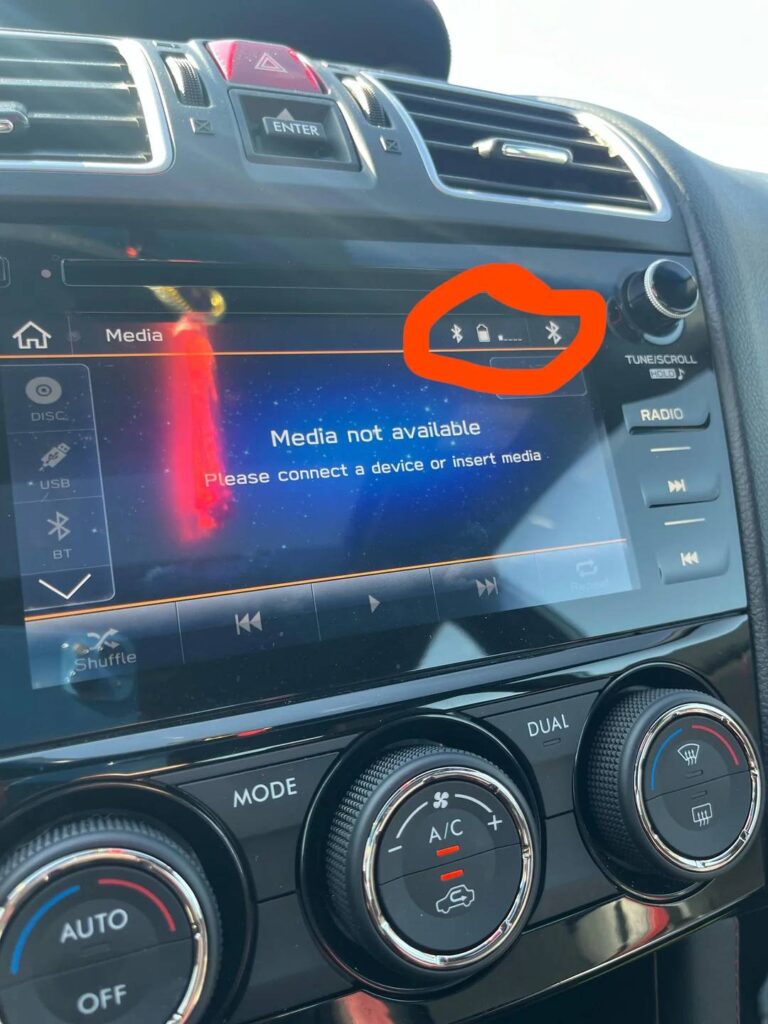
Understanding Subaru Bluetooth Pairing Problems
Bluetooth technology is designed to create a seamless wireless connection between your smartphone and your vehicle’s infotainment system. In Subaru vehicles, this connection enables hands-free calling, wireless audio streaming, contact synchronization, and integration with various smartphone features. While the pairing process is usually straightforward, even a small communication error between the phone and the vehicle can prevent a successful connection.
When a Bluetooth pairing issue occurs, drivers may experience several different symptoms. Some users find that their phone cannot detect the Subaru infotainment system, while others discover that the vehicle fails to recognize their device altogether. In other cases, the pairing process starts normally but fails before completion. Certain users report that the connection works initially but disconnects unexpectedly during a drive. Others may notice that music streaming functions correctly while phone calls do not, or that contacts and call history fail to sync with the vehicle.
Understanding the specific symptom is often the first step toward identifying the underlying cause. Since Bluetooth pairing relies on both the smartphone and the vehicle’s software working together, a problem on either side can lead to connection failures. Recognizing how the system is supposed to function helps narrow down the troubleshooting process and allows drivers to apply the most effective solution more quickly.
Common Causes of Subaru Bluetooth Pairing Problems
One of the most common causes of Subaru Bluetooth pairing problems is outdated smartphone software. Both Android and iPhone devices receive regular operating system updates that improve Bluetooth performance, security, and compatibility. If your phone is running an older version of its operating system, it may struggle to communicate properly with your Subaru’s infotainment system.
Software bugs within the Subaru infotainment system can also contribute to pairing failures. Certain versions of Subaru Starlink and infotainment software have been known to experience temporary Bluetooth glitches that affect connectivity. These issues may appear after a system update, a battery replacement, or a software malfunction within the vehicle itself.
Another frequently overlooked issue involves storing too many paired devices. Most Subaru infotainment systems maintain a memory of previously connected smartphones. When this memory becomes crowded with old devices, conflicts can occur that prevent new connections from being established successfully. Removing unused devices often resolves this problem immediately.
Corrupted Bluetooth data can create additional complications. Over time, cached information stored on a smartphone or within the infotainment system may become damaged. This can lead to failed pairing attempts, incomplete connections, or repeated disconnections. Such issues are particularly common after major software updates on either the vehicle or the smartphone.
Bluetooth interference is another potential cause. Devices such as smartwatches, wireless earbuds, tablets, and other nearby electronics may compete for Bluetooth resources and disrupt the pairing process. In busy environments where multiple wireless devices are active, signal interference can become a significant factor.
Finally, simple user errors can occasionally be responsible. The vehicle may not be in pairing mode, Bluetooth visibility settings may be disabled, or the pairing confirmation prompt may be missed during setup. Even minor mistakes during the pairing process can prevent a successful connection.
Easy Fixes for Subaru Bluetooth Pairing Problems
The simplest and often most effective solution is to restart both your smartphone and the Subaru infotainment system. A complete reboot clears temporary software glitches that may be interfering with Bluetooth communication. After restarting both devices, attempt the pairing process again to see if the issue has been resolved.
If the problem persists, delete any existing Bluetooth connections from both the phone and the vehicle. On your smartphone, locate the saved Subaru connection and select the option to forget the device. Then access the Bluetooth settings in your Subaru and remove the phone from the list of paired devices. Starting with a completely fresh connection often eliminates conflicts caused by outdated or corrupted pairing information.
Updating your smartphone software should also be a priority. Manufacturers regularly release updates that improve Bluetooth stability and compatibility with vehicle infotainment systems. Installing the latest version of iOS or Android can often solve connectivity issues that appear after older software becomes incompatible with newer vehicle systems.
Checking for available Subaru infotainment software updates is equally important. New firmware releases frequently address Bluetooth bugs, performance issues, and compatibility concerns. Depending on your Subaru model, updates may be available through the infotainment system, an authorized Subaru dealer, or official support channels.
Android users may benefit from clearing the Bluetooth cache. Cached files can occasionally become corrupted and interfere with the pairing process. Removing these temporary files allows the Bluetooth service to rebuild clean connection data the next time the phone attempts to pair with the vehicle.
If none of the previous solutions work, resetting the Bluetooth settings within the Subaru infotainment system can help restore normal operation. This process removes stored Bluetooth information and returns the system to its default state. After completing the reset, pair your smartphone again as if connecting for the first time. In many cases, this simple procedure successfully resolves persistent Subaru Bluetooth pairing problems without requiring professional assistance.
Model Specific Bluetooth Issues
While Bluetooth pairing problems can affect any Subaru vehicle, certain models have developed recurring issues that owners report more frequently. Understanding these model specific concerns can help narrow down potential causes and speed up the troubleshooting process.
Subaru Forester Bluetooth Problems
The Subaru Forester is one of the brand’s most popular models, but some owners have experienced Bluetooth pairing failures after software updates or when connecting newer smartphones. Common complaints include devices failing to reconnect automatically after the vehicle is restarted, intermittent audio streaming interruptions, and occasional synchronization problems with contacts and call logs.
In many Forester cases, removing all previously paired devices and re-establishing the connection from scratch resolves the issue. Ensuring that both the smartphone and infotainment system are running the latest software versions can also improve connection reliability.
Subaru Outback Bluetooth Pairing Issues
Outback owners often report Bluetooth problems related to the Starlink infotainment system. Symptoms may include delayed pairing, dropped connections during phone calls, or failure to detect devices that were previously connected successfully.
Software updates frequently address these concerns, making it important to check for available firmware upgrades. Drivers who continue experiencing issues after updating should perform a Bluetooth reset and recreate the connection profile to eliminate any corrupted pairing data.
Subaru Crosstrek Bluetooth Connectivity Problems
The Crosstrek occasionally encounters device recognition issues, particularly when multiple smartphones have been connected to the vehicle over time. Some users notice that the infotainment system struggles to identify new devices or repeatedly attempts to connect to older saved phones.
Deleting unused paired devices and limiting the number of active Bluetooth profiles stored within the system can significantly improve performance. A factory reset may be beneficial if recognition problems persist despite other troubleshooting efforts.
Subaru Ascent Bluetooth Troubleshooting
Because the Ascent is commonly used as a family vehicle, multiple drivers often connect their smartphones to the same infotainment system. This can create pairing conflicts when several devices compete for automatic connection priority.
Managing paired devices carefully and assigning a primary device can reduce connection conflicts. Drivers should also verify that nearby family members’ phones are not automatically attempting to connect while a new pairing session is being performed.
Bluetooth Problems with iPhone and Android
Different smartphone operating systems can create unique Bluetooth challenges. Although Subaru systems are designed to work with both iPhone and Android devices, compatibility issues occasionally arise due to software updates, security settings, or manufacturer-specific Bluetooth implementations.
iPhone Pairing Issues
iPhone users may encounter Bluetooth pairing problems after major iOS updates. Changes to privacy settings, wireless communication protocols, or Apple CarPlay integration can occasionally interfere with existing Subaru Bluetooth connections.
If an iPhone fails to connect, users should first verify that Bluetooth is enabled and functioning properly with other devices. Forgetting the Subaru connection and pairing again often resolves software-related conflicts. It is also advisable to check whether a pending iOS update contains Bluetooth stability improvements.
In some situations, Apple CarPlay settings may interfere with standard Bluetooth functions. Disabling and reconfiguring CarPlay can help restore proper connectivity, particularly if phone calls or audio streaming features are not functioning correctly.
Android Pairing Issues
Android devices can present additional compatibility challenges because different manufacturers customize the operating system in various ways. Samsung, Google Pixel, Motorola, OnePlus, and other brands may handle Bluetooth communication differently, leading to inconsistent behavior across devices.
Android users experiencing pairing failures should ensure that all system updates are installed and that Bluetooth permissions are properly configured. Clearing the Bluetooth cache can be especially effective on Android devices because corrupted temporary files frequently contribute to connection issues.
Battery optimization settings may also affect Bluetooth performance. Some Android phones restrict background processes to conserve power, which can interfere with automatic reconnection features. Adjusting these settings may improve long-term Bluetooth stability.
When to Perform a Factory Reset
A factory reset should generally be considered a last resort after other troubleshooting methods have failed. While more drastic than deleting paired devices or rebooting the system, a reset can resolve deeply rooted software conflicts that prevent normal Bluetooth operation.
Several signs may indicate that a factory reset is necessary. Persistent pairing failures, repeated infotainment crashes, missing Bluetooth menu options, and ongoing connection instability despite software updates often point to underlying system corruption that simpler fixes cannot address.
Before proceeding, drivers should understand that a factory reset typically removes saved preferences, paired devices, navigation settings, and other personalized configurations. Taking note of important settings beforehand can make the reconfiguration process easier once the reset is complete.
The reset procedure varies depending on the Subaru model and infotainment system version. In most cases, users can access the settings menu, locate the system reset option, and follow the on-screen instructions. After the reset is complete, reconnect your smartphone as if pairing it for the first time.
Many owners discover that a factory reset restores Bluetooth functionality immediately by eliminating corrupted data and returning the infotainment system to a clean operating state. While it may require additional setup afterward, the process can be highly effective when other troubleshooting methods have not produced results.
When to Contact a Subaru Dealer
Most Subaru Bluetooth pairing problems can be resolved through software updates, device management, or system resets. However, there are situations where professional assistance becomes necessary. If you have attempted all recommended troubleshooting steps and the problem continues to occur, the issue may involve hardware components rather than software conflicts.
A faulty Bluetooth module is one possible cause. The module responsible for wireless communication can develop defects over time due to electrical issues, manufacturing faults, or normal wear. When this happens, the infotainment system may fail to detect devices, lose connections unexpectedly, or stop offering Bluetooth functionality altogether.
Infotainment hardware failures can also produce symptoms that resemble software glitches. Touchscreen malfunctions, freezing menus, repeated system restarts, and missing Bluetooth settings may indicate a deeper issue within the head unit itself. In such cases, software updates alone are unlikely to resolve the problem.
Another potential concern involves antenna or signal-related components. Although less common, damaged communication hardware can reduce Bluetooth performance and make pairing unreliable. A dealership technician can perform diagnostic tests to identify whether the problem originates from a hardware defect.
Drivers whose vehicles remain under warranty should contact their Subaru dealer as soon as persistent Bluetooth issues arise. Warranty coverage may include software repairs, module replacements, or infotainment system updates, potentially reducing repair costs significantly.
During a professional diagnostic appointment, technicians typically examine software versions, system logs, Bluetooth hardware status, and communication errors stored within the vehicle’s electronic systems. This comprehensive evaluation helps identify problems that may not be visible through standard troubleshooting procedures.
Preventing Future Subaru Bluetooth Pairing Problems
Preventative maintenance is often the best way to avoid recurring Bluetooth issues. While no technology is completely immune to occasional glitches, following a few simple practices can greatly improve connection stability and reduce the likelihood of future pairing failures.
One of the most important habits is keeping both your smartphone and Subaru infotainment software up to date. Manufacturers regularly release updates that address compatibility issues, security vulnerabilities, and Bluetooth performance concerns. Ignoring these updates can leave your devices vulnerable to known connectivity problems.
It is also helpful to periodically review the list of paired devices stored in your vehicle. Removing phones that are no longer used prevents memory clutter and reduces the risk of connection conflicts. This is especially important for households where multiple drivers share the same Subaru.
Avoid pairing more devices than necessary. Although Subaru infotainment systems can store multiple connections, maintaining a smaller list of active devices often improves performance and simplifies automatic reconnection behavior.
Restarting your smartphone occasionally can also help maintain stable Bluetooth functionality. Temporary software glitches accumulate over time, and a simple reboot can clear processes that may interfere with wireless communication.
After major operating system updates on your phone, verify that Bluetooth connectivity continues to function correctly. Significant Android or iOS updates sometimes modify Bluetooth settings or permissions, requiring users to re-establish connections with previously paired vehicles.
Finally, always follow the correct pairing procedure when connecting a new device. Ensuring that Bluetooth visibility is enabled, confirming pairing requests promptly, and completing all setup steps reduces the risk of future communication problems.
Conclusion
Subaru Bluetooth pairing problems can be frustrating, especially when they interfere with hands-free calling, music streaming, navigation audio, and other features that drivers rely on every day. Fortunately, the majority of these issues stem from software conflicts, outdated systems, corrupted connection data, or device management problems rather than serious hardware failures.
Simple solutions such as restarting your phone, deleting old Bluetooth connections, updating software, clearing cached data, or resetting the infotainment system can often restore full functionality within minutes. Understanding the specific symptoms and identifying the underlying cause allows drivers to apply the most effective fix without unnecessary expense or inconvenience.
For persistent issues that continue despite multiple troubleshooting attempts, professional diagnostic services may be required to determine whether a hardware problem is present. In these situations, an authorized Subaru dealer can provide advanced testing and repair options.
By keeping software updated, managing paired devices carefully, and following recommended Bluetooth maintenance practices, Subaru owners can significantly reduce the likelihood of future connectivity problems. A reliable Bluetooth connection not only enhances convenience but also contributes to a safer and more enjoyable driving experience.
Have you experienced Subaru Bluetooth pairing problems with your Forester, Outback, Crosstrek, Ascent, Legacy, or WRX? Share your experience and the solution that worked for you. Your insight may help other Subaru owners quickly resolve similar connectivity challenges.