Rear Access Open Alert is a common notification in modern security and access control systems. Many users see this alert and think it signals a serious security breach. In most cases, the issue is not that severe. It often comes from a simple door sensor error or a system configuration problem.
Modern security systems rely on door sensors to monitor entry points in real time. The rear access point is usually an important zone because it connects to less visible areas of a building. When the system detects that this door is open or not properly closed, it generates a Rear Access Open Alert to protect the site.
This alert does not always mean someone has forced entry. In many situations, the system triggers it because of sensor misalignment, hardware wear, or incorrect calibration. Environmental factors like vibration or wind can also cause false signals.
This is why users often get confused. The alert looks serious, but the real cause may be minor. Without proper understanding, users may ignore important warnings or spend time fixing the wrong problem.
Understanding the meaning of this alert helps users react correctly. It also reduces unnecessary maintenance and improves overall system reliability. This is especially important in smart buildings, offices, and home security setups that depend on automated monitoring.
In this guide, you will learn what Rear Access Open Alert means, why it happens, and how to fix it step by step.
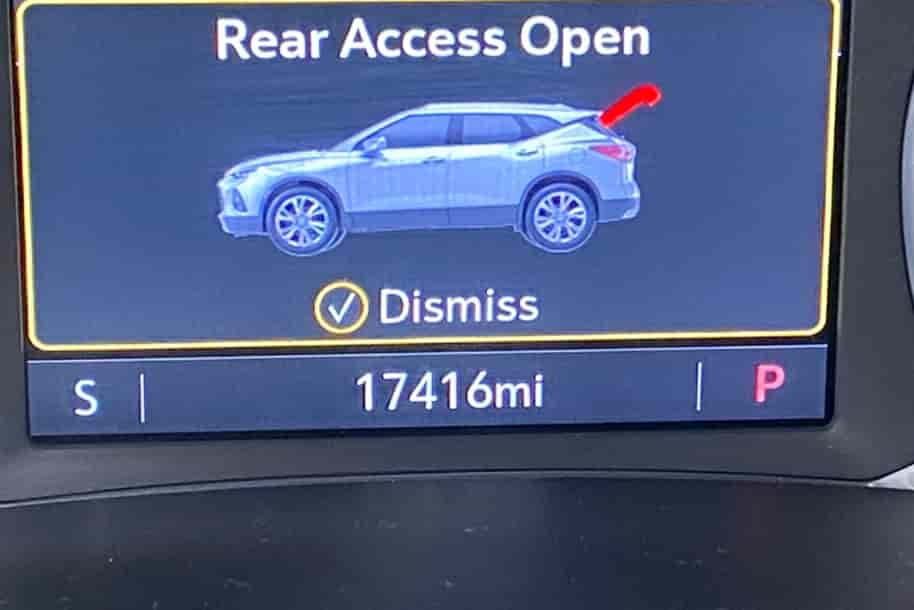
What Is Rear Access Open Alert?
Rear Access Open Alert is a warning message generated by an access control system when it detects that a rear entry point is open or not properly secured. This alert helps the system monitor sensitive access zones and prevent unauthorized entry into restricted areas.
In most security systems, the rear access point refers to secondary doors such as back doors, service entrances, or less visible building entry points. These areas often receive less human supervision, so the system relies heavily on sensors to track their status in real time.
The alert is triggered when a door sensor detects an open state for longer than the allowed time or when it fails to confirm that the door is fully closed. The system then sends a notification to the control panel or security dashboard.
Door sensors play a key role in this process. They usually work using magnetic contact technology or infrared detection. When the connection between the sensor components is interrupted, the system assumes the door is open and activates the alert.
It is important to understand that Rear Access Open Alert does not always indicate a security breach. In many cases, the system reacts to technical conditions rather than actual intrusion. For example, a slightly misaligned door or a weak magnetic signal can also trigger the warning.
Security monitoring systems use this alert to maintain situational awareness across all entry points. This allows security teams or property owners to respond quickly when a real risk occurs.
Understanding this meaning is essential before moving to troubleshooting steps. It helps users avoid confusion and ensures they respond correctly to each alert instead of treating every notification as an emergency.
Common Causes of Rear Access Open Alert
Rear Access Open Alert often appears when a security system detects that a rear entry point is not properly secured. In most situations, the issue comes from technical or environmental factors rather than an actual security breach. Understanding the root causes helps users respond correctly and avoid unnecessary troubleshooting.
One of the most frequent causes is a malfunctioning door sensor. These sensors can degrade over time due to continuous use or exposure to environmental conditions. When a sensor loses accuracy, it may incorrectly signal that the door is open even when it is fully closed. This is especially common in older magnetic contact sensors.
Another common issue is sensor misalignment. Rear doors are often used more frequently or exposed to stronger physical pressure, which can slowly shift the position of the sensor and magnet. When alignment is not precise, the system fails to detect a proper closed state and triggers the alert repeatedly.
Wiring problems can also lead to false warnings. Loose or damaged connections between the sensor and the control panel can interrupt signal transmission. When the system receives unstable or incomplete data, it interprets the situation as an open rear access point.
Environmental conditions also play a role. Strong wind, vibration, or slight structural movement can temporarily break sensor contact. In some cases, temperature changes may affect the sensitivity of certain components, leading to inaccurate readings.
Finally, incorrect system configuration can trigger alerts even when the hardware is working correctly. If the rear access zone is not properly set up in the control software, the system may misinterpret normal door status as a security issue.
Overall, Rear Access Open Alert usually results from a combination of hardware, configuration, and environmental factors rather than a single failure point.
Risks of Ignoring Rear Access Open Alert
Ignoring a Rear Access Open Alert can create serious problems for both security and system performance. Even though many alerts come from minor technical issues, users should never dismiss them without checking the cause. Treating every alert as unimportant can lead to hidden risks that grow over time.
One major risk is reduced security visibility. The rear access point is often a less monitored entry area in buildings, so it relies heavily on sensors. If the system repeatedly shows an open status and no one investigates it, a real intrusion attempt could go unnoticed. This weakens the overall protection of the property.
Another risk is system fatigue and alert overload. When users ignore repeated notifications, they may become desensitized to warnings from the system. Over time, this can lead to delayed responses even when a real security threat occurs. This reduces the effectiveness of the entire access control system.
Ignoring the alert can also hide hardware deterioration. A faulty sensor or wiring issue may start as a small problem but gradually worsen. If not fixed early, it can lead to complete sensor failure or unstable system behavior, which may require more expensive repairs later.
In smart building environments, ignored alerts can also affect system data accuracy. Security logs may become unreliable, making it harder to audit access events or track movement history. This can create operational issues for facility managers or security teams.
Overall, while Rear Access Open Alert does not always indicate an emergency, it should always be checked and resolved properly. Quick action helps maintain system reliability, prevent security gaps, and ensure the access control system works as intended.
How to Fix Rear Access Open Alert
Fixing a Rear Access Open Alert requires a structured approach. In most cases, the issue comes from sensors, alignment, or system configuration, so users can resolve it without replacing the entire system. The key is to follow each step carefully and eliminate possible causes one by one.
Start by checking the physical condition of the rear door. Make sure the door is fully closed and nothing is blocking it. Even small objects or slight misalignment can prevent the sensor from detecting a proper closed state. If the door does not close smoothly, fix the mechanical issue first before checking the system.
Next, inspect the door sensor and its alignment. The sensor and magnet must face each other correctly and maintain proper distance. If they are shifted, reposition them and test the system again. Many alerts disappear immediately after correcting alignment.
After that, check the wiring connections. Look for loose, damaged, or corroded wires between the sensor and the control panel. If the connection is unstable, secure or replace the wiring to restore proper signal transmission.
If the hardware looks fine, move to the control system. Restart or reset the access control panel to clear temporary errors. Then review the system logs to confirm whether the alert is still active or was caused by a previous event.
In some cases, the system configuration may need adjustment. Verify that the rear access zone is set correctly in the software. Incorrect settings can cause false alerts even when the hardware is working normally.
If the problem continues after all these steps, the sensor may be faulty and require replacement. Using a new, high-quality sensor usually resolves persistent alerts and restores system stability.
How to Prevent Rear Access Open Alert
Preventing Rear Access Open Alert is more effective than repeatedly fixing it after it appears. A stable access control system depends on proper installation, regular maintenance, and correct configuration. When these elements are managed well, false alerts and system errors can be significantly reduced.
One of the most important steps is regular sensor maintenance. Door sensors should be inspected periodically to ensure they are clean, properly aligned, and functioning correctly. Dust, vibration, or physical impact can slowly affect sensor accuracy, so routine checks help maintain stable performance.
Proper installation also plays a key role. The sensor and magnet must be installed with precise alignment and at the correct distance. Poor installation is one of the main reasons behind recurring Rear Access Open Alert issues. Using high-quality hardware reduces the risk of early failure and improves long-term reliability.
System configuration should also be reviewed regularly. Access control settings must match the actual layout of the building. If the rear access zone is not configured correctly, the system may trigger false alerts even when all doors are closed properly. Updating firmware and software can also help improve system stability.
Environmental protection is another important factor. Rear doors exposed to wind, vibration, or temperature changes should have reinforced sensors or protective housing. This reduces the chance of temporary signal disruption that can trigger false alerts.
Finally, users should avoid ignoring early warning signs. Small issues like occasional alerts or slight delays in system response should be checked immediately. Early intervention helps prevent larger system failures and reduces maintenance costs over time.
With proper care and setup, Rear Access Open Alert can be minimized, ensuring a more stable and reliable security system.
Frequently Asked Questions
Rear Access Open Alert often raises many questions from users because the notification appears in both normal and abnormal system conditions. One of the most common questions is why the alert keeps appearing repeatedly. In most cases, this happens due to unstable sensor performance, poor alignment between the door sensor and magnet, or incorrect configuration in the access control system. Environmental factors such as vibration, wind, or slight door movement can also trigger repeated alerts even when there is no real security issue.
Another frequent concern is whether Rear Access Open Alert indicates a security breach. In general, this alert does not automatically mean an intrusion has occurred. It is usually generated when the system detects an abnormal door status. However, users should never ignore it completely because it may also appear when a door is actually left open or when there is a real access issue that needs attention.
Many users also ask if the alert is just a false alarm. The answer is yes in many situations. Faulty sensors, weak magnetic contact, or wiring problems can easily cause incorrect readings. This is why regular inspection and proper calibration are essential to reduce unnecessary alerts and improve system accuracy.
Another important question is how serious this alert is. The severity depends on the root cause. If it is caused by a technical error, it is not critical but still needs fixing. If it reflects a real open entry point, it can create a security risk and must be handled immediately.
Finally, some users wonder whether they need a technician. In many cases, basic troubleshooting such as checking the door, adjusting the sensor, or restarting the system is enough. However, if the alert continues after these steps, professional support may be required to inspect deeper hardware or wiring issues.
Conclusion
Rear Access Open Alert is a common notification in modern access control and security systems, but it is often misunderstood by users. Many people assume it always signals a serious security breach, while in reality, it is more frequently caused by technical issues such as sensor misalignment, wiring instability, environmental interference, or incorrect system configuration. Understanding this difference is important for responding correctly and avoiding unnecessary concern.
In most cases, this alert does not indicate immediate danger. Instead, it reflects that the system has detected an abnormal door status and is trying to maintain accurate monitoring of rear access points. Because these areas are often less visible and less frequently supervised, the system depends heavily on sensors to ensure proper security coverage.
When users understand the meaning and causes of Rear Access Open Alert, they can troubleshoot the issue more effectively. Simple steps such as checking door alignment, inspecting sensors, reviewing system settings, and restarting the control panel can resolve most problems without technical support. Regular maintenance also plays a key role in preventing repeated alerts and ensuring long term system stability.
However, it is still important not to ignore this notification completely. Even if it is often a false alarm, it can sometimes indicate a real issue that requires attention. Prompt response helps prevent small technical problems from developing into larger system failures or security risks.
By understanding, fixing, and preventing Rear Access Open Alert properly, users can maintain a more reliable, stable, and efficient security system that ensures consistent protection for all access points.