Imagine starting your Jeep, ready for your daily drive, only to discover that the touchscreen is completely frozen, black, or refusing to respond. Suddenly, essential features like navigation, backup camera display, Apple CarPlay, Android Auto, and vehicle settings may become unavailable. For many Jeep owners, a Jeep Screen Not Working issue can be frustrating, especially when the problem appears without warning.
Modern Jeep vehicles rely heavily on advanced infotainment systems such as Uconnect to control entertainment, communication, navigation, and important vehicle functions. While these systems are designed for convenience, software glitches, electrical problems, battery issues, and hardware failures can sometimes cause the screen to malfunction.
The good news is that not every Jeep screen problem requires an expensive repair or replacement. In many cases, a simple system reset, software update, or electrical check can restore normal operation within minutes.
This guide will explain the most common reasons why your Jeep Screen Not Working, including frozen displays, black screens, touchscreen failures, and Uconnect errors. You will also learn step-by-step troubleshooting methods, repair options, and signs that indicate when professional service may be necessary.
Whether you drive a Jeep Wrangler, Grand Cherokee, Compass, Cherokee, or Gladiator, this guide will help you identify the problem and find the right solution before spending unnecessary money on repairs.
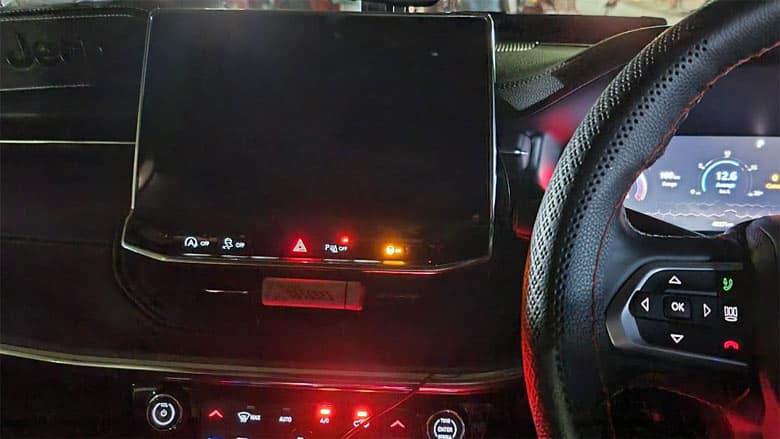
Understanding Why Your Jeep Screen Is Not Working
A modern Jeep is equipped with an advanced infotainment system that does much more than play music. The touchscreen acts as the central control point for navigation, smartphone connectivity, climate settings, vehicle information, and safety features such as the backup camera. When your Jeep Screen Not Working, it can affect both convenience and important driving functions.
Most Jeep models use the Uconnect infotainment system, which combines hardware components, software programming, and communication networks to deliver a smooth user experience. Like any electronic system, it can experience failures caused by software bugs, electrical interruptions, damaged components, or communication errors between vehicle modules.
Understanding the type of screen problem you are experiencing is the first step toward finding the right solution. A completely black screen may have a different cause than a touchscreen that turns on but does not respond.
Common Symptoms of Jeep Screen Problems
Before attempting any repair, identify the exact symptoms. This will help narrow down the possible cause and prevent unnecessary replacements.
Jeep Screen Is Completely Black
One of the most common complaints from Jeep owners is a screen that remains completely dark after starting the vehicle. In some cases, the radio or other functions may still work even though the display is not visible.
Possible causes include:
• Software crash in the Uconnect system
• Blown fuse affecting the display power supply
• Low battery voltage
• Faulty screen hardware
• Loose electrical connection
A black screen does not always mean the display needs replacement. Many cases can be solved with a simple system reset.
Jeep Touchscreen Is Frozen or Not Responding
Another common issue is when the display turns on, but the touchscreen does not respond to finger touches. You may see the normal interface, but buttons cannot be selected or menus cannot be opened.
This problem is often related to:
• Temporary software glitches
• Uconnect system freezing
• Touchscreen calibration problems
• Internal hardware failure
If the screen works after restarting the vehicle, the issue may only be a temporary software problem.
Jeep Screen Keeps Restarting
Some Jeep owners experience a situation where the screen repeatedly turns off and turns back on. This can make it difficult to use navigation, Bluetooth, or other infotainment features.
Common causes include:
• Unstable power supply
• Weak vehicle battery
• Corrupted software files
• Faulty infotainment module
A repeated reboot cycle usually requires deeper troubleshooting if a simple reset does not solve the issue.
Backup Camera Display Not Showing
The backup camera is connected to the infotainment system, so a screen problem can prevent the rear camera image from appearing when reversing.
Possible reasons include:
• Uconnect system failure
• Camera connection issue
• Display malfunction
• Electrical communication problems
Because the backup camera is an important safety feature, persistent issues should be inspected as soon as possible.
Why Identifying the Problem Matters
Many Jeep owners immediately assume that a failed screen requires a costly replacement. However, replacing the entire display unit is often unnecessary if the actual problem is software-related or caused by a weak electrical connection.
By identifying whether your issue involves the display, touchscreen, power supply, or software system, you can choose the correct troubleshooting method and potentially save hundreds of dollars in repair costs.
The next step is understanding the most common causes behind a Jeep Screen Not Working problem and how each issue can affect your vehicle’s infotainment system.
Common Causes of Jeep Screen Not Working
1. Software Glitches and Uconnect System Errors
Software problems are among the most frequent reasons behind a Jeep Screen Not Working issue. Like smartphones and computers, the Uconnect system relies on software to operate different features. A temporary system crash can cause the screen to freeze, remain black, or stop responding completely.
These software problems may appear after:
• A system update
• A battery replacement
• A sudden power interruption
• Connecting a new smartphone
• Long periods of vehicle inactivity
In many cases, the hardware is still functioning properly, but the software becomes stuck and prevents normal operation.
A simple reboot or Uconnect reset can often restore the system without requiring professional repair.
2. Weak Battery or Electrical Problems
Many Jeep owners do not realize that the vehicle battery plays an important role in infotainment performance. When battery voltage drops, electronic systems may behave unpredictably.
Signs that a weak battery may be causing your Jeep screen problem include:
• Slow screen startup
• Random system shutdowns
• Display flickering
• Multiple electronic errors appearing at once
• Problems occurring after cold weather
A battery that can still start the engine may not always provide stable voltage for sensitive electronic modules. The infotainment system requires consistent electrical power to function correctly.
Checking battery health and electrical connections should be one of the first troubleshooting steps before replacing expensive components.
3. Blown Fuse or Power Supply Failure
The infotainment system depends on specific fuses to protect electrical circuits. If a fuse fails, power may not reach the screen or related components.
A blown fuse can cause:
• Completely dead display
• No response from touchscreen
• Loss of radio and entertainment functions
Checking the fuse box is a simple and affordable troubleshooting step. However, if a replacement fuse fails again, there may be a deeper electrical problem that requires professional diagnosis.
4. Faulty Touchscreen Hardware
Sometimes the problem is not software but physical damage inside the display unit. The touchscreen contains several components, including the LCD panel and touch-sensitive layer.
Hardware failure symptoms include:
• Screen turns on but touch does not work
• Certain areas of the screen stop responding
• Random touches without input
• Visible cracks or display defects
If resetting the system and checking electrical connections do not solve the problem, the touchscreen hardware may need repair or replacement.
5. CAN Bus Communication Issues
Modern Jeep vehicles use a communication network called CAN Bus to allow different electronic modules to exchange information. The infotainment system communicates with other vehicle systems through this network.
If communication between modules fails, the screen may display incorrect information or stop functioning completely.
Possible causes include:
• Electrical faults
• Damaged wiring
• Module communication errors
• Software conflicts
CAN Bus problems are more complex and usually require professional diagnostic equipment.
Understanding the exact cause of your Jeep screen failure can prevent unnecessary expenses and help you choose the most effective repair method.
Step-by-Step Fixes for Jeep Screen Not Working
Before visiting a repair shop or replacing your Jeep display, try these troubleshooting methods. Many common Uconnect and touchscreen problems can be fixed with simple steps.
1. Restart Your Jeep Infotainment System
The first solution is often the simplest: restart the system.
Follow these steps:
- Turn off your Jeep completely.
- Remove the key or turn off the ignition.
- Open the driver door.
- Wait several minutes until the electronic systems fully shut down.
- Restart the vehicle and check the screen.
This process allows the infotainment module to restart and clear temporary software errors.
2. Perform a Jeep Uconnect Soft Reset
A Uconnect soft reset can fix many issues, including frozen screens and unresponsive touch controls.
The general reset process usually involves:
- Turn the ignition to the ON position.
- Press and hold the volume button and tuner button.
- Continue holding for several seconds until the system restarts.
- Wait for the Uconnect logo or startup screen to appear.
The exact reset method may vary depending on your Jeep model and year, so always check the owner’s manual for specific instructions.
3. Disconnect and Reset Battery Power
If a soft reset does not work, disconnecting the battery can perform a deeper electronic reset.
Steps:
- Turn off the vehicle.
- Disconnect the negative battery terminal.
- Wait approximately 10 to 15 minutes.
- Reconnect the battery.
- Start the Jeep and check the infotainment system.
This process removes temporary electrical memory from some vehicle modules and may restore normal operation.
However, remember that disconnecting the battery can reset certain vehicle settings, so you may need to adjust your preferences afterward.
4. Check the Jeep Screen Fuse
If your Jeep screen remains completely black and does not respond after restarting or resetting the system, checking the fuse should be the next troubleshooting step.
The infotainment system has dedicated fuses that protect the electrical circuits supplying power to the display, radio module, and related components. A blown fuse can interrupt power and make the screen appear completely dead.
To check the fuse:
- Turn off your Jeep and remove the ignition key.
- Locate the fuse box according to your owner’s manual.
- Identify the fuse connected to the radio, display, or infotainment system.
- Inspect the fuse for a broken metal strip or visible damage.
- Replace it with a fuse that has the same amperage rating if necessary.
Never replace a fuse with one that has a higher amperage rating, as this can create additional electrical problems or damage vehicle components.
If the new fuse blows shortly after replacement, this may indicate a deeper electrical issue, such as a short circuit or damaged wiring. In this situation, professional diagnosis is recommended.
5. Update Jeep Uconnect Software
Outdated or corrupted software can cause many infotainment problems, including frozen screens, connection failures, and random system crashes.
Jeep regularly releases software updates to improve system stability, fix bugs, and enhance compatibility with newer smartphones and applications.
Updating your Uconnect system may help solve problems such as:
• Jeep touchscreen not responding
• Bluetooth connection failures
• Apple CarPlay or Android Auto issues
• Screen freezing during operation
• Navigation errors
Before updating, check your current software version through the Uconnect settings menu if the screen is still accessible. If the display is completely unusable, you may need assistance from a Jeep dealer or automotive technician.
Keeping your infotainment software updated is also a good preventive measure because many recurring screen issues are caused by outdated system programming.
6. Perform a Factory Reset as a Last Software Solution
If basic resets do not solve the issue, a factory reset may restore your Jeep infotainment system.
A factory reset removes saved settings and returns the system to its original configuration. This can fix problems caused by corrupted user data or software conflicts.
Before performing a factory reset, remember that it may remove:
• Paired Bluetooth devices
• Saved radio stations
• Personal system settings
• Connected smartphone information
Use this option only after trying simpler solutions first.
Jeep Screen Problems by Model
Different Jeep models may experience different infotainment issues depending on their hardware configuration, software version, and production year. Understanding common problems by model can help identify the likely cause faster.
Jeep Wrangler Screen Not Working
The Jeep Wrangler is known for its rugged design and off-road capability, but modern versions also rely heavily on electronic systems, including Uconnect infotainment.
Common Jeep Wrangler screen problems include:
• Frozen touchscreen
• Black display after startup
• Backup camera not appearing
• Apple CarPlay connection problems
• Random system rebooting
Many Wrangler owners experience temporary software issues that can often be fixed through a Uconnect reset. However, vehicles exposed to extreme outdoor conditions may also experience electrical connection problems due to moisture, temperature changes, or aftermarket accessories.
If your Wrangler screen stops working after installing new equipment such as a winch, lighting system, or aftermarket electronics, an electrical inspection may be necessary.
Jeep Grand Cherokee Screen Not Working
The Jeep Grand Cherokee features more advanced technology compared with many other Jeep models, including larger displays, premium audio systems, and additional electronic modules.
Common Grand Cherokee infotainment issues include:
• Screen freezing while driving
• Display going completely black
• Navigation system failure
• Delayed touchscreen response
• System restarting repeatedly
Because the Grand Cherokee contains more integrated electronic systems, diagnosing the exact cause may require specialized scanning equipment.
A simple reset may solve minor software problems, but repeated failures could indicate issues with the infotainment module, wiring, or internal hardware.
Jeep Compass Screen Not Working
The Jeep Compass is a popular compact SUV that uses Uconnect systems across many model years. Owners commonly report touchscreen and connectivity problems.
Typical issues include:
• Slow touchscreen response
• Screen freezing after phone connection
• Bluetooth and CarPlay problems
• Display turning off unexpectedly
Many Compass screen problems are related to software compatibility or temporary system errors. Updating the Uconnect software and performing a reset can often improve reliability.
Jeep Cherokee and Gladiator Screen Issues
The Jeep Cherokee and Gladiator also use advanced infotainment systems that may experience similar problems.
For the Jeep Cherokee, common complaints include:
• Frozen display
• Unresponsive touch controls
• Radio and screen communication issues
For the Jeep Gladiator, owners may experience:
• Screen rebooting during off-road use
• Smartphone connection failures
• Display issues caused by electrical accessories
Since Gladiator owners often install aftermarket equipment, additional electrical modifications should always be checked when diagnosing infotainment problems.
Why Model-Specific Diagnosis Matters
Although many Jeep vehicles share similar Uconnect technology, the solution may vary depending on the model year and installed system.
A repair method that works for a Jeep Wrangler may not completely solve a problem on a newer Grand Cherokee or Compass. Before replacing any component, identify:
• Jeep model and year
• Uconnect system version
• Exact screen symptoms
• Recent repairs or modifications
This information can save time and prevent unnecessary replacement costs.
When Should You Replace Your Jeep Screen?
Not every Jeep Screen Not Working problem requires a complete replacement. Many issues are caused by software bugs, electrical problems, or temporary system failures that can be repaired without replacing the display.
However, there are situations where replacing the screen becomes the most practical solution.
Signs You Need Jeep Screen Replacement
Your Jeep screen may require replacement if you experience:
Completely Dead Display
If the screen remains completely black after performing resets, checking power connections, and confirming that the fuse is working properly, the display hardware may have failed.
Physical Damage
Cracks, impact damage, liquid exposure, or severe scratches can permanently affect the touchscreen and LCD panel.
Permanent Touchscreen Failure
If the display turns on but certain areas never respond to touch input, the touch layer may be damaged.
Repeated System Failures
A screen that repeatedly freezes, restarts, or loses functionality even after software updates may indicate internal hardware problems.
Jeep Screen Repair vs Replacement
Choosing between repair and replacement depends on the cause of the problem.
| Repair Option | Replacement Option |
|---|---|
| Suitable for software issues | Suitable for hardware failure |
| Usually lower cost | Higher upfront cost |
| Can fix temporary errors | Provides a new display system |
| May not solve damaged components | More reliable long-term solution |
Before replacing your Jeep screen, always confirm that the problem is not caused by a software issue or electrical fault. Many owners spend significant money replacing screens when a simple reset or wiring repair could have solved the problem.
Jeep Screen Replacement Cost Factors
The cost of replacing a Jeep screen depends on several factors:
• Jeep model and year
• OEM or aftermarket screen choice
• Labor costs
• Additional programming requirements
Original equipment manufacturer screens usually provide the best compatibility but may cost more. Aftermarket options can be more affordable and may include upgraded features such as improved smartphone integration.
However, choosing the cheapest replacement is not always the best solution. Poor-quality aftermarket screens may create new problems with compatibility, touch response, or vehicle communication systems.
How to Prevent Future Jeep Screen Problems
Fixing a Jeep Screen Not Working problem is important, but preventing the issue from happening again can save you time, money, and frustration. Since modern Jeep infotainment systems rely on software, electronics, and vehicle communication networks, proper maintenance can significantly improve long-term reliability.
Keep Your Jeep Software Updated
One of the easiest ways to prevent infotainment problems is keeping your Uconnect software updated. Manufacturers release updates to improve system performance, fix bugs, and improve compatibility with newer smartphones and applications.
An outdated system may experience:
• Frequent screen freezing
• Bluetooth connection problems
• Slow response times
• Random system crashes
Checking for available updates periodically can help your Jeep infotainment system operate more smoothly.
Maintain a Healthy Vehicle Battery
A weak battery is one of the most overlooked causes of electronic problems in modern vehicles. Even if your Jeep starts normally, unstable voltage can affect sensitive systems such as the touchscreen and infotainment module.
To protect your Jeep screen:
• Check battery condition regularly
• Replace an aging battery before failure occurs
• Clean battery terminals
• Inspect electrical connections
If your Jeep screen problems started after a battery replacement or jump start, the electrical interruption may have caused the infotainment system to require a reset.
Avoid Installing Low-Quality Electronic Accessories
Many Jeep owners customize their vehicles with additional accessories such as aftermarket lighting, audio systems, dash cameras, or communication devices.
While modifications can improve your driving experience, poorly installed electronics can interfere with the vehicle’s electrical system.
Potential problems include:
• Power fluctuations
• Wiring issues
• Communication errors between modules
• Infotainment system instability
Always use high-quality components and professional installation when adding electrical accessories to your Jeep.
Protect the Touchscreen From Extreme Conditions
Extreme temperatures can affect electronic components. Excessive heat or cold may temporarily reduce touchscreen performance or shorten component lifespan.
Helpful practices include:
• Park in shaded areas when possible
• Use sun protection accessories
• Avoid pressing the touchscreen with excessive force
• Keep liquids away from the display
A touchscreen is designed for regular use, but careful handling can help prevent unnecessary damage.
Perform Regular Vehicle Inspections
Routine maintenance should include checking electronic systems, not just mechanical components.
During regular service, ask technicians to inspect:
• Battery performance
• Electrical connections
• Software updates
• Warning messages from vehicle modules
Early detection can prevent minor issues from becoming expensive repairs.
Frequently Asked Questions About Jeep Screen Not Working
Why is my Jeep screen not working but the radio still works?
If your Jeep radio works but the screen is black, the problem may be related to the display unit, software failure, power supply, or communication between infotainment components.
In many cases, the radio module continues functioning while the touchscreen display experiences a separate issue. Try restarting the Uconnect system before considering replacement.
How do I reset my Jeep screen?
A Jeep screen reset method depends on the model year and Uconnect version. In many cases, you can perform a soft reset by holding specific buttons on the infotainment system until the display restarts.
If the soft reset does not work, disconnecting the battery for several minutes may help reset electronic modules.
Always check your owner’s manual for the correct procedure for your specific Jeep model.
Why is my Jeep touchscreen frozen?
A frozen Jeep touchscreen is commonly caused by software glitches, temporary system errors, or outdated infotainment software.
Possible solutions include:
• Restarting the vehicle
• Performing a Uconnect reset
• Updating system software
• Checking battery condition
If the touchscreen remains frozen after these steps, hardware failure may be the cause.
How much does it cost to replace a Jeep screen?
The cost of Jeep screen replacement depends on the vehicle model, screen type, parts availability, and labor costs.
OEM replacement screens are generally more expensive but provide better compatibility. Aftermarket screens may cost less but should be carefully selected to avoid compatibility issues.
Can I fix a Jeep screen problem myself?
Many common problems can be fixed at home, especially software-related issues. Simple solutions such as restarting the system, checking fuses, or resetting Uconnect may solve the problem.
However, electrical faults, damaged screens, or communication issues usually require professional diagnosis.
Conclusion
A Jeep Screen Not Working problem can be frustrating, especially when it affects important features such as navigation, backup cameras, smartphone connectivity, and vehicle settings. However, a malfunctioning screen does not always mean you need an expensive replacement.
The most common causes include software glitches, weak batteries, blown fuses, electrical issues, outdated Uconnect software, and hardware failures. By identifying the symptoms and following the correct troubleshooting steps, many Jeep owners can restore their infotainment system without unnecessary repair costs.
Simple solutions such as restarting the system, performing a Uconnect reset, checking the fuse, and updating software should always be tried before replacing the entire display unit.
For more serious problems involving damaged hardware or communication failures, professional inspection may be the best option. A qualified technician can accurately diagnose the issue and recommend whether repair or replacement is the smarter investment.
Whether you drive a Jeep Wrangler, Grand Cherokee, Compass, Cherokee, or Gladiator, understanding how your infotainment system works can help you solve problems faster and maintain a better driving experience.
Have you experienced a Jeep Screen Not Working issue? Share your Jeep model, year, and symptoms in the comments. Your experience may help other Jeep owners find the right solution.