Have you just changed the engine oil on your GMC Sierra, only to find that the Oil Life Remaining message is still displayed on the dashboard? If so, you’re not alone. Many GMC Sierra owners assume that replacing the engine oil automatically clears the maintenance reminder, but that’s not how the Oil Life Monitoring System works. To keep your truck’s maintenance schedule accurate, you must manually reset the oil life monitor after every oil change.
Learning how to reset oil life on GMC Sierra is a quick and simple process that takes only a few minutes. Whether you drive a GMC Sierra 1500, 2500HD, or 3500HD, resetting the oil life indicator ensures your truck can accurately calculate the next oil change interval based on your driving habits, engine load, temperature, and operating conditions. Skipping this step may lead to incorrect maintenance reminders, making it difficult to know when your next oil service is actually due.
In this step-by-step guide, you’ll learn exactly how to reset oil life on GMC Sierra for different model years, including the latest 2026 models. We’ll also explain how the Oil Life Monitoring System works, why it’s important to reset it after every oil change, and what to do if the oil life won’t reset properly. By the end of this guide, you’ll be able to complete the process with confidence and keep your GMC Sierra running at its best.
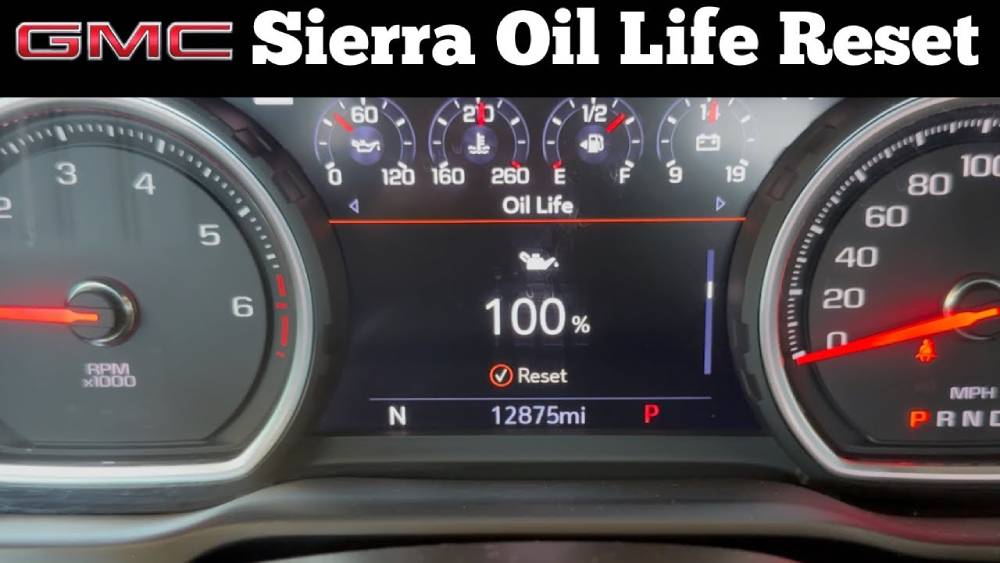
What Is the Oil Life Monitor on a GMC Sierra?
The Oil Life Monitoring System in a GMC Sierra is an intelligent maintenance feature designed to estimate when your engine oil should be replaced. Unlike older vehicles that rely solely on a fixed mileage interval, GMC’s system continuously analyzes several operating conditions to determine the remaining life of the engine oil. This provides a more accurate maintenance schedule based on how the truck is actually driven rather than following a one size fits all recommendation.
The system evaluates factors such as engine temperature, driving speed, engine load, trip duration, idle time, and overall driving conditions. For example, frequent short trips, towing heavy loads, stop and go traffic, or driving in extremely hot or cold weather can cause the oil to deteriorate faster than normal highway driving. As these conditions accumulate, the Oil Life Monitor gradually reduces the oil life percentage displayed on the Driver Information Center.
It is important to understand that the Oil Life Monitor does not directly measure the quality or level of the engine oil. Instead, it uses sophisticated algorithms developed by General Motors to calculate the estimated remaining oil life based on your driving habits. This means you should still check your engine oil level regularly and inspect for leaks or contamination between scheduled maintenance.
Many drivers also confuse the Oil Life Monitor with other dashboard warning lights. While these indicators may appear similar, they serve very different purposes.
| Indicator | Purpose | What You Should Do |
|---|---|---|
| Oil Life Monitor | Tracks estimated oil service interval | Change the oil when the percentage is low and reset the system afterward |
| Check Engine Light | Indicates an engine or emissions-related problem | Diagnose the issue with an OBD-II scanner or visit a qualified technician |
| Service Vehicle Soon Light | Alerts you to a vehicle maintenance or system issue | Inspect the vehicle and perform the recommended service |
Understanding the difference between these warnings helps prevent unnecessary repairs while ensuring your GMC Sierra receives maintenance at the appropriate time.
Before You Reset the Oil Life
Before performing the oil life reset procedure, there are a few important steps you should complete. Although resetting the Oil Life Monitor only takes a minute, doing it incorrectly can lead to inaccurate maintenance reminders and confusion about when your next oil change is actually due.
First, make sure the engine oil and oil filter have already been replaced. The Oil Life Monitor should never be reset simply to remove the maintenance reminder without performing an oil change. Doing so causes the system to assume fresh oil has been installed, which may result in extended oil change intervals and unnecessary engine wear.
Next, verify that the correct engine oil has been used. GMC recommends using the oil viscosity and specification listed in your owner’s manual. Using the proper oil helps maximize engine performance, fuel efficiency, and the accuracy of the Oil Life Monitoring System.
Park the truck on a level surface and engage the parking brake before beginning the reset process. Depending on your model year, you may need to switch the ignition to the ON position without starting the engine. On push button start models, this is usually done by pressing the Start button once without pressing the brake pedal.
Since the reset procedure varies slightly between different GMC Sierra generations, it’s helpful to identify your vehicle’s model year before starting. Older trucks may use the accelerator pedal method, while newer models typically perform the reset through the Driver Information Center using the steering wheel controls.
Taking a few moments to prepare ensures the reset process is completed correctly the first time and helps maintain an accurate maintenance schedule for your truck.
How to Reset Oil Life on GMC Sierra (Step by Step)
The exact procedure for resetting the Oil Life Monitor depends on your GMC Sierra’s model year. General Motors has updated the dashboard interface over the years, so the steps may differ slightly between older and newer trucks. Follow the instructions below that match your vehicle.
For 2019 to 2026 GMC Sierra Models
Newer GMC Sierra models feature a fully digital or semi digital Driver Information Center, making the reset process quick and straightforward.
- Park the vehicle safely and turn the ignition to the ON position without starting the engine. If your truck has a push button start, press the Start button once without pressing the brake pedal.
- Use the steering wheel controls to open the Driver Information Center.
- Scroll through the menu until you find Oil Life or Remaining Oil Life.
- Press and hold the OK button on the steering wheel for several seconds.
- Continue holding the button until the oil life display changes to 100%.
- Turn the ignition off, then start the engine normally to confirm that the reset was successful.
Success Tip: If the display does not reset immediately, repeat the process and make sure you are viewing the Oil Life screen before holding the OK button.
For 2014 to 2018 GMC Sierra Models
The reset procedure for 2014 through 2018 models is very similar, although the menu layout may vary slightly depending on the trim level and instrument cluster.
- Turn the ignition to the ON position without starting the engine.
- Use the directional buttons on the steering wheel to access the Driver Information Center.
- Navigate to the Oil Life Remaining screen.
- Press and hold the SET/CLR button until the display reads 100%.
- Switch the ignition off and restart the truck to verify that the oil life has been successfully reset.
If your Sierra has a different instrument cluster configuration, consult the owner’s manual for model specific menu options. The reset process remains largely the same, with only minor differences in button labels or screen navigation.
How to Reset Oil Life on 2007 to 2013 GMC Sierra Models
If you own a 2007 through 2013 GMC Sierra, resetting the oil life monitor is even simpler because these models typically use the accelerator pedal method instead of the Driver Information Center menu. This procedure is widely used across many General Motors vehicles from the same generation and can usually be completed in less than one minute.
Start by parking the truck on a level surface and engaging the parking brake. Turn the ignition key to the ON position without starting the engine. For vehicles equipped with keyless ignition, press the Start button without pressing the brake pedal so that the dashboard electronics power on.
Within five seconds, fully press and release the accelerator pedal three times. Each press should go all the way to the floor before being released. If performed correctly, the Oil Life Monitor should automatically reset. Depending on the model, you may notice the oil life percentage return to 100 percent or see the maintenance reminder flash briefly before disappearing.
Turn the ignition off and wait a few seconds before starting the engine. Check the Driver Information Center to verify that the oil life now reads 100 percent. If the percentage has not changed, repeat the process while ensuring the accelerator pedal is pressed fully each time and that all three presses occur within the five second window.
Some trim levels and heavy duty GMC Sierra models may use a slightly different procedure, especially if they include upgraded instrument clusters. If the accelerator method does not work after several attempts, refer to the owner’s manual for your specific model year or use the Driver Information Center if available.
How to Confirm the Reset Worked
After completing the reset procedure, it is important to verify that the Oil Life Monitoring System has been successfully updated. Skipping this step could leave you assuming the reset was completed when the maintenance reminder is still active.
The easiest way to confirm the reset is by turning the ignition back on and navigating to the Oil Life screen in the Driver Information Center. A successful reset should display an oil life value of 100 percent, indicating that the system recognizes a fresh oil change and has restarted its maintenance calculations.
Next, start the engine and watch the dashboard carefully. The Change Engine Oil Soon message should no longer appear during startup. If the message remains visible or the oil life percentage still shows its previous value, the reset procedure was not completed successfully.
It is also a good idea to drive the vehicle for a few minutes before checking the display one more time. Under normal conditions, the oil life percentage will remain at 100 percent until enough driving has occurred for the monitoring system to begin calculating oil degradation. If the value immediately drops to an unusually low percentage or the warning message returns, repeat the reset procedure and verify that the correct steps were followed.
For added peace of mind, record the date and mileage of your oil change in a maintenance log or smartphone app. Keeping accurate service records makes it easier to follow future maintenance intervals and can also increase the resale value of your GMC Sierra by demonstrating a consistent maintenance history.
Why Your GMC Sierra Oil Life Won’t Reset
Although the reset procedure is usually straightforward, there are times when the Oil Life Monitor refuses to reset. Fortunately, most problems are caused by simple mistakes rather than serious mechanical issues.
One of the most common reasons is performing the reset sequence incorrectly. Missing a step, releasing the confirmation button too early, or pressing the accelerator pedal too slowly can prevent the system from recognizing the command. Carefully repeating the procedure often resolves the issue.
Another common cause is placing the ignition in the wrong mode. Most GMC Sierra models require the ignition to be in the ON position without the engine running. If the engine is started before the reset is completed, the system may ignore the reset request.
Low battery voltage can also interfere with electronic systems inside the vehicle. If your truck has a weak battery or has recently experienced electrical problems, charging or replacing the battery may solve the issue.
In some cases, drivers accidentally attempt to clear a Check Engine Light instead of the Oil Life Monitor. Resetting the oil life only affects the maintenance reminder and does not erase diagnostic trouble codes or repair engine related faults. If the Check Engine Light remains illuminated, the vehicle should be scanned with an OBD II diagnostic tool to identify the underlying problem.
Certain GMC Sierra models may also require a software update if the instrument cluster fails to respond correctly. While this situation is uncommon, a GMC dealership or qualified repair shop can verify whether your vehicle’s software is up to date.
If none of these solutions work, consult your owner’s manual for the exact procedure that matches your model year. Small differences in trim level, instrument cluster design, or factory options can sometimes affect the reset process. Taking a few extra minutes to confirm the correct method will usually resolve the problem without the need for professional assistance.
Common Mistakes to Avoid
Resetting the Oil Life Monitor is a simple task, but a few common mistakes can reduce the accuracy of your vehicle’s maintenance schedule. Avoiding these errors will help ensure your GMC Sierra continues to provide reliable service reminders.
One of the biggest mistakes is resetting the oil life without actually changing the engine oil and filter. The Oil Life Monitoring System assumes fresh oil has been installed after every reset. If the old oil remains in the engine, the system will calculate future service intervals based on incorrect information, potentially increasing engine wear over time.
Another common mistake is using the wrong engine oil. Always choose the oil grade and specification recommended by General Motors for your specific GMC Sierra model and engine. Using an incorrect viscosity or non-approved oil can negatively affect engine performance, fuel economy, and long-term durability.
Many owners also confuse the Oil Life Monitor with the Check Engine Light. Resetting the oil life indicator will not clear diagnostic trouble codes or turn off a Check Engine Light caused by a mechanical or emissions-related problem. If the warning light remains on after resetting the oil life, the vehicle should be inspected using an OBD-II scanner.
Some drivers rush through the reset procedure without carefully following the correct sequence for their model year. Holding the confirmation button for too short a time or failing to access the correct menu can prevent the system from resetting. Always verify that the Oil Life display reads 100 percent before considering the process complete.
Finally, avoid relying entirely on the Oil Life Monitor without checking your engine oil manually. Even though the monitoring system is highly accurate, it cannot detect low oil levels caused by leaks or excessive oil consumption. Checking the dipstick regularly remains an important part of routine vehicle maintenance.
Frequently Asked Questions
Can I reset the oil life without changing the oil?
Technically, yes. The system allows you to reset the oil life at any time. However, doing so is strongly discouraged because it causes the Oil Life Monitor to assume fresh engine oil has been installed. This can lead to delayed oil changes and increased engine wear. Always reset the oil life only after replacing both the engine oil and oil filter.
Does resetting the oil life clear the Check Engine Light?
No. The Oil Life Monitor and the Check Engine Light are completely separate systems. Resetting the oil life only clears the maintenance reminder and restarts the oil life calculation. It will not erase diagnostic trouble codes or fix engine-related problems that trigger the Check Engine Light.
How often should I change the oil in my GMC Sierra?
The ideal oil change interval depends on your engine, driving habits, and operating conditions. Most modern GMC Sierra models equipped with the Oil Life Monitoring System can safely determine the appropriate service interval. Under normal driving conditions, many owners change the oil approximately every 7,500 to 10,000 miles when using the recommended full synthetic engine oil. If you frequently tow heavy loads, drive in extreme temperatures, or make frequent short trips, more frequent oil changes may be necessary.
Will disconnecting the battery reset the oil life monitor?
In most cases, no. Disconnecting the battery may reset certain electronic settings, but it generally does not reset the Oil Life Monitoring System. The recommended reset procedure should always be performed through the Driver Information Center or the accelerator pedal method, depending on your model year.
Can I reset the oil life with the engine running?
No. Most GMC Sierra models require the ignition to be in the ON position while the engine remains off. Starting the engine before completing the reset may prevent the system from recognizing the command. Always follow the procedure outlined for your specific model year.
Why does my oil life still show a low percentage after resetting?
If the display does not return to 100 percent, the reset procedure may not have been completed correctly. Repeat the steps carefully, ensuring you are following the instructions for your exact model year. If the issue persists, consult your owner’s manual or have the vehicle inspected for potential software or instrument cluster issues.
Maintenance Tips After Resetting Oil Life
Resetting the Oil Life Monitor is only one part of maintaining your GMC Sierra. Developing good maintenance habits will help maximize engine performance, improve reliability, and extend the lifespan of your truck.
After every oil change, record the service date and mileage. Keeping accurate maintenance records makes it easier to monitor future service intervals and provides valuable documentation if you decide to sell the vehicle.
Check your engine oil level regularly, especially before long trips or when towing heavy loads. Even newer engines can consume small amounts of oil over time, and maintaining the proper oil level is essential for engine protection.
Always replace the oil filter whenever you change the engine oil. A clean filter removes contaminants that can reduce lubrication efficiency and shorten engine life.
Use only engine oil that meets General Motors’ recommended specifications for your particular engine. High quality full synthetic oil provides excellent protection under a wide range of driving conditions and helps the Oil Life Monitoring System perform as intended.
Finally, follow the complete maintenance schedule outlined in your GMC Sierra owner’s manual. In addition to oil changes, regular inspections of the air filter, transmission fluid, brake system, coolant, tires, and battery will help keep your truck operating safely and efficiently for years to come.
Conclusion
Knowing how to reset oil life on GMC Sierra is an essential skill for every owner who performs routine maintenance or changes their own engine oil. Although the process varies slightly between different model years, the reset itself takes only a few minutes and ensures that the Oil Life Monitoring System continues to provide accurate maintenance reminders.
Whether you drive a 2007 GMC Sierra or the latest 2026 model, following the correct reset procedure after every oil change helps prevent inaccurate service intervals and keeps your maintenance schedule on track. Remember that the Oil Life Monitor is designed to estimate oil condition based on your driving habits, but it should always be used alongside regular oil level inspections and scheduled vehicle maintenance.
If the oil life does not reset on the first attempt, don’t panic. Double check that you are using the correct procedure for your model year, verify the ignition is in the proper position, and repeat the steps carefully. Most reset issues can be resolved in just a few minutes without the need for special tools or professional assistance.
By following the guidance in this article, you can confidently reset your GMC Sierra’s Oil Life Monitor, maintain accurate service records, and help protect your engine for thousands of miles to come. If you found this guide helpful, consider bookmarking it for future reference and sharing it with other GMC Sierra owners who may benefit from these simple maintenance tips.