Getting into your Honda and connecting your iPhone should feel simple, not frustrating. However, many drivers still need to plug in a USB cable every time they want to use Apple CarPlay. While wired CarPlay provides a reliable connection, dealing with cables can be inconvenient, especially during short trips or daily commutes.
The good news is that many Honda vehicles now support wireless Apple CarPlay, allowing drivers to access navigation, music, calls, and messages without connecting a USB cable. For older Honda models, there are also upgrade options that can add wireless functionality without replacing the entire infotainment system.
Learning how to connect Apple CarPlay Honda without USB depends on your vehicle model, infotainment system, and iPhone compatibility. Some Honda owners can enable wireless CarPlay directly through the factory settings, while others may need a wireless CarPlay adapter to convert an existing wired connection.
In this guide, you will learn how to connect Apple CarPlay Honda without USB, check wireless compatibility, upgrade older Honda models, and troubleshoot common connection issues. Whether you drive a Honda Civic, Accord, CR-V, or another Honda model, this complete wireless setup guide will help you create a more convenient and cable-free driving experience.
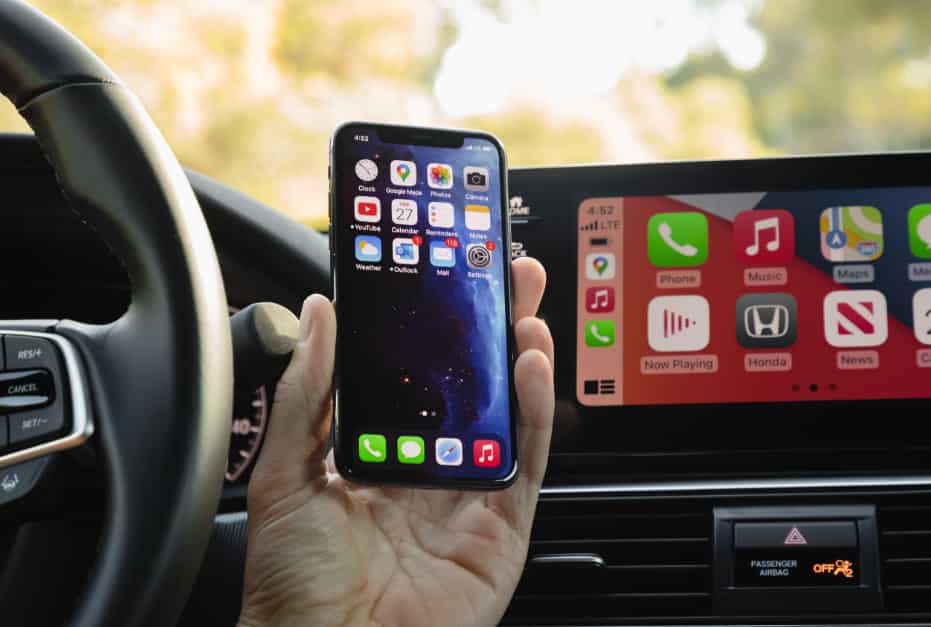
Can You Connect Apple CarPlay Honda Without USB?
Many Honda owners wonder whether they can use Apple CarPlay without connecting their iPhone through a USB cable. The answer depends on the Honda model, production year, and the type of infotainment system installed in the vehicle. Some newer Honda vehicles include built-in wireless Apple CarPlay, while many older models only support wired connections through a USB port.
Traditional Apple CarPlay works by creating a direct connection between the iPhone and the Honda infotainment system through a USB data cable. This method provides a stable connection and allows the phone to charge while using features such as Apple Maps, Siri, Spotify, and phone calls. However, it requires drivers to connect their devices manually every time they enter the vehicle.
Wireless Apple CarPlay removes this limitation by using Bluetooth and Wi-Fi technology. Bluetooth is typically used for the initial pairing process, while Wi-Fi creates a faster connection that allows data transfer between the iPhone and the Honda system. Once the setup is complete, the phone can automatically connect whenever the vehicle starts.
Before trying to connect Apple CarPlay Honda without USB, drivers should check whether their vehicle supports wireless functionality. The easiest way is to review the vehicle specifications, check the infotainment settings, or look for a wireless CarPlay option when pairing an iPhone.
If a Honda vehicle does not include factory wireless Apple CarPlay, owners may still be able to upgrade the system using a compatible wireless CarPlay adapter. These adapters are designed to work with many Honda models that already support wired Apple CarPlay, providing a simple way to enjoy a cable free experience without replacing the original entertainment system.
How to Connect Apple CarPlay Honda Without USB (Step by Step Guide)
Connecting Apple CarPlay Honda without USB is a straightforward process if your vehicle supports wireless connectivity. The setup usually takes only a few minutes, and after the first pairing, your iPhone can automatically connect whenever you start your Honda. Before beginning, make sure your iPhone is compatible with Apple CarPlay and that Bluetooth and Wi-Fi are enabled.
Start by turning on your Honda vehicle and accessing the infotainment system. Open the connection settings and look for the option to add or pair a mobile device. At the same time, open your iPhone settings and go to Bluetooth. Select your Honda infotainment system from the available devices and complete the pairing process.
After the Bluetooth connection is established, your Honda system should display a prompt asking you to enable Apple CarPlay. Accept the request on both your vehicle screen and iPhone. You may also need to allow access to contacts, messages, notifications, and other features to get the full Apple CarPlay experience.
Once connected, your iPhone will use a wireless connection through Bluetooth and Wi-Fi to communicate with the Honda infotainment system. You can now access essential apps such as Apple Maps for navigation, Siri for voice commands, Spotify for music streaming, and Messages for hands free communication.
To make sure everything works correctly, test the main Apple CarPlay features after setup. Try making a phone call, using voice commands with Siri, playing music, and opening navigation. If all functions work properly, your Honda wireless Apple CarPlay setup is complete.
For the best experience, keep your iPhone software updated and remove unused Bluetooth devices from your Honda system. This helps prevent connection conflicts and improves the reliability of your wireless CarPlay connection over time.
How to Add Wireless Apple CarPlay to Older Honda Models
Many older Honda vehicles do not have built in wireless Apple CarPlay. Instead, they require an iPhone connection through a USB cable. This system works well, but many drivers prefer a wireless experience.
Using a cable every time you enter the vehicle can be inconvenient. Drivers often want faster access to navigation, music, and calls without searching for a USB cable.
A wireless CarPlay adapter is one of the simplest ways to upgrade an older Honda model. This device can convert wired Apple CarPlay into a wireless connection. It works with the existing Honda infotainment system and does not require major changes.
The installation process is usually quick. First, connect the wireless CarPlay adapter to the USB port that supports Apple CarPlay. Next, pair your iPhone with the adapter using Bluetooth. After the first setup, the adapter can connect automatically when you start your Honda.
This upgrade allows Honda owners to keep their original infotainment system. There is no need to replace the factory screen or install a new multimedia unit. It is a practical solution for drivers who want wireless features at a lower cost.
However, choosing the right wireless CarPlay adapter Honda owners can rely on is important. A quality adapter should provide stable performance, quick connection speed, and good compatibility. Cheap adapters may cause problems such as connection drops, audio delays, or slow startup times.
Before buying an adapter, check your Honda model carefully. Most wireless adapters require an existing wired Apple CarPlay system. They work as a bridge between the USB connection and the wireless network.
For many older Honda vehicles, upgrading from wired to wireless Apple CarPlay is an affordable solution. It provides a modern driving experience while keeping the original design of the vehicle.
Best Ways to Get Wireless Apple CarPlay in a Honda
Honda owners have several options when they want to use Apple CarPlay without a USB cable. The best choice depends on the vehicle model, budget, and desired level of integration. Some drivers prefer a factory solution, while others choose a simple upgrade that works with their existing system.
The first option is factory wireless Apple CarPlay. This is the most seamless solution because the feature is built directly into the Honda infotainment system. It provides a clean user experience with reliable performance and automatic connection. Drivers can use navigation, music, calls, and Siri without connecting their iPhone with a cable.
However, factory wireless Apple CarPlay is only available on selected Honda models and newer production years. Owners of older vehicles may not have this feature from the manufacturer. In this case, an upgrade solution may be more practical.
A wireless CarPlay adapter is the most popular upgrade option for many Honda drivers. It allows vehicles with wired Apple CarPlay to support a wireless connection. The adapter is easy to install and usually does not require professional help. It is also more affordable than replacing the entire infotainment system.
The main advantage of a wireless CarPlay adapter is convenience. Drivers can keep the original Honda screen while removing the need for a USB cable. This solution is ideal for people who want modern features without making expensive changes to their vehicle.
Another option is an aftermarket infotainment upgrade. This involves replacing the original head unit with a new system that supports wireless Apple CarPlay. These systems often include additional features such as larger displays, improved audio settings, and extra smartphone compatibility.
An aftermarket upgrade can provide more features, but it also has some disadvantages. The installation cost is higher, and the new system may not have the same factory appearance. Some drivers may prefer keeping the original Honda design.
For most Honda owners, a wireless CarPlay adapter offers the best balance between price, convenience, and compatibility. It provides a simple way to enjoy wireless Apple CarPlay without replacing the original infotainment system.
Honda Models That Support Wireless Apple CarPlay
Wireless Apple CarPlay availability depends on the Honda model and production year. Newer Honda vehicles are more likely to include built in wireless connectivity, while older models usually require a USB connection or an upgrade solution.
The Honda Civic is one of the most popular models with Apple CarPlay support. Recent Civic models offer advanced infotainment features, including wireless smartphone integration on selected trims. Drivers can connect their iPhone without using a USB cable and access navigation, music, and communication apps easily.
The Honda Accord is another model that offers wireless Apple CarPlay on newer versions. As a premium sedan in the Honda lineup, the Accord includes advanced technology features designed to improve comfort and convenience. Wireless connectivity helps create a cleaner and more modern driving experience.
The Honda CR V is also available with wireless Apple CarPlay on certain model years. This feature is especially useful for SUV owners who use their vehicles for daily driving and longer trips. Drivers can access Apple Maps, Siri, and entertainment apps while keeping their phone connected wirelessly.
Other Honda vehicles, such as the Honda Pilot, Honda HR V, and Honda Odyssey, may also support wireless Apple CarPlay depending on the trim level and year. Since Honda updates its infotainment systems regularly, compatibility can vary between different versions of the same model.
To check if your Honda supports wireless Apple CarPlay, review the vehicle manual or visit the official Honda information resources. You can also check the infotainment settings to see whether a wireless phone connection option is available.
If your Honda only supports wired Apple CarPlay, you may still be able to add wireless functionality with a compatible adapter. This option allows many older Honda models to enjoy a wireless experience without replacing the original infotainment system.
Understanding your Honda model compatibility is the first step before setting up Apple CarPlay without USB. It helps you choose the right connection method and avoid unnecessary upgrades.
Common Honda Apple CarPlay Connection Problems and Fixes
Even after setting up wireless Apple CarPlay, some Honda owners may experience connection issues. These problems can happen because of outdated software, incorrect settings, or compatibility limitations. Understanding common problems can help you fix the connection faster.
One common issue is that Apple CarPlay does not connect automatically when the vehicle starts. This usually happens when Bluetooth pairing is incomplete or the iPhone connection settings are not configured correctly. To solve this problem, check that Bluetooth and Wi-Fi are enabled on your iPhone. You can also remove the Honda system from your Bluetooth list and pair the devices again.
Another problem is frequent disconnection during use. A wireless CarPlay connection depends on both Bluetooth and Wi-Fi signals. Interference from other devices or outdated software may affect performance. Updating your iPhone to the latest iOS version can improve stability and reduce connection problems.
Some drivers may also experience audio delays or slow response times. This can happen with low quality wireless CarPlay adapters or unstable connections. Using a reliable adapter and keeping the device firmware updated can help improve performance.
If your Honda infotainment system does not recognize your iPhone, try restarting both devices. Turn the vehicle off completely and restart your iPhone before attempting a new connection. In some cases, resetting the Honda infotainment settings may be necessary.
Another helpful step is removing old devices from the Honda system. Having too many saved phones can create connection conflicts. Keep only the devices you use regularly to ensure a smoother wireless CarPlay experience.
Regular maintenance also helps prevent future issues. Keep your iPhone software updated, check adapter compatibility, and review Honda infotainment settings when problems appear. Most wireless Apple CarPlay problems can be solved with simple adjustments instead of expensive repairs.
Wireless Apple CarPlay vs USB CarPlay: Which Is Better for Honda?
Choosing between wireless Apple CarPlay and USB CarPlay depends on what matters most to each Honda driver. Both options provide access to important iPhone features, including navigation, music, calls, and voice commands. However, they offer different experiences when it comes to convenience, stability, and everyday use.
Wireless Apple CarPlay is designed for drivers who want a simple and cable free experience. Once the initial setup is complete, the iPhone can connect automatically when the Honda vehicle starts. This makes daily driving more convenient because there is no need to search for a USB cable or plug in the phone manually.
The biggest advantage of wireless CarPlay is convenience. It keeps the vehicle interior cleaner and allows drivers to keep their phone in a pocket or bag. This is especially useful for short trips where charging the phone is not necessary.
However, wireless Apple CarPlay also has some limitations. The connection depends on Bluetooth and Wi-Fi performance. Some users may experience minor delays or connection issues, especially with third party adapters. Wireless CarPlay also does not charge the iPhone while in use.
USB Apple CarPlay remains a reliable option for many Honda owners. A wired connection usually provides stronger stability and faster response because data travels directly through the cable. It also allows the iPhone to charge while using Apple CarPlay.
The main disadvantage of USB CarPlay is the need for a physical connection. Drivers must connect their phone every time they want to use the system. A damaged cable or USB port can also affect performance.
For Honda owners with newer vehicles, factory wireless Apple CarPlay is often the best choice because it combines convenience with strong integration. For older Honda models, a wireless CarPlay adapter provides a practical upgrade. Drivers who prioritize maximum stability and phone charging may still prefer the traditional USB connection.
Ultimately, the best option depends on personal needs. Wireless Apple CarPlay offers a more modern experience, while USB CarPlay provides proven reliability and consistent performance.
Frequently Asked Questions About Honda Wireless Apple CarPlay
Can I use Apple CarPlay in Honda without USB?
Yes, you can use Apple CarPlay in Honda without a USB cable if your vehicle supports wireless Apple CarPlay. Many newer Honda models include this feature from the factory. Older models may need a wireless CarPlay adapter to convert a wired connection into a wireless one.
Does every Honda have wireless Apple CarPlay?
No, not every Honda vehicle has wireless Apple CarPlay. Availability depends on the model, trim level, and production year. Some Honda vehicles only support wired Apple CarPlay through a USB connection.
Can I convert wired Honda CarPlay to wireless?
Yes, many Honda owners can convert wired Apple CarPlay into a wireless connection by using a compatible wireless CarPlay adapter. These adapters connect to the existing USB CarPlay port and allow an iPhone to connect wirelessly.
Do wireless CarPlay adapters work with Honda vehicles?
Many wireless CarPlay adapters work with Honda vehicles that already support wired Apple CarPlay. However, compatibility can vary depending on the infotainment system and vehicle model. Always check the adapter specifications before purchasing.
Why is my Honda Apple CarPlay not connecting?
Honda Apple CarPlay connection problems can happen because of Bluetooth settings, Wi-Fi issues, outdated software, or device pairing errors. Restarting the iPhone, updating iOS, and reconnecting the device can often solve common problems.
Does wireless Apple CarPlay drain the iPhone battery faster?
Wireless Apple CarPlay may use more battery because it relies on wireless communication. Drivers who use CarPlay for long trips may prefer keeping a charging option available.
Is wireless Apple CarPlay better than USB CarPlay?
Wireless Apple CarPlay offers more convenience because it removes the need for cables. USB CarPlay usually provides stronger stability and charges the iPhone at the same time. The better option depends on whether you value convenience or consistent performance.
Conclusion
Learning how to connect Apple CarPlay Honda without USB can help drivers enjoy a more convenient and modern driving experience. Wireless Apple CarPlay removes the need for cables and allows quick access to essential features such as navigation, music, calls, and voice commands.
For Honda models with built in wireless Apple CarPlay, the setup process is simple. Drivers only need to pair their iPhone with the Honda infotainment system through Bluetooth and Wi-Fi. Once connected, the system can automatically recognize the device during future trips.
For older Honda vehicles, a wireless CarPlay adapter is a practical upgrade option. It allows drivers to keep their original infotainment system while adding wireless functionality. This solution is often more affordable than replacing the entire multimedia system.
Choosing the right method depends on your Honda model, budget, and personal preferences. Newer vehicles may benefit from factory wireless CarPlay, while older models can achieve a similar experience with a reliable adapter.
Before upgrading, check your Honda compatibility and choose a solution that matches your driving needs. A proper setup can make every journey more comfortable by reducing cable clutter and creating a smoother connection between your iPhone and Honda vehicle.
With the right approach, you can enjoy the benefits of wireless Apple CarPlay and create a cleaner, smarter, and more enjoyable driving experience.