Few dashboard warnings are as unsettling as the “Service Brake Assist” message appearing on your GMC Terrain. Since your vehicle’s braking system is one of its most critical safety features, it’s natural to wonder whether the warning indicates a serious problem or if it’s still safe to continue driving.
The Brake Assist System is designed to help drivers apply maximum braking force during emergency situations, reducing stopping distance when every second matters. When the vehicle detects a fault within the Brake Assist System or one of its related components, it triggers the Service Brake Assist Message to alert you that the system may not perform as intended. Although this warning does not necessarily mean your brakes have completely failed, it should never be ignored, as reduced braking assistance can increase stopping distance and compromise overall driving safety.
The good news is that this warning can be caused by a wide range of issues, from something as simple as low brake fluid or a weak battery to more complex problems involving the ABS module, wheel speed sensors, or brake booster. Identifying the root cause early can help prevent further damage and potentially save you from expensive repairs.
In this comprehensive guide, you’ll learn what the GMC Terrain Service Brake Assist Message means, the most common causes behind it, how to diagnose the problem, practical repair solutions, and the proper way to reset the warning once the underlying issue has been fixed. Whether you’re troubleshooting the problem yourself or preparing for a visit to a repair shop, this guide will help you make informed decisions and keep your GMC Terrain operating safely.
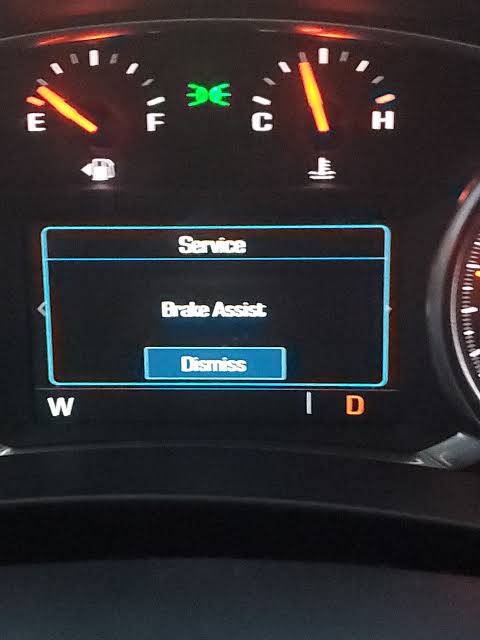
What Does the GMC Terrain Service Brake Assist Message Mean?
The Service Brake Assist Message on a GMC Terrain indicates that the vehicle has detected a malfunction within the Brake Assist System or one of its supporting electronic components. This warning does not necessarily mean that the hydraulic braking system has failed. Instead, it suggests that the feature designed to provide additional braking force during emergency situations may no longer operate as intended.
Brake Assist works alongside several advanced safety systems, including the Anti-lock Braking System (ABS), Electronic Stability Control (ESC), Traction Control System (TCS), and various sensors that continuously monitor wheel speed, brake pedal input, and vehicle stability. These systems communicate with the Electronic Brake Control Module (EBCM), which determines how much braking assistance is required during sudden stops.
When the EBCM receives abnormal data from one or more sensors, detects an electrical fault, or experiences an internal malfunction, it stores a diagnostic trouble code and displays the Service Brake Assist warning on the dashboard. Depending on the severity of the issue, other warning lights such as the ABS, Traction Control, or StabiliTrak indicators may also illuminate simultaneously.
In many cases, the vehicle remains drivable because the conventional hydraulic braking system continues to function. However, the loss of brake assist can result in increased pedal effort and longer stopping distances during emergency braking. For this reason, drivers should diagnose and repair the underlying problem as soon as possible instead of simply clearing the warning message.
It is also important to understand that the Brake Assist System relies heavily on accurate sensor data and a stable electrical system. Even seemingly unrelated issues, such as a weak battery or low charging voltage, can trigger the warning by disrupting communication between control modules.
Common Causes of the GMC Terrain Service Brake Assist Message
Several different faults can trigger the Service Brake Assist Message, ranging from inexpensive sensor failures to more complex electronic or hydraulic problems. Identifying the correct cause is the first step toward an effective repair.
Faulty Wheel Speed Sensor
A defective wheel speed sensor is one of the most common reasons for the warning. These sensors measure the rotational speed of each wheel and transmit real time data to the ABS and Brake Assist systems. Dirt buildup, corrosion, damaged wiring, or physical impact can interrupt the signal, causing the control module to disable brake assist as a safety precaution.
Common symptoms include an illuminated ABS light, intermittent traction control warnings, and inconsistent braking performance on slippery roads. Replacing a faulty sensor is typically a straightforward repair that restores normal system operation.
ABS Control Module Failure
The ABS control module serves as the central processor for several braking and stability systems. Internal electronic failures, software corruption, or moisture intrusion can prevent the module from processing sensor information correctly. When this occurs, the Brake Assist System may become unavailable.
Drivers may notice multiple warning lights appearing simultaneously, including ABS, StabiliTrak, and Traction Control indicators. Professional diagnostic equipment is usually required to confirm module failure before replacement.
Brake Booster Problems
The brake booster uses engine vacuum or electronic assistance to reduce the amount of force required to press the brake pedal. If the booster develops a leak or fails internally, the brake pedal may become unusually hard, making emergency braking more difficult.
Unlike electronic faults, brake booster problems often produce noticeable changes in pedal feel. Drivers should treat this symptom seriously because it directly affects braking performance.
Low Brake Fluid
Brake fluid is essential for transmitting hydraulic pressure throughout the braking system. A low fluid level may indicate worn brake pads, a leaking brake line, or another mechanical issue. Some GMC Terrain models may display the Service Brake Assist Message when brake fluid drops below the recommended level.
Inspecting the brake fluid reservoir is one of the quickest diagnostic steps and should always be performed before assuming a major component has failed.
Brake Pedal Position Sensor Failure
The brake pedal position sensor monitors how quickly and how far the driver presses the brake pedal. Brake Assist relies on this information to determine when emergency braking is occurring. A malfunctioning sensor may prevent the system from recognizing panic braking events, resulting in reduced braking assistance.
Weak Battery or Charging System
Modern GMC Terrain vehicles depend on stable electrical voltage to operate numerous electronic control modules. An aging battery, failing alternator, or poor electrical connection can generate low voltage conditions that interfere with communication between braking components.
Many owners are surprised to discover that replacing an old battery or repairing the charging system eliminates the warning without requiring any brake component replacement.
Damaged Wiring or Corroded Connectors
Brake system wiring is exposed to water, road salt, vibration, and extreme temperature changes. Over time, connectors may corrode or wires may become damaged, creating intermittent electrical faults that are difficult to diagnose. A careful visual inspection often reveals broken insulation, loose connectors, or corrosion around sensor terminals.
Software or Electronic Control Module Issues
Occasionally, the warning results from outdated software or temporary communication errors between vehicle control modules. Manufacturers sometimes release software updates that improve system reliability or resolve known issues. If no mechanical faults are found, checking for available software updates may be the final step in the diagnostic process.
Symptoms That Often Accompany the Service Brake Assist Message
The Service Brake Assist Message rarely appears by itself. In most situations, additional warning lights or changes in vehicle behavior provide valuable clues about the underlying problem. Recognizing these symptoms can help narrow down the cause before beginning a full diagnostic inspection.
| Symptom | Possible Cause |
|---|---|
| Service Brake Assist Message | Brake Assist System fault or electronic communication issue |
| ABS Warning Light | Faulty wheel speed sensor, damaged ABS wiring, or failed ABS module |
| Traction Control Light | Wheel speed sensor malfunction or traction control system fault |
| StabiliTrak Warning | Electronic stability control issue affecting multiple safety systems |
| Hard Brake Pedal | Brake booster failure or vacuum leak |
| Increased Stopping Distance | Reduced or disabled brake assist function |
| Brake Pedal Feels Different | Brake booster, pedal position sensor, or hydraulic issue |
| Check Engine Light | Electrical fault affecting multiple vehicle systems |
| Cruise Control Disabled | Communication fault between control modules |
| Multiple Dashboard Warning Lights | Low battery voltage, charging system failure, or module communication error |
Drivers should pay close attention to how the vehicle behaves after the warning appears. If braking performance feels normal and only the message is displayed, the problem may be limited to an electronic sensor or control module. However, if the brake pedal becomes stiff, braking distance increases, or the vehicle pulls to one side while stopping, the issue could involve a mechanical component that requires immediate attention.
Additional symptoms such as intermittent warning lights, reduced traction control performance, or unusual ABS activation during normal braking often point toward faulty wheel speed sensors or damaged wiring. On the other hand, warnings that appear immediately after replacing the battery or during cold weather may indicate voltage-related problems rather than actual brake component failure.
Because several braking and stability systems share the same sensors and control modules, a single fault can trigger multiple dashboard alerts simultaneously. Performing a complete diagnostic scan with a compatible OBD-II scanner is the most effective way to identify the exact cause instead of replacing parts based solely on warning messages.
Is It Safe to Drive with the GMC Terrain Service Brake Assist Message?
The answer depends on the cause of the warning and how your vehicle behaves after the message appears. In many cases, you can still drive a GMC Terrain with the Service Brake Assist Message displayed because the primary hydraulic braking system remains operational. However, the Brake Assist System may no longer provide additional braking force during emergency stops, increasing the amount of pressure required on the brake pedal and extending stopping distances.
If the only symptom is the dashboard warning and the brake pedal feels normal, you may be able to drive a short distance to your home or a nearby repair facility. Even then, you should avoid aggressive driving, maintain a greater following distance, and allow extra room for braking until the problem is diagnosed.
On the other hand, certain symptoms indicate that the vehicle should not be driven. A hard brake pedal, noticeably reduced braking performance, grinding noises, brake fluid leaks, or multiple warning lights appearing together can signal a more serious problem affecting the braking system. Continuing to drive under these conditions increases the risk of losing braking efficiency and could lead to an accident.
If the ABS, StabiliTrak, and Traction Control warnings appear alongside the Service Brake Assist Message, the vehicle may have limited stability assistance during slippery road conditions. While the brakes themselves may still function, emergency handling and braking performance could be compromised.
The safest approach is to scan the vehicle for diagnostic trouble codes as soon as possible. If braking performance changes significantly or you feel uncomfortable driving the vehicle, arrange for it to be towed to a qualified repair shop rather than risking further damage or reduced safety.
How to Diagnose the GMC Terrain Service Brake Assist Message
Proper diagnosis is essential because the Service Brake Assist Message can be triggered by several different systems. Replacing parts without confirming the root cause often leads to unnecessary expenses and recurring warning messages.
Begin by connecting a compatible OBD-II scan tool capable of reading manufacturer-specific ABS and brake system codes. Generic code readers may only access engine-related trouble codes and could miss faults stored in the Electronic Brake Control Module. Record all active and pending diagnostic trouble codes before clearing anything, as they provide valuable information about the source of the problem.
Next, inspect the brake fluid reservoir. The fluid should be between the minimum and maximum level marks and should appear clean. Low or contaminated brake fluid may indicate worn brake pads, a hydraulic leak, or overdue maintenance. If the fluid level is low, inspect the entire braking system before simply topping it off.
Check the condition of the vehicle’s battery and charging system. Modern GMC Terrain models rely heavily on stable system voltage, and a weak battery can generate false electronic warnings. Measure battery voltage with the engine off and again while the engine is running to verify that the alternator is charging correctly.
Inspect each wheel speed sensor and its wiring harness for physical damage, corrosion, loose connectors, or excessive dirt buildup. Because these sensors are mounted near the wheel hubs, they are exposed to water, road debris, and harsh weather conditions, making them one of the most common failure points.
If no obvious problems are found, inspect the brake booster for vacuum leaks or abnormal pedal feel. A booster that fails to provide proper assistance can trigger brake system warnings while also making the brake pedal noticeably harder to press.
Finally, perform a road test after completing any repairs. Monitor whether the warning message returns and verify that the ABS, Traction Control, and Brake Assist systems operate normally. If the warning reappears immediately after clearing the codes, additional diagnosis of the ABS module or Electronic Brake Control Module may be required.
How to Fix the GMC Terrain Service Brake Assist Message
The correct repair depends entirely on the fault identified during diagnosis. Simply resetting the warning without addressing the underlying problem will usually cause the message to return within a short period of driving.
If a faulty wheel speed sensor is responsible, replacing the damaged sensor and repairing any broken wiring is often enough to restore proper Brake Assist operation. This is one of the most common and least expensive repairs associated with the warning.
When low brake fluid is the cause, refill the system with the manufacturer-recommended brake fluid only after identifying and correcting the reason for the fluid loss. If worn brake pads or a leaking brake line caused the low fluid level, those issues must be repaired before the warning can be permanently resolved.
A weak battery or failing alternator should also be addressed promptly. Replacing an aging battery or repairing the charging system often restores normal communication between electronic control modules and eliminates brake system warnings caused by unstable voltage.
If diagnostic testing confirms an ABS control module failure, replacement or professional rebuilding of the module may be necessary. Some replacement modules require programming or calibration using factory-level diagnostic equipment before they can communicate correctly with the rest of the vehicle.
Brake booster failures typically require replacing the entire booster assembly. After installation, technicians should verify proper brake pedal operation and ensure there are no vacuum leaks or hydraulic issues affecting braking performance.
In some situations, manufacturers release software updates that resolve communication errors or improve brake system reliability. Checking for available software updates at a dealership or qualified repair facility can be worthwhile, especially if no mechanical defects are found during inspection.
Once all repairs have been completed, clear the stored diagnostic trouble codes using an appropriate scan tool and perform another road test. If the Service Brake Assist Message does not return and all braking systems operate normally, the repair can be considered successful. However, if the warning reappears, additional diagnostics should be performed instead of replacing components based on guesswork.
How to Reset the GMC Terrain Service Brake Assist Message
Resetting the Service Brake Assist Message should always be the final step after the underlying issue has been diagnosed and repaired. Clearing the warning without fixing the actual problem will not permanently solve the issue, as the Electronic Brake Control Module (EBCM) will detect the fault again and reactivate the warning during the next drive cycle.
The simplest reset method is to restart the vehicle after completing the necessary repairs. In some cases, the control module automatically verifies that all systems are functioning correctly and clears the warning after several successful ignition cycles.
Another effective method is to use a professional OBD-II scan tool capable of accessing ABS and brake system modules. After repairing the fault, connect the scanner, erase all stored diagnostic trouble codes, and restart the engine. If no active faults remain, the Service Brake Assist Message should disappear.
Some owners choose to disconnect the negative battery cable for several minutes to reset the vehicle’s electronic systems. While this may temporarily clear certain dashboard warnings, it is generally not the most reliable solution because many fault codes remain stored in non-volatile memory. Disconnecting the battery may also reset the clock, radio presets, and other personalized vehicle settings.
After clearing the codes, perform a short road test under normal driving conditions. Apply the brakes several times and verify that the ABS, Traction Control, and StabiliTrak warning lights remain off. If the Service Brake Assist Message returns immediately or after a few miles of driving, the original fault has not been fully resolved or another related issue is present.
It is also important to remember that some repairs, particularly ABS module replacement or software updates, require calibration procedures using manufacturer-approved diagnostic equipment. Without proper programming, the warning may remain active even after replacing the defective component.
Estimated Repair Costs
The cost of repairing the GMC Terrain Service Brake Assist Message varies depending on the failed component, your vehicle’s model year, labor rates in your area, and whether genuine OEM or aftermarket parts are used. Some repairs are relatively inexpensive, while others involving electronic control modules can become significantly more costly.
| Repair Item | Estimated Cost (USD) |
|---|---|
| OBD-II Diagnostic Scan | $50 to $150 |
| Wheel Speed Sensor Replacement | $120 to $350 |
| Brake Fluid Flush or Refill | $90 to $180 |
| Brake Pedal Position Sensor | $150 to $350 |
| Battery Replacement | $180 to $400 |
| Alternator Replacement | $500 to $900 |
| Brake Booster Replacement | $500 to $1,200 |
| ABS Control Module Replacement | $800 to $1,800 |
| Wiring Repair | $100 to $600 |
| Software Update or Module Reprogramming | $80 to $250 |
Labor costs often represent a significant portion of the total repair bill. For example, replacing a wheel speed sensor is generally a quick procedure, while diagnosing intermittent electrical faults or replacing an ABS control module may require several hours of labor.
If your GMC Terrain is still covered by the factory warranty or an extended service contract, some repairs may be covered depending on the cause of the failure. Always check your warranty documentation before authorizing major repairs.
To avoid unnecessary expenses, request a complete diagnostic report before replacing expensive components. A thorough inspection helps ensure the repair targets the actual cause rather than replacing parts based on assumptions.
Tips to Prevent the Service Brake Assist Message from Returning
Although some component failures are unavoidable due to normal wear, regular maintenance can significantly reduce the likelihood of seeing the Service Brake Assist Message again.
Inspect the brake system during every scheduled service. Routine inspections can identify worn brake pads, leaking hydraulic components, or damaged sensors before they develop into larger problems that trigger dashboard warnings.
Maintain the proper brake fluid level and replace the fluid according to GMC’s recommended maintenance schedule. Old or contaminated brake fluid can reduce braking performance and contribute to corrosion inside the braking system.
Keep your vehicle’s battery and charging system in good condition. Modern braking systems rely heavily on stable electrical voltage, and weak batteries are a surprisingly common cause of electronic warning messages.
Wash the undercarriage regularly if you frequently drive on salted winter roads or through muddy conditions. Removing accumulated dirt and road salt helps protect wheel speed sensors, wiring harnesses, and electrical connectors from corrosion.
Address warning lights promptly instead of postponing repairs. Small electrical faults often become larger and more expensive if ignored for extended periods.
Use high-quality replacement parts whenever possible. Genuine OEM components or reputable aftermarket parts typically provide better compatibility with the vehicle’s electronic systems and reduce the risk of recurring faults.
If your GMC dealer announces software updates or technical service bulletins related to the braking system, schedule the update as soon as practical. Updated software may improve communication between electronic control modules and resolve known issues affecting Brake Assist performance.
Frequently Asked Questions
Can I drive with the Service Brake Assist Message on?
In many cases, yes. The standard hydraulic brakes usually continue to function even when Brake Assist is unavailable. However, emergency braking performance may be reduced, so the vehicle should be inspected as soon as possible.
Can a weak battery trigger the Service Brake Assist Message?
Yes. Low system voltage can interfere with communication between the Electronic Brake Control Module and other control units, causing the warning to appear even when the braking components are functioning properly.
Will replacing the battery automatically clear the warning?
Not always. If low voltage was the only cause, the warning may disappear after several drive cycles. If fault codes remain stored or another issue exists, the message will continue to appear until the problem is repaired and the codes are cleared.
Does the Service Brake Assist Message mean my brakes have failed?
No. The warning usually indicates that the Brake Assist feature is unavailable or operating improperly. The conventional braking system often remains functional, but emergency braking assistance may be reduced.
How do I permanently reset the Service Brake Assist Message?
Repair the underlying fault first, then clear the diagnostic trouble codes using a compatible scan tool. If no active faults remain, the warning should not return.
Can low brake fluid cause this warning?
Yes. Low brake fluid can trigger multiple brake system warnings, including the Service Brake Assist Message, particularly if the fluid level falls below the minimum specification.
How much does it typically cost to fix?
Repair costs range from less than $150 for minor issues such as brake fluid service or sensor replacement to more than $1,500 if the ABS control module or brake booster requires replacement.
Should I replace the ABS module immediately?
No. Because ABS module replacement is one of the most expensive repairs, it should only be performed after confirming the diagnosis with manufacturer-specific diagnostic equipment.
Conclusion
The GMC Terrain Service Brake Assist Message is more than just another dashboard notification. It serves as an early warning that one or more components within the vehicle’s braking assistance system may not be operating correctly. Although the message does not usually indicate complete brake failure, ignoring it can reduce emergency braking performance and increase the risk of accidents.
Fortunately, many of the most common causes, including faulty wheel speed sensors, low brake fluid, weak batteries, damaged wiring, or brake pedal position sensor failures, can be identified through systematic diagnosis. Addressing these issues early not only improves vehicle safety but can also prevent more expensive repairs involving the ABS control module or brake booster.
If the warning appears, avoid relying solely on resetting the message. Instead, perform a complete diagnostic inspection, repair the underlying fault, and verify that the Brake Assist System is functioning correctly before returning the vehicle to normal use.
Have you experienced the Service Brake Assist Message on your GMC Terrain? Share your model year, the diagnostic trouble codes you found, and the repair that solved the problem in the comments below. Your experience may help other GMC owners diagnose the same issue more quickly and avoid unnecessary repair costs.