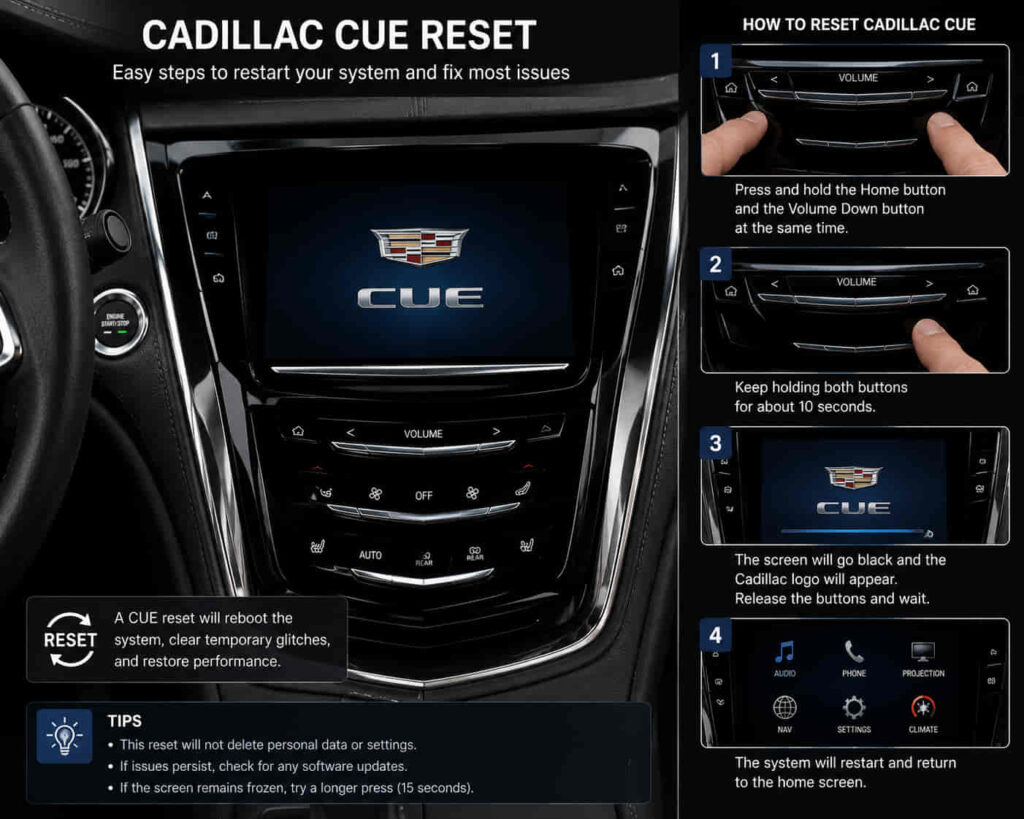
A Cadillac CUE reset can fix several infotainment problems caused by temporary software errors, system freezes, connection failures, and communication issues between vehicle modules. The Cadillac User Experience (CUE) system controls important vehicle functions, including touchscreen controls, audio settings, navigation features, Bluetooth connectivity, and smartphone integration. When the software experiences a temporary malfunction, resetting the system can restore normal operation without replacing hardware components.
Many Cadillac CUE problems appear as software-related symptoms rather than physical failures. Drivers may experience an unresponsive touchscreen, slow menu performance, Bluetooth connection issues, missing audio functions, or a blank display. These problems can occur because the infotainment system manages multiple connected functions through a combination of hardware, software, and vehicle communication networks.
However, a Cadillac CUE reset is not a universal solution for every problem. Resetting can resolve temporary software glitches, but it cannot repair damaged touchscreen hardware, failed infotainment modules, or serious electrical communication problems. Understanding the difference between a software issue and a hardware failure helps prevent unnecessary repairs.
This guide explains the common Cadillac CUE problems that a reset can solve, why these issues happen, and when a reset is no longer enough to restore the infotainment system.
Can a Cadillac CUE Reset Fix a Frozen Touchscreen?
A Cadillac CUE reset can often fix a frozen touchscreen when the problem is caused by temporary software errors that prevent the infotainment system from processing user commands correctly. The touchscreen is the main interface for Cadillac CUE, allowing drivers to control audio, navigation, vehicle settings, and connected devices. When the software becomes unstable, the display may remain active but stop responding to touch input.
A frozen CUE screen usually happens because the infotainment software experiences a temporary communication problem. Cadillac CUE manages multiple functions at the same time, and conflicts between applications, connected devices, or internal processes can cause the interface to become slow or completely unresponsive.
Resetting the system allows the infotainment software to restart its operating processes and rebuild communication between the display module and other CUE components. This is similar to restarting a computer when an application stops responding because the issue may exist in the software environment rather than the physical touchscreen.
For example, a Cadillac owner may notice that the screen remains visible, but tapping navigation, audio controls, or settings produces no response. If the cause is a temporary software freeze, a reset can restore normal touchscreen operation without replacing the display hardware.
However, repeated freezing after multiple resets may indicate a deeper problem involving the touchscreen digitizer, infotainment module, wiring connection, or software version. In those cases, additional diagnosis is required.
Can Resetting Cadillac CUE Fix a Black or Blank Screen?
Resetting Cadillac CUE can fix a black or blank screen when the issue is caused by a temporary software crash or failed system startup process. The CUE display depends on communication between the infotainment module, vehicle network, and display hardware, so a disruption in this process can prevent the screen from showing information.
A black screen does not always mean the display hardware has failed. Software errors can prevent the system from loading the user interface even when the vehicle still operates normally. The audio system, steering wheel controls, or other vehicle functions may continue working because different modules manage separate parts of the vehicle.
A system reset forces Cadillac CUE to restart its software environment and attempt a new connection between the infotainment components. This can restore the display when the failure is related to temporary memory errors, software conflicts, or interrupted startup sequences.
For example, a Cadillac CUE screen may remain completely dark after starting the vehicle but return to normal after a successful reset. This situation suggests that the display hardware may still be functional and that the problem was related to system initialization.
If the screen remains blank after repeated resets, the cause may involve a damaged display unit, failed infotainment module, electrical power issue, or communication failure within the vehicle network. A reset can identify whether the issue is software-related, but it cannot repair physical component failures.
Read more: Are Cadillacs Expensive to Maintain
Can a Cadillac CUE Reset Solve Bluetooth Connection Problems?
A Cadillac CUE reset can solve Bluetooth connection problems when the issue is caused by incorrect pairing data, temporary software conflicts, or communication errors between the infotainment system and a smartphone. The Bluetooth system in Cadillac CUE depends on stable communication between the vehicle module and connected devices, so a software problem can prevent normal pairing or audio streaming.
Bluetooth failures can appear in several ways, including a phone that cannot connect, repeated disconnections, missing contact synchronization, or audio that stops working during calls or media playback. These problems do not always indicate a hardware failure because the connection process relies on stored device information and software communication.
Resetting Cadillac CUE can refresh the infotainment system and remove temporary connection errors that prevent Bluetooth from operating correctly. After a reset, the system may need to establish a new connection with the smartphone because previous pairing information may no longer communicate properly.
For example, a Cadillac owner may experience a phone that appears in the Bluetooth menu but fails to complete the connection process. If the problem comes from corrupted pairing data or a temporary software issue, resetting CUE and reconnecting the device can restore normal operation.
However, if Bluetooth problems continue after resetting and pairing the phone again, the cause may involve outdated software, a faulty infotainment module, or a communication issue within the vehicle network. In these situations, a deeper diagnosis is needed instead of repeated resets.
Can Resetting Cadillac CUE Fix Apple CarPlay or Android Auto Problems?
Resetting Cadillac CUE can fix some Apple CarPlay and Android Auto problems when the issue comes from temporary software errors, device recognition failures, or communication problems between the smartphone and infotainment system. These smartphone integration features require multiple systems to work together, including the CUE software, USB connection, phone operating system, and application services.
Common connection problems include the phone not being recognized, CarPlay or Android Auto disconnecting randomly, missing applications, or the system failing to start after connecting the device. These issues often occur because the communication process between the vehicle and smartphone is interrupted.
A Cadillac CUE reset allows the infotainment system to restart its communication processes and establish a fresh connection with the connected device. This can resolve temporary errors caused by memory problems, software conflicts, or an unstable connection state.
For example, a Cadillac owner may connect a smartphone through USB, but the CUE system only charges the phone without launching Apple CarPlay or Android Auto. If the cause is a temporary communication failure, resetting the infotainment system and reconnecting the device may restore normal operation.
However, a reset will not solve every smartphone integration problem. A damaged USB port, incompatible phone software, faulty cable, or outdated CUE software may require additional troubleshooting. The reset process is most effective when the failure originates from temporary software behavior rather than physical hardware problems.
Can a CUE Reset Improve Slow Performance and System Lag?
A Cadillac CUE reset can improve slow performance and system lag when the problem is caused by temporary software overload, memory issues, or communication delays between infotainment processes. Like other computer-based systems, Cadillac CUE manages multiple functions simultaneously, and excessive background processes or software conflicts can reduce response speed.
Slow CUE performance may appear as delayed touchscreen responses, slow menu loading, delayed audio commands, or applications that take longer than expected to open. These symptoms often occur gradually because the system continues storing temporary data and managing connections with multiple devices.
Resetting Cadillac CUE allows the infotainment system to restart its internal processes and clear temporary software states that may affect performance. This refresh can improve responsiveness when the issue comes from software behavior rather than physical hardware limitations.
For example, a Cadillac owner may notice that the touchscreen takes several seconds to respond when switching between navigation, audio, and vehicle settings. If the cause is temporary system lag, restarting the CUE system can restore faster operation.
However, a reset cannot improve performance if the underlying issue involves outdated software, failing hardware, insufficient system resources, or a damaged infotainment module. If slow performance returns repeatedly after resetting, the vehicle may require a software update or professional diagnosis.
Resetting Cadillac CUE can fix some navigation and audio problems when the failure is caused by software errors, incorrect system states, or temporary communication problems within the infotainment system. Cadillac CUE controls multiple entertainment and information functions, so a software issue can affect several features at the same time.
Navigation problems may include incorrect loading, frozen maps, delayed responses, or the system failing to display navigation information properly. Audio-related problems may include missing sound, delayed controls, radio errors, or inconsistent operation of connected media sources.
Because navigation and audio functions rely on the same infotainment platform, restarting Cadillac CUE can refresh the communication between these features and the main system software. This process may restore normal operation when the problem is caused by a temporary software malfunction.
For example, a Cadillac CUE system may display the navigation interface but fail to respond when the driver enters a destination, or the audio controls may stop reacting even though the radio hardware is still functional. A reset can resolve these situations if the cause is a temporary system error.
However, persistent navigation or audio failures may indicate problems beyond software. Issues involving the infotainment module, amplifier, wiring, antenna system, or vehicle communication network require additional testing because a reset cannot repair damaged hardware components.
Can a Factory Reset Fix Cadillac CUE Software Problems?
A factory reset can fix certain Cadillac CUE software problems by restoring the infotainment system to its original configuration, but it should only be used when simpler reset methods do not resolve the issue. Unlike a basic system reboot, a factory reset removes stored user settings and returns many CUE functions to their default state.
Factory reset is useful when the problem is related to corrupted settings, incorrect configurations, or persistent software behavior after regular restarting. It can remove stored Bluetooth connections, personalized preferences, and saved system information that may be causing conflicts within the infotainment system.
However, a factory reset does not repair damaged hardware or replace missing software components. The process only changes the system configuration and clears stored data. If the Cadillac CUE problem comes from a failed display, damaged control module, faulty wiring, or vehicle communication issue, resetting the system will not correct the underlying cause.
Before performing a factory reset, Cadillac owners should understand that important personal settings may need to be configured again afterward. Connected devices, navigation preferences, audio settings, and other personalized options may require reinstallation.
For example, if a Cadillac CUE system repeatedly fails to connect with devices despite normal troubleshooting, a factory reset may help remove conflicting stored information. However, if the system continues crashing after the reset, the problem likely requires software updates or professional inspection.
When Does Cadillac CUE Need Professional Repair Instead of a Reset?
Cadillac CUE needs professional repair when repeated resets fail to restore normal operation or when the problem involves hardware damage, electrical faults, or communication failures between vehicle modules. A reset is designed to resolve temporary software issues, but it cannot repair physical components that are no longer functioning correctly.
Signs that a Cadillac CUE system may require professional diagnosis include repeated system crashes, a touchscreen that remains unresponsive after resets, a display that stays permanently black, or multiple infotainment functions failing at the same time. These symptoms suggest that the problem may exist beyond temporary software behavior.
Professional diagnosis may involve checking the infotainment module, electrical connections, software version, vehicle communication network, and related electronic components. Technicians can use diagnostic equipment to identify whether the failure comes from the CUE hardware or another vehicle system affecting communication.
For example, if the Cadillac CUE screen repeatedly freezes even after factory reset and software updates, replacing or repairing a hardware component may be necessary. Continuing to reset the system in this situation only delays the correct solution.
Understanding the difference between software problems and hardware failures helps owners avoid unnecessary repairs. A reset is an effective first step for temporary issues, but persistent failures require a deeper evaluation of the Cadillac CUE system.
How Can You Use Cadillac CUE Reset Effectively?
A Cadillac CUE reset is an effective first troubleshooting step for temporary infotainment problems, but it works best when the cause of the issue is related to software behavior rather than hardware failure. The CUE system manages multiple vehicle functions, including touchscreen controls, audio, navigation, Bluetooth, Apple CarPlay, and Android Auto, so temporary communication errors can affect several features at the same time.
Resetting the system can restore normal operation when problems come from frozen software, incorrect connection states, temporary memory issues, or failed startup processes. It provides a simple way to refresh the infotainment system before considering more complex repairs.
However, understanding the limits of a reset is important. A Cadillac CUE reset cannot repair damaged displays, failed infotainment modules, electrical problems, or physical component failures. When issues continue after multiple resets, professional diagnosis is necessary to identify the actual cause.
The most effective approach is to begin with simple troubleshooting, use reset methods appropriately, and evaluate whether the problem returns. Maintaining updated software, using compatible devices, and addressing early warning signs can help keep the Cadillac CUE system operating reliably.
A proper reset strategy allows Cadillac owners to solve common infotainment problems efficiently while avoiding unnecessary repairs and ensuring that the vehicle’s technology continues working as designed.