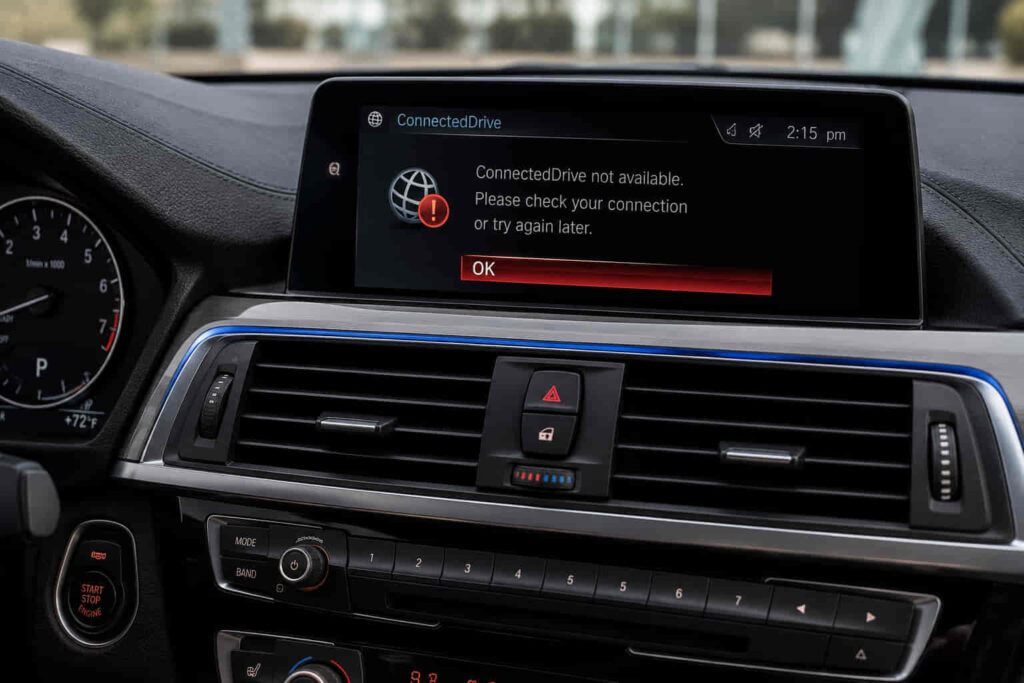
BMW ConnectedDrive can stop working when communication between the vehicle, BMW’s connected-services infrastructure, your BMW ID, or the My BMW App is interrupted, or when the required ConnectedDrive service is unavailable. Common symptoms include vehicle information that does not update in the app, Remote Services commands that fail to reach the car, missing connected features, or ConnectedDrive functions that remain unavailable even though iDrive itself continues to operate normally.
There are 7 common causes of BMW ConnectedDrive not working, including a temporary service-side problem, loss of vehicle connectivity, BMW ID or vehicle-account synchronization issues, unavailable ConnectedDrive services, privacy or data-sharing settings, My BMW App synchronization problems, and a vehicle software or telematics issue. These causes affect different parts of the ConnectedDrive communication path, so repeatedly reinstalling the app or restarting iDrive will not solve every failure.
The correct troubleshooting process starts by determining whether the problem is service-side, account-side, app-side, or vehicle-side. A phone with a working internet connection does not prove that the BMW itself can communicate with ConnectedDrive, and a My BMW App problem does not automatically mean the vehicle has a hardware fault. This guide explains how to isolate each cause, restore the affected connection or service, and determine when a persistent ConnectedDrive problem requires BMW support or vehicle-level diagnosis.
What Are the 7 Common Reasons BMW ConnectedDrive Is Not Working?
The 7 common reasons BMW ConnectedDrive is not working are a temporary BMW service problem, loss of vehicle connectivity, a BMW ID or vehicle-account synchronization issue, unavailable ConnectedDrive services, restrictive privacy or data settings, a My BMW App synchronization problem, and a vehicle software or telematics fault. These causes occur at different points in the ConnectedDrive communication chain, which is why the same symptom does not always require the same fix.
A temporary ConnectedDrive service problem is the first cause to consider when several online functions stop working at the same time. ConnectedDrive depends on services outside the vehicle to exchange information between the BMW, the associated account, and supported remote functions. If that service path is temporarily unavailable, the My BMW App can remain installed and iDrive can continue operating while connected functions fail. When multiple previously working services become unavailable suddenly without any vehicle or account changes, checking whether the problem is service-side prevents unnecessary resets or vehicle repairs.
Loss of vehicle connectivity is another major cause because ConnectedDrive requires the BMW itself to communicate with the connected-services infrastructure. A phone that has Wi-Fi or cellular data does not establish that the vehicle has a working communication path. If the BMW cannot exchange data, the My BMW App may continue displaying previously received information while vehicle status stops updating or Remote Services requests fail. Moving the vehicle to an area with better connectivity and allowing it to re-establish communication can help distinguish a temporary signal condition from a persistent vehicle-side problem.
A BMW ID or vehicle-account synchronization problem can interrupt access even when the app and vehicle each appear to function independently. ConnectedDrive services need to associate the correct user identity with the correct vehicle and available functions. If that relationship is incomplete, authentication has changed, or the vehicle is no longer correctly associated with the account, information and remote functions may not appear as expected. Signing into the correct BMW ID and verifying that the intended vehicle remains associated with the account addresses the identity layer rather than treating the symptom as a telematics hardware failure.
ConnectedDrive can also appear to be broken when the requested service is not currently available for that vehicle or account. Connected functionality varies according to the BMW, equipment, market, and applicable service availability. A feature that is not active or available cannot necessarily be restored by restarting iDrive or reinstalling the My BMW App. The correct diagnosis is to verify whether the missing function should currently be available to the specific vehicle and account. An unavailable service and a malfunctioning service are two different conditions.
Privacy and data-sharing settings form another possible failure point because connected functions depend on the vehicle being permitted to exchange the information required for those services. If relevant permissions or privacy settings restrict data communication, some ConnectedDrive features may stop updating or become unavailable even though the vehicle’s basic infotainment functions still work. The exact menu structure varies between BMW models and iDrive generations, so the correct approach is to verify the applicable privacy and data settings for the vehicle rather than follow one universal menu sequence.
A My BMW App synchronization or application-state problem can create symptoms that resemble a broader ConnectedDrive failure. The app acts as an interface through which the user views vehicle information and initiates supported remote functions, but it is only one part of the system. An authentication session, outdated application state, synchronization problem, or app-side error can prevent information from displaying correctly even when the vehicle’s connected-services hardware remains functional. Re-establishing the BMW ID session, confirming the correct vehicle association, updating the app when appropriate, and allowing synchronization to occur can resolve an app-side problem without changing the vehicle itself.
The final major cause is a vehicle software, iDrive, or telematics condition that prevents ConnectedDrive communication from operating correctly. This becomes more relevant after service-side, account-side, app-side, and basic connectivity causes have been excluded. A temporary vehicle software state may respond to the applicable restart procedure, while a persistent communication problem can require software evaluation or diagnosis of the vehicle’s connected-services hardware. Repeatedly reinstalling the phone app will not repair a vehicle-side communication fault.
These seven causes show why BMW ConnectedDrive not working should be diagnosed by failure layer rather than by symptom alone. A stale vehicle status can originate from vehicle communication or synchronization, a failed remote command can involve several communication stages, and a missing feature can be an availability issue rather than a technical fault. The fastest path to a permanent fix is to determine whether the failed layer is BMW’s service, the vehicle connection, the BMW ID and account, service availability, vehicle permissions, the My BMW App, or the vehicle system itself.
Why Is the My BMW App Not Updating Vehicle Status?
The My BMW App may stop updating vehicle status when fresh information has not successfully moved from the BMW through the connected-services infrastructure to the associated account and app. The app can therefore open normally and still show old mileage, range, location, locking status, or other supported vehicle information. An operating app interface does not prove that new data has recently been transmitted by the vehicle.
The update path starts with the vehicle. ConnectedDrive needs the BMW to communicate relevant information before that information can become available remotely. If the vehicle has limited connectivity or has not successfully transmitted a new status, refreshing the phone application cannot create vehicle data that the connected-services system has not received. This is why refreshing the My BMW App is not the same as forcing the vehicle to transmit a new status.
The displayed update time provides useful diagnostic context. If several vehicle data fields remain unchanged from the same earlier update, the problem can exist before the information reaches the app interface. If other connected functions work while only one displayed element behaves incorrectly, the scope of the failure is narrower and should not immediately be diagnosed as complete ConnectedDrive failure.
Account synchronization also matters because the vehicle information must be associated with the correct BMW ID and vehicle. A session or vehicle-association issue can interfere with the data presented to the user even when the BMW itself is capable of communication. Confirming the correct account and vehicle relationship therefore separates an identity/synchronization problem from a vehicle connectivity problem.
The phone’s connection is only the final part of this path. A smartphone with reliable internet access can communicate with the app service, but that does not establish that the BMW has recently communicated its own status. This creates an important diagnostic distinction: phone connectivity and vehicle connectivity are separate conditions.
When the vehicle status remains stale, troubleshooting should therefore follow the direction in which the data travels. Confirm that the correct BMW and BMW ID are being used, determine whether the vehicle has had an opportunity to establish connectivity, verify that relevant connected services and data settings are available, and then evaluate the app state. If vehicle information remains persistently outdated after these conditions are satisfied, the problem may require BMW support or vehicle-side connectivity diagnosis rather than repeated app refreshes.
Why Are BMW ConnectedDrive Remote Services Not Working?
BMW ConnectedDrive Remote Services may stop working when a command cannot complete the communication path between the My BMW App, the BMW account and connected-services infrastructure, and the vehicle itself. A failed remote command does not automatically mean the requested vehicle function is defective. Remote Services depend on several communication layers completing the request successfully before the BMW can execute and report the result.
The process begins when a supported command is submitted through the My BMW App. The request must be associated with the correct BMW ID and vehicle, processed through BMW’s connected-services environment, and then delivered to a vehicle that can receive the request. If communication fails at any stage, the app can report that the command was unsuccessful even though functions inside the vehicle continue operating normally. This explains why a door-locking system, for example, can work from the vehicle while a supported remote locking request fails.
Vehicle connectivity is particularly important because Remote Services require communication in both directions. The request needs to reach the BMW, and information about the result needs to move back through the connected system. A smartphone with strong cellular or Wi-Fi connectivity only confirms the phone side of that path. It does not confirm that the vehicle itself currently has sufficient connectivity to receive a remote request.
The scope of the failure provides useful diagnostic evidence. If vehicle status also remains outdated and several Remote Services fail together, the problem is broader than one remote function and vehicle communication or service availability becomes more relevant. If current vehicle information appears normally but one specific remote feature is unavailable, the diagnosis should also consider whether that particular function is supported and active for the vehicle rather than assuming that all ConnectedDrive communication has failed.
Account state and vehicle association create another possible failure point. Remote requests need to originate from the appropriate BMW ID and be associated with the intended vehicle. An authentication or synchronization problem can therefore interrupt Remote Services even when the app still opens. Re-establishing the correct account session and confirming vehicle association addresses this identity layer without unnecessarily changing vehicle hardware.
Repeatedly submitting the same command is not a permanent fix when the communication path remains unavailable. Likewise, reinstalling the My BMW App cannot restore a vehicle-side connection that is not functioning. Troubleshooting should instead determine whether other ConnectedDrive data is current, whether the correct account and vehicle are active, whether the requested service is available, and whether the BMW itself can communicate with connected services.
The key distinction is remote command failure versus vehicle-function failure. Remote Services add a communication path to a supported vehicle function; they do not replace the vehicle’s local control system. If the function operates normally from inside or near the vehicle but fails only through ConnectedDrive, diagnosis should remain focused on the remote-service path before the underlying vehicle function is treated as defective.
Does BMW ConnectedDrive Need a Subscription to Work?
Some BMW ConnectedDrive functions depend on the services and feature availability assigned to the specific vehicle, account, equipment, market, and service status, so a missing connected feature should not automatically be diagnosed as a technical failure. ConnectedDrive covers multiple digital functions rather than one universal service with the same availability conditions on every BMW.
This distinction becomes important when one ConnectedDrive function disappears while other connected functions continue to work. If the vehicle still exchanges data with the My BMW App but a particular feature is no longer available, complete vehicle connectivity failure becomes less likely. The relevant question is whether that function is currently included, supported, activated, or otherwise available for the specific BMW.
Service availability can also differ between vehicles that appear similar. Model, production configuration, installed equipment, software environment, market, and the services associated with the vehicle can affect which ConnectedDrive functions are available. A procedure that restores a feature on one BMW therefore cannot establish that the same feature should exist on another vehicle.
A service-status or entitlement issue also cannot be repaired by repeatedly restarting iDrive. Restarting a system can clear a temporary software state, but it does not create a service that is not assigned or available to the vehicle. The same principle applies to reinstalling the My BMW App: a fresh installation can address an app-side problem, but it does not change the underlying availability of a ConnectedDrive function.
The diagnostic pattern is therefore different from a complete ConnectedDrive outage. If multiple connected functions stop updating simultaneously, communication or service infrastructure deserves attention. If the vehicle remains connected and other functions continue to work while one service is missing, checking that feature’s availability for the BMW provides a more precise next step.
This distinction can prevent unnecessary troubleshooting because an unavailable ConnectedDrive service is not the same as a malfunctioning ConnectedDrive service. A malfunction exists when a function that should be available cannot operate correctly. An availability issue exists when the vehicle or account does not currently have access to that function in the first place.
Before diagnosing vehicle hardware, the owner should therefore confirm which ConnectedDrive functions should be active for the specific BMW and account. If the service should be available but remains inaccessible despite correct account association and vehicle connectivity, troubleshooting can then move toward synchronization, software, or BMW support rather than repeatedly resetting unrelated systems.
How Do You Reset BMW ConnectedDrive?
There is no single BMW ConnectedDrive reset that fixes every problem because ConnectedDrive depends on the My BMW App, BMW ID, service availability, vehicle connectivity, iDrive, and the vehicle’s connected-services system. The correct reset or restart depends on which layer has stopped working. A procedure that fixes a temporary app or iDrive state will not restore an unavailable service or repair a persistent vehicle communication fault.
Before resetting anything, determine the scope of the failure. If the My BMW App opens but displays old vehicle information, the problem may involve synchronization or vehicle communication rather than the app interface itself. If Remote Services fail while current vehicle data remains available, the failure may be limited to the remote-service path. If several ConnectedDrive functions become unavailable together, service availability or vehicle connectivity deserves more attention than repeatedly reinstalling the app.
When the problem appears to be app- or account-related, re-establishing the BMW ID session and confirming that the correct vehicle remains associated with the account can restore the identity and synchronization layer. Updating the My BMW App when an update is available can also eliminate an app-side compatibility or software-state problem. These actions affect the phone and account side of ConnectedDrive; they do not reset the vehicle’s telematics hardware.
If the problem appears within the vehicle interface, restarting the applicable iDrive system can clear a temporary software state and allow connected functions to initialize again. The exact restart procedure can differ between BMW models and iDrive generations, so one button sequence or hold duration should not be treated as universal. After the restart, the system needs an opportunity to reconnect and synchronize before the result can be evaluated.
A restart should also be distinguished from removing power from the vehicle. Disconnecting the BMW’s battery should not be treated as the default ConnectedDrive reset. ConnectedDrive problems can originate outside the vehicle, and removing battery power does not repair a BMW ID problem, restore an unavailable service, resolve a BMW-side service interruption, or guarantee that the telematics system will reconnect correctly.
The reset is successful only when the affected ConnectedDrive function resumes normal communication. That can mean vehicle status begins updating again, a supported Remote Services command completes successfully, or the previously unavailable connected function returns. If the same failure persists after the appropriate app, account, or vehicle restart, continuing to repeat the reset provides less diagnostic value than identifying which communication layer remains unavailable.
The correct sequence is therefore identify the failed layer, restart or re-establish that layer when appropriate, allow ConnectedDrive to reconnect, and verify the original function. Resetting is a troubleshooting action for a temporary state; it is not a universal repair for every BMW ConnectedDrive failure.
Why Is BMW ConnectedDrive Still Not Working After a Reset?
If BMW ConnectedDrive is still not working after an appropriate reset, the underlying problem may involve service availability, vehicle connectivity, BMW ID synchronization, feature availability, or a persistent vehicle-side communication condition rather than a temporary software state. A restart changes the current state of a system, but it cannot correct every condition required for ConnectedDrive to operate.
A service-side problem illustrates this limitation. Restarting iDrive or the My BMW App affects the owner’s devices, while the ConnectedDrive service path also depends on infrastructure outside them. If that external service is unavailable, multiple resets can produce the same result because the interrupted layer has not changed. The useful next step is to determine whether the failure affects multiple connected functions and whether the service becomes available again rather than assuming the restart itself failed.
Vehicle connectivity creates a similar boundary. A restart can allow a communication system to initialize again, but the BMW still needs a usable connection to exchange data. If the vehicle consistently cannot communicate, the My BMW App can remain functional on the phone while showing stale information or failed remote requests. Reinstalling the app does not repair that vehicle-side communication path.
Account and service conditions also survive unrelated resets. If the correct vehicle is not properly associated with the BMW ID or a requested ConnectedDrive feature is not currently available to the vehicle, restarting iDrive does not change those conditions. This is why the failure scope should be checked again after a reset instead of immediately progressing to more aggressive reset procedures.
A persistent vehicle-side software or telematics condition becomes more relevant after the other layers have been excluded. If the correct account is active, the service should be available, relevant permissions are enabled, and the vehicle repeatedly fails to communicate under suitable conditions, vehicle-level diagnosis can provide more value than another phone or interface restart.
The diagnostic principle is straightforward: a restart can clear a temporary state, but it cannot repair a failed communication path or restore a service that is not available to the vehicle. When ConnectedDrive remains unavailable after the appropriate restart, troubleshooting should move to the next unresolved layer instead of repeating the same action.
How Long Does BMW ConnectedDrive Take to Update?
BMW ConnectedDrive does not have one universal update time for every vehicle status field or connected function because fresh information depends on the vehicle successfully communicating data through BMW’s connected-services infrastructure and that information becoming available to the associated account and My BMW App. ConnectedDrive should therefore not be treated as a continuous real-time feed for every piece of vehicle information.
The timestamp or last-update information in the app can help determine whether the displayed status is current. If mileage, range, location, locking status, or another supported field reflects an earlier vehicle update, refreshing the app may retrieve the information currently available to the account without necessarily forcing the BMW to create and transmit a new vehicle status at that moment.
This difference explains why repeated app refreshes can produce no visible change. The phone may successfully contact the service while the latest available vehicle data remains unchanged. App refresh and vehicle data transmission are separate events. Fresh information requires the communication path to function from the BMW outward, not only from the smartphone inward.
Vehicle conditions and connectivity can also affect when new information becomes available. If the BMW has not recently established a suitable connected-services communication path, the account may continue to display the last successfully received status. Once the vehicle communicates again, updated information can become available without the owner having changed the phone itself.
A short delay should therefore not automatically be diagnosed as telematics failure. The problem becomes more significant when vehicle information remains unusually stale across multiple fields, Remote Services also fail, and the vehicle has had sufficient opportunity to reconnect under suitable conditions. That pattern provides stronger evidence of a broader communication problem than one delayed status field.
Rather than relying on one fixed number of minutes, evaluate data freshness, failure scope, and communication opportunity together. If ConnectedDrive repeatedly fails to receive new vehicle information despite the correct account, active services, appropriate settings, and suitable vehicle connectivity, the troubleshooting process should move toward BMW support or vehicle-side diagnosis.
Why Is BMW ConnectedDrive Not Working After a Software Update?
BMW ConnectedDrive can stop working after an app or vehicle software update when the update changes a software state, authentication session, synchronization condition, or relevant vehicle setting, but the timing of the failure does not prove that the update itself caused the problem. ConnectedDrive still depends on communication between the vehicle, BMW ID, connected-services infrastructure, and My BMW App, so each layer should be checked before the update is treated as the confirmed cause.
An app update can change the phone-side environment without changing the vehicle itself. If ConnectedDrive problems begin immediately afterward, the BMW ID session, vehicle association, app permissions, and synchronization state become relevant diagnostic points. Signing back into the correct BMW ID or allowing the app to re-establish synchronization can resolve an application-state problem when the vehicle and ConnectedDrive service remain functional.
A vehicle software update affects a different layer. Connected functions may need to initialize, reconnect, or synchronize after the software environment changes. Relevant privacy or data-sharing settings should also be verified because ConnectedDrive needs permission to exchange the information required by supported services. The exact settings and menu locations differ across BMW models and iDrive generations, so one universal menu sequence should not be applied to every vehicle.
The scope of the failure helps determine whether the update is actually relevant. If only the My BMW App behaves incorrectly while vehicle-side connected functions remain available, the diagnostic focus should stay closer to the app and account. If multiple ConnectedDrive functions stop communicating after a vehicle update, vehicle-side initialization or connectivity becomes more relevant. If other owners or vehicles are experiencing a broader service interruption at the same time, the apparent relationship with the update may simply be coincidental.
Restarting the affected interface can be appropriate when the failure results from a temporary software state, but repeated restarts provide diminishing diagnostic value when the problem persists. A restart cannot activate an unavailable ConnectedDrive service, correct an account-association problem, or repair a vehicle communication fault.
The correct interpretation is therefore update timing → identify changed layer → verify synchronization and settings → test ConnectedDrive communication → escalate if the failure persists. An update provides useful diagnostic context, but it should not become the diagnosis until the evidence shows that the failure originates from the updated software environment.
Can Poor Signal Stop BMW ConnectedDrive From Working?
Yes. Poor or unavailable vehicle connectivity can prevent BMW ConnectedDrive from updating vehicle data or completing Remote Services because the BMW needs its own communication path to exchange information with the connected-services infrastructure. Strong cellular data or Wi-Fi on the owner’s smartphone does not prove that the vehicle itself can communicate successfully.
This distinction explains a common ConnectedDrive symptom: the My BMW App opens normally and the phone has internet access, but the displayed vehicle status remains old. The smartphone can reach the app service while the BMW has not successfully transmitted fresh information. The app can therefore display the last available vehicle data even though no new communication has occurred from the car.
Remote commands depend on the vehicle connection in the opposite direction as well. A request initiated in the My BMW App needs to travel through the connected-services system and reach the BMW before the supported function can execute. If the vehicle cannot receive that request, a remote command can fail even though the phone successfully submitted it.
Connectivity conditions can also explain intermittent behavior. A BMW may reconnect after moving from an area with limited coverage into a location where vehicle communication is available, allowing status information or connected functions to resume. An isolated failure under poor connectivity therefore does not establish that the vehicle’s telematics hardware has failed.
A persistent problem creates a different diagnostic context. If the BMW repeatedly fails to update or receive supported remote requests across different locations and conditions while the correct BMW ID, active services, and relevant settings have been verified, a simple weak-signal explanation becomes less convincing. At that point, vehicle-side connectivity or telematics diagnosis deserves greater attention.
The important relationship is phone connectivity ≠ vehicle connectivity. ConnectedDrive requires the complete communication path to function. Testing only the smartphone’s internet connection verifies one endpoint while leaving the BMW’s connection unresolved.
When Should You Contact BMW About ConnectedDrive Not Working?
Contact BMW support or an authorized BMW Center when ConnectedDrive remains unavailable after the service, BMW ID, My BMW App, feature availability, privacy settings, and basic vehicle-connectivity conditions have been checked, or when the BMW consistently fails to communicate with supported ConnectedDrive services. Escalation is most useful when troubleshooting has narrowed the failure to a layer that cannot be corrected through normal account, app, or vehicle-interface actions.
The appropriate support path depends on the failure scope. If the problem involves BMW ID access, vehicle association, or the availability of a ConnectedDrive service, account or ConnectedDrive support can address information that cannot be corrected by replacing vehicle components. A service entitlement problem should therefore be resolved as a service or account issue before the vehicle is diagnosed for hardware failure.
Vehicle-level diagnosis becomes more relevant when the account and services are correct but the BMW repeatedly cannot communicate. A persistent inability to update vehicle status, repeated Remote Services failures, and failure across suitable connectivity conditions can collectively indicate that the problem is no longer limited to the phone application. Vehicle software, the connected-services communication system, or another vehicle-side condition may then require diagnosis.
The same escalation logic applies after repeated resets. If an appropriate app or iDrive restart temporarily changes the system but the same failure returns, continuing to repeat that action does not identify the cause. The unresolved layer needs to be examined instead. Diagnostic evidence such as which functions work, which functions fail, whether vehicle data updates, and when the problem began can help narrow that layer.
Owners should therefore avoid replacing ConnectedDrive troubleshooting with a sequence of increasingly aggressive resets. Disconnecting the battery, repeatedly reinstalling the app, or assuming that the iDrive system has failed can introduce unrelated variables without establishing why communication stopped. A structured diagnosis preserves the relationship between symptom and failure point.
The permanent fix for BMW ConnectedDrive not working is determined by the layer that has failed: BMW’s connected service, the BMW ID and account, the My BMW App, service availability, vehicle connectivity, or the vehicle’s software and telematics system. Once that layer is identified, the repair can address the actual communication failure instead of repeatedly resetting parts of ConnectedDrive that are still functioning normally.