Few things are more frustrating than opening the Toyota app, tapping the remote start button, and getting no response from your vehicle. Whether you’re trying to warm up your car on a cold morning, cool it down during a hot summer day, or simply lock the doors remotely, Toyota Remote Connect is designed to make vehicle ownership more convenient. When the feature suddenly stops working, that convenience quickly turns into confusion and frustration.
Toyota Remote Connect is part of Toyota Connected Services, allowing drivers to remotely start the engine, lock or unlock doors, locate their vehicle, and monitor important vehicle information directly from their smartphone. However, like any connected technology, it can occasionally experience issues that prevent commands from reaching the vehicle.
The good news is that most Toyota Remote Connect problems are not caused by serious vehicle defects. In many cases, the issue can be traced to an expired subscription, poor cellular coverage, app-related glitches, software updates, or account configuration problems. Understanding the root cause is the first step toward restoring full functionality.
In this guide, we’ll explore the most common reasons Toyota Remote Connect is not working and walk you through quick troubleshooting steps that can help get your connected services back up and running in minutes.
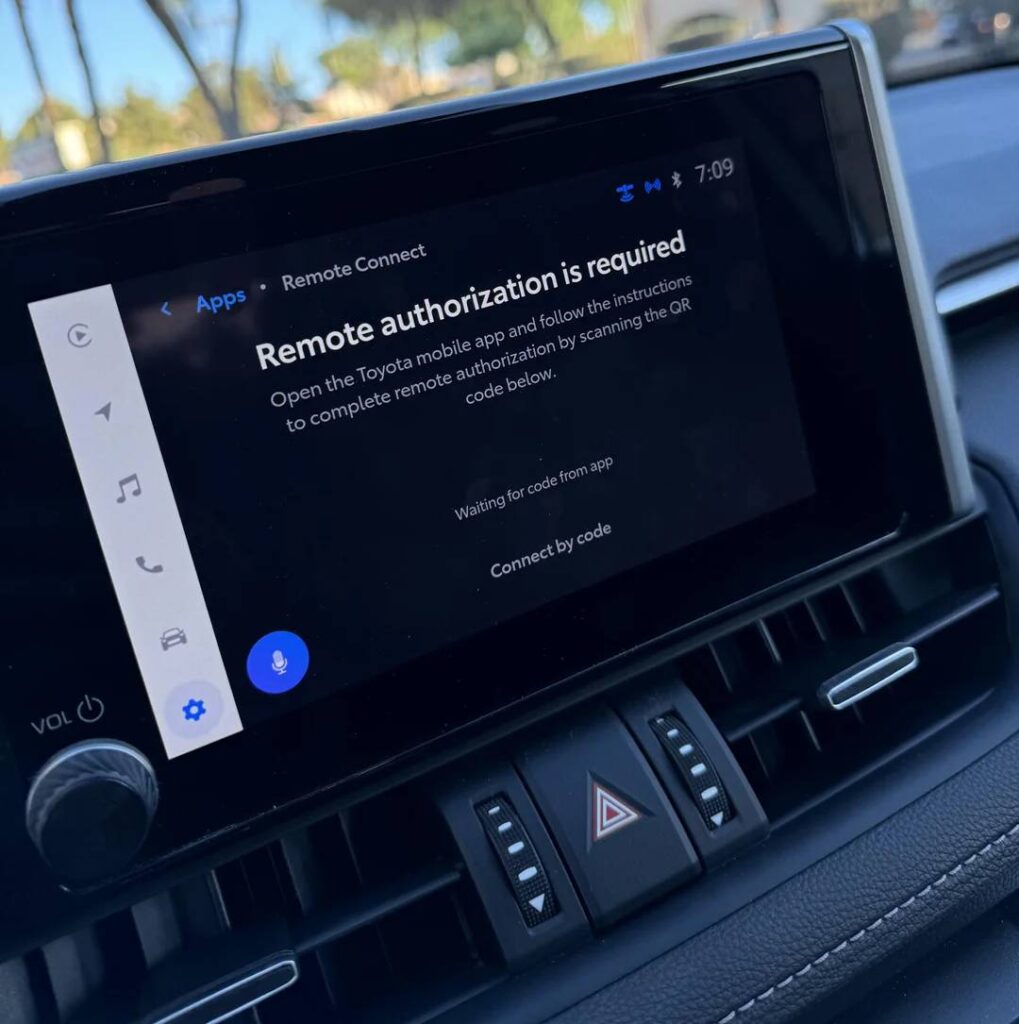
What Is Toyota Remote Connect?
Toyota Remote Connect is a connected vehicle service that allows drivers to interact with their vehicles through the Toyota app. Designed to enhance convenience and security, the feature gives owners access to several remote functions without needing to be physically near their vehicle.
Depending on the vehicle model and trim level, Remote Connect may allow users to remotely start the engine, lock or unlock doors, locate a parked vehicle, check vehicle status, and receive alerts related to vehicle activity. These functions rely on communication between the vehicle, Toyota’s cloud-based servers, and the Toyota app installed on a compatible smartphone.
Many Toyota owners use Remote Connect daily because it simplifies common tasks. For example, remote start can help make the cabin comfortable before entering the vehicle, while remote lock and unlock functions provide peace of mind if drivers forget whether they secured their car.
However, because the system depends on multiple technologies working together, problems can occur at several points in the connection process. A failure in the app, vehicle communication module, cellular network, or subscription status can all prevent Remote Connect from functioning properly. Understanding how the system works makes troubleshooting much easier when issues arise.
Why Toyota Remote Connect Is Not Working
There are several reasons why Toyota Remote Connect may stop responding or fail to execute commands. Identifying the underlying cause can save time and prevent unnecessary visits to the dealership.
One of the most common causes is an expired Toyota Connected Services subscription. Many owners enjoy a complimentary trial period after purchasing their vehicle and may not realize the service has expired. Once the subscription ends, Remote Connect features become unavailable until the service is renewed.
Poor cellular coverage is another frequent issue. Unlike a traditional key fob, Remote Connect relies on cellular communication. If the vehicle is parked in an underground garage, remote area, or location with weak signal strength, commands may fail to reach the vehicle.
Problems with the smartphone itself can also interfere with connectivity. Weak internet access, disabled mobile data, outdated applications, or software conflicts may prevent the Toyota app from communicating with Toyota’s servers.
Vehicle-related factors can contribute as well. A weak 12-volt battery, communication module malfunction, or outdated vehicle software may interrupt the connection between the vehicle and Toyota’s network.
In some cases, the problem may not be on the user’s side at all. Toyota occasionally performs system maintenance or experiences temporary server outages that affect Connected Services across multiple vehicles.
Quick Fix #1: Verify Your Toyota Connected Services Subscription
Before attempting more advanced troubleshooting steps, check whether your Toyota Connected Services subscription is active. This simple verification resolves a surprising number of Remote Connect complaints.
Open the Toyota app and navigate to your account settings or Connected Services section. Review the status of your Remote Connect subscription and confirm that it remains active. If your complimentary trial period has expired, you may need to purchase or renew a subscription plan before remote features become available again.
Many drivers overlook this possibility because the app may still allow them to log in even after service expiration. The application itself continues to function, but remote commands such as engine start, door lock, and vehicle locator may no longer work.
If the subscription appears active but Remote Connect remains unavailable, try signing out of the app and signing back in. This refreshes account authentication and may restore communication between your account and Toyota’s servers.
After confirming your subscription status, wait a few minutes and test a simple command such as vehicle status refresh or door lock. If the command succeeds, the issue was likely related to account verification or service activation. If problems persist, proceed to the next troubleshooting steps.
Quick Fix #2: Check Internet and Cellular Coverage
A stable connection is essential for Toyota Remote Connect to function properly. Unlike a traditional remote key fob that operates over a short distance, Remote Connect relies on cellular networks and internet connectivity to send commands between your smartphone and vehicle.
Start by checking your smartphone’s internet connection. Open a web browser or another app that requires internet access to verify that your device is connected. If you’re using Wi-Fi, try switching to mobile data. If you’re using mobile data, consider moving to an area with stronger signal strength.
Next, consider the location of your vehicle. Parking garages, underground structures, tunnels, and remote rural areas can interfere with the vehicle’s cellular communication. Even if your phone has a strong signal, the vehicle itself must also be able to communicate with Toyota’s servers.
If possible, move the vehicle to an open outdoor location and wait a few minutes before sending another command. Sometimes the vehicle’s communication module needs time to reconnect after entering an area with stronger coverage.
Temporary network disruptions can also affect service availability. If everything appears normal but commands continue to fail, wait a short period and try again later. Network interruptions are often resolved without any action required from the vehicle owner.
Quick Fix #3: Restart and Update the Toyota App
Mobile applications occasionally develop temporary glitches that interfere with their performance. A simple restart can often resolve communication problems and restore Remote Connect functionality.
Completely close the Toyota app instead of leaving it running in the background. Reopen the application and attempt to send a command to the vehicle. If the issue persists, sign out of your Toyota account and sign back in. This refreshes authentication credentials and can resolve synchronization issues.
Outdated software is another common source of problems. Visit your device’s app store and check whether a newer version of the Toyota app is available. Developers regularly release updates to improve stability, fix bugs, and maintain compatibility with the latest operating systems.
Android users may also benefit from clearing the application’s cache. Cached data can occasionally become corrupted and interfere with normal operation. Clearing the cache allows the app to rebuild fresh data without affecting account information.
If updating the app does not solve the problem, consider uninstalling and reinstalling it. A clean installation often eliminates hidden software conflicts that may prevent commands from reaching the vehicle.
After reinstalling, log in using your Toyota account credentials and test several functions to confirm that communication has been restored.
Quick Fix #4: Confirm Vehicle and Account Registration
Incorrect account information or vehicle registration issues can prevent Toyota Remote Connect from working even when everything else appears normal.
Begin by verifying that the vehicle is linked to the correct Toyota account. This issue is especially common among owners who recently purchased a used Toyota or transferred ownership from another driver. In such cases, the vehicle may still be associated with a previous account, limiting access to Connected Services.
Open the Toyota app and review the vehicle information displayed under your account. Confirm that the Vehicle Identification Number (VIN), model, and ownership details match your actual vehicle.
If the information is incorrect, you may need to remove and re-add the vehicle. Follow Toyota’s verification process carefully, as some vehicles require ownership confirmation before Connected Services can be activated.
Additionally, ensure that all required permissions have been granted within the app. Certain functions may not work properly if location services, notifications, or account verification settings are disabled.
Owners who recently changed phones should also verify that the Toyota app completed its setup process correctly on the new device. Incomplete account migration can occasionally disrupt Remote Connect services.
Once registration information has been confirmed and updated if necessary, test a basic command such as vehicle status refresh. Successful communication indicates that the account and vehicle are properly linked and ready to use.
Quick Fix #5: Troubleshoot Remote Start Not Working
One of the most common complaints among Toyota owners is that other Remote Connect features work normally while remote start fails. In many cases, this does not indicate a system malfunction. Instead, the vehicle may not meet the conditions required for remote engine start.
Toyota includes several safety requirements that must be satisfied before the remote start command can be executed. For example, all doors must be securely closed and locked. The hood must also be fully closed. If any door or the hood is detected as open, the vehicle will reject the command.
The vehicle must be in Park, and there should be no active warning messages that could affect safe operation. Certain diagnostic trouble codes or maintenance alerts may temporarily disable remote start functionality until the issue is resolved.
Fuel level can also play a role. Some Toyota models may restrict remote start operation when fuel levels become critically low. Additionally, repeated failed start attempts may temporarily lock out the feature for security reasons.
It is also important to verify that your specific Toyota model supports remote start through Remote Connect. Feature availability varies by model year, trim level, and market. Some vehicles support remote lock and unlock but do not include remote engine start capability.
If door lock commands work successfully but remote start does not, there is a strong chance that one of the vehicle’s safety conditions is preventing activation rather than a communication issue with the app.
Quick Fix #6: Update Vehicle Software
Modern Toyota vehicles rely heavily on software to manage connected services. If the vehicle’s software becomes outdated, communication issues may develop between the car, the Toyota app, and Toyota’s cloud infrastructure.
Start by checking whether your vehicle has any available software updates. Depending on the model, updates may be delivered through over-the-air technology or installed through the vehicle’s infotainment system. New software releases often include performance improvements, bug fixes, and enhanced compatibility with Connected Services.
An outdated infotainment system can occasionally cause synchronization problems that affect Remote Connect features. Even if the application on your phone is fully updated, mismatched software versions may still interfere with communication.
Review your owner’s manual or consult the Toyota app for information regarding available updates. Some vehicles display update notifications directly on the infotainment screen when new software becomes available.
If you are unable to install updates yourself, a Toyota dealership can inspect the system and perform necessary software upgrades. While this may require a service appointment, updating the vehicle software can often resolve persistent connectivity issues that simpler troubleshooting methods cannot fix.
Keeping both your smartphone app and vehicle software current is one of the most effective ways to prevent future Remote Connect problems.
Common Toyota Remote Connect Error Messages
Understanding error messages can significantly reduce troubleshooting time. Many messages provide useful clues about the source of the problem and help narrow down potential solutions.
Vehicle Not Responding
This message usually indicates that the vehicle cannot communicate with Toyota’s servers. Weak cellular coverage, communication module issues, or a low vehicle battery are common causes. Moving the vehicle to an area with better reception may resolve the issue.
Command Failed
A command failure generally means the request reached the system but could not be completed. This may occur when required safety conditions are not met, when the vehicle is temporarily unavailable, or when network interruptions occur during command processing.
This message often points to a temporary server-side issue. Toyota may be performing maintenance, experiencing high traffic, or dealing with a temporary outage affecting Connected Services. In these situations, waiting and trying again later is usually the best approach.
Subscription Required
This error indicates that Remote Connect services are unavailable because the subscription is inactive, expired, or not properly linked to the vehicle. Verifying account status within the Toyota app is the first step toward resolving the problem.
Authentication Error
Authentication errors typically occur when account credentials cannot be verified. Signing out of the app, updating account information, and logging in again often restores access.
By paying close attention to the exact wording of an error message, Toyota owners can often identify the root cause much faster and apply the most effective solution.
When to Contact Toyota Support
If you have worked through all the troubleshooting steps and Toyota Remote Connect is still not functioning properly, it may be time to contact Toyota support for further assistance. While most connectivity issues can be resolved through simple fixes, some situations require professional diagnostics or account-level intervention.
One reason to contact support is when your Remote Connect subscription is active but the service remains unavailable. In some cases, there may be an issue with account provisioning, vehicle registration records, or backend service activation that cannot be resolved through the app alone.
You should also seek assistance if your vehicle consistently displays communication errors despite having strong cellular coverage and a stable internet connection. Persistent connectivity failures could indicate a problem with the vehicle’s Data Communication Module or another connected-services component.
Owners who recently purchased a pre-owned Toyota may encounter ownership transfer issues that prevent Connected Services from activating correctly. Toyota support can verify account status and ensure the vehicle is properly associated with the new owner.
Before contacting support, gather important information that may help speed up the troubleshooting process. This includes your Vehicle Identification Number (VIN), Toyota account email address, smartphone model, operating system version, and screenshots of any error messages you receive. Providing these details upfront can help support representatives identify the problem more efficiently.
If necessary, Toyota support may recommend visiting an authorized dealership for a comprehensive inspection of the vehicle’s communication systems.
Frequently Asked Questions
Why is Toyota Remote Connect showing offline?
Toyota Remote Connect may display an offline status when the vehicle cannot communicate with Toyota’s servers. Common causes include poor cellular reception, temporary network outages, a weak vehicle battery, software issues, or subscription-related problems. Verifying connectivity and account status is usually the best place to start.
Does Toyota Remote Connect require a subscription?
Yes. Most Toyota vehicles require an active Toyota Connected Services subscription after the complimentary trial period expires. Without an active subscription, remote functions such as engine start, door lock and unlock, and vehicle location services may no longer be available.
Why won’t my Toyota start remotely through the app?
Remote start may fail if the vehicle does not meet Toyota’s safety requirements. Common causes include unlocked doors, an open hood, low fuel levels, active warning lights, or a vehicle that is not in Park. It is also important to confirm that your specific model supports remote start functionality.
How do I reset Toyota Remote Connect?
A basic reset can often be performed by signing out of the Toyota app, closing the application completely, restarting your smartphone, and signing back in. If issues persist, updating the app, reinstalling it, or re-registering the vehicle may help restore normal operation.
Can a low battery affect Toyota Remote Connect?
Yes. A weak or failing 12-volt battery can interfere with the vehicle’s communication systems and prevent Remote Connect features from working correctly. If you notice slow vehicle startup, electrical issues, or repeated connectivity failures, having the battery tested may be worthwhile.
How long does it take for Remote Connect commands to work?
Most commands are processed within a few seconds. However, delays may occur due to network congestion, weak signal strength, or temporary server issues. If a command does not execute immediately, waiting a few minutes and trying again may resolve the issue.
Conclusion
Toyota Remote Connect is designed to make vehicle ownership more convenient by allowing drivers to access important functions directly from their smartphones. When the service stops working, it can be frustrating, especially when you rely on features such as remote start, vehicle location, or remote locking throughout your daily routine.
Fortunately, most Remote Connect issues have relatively simple solutions. Problems are often linked to expired subscriptions, weak cellular coverage, app glitches, outdated software, or account registration errors rather than serious vehicle defects. By methodically checking each potential cause, many owners can restore functionality without requiring dealership service.
Keeping your Toyota app updated, maintaining an active Connected Services subscription, and ensuring your vehicle software remains current can significantly reduce the likelihood of future connectivity problems. Regularly reviewing account settings and vehicle registration information can also help prevent unexpected interruptions.
If Toyota Remote Connect is still not working after following all the troubleshooting steps in this guide, contacting Toyota support is the next logical step. Their team can investigate account-related issues, verify service activation, and determine whether additional diagnostics are needed.
With the right approach, most Remote Connect problems can be resolved quickly, allowing you to get back to enjoying the convenience and control that Toyota’s connected technology was designed to provide.