Wireless charging is one of the most convenient features available in modern Subaru vehicles. Instead of dealing with tangled cables and worn charging ports, drivers can simply place their smartphones on the charging pad and keep their devices powered throughout the journey. However, that convenience quickly turns into frustration when the system suddenly stops working.
If your Subaru wireless charger is not working, you’re not alone. Many Subaru owners have reported issues ranging from intermittent charging and blinking indicator lights to complete charging failure. In some cases, the charger may recognize a phone but stop charging after a few seconds. In others, the device may not be detected at all. These problems can be especially frustrating during long trips when keeping your phone charged is essential for navigation, communication, and entertainment.
The good news is that most wireless charging problems can be resolved without an expensive repair. Common causes include improper phone placement, incompatible accessories, software glitches, overheating, and simple user settings that are often overlooked.
In this guide, we’ll explore the most common reasons why a Subaru wireless charger may stop working and provide step-by-step solutions to help restore normal operation. Whether you drive an Outback, Forester, Crosstrek, Ascent, or another Subaru model, these troubleshooting tips can help you get your wireless charging system back on track.
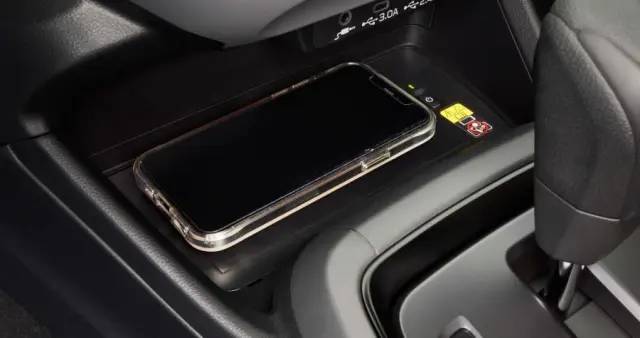
How Subaru Wireless Charging Works
Before troubleshooting any charging issue, it helps to understand how Subaru’s wireless charging system operates. Most modern Subaru models equipped with wireless charging use Qi technology, the industry standard for cable free charging. When a compatible smartphone is placed on the charging pad, electromagnetic coils inside the pad transfer energy to coils inside the phone, allowing the battery to charge without a physical connection.
While the process seems simple, wireless charging is more sensitive than traditional wired charging. The phone must be positioned correctly over the charging coils, and the device must support Qi charging standards. Even a slight misalignment can reduce charging efficiency or prevent charging altogether.
Subaru offers wireless charging in several popular models, including the Outback, Forester, Crosstrek, Ascent, Legacy, and WRX. Depending on the model year and trim level, the charging pad may be located in the center console, beneath the infotainment screen, or inside a storage compartment. Understanding these basics can help drivers identify whether the issue is related to the phone, the charger, or the vehicle itself.
1. Your Phone Is Not Properly Centered on the Charging Pad
One of the most common reasons a Subaru wireless charger is not working is incorrect phone placement. Wireless charging relies on precise alignment between the charging coils in the vehicle and those inside the smartphone. If the phone is slightly off center, the charger may fail to establish a stable connection.
This issue often occurs while driving. Vibrations, sharp turns, and sudden stops can cause the phone to shift on the charging pad. As a result, charging may start normally but disconnect after a few minutes. Some users mistakenly assume the charger is defective when the problem is simply caused by poor positioning.
To fix this issue, remove the phone from the charging pad and place it back carefully in the center. If your phone has a large camera module, experiment with different orientations to find the most effective charging position. Check the charging indicator light and verify that the battery icon on your phone confirms charging has begun.
Many charging problems can be resolved within seconds simply by repositioning the device correctly.
2. A Thick or Incompatible Phone Case Is Blocking the Signal
Phone cases provide valuable protection, but they can also interfere with wireless charging performance. Thick protective cases, wallet style covers, metal accessories, and magnetic mounts can create barriers between the phone and the charging pad.
Wireless charging works best when the distance between the charging coils is minimal. A bulky case increases this distance and may weaken the energy transfer. In some situations, the charger may detect the phone but fail to deliver enough power to maintain charging. This can lead to slow charging speeds, repeated disconnects, or complete charging failure.
Magnetic accessories can create additional complications. Some aftermarket magnetic plates used for dashboard mounts may disrupt the wireless charging process entirely. Similarly, certain wallet cases containing cards or RFID blockers can interfere with signal transmission.
If your Subaru wireless charger is not charging consistently, remove the phone case and test the charger again. If charging resumes normally, the case is likely the source of the problem. Consider switching to a wireless charging compatible case specifically designed to support Qi charging technology.
3. Foreign Objects on the Charging Pad Are Interrupting Power Transfer
Another frequent reason your Subaru wireless charger is not working is the presence of foreign objects on the charging surface. Wireless charging systems are designed to detect and avoid energy transfer when metal or other interfering materials are present, as a safety precaution.
Small items such as coins, keys, credit cards, or even thick layers of dust can disrupt the magnetic field required for charging. When this happens, the system may automatically stop charging or refuse to start at all. In some Subaru models, the indicator light may flash or turn off completely when interference is detected.
Drivers often place their phones on the charging pad along with other small items without realizing they are affecting performance. Over time, debris inside the console area can also build up and create a barrier between the phone and the charging coils.
To resolve this issue, remove everything from the charging pad and inspect the surface carefully. Wipe it clean using a soft cloth and ensure no metallic or electronic objects remain in the area. Once the surface is clear, place your phone back on the pad and check whether charging resumes normally.
4. Your Smartphone Is Not Fully Qi Compatible or Has Limited Support
Although most modern smartphones support wireless charging, not all devices are fully compatible with Subaru’s Qi charging system. Some older phones may lack the required hardware, while others may support wireless charging but only under specific conditions.
Compatibility issues are especially common with budget Android devices or older iPhone models. Even when a phone technically supports wireless charging, performance can vary depending on coil placement, charging speed limits, and software optimization.
In some cases, the phone may appear to charge intermittently or only when placed in a very precise position. This creates the impression that the Subaru wireless charger is malfunctioning when the real issue is limited device compatibility.
To check compatibility, refer to your phone’s official specifications and confirm that it supports Qi wireless charging. If your device is compatible but still experiencing issues, testing it with another wireless charger can help determine whether the problem is vehicle related or device specific. Upgrading to a newer Qi certified device often resolves persistent charging inconsistencies.
5. Wireless Charging Has Been Disabled or Glitched in the System Settings
In some Subaru vehicles, the wireless charging system can be manually turned off or affected by temporary software glitches in the infotainment system. This can happen after a system update, battery disconnection, or simple user interaction with vehicle settings.
When wireless charging is disabled, the pad may appear inactive even though the vehicle is powered on. In other cases, the system may freeze temporarily, causing the charger to stop responding or fail to detect devices properly.
A simple reset can often resolve this issue. Start by turning off the vehicle completely, removing the phone from the charging pad, and restarting the engine. Some Subaru models may also require you to access the infotainment settings to toggle the wireless charging feature back on.
If the problem persists, a full infotainment system reboot or software update may be required. These updates often include improvements to power management and device compatibility, which can significantly improve wireless charging stability over time.
6. Overheating Protection Has Been Activated
Wireless charging generates heat as part of the energy transfer process, and Subaru systems are designed with built in safety features to prevent overheating. When the charging pad or the phone becomes too hot, the system may automatically reduce charging speed or stop charging entirely to protect both the vehicle and the device.
This issue is more common in hot climates or when the vehicle is parked under direct sunlight for long periods. It can also occur if the phone is already warm due to heavy app usage, navigation, or streaming before being placed on the charging pad.
When overheating protection is triggered, drivers may notice that charging starts normally but stops after a few minutes. In some cases, the indicator light may change behavior or the phone may show a charging paused message.
To fix this issue, allow both the phone and the charging pad to cool down before trying again. Park the vehicle in a shaded area if possible, and avoid using power intensive apps while the phone is charging. Removing thick phone cases can also significantly reduce heat buildup and improve charging stability.
7. Low Vehicle Battery Voltage Is Affecting Performance
Another overlooked cause of Subaru wireless charger problems is low vehicle battery voltage. The wireless charging system relies on stable electrical power from the vehicle’s battery and alternator. If the battery is weak or nearing the end of its lifespan, it may not supply consistent power to the charging pad.
This issue is more likely to appear in older vehicles or cars that are frequently used for short trips where the battery does not have enough time to fully recharge. When voltage drops below optimal levels, the charging system may behave unpredictably, including slow charging, intermittent connection, or complete failure to activate.
Drivers may also notice other electrical symptoms in the vehicle, such as dim interior lights, delayed infotainment startup, or warning messages on the dashboard.
To address this issue, it is important to test the vehicle battery health. A simple voltage test or professional diagnostic at a service center can confirm whether the battery needs charging, maintenance, or replacement. Ensuring a healthy electrical system often resolves multiple accessory related issues, including wireless charging failures.
8. Hardware Failure or Infotainment System Malfunction
If all basic troubleshooting steps fail, the issue may be related to a hardware fault in the wireless charging module or a malfunction within the vehicle’s infotainment system. Over time, internal components such as charging coils, wiring connections, or control modules can degrade or become damaged.
In this case, the wireless charger may show no response at all. The indicator light may remain off, or the system may not detect any device placed on the pad. Unlike minor issues such as misalignment or case interference, hardware failures typically do not improve with resets or adjustments.
Infotainment system glitches can also contribute to charging failure. Software bugs, incomplete updates, or communication errors between vehicle modules can temporarily disable charging functionality.
If hardware failure is suspected, the best solution is to visit an authorized Subaru service center for a full diagnostic. Technicians can inspect the charging unit, check electrical connections, and perform software recalibration if needed. In some cases, replacing the charging module may be necessary to restore full functionality.
9. Phone Software or Operating System Issues
Sometimes the problem is not with your Subaru at all but with your smartphone software. Operating system bugs, background processes, or power management settings can interfere with wireless charging performance. This is especially common after major iOS or Android updates, where temporary glitches may affect how the device communicates with Qi chargers.
In some cases, the phone may recognize the charging pad but fail to maintain a stable charging connection. You might notice the charging icon appearing and disappearing repeatedly, or the battery percentage increasing very slowly even when the phone is correctly positioned.
Battery optimization settings can also play a role. Some phones automatically reduce charging activity to manage heat or preserve battery health, which may be mistaken for a malfunction in the Subaru wireless charger.
To fix this, start by restarting your smartphone. This simple step clears temporary software glitches that may be affecting charging behavior. Next, check for any available system updates and install them if needed. Updating your operating system often resolves known compatibility issues with wireless charging systems.
If the problem continues, try disabling battery optimization features temporarily or testing the phone in safe mode to rule out third party app interference. If your phone charges normally on other wireless chargers, the issue is likely software related rather than a defect in your Subaru.
Frequently Asked Questions (FAQ)
Why does my Subaru wireless charger keep disconnecting?
This usually happens due to poor phone alignment, overheating, or interference from thick phone cases. Vibrations while driving can also shift the phone slightly, breaking the charging connection. Adjusting the position or removing the case often solves the issue.
Why is the Subaru wireless charger blinking orange?
A blinking orange light typically indicates a problem such as misalignment, foreign object detection, or overheating. It is a built in safety signal that stops charging until the issue is resolved.
Can I use MagSafe or magnetic accessories with Subaru wireless charging?
MagSafe cases and magnetic attachments can interfere with Qi charging. In many cases, they reduce charging efficiency or prevent charging entirely. Removing magnetic accessories usually restores normal performance.
Does wireless charging drain the car battery?
Wireless charging uses a small amount of energy from the vehicle’s electrical system, but it is minimal and does not significantly drain the car battery under normal conditions. However, a weak vehicle battery may affect performance.
How do I know if my Subaru wireless charger is broken?
If the charger shows no indicator light, fails with multiple compatible phones, and does not respond after resets, it may indicate a hardware failure. In that case, a professional inspection is recommended.
Conclusion
A Subaru wireless charger not working can be frustrating, especially when you rely on it for daily navigation, communication, and convenience on the road. However, as you have seen throughout this guide, most issues are not caused by serious hardware failures but by simple and fixable factors.
From improper phone placement and incompatible cases to overheating, software glitches, and minor system settings, there are many reasons why the charging pad may stop working correctly. The key is to approach the problem step by step, starting with the easiest checks before moving on to more advanced troubleshooting.
In many cases, simply repositioning your phone, removing the case, or clearing foreign objects from the charging surface can immediately restore normal function. In other situations, a quick phone restart or vehicle reset may be enough to resolve temporary software issues.
If none of these solutions work, the problem may be related to hardware failure or a deeper electrical issue within the vehicle. At that point, contacting an authorized Subaru service center is the safest option to ensure proper diagnosis and repair.
By understanding how the system works and what commonly causes failure, you can save time, avoid unnecessary repairs, and keep your Subaru wireless charging system running smoothly for the long term. If you have experienced a different fix that worked for you, sharing it can also help other Subaru owners facing the same issue.