Seeing the Mercedes Key Not Detected message can quickly turn a normal drive into a stressful situation. You press the Start button, but nothing happens. The doors may unlock normally, yet the engine refuses to start. Many Mercedes owners immediately think the smart key has failed or needs an expensive replacement. In reality, the cause is often much simpler.
A weak key fob battery, signal interference, or a low vehicle battery can all trigger this warning. In some cases, the problem comes from the KEYLESS GO system, the electronic ignition switch, or the immobilizer. Because these components work together, even a small fault can prevent your Mercedes from recognizing the key.
This guide explains why the Mercedes Key Not Detected warning appears and how you can fix it step by step. You will learn how the smart key system works, what causes the warning, and which troubleshooting methods solve the problem most often. You will also discover emergency ways to start your vehicle, understand possible repair costs, and know when it is time to seek professional help.
By the end of this article, you will know how to identify the real cause before replacing parts or visiting a dealership. Whether you own a Mercedes C Class, E Class, GLC, GLE, S Class, or another model, these practical solutions can help you save both time and money.
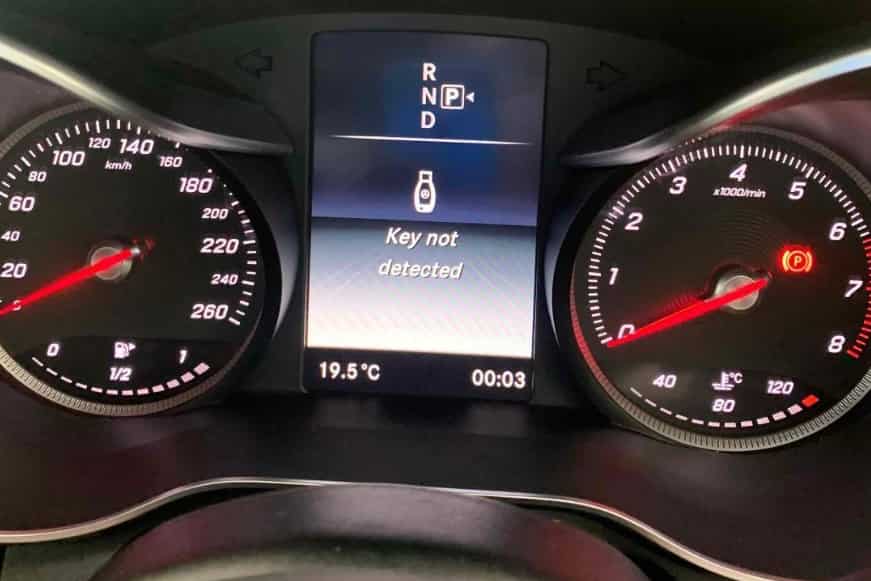
What Does “Mercedes Key Not Detected” Mean?
The Mercedes Key Not Detected warning means your vehicle cannot recognize or verify the smart key. Without successful authentication, the engine will not start. This feature protects your vehicle from unauthorized access and theft.
Mercedes vehicles use the KEYLESS GO system to communicate with the smart key. The system sends a radio signal and waits for the key to respond with the correct encrypted code. If the vehicle does not receive a valid response, it displays the warning message and blocks the starting process.
This warning does not always mean the key is broken. In many cases, the key still works, but another issue interrupts communication. A weak key fob battery, signal interference, or a low vehicle battery can all prevent proper detection. More complex problems may involve the receiver antenna, the electronic ignition switch, or the immobilizer.
The warning may also appear only once and disappear after a second attempt. However, repeated failures often indicate that one or more components require attention. Identifying the exact cause early can help you avoid unnecessary repairs and reduce the risk of becoming stranded.
Although the message looks alarming, many drivers solve the problem without replacing the smart key. A systematic inspection usually reveals whether the fault comes from the key, the vehicle, or the communication between both systems. Understanding how these components work together makes troubleshooting much easier and prevents unnecessary expenses.
Common Causes of Mercedes Key Not Detected
Several different issues can trigger the Mercedes Key Not Detected warning. Some problems are easy to fix at home, while others require professional diagnosis. Understanding the most common causes helps you find the right solution faster and avoid replacing parts that still work properly.
Weak or Dead Key Fob Battery
A weak key fob battery is the most common reason for this warning. As the battery loses power, the key sends a weaker signal to the vehicle. The car may detect the key one moment and fail to recognize it the next.
You may also notice that the lock and unlock buttons respond slowly or only work at a short distance. In many cases, replacing the battery restores normal operation within a few minutes. Always use the battery type recommended by Mercedes to ensure reliable performance.
Incorrectly Installed Key Battery
Replacing the battery does not always solve the problem. If you install the battery in the wrong direction, the key cannot receive enough power. A loose battery or poor contact inside the key can produce the same result.
Low quality replacement batteries can also cause unexpected issues. Some batteries lose voltage quickly, even when they are new. Double check the battery orientation and make sure it fits securely before looking for more complex faults.
Signal Interference
Electronic devices can interfere with communication between the smart key and your Mercedes. Mobile phones, wireless chargers, laptops, and other smart keys may weaken or interrupt the radio signal.
Metal objects can create similar problems. A key stored inside a metal case or placed next to electronic accessories may become difficult for the vehicle to detect. Moving the key away from these objects often restores a stable connection.
Low Vehicle Battery
Many drivers focus only on the key, but the vehicle battery also plays an important role. A weak twelve volt battery can reduce the performance of several electronic systems, including the KEYLESS GO system.
If the battery voltage drops too low, the vehicle may struggle to recognize the key. You may also notice dim interior lights, warning messages, or a slow engine crank. Checking the battery condition should always be part of the troubleshooting process.
Damaged Smart Key
Daily use exposes the smart key to drops, moisture, and accidental impacts. Even if the outside looks normal, the internal circuit board may suffer damage. A cracked solder joint or damaged electronic component can interrupt communication with the vehicle.
Water damage creates similar symptoms. Moisture can corrode internal contacts and reduce signal strength. If the key recently became wet or suffered a hard impact, inspect it carefully before assuming another component has failed.
Faulty KEYLESS GO Antenna
Your Mercedes uses several antennas to detect the smart key inside and around the vehicle. If one of these antennas fails, the system may lose contact with the key even when the battery remains fully charged.
The warning may appear only in certain locations around the cabin. For example, the key may work near one seat but fail near another. This pattern often points to an antenna or receiver problem instead of a faulty key.
Lost Key Programming
The smart key stores encrypted information that allows the vehicle to verify its identity. Although this programming rarely disappears, electronic faults or replacement components can affect synchronization.
A newly purchased key also requires programming before the vehicle accepts it. If neither the original key nor the spare key works correctly, a qualified technician should inspect the programming before replacing additional parts.
Immobilizer Problems
The immobilizer protects your Mercedes against theft by verifying that the correct key is present. If the system cannot confirm the key’s identity, it blocks the engine from starting even though other functions may continue to work.
An immobilizer fault can produce warning messages that resemble key detection problems. Professional diagnostic equipment usually helps separate an immobilizer issue from a damaged key or receiver.
Electronic Ignition Switch Failure
The electronic ignition switch communicates directly with the smart key before the engine starts. When this module develops a fault, it may stop recognizing a valid key even though the key functions normally.
Drivers often experience intermittent starting problems before the switch fails completely. Ignoring these early signs can eventually leave the vehicle unable to start.
Software or Control Module Fault
Modern Mercedes vehicles rely on multiple control modules to manage electronic communication. A software error or internal module fault can interrupt the key recognition process without any visible damage.
Although software related issues occur less often than battery problems, they should not be ignored. A diagnostic scan can identify stored fault codes and help technicians locate the affected module quickly.
How to Fix Mercedes Key Not Detected
The best way to fix the Mercedes Key Not Detected warning is to start with the simplest checks. Many drivers solve the problem within a few minutes without replacing expensive parts. Follow the steps below in order. This approach helps you identify the real cause while avoiding unnecessary repairs.
Step 1. Move the Key Away From Electronic Devices
Start by removing the key from bags, metal cases, or pockets filled with electronic devices. Mobile phones, wireless chargers, Bluetooth accessories, and laptops can interfere with the signal between the key and the vehicle.
Next, sit inside the vehicle with only the key in your hand. Press the brake pedal and try starting the engine again. If the warning disappears, signal interference was likely the cause.
Step 2. Replace the Key Fob Battery
If the warning remains, inspect the key fob battery. Even if the buttons still lock and unlock the doors, the battery may not provide enough power for reliable communication during engine start.
Install a new battery that matches the specification recommended for your Mercedes model. Check the battery orientation carefully before closing the key fob. Once you finish, test every function, including locking, unlocking, and starting the vehicle.
Step 3. Try the Spare Key
A spare key can quickly narrow down the source of the problem. If the spare key starts the vehicle without any warning, the original key likely has a battery issue, internal damage, or programming fault.
If both keys produce the same warning, the problem probably lies inside the vehicle rather than the keys themselves. This simple comparison can save time during diagnosis.
Step 4. Hold the Key Close to the Start Button
Many Mercedes models include a short range detection feature. Hold the key close to the Start button while pressing the brake pedal. Then press the button again to attempt an engine start.
The exact detection point varies between models, so consult your owner’s manual if the first attempt does not work. This method often helps when the key battery is weak but still has enough power to communicate at close range.
Step 5. Use the Emergency Key Slot If Your Model Supports It
Some Mercedes models allow you to remove the Start button and insert the smart key into an emergency ignition slot. This design provides an alternative way to authenticate the key when wireless communication becomes unreliable.
Always follow the procedure described in your owner’s manual. Different Mercedes models use different ignition systems, so avoid forcing any component into place.
Step 6. Check the Vehicle Battery
A weak vehicle battery can interrupt communication between several electronic systems. Use a battery tester or a multimeter to verify the battery voltage. If the battery shows low voltage, recharge or replace it before continuing with additional troubleshooting.
Also look for other signs of a weak battery. Slow engine cranking, dim lights, and multiple warning messages often appear together when the battery begins to fail.
Step 7. Lock and Unlock the Vehicle Again
Sometimes the communication between the key and the vehicle needs a fresh connection. Step outside the vehicle, close every door, and lock it using the smart key. Wait for a few seconds before unlocking the vehicle again.
Enter the cabin and attempt another engine start. Although this method does not solve every case, it can restore normal communication after a temporary electronic interruption.
Step 8. Check for Physical Damage
Inspect the key fob carefully. Look for cracks, loose buttons, signs of water exposure, or damage around the battery compartment. Even small defects can affect the internal circuit board and reduce signal strength.
If the key recently fell onto a hard surface or became wet, internal damage may exist even when the exterior looks normal. In that situation, professional testing is often the safest option.
Step 9. Scan the Vehicle for Diagnostic Trouble Codes
If the warning continues, connect a Mercedes compatible diagnostic scanner. A full system scan can identify faults stored in the KEYLESS GO system, electronic ignition switch, immobilizer, body control module, or receiver antennas.
Diagnostic trouble codes provide valuable information that visual inspections cannot reveal. Reading these codes before replacing parts reduces repair costs and prevents unnecessary work.
Step 10. Contact a Qualified Mercedes Specialist
If none of the previous steps solves the problem, professional diagnosis becomes the next logical step. A qualified Mercedes specialist has the equipment needed to test communication between the key, antennas, ignition system, and control modules.
Professional technicians can also determine whether the vehicle requires software updates, key programming, or component replacement. Accurate diagnosis often costs less than replacing parts based on guesswork.
How to Start a Mercedes When the Key Is Not Detected
Seeing the Mercedes Key Not Detected warning does not always mean you are stranded. Many Mercedes models include backup methods that allow the vehicle to recognize the smart key when normal wireless communication fails. The exact procedure depends on the model and model year, so always refer to your owner’s manual for model specific instructions.
Method 1. Hold the Key Near the Start Button
Many Mercedes vehicles can detect the smart key at a very short distance. Sit in the driver’s seat and press the brake pedal. Hold the key directly against or very close to the Start button. Then press the button again while keeping the key in place.
This method often works when the key fob battery is weak but still has enough power to transmit a short range signal. If the engine starts, replace the key battery as soon as possible to prevent the problem from returning.
Method 2. Use the Emergency Ignition Slot
Some Mercedes models include an emergency ignition slot behind the removable Start button. Remove the button only if your owner’s manual confirms that your vehicle supports this feature.
Insert the smart key into the ignition slot and follow the normal starting procedure. The vehicle may recognize the key through direct contact instead of wireless communication. Do not force the button or the key if the design differs from your model.
Method 3. Unlock the Vehicle With the Mechanical Key
If the remote buttons stop working, remove the mechanical key from the smart key fob. Use it to unlock the driver’s door through the hidden lock cylinder.
The security alarm may activate after you open the door. This reaction is normal because the vehicle cannot immediately verify the electronic key. Once the system recognizes the smart key, the alarm usually stops automatically.
Important Safety Tips
Avoid forcing the Start button or attempting to disassemble the ignition system. These actions can damage sensitive electronic components and increase repair costs.
Do not continue jump starting the vehicle if you suspect an electrical fault. Repeated voltage spikes may affect other control modules. If the warning appears frequently after trying the basic troubleshooting steps, arrange a professional inspection as soon as possible.
Remember that emergency starting methods provide a temporary solution. They do not eliminate the underlying problem. Replacing a weak battery, repairing a damaged key, or fixing an electronic fault remains essential for reliable long term operation.
Mercedes Key Not Detected After Replacing the Battery
Replacing the key fob battery should solve many key detection issues, but the Mercedes Key Not Detected warning may still appear. This usually means another problem is preventing the vehicle from communicating with the smart key. Before assuming the key needs replacement, perform a few simple checks.
First, make sure you installed the battery correctly. The positive and negative sides must match the markings inside the key fob. An incorrect installation can stop the key from working even if the battery is brand new. You should also confirm that you used the correct battery type recommended for your Mercedes model.
Next, inspect the battery contacts inside the key fob. Dirt, corrosion, or bent contacts can interrupt the power supply. Clean the contacts gently and ensure the battery fits securely. If possible, test the key with another new battery from a trusted manufacturer to rule out a defective replacement battery.
If the warning remains, examine the key for signs of damage. Water exposure, accidental drops, or internal circuit damage can reduce the signal strength. A spare key can also help identify the source of the problem. If the spare key works normally, the original key likely needs repair or replacement. If both keys display the same warning, the issue probably lies within the vehicle.
Finally, check the condition of the vehicle’s twelve volt battery. Low voltage can affect the KEYLESS GO system and prevent the vehicle from recognizing the key. In most cases, replacing the key fob battery does not erase the key’s programming, so reprogramming is rarely necessary unless diagnostic testing identifies a specific electronic fault.
Can You Drive With a Mercedes Key Not Detected Warning?
Yes, you may be able to continue driving if the Mercedes Key Not Detected warning appears after the engine has already started. In many Mercedes models, the vehicle does not shut off immediately if it temporarily loses communication with the smart key. However, this does not mean the issue is safe to ignore.
The biggest concern is restarting the engine. Once you turn the vehicle off, it may fail to recognize the key again. As a result, you could find yourself unable to restart the car in a parking lot, at a gas station, or in another inconvenient location.
If the warning appears while driving, avoid unnecessary stops until you reach a safe destination. Keep the smart key inside the vehicle and avoid placing it near electronic devices that could interfere with its signal. If you have a spare key, carry it with you in case the primary key stops working completely.
After reaching your destination, inspect the key fob battery and check the vehicle battery for signs of low voltage. If the warning continues to appear, schedule a diagnostic inspection as soon as possible. Ignoring repeated key detection problems can increase the risk of unexpected starting failures and may indicate a developing electrical fault.
Although the vehicle may continue operating normally for a short time, the Mercedes Key Not Detected warning should never be considered normal. Identifying and repairing the underlying cause early is the best way to avoid future breakdowns and maintain the reliability of your Mercedes.
Mercedes Models Commonly Affected
The Mercedes Key Not Detected warning can appear on almost any modern Mercedes model equipped with a smart key and the KEYLESS GO system. While the warning looks the same across different vehicles, the underlying cause may vary depending on the model, model year, and electronic features.
The Mercedes C Class is one of the most common models to experience this issue. Most cases involve a weak key fob battery, low vehicle battery voltage, or intermittent communication with the Start button. Replacing the battery often resolves the problem, but repeated warnings may require further diagnosis.
Owners of the Mercedes E Class also report key detection problems. In addition to battery related issues, some vehicles develop faults in the electronic ignition switch or the KEYLESS GO receiver. These components require professional testing to confirm the exact cause.
The Mercedes GLC and Mercedes GLE rely on multiple antennas to detect the smart key inside and outside the cabin. Signal interference, antenna faults, or a weak vehicle battery can interrupt communication and trigger the warning message. Drivers should inspect both the key and the vehicle before replacing expensive components.
Luxury models such as the Mercedes S Class include more advanced electronic systems and additional key detection zones. Although these features improve convenience, they also increase the number of components involved in the authentication process. Accurate diagnosis is essential when the warning appears repeatedly.
Compact models such as the Mercedes A Class and Mercedes CLA can experience similar symptoms. In most cases, the issue relates to the key battery, signal interference, or normal wear of the smart key. Regardless of the model you drive, following a systematic troubleshooting process is the fastest way to identify the real cause and restore reliable key detection.
How Much Does It Cost to Fix Mercedes Key Detection Problems?
The cost of fixing a Mercedes Key Not Detected problem depends on the actual cause. Some issues require only a new key fob battery, while others involve electronic components that need professional diagnosis. Identifying the fault before replacing parts can help you avoid unnecessary expenses.
A key fob battery is usually the least expensive repair. Replacing the battery takes only a few minutes and often solves the problem if the warning appears because of a weak signal. If the smart key has internal damage, you may need to replace or repair the key instead. A replacement smart key typically costs much more because it must be programmed to work with your vehicle.
Problems involving the vehicle battery also vary in cost. Charging the battery is inexpensive, but replacing a worn battery costs more depending on the model and battery type. If diagnostic testing reveals a faulty KEYLESS GO antenna, electronic ignition switch, or immobilizer, repair costs increase because these components require specialized equipment and programming.
Labor charges also affect the final repair bill. Authorized Mercedes dealerships generally charge more than independent repair shops, but they have direct access to factory software and original replacement parts. An experienced Mercedes specialist may provide the same level of diagnosis at a lower cost, especially for older vehicles.
Before approving any repair, ask for a complete diagnostic report. A professional inspection can confirm whether the issue comes from the smart key, the vehicle battery, or an electronic control module. Accurate diagnosis prevents unnecessary part replacements and ensures you pay only for the repairs your Mercedes actually needs.
When Should You Visit a Mercedes Dealer or Locksmith?
Many Mercedes Key Not Detected problems can be solved with simple troubleshooting. However, some situations require professional equipment and technical expertise. If basic checks do not resolve the warning, it is time to seek professional assistance.
Visit a qualified technician if both smart keys fail to start the vehicle. This usually indicates that the problem is not related to the key fob battery. Instead, the fault may involve the KEYLESS GO system, the electronic ignition switch, the immobilizer, or another control module.
You should also arrange an inspection if the warning appears repeatedly after replacing the key battery. A professional diagnostic scan can identify hidden faults that are impossible to detect through a visual inspection. Early diagnosis often prevents more expensive repairs later.
A Mercedes dealership is the best choice when you need a new factory programmed smart key or software updates. Dealership technicians have access to manufacturer tools and original replacement parts. This option provides the highest level of compatibility, but it usually comes with a higher service cost.
A qualified automotive locksmith may offer a faster and more affordable solution for key replacement or key programming. Many locksmiths have advanced equipment that supports a wide range of Mercedes models. However, their capabilities depend on the vehicle model and the type of security system installed.
If your vehicle has complex electronic faults, a Mercedes specialist is often the best option. These technicians focus on Mercedes vehicles and understand the common issues affecting key recognition systems. Choosing the right repair professional can save time, reduce costs, and restore reliable operation without replacing unnecessary parts.
How to Prevent Mercedes Key Detection Problems
Preventing the Mercedes Key Not Detected warning is much easier than dealing with a vehicle that refuses to start. A few simple maintenance habits can reduce the risk of key recognition problems and improve the reliability of your Mercedes.
Replace the key fob battery before it becomes completely discharged. Most key batteries last several years, but their performance gradually declines over time. If you notice a shorter operating range or delayed response when locking the vehicle, replace the battery before it fails.
Protect the smart key from water, dust, and accidental impacts. Although Mercedes key fobs are designed for daily use, internal electronic components remain sensitive to moisture and physical damage. Using a protective key case can help prevent unnecessary wear.
Keep the smart key away from devices that generate strong electronic signals. Mobile phones, wireless chargers, and other electronic accessories can interfere with communication between the key and the vehicle. Storing the key separately helps maintain a stable signal.
Do not ignore the condition of your vehicle battery. A weak twelve volt battery can affect multiple electronic systems, including the KEYLESS GO system. Regular battery inspections can prevent unexpected starting problems.
It is also a good idea to keep a fully functional spare key in a safe place. Testing the spare key occasionally ensures it works when you need it most. If you notice intermittent key detection warnings, schedule a diagnostic inspection as soon as possible. Addressing small issues early can prevent more expensive repairs and help keep your Mercedes operating reliably for years.
Frequently Asked Questions
Why does my Mercedes say “Key Not Detected”?
Your Mercedes displays this warning when it cannot recognize or verify the smart key. Common causes include a weak key fob battery, signal interference, a low vehicle battery, or a fault in the KEYLESS GO system. In some cases, the problem may involve the electronic ignition switch or the immobilizer.
Can a dead key fob battery stop my Mercedes from starting?
Yes. A dead or weak key fob battery can prevent the vehicle from detecting the smart key. Replacing the battery is often the quickest and least expensive solution.
Why is my Mercedes key not detected after replacing the battery?
A new battery does not always solve the problem. Incorrect battery installation, damaged battery contacts, internal key damage, or a weak vehicle battery can all trigger the same warning. If both keys fail, the fault is more likely inside the vehicle.
Can I start my Mercedes if the key is not detected?
Many Mercedes models support an emergency starting procedure. Holding the smart key close to the Start button or using the emergency ignition slot may allow the vehicle to start. Always check your owner’s manual because the procedure varies by model.
Does a Mercedes key need to be reprogrammed after changing the battery?
No. Replacing the key fob battery normally does not erase the key’s programming. Reprogramming is only necessary if the key, vehicle, or security system develops an electronic fault.
How do I know if the problem is the key or the vehicle?
The easiest test is to use the spare key. If the spare key works normally, the original key likely has a fault. If both keys produce the same warning, the problem is usually related to the vehicle.
Can signal interference cause key detection problems?
Yes. Mobile phones, wireless chargers, laptops, and other electronic devices can interfere with communication between the smart key and the vehicle. Moving the key away from these devices may restore normal operation.
How much does it cost to replace a Mercedes smart key?
The cost depends on your Mercedes model, model year, and programming requirements. A replacement smart key costs significantly more than a simple battery replacement because it must be programmed to work with your vehicle.
Is it safe to drive with a Mercedes Key Not Detected warning?
If the engine is already running, you may be able to continue driving. However, the vehicle may not restart after you turn it off. Diagnose and repair the problem as soon as possible to avoid becoming stranded.
Conclusion
The Mercedes Key Not Detected warning can be frustrating, but it does not always point to a serious mechanical problem. In many cases, the issue comes from a weak key fob battery, signal interference, or a low vehicle battery. More complex faults may involve the KEYLESS GO system, the electronic ignition switch, or the immobilizer. Identifying the real cause before replacing parts can save both time and money.
Start with the simplest troubleshooting steps. Replace the key fob battery, eliminate possible signal interference, test the spare key, and inspect the vehicle battery. If the warning remains, use the available emergency starting method for your model and perform a diagnostic scan to identify any electronic faults. A systematic approach is far more effective than replacing expensive components without confirming the source of the problem.
If professional assistance becomes necessary, choose a qualified Mercedes specialist, an experienced automotive locksmith, or an authorized dealership based on the type of repair your vehicle requires. Proper diagnosis ensures the correct solution and helps prevent the same issue from returning.
Have you experienced the Mercedes Key Not Detected warning on your Mercedes? Share your model, model year, and symptoms in the comments. Your experience may help other owners find the right solution more quickly.