A Mazda audio system not working can quickly turn an enjoyable drive into a frustrating experience. Whether you rely on your vehicle for daily commuting, long road trips, or hands free phone calls, losing access to music, navigation prompts, or important notifications can make every journey less comfortable. In many cases, the problem appears without warning. The radio may turn on but produce no sound, Bluetooth may connect without playing audio, or the infotainment display may function normally while every speaker remains silent.
Fortunately, a silent audio system does not always indicate an expensive repair. Many Mazda owners discover that the issue is caused by simple factors such as incorrect sound settings, a temporary software glitch, a recently replaced battery, or a disconnected Bluetooth device. Other situations may involve a blown fuse, a failing Bose amplifier, damaged speaker wiring, or an infotainment module that requires professional diagnosis. Identifying the real cause is the most important step because replacing parts without proper testing often leads to unnecessary expenses.
This complete guide explains the most common reasons why a Mazda audio system not working issue occurs and provides practical solutions that you can follow step by step. You will learn how to identify common symptoms, perform safe troubleshooting procedures, understand repair costs, and recognize when professional service is the best option. By following a logical diagnostic process, you can save both time and money while restoring your Mazda audio system to normal operation as quickly as possible.
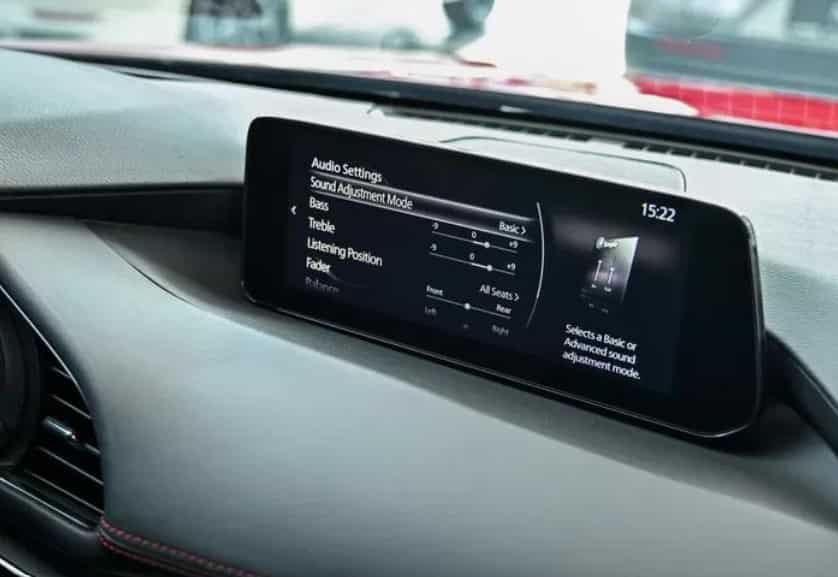
Why Is My Mazda Audio System Not Working?
A Mazda audio system not working can result from several different issues. Modern Mazda vehicles rely on many electronic components that work together. These include the infotainment system, speakers, amplifier, Bluetooth module, USB ports, and vehicle software. If one component stops working correctly, the entire audio system may lose sound.
Many drivers expect a major hardware failure when the audio stops working. However, the real cause is often much simpler. Incorrect settings, software glitches, or Bluetooth connection errors can all interrupt audio playback. In other cases, a blown fuse, faulty amplifier, or damaged wiring may require further inspection. Understanding the possible causes helps you diagnose the problem faster and avoid unnecessary repair costs.
Infotainment Software Problems
The infotainment system controls almost every audio function in your Mazda. It manages the radio, Bluetooth streaming, USB playback, navigation voice guidance, Apple CarPlay, and Android Auto. A software error can affect any of these features.
You may notice that the screen responds normally while the speakers remain silent. In some cases, the system freezes or becomes slow. Audio may also stop after a software update or a temporary power interruption.
Restart the infotainment system first. This simple step often restores normal operation. If the problem returns, check for available software updates. A factory reset may also solve persistent software issues. If none of these solutions work, ask a qualified technician to inspect the infotainment module.
Muted Audio or Incorrect Sound Settings
Always check the basic audio settings before looking for serious faults. Many drivers overlook this step and assume that a component has failed.
Start by increasing the master volume. Next, confirm that mute mode is turned off. Then check the balance and fade settings. If the sound is directed to one side or only to the rear speakers, the system may appear to have stopped working.
You should also verify the volume for each audio source. Bluetooth media, navigation guidance, and phone calls often use separate volume controls. Adjusting these settings may restore sound immediately.
Bluetooth or Smartphone Connection Issues
Bluetooth connection problems are a common reason for a Mazda audio system not working. Sometimes the phone connects successfully, but music never plays through the vehicle speakers.
This issue often occurs when the media audio option is disabled. It can also happen if another paired device takes priority. Software updates on the phone or the vehicle may create temporary compatibility problems.
Delete the Bluetooth connection from both devices. Restart the phone and the vehicle. Then pair them again and enable media audio. If the problem continues, connect another smartphone. This simple test helps determine whether the issue comes from the phone or the vehicle.
Apple CarPlay or Android Auto Problems
Apple CarPlay and Android Auto need a stable connection to work properly. A damaged USB cable can interrupt that connection. A dirty USB port may cause the same problem. Outdated software or incorrect permissions can also stop audio playback.
Some drivers can see navigation on the screen but hear no sound. Others can use voice commands, yet music never plays through the speakers. These symptoms usually point to a connection issue instead of a hardware failure.
Replace the USB cable with a certified one. Clean the USB port carefully. Restart the smartphone and install the latest software updates. Finally, confirm that media playback permissions remain enabled.
Blown Audio Fuse
Every Mazda audio system uses fuses to protect electrical components. A fuse stops electrical flow when it detects an overload. This protection helps prevent serious damage.
A blown fuse can disable the radio, amplifier, or infotainment system. In some situations, the display still works while the speakers remain silent.
Locate the correct fuse by using the fuse diagram for your vehicle. Inspect it carefully and replace it only if it has failed. Always install a fuse with the same amperage rating. Using a larger fuse can damage the electrical system.
Faulty Bose Amplifier
Many Mazda models include a premium Bose sound system. This system uses an external amplifier to power the speakers. If the amplifier develops a fault, audio performance often becomes unstable.
You may hear distorted sound before the audio disappears completely. Some speakers may stop working while others continue to play. In other cases, the sound returns after restarting the vehicle but disappears again later.
Inspect the amplifier only after ruling out software and fuse problems. Most amplifier tests require professional equipment. A qualified technician can confirm whether the amplifier needs repair or replacement.
Damaged Speakers or Wiring
Speakers and wiring can wear out over time. Constant vibration, moisture, and age gradually reduce their performance. Loose connectors or damaged wires can also interrupt the audio signal.
A failing speaker often produces buzzing, crackling, or distorted sound. Wiring problems usually cause the audio to cut in and out while driving. These symptoms become more noticeable on rough roads.
Use the balance and fade controls to test each speaker individually. This process helps identify whether the problem affects one speaker or the entire audio system.
Weak or Recently Replaced Battery
A stable power supply is essential for every electronic system in your Mazda. Low battery voltage can interrupt communication between control modules. As a result, the audio system may stop working correctly.
Many owners notice a Mazda audio system not working after replacing the battery. The infotainment system may need time to restore its settings after power returns. Temporary communication errors can also occur during this process.
Check the battery voltage before replacing expensive audio components. Make sure the battery terminals are clean and secure. Then confirm that the charging system operates correctly. These simple checks can solve many temporary audio problems.
Mazda Audio System Not Working Symptoms
A Mazda audio system not working does not always show the same symptoms. Some problems affect the entire system, while others impact only one feature. Identifying the exact symptom helps you narrow down the possible cause. It also saves time during the troubleshooting process.
Before replacing any parts, pay close attention to when the problem occurs. Notice whether the issue appears all the time or only under certain conditions. This information makes it much easier to find the correct solution.
Radio Turns On but There Is No Sound
One of the most common complaints is a radio that powers on without producing any sound. The display works normally, and you can change stations, but the speakers remain silent.
Start by checking the volume level and mute settings. Next, switch to another audio source such as Bluetooth or USB. If every source remains silent, inspect the audio fuse and restart the infotainment system. A faulty amplifier can also cause this symptom, especially in Mazda models equipped with a Bose sound system.
Infotainment Screen Works but Audio Does Not
The infotainment display may respond normally while the audio system produces no sound. This situation often points to a software issue instead of a damaged display.
Restart the infotainment system and test every available audio source. If the problem affects the radio, Bluetooth, and USB at the same time, the issue may involve the software, amplifier, or internal audio control module.
If the problem continues after a restart, check for software updates. A factory reset may also restore normal operation if incorrect settings or temporary software errors caused the failure.
Bluetooth Is Connected but No Music Plays
Many Mazda owners connect their phones successfully but hear nothing from the speakers. This issue often causes confusion because the Bluetooth icon shows an active connection.
First, confirm that the phone allows media audio through the Bluetooth connection. Then increase both the phone volume and the vehicle volume. Next, disconnect the phone and pair it again.
If another smartphone plays music without any problem, the original phone likely caused the issue. Updating the phone software may also improve compatibility.
Sound Works Only on One Side
If you hear audio from only the left or right speakers, the problem usually involves the balance settings, speaker wiring, or a damaged speaker.
Open the audio settings and return the balance control to the center position. After that, test each speaker separately by adjusting the balance and fade controls.
If one speaker remains silent during every test, inspect the speaker connection. If several speakers stop working together, the amplifier may require further diagnosis.
Audio Cuts In and Out While Driving
Audio that comes and goes while driving usually indicates an unstable connection. Loose wiring, failing connectors, or an overheating amplifier can all create this symptom.
Pay attention to when the sound disappears. If the problem occurs after driving for several minutes, excessive heat may affect the amplifier. If the audio returns after hitting a bump, inspect the wiring and speaker connections.
Software issues can also interrupt audio playback. Therefore, restarting the infotainment system remains an important first step.
Bose System Produces Static or Distortion
Mazda vehicles equipped with a Bose sound system may develop static, crackling, or distorted audio before complete failure occurs. These symptoms often appear gradually instead of all at once.
Listen carefully to determine whether the distortion affects every speaker or only one location. A single distorted speaker usually indicates speaker damage. However, distortion across multiple speakers may point to an amplifier problem.
Ignoring these warning signs can lead to complete audio loss. Early diagnosis often reduces repair costs and prevents additional component damage.
Audio Stopped Working After Battery Replacement
Some drivers notice audio problems immediately after installing a new battery. Although this situation seems serious, it often has a simple explanation.
The infotainment system may need time to restore communication with other electronic modules. In some cases, stored settings reset during the battery replacement process. This temporary interruption can prevent normal audio playback.
Restart the vehicle and allow every system to initialize completely. Next, test each audio source and reconnect any paired Bluetooth devices. If the audio still does not return, perform an infotainment reset before considering more advanced repairs.
Step by Step Fixes for a Mazda Audio System Not Working
If your Mazda audio system not working has left you without music, navigation prompts, or hands free calling, avoid replacing expensive parts right away. Many audio problems have simple solutions. Follow the steps below in order. After each step, test the audio system before moving to the next one. This approach helps you identify the real cause while avoiding unnecessary repair costs.
Step 1: Check the Volume and Mute Settings
Start with the basics. Although this step seems obvious, it solves more problems than many drivers expect.
Turn the volume knob clockwise and confirm that the system is not muted. Next, use the steering wheel controls to increase the volume. Some Mazda models allow you to mute the system with a single button, so verify that this feature is not active.
If you use a smartphone, increase the media volume on the device as well. Phone volume and vehicle volume often work independently. Finally, check the navigation voice volume because some systems store separate audio levels for different functions.
Step 2: Select the Correct Audio Source
An incorrect audio source can make the system appear faulty even when it works normally.
Open the audio menu and switch between every available source. Test the FM radio first because it does not rely on an external device. Then try AM radio, Bluetooth, USB, Apple CarPlay, Android Auto, or any other source available in your vehicle.
If one source works while another remains silent, the issue most likely involves the connected device rather than the audio system itself. This simple comparison can save a great deal of diagnostic time.
Step 3: Restart the Infotainment System
Temporary software glitches can interrupt audio playback. A quick restart often clears these errors and restores normal performance.
Park the vehicle safely before restarting the system. Follow the restart procedure recommended for your Mazda model and model year. After the system boots again, test the radio, Bluetooth, and USB functions one by one.
If the sound returns after the restart, monitor the system over the next few days. Frequent software freezes may indicate that the infotainment software needs an update.
Step 4: Turn the Vehicle Off and Start It Again
A complete ignition cycle can reset temporary communication errors between electronic modules.
Turn the engine off and remove the key if your vehicle uses a traditional ignition. If your Mazda has a push button start, switch the ignition completely off before opening the driver’s door. Wait a few minutes, then restart the vehicle.
Once the system finishes loading, test every audio source again. This simple procedure often resolves minor electronic issues without additional repairs.
Step 5: Disconnect and Reconnect Bluetooth
Bluetooth connection problems remain one of the most common causes of audio failure.
Delete the Mazda connection from your smartphone first. Next, remove the phone from the list of paired devices in the infotainment system. Restart both devices before creating a new Bluetooth connection.
After pairing finishes, confirm that media audio is enabled. Then play music from a streaming application or stored audio file. If the connection works normally, the original pairing information likely caused the problem.
Step 6: Test Apple CarPlay or Android Auto
If you use Apple CarPlay or Android Auto, inspect the physical connection before looking for more complex faults.
Replace the USB cable with a certified cable that supports data transfer. Clean the USB port carefully and remove any dust or debris. Then restart your smartphone and reconnect it to the vehicle.
If possible, connect a different phone. This comparison helps determine whether the issue comes from the vehicle or the original device. You should also install the latest software updates on both the smartphone and the infotainment system whenever they become available.
Step 7: Check the Audio Fuse
If the audio system still produces no sound, inspect the audio fuse. A blown fuse can interrupt power to the radio, amplifier, or infotainment system.
Find the correct fuse box by referring to your owner’s manual. Locate the fuse assigned to the audio system and remove it with a fuse puller. Hold the fuse under good lighting and inspect the metal strip inside.
Replace the fuse only if it has failed. Always use a replacement with the same amperage rating. After installing the new fuse, start the vehicle and test the audio system again. If the replacement fuse fails shortly afterward, stop troubleshooting and have the electrical system inspected by a qualified technician.
Step 8: Check the Balance and Fade Settings
Incorrect balance or fade settings can make it seem as though several speakers have stopped working.
Open the audio settings menu and return both controls to the center position. Then play a song with clear vocals and listen carefully from every seat inside the vehicle.
If the sound returns after adjusting these settings, no additional repair is necessary. If one side remains silent, continue with the next step.
Step 9: Test Each Speaker
Testing every speaker helps you determine whether the problem affects one component or the entire system.
Use the balance and fade controls to send audio to each speaker individually. Listen for crackling, distortion, or complete silence. Repeat the test with both the radio and Bluetooth audio.
A single silent speaker usually points to a damaged speaker or a loose connection. If several speakers stop working at the same time, the amplifier or wiring deserves closer attention.
Step 10: Inspect the Amplifier
Many Mazda vehicles equipped with a Bose sound system use an external amplifier. If this component fails, the speakers may lose power even though the infotainment screen continues to operate normally.
Common signs include intermittent sound, distorted audio, or complete silence from multiple speakers. Some drivers also notice that the sound returns for a short time after restarting the vehicle.
Inspect the amplifier for signs of water intrusion, corrosion, or overheating if it is easily accessible. However, avoid disassembling electronic components unless you have the proper experience. Professional testing provides the most accurate diagnosis.
Step 11: Check the Battery Voltage
Low battery voltage can interfere with electronic modules throughout the vehicle. As a result, the audio system may not function correctly even though none of the audio components have failed.
Use a digital multimeter to measure battery voltage. A healthy battery should provide stable voltage with the engine off and a higher charging voltage while the engine is running.
Also inspect the battery terminals for corrosion or loose connections. Clean and tighten the terminals if necessary. Stable electrical power often restores proper communication between the infotainment system and other control modules.
Step 12: Perform a Factory Reset
If every previous step fails, a factory reset may resolve software related problems.
Before starting the reset, save any important settings or paired Bluetooth devices because the system will erase stored preferences. Then follow the reset procedure listed for your Mazda model and model year.
After the reset finishes, reconnect your smartphone and test every audio source again. If the Mazda audio system not working problem continues after a factory reset, the issue likely involves hardware rather than software. At this point, a professional inspection is the most practical next step.
Mazda Audio System Problems by Model
Although many audio issues appear across the Mazda lineup, some problems occur more often in specific models. Understanding these patterns can help you identify the cause more quickly. It also allows you to focus on the components that commonly fail in your vehicle.
Mazda3 Audio System Problems
The Mazda3 offers a reliable infotainment system, but owners still report several recurring audio issues. Bluetooth may connect without playing music. The infotainment system may also freeze or stop responding during startup.
Some drivers experience random audio loss while using Apple CarPlay or Android Auto. Others notice that the sound disappears after a software update or battery replacement.
Begin by restarting the infotainment system. Then reconnect your smartphone and test another USB cable if you use a wired connection. If every audio source remains silent, inspect the audio fuse and check the amplifier if your vehicle includes a Bose sound system.
Mazda6 Audio System Problems
Many Mazda6 owners report problems that affect sound quality instead of complete audio loss. Common symptoms include distorted sound, crackling speakers, or audio that cuts in and out while driving.
Older vehicles may also develop wiring problems as electrical connections age. Moisture can damage connectors over time, especially in areas with high humidity.
Test every speaker individually before replacing any components. If several speakers fail at the same time, inspect the amplifier and electrical connections before purchasing new speakers.
Mazda CX 5 Audio System Problems
The Mazda CX 5 combines advanced infotainment features with smartphone integration. As a result, many reported issues involve software or connectivity rather than damaged hardware.
Drivers sometimes notice that Bluetooth connects successfully but produces no sound. Others report that Apple CarPlay disconnects without warning or that the infotainment screen freezes during use.
Restart the infotainment system and install the latest software updates if available. Next, reconnect your smartphone and test another USB cable. If the problem affects every audio source, inspect the fuse and amplifier before replacing the infotainment unit.
Mazda CX 30 Audio System Problems
The Mazda CX 30 uses a modern infotainment platform with several connected features. Most reported audio problems involve temporary software errors or smartphone communication issues.
Some owners experience delayed audio after starting the vehicle. Others notice that music stops while navigation continues to work normally.
Restart the system and reconnect your mobile device before performing more advanced troubleshooting. If the problem continues, check for software updates and verify that the battery provides stable voltage.
Mazda CX 50 Audio System Problems
The Mazda CX 50 includes advanced multimedia features that depend on stable software and reliable electronic communication. A minor software error can affect several functions at the same time.
Owners may report missing audio after connecting a smartphone or switching between different media sources. In some cases, the system responds normally while the speakers remain silent.
Test the radio before checking Bluetooth or USB playback. If the radio also produces no sound, continue with fuse inspection and amplifier diagnosis. This method helps eliminate unnecessary guesswork.
Mazda CX 9 Audio System Problems
The Mazda CX 9 often includes a premium Bose audio system with multiple speakers throughout the cabin. While this setup delivers excellent sound quality, it also adds more components that require proper communication.
A failing amplifier may disable several speakers at once. Loose wiring can also affect rear speakers while the front speakers continue to operate normally.
Inspect the amplifier if multiple speakers stop working together. If only one speaker fails, test its wiring before replacing the speaker itself.
Mazda MX 5 Miata Audio System Problems
The Mazda MX 5 Miata presents unique challenges because the cabin experiences greater exposure to vibration, temperature changes, and moisture. These conditions can shorten the life of speakers and electrical connectors.
Drivers may hear distorted sound before a speaker stops working completely. Bluetooth connection issues can also interrupt music playback during longer drives.
Inspect the speakers for visible damage and test each audio source separately. If the problem appears only during Bluetooth streaming, reconnect the phone and install the latest software updates before replacing any hardware.
Mazda Bose Sound System Not Working
A faulty Bose sound system can reduce the driving experience, especially if you enjoy high quality audio. Many premium Mazda models use a Bose amplifier to power every speaker. When this component develops a fault, the entire system may stop working even though the infotainment screen still functions normally.
Several warning signs can help you identify an amplifier problem. You may hear crackling, popping, or distorted sound before the audio disappears completely. In some cases, only a few speakers work while the others remain silent. The sound may also cut in and out during a drive or return for a short time after restarting the vehicle. These symptoms often become worse as the amplifier heats up.
Although amplifier failure is common, it is not the only possible cause. A blown fuse, weak battery, loose wiring, or outdated infotainment software can produce similar symptoms. For this reason, always inspect the fuse, restart the infotainment system, and test every speaker before replacing expensive components. A systematic inspection saves both time and money.
Many Mazda owners ask whether they should repair or replace the original Bose amplifier. The answer depends on the condition of the unit. Minor electrical faults often allow a technician to repair the amplifier by replacing damaged internal components. However, severe water damage or extensive circuit failure usually makes replacement the better option.
Before making a repair decision, request a complete diagnostic inspection. This step confirms that the amplifier caused the problem and rules out issues with the speakers, wiring, or infotainment system. A proper diagnosis helps restore your Mazda audio system while avoiding unnecessary repair costs.
Mazda Audio System Repair Costs
The cost to repair a Mazda audio system not working depends on the actual cause of the problem. Some issues require only a simple reset or fuse replacement, while others involve expensive components such as the amplifier or infotainment unit. Finding the exact fault before replacing parts is the best way to control repair costs.
Software related problems are usually the least expensive to fix. A system reset or software update may solve the issue with little or no cost. Replacing a blown fuse is also affordable and often takes only a few minutes. However, repairs become more expensive when the problem involves damaged wiring, failed speakers, or a faulty Bose amplifier.
The table below provides average repair costs. Actual prices vary by vehicle model, location, labor rates, and parts availability.
| Repair Service | Estimated Cost |
|---|---|
| Software diagnosis or system reset | $0 to $150 |
| Audio fuse replacement | $10 to $50 |
| Bluetooth or USB diagnosis | $50 to $150 |
| Speaker replacement | $100 to $400 per speaker |
| Wiring repair | $100 to $500 |
| Bose amplifier repair | $200 to $600 |
| Bose amplifier replacement | $500 to $1,500 |
| Infotainment unit replacement | $700 to $2,000 or more |
| Dealer diagnostic inspection | $100 to $250 |
Before approving any repair, ask the technician to confirm the failed component through proper testing. Replacing parts without a diagnosis can increase costs and may not solve the problem. A careful inspection ensures that you pay only for the repair your Mazda actually needs.
Can You Fix a Mazda Audio System at Home?
Yes, you can fix many Mazda audio system not working issues at home without special tools. Most problems involve simple settings, temporary software errors, or connection issues. By following a logical troubleshooting process, you may restore the audio system in just a few minutes.
Start with the easiest checks. Confirm that the system is not muted and increase the volume. Next, switch between the available audio sources to determine whether the problem affects the entire system or only one feature. Restart the infotainment system, reconnect your Bluetooth device, and test a different USB cable if you use Apple CarPlay or Android Auto. You should also inspect the audio fuse because replacing a blown fuse is quick, inexpensive, and requires only basic tools.
Some repairs demand more experience and specialized equipment. A faulty Bose amplifier, damaged wiring, or a failed infotainment module often requires professional testing. These components connect to several electronic systems inside the vehicle, so replacing them without a proper diagnosis can create additional problems.
If the audio system still does not work after completing every basic troubleshooting step, avoid replacing expensive parts on your own. Instead, ask a qualified technician to inspect the vehicle with professional diagnostic equipment. An accurate diagnosis identifies the real cause of the failure and prevents unnecessary repair costs. In many cases, spending a small amount on testing is far less expensive than replacing components that still work correctly.
When Should You Visit a Mazda Dealer?
Some audio problems have simple solutions, but others require professional diagnosis. If you have completed every troubleshooting step and the Mazda audio system not working issue remains, it is time to visit a Mazda dealer or a trusted repair shop.
Pay attention to warning signs that indicate a more serious problem. A black infotainment screen, repeated system freezes, or complete audio loss across every source often points to a hardware or software fault. If the audio system stops working after electrical repairs or continues to blow the same fuse, the vehicle may have an underlying electrical issue that needs professional testing.
Drivers with a Bose sound system should also seek expert assistance when multiple speakers stop working at the same time. A failing amplifier can produce symptoms that resemble speaker or wiring problems. Professional diagnostic equipment helps identify the exact cause without replacing unnecessary parts.
You should also visit a dealer if your Mazda requires a software update or module programming. Some updates need manufacturer approved diagnostic tools that independent repair shops may not have. If your vehicle is still covered by a factory warranty or an extended warranty, professional service may also reduce or eliminate repair costs.
Before approving any repair, ask for a detailed inspection report. Request an explanation of the failed component, the recommended repair, and the total cost. Understanding the diagnosis allows you to make an informed decision and helps ensure that the repair solves the problem the first time.
How to Prevent Future Mazda Audio System Problems
Preventing future audio problems can help you avoid unexpected repair costs and maintain a better driving experience. A Mazda audio system not working issue often starts with small problems that become worse over time. Regular care and simple maintenance can reduce the risk of major failures.
Keep Mazda Connect Software Updated
Software updates improve system stability and fix known issues. An outdated infotainment system may create problems with Bluetooth, Apple CarPlay, Android Auto, and audio playback.
Check for available updates regularly. Installing the latest software helps your Mazda communicate better with connected devices and reduces unexpected system errors.
Use High Quality USB Cables
Poor quality USB cables can create unstable connections between your smartphone and Mazda infotainment system. A damaged cable may interrupt music playback or prevent Apple CarPlay and Android Auto from working correctly.
Choose a reliable cable that supports both charging and data transfer. Replace cables that show signs of damage, such as exposed wires or loose connectors.
Maintain a Healthy Battery
The battery powers many electronic systems inside your Mazda. A weak battery can cause communication problems between control modules and may affect audio performance.
Check the battery condition during regular maintenance. Clean the terminals and make sure the connections remain tight. Stable electrical power helps the infotainment system operate correctly.
Protect Speakers and Electronics From Moisture
Moisture can damage speakers, wiring, and electronic components. Avoid exposing interior electronics to excessive water and repair any leaks as soon as possible.
A dry and clean cabin environment helps protect the audio system and extends the life of expensive components.
Avoid Poor Aftermarket Installations
Incorrect wiring from aftermarket audio upgrades can create electrical problems. Poor installations may damage speakers, amplifiers, or the infotainment system.
Always choose experienced installers who understand Mazda electrical systems. Professional installation protects your vehicle and helps maintain reliable audio performance.
Frequently Asked Questions
Why Is My Mazda Radio On but There Is No Sound?
If your Mazda radio turns on but produces no sound, check the volume, mute settings, and audio source first. A software glitch, blown fuse, faulty amplifier, or wiring problem can also cause this issue.
Restart the infotainment system and test another audio source. If Bluetooth, USB, and radio all have no sound, the problem may involve the amplifier or another internal component.
How Do I Reset My Mazda Audio System?
You can reset your Mazda audio system by restarting the infotainment system or performing a factory reset through the settings menu. The exact process depends on your Mazda model and model year.
Before performing a factory reset, save your Bluetooth connections and personal settings. The reset will remove stored preferences and restore the system to its original configuration.
Why Is Bluetooth Connected but There Is No Audio in My Mazda?
A Bluetooth connection does not always mean that media audio works correctly. Your phone may connect for calls but fail to send music through the vehicle speakers.
Check that media audio is enabled on your phone. Then remove the Bluetooth connection from both devices and pair them again. Testing another smartphone can also help identify the source of the problem.
Can a Blown Fuse Cause a Mazda Audio System to Stop Working?
Yes, a blown fuse can prevent the Mazda audio system from working. The fuse protects electrical components such as the radio, amplifier, and infotainment system.
If the fuse fails repeatedly after replacement, the vehicle may have a deeper electrical problem. A technician should inspect the system to find the cause.
Why Did My Mazda Audio Stop Working After Battery Replacement?
A battery replacement can temporarily interrupt communication between electronic modules. The infotainment system may lose stored settings or experience a software error after power is disconnected.
Restart the vehicle, reconnect Bluetooth devices, and test the audio system again. If the problem continues, check the battery connections and perform an infotainment reset.
How Much Does Mazda Bose Amplifier Replacement Cost?
A Mazda Bose amplifier replacement usually costs between $500 and $1,500. The final price depends on the vehicle model, amplifier availability, labor rates, and whether you choose a new or refurbished unit.
Always confirm that the amplifier has failed before replacing it. Other issues, such as wiring problems or software errors, can create similar symptoms.
Can a Software Update Fix Mazda Audio Problems?
Yes, a software update can fix many Mazda audio problems. Updates may improve system stability, Bluetooth compatibility, and smartphone integration.
However, software updates cannot repair damaged speakers, failed amplifiers, or broken wiring. Hardware problems require physical inspection and repair.
Is It Safe to Disconnect the Battery to Reset the Mazda Audio System?
Disconnecting the battery may reset some temporary electronic issues, but it is not always the best solution. Modern Mazda vehicles contain many connected control modules that depend on stable electrical communication.
Try restarting the infotainment system first. If the problem continues, follow the recommended reset procedure for your specific Mazda model.
Conclusion
A Mazda audio system not working problem can come from many different causes, ranging from simple settings issues to more complex hardware failures. In many cases, drivers can restore audio by checking the volume, reconnecting Bluetooth, restarting the infotainment system, or replacing a damaged fuse.
However, problems involving the Bose amplifier, wiring, speakers, or infotainment module require a more careful diagnosis. Replacing expensive components without testing can increase repair costs and may not solve the original issue. A step by step troubleshooting process helps you identify the real cause and choose the right solution.
Regular maintenance also plays an important role in preventing future audio problems. Keeping the software updated, maintaining a healthy battery, using reliable USB cables, and protecting electronic components from moisture can improve system reliability.
If your Mazda audio system still does not work after trying these solutions, professional inspection is the safest next step. A qualified technician can test the electrical system, identify the failed component, and recommend the most effective repair.
Have you experienced a Mazda audio system not working issue? Share your Mazda model, year, and symptoms in the comments. Your experience may help other Mazda owners find the right solution faster.