Few things are more frustrating than opening the Kia Connect app and finding that it does not work. You may try to remote start your vehicle before work. You may also check the vehicle status or lock the doors from your phone. When none of these features respond, the experience quickly becomes frustrating.
If your Kia Connect is not working, you are not alone. Many Kia owners experience connection problems from time to time. These issues can affect remote commands, account access, vehicle updates, notifications, and location services. In many cases, the vehicle is not the source of the problem. Instead, the issue comes from your internet connection, smartphone settings, account, software, subscription, or a temporary server outage.
Fortunately, you can solve most Kia Connect problems in just a few minutes. Start by checking the most common causes. Then work through each solution step by step. This approach helps you restore the connection and prevents the same issue from happening again.
This guide explains why Kia Connect stops working and how to fix it. You will learn how to solve remote start failures, login errors, offline messages, activation problems, and vehicle synchronization issues. You will also know when basic troubleshooting is enough and when you should contact Kia Support for additional help.
Why Is Kia Connect Not Working?
If your Kia Connect is not working, the problem usually comes from your internet connection, smartphone settings, account, subscription, or a temporary server issue. In some cases, the vehicle cannot receive remote commands because it has a weak cellular signal or does not meet the required conditions. An outdated app or an expired subscription can also stop important features from working.
Most connection problems are easy to fix. First, make sure your phone has a stable internet connection. Next, update the Kia Connect app to the latest version. Then sign out of your account and sign in again. You should also check whether your subscription is active and confirm that your vehicle supports the feature you want to use.
If the problem continues, restart your smartphone and refresh the infotainment system in your vehicle. You can also reconnect the vehicle to your Kia Connect account. When none of these solutions work, the issue may come from a temporary server outage. In that situation, you should wait for the service to recover or contact Kia Support for further assistance.
Why Is Kia Connect Not Working?
Kia Connect depends on several systems that work together. Your smartphone, the mobile app, your Kia account, the vehicle, and cloud services must communicate without interruption. If one part stops working, the entire service may fail.
Many drivers assume that the vehicle is responsible for every connection problem. However, that is rarely the case. Most issues begin with a network problem, outdated software, incorrect account information, or an inactive subscription. Small configuration errors can also prevent remote features from responding.
The first step is to identify the symptom. For example, the app may not open, remote start may fail, or the vehicle status may stop updating. Some users cannot log in, while others see an offline message even though the vehicle works normally. Each symptom points to a different cause.
The following sections explain every common reason why Kia Connect stops working. They also provide practical solutions that you can follow without technical experience.
Common Kia Connect Problems and What They Mean
Kia Connect can stop working in several ways, and each symptom usually points to a different cause. Some drivers cannot open the app, while others can access their account but fail to send remote commands. In other situations, the app loads normally but does not update the vehicle status or displays an offline message. Understanding the exact problem is the first step toward finding the right solution. Instead of trying random fixes, you should identify which feature has stopped working because each issue requires a different approach.
One of the most common complaints is that the Kia Connect app crashes, freezes, or remains stuck on the loading screen. This issue often appears after a software update, damaged cache files, or an unstable internet connection. Login problems are also common. The app may reject valid credentials, ask you to sign in repeatedly, or display an authentication error. These problems usually relate to account settings, expired login sessions, or temporary server issues. Remote start failures create another source of frustration. Even though the command appears to send successfully, the engine never starts because the vehicle does not meet the required conditions, the subscription has expired, or the cellular connection is weak.
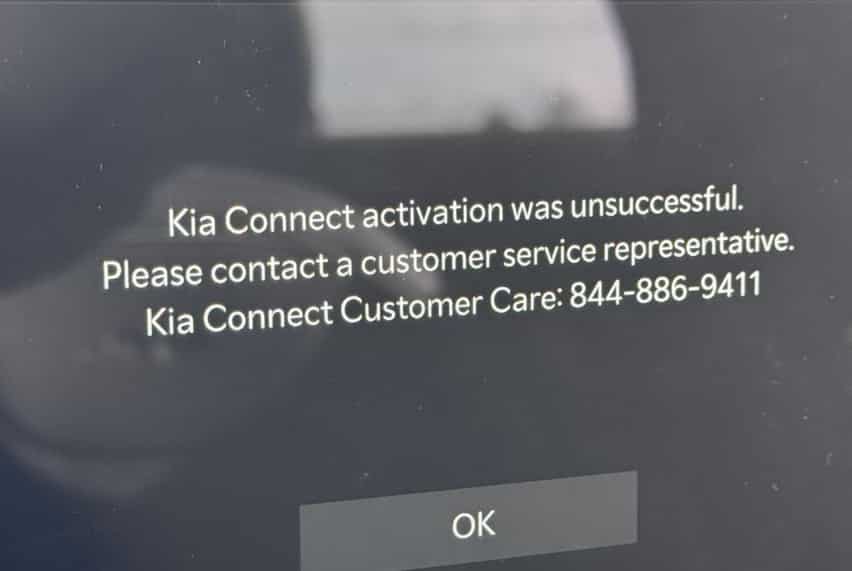
Many owners also notice that the vehicle status does not refresh or that the app reports the vehicle as offline. In most cases, the vehicle is not defective. Instead, communication between the vehicle, the cloud service, and your smartphone has been interrupted. Activation errors can also occur when registering a new vehicle or moving your account to another device. Once you recognize the exact symptom, you can narrow down the possible causes and apply the most effective solution instead of wasting time on unnecessary troubleshooting steps.
Main Causes of Kia Connect Not Working
Several systems work together every time you use Kia Connect. Your smartphone sends a request through the internet, the cloud service processes the command, and the vehicle receives the information through its built in communication system. If any part of this process fails, Kia Connect may stop responding or deliver incomplete information. For this reason, identifying the root cause is more effective than trying multiple fixes without a clear direction.
A weak internet connection is one of the most common reasons for connection problems. The app requires a stable network to communicate with the cloud service. At the same time, the vehicle needs reliable cellular coverage to receive remote commands. If either connection becomes unstable, features such as remote start, door lock control, vehicle status updates, or location tracking may fail.
Software problems can also interrupt normal operation. An outdated Kia Connect app, an older infotainment system, or corrupted cache files may prevent the app from communicating correctly with the vehicle. Login sessions may also expire over time, forcing the app to reject valid credentials until you sign in again. In some cases, the issue begins after a software update that changes account permissions or app settings.
Your Kia Connect subscription is another important factor. Some connected services require an active subscription before they become available. If the subscription expires or your account loses access, several remote features may stop working even though the vehicle operates normally. Compatibility also matters because available services can vary by model, model year, trim level, and region.
Finally, the problem may not come from your phone or your vehicle at all. Temporary server maintenance, cloud service interruptions, or regional network outages can prevent Kia Connect from processing requests. During these events, every setting on your device may appear correct, yet the service remains unavailable until normal communication returns. Understanding these possible causes allows you to troubleshoot the issue more efficiently and choose the right solution in the next section.
How to Fix Kia Connect Not Working
If Kia Connect is not working, start with the simplest solutions before making major changes to your account or vehicle settings. A systematic approach helps you identify the real cause and avoids unnecessary troubleshooting. In many cases, the problem disappears after a few basic checks.
Begin by confirming that your smartphone has a stable internet connection. Switch between WiFi and mobile data to see whether the connection improves. If the app still does not respond, close it completely and open it again. Restarting your phone can also remove temporary software glitches that interfere with normal communication. Next, visit your app store and install the latest version of Kia Connect. Software updates often include bug fixes that improve stability and resolve known connection problems.
After updating the app, sign out of your Kia account and sign in again. This step refreshes your authentication session and can fix many login related issues. You should also confirm that your Kia Connect subscription is active and that your vehicle supports the feature you want to use. Some remote services are unavailable if the subscription has expired or if the vehicle model does not include that function.
If the problem continues, check your vehicle’s infotainment system for available software updates. An outdated system may fail to communicate correctly with the cloud service. You should also park the vehicle in an area with strong cellular coverage because poor signal strength can prevent remote commands from reaching the vehicle. If the app reports that the vehicle is offline, wait a few minutes and refresh the connection before sending another request.
When none of these steps solves the problem, remove the vehicle from your Kia Connect account and complete the registration process again if necessary. This step can restore communication after activation or synchronization errors. If the service still does not work, the issue may be related to temporary server maintenance or a regional network outage. At that point, the best option is to contact Kia Support or your local dealership for further assistance. Following these steps in order gives you the best chance of restoring Kia Connect quickly without replacing parts or scheduling unnecessary repairs.
Kia Connect Remote Start Not Working
Remote start is one of the most valuable features in Kia Connect because it allows you to start the engine and prepare the cabin before entering the vehicle. When this function stops working, many drivers assume that the app is broken. In reality, the problem often comes from a specific condition that prevents the vehicle from accepting the command.
Before trying advanced troubleshooting, make sure your vehicle meets all basic requirements. The doors, hood, and liftgate should be fully closed, and the vehicle should be locked. The gear selector must remain in the correct position, and the battery should have enough power to support remote functions. If any safety condition is not satisfied, the vehicle will reject the request even though the app appears to send the command successfully.
Your internet connection also plays an important role. The smartphone must connect to the Kia Connect service, and the vehicle must have a reliable cellular signal. If either connection becomes unstable, the command may fail or take longer than expected. An expired Kia Connect subscription can produce the same result because some remote services require an active plan before they become available.
If remote start still does not work, update the Kia Connect app, sign out of your account, and sign in again. You should also check for available software updates on the vehicle’s infotainment system. After completing these steps, send another remote start request while the vehicle is parked in an area with strong network coverage. If the feature continues to fail after repeated attempts, the issue may involve a temporary server interruption or a vehicle specific fault. In that situation, contacting Kia Support or your local dealer is the most effective way to identify the exact cause and restore normal operation.
Kia Connect Not Working on iPhone or Android
Kia Connect should deliver a similar experience on both iPhone and Android devices, but each operating system has its own settings that can affect performance. If the app does not open, crashes unexpectedly, or cannot connect to your vehicle, the issue may come from your smartphone rather than the vehicle itself. Checking your device settings is often faster than resetting your account or visiting a dealership.
Start by confirming that your phone has a stable internet connection. Then make sure you are using the latest version of the Kia Connect app. Older versions may contain bugs that prevent the app from communicating with Kia’s cloud services. If an update is available, install it before trying any other solution. You should also restart your phone because this simple step can clear temporary software conflicts and restore normal performance.
Next, review the app permissions on your device. Kia Connect needs access to services such as location, notifications, and mobile data to deliver many connected features. If one of these permissions is disabled, some functions may stop working or provide incomplete information. Battery optimization settings can also interfere with background activity, especially on Android devices. Allowing the app to run without unnecessary restrictions can improve reliability and reduce connection problems.
If the issue continues, clear the app cache on Android or reinstall the app on your iPhone or Android device. After reinstalling, sign in with your Kia account and allow the app to complete the synchronization process. Finally, test several features, including vehicle status, remote lock, and remote start, to confirm that the connection has been restored. If every feature still fails, the problem is more likely related to your account, your vehicle, or a temporary server issue than to your smartphone.
When to Contact Kia Support
Most Kia Connect problems can be resolved by checking your internet connection, updating the app, refreshing your account, or verifying your subscription. However, some issues require assistance from Kia Support or an authorized dealership. If you have completed every troubleshooting step and the service still does not work, it is time to seek professional help.
Contact Kia Support if the app continues to display activation errors after you register your vehicle or if you cannot link the vehicle to your account. You should also ask for assistance if remote commands never reach the vehicle, even though your phone has a stable internet connection and your subscription is active. Repeated login failures, missing connected services, and vehicle synchronization problems may also indicate an account or system issue that cannot be resolved from the app.
A dealership can provide additional support when the problem involves the vehicle itself. The technician can check the infotainment system, install software updates, inspect the communication module, and confirm that every connected service is configured correctly. This inspection can identify hardware or software issues that are not visible through the mobile app.
Before contacting Kia Support, prepare a few important details. Record your vehicle identification number, the model and model year, the version of the Kia Connect app, your smartphone operating system, and a description of the problem. If possible, take screenshots of any error messages and note the time when the issue occurred. Providing complete information helps the support team identify the cause more quickly and recommend the most effective solution.
If the issue results from temporary server maintenance or a regional service interruption, Kia Support can confirm the outage and provide updates on when normal service is expected to return. This information prevents unnecessary troubleshooting and gives you a clear understanding of the next steps.
Frequently Asked Questions
Why is my Kia Connect not working?
Kia Connect may stop working because of a poor internet connection, weak cellular coverage, an outdated app, login issues, an inactive subscription, or temporary server maintenance. Start by checking your network, updating the app, and signing in to your account again before trying more advanced troubleshooting.
Why does Kia Connect say my vehicle is offline?
An offline message usually means the vehicle cannot communicate with the Kia Connect servers. Weak cellular coverage, temporary network interruptions, or synchronization delays are the most common causes. In most cases, the connection returns automatically once the communication is restored.
Why is Kia Connect remote start not working?
Remote start may fail if the vehicle does not meet the required safety conditions. Closed doors, a locked vehicle, sufficient battery power, and an active subscription are all important requirements. A weak cellular signal can also prevent the command from reaching the vehicle.
How do I reset Kia Connect?
You can reset Kia Connect by signing out of the app, restarting your smartphone, and signing in again. If the issue continues, update the app, restart the infotainment system, or remove and register the vehicle again to refresh the connection.
Does Kia Connect require a subscription?
Many connected services require an active Kia Connect subscription. If your plan expires, features such as remote start, remote lock, vehicle status, and other connected services may become unavailable.
Why is my vehicle status not updating?
Vehicle status may stop updating because of poor network coverage, delayed synchronization, temporary server issues, or outdated software. Refresh the app after a few minutes and confirm that both your smartphone and vehicle have a stable connection.
Can a software update cause Kia Connect problems?
Yes. A software update may temporarily affect app settings, account authentication, or communication between the app and the vehicle. Installing the latest updates for both the mobile app and the infotainment system usually resolves these issues.
When should I contact Kia Support?
Contact Kia Support if the app cannot activate your vehicle, remote features never respond, login problems continue after basic troubleshooting, or the service remains unavailable for an extended period. Support representatives can verify your account, check service availability, and recommend the next steps.
Conclusion
Experiencing Kia Connect not working can be frustrating, especially when you rely on connected features every day. Fortunately, most problems have a simple explanation and an equally practical solution. Issues such as poor internet connectivity, weak cellular coverage, outdated software, expired subscriptions, or temporary server interruptions account for the majority of connection failures. By identifying the exact symptom and following a logical troubleshooting process, you can often restore the service within a few minutes.
Instead of trying random fixes, begin with the basics. Verify your network connection, update the Kia Connect app, confirm that your subscription is active, and make sure your vehicle meets the required conditions for remote services. If the problem persists, check for infotainment software updates and allow the app to synchronize with your vehicle again. These steps solve most common issues without requiring professional assistance.
If Kia Connect still does not work after completing every recommended solution, do not ignore the problem. Contact Kia Support or your local Kia dealership for a detailed diagnosis. They can verify your account, inspect the vehicle’s communication system, and identify issues that cannot be resolved through the mobile app.
We hope this guide has helped you understand why Kia Connect is not working and how to fix it with confidence. Save this page for future reference, and return whenever you need to troubleshoot a connection problem. With the right approach, you can keep your Kia Connect services running smoothly and enjoy every connected feature your vehicle has to offer.