Have you recently changed the oil in your Toyota RAV4, only to discover that the maintenance light is still illuminated on the dashboard? This is a common situation that confuses many drivers. Seeing a warning light remain on after completing routine service can make you wonder whether there is still a problem with your vehicle or if another repair is needed.
The good news is that the Toyota RAV4 maintenance light is usually just a reminder system designed to notify you when scheduled maintenance is due. After an oil change or other routine service, the light must be manually reset to restart the maintenance tracking cycle. Fortunately, the reset process is simple and can often be completed in just a few minutes without any special tools or mechanical experience.
In this guide, you will learn how to reset the maintenance light on Toyota RAV4 models from 2006 through 2026. We will cover the exact steps for different generations, explain the difference between the maintenance required light and the check engine light, and provide troubleshooting tips if the reset does not work as expected.
By following the instructions in this article, you can save time, avoid unnecessary trips to the dealership, and keep your Toyota RAV4 maintenance records accurate and up to date.
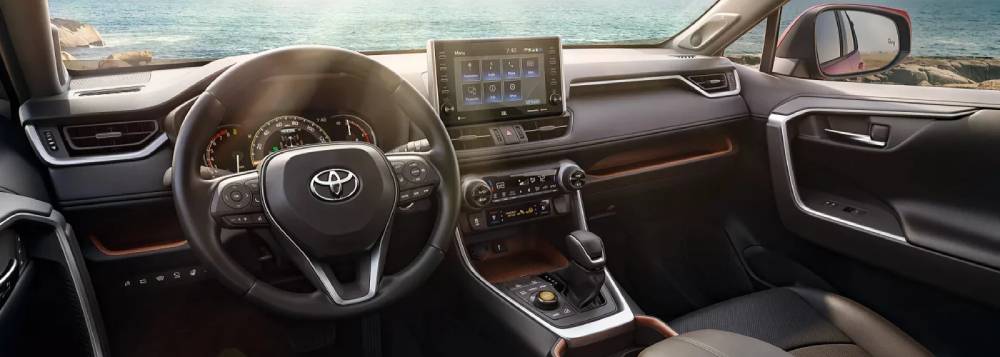
What Does the Maintenance Light Mean on a Toyota RAV4?
Many Toyota RAV4 owners become concerned when they see the Maintenance Required light appear on the dashboard. However, this indicator is often misunderstood. Unlike more serious warning lights, the maintenance light is primarily a reminder system that helps drivers stay on schedule with routine vehicle service.
The Maintenance Required light is programmed to illuminate after a predetermined mileage interval, typically every 5,000 miles. Its main purpose is to remind the driver that regular maintenance, such as an oil change, tire rotation, or general inspection, may be due. This proactive system helps ensure the vehicle continues to operate efficiently and reliably over time.
One of the most common misconceptions is confusing the maintenance light with the Check Engine light. While the maintenance light serves as a scheduled service reminder, the Check Engine light indicates that the vehicle’s onboard diagnostic system has detected a potential issue affecting engine performance, emissions, or other critical systems. A maintenance light does not necessarily mean that something is wrong with the vehicle.
In most cases, it is safe to drive with the maintenance light on if the vehicle is operating normally and routine service is simply overdue. However, ignoring maintenance reminders for extended periods can lead to increased wear, reduced fuel efficiency, and potentially costly repairs in the future. Understanding the purpose of this light helps drivers respond appropriately and maintain their Toyota RAV4 in optimal condition.
Before You Reset the Maintenance Light
Before resetting the maintenance light, it is important to confirm that the recommended maintenance has actually been completed. The reminder system exists for a reason, and resetting it without performing the necessary service can cause you to lose track of important maintenance intervals.
For most Toyota RAV4 models, the maintenance reminder is triggered after approximately 5,000 miles of driving. Common services performed at these intervals include engine oil changes, tire rotations, brake inspections, fluid level checks, and general vehicle inspections. Completing these tasks before resetting the light ensures the vehicle continues to operate safely and efficiently.
Many drivers are tempted to reset the maintenance light simply to remove the dashboard notification. While doing so may temporarily eliminate the reminder, it can create long term maintenance issues if essential services are overlooked. Neglected maintenance can contribute to premature engine wear, reduced fuel economy, and unexpected mechanical failures.
Taking a few moments to verify that all scheduled maintenance has been completed before performing the reset is a smart practice. It not only keeps your maintenance records accurate but also helps protect your investment and extend the lifespan of your Toyota RAV4.
How to Reset Maintenance Light on Toyota RAV4 (2006–2012 Models)
If you own a Toyota RAV4 manufactured between 2006 and 2012, the maintenance light can usually be reset using the trip meter button located on the instrument panel. The process is straightforward and requires only a few minutes.
Begin by turning the ignition switch to the OFF position. Make sure the vehicle is completely powered down before proceeding. Next, locate and press the trip meter reset button. Continue holding the button while turning the ignition key to the ON position without starting the engine.
As the system initializes, keep the trip meter button pressed. After several seconds, the odometer display will begin counting down or show a series of zeros. This indicates that the maintenance data is being reset. Once the process is complete, the maintenance light should turn off automatically.
Release the button and turn the ignition off. Then restart the vehicle to verify that the Maintenance Required light no longer appears on the dashboard. If the light remains illuminated, repeat the procedure carefully and ensure that the correct trip meter display was selected before starting the reset process.
Some owners encounter issues because they release the button too early or accidentally start the engine during the reset sequence. Following each step precisely is essential for a successful reset. Once completed correctly, the maintenance reminder system will restart and begin tracking mileage until the next scheduled service interval.
How to Reset Maintenance Light on Toyota RAV4 (2013–2018 Models)
Toyota RAV4 models produced between 2013 and 2018 feature a more advanced dashboard interface than earlier generations. Depending on the trim level and equipment package, the maintenance reminder can often be reset through the vehicle’s multi information display rather than using the traditional trip meter button.
Start by turning the ignition to the ON position. If your vehicle uses a push button start system, press the Start button twice without pressing the brake pedal. This will activate the electronics without starting the engine.
Using the steering wheel controls, navigate through the information screens displayed in the instrument cluster. Locate the Settings menu and access the vehicle settings section. Scroll until you find the Maintenance Reset option. In some model years, this feature may appear under Scheduled Maintenance or Vehicle Maintenance settings.
Select the reset option and confirm your choice when prompted. The system will display a confirmation message indicating that the maintenance data has been successfully reset. After completing the process, return to the main display screen and verify that the maintenance reminder no longer appears.
If your specific model does not include the maintenance reset option in the settings menu, consult the owner’s manual for the alternative reset procedure. Toyota occasionally updated the software interface during these model years, which may result in slight differences between vehicles. Regardless of the method used, a successful reset should clear the reminder and restart the maintenance tracking interval.
How to Reset Maintenance Light on Toyota RAV4 (2019–2026 Models)
The fifth generation Toyota RAV4 introduced a redesigned dashboard and a more sophisticated digital information system. As a result, resetting the maintenance light is generally accomplished through the vehicle’s menu system.
Begin by switching the vehicle to the ON mode without starting the engine. Once the instrument cluster and touchscreen systems are active, use the steering wheel controls to access the multi information display. Navigate to the Settings tab, which is often represented by a gear icon.
Within the settings menu, locate the Vehicle Settings section. Scroll through the available options until you find Scheduled Maintenance or Maintenance Reset. Select this option to open the maintenance management screen.
The system will display a prompt asking whether you would like to reset the maintenance data. Confirm your selection and wait a few moments while the vehicle updates the service interval information. Once completed, a confirmation message should appear on the display.
Turn the vehicle off and then restart it to ensure the maintenance reminder has been cleared successfully. If the reset was performed correctly, the dashboard should no longer display a maintenance notification.
Because Toyota continuously updates software and display layouts, some model years may feature slightly different menu names. However, the overall process remains similar across most 2019 through 2026 RAV4 models. Checking the owner’s manual can provide additional guidance if menu options differ from those described above.
What If the Maintenance Light Won’t Reset?
In some situations, the maintenance light may remain illuminated even after completing the reset procedure. This can be frustrating, especially if the required maintenance has already been performed. Fortunately, several common causes can usually be identified and resolved without extensive repairs.
The first thing to check is whether the correct reset procedure was followed for your specific model year. Toyota has used different dashboard systems throughout the RAV4’s production history, and using instructions intended for another generation may prevent the reset from working properly.
Another possible cause is an interrupted reset sequence. Releasing the reset button too early, selecting the wrong display screen, or accidentally starting the engine during the process can prevent the maintenance data from clearing. Repeating the procedure carefully often resolves the issue.
Low battery voltage can also interfere with certain electronic functions. If the vehicle battery is weak or has recently been disconnected, some dashboard systems may not respond correctly during the reset process. Ensuring the battery is fully charged can help eliminate this possibility.
If the maintenance light continues to appear despite multiple reset attempts, there may be a software issue within the instrument cluster or maintenance monitoring system. In such cases, a Toyota dealership or qualified technician can use diagnostic equipment to inspect the system and perform a manual reset if necessary.
It is also important to remember that resetting the maintenance light will not clear diagnostic trouble codes or repair underlying mechanical problems. If other warning lights are present, such as the Check Engine light, additional diagnostics may be required to identify the root cause of the issue.
Common Toyota RAV4 Dashboard Lights Explained
Modern Toyota RAV4 models are equipped with numerous dashboard indicators designed to keep drivers informed about vehicle performance, maintenance needs, and potential safety concerns. Understanding these warning lights can help prevent unnecessary worry and allow you to respond appropriately when an alert appears.
One of the most commonly seen indicators is the Maintenance Required light. This reminder is triggered by mileage intervals and typically signals that routine service such as an oil change may be due. Unlike diagnostic warning lights, it does not indicate a mechanical failure.
The Check Engine light is far more serious. When illuminated, the vehicle’s onboard diagnostic system has detected an issue affecting the engine, emissions system, fuel delivery, or another critical component. While some causes may be minor, others can significantly impact vehicle performance and should be investigated promptly.
The Oil Pressure Warning Light indicates that engine oil pressure has dropped below a safe operating level. Continuing to drive with low oil pressure can result in severe engine damage. Drivers should stop the vehicle as soon as it is safe to do so and inspect the oil level.
The Tire Pressure Monitoring System light appears when one or more tires fall below the recommended pressure range. Underinflated tires can negatively affect handling, fuel economy, and tire lifespan. Checking and adjusting tire pressure regularly helps maintain safe driving conditions.
Another important indicator is the Battery Warning Light. This warning often signals a charging system problem involving the battery, alternator, or electrical connections. Ignoring this alert may eventually leave the vehicle unable to start.
Familiarity with dashboard warning lights allows Toyota RAV4 owners to distinguish between routine maintenance reminders and alerts that require immediate attention. This knowledge can improve vehicle reliability and help avoid costly repairs.
Toyota RAV4 Maintenance Schedule Overview
Following Toyota’s recommended maintenance schedule is one of the most effective ways to maximize the lifespan and reliability of a RAV4. Regular service not only keeps the vehicle running smoothly but also helps identify potential problems before they become expensive repairs.
At approximately every 5,000 miles, Toyota recommends basic maintenance procedures that typically include tire rotation, brake inspection, fluid level checks, and a general vehicle inspection. These routine services help ensure even tire wear and maintain overall vehicle safety.
At around every 10,000 miles, most modern Toyota RAV4 models require an engine oil and oil filter replacement if synthetic oil is being used. Fresh oil plays a crucial role in lubricating engine components, reducing friction, and preventing premature wear.
When the vehicle reaches 30,000 miles, maintenance requirements become more comprehensive. Services may include engine air filter replacement, cabin air filter replacement, brake system inspection, fluid inspections, and additional system checks. Completing these services on schedule helps maintain fuel efficiency and vehicle performance.
As mileage increases, Toyota recommends additional inspections and component replacements based on age and usage conditions. Drivers who frequently operate their vehicles in extreme temperatures, heavy traffic, dusty environments, or towing conditions may need more frequent maintenance.
Consistently following the recommended maintenance schedule offers several benefits. It can improve fuel economy, reduce the likelihood of unexpected breakdowns, extend the life of major components, and preserve the vehicle’s resale value. Most importantly, it ensures that maintenance reminders accurately reflect the service needs of the vehicle.
Frequently Asked Questions
Why is my Toyota RAV4 maintenance light still on after an oil change?
The most common reason is that the maintenance reminder system was not manually reset after the oil change was completed. The maintenance light does not automatically turn off when service is performed. If the light remains illuminated, repeat the reset procedure for your specific model year and verify that all steps are followed correctly.
How long does it take to reset the maintenance light on a Toyota RAV4?
In most cases, the reset process takes less than two minutes. Older models typically require the use of the trip meter reset button, while newer models use the multi information display and settings menu.
Can I reset the maintenance light without disconnecting the battery?
Yes. Toyota designed the maintenance reminder system to be reset through dashboard controls. Disconnecting the battery is generally unnecessary and may reset other vehicle settings that you would prefer to keep.
Does resetting the maintenance light fix engine problems?
No. Resetting the maintenance light only clears the service reminder and restarts the maintenance interval counter. It does not repair mechanical issues or clear diagnostic trouble codes stored in the vehicle’s computer.
Is the Maintenance Required light the same as the Check Engine light?
No. The Maintenance Required light is simply a service reminder based on mileage intervals. The Check Engine light indicates that the onboard diagnostic system has detected a fault that may require inspection or repair.
Can I drive with the maintenance light on?
In most cases, yes. The maintenance light is intended to remind you that routine service may be due. However, delaying maintenance for extended periods can negatively affect vehicle performance and longevity.
How often should I reset the maintenance light?
The maintenance light should only be reset after completing the recommended service associated with the reminder. Resetting it without performing maintenance can make it difficult to track future service intervals accurately.
What happens if I ignore the maintenance light?
Ignoring the reminder will not immediately damage the vehicle, but overdue maintenance can eventually lead to increased wear, reduced fuel efficiency, and higher repair costs. Following Toyota’s maintenance schedule remains the best way to keep your RAV4 operating at its best.
Conclusion
Knowing how to reset the maintenance light on a Toyota RAV4 is a simple but valuable skill that every owner should learn. Whether you drive an older RAV4 from the late 2000s or a newer model equipped with advanced digital displays, the reset process can usually be completed in just a few minutes without professional assistance.
It is important to remember that the Maintenance Required light is designed to help you stay on top of routine vehicle care. While resetting the light removes the reminder from your dashboard, it should only be done after the recommended maintenance has been completed. Keeping up with oil changes, tire rotations, fluid inspections, and other scheduled services helps ensure your RAV4 remains reliable, efficient, and safe to drive for years to come.
Throughout this guide, we have covered the maintenance light reset procedures for all major Toyota RAV4 generations, explained the difference between maintenance reminders and diagnostic warning lights, and provided troubleshooting solutions for situations where the reset does not work as expected. By following the correct steps for your specific model year, you can avoid unnecessary dealership visits and maintain accurate service intervals.
If you found this guide helpful, consider bookmarking it for future reference and sharing it with other Toyota RAV4 owners. Staying informed about routine maintenance is one of the easiest ways to protect your investment and enjoy a smoother ownership experience. With the right maintenance habits and a clear understanding of your vehicle’s reminder system, your Toyota RAV4 can continue delivering dependable performance mile after mile.