Have you recently changed the oil in your Toyota Tundra only to find that the maintenance light is still illuminated on the dashboard? If so, you are not alone. Many Tundra owners are surprised when the maintenance reminder remains active even after completing routine service. Fortunately, this is usually a simple issue that can be resolved in less than a minute.
The maintenance light on a Toyota Tundra is designed to remind drivers when scheduled service is due. It is not the same as the Check Engine Light and does not necessarily indicate a mechanical problem. Instead, it serves as a helpful reminder to perform essential maintenance tasks such as oil changes, tire rotations, and vehicle inspections.
One challenge many owners face is that the reset procedure varies depending on the model year. Older Tundra models rely on the ODO/TRIP button, while newer generations use digital menus within the vehicle’s Multi Information Display. Following the wrong procedure can leave drivers frustrated when the light refuses to turn off.
In this complete guide, you will learn how to reset the maintenance light on Toyota Tundra models from every generation, understand what triggers the reminder, and discover solutions for common reset problems. Whether you own an older Tundra or the latest model, this guide will help you get the job done quickly and correctly.
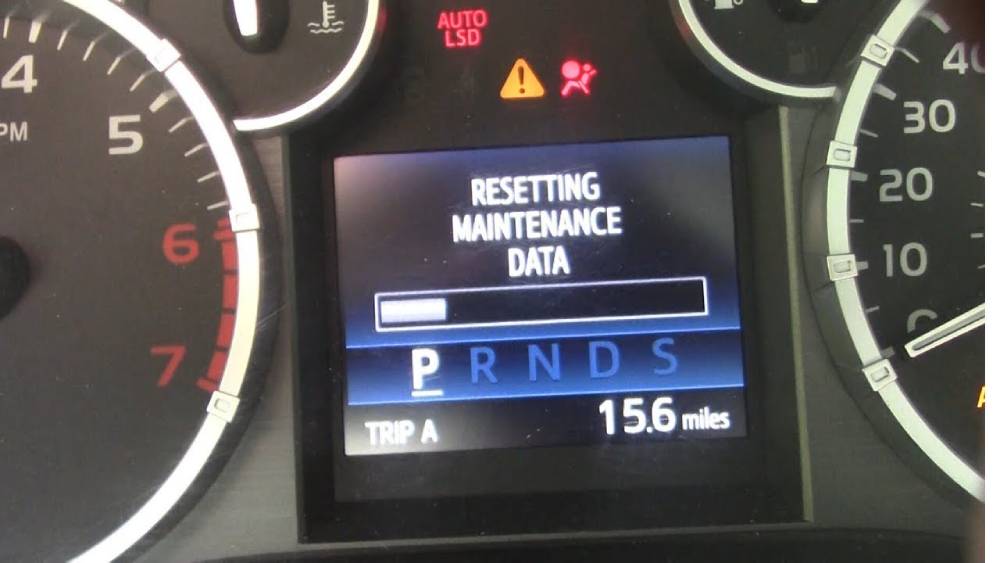
What Does the Maintenance Light Mean on a Toyota Tundra?
The maintenance light on a Toyota Tundra is a built in service reminder designed to help owners stay on top of routine vehicle maintenance. Unlike warning indicators that signal a mechanical issue or system malfunction, the maintenance light is primarily mileage based and appears at predetermined service intervals.
In most Toyota Tundra models, the maintenance reminder illuminates approximately every 5,000 miles. This interval often coincides with routine services such as oil changes, tire rotations, fluid inspections, and general vehicle checkups. The purpose of the light is to ensure that important maintenance tasks are not overlooked, helping to extend engine life and maintain optimal vehicle performance.
Many drivers mistakenly assume that the maintenance light indicates a serious problem with the truck. However, in most cases, it simply means that scheduled service is due. If your Tundra is running normally and no other warning lights are present, there is usually no immediate cause for concern.
It is important to understand that resetting the maintenance light does not fix any mechanical issues. The light should only be reset after the recommended service has been completed. Doing so allows the system to accurately track the next maintenance interval and continue providing timely reminders.
When Should You Reset the Maintenance Light?
The best time to reset the maintenance light is immediately after completing the required maintenance service. This ensures that the reminder system starts counting from zero and accurately tracks the next service interval.
Many vehicle owners are tempted to reset the light simply because it is distracting or because they want a clean dashboard display. While this may seem harmless, clearing the reminder without performing the recommended maintenance can lead to missed service intervals and potentially more expensive repairs in the future.
Regular maintenance plays a crucial role in preserving the reliability of a Toyota Tundra. Engine oil gradually loses its effectiveness, tires wear unevenly, and fluids can deteriorate over time. Ignoring scheduled maintenance may result in reduced fuel efficiency, increased engine wear, and unexpected breakdowns.
If you recently purchased a used Toyota Tundra and the maintenance light is already on, it is a good idea to verify the vehicle’s service history before resetting the reminder. This helps ensure that important maintenance tasks have not been overlooked by the previous owner.
By treating the maintenance light as a helpful reminder rather than an annoyance, you can keep your truck running smoothly and avoid costly repairs down the road.
How to Reset Maintenance Light on Toyota Tundra 2000–2006 Models
Owners of early Toyota Tundra models can reset the maintenance light using a simple procedure involving the Trip or Odometer button. The process requires no special tools and typically takes less than one minute.
Step 1: Turn the ignition switch to the OFF position.
Step 2: Locate and press the Trip/Odometer button on the instrument cluster.
Step 3: While holding the button, turn the ignition key to the ON position without starting the engine.
Step 4: Continue holding the button for several seconds. The odometer display may show a series of dashes or begin a countdown sequence.
Step 5: Wait until the display returns to normal and the maintenance reminder resets.
Step 6: Release the button and turn the ignition off.
Step 7: Start the vehicle and verify that the maintenance light is no longer illuminated.
If the light remains on, repeat the process carefully and ensure the button remains pressed throughout the reset sequence. Releasing the button too early is one of the most common reasons the procedure fails.
Some owners may experience issues after a recent battery replacement or electrical interruption. In such cases, repeating the reset procedure often resolves the problem. If the maintenance light continues to appear, consult the owner’s manual for model specific instructions or have the vehicle inspected by a qualified technician.
How to Reset Maintenance Light on Toyota Tundra 2007–2021 Models
Toyota Tundra models produced between 2007 and 2021 use a slightly different reset procedure compared to earlier generations. The key to a successful reset is ensuring that the display is set to Trip A before beginning the process.
Step 1: Insert the key into the ignition and turn it to the ON position without starting the engine. If your truck uses a push button start system, press the start button twice without pressing the brake pedal.
Step 2: Press the ODO/TRIP button repeatedly until the display shows Trip A. Do not use Trip B or the main odometer reading, as the reset procedure may not work correctly.
Step 3: Turn the ignition completely OFF.
Step 4: Press and hold the ODO/TRIP button.
Step 5: While continuing to hold the button, turn the ignition back to the ON position without starting the engine.
Step 6: Keep holding the button. The display should begin showing a series of dashes that gradually disappear or a progress indicator that signals the reset process.
Step 7: Once the display returns to normal, release the button.
Step 8: Start the engine and confirm that the maintenance required light has been cleared.
Many reset failures occur because drivers accidentally select the wrong display mode before beginning the procedure. If the maintenance light remains on, repeat the process and make sure Trip A is displayed before turning the ignition off.
This reset procedure is commonly used after an oil change and is one of the most frequently searched maintenance tasks among Toyota Tundra owners.
How to Reset Maintenance Light on Toyota Tundra 2022–Present Models
The third generation Toyota Tundra introduced in 2022 features a more advanced digital dashboard and a redesigned Multi Information Display. As a result, resetting the maintenance reminder is now completed through the vehicle’s settings menu rather than with the traditional ODO/TRIP button.
Step 1: Start the vehicle or enter accessory mode.
Step 2: Use the steering wheel controls to access the Multi Information Display.
Step 3: Navigate to the Settings menu.
Step 4: Select Vehicle Settings.
Step 5: Scroll to Maintenance Reset or Scheduled Maintenance.
Step 6: Select Reset and confirm your choice when prompted.
Step 7: Wait for the confirmation message indicating that the maintenance data has been reset successfully.
Step 8: Return to the main dashboard screen and verify that the maintenance reminder no longer appears.
Depending on trim level and software version, menu names may vary slightly. Some models equipped with larger digital displays may place the maintenance reset function in a different submenu. If you cannot locate the option, refer to your owner’s manual for the exact navigation path.
The digital reset system provides greater flexibility and allows drivers to manage maintenance reminders directly through the vehicle’s onboard software, making the process faster and more user friendly.
Maintenance Light Won’t Reset? Common Fixes
Although resetting the maintenance light is usually straightforward, there are situations where the reminder remains active even after following the correct procedure. Understanding the most common causes can save time and frustration.
One frequent issue is using the wrong reset instructions for your specific model year. Toyota has updated the instrument cluster and dashboard controls several times throughout the Tundra’s history. A procedure that works on a 2015 model may not work on a 2024 model.
Another common problem is not completing the reset sequence correctly. Releasing the ODO/TRIP button too early, selecting Trip B instead of Trip A, or turning the ignition on in the wrong order can prevent the system from resetting.
In some cases, the maintenance reminder may reappear shortly after being cleared. This often occurs when the reset was not fully completed or when the system did not save the new maintenance interval properly. Repeating the process carefully usually resolves the issue.
Battery related problems can also interfere with electronic systems. If the vehicle recently experienced a dead battery, battery replacement, or electrical interruption, some settings may require reinitialization before the maintenance reminder functions normally.
Finally, software glitches within the instrument cluster or vehicle control modules can occasionally cause reset issues. While uncommon, these situations may require a diagnostic scan or dealer assistance to identify and correct the underlying problem.
If repeated reset attempts fail, consulting a certified Toyota technician is the safest way to ensure that no deeper electronic issues are present.
Maintenance Light vs Check Engine Light
One of the most common misconceptions among Toyota Tundra owners is confusing the maintenance light with the Check Engine Light. While both indicators appear on the dashboard, they serve entirely different purposes and require different responses.
The maintenance light is a scheduled service reminder. It is programmed to illuminate after a certain number of miles have been driven and is intended to remind the driver that routine maintenance is due. Services such as oil changes, tire rotations, and general inspections are typically associated with this reminder. In most cases, the vehicle will continue to operate normally when the maintenance light is on.
The Check Engine Light, on the other hand, is part of the vehicle’s onboard diagnostic system. When this light appears, it indicates that the engine, emissions system, or another critical component has detected a fault. The severity of the issue can range from something minor, such as a loose gas cap, to more significant problems involving sensors, ignition systems, or emissions equipment.
Another important distinction is how the lights are reset. The maintenance light can usually be cleared manually after completing the required service. The Check Engine Light often requires diagnosing and repairing the underlying issue before the light can be permanently cleared.
Understanding the difference between these two dashboard indicators can help drivers make informed decisions and avoid unnecessary stress when a warning light appears.
Frequently Asked Questions
How often does the Toyota Tundra maintenance light come on?
In most Toyota Tundra models, the maintenance reminder appears approximately every 5,000 miles. The exact interval may vary depending on model year, driving conditions, and maintenance settings.
Can I reset the maintenance light without changing the oil?
Yes, the system allows you to manually reset the reminder without performing maintenance. However, this is generally not recommended because it can lead to missed service intervals and increased wear on vehicle components.
Why does the maintenance light come back after resetting?
The light may return if the reset procedure was not completed correctly, the maintenance interval was not properly stored, or additional maintenance settings require adjustment. Repeating the reset process often resolves the issue.
Does disconnecting the battery reset the maintenance light?
Disconnecting the battery may temporarily affect certain electronic settings, but it is not a reliable method for resetting the maintenance reminder. Using the proper reset procedure is the recommended approach.
Is the maintenance light the same as the Check Engine Light?
No. The maintenance light is a service reminder based on mileage or maintenance intervals, while the Check Engine Light indicates that the vehicle has detected a potential problem requiring diagnosis.
Should I drive my Toyota Tundra with the maintenance light on?
In most situations, yes. The maintenance light is simply reminding you that scheduled service is due. However, it is important to arrange maintenance as soon as possible to keep your vehicle operating at its best.
Conclusion
Knowing how to reset the maintenance light on a Toyota Tundra is a simple but valuable skill for any owner. Whether you drive an early first generation model, a second generation truck, or the latest Tundra equipped with a digital dashboard, the process can usually be completed in just a few minutes without special tools or professional assistance.
The most important thing to remember is that the maintenance light is designed to help protect your investment by reminding you when routine service is due. While it can be tempting to clear the reminder immediately, the best practice is to perform the recommended maintenance first and then reset the system. This ensures accurate service tracking and helps maintain long term reliability.
By following the correct reset procedure for your specific model year, you can eliminate unnecessary dashboard warnings and keep your maintenance schedule organized. Regular oil changes, inspections, and preventative maintenance remain the foundation of dependable Toyota Tundra ownership.
If you found this guide helpful, consider bookmarking it for future service intervals and sharing it with other Toyota Tundra owners who may be dealing with the same maintenance light issue. A few minutes of preventative maintenance today can help prevent costly repairs tomorrow.