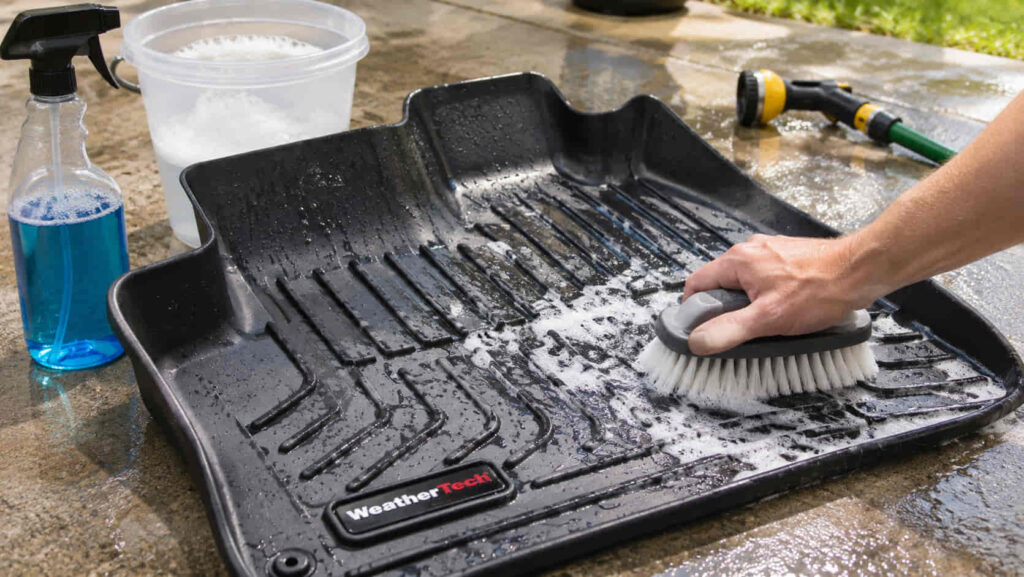
To clean WeatherTech mats, remove them from your vehicle, rinse away loose dirt, apply a mild detergent or specialized floor mat cleaner, scrub the surface with a medium-bristle brush, and rinse thoroughly before allowing them to dry. This cleaning method removes accumulated dirt, mud, road salt, and everyday stains while preserving the material and surface texture of the mats.
WeatherTech manufactures several types of automotive floor protection products, including FloorLiner, FloorLiner HP, All-Weather Floor Mats, and Trim-To-Fit Floor Mats. Although these products differ in material composition and structural design, they share similar cleaning requirements. WeatherTech recommends using its TechCare FloorLiner and FloorMat Cleaner or a mild household detergent mixed with warm water. WeatherTech
Stubborn stains, white residue, and surface discoloration require additional cleaning to remove contaminants trapped within textured surfaces and drainage channels. Deep cleaning helps restore the original appearance of the mats, while a compatible floor mat protector helps resist staining and everyday wear.
Avoid harsh chemicals, abrasive cleaners, tire shine, and silicone-based dressings that can damage the material or create a slippery surface. Maintaining adequate traction is particularly important for driver’s side floor mats because they are positioned directly beneath the vehicle’s pedals. WeatherTech+1
This guide explains how to clean WeatherTech mats at home, remove stubborn stains and road salt residue, restore their appearance, select suitable cleaning products, and maintain their protective performance through regular care.
What Do You Need to Clean WeatherTech Mats?
To clean WeatherTech mats effectively, you need warm water, a mild detergent or dedicated floor mat cleaner, a medium-bristle brush, a garden hose, and a microfiber towel. These supplies remove surface contaminants and embedded dirt without relying on aggressive chemicals or abrasive cleaning methods that may damage the material.
WeatherTech’s TechCare FloorLiner and FloorMat Cleaner is specifically formulated to remove dirt, grease, scuff marks, and stains from the company’s automotive floor protection products. Mild household detergent mixed with warm water provides an alternative for routine cleaning. Warm water helps loosen accumulated dirt, while the surfactants in the detergent help separate oily contaminants from the mat’s surface.
A medium-bristle brush removes dirt trapped within textured surfaces, raised edges, and drainage channels. Unlike a microfiber towel, which primarily removes surface contaminants and absorbs moisture, a brush reaches recessed areas where mud, sand, and road salt accumulate.
A garden hose provides sufficient water flow to rinse away loosened contaminants and detergent residue. A microfiber towel absorbs remaining moisture before air-drying. WeatherTech’s TechCare FloorLiner and FloorMat Protector is an optional addition to the cleaning process that helps maintain the appearance of the mats and resist everyday staining.
How Do You Clean WeatherTech Mats at Home?
To clean WeatherTech mats at home, follow six steps: remove the mats from the vehicle, shake off loose debris, rinse with water, apply a suitable cleaning solution, scrub and rinse the surface, and dry the mats before reinstalling them. This method removes contaminants from both the exposed surface and recessed channels without requiring professional automotive detailing equipment.
First, remove the WeatherTech mats from the vehicle by disengaging the retention clips or factory anchoring systems. Lift the mats carefully to prevent accumulated dirt, sand, and water from spilling onto the vehicle’s carpeting. Cleaning the mats outside the vehicle prevents detergent and excess moisture from entering the interior, where trapped moisture can contribute to unpleasant odors.
Shake the mats over an outdoor surface or use a vacuum cleaner to remove loose debris, such as gravel, sand, dried leaves, and dust. Removing these particles before scrubbing reduces the risk of dragging abrasive contaminants across the textured surface. Pay particular attention to the drainage channels and raised edges where debris tends to accumulate.
Rinse the mats with fresh water using a garden hose. Direct the water into the recessed channels and corners to loosen compacted dirt and soften dried mud. A bathtub provides an alternative cleaning location when an outdoor water source is unavailable. WeatherTech
Apply TechCare FloorLiner and FloorMat Cleaner or a mixture of mild detergent and warm water across the entire surface. The cleaning solution loosens contaminants that water alone cannot remove, particularly oily deposits and dirt embedded within the textured material.
Scrub the mats with a medium-bristle brush, concentrating on heavily soiled areas, heel contact points, and drainage channels. Use controlled pressure to dislodge embedded contaminants without unnecessarily abrading the surface. Rinse the mats thoroughly with fresh water until no visible detergent foam or loosened dirt remains. Incomplete rinsing can leave a cloudy residue that reduces the visual quality of the mats. WeatherTech+1
Allow the mats to air-dry completely in a clean, ventilated area or remove excess moisture with a microfiber towel. Once dry, reinstall each mat in its designated position and reconnect the retention system where applicable. Ensure the driver’s side mat lies securely against the vehicle floor without interfering with the accelerator, brake, or clutch pedal. Proper installation maintains both the protective function of the mats and driving safety.
Read more: does autozone test alternators
What Is the Best Cleaner for WeatherTech Mats?
The best cleaner for WeatherTech mats is TechCare FloorLiner and FloorMat Cleaner, a specialized cleaning solution developed by WeatherTech for its automotive floor protection products. The formula removes dirt, grease, scuff marks, and everyday contaminants without relying on aggressive cleaning agents that may compromise the material or surface finish.
A mild household detergent mixed with warm water is an effective alternative for routine cleaning. Detergents contain surfactants that reduce water’s surface tension and help separate oily contaminants from the mat’s surface. This cleaning mechanism makes mild detergent suitable for removing everyday dirt, muddy footprints, and residue transferred from footwear.
You can clean WeatherTech mats with mild dish soap, provided it does not contain harsh solvents, bleach, or ingredients that leave a slippery coating. Apply a diluted solution using a medium-bristle brush and rinse thoroughly with clean water. Excessive soap does not necessarily improve cleaning performance and increases the amount of rinsing required to remove detergent residue.
Specialized floor mat cleaners are preferable when dealing with accumulated grime, greasy deposits, and stubborn scuff marks. Mild detergent is sufficient for regular maintenance when the mats contain ordinary dust, sand, and mud. Selecting a cleaner according to the type and severity of contamination helps maintain the appearance, texture, and protective performance of WeatherTech mats.
How Do You Remove Stubborn Stains From WeatherTech Mats?
To remove stubborn stains from WeatherTech mats, soften the accumulated contaminants with warm water, apply a specialized floor mat cleaner, and scrub the affected areas with a medium-bristle brush. Stubborn stains require deeper cleaning because dirt, grease, and footwear residue accumulate within the textured surface and recessed drainage channels.
Dried mud requires thorough rinsing before scrubbing. Water penetrates and softens compacted soil deposits, making them easier to dislodge without excessive mechanical force. Apply the cleaning solution after removing loose particles to prevent sand and small stones from scratching the mat during scrubbing.
Grease and oil stains require a cleaning solution capable of breaking down oily deposits. TechCare FloorLiner and FloorMat Cleaner uses a foaming formula that adheres to the surface and helps lift contaminants for easier removal. Scrub the affected area with controlled pressure, rinse thoroughly, and repeat the cleaning process when visible residue remains. WeatherTech+1
Black scuff marks caused by footwear require targeted cleaning because friction transfers material from shoe soles onto the floor mat. Apply the cleaner directly to the affected area and scrub gently until the transferable residue is removed. Avoid abrasive pads and aggressive scrubbing, which may alter the original surface texture.
Inspect the mats after they have dried completely to distinguish remaining stains from permanent surface damage. Scratches, material degradation, and discoloration caused by prolonged wear cannot always be reversed through cleaning. Recognizing this difference prevents unnecessary exposure to stronger cleaning chemicals that may further compromise the material.
How Do You Remove Salt Stains and White Residue From WeatherTech Mats?
To remove salt stains and white residue from WeatherTech mats, rinse the mats thoroughly with warm water, apply a mild detergent or specialized floor mat cleaner, and scrub the affected areas with a medium-bristle brush. Water dissolves soluble road salt deposits, while the cleaning solution helps remove dirt and oily contaminants that accumulate alongside salt crystals.
Road salt stains develop when footwear transfers deicing substances, such as sodium chloride and calcium chloride, onto the floor mats. As the accumulated moisture evaporates, dissolved salts remain on the surface and form visible white deposits. These deposits become particularly noticeable on black WeatherTech mats during winter.
Allow warm water to soften hardened salt deposits before applying the cleaning solution. Scrub the drainage channels, raised edges, and textured surfaces where salt crystals accumulate. Rinse the mats thoroughly with fresh water and repeat the cleaning process if deposits remain after drying.
White residue can also result from mineral deposits in hard water or insufficient rinsing after detergent application. Using distilled water for the final rinse helps minimize mineral deposits, while thorough rinsing prevents detergent residue from remaining on the surface.
Inspect the mats after they have dried completely. White marks that disappear after washing indicate removable surface contamination, whereas persistent discoloration may indicate abrasion or material degradation. Avoid using aggressive chemicals to remove permanent marks, as these substances may further damage the surface.
WeatherTech recommends using its TechCare FloorLiner and FloorMat Cleaner with a handheld scrubbing brush to remove stubborn salt deposits. Applying additional cleaner where necessary helps loosen residual contamination before the final rinse. WeatherTech
How Do You Make WeatherTech Mats Black Again?
To make WeatherTech mats black again, deep clean the surface to remove accumulated contaminants and apply TechCare FloorLiner and FloorMat Protector to restore a clean, uniform appearance. This method improves the appearance of black floor mats without introducing a slippery coating that compromises driving safety.
Black WeatherTech mats lose their original appearance for three main reasons: accumulated dirt, surface residue, and material wear. Dust and road salt create a grayish or whitish layer that obscures the original black color. Repeated friction from footwear also causes surface abrasion, particularly in areas beneath the driver’s heels.
Deep cleaning restores the appearance of mats affected by removable contaminants. Apply TechCare FloorLiner and FloorMat Cleaner, scrub the discolored areas, and rinse away all remaining residue. Allow the mats to dry completely before evaluating their appearance, as moisture temporarily darkens the surface and can conceal remaining discoloration.
Apply a light coating of TechCare FloorLiner and FloorMat Protector to the clean, dry mats and distribute the solution evenly using a damp sponge. According to WeatherTech, the protector maintains a renewed appearance, resists staining and everyday wear, and dries to a slip-resistant finish. WeatherTech+1
Avoid using tire shine, petroleum-based dressings, or conventional silicone-based protectants to darken WeatherTech mats. These products may produce a glossy appearance but can reduce surface traction. Cleaning and conditioning improve surface appearance but do not reverse permanent pigment degradation, deep scratches, or material loss caused by prolonged use.
What Cleaning Products Should You Avoid on WeatherTech Mats?
Avoid using harsh chemical cleaners, bleach, petroleum-based solvents, abrasive cleaning compounds, tire shine, and conventional silicone-based dressings on WeatherTech mats. These products may alter the material, damage the surface finish, or leave a slippery coating that compromises driving safety.
Harsh chemical cleaners and petroleum-based solvents may be incompatible with the thermoplastic materials used in WeatherTech floor protection products. Prolonged exposure to unsuitable chemicals can affect surface appearance and material properties. Mild detergent or a manufacturer-approved floor mat cleaner provides a safer alternative for removing dirt, grease, and accumulated contaminants.
Abrasive cleaning compounds, wire brushes, and scouring pads can scratch the surface of WeatherTech mats. These scratches alter the original texture and may make subsequent cleaning more difficult by creating additional irregularities where contaminants accumulate. A medium-bristle brush provides sufficient mechanical cleaning action for routine maintenance and stubborn stain removal.
Avoid using conventional Armor All protectants or similar products that leave a slippery finish on WeatherTech mats. Although these products can improve the appearance of automotive surfaces, a product suitable for dashboards or exterior trim is not necessarily suitable for floor mats. Reduced surface traction beneath the driver’s feet increases the risk of slipping when operating the accelerator, brake, or clutch pedal.
Use a dedicated floor mat protector designed to maintain surface traction instead of a conventional automotive dressing. Selecting products according to material compatibility and intended application preserves both the appearance and functional performance of WeatherTech mats.
Does the Cleaning Method Depend on the Type of WeatherTech Mat?
The basic cleaning method remains consistent across WeatherTech mat types, but differences in material flexibility, surface texture, and structural design affect how each product should be handled during cleaning. WeatherTech recommends using a specialized floor mat cleaner or mild detergent with warm water for its FloorLiner, FloorLiner HP, All-Weather Floor Mats, and Trim-To-Fit Floor Mats. WeatherTech
WeatherTech FloorLiners feature a relatively rigid material with raised sidewalls and recessed channels that contain liquids and debris. Cleaning these mats requires particular attention to corners, drainage channels, and raised edges where mud and road salt accumulate.
WeatherTech FloorLiner HP uses a softer, more flexible material while maintaining extended footwell coverage. All-Weather Floor Mats also feature a flexible construction but primarily protect the vehicle floor rather than the surrounding footwell walls. These material and design differences affect how the mats should be handled during removal, scrubbing, and rinsing. WeatherTech+1
Trim-To-Fit Floor Mats feature customizable edges that accommodate different vehicle floor dimensions. Pay particular attention to trimmed sections and recessed grooves when removing accumulated contaminants.
Regardless of the WeatherTech mat type, use compatible cleaning solutions, moderate brushing pressure, and thorough rinsing. Maintaining the original surface texture, material integrity, and secure fit is more important than achieving a glossy finish.
Can You Clean WeatherTech Mats With a Pressure Washer?
A pressure washer can remove dirt from WeatherTech mats, but a garden hose is the preferred option for routine cleaning because it provides sufficient water flow without exposing the material to unnecessary pressure. High-pressure water is generally unnecessary when a suitable cleaning solution and medium-bristle brush are used.
Pressure washers remove contaminants by directing concentrated streams of water against a surface. Although this mechanism helps dislodge compacted mud and debris, excessive pressure may damage textured surfaces, thin edges, or retention system components. The risk depends on the water pressure, nozzle configuration, spraying distance, and condition of the material.
When using a pressure washer, select a low-pressure setting and a wide spray pattern. Avoid directing concentrated water jets at the edges, retention holes, or individual sections of the mat for extended periods. Remove the mats from the vehicle before washing to prevent water from entering the carpeting and surrounding interior components.
A garden hose combined with TechCare FloorLiner and FloorMat Cleaner provides an effective alternative for heavily soiled mats. The cleaning solution loosens contaminants, while brushing removes embedded dirt from recessed channels. This combination reduces the need for high-pressure cleaning and helps preserve the original surface texture.
WeatherTech’s official cleaning instructions recommend rinsing with fresh water, applying a compatible cleaner, and scrubbing with a medium-bristle brush. The manufacturer does not specify a safe pressure rating for pressure washing in these instructions, making conventional rinsing the more conservative cleaning method. WeatherTech+1
How Do You Protect WeatherTech Mats After Cleaning?
To protect WeatherTech mats after cleaning, apply TechCare FloorLiner and FloorMat Protector to the clean, dry surface and distribute the solution evenly with a damp sponge. This specialized protectant forms a protective coating designed to resist stains, scuff marks, and everyday wear while maintaining a slip-resistant finish.
WeatherTech FloorLiner and FloorMat Protector helps maintain the original appearance of automotive floor mats by reducing surface staining and making subsequent cleaning easier. Unlike conventional automotive dressings designed to produce a glossy finish, this product is formulated specifically for WeatherTech floor protection materials. WeatherTech
Ensure the mats are completely dry before applying the protective solution. Remaining moisture may interfere with the uniform application and effectiveness of the coating. Spray a light layer across the upper surface and distribute the protectant evenly with a damp sponge, paying attention to textured areas and recessed channels.
Avoid excessive application because accumulated protectant can create visible spots and increase drying time. Allow the coating to dry completely before reinstalling the mats. WeatherTech permits repeated application as needed rather than requiring a fixed treatment schedule. WeatherTech+1
Regular cleaning combined with a compatible protective treatment helps maintain the appearance and functionality of WeatherTech mats. However, protective coatings do not eliminate existing scratches, reverse permanent material deterioration, or compensate for incorrect installation.
How Often Should You Clean WeatherTech Mats?
WeatherTech mats should be cleaned every two to four weeks under normal driving conditions and more frequently when exposed to mud, road salt, or excessive dirt. The appropriate cleaning frequency depends on driving habits, weather conditions, and the amount of contamination transferred into the vehicle.
For vehicles used primarily for daily commuting, cleaning WeatherTech mats every two to four weeks helps prevent dirt from accumulating within textured surfaces and drainage channels. Removing loose debris between washes reduces friction between abrasive particles and the mat’s surface, particularly in areas exposed to repeated footwear contact.
Vehicles frequently driven in snowy, rainy, or off-road conditions require weekly cleaning or cleaning whenever substantial contamination accumulates. Road salt, wet mud, and sand create deposits that become more difficult to remove after moisture evaporates. Prompt cleaning prevents these contaminants from forming hardened deposits and reduces the effort required for subsequent washing.
Deep cleaning is necessary when routine washing no longer removes visible stains, greasy deposits, or discoloration caused by accumulated residue. Applying a compatible floor mat protector after deep cleaning helps resist subsequent staining and simplifies regular maintenance. Cleaning frequency should ultimately reflect the condition of the mats rather than a fixed maintenance schedule.
What Are the Common Mistakes When Cleaning WeatherTech Mats?
Six common mistakes when cleaning WeatherTech mats include washing them inside the vehicle, using harsh chemicals, scrubbing with abrasive tools, leaving detergent residue, applying slippery protectants, and reinstalling wet or improperly secured mats. These mistakes affect material integrity, cleaning effectiveness, and driving safety.
Washing floor mats inside the vehicle allows water and cleaning solutions to enter the underlying carpeting. Trapped moisture contributes to unpleasant odors and creates conditions favorable to mold growth. Removing the mats before washing prevents unnecessary moisture exposure within the vehicle interior.
Using aggressive chemicals and abrasive cleaning tools increases the risk of surface deterioration. Strong solvents, wire brushes, and scouring pads may alter the original texture and appearance of WeatherTech materials. Compatible cleaning solutions and medium-bristle brushes provide effective cleaning without excessive abrasion.
Incomplete rinsing leaves detergent deposits that can create a cloudy appearance or slippery surface. Applying conventional tire shine or silicone-based dressings introduces additional traction concerns, particularly beneath the driver’s feet. Thorough rinsing and using a dedicated slip-resistant floor mat protector help maintain appropriate surface conditions.
Reinstalling damp or improperly secured mats compromises interior cleanliness and driving safety. Allow the mats to dry completely, reconnect the factory retention system, and verify unobstructed pedal movement before operating the vehicle. Proper cleaning, drying, and installation preserve the protective performance of WeatherTech mats throughout their service life.