Many new Dodge Charger owners expect to find the battery under the hood. However, most modern Dodge Charger models place the 12V battery inside the trunk beneath the floor panel. This design often surprises first-time owners, especially when they need to jump-start the vehicle, replace the battery, or perform routine maintenance. Knowing the exact battery location can save time and help prevent unnecessary damage to interior trim or electrical components.
The trunk-mounted battery is more than a unique design choice. Dodge engineers relocated the battery to improve weight distribution, reduce heat exposure from the engine compartment, and create additional space under the hood. As a result, the battery can deliver more consistent performance while supporting the vehicle’s overall handling and electrical system reliability.
This guide explains exactly where the Dodge Charger battery is located and how to access it safely. You will also learn why the battery is installed in the trunk, where the jump-start terminals are located, how to replace the battery correctly, and which battery specifications are recommended for different model years. By the end of this article, you will have a complete understanding of the Dodge Charger battery location and the maintenance procedures needed to keep your vehicle operating reliably.
Where Is the Battery Located in a Dodge Charger?
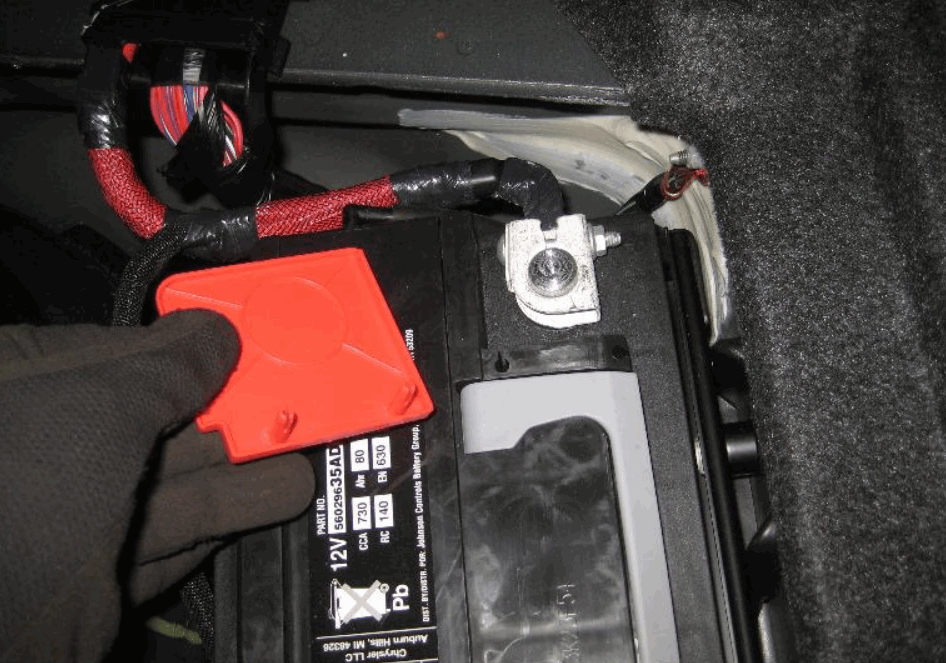
The Dodge Charger battery is located beneath the trunk floor on most models built from 2006 onward. Unlike many sedans, the Charger does not place the battery under the hood. Dodge moved it to the rear of the vehicle to improve balance and protect it from engine heat. This design also creates more space inside the engine compartment for other components.
Open the trunk and lift the cargo floor panel to reach the battery compartment. Most models include a removable cover that protects the battery from dust and accidental damage. Some trim levels also use a foam insert around the battery. Remove the cover to expose the battery, the hold-down bracket, and both battery terminals. This layout gives you direct access for inspection, testing, or replacement.
Many owners search under the hood first because that is where most vehicles store the battery. However, the Dodge Charger only places the jump-start terminals in the engine bay. Dodge designed these terminals to let you jump-start the vehicle without opening the battery compartment. Knowing this difference prevents confusion and saves time when the battery loses power.
Most Dodge Charger model years use the same battery location, although small design changes exist between generations. For example, some performance trims include extra covers or nearby electrical components. Even so, you will still find the battery beneath the trunk floor. Once you know where to look, you can access it within a few minutes for regular maintenance or battery replacement.
Why Is the Dodge Charger Battery Located in the Trunk?
Dodge places the battery in the trunk to improve vehicle performance, increase component durability, and optimize engine bay space. This layout distributes weight more evenly between the front and rear axles. Better weight balance helps the Charger remain more stable during acceleration, braking, and cornering. As a result, the vehicle delivers more predictable handling than a front-heavy design.
The trunk also protects the battery from excessive engine heat. High temperatures accelerate chemical reactions inside a battery and shorten its service life. By moving the battery away from the engine, Dodge reduces heat exposure during daily driving. A cooler operating environment helps the battery maintain stable voltage and supports more consistent starting performance throughout the year.
Another advantage of a rear-mounted battery is the additional space it creates under the hood. Modern Dodge Charger models contain large engines, cooling systems, electrical modules, and air intake components. Relocating the battery gives engineers greater flexibility when arranging these systems. It also provides easier access to several engine components during routine maintenance and repairs.
Although the trunk location offers clear benefits, it also changes how owners perform basic maintenance. You cannot access the battery by opening the hood because the engine compartment only contains remote jump-start terminals. Likewise, replacing the battery requires opening the trunk and removing the protective floor panel first. Learning this layout helps owners avoid unnecessary searching and complete maintenance more efficiently.
Overall, the trunk-mounted battery reflects a practical engineering decision rather than an unusual design choice. It improves weight distribution, reduces heat exposure, and frees valuable engine bay space without making routine maintenance significantly more difficult. Once owners understand the system, accessing and servicing the battery becomes a straightforward process.
How Do You Access the Battery in a Dodge Charger?
Accessing the Dodge Charger battery only takes a few minutes because the battery sits beneath the trunk floor. Before you begin, park the vehicle on a level surface and switch off the engine. Remove the key or key fob from the vehicle to prevent accidental electrical activity. If the engine has been running, allow it to cool before working around any electrical components.
Open the trunk and lift the cargo floor panel to expose the storage compartment. Most Dodge Charger models include a removable carpeted floor that lifts without special tools. After raising the panel, locate the protective battery cover near the rear section of the trunk. Some models include a foam insert or plastic shield around the battery. Remove these pieces carefully and place them aside to create a clear working area.
Once the battery is visible, inspect the terminals and cables before touching any components. Look for corrosion, loose connections, or damaged wiring that could affect battery performance. If you notice white or blue residue around the terminals, clean the area before removing the battery. A clean connection improves electrical flow and reduces the risk of starting problems.
When you are ready to disconnect the battery, loosen the negative terminal first to reduce the chance of creating an electrical short. Next, disconnect the positive terminal and remove the hold-down bracket that secures the battery in place. Keep all bolts and fasteners in a safe location because you will need them during reinstallation. Lift the battery carefully, as most automotive batteries weigh between 35 and 50 pounds.
After removing the battery, inspect the battery tray for dirt, moisture, or corrosion. Wipe the surface clean before installing a new battery or reconnecting the existing one. Taking a few extra minutes to inspect the compartment helps prevent future electrical issues and ensures the new battery sits securely inside the vehicle.
How Do You Replace the Battery in a Dodge Charger?
Replacing the Dodge Charger battery is a straightforward task when you follow the correct sequence. Start by confirming that the replacement battery matches your vehicle’s specifications. Check the group size, battery type, cold cranking amps (CCA), and terminal layout before installation. Using the correct battery helps maintain reliable starting performance and supports the vehicle’s electrical system.
After accessing the battery compartment, disconnect the negative terminal first. Next, disconnect the positive terminal and remove the hold-down bracket. Lift the old battery straight out of the compartment with both hands because automotive batteries are heavy. Avoid tilting the battery during removal, as this may cause acid to leak from a damaged case.
Before installing the new battery, inspect the battery tray and cable terminals. Remove any dirt or corrosion with a battery cleaning brush or a terminal cleaner. Dry the compartment completely before placing the new battery into position. A clean mounting surface helps the battery sit securely and reduces the risk of poor electrical connections.
Lower the new battery into the tray and make sure the terminals face the correct direction. Reinstall the hold-down bracket to keep the battery firmly in place while driving. Next, connect the positive terminal first and tighten the connection securely. Finish by connecting the negative terminal and confirming that both cables fit tightly without excessive movement. This installation order reduces the chance of accidental short circuits.
Start the engine after completing the installation. The engine should crank normally, and the dashboard should display no battery-related warning lights. Reset the clock, radio presets, or other memory settings if they were cleared during the replacement. Finally, reinstall the battery cover, replace the trunk floor panel, and close the trunk. Your Dodge Charger is now ready for normal driving with a properly installed battery.
Where Are the Jump Start Terminals on a Dodge Charger?
The jump-start terminals on a Dodge Charger are located under the hood, even though the battery sits beneath the trunk floor. Dodge added these remote terminals to make jump-starting safer and more convenient. You do not need to remove the trunk floor or access the battery compartment when the battery loses power. Instead, you can connect jumper cables directly to the designated terminals in the engine bay.
Open the hood and locate the positive jump-start terminal near the fuse box. A red plastic cover with a plus (+) symbol identifies the positive connection point. The negative connection is usually a dedicated grounding stud or an unpainted metal surface attached to the engine or chassis. These locations provide a secure electrical path and reduce the risk of damaging sensitive electronic components.
Connect the red jumper cable to the positive terminal on the Dodge Charger first. Next, attach the other end of the red cable to the positive terminal of the assisting battery. Connect the black cable to the negative terminal of the assisting battery, then attach the remaining end to the designated ground point on the Charger. This sequence reduces the chance of sparks near the battery and helps protect the vehicle’s electrical system.
Start the assisting vehicle and allow it to run for a few minutes before attempting to start the Dodge Charger. If the engine starts successfully, let it idle for several minutes to allow the alternator to recharge the battery. Remove the jumper cables in the reverse order of installation, beginning with the ground connection and ending with the positive cable. Avoid allowing the cable clamps to touch each other during removal.
If the Dodge Charger does not start after several attempts, the battery may no longer hold a charge or another electrical problem may be preventing the engine from starting. In that case, test the battery voltage and charging system before replacing the battery. Identifying the root cause helps prevent repeated starting problems and unnecessary battery replacements.
What Battery Does a Dodge Charger Use?
Choosing the correct battery for a Dodge Charger ensures reliable starting performance and stable electrical operation. Most Dodge Charger models use an AGM (Absorbent Glass Mat) battery because it delivers higher starting power and supports modern electrical systems. However, the exact battery specification depends on the model year, engine size, and factory equipment. Checking your owner’s manual or the original battery label helps you confirm the correct replacement before making a purchase.
Battery Group Size is one of the most important specifications to verify. The group size determines the battery’s physical dimensions and terminal position. Installing the wrong size may prevent the battery from fitting securely inside the battery tray or connecting properly to the factory cables. Always select a battery that matches the manufacturer’s recommended group size to ensure a safe and reliable installation.
Cold Cranking Amps (CCA) also play a critical role in battery performance. CCA measures how much power a battery can deliver during cold weather starts. A higher CCA rating helps the engine crank more easily in low temperatures, while a lower rating may cause slow starting or repeated starting failures. Choosing a battery that meets or exceeds the factory CCA specification provides dependable performance throughout the year.
Battery capacity is another factor worth considering. Reserve Capacity (RC) indicates how long the battery can supply electrical power if the charging system stops working. A battery with adequate reserve capacity can keep essential systems operating longer during an alternator failure. This additional capacity improves reliability and reduces the risk of becoming stranded because of an unexpected charging problem.
Several well-known manufacturers produce high-quality replacement batteries for the Dodge Charger. Brands such as Interstate, Optima, DieHard, ACDelco, and Bosch offer AGM batteries that meet or exceed original equipment standards. Selecting a reputable brand, installing the correct battery specification, and following the recommended maintenance schedule will help maximize battery life and ensure consistent starting performance.
What Are the Signs of a Failing Dodge Charger Battery?
A failing Dodge Charger battery usually shows several warning signs before it stops working completely. Recognizing these symptoms early can help you avoid unexpected breakdowns and costly repairs. In most cases, the battery loses its ability to store and deliver enough electrical power as it ages. Replacing it before total failure reduces the risk of getting stranded with a vehicle that will not start.
One of the first signs is slow engine cranking. The engine may take longer than usual to start, especially after the vehicle has been parked overnight. Instead of starting immediately, the starter motor may sound weak or sluggish. This symptom often indicates that the battery can no longer supply enough current to crank the engine efficiently.
Another common warning sign is a battery warning light on the dashboard. Although this light does not always mean the battery has failed, it indicates a problem within the charging system. A weak battery, a failing alternator, or loose battery connections can all trigger the warning light. Testing both the battery and charging system helps identify the exact cause before replacing any parts.
Electrical components may also begin to perform poorly as the battery weakens. Headlights can appear dim, interior lights may flicker, and power accessories might respond more slowly than usual. You may also notice problems with the infotainment system, power windows, or climate controls. These symptoms occur because the battery cannot provide stable voltage to the vehicle’s electrical system.
Battery age is another reliable indicator. Most Dodge Charger batteries last three to five years under normal driving conditions. However, extreme temperatures, frequent short trips, and long periods of inactivity can reduce battery life. If your battery is approaching the end of its expected lifespan, scheduling a battery test is often more practical than waiting for a complete failure.
Regular inspections help detect battery problems before they become serious. Check the battery terminals for corrosion, inspect the cables for damage, and monitor the battery voltage during routine maintenance. Replacing a weak battery at the right time improves starting reliability and helps protect other electrical components from unnecessary strain.
Frequently Asked Questions About Dodge Charger Battery Location
Can I replace the Dodge Charger battery myself?
Yes, you can replace the battery yourself if you have basic mechanical skills and the proper tools. The process is straightforward because the battery is located beneath the trunk floor instead of inside the engine bay. Always disconnect the negative terminal first and reconnect the positive terminal first during installation. Following the correct sequence helps prevent electrical damage and ensures a safe replacement.
Can I charge the battery without removing it?
Yes, you can charge the battery while it remains inside the vehicle. Connect a compatible battery charger directly to the battery terminals in the trunk or use the remote charging points if your charger supports that method. Make sure the ignition is off before charging, and follow the charger’s instructions to avoid overcharging the battery.
Can a dead battery prevent the trunk from opening?
Yes, a completely discharged battery can make it difficult to open the trunk, especially if the electronic trunk release does not receive enough power. Most Dodge Charger models include a mechanical key inside the key fob or an emergency trunk access method. Refer to your owner’s manual if the electronic release does not operate.
How long does a Dodge Charger battery last?
A Dodge Charger battery typically lasts three to five years under normal driving conditions. Battery life depends on climate, driving habits, and maintenance. Frequent short trips, extreme temperatures, and long periods without driving can shorten its lifespan. Regular battery testing helps identify a weak battery before it fails unexpectedly.
How much does it cost to replace a Dodge Charger battery?
The cost of replacing a Dodge Charger battery depends on the battery type and brand. Most replacement batteries range from $180 to $350, while professional installation may add $30 to $100 in labor charges. Premium AGM batteries generally cost more than conventional flooded batteries, but they also provide better durability and support modern electrical systems.
Conclusion
Finding the Dodge Charger battery location is much easier once you know that the battery sits beneath the trunk floor instead of under the hood. This design improves weight distribution, protects the battery from excessive engine heat, and creates additional space inside the engine compartment. Although the layout differs from many other vehicles, accessing the battery becomes simple after removing the trunk floor panel.
Understanding how to locate, access, maintain, and replace the battery helps you complete routine maintenance with confidence. It also allows you to use the remote jump-start terminals correctly and recognize early signs of battery failure before they lead to starting problems. By choosing the correct battery specifications and following the recommended maintenance schedule, you can improve reliability, extend battery life, and keep your Dodge Charger ready for daily driving in every season.