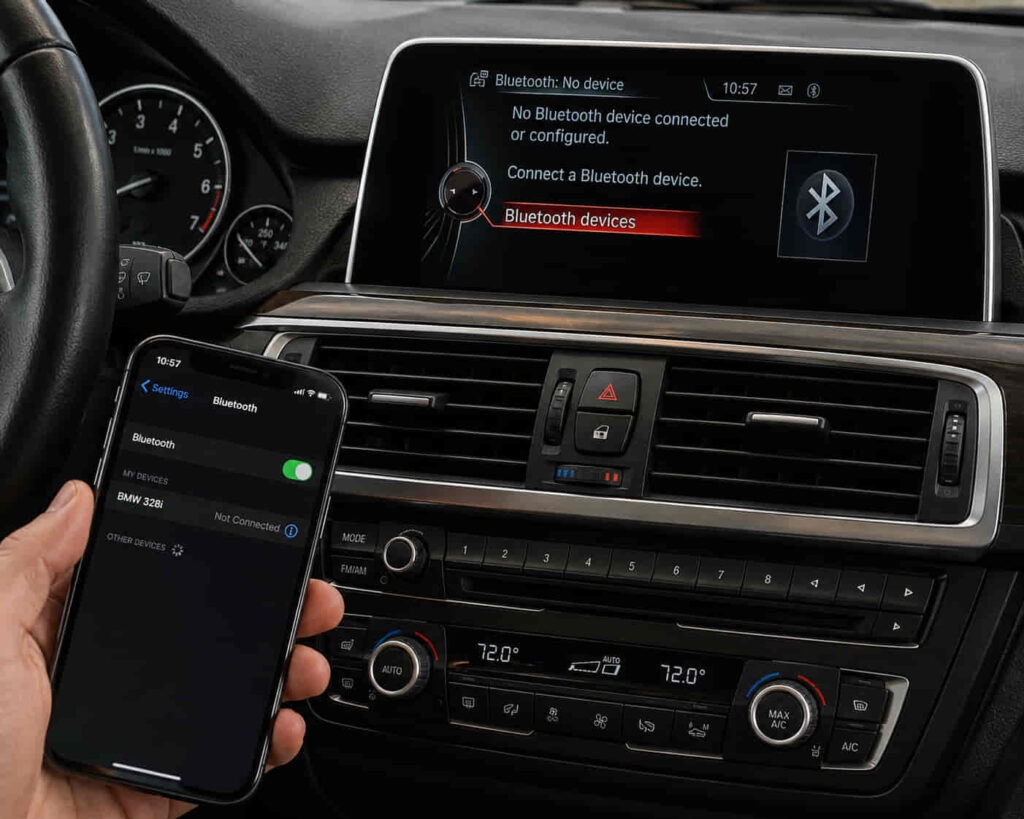
BMW Bluetooth can stop working because of a pairing problem, conflicting saved-device data, incorrect Bluetooth settings, a phone-side issue, an iDrive problem, software compatibility, or a fault within the vehicle’s communication system. The correct fix depends on how the problem appears. A phone that will not pair with the vehicle represents a different failure state from a phone that connects successfully but cannot play Bluetooth audio, make calls, or maintain a stable connection.
Bluetooth communication also depends on both sides of the connection. The BMW infotainment system must recognize and communicate with the smartphone, while the phone must maintain the corresponding Bluetooth connection and permitted functions. A problem with stored pairing information, device configuration, smartphone software, or iDrive can therefore interrupt Bluetooth operation without indicating that a physical component has failed.
Troubleshooting should begin with the connection and configuration layers before moving toward hardware diagnosis. Re-establishing the pairing, checking the intended Bluetooth functions, comparing behavior with another phone, and evaluating the infotainment system can help narrow the source of the fault. If the problem remains after pairing, phone-side, iDrive, and software causes have been excluded, a vehicle communication-system fault becomes more relevant. This article explains seven reasons your BMW Bluetooth may not be working and how each cause changes the appropriate diagnostic direction.
Why can an old Bluetooth pairing stop your BMW from connecting?
An old Bluetooth pairing can prevent your BMW from connecting correctly when the saved connection information on the vehicle and smartphone no longer establishes a valid Bluetooth session. Both devices retain pairing information after the initial setup, allowing them to recognize each other during later connections. If that stored relationship becomes inconsistent, the phone may still appear in the BMW’s device list even though the connection no longer works as expected.
This problem can appear in several ways. The smartphone may be visible in iDrive but fail to connect, the vehicle may repeatedly attempt a connection without completing it, or a previously working phone may stop connecting automatically. These symptoms indicate a connection-state problem, but they do not by themselves prove that the BMW’s Bluetooth hardware has failed. The saved pairing should be treated as one of the first variables to eliminate before moving toward software or hardware diagnosis.
Removing the existing pairing from both sides and establishing a new connection can resolve the problem when outdated or inconsistent pairing data is responsible. Deleting the phone only from the BMW may leave the vehicle stored on the smartphone, while removing only the BMW from the phone leaves the corresponding device information in the vehicle. Clearing the old relationship from both devices creates a clean pairing state before they attempt to recognize each other again.
After a new pairing is established, the relevant Bluetooth functions should be tested rather than assuming that a successful connection means every feature is working. A phone can establish a Bluetooth relationship while audio streaming, telephone functions, or another supported feature still behaves differently. If the same failure remains after a clean pairing, troubleshooting should move beyond stored pairing data toward settings, phone-side behavior, iDrive, software, or vehicle-side communication faults.
Can too many saved devices cause BMW Bluetooth problems?
Multiple saved devices can contribute to BMW Bluetooth connection problems when the vehicle attempts to connect with a different stored device or the current device configuration does not match the driver’s intended connection. Saving several phones does not automatically cause Bluetooth to fail, but it introduces additional connection states that can complicate automatic device selection and troubleshooting.
This becomes particularly relevant in a BMW used by several drivers. The infotainment system may recognize more than one previously paired smartphone when those devices are present in or near the vehicle. If the expected phone does not connect while another saved device does, the problem differs from a complete Bluetooth-system failure. The Bluetooth system is communicating, but the active-device configuration is not producing the connection the driver expects.
Removing unused devices can simplify this connection environment. The objective is not to assume that BMW Bluetooth has a universal maximum beyond which it stops working, but to eliminate obsolete pairings and reduce ambiguity about which phone the vehicle should connect to. Once unnecessary devices have been removed, the intended smartphone can be paired or selected again and its functions tested.
Saved-device configuration also helps with diagnosis. If one phone connects normally while another consistently fails, the result shifts attention toward the affected phone, its pairing information, settings, or compatibility state. If no known-compatible device can establish the expected Bluetooth functions, vehicle-side causes become more relevant. Comparing device behavior therefore helps separate an individual pairing problem from a broader BMW Bluetooth problem.
Deleting saved devices should not be treated as a universal repair for every Bluetooth symptom. A BMW that connects successfully but produces no Bluetooth audio, repeatedly loses a newly created connection, or does not make Bluetooth functionality available may require a different diagnostic path. The purpose of simplifying saved devices is to eliminate connection conflicts before moving to configuration, software, iDrive, or hardware causes.
Read more: BMW N20 Engine Problems
Can incorrect Bluetooth settings stop your BMW from working with your phone?
Yes, incorrect Bluetooth settings can make BMW Bluetooth appear not to work even when the vehicle and smartphone have successfully established a connection. Pairing a phone does not necessarily mean every supported Bluetooth function is configured as the driver expects. Telephone calls, contacts, and audio streaming represent different functions, so a connection can exist while one intended feature remains unavailable.
This distinction is particularly important when the phone appears as connected in the BMW but music does not play through the vehicle. In that situation, the failure state differs from a phone that cannot pair at all. The BMW already recognizes the device, so troubleshooting should focus on whether the intended audio function is enabled, whether the phone is selected as the appropriate media source, and whether the connection is configured for the function the driver is trying to use.
The same principle applies to telephone functions. A smartphone can maintain a Bluetooth connection while call-related behavior does not operate as expected because the relevant function or permission is not available to the connection. The useful diagnostic relationship is therefore successful pairing → verify intended Bluetooth function → verify configuration → test the specific feature. This prevents a function-level problem from being misclassified as complete Bluetooth failure.
Settings on both sides of the connection matter. The BMW infotainment system determines how the paired device is used by the vehicle, while the smartphone controls its own Bluetooth state and applicable permissions. A configuration change on either device can therefore alter behavior without requiring a physical repair to the BMW.
If the correct functions are enabled and the problem remains, repeatedly changing the same setting provides little additional diagnostic value. Troubleshooting should then move toward the smartphone state, pairing data, iDrive operation, or software compatibility. A connected phone with one unavailable feature should be diagnosed differently from a BMW that cannot detect or connect to Bluetooth devices at all.
Can your iPhone or Android phone cause BMW Bluetooth connection problems?
Yes, an iPhone or Android phone can be responsible for a BMW Bluetooth connection problem because Bluetooth communication depends on both the smartphone and the vehicle operating correctly. A connection failure that appears inside the BMW does not establish that the vehicle is the source of the fault. The phone’s Bluetooth state, stored pairing information, software condition, and compatibility with the vehicle’s infotainment system can all affect the connection.
A phone-side problem becomes more relevant when the BMW works normally with another smartphone. For example, if a second compatible phone pairs and maintains the expected Bluetooth functions while the original device consistently fails, the vehicle has demonstrated that its Bluetooth system can establish a connection. This does not identify the exact phone-side fault, but it substantially narrows the diagnostic scope.
Restarting the affected smartphone can also help distinguish a temporary device state from a persistent connection problem. A phone can experience a software or Bluetooth-service condition that interferes with communication even though Bluetooth appears enabled in its settings. If restarting the device restores normal BMW connectivity, replacing vehicle hardware would clearly not address the mechanism that caused the failure.
Changes to the smartphone can provide additional context. A Bluetooth problem that begins after replacing the phone, changing relevant settings, or updating its operating system should be evaluated in relation to that change. The timing does not prove that the phone software caused the problem, but it establishes a useful diagnostic sequence because the connection operated differently before and after the device environment changed.
Testing another phone is therefore more than a workaround. It functions as a diagnostic comparison between two devices using the same BMW Bluetooth system. One phone fails while another works → investigate the affected phone and its connection state; multiple compatible phones fail in the same BMW → vehicle-side causes become more relevant. This comparison reduces unnecessary troubleshooting by narrowing which side of the Bluetooth connection requires further attention.
If phone-side checks, a clean pairing, and the correct Bluetooth settings do not restore operation, the diagnostic path should move toward the BMW infotainment system. At that point, iDrive state, vehicle software, and eventually communication hardware become more relevant than repeatedly modifying the smartphone.
Can an iDrive problem cause BMW Bluetooth to stop working?
Yes, an iDrive problem can cause BMW Bluetooth to stop working correctly when the infotainment system is unable to manage pairing, device recognition, or Bluetooth functions as expected. On BMW vehicles where Bluetooth functions are integrated with iDrive, the infotainment system acts as the vehicle-side interface for connecting and managing smartphones. A temporary system problem can therefore affect Bluetooth even when the phone itself is operating normally.
An iDrive-related problem can appear differently from a simple pairing failure. The smartphone may already be saved in the vehicle but fail to connect, Bluetooth functions may become temporarily unavailable, or the infotainment system may stop responding normally when the driver attempts to manage connected devices. These symptoms make vehicle-side system state more relevant, particularly after the phone, pairing information, and Bluetooth settings have already been checked.
Restarting the infotainment system can help when the failure is caused by a temporary software state. A restart allows the system to initialize again without assuming that the stored vehicle configuration or communication hardware is defective. The exact restart procedure can differ between BMW models and iDrive generations, so troubleshooting should follow the procedure appropriate for the specific vehicle rather than applying one button sequence universally.
An iDrive restart should also be distinguished from a broader factory reset. Restarting the system is intended to reload its current operating state, whereas resetting vehicle or infotainment settings can remove stored preferences and other data. Erasing a wider set of settings is therefore not the appropriate first response to every Bluetooth connection problem, especially when a simpler restart or new pairing has not yet been tested.
The result of the restart provides diagnostic information. If Bluetooth operation returns immediately after iDrive restarts, a temporary infotainment state becomes more plausible than an immediate hardware failure. If the problem persists across clean pairings, multiple compatible phones, correct settings, and repeated system operation, the investigation should move toward software compatibility or a deeper vehicle-side fault.
Can outdated software cause BMW Bluetooth problems?
Yes, software can contribute to BMW Bluetooth problems because a Bluetooth connection depends on interaction between the vehicle’s infotainment software and the smartphone’s operating system. The two systems must recognize each other and exchange supported Bluetooth functions correctly. Changes on either side can therefore affect a connection that previously operated normally.
Software becomes particularly relevant when Bluetooth behavior changes after a smartphone operating-system update, a new phone is introduced, or the vehicle’s infotainment environment changes. For example, a phone that previously connected normally but begins experiencing connection problems after a software change creates a useful diagnostic timeline. That timing does not prove the update caused the fault, but it identifies compatibility and software state as areas worth evaluating.
The reverse situation also provides useful evidence. If several phones experience the same Bluetooth problem in one BMW while those phones connect normally to other Bluetooth devices, the vehicle side deserves greater attention. If only one phone is affected while another compatible device works normally with the BMW, the smartphone or interaction between that specific phone and vehicle becomes a stronger diagnostic direction.
A software update should not be presented as a guaranteed Bluetooth repair. Updating software is relevant when an available update addresses compatibility, stability, or functionality applicable to the vehicle and device involved. A persistent hardware fault will not be corrected simply by installing newer software, just as a phone-side configuration problem does not necessarily require changes to the BMW.
Software diagnosis should therefore follow the evidence produced by earlier troubleshooting. Pairing information, Bluetooth settings, phone behavior, and iDrive state should already have been evaluated before a deeper vehicle-side problem is assumed. The useful sequence is connection failure → eliminate pairing and configuration causes → compare devices → evaluate iDrive → investigate software compatibility → consider hardware diagnosis.
When Bluetooth remains unavailable after these software and configuration layers have been addressed, repeatedly deleting devices or restarting the system becomes less useful. At that stage, the possibility of a fault within the vehicle’s communication hardware becomes more relevant and provides the final diagnostic direction for a persistent BMW Bluetooth problem.
Can a communication module fault cause BMW Bluetooth to stop working?
Yes, a fault within the BMW communication hardware can cause Bluetooth to stop working when the vehicle can no longer establish or manage the required wireless connection correctly. However, a hardware fault should generally become a stronger diagnostic consideration only after pairing data, Bluetooth settings, the smartphone, iDrive operation, and relevant software conditions have been evaluated. Bluetooth failure alone does not prove that a communication module needs replacement.
A hardware-related problem becomes more relevant when the failure affects multiple compatible smartphones in the same vehicle. If different phones cannot establish the expected Bluetooth functions even after old pairings have been removed and new connections attempted, the fault is less likely to be limited to one smartphone. The same reasoning applies when Bluetooth functionality remains unavailable after the infotainment system has been restarted and configuration-related causes have been excluded.
The exact vehicle-side architecture varies between BMW models, production periods, and infotainment generations. For this reason, the component responsible for Bluetooth communication should be identified for the specific vehicle before a module is diagnosed or replaced. Referring to every BMW Bluetooth hardware problem as the same module would ignore differences in how communication and infotainment functions are implemented across BMW platforms.
Persistent failure can also involve more than the physical module itself. Power supply, electrical connections, wiring, network communication, or another supporting fault can prevent a functional component from communicating correctly with the rest of the vehicle. A diagnostic scan and system-level testing can therefore provide more useful evidence than replacing communication hardware solely because Bluetooth has stopped working.
The pattern of the failure helps determine when professional diagnosis is justified. A single phone that will not connect while another works normally points away from a complete vehicle-side Bluetooth failure. In contrast, Bluetooth remaining unavailable across multiple devices after pairing, settings, phone-side, iDrive, and software causes have been addressed makes a deeper vehicle-side fault more plausible.
The correct troubleshooting sequence is pairing and saved-device data → Bluetooth settings → smartphone state → iDrive operation → software compatibility → vehicle communication hardware. Following this order prevents a relatively simple connection problem from being mistaken for an expensive component failure while still providing a clear path toward hardware diagnosis when user-level troubleshooting does not restore Bluetooth operation.
A confirmed communication-system fault should be repaired according to the component and electrical condition identified during diagnosis rather than the Bluetooth symptom alone. This completes the distinction that applies throughout BMW Bluetooth troubleshooting: “Bluetooth not working” describes the symptom, while pairing, configuration, software, electrical, and hardware faults describe possible causes. Identifying which layer has failed is what determines the appropriate repair.