Walking away from your Honda and expecting the doors to lock automatically is a small convenience that quickly becomes important. When the system suddenly stops working, the problem can feel confusing and frustrating. You may hear no confirmation sound, notice that one door stays unlocked, or discover that the vehicle only locks correctly on certain occasions. This can create a real security concern, especially if you rely on the feature every day.
The good news is that Honda Walk Away Auto Lock not working does not always mean that your vehicle has a serious electrical problem. In many cases, the cause is simple. The feature may be turned off, a door may not be fully closed, the key fob battery may be weak, or another smart key may be too close to the vehicle. Signal interference, a weak car battery, or a faulty door sensor can also affect how the system responds.
This guide explains 12 common causes and shows you how to check each one in a logical order. You will learn how the system works, how to reset it, what to inspect after a battery replacement, and when professional service may be necessary. By starting with the easiest solutions first, you may be able to restore the feature without replacing expensive parts or visiting a dealership.
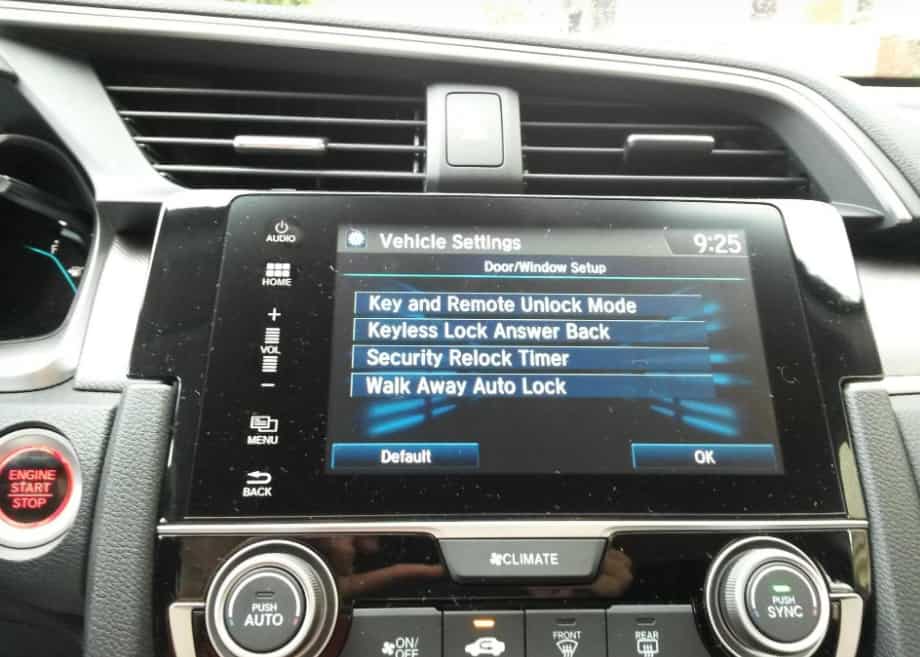
How Honda Walk Away Auto Lock Works
Honda Walk Away Auto Lock makes daily driving easier by locking the doors automatically after you leave the vehicle with the smart key. You do not need to press the lock button or touch the door handle. Instead, the system tracks the smart key and locks the vehicle when every required condition is met. Honda combines Smart Entry, proximity sensors, door latch sensors, and the body control module to make this feature work smoothly.
The process starts after you switch off the engine and leave the vehicle with the registered smart key. Close every door, the trunk, and the hood completely. The proximity sensors then check whether the key has moved outside the detection range. At the same time, the control module verifies that no programmed key remains inside the cabin. Once every condition is satisfied, the system locks all doors automatically. Most Honda models also provide a confirmation beep or flashing lights to show that the locking process has finished.
Many drivers mistake Walk Away Auto Lock for other locking features. However, each function works differently. Remote locking requires you to press a button on the key fob. Automatic door locking usually activates when the vehicle begins moving. Walk Away Auto Lock depends on the smart key leaving the vehicle after every door has closed properly. Even if the key fob buttons still work, a problem with a sensor or another electronic component can stop the automatic locking feature.
Keep in mind that Honda does not offer this feature on every model or trim level. Menu names and settings may also differ between production years. Understanding how the system operates helps you troubleshoot problems more quickly and avoid replacing parts that still work correctly.
The Walk Away Auto Lock Feature Is Disabled
One of the most common reasons why Honda Walk Away Auto Lock is not working is that the feature has been turned off. Many drivers assume the system is always active, but that is not always true. Honda allows owners to customize several convenience features through the vehicle settings menu. During routine maintenance, a software update, or a battery replacement, these settings may return to their default values. In some cases, another driver may disable the feature without realizing it.
Before looking for mechanical or electrical problems, confirm that Walk Away Auto Lock is still enabled. This simple check can save both time and money. Open the vehicle settings menu through the infotainment screen or the driver information display. Next, look for the door setup or keyless access settings. Depending on your Honda model, you may also find the option under Vehicle Settings or Smart Entry. If Walk Away Auto Lock is turned off, switch it back on and save the new setting before leaving the menu.
After enabling the feature, test it under normal conditions. Turn off the engine and take only one registered smart key with you. Close every door, the trunk, and the hood completely. Wait a moment before walking away from the vehicle. Listen for the confirmation beep or watch for the hazard lights to flash. Finally, return to the vehicle and check that every door is locked.
If the system begins working again, the problem was only a disabled setting. No additional repairs or replacement parts are necessary. However, if Honda Walk Away Auto Lock is still not working after you enable the feature, continue with the next troubleshooting step. A simple setting is often the easiest problem to fix, but it is also one of the most common causes that drivers overlook.
A Door Is Not Fully Closed
An incompletely closed door often prevents Honda Walk Away Auto Lock from working. Many drivers immediately suspect the smart key or the vehicle settings. However, they often ignore the doors. Even a small gap between the door and the body can interrupt the locking sequence. Before locking the vehicle, the system checks every door. If it detects one open door, it cancels the command to protect the vehicle.
This issue usually appears after carrying groceries, loading luggage, or helping passengers leave the vehicle. A seat belt, a backpack, or loose clothing can stop the latch from closing completely. From the outside, the door may look secure. In reality, the latch has not reached its fully locked position. As a result, the vehicle may beep without locking the doors. You may also notice an open door warning on the instrument panel.
Open every door and close it firmly. Listen for the latch to click into place. Pay extra attention to the rear doors because drivers often miss them during a quick inspection. Then check the instrument cluster for any warning message. If the warning stays on, inspect the latch area carefully. Remove dirt, leaves, ice, or any small object that could block the mechanism.
Door alignment also plays an important role. Daily use, worn hinges, or a minor impact can move the door slightly out of position. When this happens, the latch sensor cannot confirm that the door has closed completely. You may also notice that one door requires extra force before it closes correctly. If that happens, inspect the striker and latch for wear or damage.
Test Walk Away Auto Lock again after checking every door. Many Honda owners solve the problem within a few minutes because one door simply failed to latch completely. If the feature still refuses to work, continue to the next troubleshooting step before replacing any parts.
The Trunk or Hood Is Not Properly Latched
Many Honda owners check every door but forget about the trunk and the hood. Both components play an important role in the Walk Away Auto Lock system. Before locking the vehicle, the control module confirms that every protected opening has closed completely. If the trunk or hood remains slightly open, the system stops the locking process to prevent possible safety issues.
This problem often occurs after loading luggage, checking the engine, or removing items from the cargo area. You may close the trunk gently and assume it has latched correctly. However, the latch may not engage fully. The same situation can happen after routine maintenance if the hood does not lock into its normal position. Even a small gap can prevent the system from completing its security check.
Start by opening the trunk and closing it firmly. Repeat the same step with the hood. Listen for a solid click and check that both panels sit flush with the surrounding body. Next, look at the instrument cluster for any warning message. A trunk open or hood open warning often points directly to the source of the problem.
If no warning appears, inspect both latch mechanisms carefully. Dirt, leaves, road salt, or other debris can prevent the latch from moving freely. Clean the area with a soft brush or cloth if necessary. Also check for signs of rust, physical damage, or excessive wear that could affect normal operation.
After completing these checks, test Walk Away Auto Lock again. Turn off the engine, close every opening, and walk away with only one registered smart key. If the doors lock normally, the trunk or hood caused the problem. If the feature still fails, continue to the next possible cause. Following a logical troubleshooting order helps you find the real issue faster and avoids unnecessary repairs.
The Smart Key Battery Is Weak
A weak smart key battery can prevent Honda Walk Away Auto Lock from working correctly. The key fob may still unlock the doors or start the engine, but it may not transmit a strong and consistent signal after you leave the vehicle. When the signal becomes unstable, the system cannot determine the key’s exact location. As a result, it may skip the automatic locking sequence.
Most Honda key fob batteries last between two and four years. Battery life depends on driving habits, climate, and daily use. Frequent use of the remote buttons can shorten battery life. Extreme temperatures can also reduce battery performance. If you notice that the remote works only at a short distance or responds inconsistently, the battery may no longer provide enough power.
Check for warning messages on the instrument cluster before replacing the battery. Many Honda models display a Smart Key Battery Low message when the battery begins to lose power. Even if you do not see this warning, replacing the battery remains a quick and inexpensive troubleshooting step.
Open the key fob carefully and install a new battery with the correct specifications. Most Honda smart keys use a CR2032 coin cell battery, although some models require a different type. Confirm the battery number before you buy a replacement. After installing the new battery, test every remote function and then try Walk Away Auto Lock again.
If the feature starts working normally, the weak battery caused the problem. If nothing changes, continue with the next troubleshooting step. A fresh battery eliminates one of the most common causes and helps you focus on other parts of the Smart Entry system.
Another Smart Key Remains Inside or Near the Vehicle
Another smart key near the vehicle can confuse the Walk Away Auto Lock system. Honda designs this feature to prevent accidental lockouts. If the system detects a registered smart key inside the cabin or very close to the vehicle, it assumes that someone may still have access to the car. Instead of locking the doors, it cancels the process.
This situation happens more often than many drivers expect. A second key may remain inside a backpack, a purse, or the center console. Another family member may also stand near the vehicle while carrying a registered smart key. Because the system detects both keys, it cannot confirm that every authorized driver has left the area. As a result, Honda Walk Away Auto Lock may not activate.
Start by collecting every registered smart key for the vehicle. Remove any extra keys from the cabin and move them several feet away from the car. Next, keep only one key with you and test the feature again. Turn off the engine, close every door, and walk away at a normal pace. Wait for the confirmation beep or watch for the hazard lights before checking the door locks.
If the system works after you remove the extra key, you have already found the cause. You do not need to replace the key fob or repair any electronic components. Simply avoid leaving another registered key inside the vehicle or too close to it during normal operation.
If Walk Away Auto Lock still fails with only one smart key nearby, continue to the next troubleshooting step. Eliminating key detection problems early makes the remaining diagnosis much easier and prevents unnecessary repairs.
Signal Interference Blocks Smart Key Communication
Signal interference can interrupt communication between the smart key and your Honda. The Walk Away Auto Lock system depends on a stable wireless signal to detect when you leave the vehicle. If another device disrupts that signal, the system may fail to recognize that the key has moved outside the detection range. As a result, the doors may remain unlocked.
Many everyday objects can create radio frequency interference. Wireless routers, mobile phone towers, security systems, garage door openers, and large electronic equipment all produce radio signals. Parking garages, apartment buildings, shopping centers, and busy business districts often contain many of these devices in a small area. Their combined signals can reduce communication between the smart key and the vehicle.
Start by testing the feature in a different location. Park in an open area away from large buildings and electronic equipment. Turn off the engine, close every door, and walk away with the smart key. If Walk Away Auto Lock works normally, interference likely caused the previous problem.
You should also keep the smart key away from other electronic devices. Avoid placing it next to a mobile phone, wireless earbuds, power bank, or another key fob. These devices can affect signal quality when they remain close together. Although this problem does not happen every day, it can create inconsistent behavior that makes diagnosis more difficult.
If the feature continues to fail in several different locations, another component may cause the problem. Continue with the next troubleshooting step before replacing the smart key or visiting a repair shop. A simple location change often provides the answer and saves both time and money.
The Vehicle Battery Has Low Voltage
A weak vehicle battery can affect more than engine starting. It also supplies power to many electronic systems, including Honda Smart Entry and Walk Away Auto Lock. When battery voltage drops below the normal operating range, the control module may limit certain convenience features to protect the remaining power. As a result, the automatic locking function may stop working even though the engine still starts.
Low battery voltage often develops gradually. You may notice dim interior lights, slow power windows, or delayed responses from the infotainment system. Some drivers also experience warning messages that appear and disappear without a clear pattern. These symptoms can point to an aging battery before it fails completely.
Start by checking the age of the battery. Most car batteries provide reliable performance for three to five years under normal driving conditions. Hot weather, frequent short trips, and long periods without driving can shorten that lifespan. If the battery has reached the end of its expected service life, inspect it before searching for more complex electrical problems.
Use a digital multimeter to measure the battery voltage if you have one. A healthy battery usually reads about 12.6 volts with the engine off. A much lower reading may indicate that the battery needs charging or replacement. You should also inspect the battery terminals for corrosion or loose connections because poor contact can reduce voltage throughout the electrical system.
After charging or replacing the battery, test Walk Away Auto Lock again. Turn off the engine, close every opening, and walk away with one registered smart key. If the feature works normally, low battery voltage caused the problem. If the issue remains, continue with the next troubleshooting step. A systematic approach helps you identify the real cause without replacing parts that still work properly.
A Door Latch Sensor Is Faulty
A faulty door latch sensor can stop Honda Walk Away Auto Lock from working even when every door appears fully closed. Each latch contains a sensor that reports the door status to the body control module. The system waits for a closed signal from every door before it locks the vehicle. If one sensor sends incorrect information, the locking sequence never begins.
Door latch sensors wear out over time. Dust, moisture, vibration, and repeated use can reduce their accuracy. A damaged connector or worn wiring can also interrupt communication between the sensor and the control module. In some cases, the problem appears only once in a while, which makes diagnosis more difficult.
Watch the instrument cluster after you close every door. An open door warning that stays on often points to a faulty latch sensor. You may also notice that the warning appears randomly while driving over bumps or rough roads. These signs suggest that the sensor no longer reports the correct door position.
Inspect the latch area for dirt or debris before replacing any parts. Clean the mechanism with a soft brush and make sure nothing blocks its movement. Then close the door several times and watch whether the warning message disappears. If the same door continues to trigger the warning, the latch sensor or its wiring likely needs further inspection.
A professional scan tool can identify which door reports incorrect data. This test saves time because it helps you locate the faulty sensor without removing every door panel. Once you repair or replace the defective component, test Walk Away Auto Lock again. If the feature still does not operate correctly, continue to the next possible cause. A careful diagnosis reduces repair costs and helps you avoid replacing parts that still function normally.
The Body Control Module Needs a Reset
The body control module manages many electronic features in your Honda, including Walk Away Auto Lock. This module receives information from the smart key, door latch sensors, and other control units. It then decides whether the vehicle should lock automatically. If the module stores incorrect data or encounters a temporary software error, the feature may stop working even though every component functions normally.
Software glitches can occur after a low battery condition, a battery replacement, or an interrupted system update. Electrical fluctuations may also affect the module and cause unexpected behavior. In many cases, the problem appears without any visible warning lights or diagnostic trouble codes. That makes the issue difficult to identify without following a logical troubleshooting process.
Start with a simple reset before replacing any parts. Turn off the engine and remove the smart key from the vehicle. Wait a few minutes before restarting the system. If the problem began after a battery replacement, check that the battery connections remain clean and secure. Loose terminals can interrupt communication between electronic modules and create inconsistent operation.
If the feature still fails, disconnecting the negative battery terminal for a short period may help reset the module on some Honda models. Follow the instructions in your owner’s manual before performing this step. After reconnecting the battery, restore any settings that the vehicle may have lost and test Walk Away Auto Lock again.
If the reset does not solve the problem, the module may require diagnostic testing or a software update. A Honda dealer or a qualified repair shop can check for stored fault codes and confirm whether the body control module operates correctly. Completing these checks before replacing electronic components helps reduce repair costs and prevents unnecessary parts replacement.
The Smart Entry System Needs a Software Update
Software controls every function of the Honda Smart Entry system. It manages communication between the smart key, the body control module, and several electronic sensors. An outdated software version can interrupt that communication and prevent Walk Away Auto Lock from working as expected. Although this problem does not occur as often as a weak key battery or an open door, Honda has released software updates for some models to improve system performance and reliability.
You may notice other electronic features behaving unexpectedly when the software needs attention. The Smart Entry system may respond slowly, the doors may lock inconsistently, or the vehicle may fail to recognize the smart key on the first attempt. These symptoms often appear together because the same software controls multiple convenience features.
Check whether Honda has released a software update for your vehicle. Visit a Honda dealership or ask a qualified repair shop to check the current software version. A technician can compare the installed version with the latest release from Honda. If an update is available, installing it may restore normal operation without replacing any hardware.
Keep your vehicle maintenance records up to date after every software service. This information helps you track previous updates and makes future diagnosis much easier. It also allows technicians to rule out software issues before they inspect electrical components or sensors.
After the update, test Walk Away Auto Lock under normal conditions. Turn off the engine, close every door, and leave the vehicle with one registered smart key. If the doors lock automatically, outdated software caused the problem. If the issue continues, move to the next troubleshooting step. A methodical approach helps you identify the true cause and avoids unnecessary repair expenses.
A Faulty Smart Key or Antenna Causes Communication Problems
A damaged smart key or a faulty antenna can interrupt communication with your Honda. Walk Away Auto Lock depends on a reliable signal to determine when you leave the vehicle. If the signal becomes weak or unstable, the system may fail to detect the correct key position. Without accurate information, it will not lock the doors automatically.
The smart key can develop problems after years of daily use. Drops, water exposure, or physical damage may affect the internal circuit board. A cracked key fob case can also allow moisture and dust to enter. These conditions often reduce signal strength and create inconsistent performance. In some situations, the key works one day and fails the next.
The vehicle also relies on several antennas to communicate with the smart key. These antennas receive and transmit radio signals around the cabin and near the exterior door handles. A damaged antenna, a loose connector, or worn wiring can interrupt that communication. When this happens, the system may struggle to recognize the smart key even though the engine still starts normally.
The easiest way to confirm the problem is to test a second registered smart key. If the second key restores normal operation, the original key likely needs repair or replacement. If both keys produce the same result, inspect the vehicle instead of the key fob. A professional technician can test the antennas with diagnostic equipment and identify the faulty component without unnecessary parts replacement.
After repairing the defective key or antenna, test Walk Away Auto Lock again in a normal parking area. If the feature operates correctly, you have confirmed the source of the problem. If it still fails, only one possible cause remains, and that final step will help complete the diagnosis.
A Failed Body Control Module or Electrical System Fault
A failed body control module or a major electrical fault ranks among the least common causes of Honda Walk Away Auto Lock problems. However, it can prevent the system from working even after you complete every basic troubleshooting step. The body control module coordinates communication between the smart key, door latch sensors, antennas, and several other electronic components. If the module stops processing data correctly, the vehicle cannot complete the automatic locking sequence.
Electrical problems can also interrupt normal operation. Damaged wiring, loose connectors, blown fuses, or poor ground connections may block communication between important control units. Water intrusion can create similar issues, especially after flooding or a windshield leak. These faults often affect more than one electronic feature. For example, you may notice problems with Smart Entry, power door locks, interior lighting, or the security system at the same time.
Inspect the related fuses before scheduling a repair. A blown fuse may interrupt power to the affected circuit and create symptoms that resemble a more serious failure. Next, look for damaged wiring around the battery, fuse box, and door harnesses if you feel comfortable performing a visual inspection. Do not disconnect electronic modules unless you understand the correct repair procedure because improper handling can create additional problems.
If every previous troubleshooting step fails, schedule a professional diagnostic inspection. A qualified technician can scan every control module, check live system data, and test the electrical circuits with specialized equipment. This process identifies the exact source of the problem and prevents unnecessary parts replacement. Accurate testing often saves more money than replacing expensive components based on guesswork.
Once the technician repairs the electrical fault or replaces the failed body control module, test Walk Away Auto Lock again under normal driving conditions. In most cases, the feature returns to normal operation after the underlying electrical problem has been resolved. Following the troubleshooting steps in this guide before seeking professional service helps you eliminate the most common causes first and makes the final diagnosis much faster.
Conclusion
If your Honda Walk Away Auto Lock is not working, do not assume that the system has suffered a major failure. In many cases, the solution is much simpler than expected. A disabled setting, a weak smart key battery, an incompletely closed door, or signal interference can stop the feature from locking the vehicle automatically. By checking each possible cause in a logical order, you can often restore normal operation without replacing expensive parts or making an unnecessary trip to the dealership.
Start with the easiest inspections and move toward the more complex ones only when necessary. This approach saves time, reduces repair costs, and helps you identify the real problem with greater confidence. If the system still fails after you complete every troubleshooting step, a professional diagnostic inspection can identify hidden electrical faults or software issues that require specialized equipment.
Understanding how Honda Walk Away Auto Lock works also helps prevent future problems. Regular battery maintenance, careful handling of the smart key, and routine inspections of the doors, trunk, and hood can keep the system operating as intended for years.
We hope this guide has helped you understand why your Honda Walk Away Auto Lock is not working and how to fix it. If you have experienced a different cause or found another effective solution, share your experience in the comments below. Your insight may help other Honda owners solve the same problem more quickly.