A Mazda Smart Brake System Malfunction warning can catch any driver by surprise. The message often appears without warning and raises an immediate question. Is the vehicle still safe to drive? Many owners also worry about costly repairs or a failing brake system. Fortunately, the warning does not always point to a major mechanical problem. Dirt on the windshield camera, a blocked radar sensor, or a weak battery can trigger the alert.
Mazda designed the Smart Brake Support system to help drivers avoid collisions. The system uses cameras, radar sensors, and electronic control units to monitor the road ahead. When it detects a possible impact, it warns the driver and may apply the brakes if necessary. If one of these components stops working correctly, the system displays a malfunction warning and may disable some safety features. In many cases, the standard braking system continues to operate normally. However, you should never ignore the warning, especially if other brake related warning lights appear at the same time.
This guide explains what a Mazda Smart Brake System Malfunction warning means and why it appears. You will learn the most common causes, warning signs, and diagnostic steps. The article also covers repair options, estimated repair costs, and practical tips to prevent the problem from returning. By the end, you will know when you can continue driving and when your Mazda needs immediate professional attention.
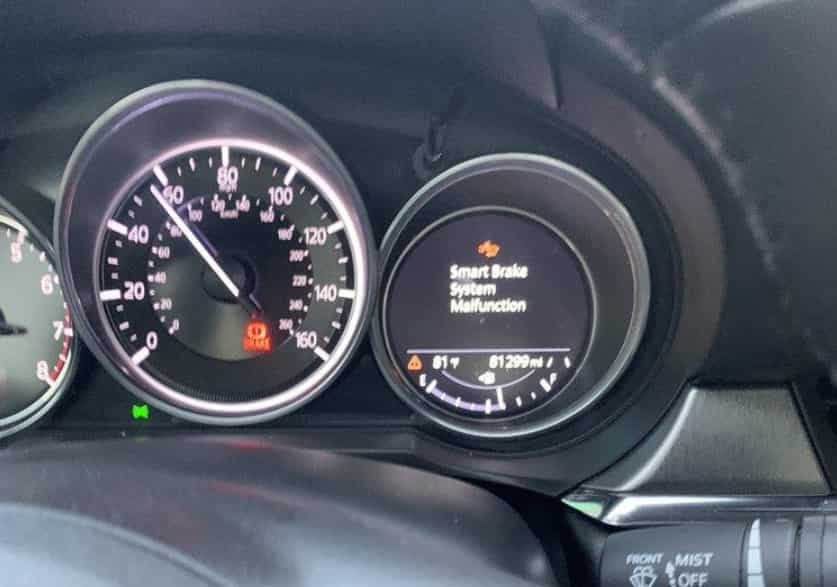
What Does the Mazda Smart Brake System Malfunction Warning Mean?
A Mazda Smart Brake System Malfunction warning means the vehicle has detected a problem with its automatic braking assistance system. The system has identified an issue that may prevent it from working correctly. Mazda calls this safety technology Smart Brake Support or SBS. Some older Mazda models use the name Smart City Brake Support or SCBS.
The Smart Brake Support system helps drivers reduce the risk of front collisions. It uses a combination of sensors and electronic systems to monitor the road. The forward sensing camera watches the area ahead of the vehicle. The radar sensor measures the distance between your Mazda and nearby objects. The control modules analyze this information and decide when the system needs to warn the driver or provide braking assistance.
When the system finds a problem, your Mazda may limit or disable some driver assistance features. The vehicle can display messages such as Smart Brake System Malfunction, Smart Brake Support Malfunction, or i-ACTIVSENSE System Malfunction. The exact message depends on your Mazda model, production year, and market.
This warning does not always mean your regular brakes have failed. In many situations, the hydraulic brake system continues to work normally. However, the vehicle may lose access to automatic emergency braking and other safety functions. Drivers should treat the warning seriously because the Mazda Smart Brake Support system may not respond during an emergency.
The cause can range from a simple sensor obstruction to a more complex electrical or hardware problem. A dirty camera lens, blocked radar sensor, weak battery voltage, damaged wiring, or incorrect sensor calibration can all affect system performance. Understanding how the system works helps you identify the problem faster and choose the right solution.
Common Mazda Smart Brake System Malfunction Warning Messages
A Mazda Smart Brake System Malfunction warning can appear in different forms depending on the Mazda model, production year, and software system. Each message points to a potential issue with the vehicle’s driver assistance technology.
The most common message is Smart Brake System Malfunction. This warning means the vehicle detected a problem that may affect automatic braking functions. The system may temporarily stop features such as collision warning and automatic emergency braking until the vehicle completes a diagnosis.
Many Mazda owners may also see Smart Brake Support Malfunction or Smart City Brake Support Malfunction. These messages relate to Mazda’s SBS and SCBS systems. Both technologies use cameras, radar sensors, and control modules to monitor road conditions and help reduce collision risks.
Other related warnings may include:
- Forward Sensing Camera Malfunction
- Front Radar Sensor System Malfunction
- i-ACTIVSENSE System Malfunction
- Brake Control System Malfunction
- Safety and Driver Support Systems Temporarily Disabled
A warning does not always mean a serious mechanical failure. The system may display an alert when the camera cannot see clearly or when the radar sensor becomes blocked. Rain, snow, fog, dust, ice, and direct sunlight can affect sensor performance.
If the warning disappears after cleaning the sensor area or restarting the vehicle, the issue may have been temporary. However, repeated warnings usually require further inspection. Problems with battery voltage, wiring, sensor alignment, software communication, or damaged components can also trigger the message.
10 Common Causes of a Mazda Smart Brake System Malfunction
A Mazda Smart Brake System Malfunction can happen for many reasons. The system depends on multiple components working together, including cameras, radar sensors, electronic modules, and the vehicle’s braking systems. A small issue with one component can affect the entire safety system.
Some causes are simple and easy to fix. Others require professional diagnosis and repair. Understanding the most common causes can help Mazda owners identify the problem faster and avoid unnecessary repairs.
A Dirty or Blocked Forward Sensing Camera
The forward sensing camera plays an important role in Mazda Smart Brake Support. It monitors the road ahead and helps detect vehicles, pedestrians, and possible collision risks.
A dirty camera area can prevent the system from collecting accurate information. Dust, mud, snow, ice, water drops, or windshield residue can reduce camera visibility. When the camera cannot analyze the road correctly, Mazda may display a Smart Brake System Malfunction warning.
Owners should check the area around the camera behind the windshield. Cleaning the glass with a suitable product may restore normal operation if visibility caused the problem.
However, drivers should avoid touching or adjusting the camera itself. The camera requires precise positioning, and incorrect handling may create additional calibration problems.
A Blocked or Dirty Radar Sensor
Mazda Smart Brake Support also depends on radar sensors to measure distance and detect objects around the vehicle. These sensors usually sit behind the front grille, emblem area, or bumper depending on the Mazda model.
Dirt, snow, ice, road debris, or cleaning products can interfere with radar performance. A blocked sensor may send incorrect information to the control system and trigger a malfunction warning.
Drivers should inspect the front area of the vehicle after driving through muddy roads, heavy snow, or construction areas. Removing visible dirt may solve a temporary sensor issue.
If the warning continues after cleaning, the radar sensor may need professional testing or calibration.
Heavy Rain, Snow, Fog, or Direct Sunlight
Weather conditions can affect how the Mazda Smart Brake Support system works. The forward sensing camera and radar sensor need clear conditions to detect objects accurately. Heavy rain, thick fog, snow, and strong sunlight can reduce sensor performance.
When the system cannot collect reliable information, Mazda may temporarily disable some safety features. The dashboard may show a Smart Brake System Malfunction warning or another driver assistance message.
This situation does not always indicate a damaged component. In many cases, the warning disappears when the weather improves. Cleaning the windshield and sensor areas can also help restore normal operation.
Drivers should avoid assuming that the system has a permanent failure after seeing a warning during poor weather. However, they should still drive carefully because automatic emergency braking and collision warning features may not work as expected.
Weak Battery or Low Electrical Voltage
A weak 12 volt battery is another common cause of Mazda Smart Brake System Malfunction warnings. Modern Mazda vehicles rely on stable electrical power to operate cameras, radar sensors, control modules, and other electronic systems.
When battery voltage drops, different systems may struggle to communicate correctly. The vehicle may display multiple warning lights, including SBS, ABS, DSC, or other safety system alerts.
Many owners notice this problem after:
- A difficult engine start
- Leaving the vehicle unused for a long period
- Replacing an old battery
- Experiencing unstable electrical power
A battery problem can confuse drivers because the vehicle may still start and operate normally. However, low voltage can affect sensitive electronic systems before it creates obvious driving problems.
Testing the battery condition is a simple first step. If the battery cannot maintain proper voltage, replacing it may remove the warning and restore normal system operation.
Camera or Radar Sensor Misalignment
The Mazda Smart Brake System requires accurate sensor positioning. Even a small change in camera or radar alignment can affect how the vehicle detects objects.
Sensor misalignment often happens after certain repairs or modifications, including:
- Windshield replacement
- Front bumper repair
- Collision damage repair
- Radar sensor replacement
- Suspension changes
When the camera or radar moves from its original position, the system may calculate incorrect distances or object locations. Mazda may then disable Smart Brake Support and display a malfunction warning.
Professional calibration helps restore accurate sensor operation. A simple reset usually cannot correct physical alignment problems.
Damaged Wiring, Connectors, or Sensor Hardware
The Mazda Smart Brake System depends on strong communication between sensors and control modules. Wiring, connectors, and electronic components help transfer important data throughout the vehicle.
A damaged connection can interrupt this communication and trigger a malfunction warning. Common causes include water exposure, corrosion, physical damage, loose connectors, or damaged wiring after repairs.
Some warning signs may include:
- The warning appears randomly.
- Multiple safety systems show errors.
- The warning disappears and returns later.
- The system fails after driving through wet conditions.
Technicians usually inspect wiring and connectors during diagnosis. They may check sensor connections, electrical signals, and communication between control modules before replacing expensive parts.
Replacing a sensor without checking the wiring first can lead to unnecessary costs. A proper diagnosis helps identify whether the problem comes from the sensor itself or the connection behind it.
ABS, DSC, or Wheel Speed Sensor Problems
The Smart Brake Support system works together with other vehicle safety technologies, including the Anti lock Braking System, Dynamic Stability Control, and wheel speed sensors.
These systems share important information about vehicle speed, wheel movement, and braking conditions. If one system develops a fault, Mazda may limit Smart Brake Support functions to maintain safety.
A faulty wheel speed sensor can create inaccurate speed information. The vehicle may then struggle to calculate braking conditions correctly. Problems with ABS or DSC can also trigger additional warning lights on the dashboard.
Drivers may notice symptoms such as:
- ABS warning light activation
- Traction control warning
- Unusual braking behavior
- Reduced driver assistance functions
When these warnings appear together, owners should not focus only on the Smart Brake System. A complete diagnostic scan should check related systems to find the actual cause.
Software or Control Module Errors
Modern Mazda vehicles use advanced electronic control systems to manage driver assistance features. The Smart Brake System communicates with several modules, including braking, safety, and vehicle control units.
A software problem or communication error can interrupt normal operation. The vehicle may store diagnostic trouble codes and display a Smart Brake System Malfunction warning.
These issues can happen after:
- Battery disconnection
- Low voltage events
- Module communication problems
- Software updates
- Electrical repairs
A system restart may remove a temporary error, but it will not fix a deeper software or hardware problem. Professional diagnostic equipment can identify stored fault codes and determine the correct repair process.
Incorrect Tires, Uneven Tire Wear, or Suspension Changes
The Mazda Smart Brake System relies on accurate vehicle movement information to operate correctly. Tires, wheel speed sensors, and suspension components all affect how the vehicle measures speed, traction, and stability.
Using incorrect tire sizes or mixing tires with different levels of wear can create inaccurate wheel speed data. The system may detect unusual differences between wheels and limit some safety features.
Common causes include:
- Installing tires with the wrong specifications
- Using different tire sizes on the same vehicle
- Driving with uneven tire pressure
- Replacing only one or two tires with different tread patterns
- Modifying the suspension height
Suspension changes can also affect sensor accuracy. Lowering or lifting the vehicle may change the relationship between the road surface, cameras, radar sensors, and control systems.
If a Smart Brake System Malfunction warning appears after tire replacement or suspension work, owners should check these areas first. A wheel alignment inspection and system diagnosis can help identify the issue.
Brake System or Brake Control Failure
Although many Smart Brake System warnings come from sensors or electronic systems, some cases involve the vehicle’s actual braking components.
The Mazda Smart Brake Support system depends on communication with the brake control system. Problems with important components can affect safety functions and trigger warning messages.
Possible causes include:
- Brake fluid problems
- ABS control module failure
- Electronic brake system faults
- Brake control communication errors
- Hydraulic brake problems
Drivers should pay close attention to additional symptoms. A Smart Brake System Malfunction warning becomes more serious when it appears with a red brake warning light, a soft brake pedal, longer stopping distance, unusual brake noise, or fluid leakage.
These signs indicate a possible braking system problem rather than a simple sensor issue. Drivers should stop using the vehicle until they receive professional assistance.
Understanding the Real Cause Before Repair
A Mazda Smart Brake System Malfunction warning does not always point to one specific failure. The system connects many technologies, so several different problems can create a similar warning message.
The best approach starts with simple checks. Inspect the camera area, clean the sensors, check the battery condition, and review any recent repairs or modifications.
If the warning continues, a complete diagnostic scan can identify stored fault codes and reveal the actual problem. Correct diagnosis prevents unnecessary part replacement and helps restore the Mazda safety systems correctly.
Warning Signs That May Appear with the Malfunction
A Mazda Smart Brake System Malfunction warning often appears with other signs that help identify the problem. These signals can come from the dashboard, driver assistance features, or the vehicle’s braking performance.
The dashboard usually provides the first clue. Mazda may display warning indicators such as the Smart Brake Support warning light, master warning light, ABS warning light, DSC warning light, or brake system warning light. A single amber warning often means the vehicle has limited some safety features. Multiple warning lights may indicate a more serious issue.
The malfunction can also affect Mazda driver assistance technologies. Features such as Automatic Emergency Braking, Smart Brake Support, Mazda Radar Cruise Control, and other i-ACTIVSENSE functions may stop working until the system returns to normal.
Drivers should also watch for physical braking symptoms. A soft brake pedal, longer stopping distance, unusual brake noise, brake fluid leaks, or reduced braking power require immediate attention. These signs may indicate a problem with the main braking system rather than only the Smart Brake Support technology.
A Smart Brake System warning does not always mean the vehicle has a complete brake failure. However, drivers should not ignore the message because the automatic safety functions may not work when needed. Check the sensor areas, monitor other warning lights, and arrange a proper diagnosis if the warning remains active.
Can You Drive with a Mazda Smart Brake System Malfunction?
A Mazda Smart Brake System Malfunction warning does not always mean you must stop driving immediately. In many cases, the vehicle’s standard braking system continues to work normally. However, the Smart Brake Support system may become unavailable, which means features like automatic emergency braking and collision warning may not operate.
Before continuing your journey, drivers should check the condition of the vehicle. If the brake pedal feels normal, the vehicle stops properly, and the dashboard only shows an amber Smart Brake System warning, you may drive for a short distance while arranging an inspection.
During this time, drive carefully and follow these safety steps:
- Keep a greater distance from other vehicles.
- Avoid high speeds and heavy traffic situations.
- Do not rely on automatic braking assistance.
- Monitor the dashboard for additional warnings.
- Schedule a diagnostic check as soon as possible.
The situation becomes more serious when other warning signs appear. Drivers should stop driving and seek professional help if they notice a red brake warning light, ABS warning, soft brake pedal, reduced braking power, unusual brake noise, or brake fluid leakage.
A Smart Brake System malfunction can come from a simple issue such as a dirty camera or blocked radar sensor. It can also result from problems with the battery, electrical system, sensors, or brake control components. The warning message alone cannot identify the exact cause.
The safest approach is to treat the warning as a request for inspection. The vehicle may still move normally, but the driver assistance system may not provide protection during an emergency. A proper diagnosis can identify the cause and restore the full function of the Mazda safety system.
How to Diagnose a Mazda Smart Brake System Malfunction
Finding the cause of a Mazda Smart Brake System Malfunction requires a step by step approach. The warning can come from many different sources, including sensors, electrical problems, software issues, or brake system faults. A proper diagnosis helps avoid unnecessary repairs and identifies the real problem.
Check the Exact Warning Message
Start by reading the message on the dashboard carefully. Mazda can display different warnings depending on the affected component. The message may mention Smart Brake Support, Forward Sensing Camera, Radar Sensor, i-ACTIVSENSE, or Brake Control System.
Also note when the warning appears. Record the driving conditions, weather, vehicle speed, and any recent repairs. This information can help technicians find the cause faster.
Inspect and Clean the Camera Area
The forward sensing camera needs a clear view through the windshield. Dirt, dust, snow, ice, or water marks can affect its ability to detect objects.
Check the area in front of the camera and clean the windshield carefully. Avoid touching or adjusting the camera because incorrect movement can affect calibration.
Check the Radar Sensor Area
Inspect the front area where Mazda places the radar sensor. Depending on the model, the sensor may sit behind the grille, emblem, or bumper.
Remove visible dirt, mud, snow, or ice. If the warning remains after cleaning, the sensor may require further testing.
Test the Battery Condition
A weak 12 volt battery can create communication problems between electronic systems. Check the battery if the warning appears with other electrical issues, difficult starting, or multiple dashboard alerts.
Battery testing can help determine whether unstable voltage causes the malfunction.
Perform a Diagnostic Scan
A basic OBD scanner may not detect every Smart Brake System problem. Mazda safety systems communicate through multiple control modules, including ABS, DSC, camera, and radar systems.
A professional scan tool can read stored diagnostic trouble codes and provide more accurate information about the failure.
Check Recent Repairs or Modifications
Think about any recent changes before the warning appeared. Windshield replacement, bumper repair, tire changes, suspension modifications, or battery replacement can affect Smart Brake System operation.
If the warning continues after basic checks, professional diagnosis and sensor calibration may become necessary.
How to Fix the Mazda Smart Brake System Malfunction
Fixing a Mazda Smart Brake System Malfunction depends on the actual cause. Some problems need simple maintenance, while others require professional repair. A correct diagnosis helps owners choose the right solution and avoid unnecessary expenses.
Start by checking the forward sensing camera and radar sensor areas. Dirt, snow, ice, or road debris can block the sensors and reduce system accuracy. Cleaning the windshield area and removing visible debris may restore normal operation.
A vehicle restart can also help when the warning comes from a temporary electronic error. However, restarting the car will not fix damaged sensors, wiring problems, or calibration issues.
Battery condition also plays an important role. A weak 12 volt battery can create unstable electrical signals and affect Mazda safety systems. Testing and replacing an aging battery may solve the warning in some cases.
Some situations require professional repair. Technicians may need to repair wiring, replace a faulty sensor, fix a brake control module, or perform a diagnostic scan. Camera or radar calibration may become necessary after windshield replacement, collision repairs, sensor replacement, or suspension changes.
The best repair approach focuses on the root cause instead of only clearing the warning message. A proper diagnosis ensures the Mazda Smart Brake Support system works correctly and provides reliable safety assistance when drivers need it most.
How to Reset a Mazda Smart Brake System Warning
A Mazda Smart Brake System Malfunction warning may disappear after a simple reset, but the result depends on the cause. A reset can clear temporary electronic errors, but it cannot repair damaged sensors, faulty wiring, or incorrect calibration.
Before attempting a reset, check the basic conditions first. Park the vehicle in a safe location and turn off the engine. Inspect the windshield area around the forward sensing camera and clean any dirt or debris. Check the radar sensor area and remove any visible blockage.
After cleaning the sensor areas, restart the vehicle and check the dashboard. If the warning disappears and the vehicle shows no other brake related warnings, the problem may have been temporary.
Disconnecting the battery can sometimes reset electronic systems, but it should not become the first solution. Removing power may erase useful diagnostic information and will not fix a mechanical or sensor related problem.
If the warning returns after restarting, the vehicle needs further diagnosis. A professional scan can check stored trouble codes from systems such as Smart Brake Support, ABS, DSC, radar sensors, and control modules.
Drivers should remember that clearing a warning message does not always mean the problem has disappeared. The goal is not only to remove the notification but to restore the full function of the Mazda safety system. A proper diagnosis helps prevent repeated warnings and ensures the Smart Brake Support system works correctly.
Mazda Smart Brake System Repair Cost
The repair cost for a Mazda Smart Brake System Malfunction depends on the cause of the problem. A simple sensor cleaning may cost nothing, while replacing advanced components such as a radar sensor, camera, or control module can become expensive.
The first cost most owners should expect is diagnosis. A professional inspection helps identify whether the issue comes from the camera, radar sensor, battery, wiring, brake system, or software communication. Proper diagnosis can prevent unnecessary part replacement.
Common repair services include:
- Sensor cleaning and inspection: Usually a low cost service
- Battery testing or replacement: Depends on battery condition and vehicle requirements
- Diagnostic scan: Cost varies by repair facility and equipment used
- Camera calibration: Often required after windshield replacement or camera work
- Radar calibration: Needed when sensor alignment changes
- Sensor replacement: Higher cost because parts and calibration may be required
- Brake control module repair: Can become expensive depending on the failure
Several factors influence the final repair cost. The Mazda model, vehicle age, location, labor rates, and replacement part availability can all affect the total price.
Owners should avoid replacing parts based only on the warning message. The same Smart Brake System warning can come from different problems, such as a dirty sensor, low battery voltage, or a damaged component.
A detailed diagnosis provides a clearer repair plan and helps reduce unnecessary expenses. In many cases, fixing the original cause restores the Mazda Smart Brake Support system without replacing multiple expensive parts.
Mazda Models That May Display an SBS Malfunction Warning
A Mazda Smart Brake System Malfunction warning can appear on many Mazda vehicles equipped with Smart Brake Support or related i-ACTIVSENSE safety technologies. The system name and available features can change depending on the model year, trim level, and market.
Common Mazda models that may include Smart Brake Support technology include:
- Mazda3
- Mazda6
- Mazda CX-3
- Mazda CX-5
- Mazda CX-30
- Mazda CX-50
- Mazda CX-60
- Mazda CX-70
- Mazda CX-80
- Mazda CX-90
- Mazda MX-30
Older Mazda vehicles may use the term Smart City Brake Support or SCBS instead of Smart Brake Support. Newer models often include more advanced i-ACTIVSENSE features that combine multiple driver assistance technologies.
The same warning message can have different causes depending on the vehicle generation. For example, one Mazda model may use a windshield mounted camera as the main detection system, while another model may rely on additional radar sensors.
Owners should always check the owner’s manual for their specific vehicle. The correct diagnosis depends on important details such as:
- Vehicle model
- Production year
- Engine and trim level
- Country or market
- Exact dashboard message
Understanding the Mazda model and safety system version helps technicians identify the correct repair process. It also prevents confusion because similar warning messages can represent different issues across different Mazda vehicles.
Regardless of the model, drivers should treat a Smart Brake System warning seriously. A proper inspection can restore the safety features and ensure the vehicle continues to provide reliable driver assistance.
How to Prevent Future Smart Brake System Problems
Preventing a Mazda Smart Brake System Malfunction requires regular maintenance and careful vehicle care. The Smart Brake Support system depends on cameras, radar sensors, electrical power, and control modules. Keeping these components in good condition helps maintain reliable safety performance.
Start by keeping the forward sensing camera and radar sensor areas clean. Dirt, snow, ice, and road debris can affect how the system detects vehicles and obstacles. Drivers should also avoid placing stickers or accessories near the camera because they can block the sensor view.
Battery maintenance is another important step. A weak 12 volt battery can create unstable electrical signals and cause warning messages from Mazda safety systems. Regular battery checks can help prevent unexpected electronic problems.
Professional repairs also play an important role. Windshield replacement, bumper repairs, collision work, and sensor replacement may require camera or radar calibration. Incorrect installation or missing calibration can cause repeated Smart Brake System warnings.
Owners should also avoid modifications that affect sensor accuracy. Incorrect tire sizes, suspension changes, aftermarket bumpers, or accessories near radar sensors can interfere with system operation.
Finally, never ignore repeated warning messages. Early diagnosis can prevent small issues from becoming expensive repairs. Regular maintenance, proper repairs, and quick attention to warning signs help keep the Mazda Smart Brake Support system working correctly.
Frequently Asked Questions About Mazda Smart Brake System Malfunction
What causes a Mazda Smart Brake System Malfunction?
A Mazda Smart Brake System Malfunction can happen because of dirty sensors, blocked cameras, weak battery voltage, sensor misalignment, wiring problems, software errors, or brake system faults. The exact cause depends on the Mazda model and the warning message shown on the dashboard.
Can I drive with a Mazda Smart Brake System Malfunction warning?
You may drive carefully if the vehicle has normal braking performance and only shows an amber Smart Brake System warning. However, the automatic braking and collision warning features may not work. Stop driving if you notice brake problems, a red brake warning light, or reduced stopping power.
How do I reset a Mazda Smart Brake System warning?
You can try a basic reset by turning off the vehicle, checking the sensor areas, cleaning visible dirt, and restarting the engine. If the warning returns, the vehicle needs proper diagnosis because a reset cannot repair damaged components.
Can a weak battery cause a Smart Brake System malfunction?
Yes. A weak 12 volt battery can affect communication between electronic control modules and trigger safety system warnings. Battery testing can help confirm whether low voltage causes the problem.
Can windshield replacement trigger a Mazda Smart Brake warning?
Yes. Windshield replacement can affect the forward sensing camera position. Mazda may require camera calibration after windshield work to restore accurate system operation.
Does this warning mean my brakes have failed?
Not always. The warning usually affects the Smart Brake Support system, not necessarily the normal braking system. However, drivers should take immediate action if they notice unusual brake pedal behavior, fluid leaks, or reduced braking performance.
How much does it cost to fix a Mazda Smart Brake System Malfunction?
The cost depends on the cause. Cleaning sensors may require little or no cost, while replacing a radar sensor, camera, or control module can become more expensive. A proper diagnosis helps determine the correct repair.
Final Verdict
A Mazda Smart Brake System Malfunction warning can come from many different causes. Some issues are simple, such as a dirty camera, blocked radar sensor, or temporary electrical problem. Other cases may involve sensor damage, calibration problems, software errors, or brake system faults.
The first step is understanding the warning message and checking the basic conditions. Clean the sensor areas, inspect the battery condition, and review any recent repairs or modifications. These simple checks can help identify common causes before expensive repairs become necessary.
However, drivers should not ignore repeated warnings. The Smart Brake Support system plays an important role in Mazda’s safety technology, and a malfunction can reduce the effectiveness of features such as automatic emergency braking and collision warning.
If the vehicle shows additional brake warnings, unusual pedal behavior, or reduced braking performance, seek professional assistance immediately. A proper diagnostic scan can identify the real cause and prevent unnecessary part replacements.
Regular maintenance, correct repairs, and early attention to warning messages help keep Mazda safety systems working properly. By understanding the causes, symptoms, and solutions, Mazda owners can make better decisions and maintain confidence behind the wheel.
Have you experienced a Mazda Smart Brake System Malfunction warning on your vehicle? Share your Mazda model, production year, and the exact dashboard message to help identify the possible cause.